
ADF Cost Intelligence
БесплатноНе проверенEnables AI assistants to analyze Azure Data Factory costs, detect waste, and provide optimization recommendations by querying pipeline run metadata and Azure pr

Описание
Enables AI assistants to analyze Azure Data Factory costs, detect waste, and provide optimization recommendations by querying pipeline run metadata and Azure pricing.
README





Ask your AI assistant which ADF pipeline is bleeding your Azure budget, and exactly why.
An enterprise FinOps intelligence system for Azure Data Factory, exposed via the Model Context Protocol (MCP). Converts raw ADF consumption metrics (DIU-hours, vCore-hours, activity runs) into dollar estimates, detects waste, identifies cost spikes, and recommends specific fixes with quantified savings. Pricing is fetched live from the Azure Retail Prices API, not hardcoded constants.
Works with Claude Desktop, Claude Code, GitHub Copilot, Cursor, Windsurf, or any MCP-compatible client.
What You Can Ask
Which ADF pipeline cost the most this month?

Why did my ADF bill spike last week?

Are any of my pipelines running wastefully?

Give me your top recommendations to cut my ADF spend.

Break down the cost of my IngestSalesData pipeline.
Example response:
Your top 3 most expensive pipelines this month:
- IngestSalesData - $142.30 (driver: DIU hours from Copy Activity)
- TransformCustomerData - $87.50 (driver: Data Flow vCore hours)
- LoadDailyReports - $34.20 - running hourly with zero rows processed
Recommendation: Switch LoadDailyReports to an event-based trigger. Estimated saving: $34.20/month ($410/year).
The 5 Tools
| Tool | What it does |
|---|---|
get_top_costly_pipelines |
Ranks all pipelines by estimated monthly cost with trend vs prior period |
get_pipeline_cost_breakdown |
Itemised cost by activity type for a specific pipeline |
get_wasteful_pipelines |
Flags zero-row runs, inactive pipelines, and debug runs in production |
get_cost_spike_analysis |
Compares current vs prior period, explains sudden cost increases |
get_optimization_recommendations |
7-rule engine with specific fixes and estimated annual savings |
Get Started in 5 Minutes
New user? Follow this path:
Step 1 - Clone and install         (~1 min)
Step 2 - Try with mock data        (~1 min)   no Azure needed
Step 3 - Connect your Azure ADF    (~10 min)  one-time setup
Step 4 - Add to your MCP client    (~2 min)
Jump to Quick Start below for the full steps.
Already have Python and an ADF instance? The shortest path to real data:
git clone https://github.com/harinarayn/adf-cost-intelligence-mcp
cd adf-cost-intelligence-mcp
pip install -r requirements.txt

# Create a service principal (one-time)
az ad sp create-for-rbac --name adf-cost-mcp-sp --role Reader \
  --scopes /subscriptions/{YOUR_SUB_ID}

# Grant it ADF read access (one-time)
az role assignment create --assignee {APP_ID} \
  --role "Data Factory Contributor" \
  --scope /subscriptions/{SUB}/resourceGroups/{RG}/providers/Microsoft.DataFactory/factories/{ADF}

# Configure credentials
cp .env.example .env
# Edit .env with your values

# Add to your MCP client config (see Connect Your MCP Client below)
# Then ask: "Which ADF pipeline cost the most this month?"
Security and Privacy
This server runs entirely in your own environment. No data ever leaves your infrastructure.
- Runs locally or in your own cloud, not our servers
- Only reads ADF run metadata (pipeline names, durations, status, DIU counts) - never your pipeline data or business content
- Service principal needs read-only access (see setup below)
- No telemetry, no callbacks, no third-party dependencies except the public Azure Retail Prices API (unauthenticated, read-only pricing data)
- Fully open source - every line of code is auditable
See SECURITY.md for the full security posture.
Prerequisites
| Requirement | How to Check |
|---|---|
| Python 3.11+ | python --version |
| Azure subscription | With at least one ADF instance |
| ADF run history | At least 7 days of pipeline runs for meaningful results |
| MCP-compatible client | Claude Desktop, Copilot, Cursor, Windsurf, or any MCP client |
Quick Start
Step 1 - Clone and install
git clone https://github.com/harinarayn/adf-cost-intelligence-mcp
cd adf-cost-intelligence-mcp
pip install -r requirements.txt
cp .env.example .env
Step 2 - Try it immediately with mock data (no Azure needed)
USE_MOCK_DATA=true python server.py
Open your MCP client and ask: "Which ADF pipeline cost the most this month?"
You'll see responses using realistic synthetic data covering 10 mock pipelines, including wasteful runs, cost spikes, and inactive pipelines.
Step 3 - Connect your real Azure ADF (~10 minutes, one-time)
3a. Login and find your subscription ID
az login
az account show --query id -o tsv
3b. Create a service principal with minimal permissions
az ad sp create-for-rbac \
  --name adf-cost-mcp-sp \
  --role Reader \
  --scopes /subscriptions/{YOUR_SUBSCRIPTION_ID}
# Save the output - you need: appId, password, tenant
3c. Grant read access to your ADF instance
az role assignment create \
  --assignee {APP_ID_FROM_ABOVE} \
  --role "Data Factory Contributor" \
  --scope /subscriptions/{SUB_ID}/resourceGroups/{RG}/providers/Microsoft.DataFactory/factories/{ADF_NAME}
Minimum permissions: The service principal only needs to read pipeline runs and activity runs.
Data Factory Contributoris the closest built-in role. For tighter security, create a custom role withMicrosoft.DataFactory/factories/read,Microsoft.DataFactory/factories/pipelineruns/read, andMicrosoft.DataFactory/factories/activityruns/read.
3d. Enable per-pipeline billing in ADF (important)
- Open ADF Studio
- Go to Manage > Factory Settings
- Set Billing by pipeline to ON and save
Without this, cost data is at factory level only, not per-pipeline.
Step 4 - Configure .env
AZURE_TENANT_ID=paste-from-step-3b
AZURE_CLIENT_ID=paste-appId-from-step-3b
AZURE_CLIENT_SECRET=paste-password-from-step-3b
AZURE_SUBSCRIPTION_ID=paste-from-step-3a
AZURE_RESOURCE_GROUP=your-resource-group-name
AZURE_DATA_FACTORY_NAME=your-adf-factory-name
USE_MOCK_DATA=false
Connect Your MCP Client
Claude Desktop
Mac/Linux: ~/.claude/claude_desktop_config.json
Windows: %APPDATA%\Claude\claude_desktop_config.json
{
  "mcpServers": {
    "adf-cost-intelligence": {
      "command": "python",
      "args": ["/absolute/path/to/adf-cost-intelligence-mcp/server.py"],
      "env": {
        "AZURE_TENANT_ID": "your-tenant-id",
        "AZURE_CLIENT_ID": "your-app-id",
        "AZURE_CLIENT_SECRET": "your-secret",
        "AZURE_SUBSCRIPTION_ID": "your-subscription-id",
        "AZURE_RESOURCE_GROUP": "your-resource-group",
        "AZURE_DATA_FACTORY_NAME": "your-adf-name",
        "USE_MOCK_DATA": "false"
      }
    }
  }
}
Restart Claude Desktop. The tools appear automatically.
Claude Code (CLI)
claude mcp add adf-cost-intelligence python /path/to/server.py
Or add a .mcp.json to your project root (safe to commit, uses env var references):
{
  "servers": {
    "adf-cost-intelligence": {
      "type": "stdio",
      "command": "python",
      "args": ["server.py"],
      "env": {
        "AZURE_TENANT_ID": "${AZURE_TENANT_ID}",
        "AZURE_CLIENT_ID": "${AZURE_CLIENT_ID}",
        "AZURE_CLIENT_SECRET": "${AZURE_CLIENT_SECRET}",
        "AZURE_SUBSCRIPTION_ID": "${AZURE_SUBSCRIPTION_ID}",
        "AZURE_RESOURCE_GROUP": "${AZURE_RESOURCE_GROUP}",
        "AZURE_DATA_FACTORY_NAME": "${AZURE_DATA_FACTORY_NAME}",
        "USE_MOCK_DATA": "false"
      }
    }
  }
}
GitHub Copilot (VS Code)
Add to .vscode/mcp.json in your workspace:
{
  "servers": {
    "adf-cost-intelligence": {
      "type": "stdio",
      "command": "python",
      "args": ["/absolute/path/to/server.py"],
      "env": {
        "AZURE_TENANT_ID": "${env:AZURE_TENANT_ID}",
        "AZURE_CLIENT_ID": "${env:AZURE_CLIENT_ID}",
        "AZURE_CLIENT_SECRET": "${env:AZURE_CLIENT_SECRET}",
        "AZURE_SUBSCRIPTION_ID": "${env:AZURE_SUBSCRIPTION_ID}",
        "AZURE_RESOURCE_GROUP": "${env:AZURE_RESOURCE_GROUP}",
        "AZURE_DATA_FACTORY_NAME": "${env:AZURE_DATA_FACTORY_NAME}",
        "USE_MOCK_DATA": "false"
      }
    }
  }
}
Cursor / Windsurf
Both support MCP via ~/.cursor/mcp.json or ~/.windsurf/mcp.json using the same format as the Claude Desktop config above.
MCP Inspector (for testing and demos)
npx @modelcontextprotocol/inspector python server.py
Opens a browser UI to call each tool individually and inspect raw JSON responses. Useful for testing your setup or running demos.
Testing with MCP Inspector
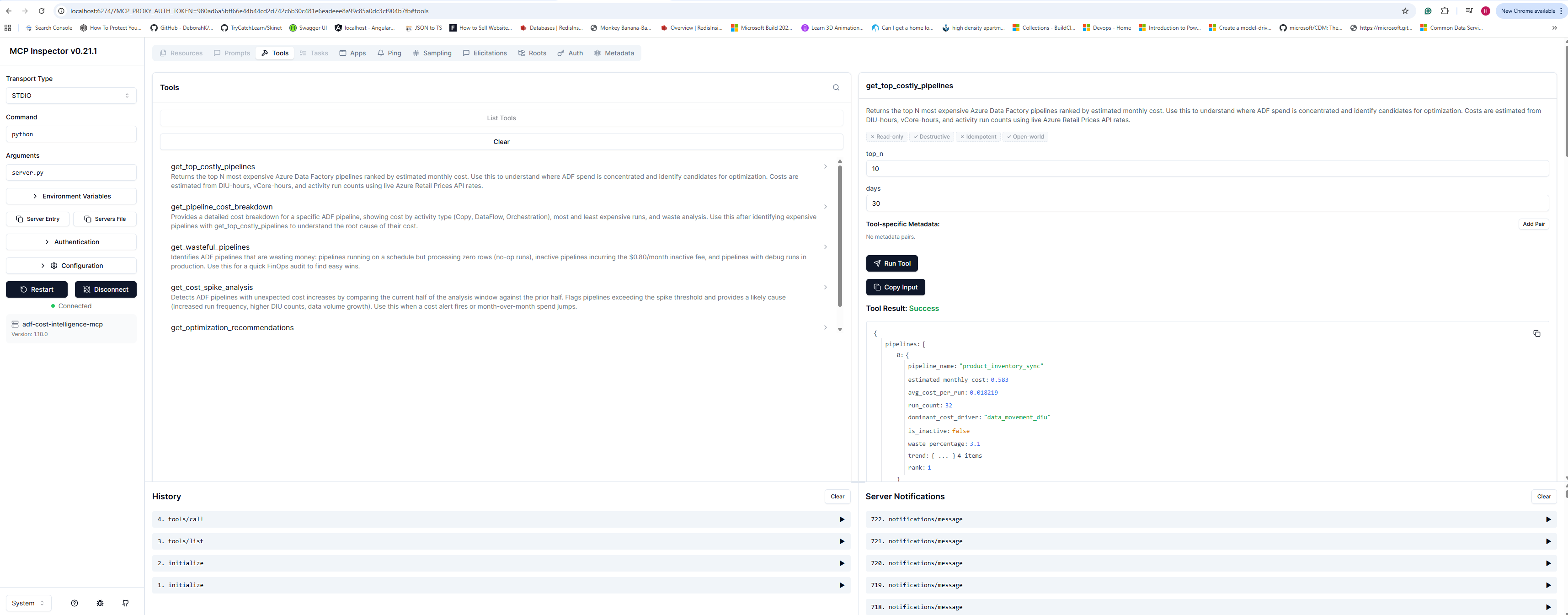
MCP Inspector lets you call each tool directly in a browser UI and inspect the raw JSON responses, with no AI client needed. Great for testing your setup, debugging, or demos.
Launch (Windows)
scripts\inspect.cmd
This loads credentials from your .env file and opens the inspector automatically.
Launch (Mac/Linux)
source .env && npx @modelcontextprotocol/inspector python server.py
What you will see
- Browser opens at
http://localhost:6274 - Green Connected indicator - server is live
- Tools tab lists all 5 tools with their descriptions
- Click any tool, enter arguments, hit Run Tool, and see the exact JSON your AI client receives
Example - test the cost ranking tool
Click get_top_costly_pipelines, enter:
{ "days": 30, "top_n": 8 }
Hit Run Tool. You will see your real ADF pipelines ranked by estimated monthly cost with waste percentages and trend data.
Running Tests
# All tests - no Azure credentials required (uses mock data)
USE_MOCK_DATA=true python -m pytest tests/ -v

# Specific modules
python -m pytest tests/test_cost_calculator.py -v
python -m pytest tests/test_pricing_client.py -v
python -m pytest tests/test_recommendations.py -v
python -m pytest tests/test_tools.py -v
How Costs Are Calculated
Costs are estimated from ADF activity run metadata using the same billing model as Azure:
| Activity Type | Billing Model |
|---|---|
| Copy (Azure IR) | DIU-hours x $0.25/DIU-hour (4-min minimum per run) |
| Copy (Self-hosted IR) | DIU-hours x $0.10/DIU-hour |
| Mapping Data Flow | vCore-hours x rate by compute type (1-min minimum) |
| Pipeline / Lookup / ForEach | Activity execution hours x $0.005/hour |
| External (Databricks, etc.) | Activity execution hours x $0.00025/hour |
| Inactive pipeline | $0.80/month flat fee |
When available, actual billed DIU-hours are read directly from billingReference in ADF activity output, not estimated from duration. Live pricing is fetched from the Azure Retail Prices API at startup and cached for 24 hours.
Optimization Rules
The recommendations engine applies 7 rules across your pipeline history:
| # | Condition | Fix | Typical Saving |
|---|---|---|---|
| 1 | Schedule trigger + >20% zero-row runs | Switch to event-based trigger | 20-80% of wasteful run cost |
| 2 | Copy DIU count > 4, data < 100 MB | Reduce maxDataIntegrationUnits | 40% of DIU cost |
| 3 | ForEach sequential=true, items > 10 | Enable parallelism (isSequential=false) | 30% of pipeline duration |
| 4 | DataFlow without IR cluster TTL | Set Time-to-Live on Integration Runtime | 15% of DataFlow cost |
| 5 | Pipeline with zero runs in 30 days | Decommission (save $0.80/month each) | $9.60/pipeline/year |
| 6 | Daily full table load, large dataset | Implement watermark incremental load | 70% of data movement cost |
| 7 | Debug runs in production factory | Enforce dev/test factory separation | ~8% of monthly pipeline cost |
How This Differs from azure-mcp and Azure Advisor
| azure-mcp (official) | Azure Advisor | This Tool | |
|---|---|---|---|
| ADF pipeline run data | No | No | Yes - every run, 30-day history |
| Cost per pipeline | No | No | Yes - estimated to 4 decimal places |
| Waste detection | No | No | Yes - zero-row runs, inactive pipelines |
| Cost spike analysis | No | No | Yes - current vs prior period |
| Specific $ savings estimates | No | Generic | Yes - per recommendation |
| Works without Log Analytics | N/A | N/A | Yes - reads ADF APIs directly |
azure-mcp gives your AI assistant a hammer. This gives it a scalpel.
Cost Disclaimer
Cost estimates are based on Azure PAYG pricing. Actual costs vary by Azure agreement type (Enterprise Agreement, CSP, PAYG), reserved capacity, region, and currency. Always cross-check significant decisions with Azure Cost Management for exact billing figures.
V2 Roadmap
- Remediation with code: Generate ADF JSON pipeline/trigger configs as fixes, not just advice
- Multi-factory support: Query across multiple ADF instances in one conversation
- Trend analysis: Week-over-week cost trending with anomaly detection
- Databricks integration: Include Databricks job cost as part of ADF external activity cost
- Budget alerts: Set thresholds and get proactive warnings
- Remote MCP (enterprise): Deploy as remote MCP server on Azure Container Apps with Managed Identity, no local credentials, full audit trail
Contributing
Contributions welcome. Key areas:
- Additional recommendation rules (open an issue to propose)
- New Azure regions in the pricing parser
- Synapse Analytics support
- Integration tests with real ADF instances
# Dev setup
pip install -r requirements.txt
USE_MOCK_DATA=true python -m pytest tests/ -v
License: MIT
Установка ADF Cost Intelligence
У этого сервера нет опубликованного пакета — он собирается из исходников. Открой репозиторий и следуй инструкции в README.
▸ github.com/harinarayn/adf-cost-intelligence-mcpFAQ
ADF Cost Intelligence MCP бесплатный?
Да, ADF Cost Intelligence MCP бесплатный — установка в пару кликов через Unyly без оплаты.
Нужен ли API-ключ для ADF Cost Intelligence?
Нет, ADF Cost Intelligence работает без API-ключей и переменных окружения.
ADF Cost Intelligence — hosted или self-hosted?
Доступен hosted-вариант: Unyly запускает сервер в облаке, локальная установка не обязательна.
Как установить ADF Cost Intelligence в Claude Desktop, Claude Code или Cursor?
Открой ADF Cost Intelligence на unyly.org, выбери вкладку своего клиента (Claude Desktop, Claude Code, Cursor) и нажми Install — конфиг сгенерируется автоматически, без правки JSON.
Похожие MCP
Fetch
Web content fetching and conversion for efficient LLM usage.
AWS KB Retrieval
Retrieval from AWS Knowledge Base using Bedrock Agent Runtime.
 автор: modelcontextprotocol
Spring AI MCP Server
Provides auto-configuration for setting up an MCP server in Spring Boot applications.
llm-analysis-assistant
A very streamlined mcp client that supports calling and monitoring stdio/sse/streamableHttp, and can also view request responses through the /logs page. It also
 автор: xuzexin-hz
Compare ADF Cost Intelligence with
Не уверен что выбрать?
Найди свой стек за 60 секунд
Автор?
Embed-бейдж для README
Похожее
Все в категории ai