
Advanced Research Agent
БесплатноНе проверенAdvanced Research Agent built with Python, MCP, Firecrawl, and LangGraph to autonomously crawl, extract, and structure web research data using LLM-driven workfl

Описание
Advanced Research Agent built with Python, MCP, Firecrawl, and LangGraph to autonomously crawl, extract, and structure web research data using LLM-driven workflows.
README
Advanced Research Agent is a Python-based autonomous research system that uses Large Language Models (LLMs), the Model Context Protocol (MCP), and Firecrawl to perform intelligent web research.
The project demonstrates the evolution from a simple interactive agent into a structured, workflow-driven research agent capable of crawling websites, extracting information, and returning structured research results.
🎯 Project Goals
- Build a practical autonomous research agent
- Integrate Firecrawl MCP tools for real-world web data extraction
- Apply ReAct-style LLM reasoning for tool usage
- Transition from a single-agent prototype to a scalable workflow architecture
- Produce structured, comparable research outputs
🧠 How the Project Works
The system operates in two stages:
1. Simple Research Agent
The initial agent is a single ReAct-based LLM agent that:
- Connects to Firecrawl via MCP
- Dynamically loads available crawling and scraping tools
- Uses step-by-step reasoning to decide which tools to call
- Runs in an interactive command-line interface
This stage focuses on experimentation, tool discovery, and validating MCP-based tool execution.
2. Advanced Research Agent
The advanced agent introduces a Workflow layer that orchestrates research execution.
Key responsibilities of the workflow include:
- Accepting user research queries
- Guiding the LLM through structured research steps
- Executing Firecrawl-powered crawling and extraction
- Normalizing raw data into structured entities
- Returning organized research results (e.g., companies and tools)
This design separates reasoning, execution, and output processing, making the system easier to extend and maintain.
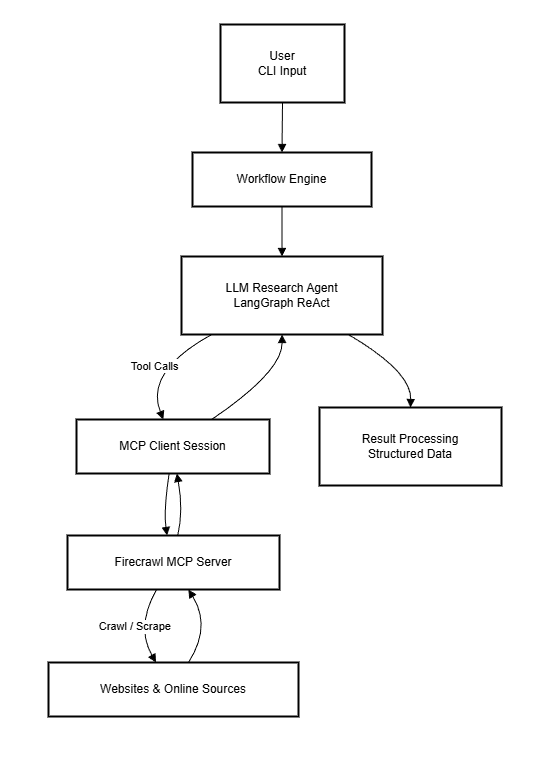
🏗️ System Architecture Overview
At a high level, the system consists of:
- A CLI-based user interface
- A workflow orchestration layer
- An LLM reasoning agent (LangGraph ReAct)
- MCP client communication
- Firecrawl MCP server for web crawling and scraping
- Result processing and structured output
full system architecture diagram.
Runtime Sequence Explanation
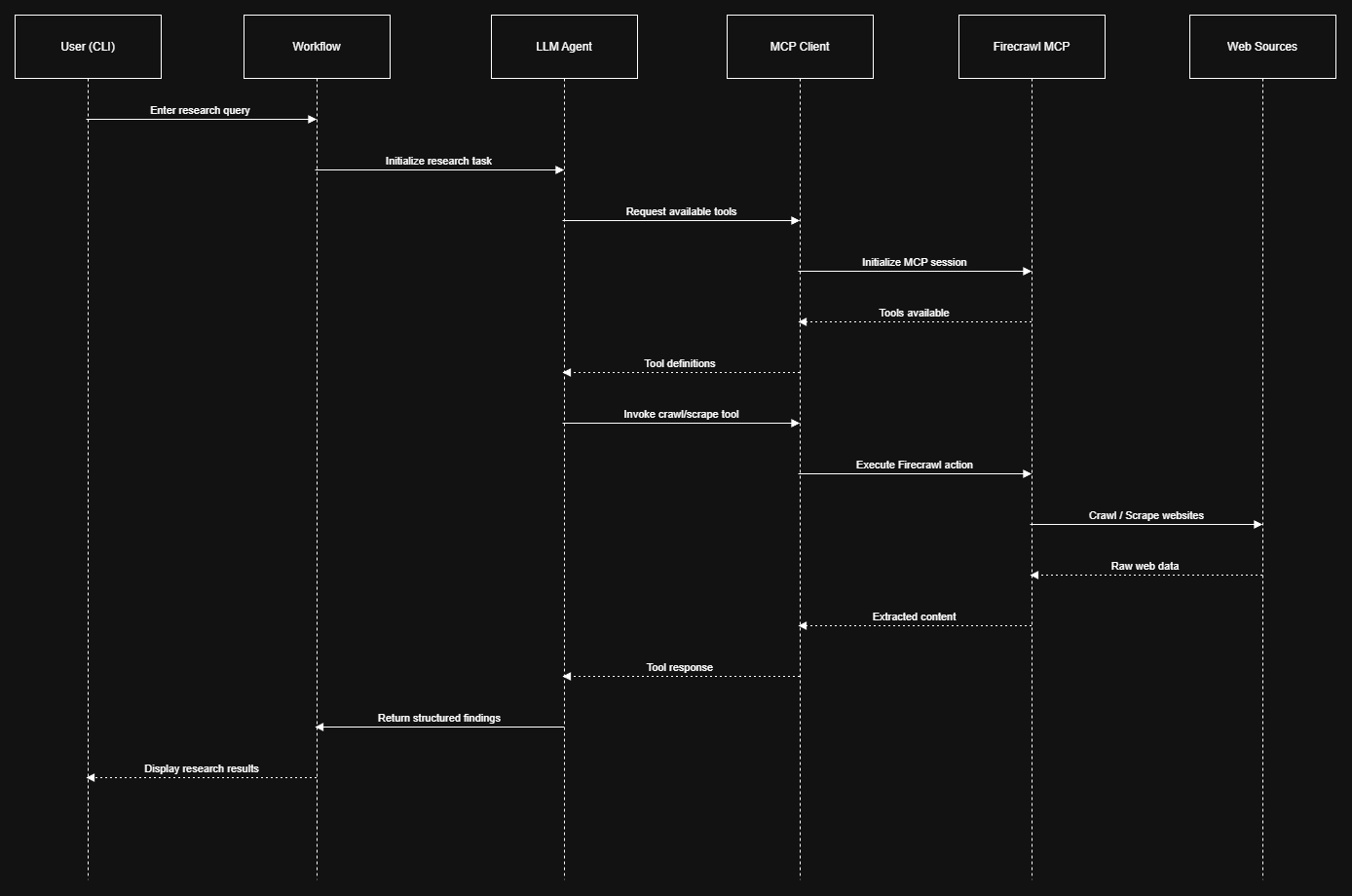
- Sequence diagram illustrates the runtime behavior of the Advanced Research Agent. After the user submits a query through the CLI, the workflow orchestrates the research task by delegating reasoning to the LLM agent. The agent dynamically interacts with Firecrawl through the MCP client to crawl and extract web data. The extracted information is then processed and returned as structured research results.
Workflow / State Diagram
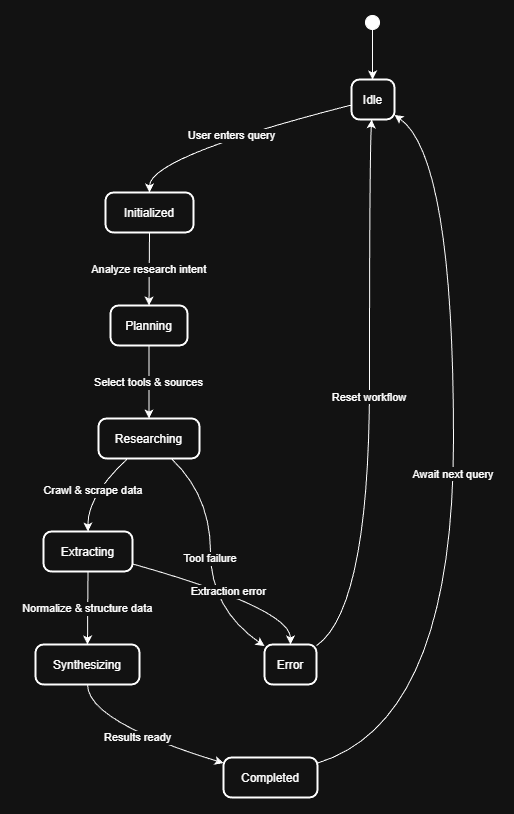
- Workflow diagram represents the internal states of the Advanced Research Agent workflow. The agent transitions from idle to active research states as it plans, executes, and synthesizes information. Error states allow the system to safely recover and return to an idle state, ensuring robustness and repeatable execution for multiple research queries.
🛠️ Technology Stack
- Python 3.10+
- LangChain
- LangGraph
- Model Context Protocol (MCP)
- Firecrawl API
- OpenAI GPT-4o-mini
- AsyncIO
- python-dotenv
📁 Project Structure (High Level)
.
├── simple_agent.py          # Prototype MCP research agent
├── main.py                  # Advanced research agent entry point
├── src/
│   └── workflow.py          # Research workflow orchestration
├── .env.example
├── requirements.txt
└── README.md
📦 Installation
Clone the repository:
- git clone https://github.com/IT21314742/Advanced-Research-Agent.git
- cd Advanced-Research-Agent
Install dependencies:
pip install -r requirements.txt
Create a .env file and add your API keys:
 OPENAI_API_KEY=your_openai_key
 FIRECRAWL_API_KEY=your_firecrawl_key
▶️ Usage
Run the Simple Agent
python simple_agent.py
- Interactive research session
- Direct tool usage via MCP
- Ideal for experimentation
Run the Advanced Research Agent
python main.py
You will be prompted to enter a research query, for example:
AI developer tools for code review
The agent will return structured research results such as:
- Tool or company name
- Official website
- Pricing model
- Open-source availability
- Technology stack (when available)
📊 Example Output
- ExampleTool
- Website: https://example.com
- Pricing: Freemium
- Open Source: No
- Tech Stack: Python, FastAPI, React
🧱 Extending the System
The architecture is designed for extension. Possible improvements include:
Adding additional workflow stages
Supporting new research domains
Exporting results to JSON, CSV, or Markdown
Adding memory or caching layers
Parallelizing research tasks
🧭 Roadmap
Persistent memory
Citation and source tracking
Parallel research execution
Report generation
Web or API interface
🤝 Contributing
- Contributions, issues, and ideas are welcome. This project is intended for developers interested in LLM agents, autonomous research systems, and MCP-based tooling.
Установка Advanced Research Agent
У этого сервера нет опубликованного пакета — он собирается из исходников. Открой репозиторий и следуй инструкции в README.
▸ github.com/IT21314742/Advanced-Research-AgentFAQ
Advanced Research Agent MCP бесплатный?
Да, Advanced Research Agent MCP бесплатный — установка в пару кликов через Unyly без оплаты.
Нужен ли API-ключ для Advanced Research Agent?
Нет, Advanced Research Agent работает без API-ключей и переменных окружения.
Advanced Research Agent — hosted или self-hosted?
Self-hosted: сервер запускается локально на твоей машине командой из раздела установки.
Как установить Advanced Research Agent в Claude Desktop, Claude Code или Cursor?
Открой Advanced Research Agent на unyly.org, выбери вкладку своего клиента (Claude Desktop, Claude Code, Cursor) и нажми Install — конфиг сгенерируется автоматически, без правки JSON.
Похожие MCP
Fetch
Web content fetching and conversion for efficient LLM usage.
AWS KB Retrieval
Retrieval from AWS Knowledge Base using Bedrock Agent Runtime.
 автор: modelcontextprotocol
Spring AI MCP Server
Provides auto-configuration for setting up an MCP server in Spring Boot applications.
llm-analysis-assistant
A very streamlined mcp client that supports calling and monitoring stdio/sse/streamableHttp, and can also view request responses through the /logs page. It also
 автор: xuzexin-hz
Compare Advanced Research Agent with
Не уверен что выбрать?
Найди свой стек за 60 секунд
Автор?
Embed-бейдж для README
Похожее
Все в категории ai