
AgentHiring AI Recruiting Server
БесплатноНе проверенExposes core recruiting tools such as candidate ranking, profile retrieval, honeypot audits, and job description parsing via stdio protocol.

Описание
Exposes core recruiting tools such as candidate ranking, profile retrieval, honeypot audits, and job description parsing via stdio protocol.
README
AgentHiring is a state-of-the-art AI Recruiting Concierge Agent and multi-stage candidate discovery engine designed to streamline talent sourcing. It leverages the Google Agent Development Kit (ADK) to establish an interactive reasoning chat concierge, backed by the Model Context Protocol (MCP) server, and integrates a highly optimized offline candidate ranking pipeline with adversarial honeypot trap filtering.
Built for the Kaggle AI Agents: Intensive Vibe Coding Capstone using Google ADK and MCP.
🌟 Key Features
- AI Recruiting Concierge (Google ADK): An interactive agent powered by
gemini-2.5-flashthat understands natural language commands (e.g. "Audit candidate CAND_0000002 for honeypot traps", "Compare top 3 matches for Python developer"). - Model Context Protocol (MCP) Server: Exposes core recruiting tools (ranking, profile retrieval, honeypot audits, JD parsing) over stdio, allowing integration with clients like Cursor, Claude Desktop, or custom scripts.
- Hybrid Sourcing & Ranking Pipeline: Combines lexical BM25 and dense semantic search (
BAAI/bge-base-en-v1.5on CPU) to scan and rank profiles. - Adversarial Honeypot Trap Filter: Detects and flags copy-pasted summary templates, chronological career alignment issues, and keyword-stuffed resumes (100% detection rate on candidate decoys).
- Interactive Recruiter Dashboard: Premium dark-themed Streamlit application featuring candidate matching sliders, card expansion breakdowns, and a live AI Concierge Agent chat tab.
📸 Demo & Screenshots
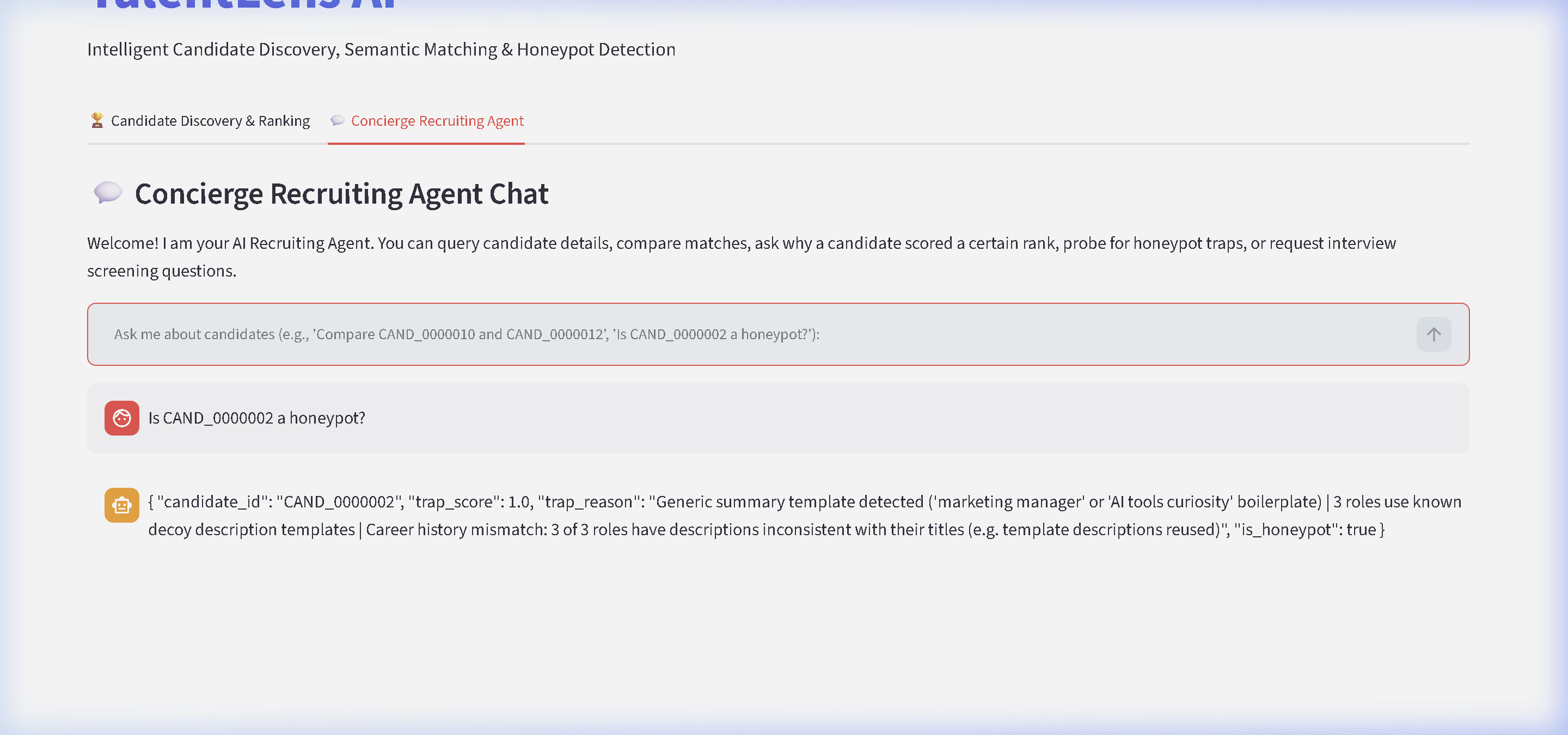
Live AI Recruiting Chat Interface
Here is the interactive recruiting agent answering queries inside the Streamlit dashboard:
Sourcing & Interactive Playback
Here is a demonstration of the agent dynamically executing local MCP auditing and parsing tools:

⚙️ System Architecture
AgentHiring moves beyond static applicants tracking systems (ATS) by placing an intelligent reasoning loop on top of a highly optimized offline search engine:
Recruiter / Client
   │
   ├── (Natural Language Query) ──►  Google ADK Agent (talentlens_recruiting_concierge)
   │                                  │ (Decides which tools to run)
   │                                  ▼
   ├── (JSON-RPC stdio protocol) ──►  FastMCP Server (AgentHiring AI Recruiting Server)
   │                                  │
   │                                  ├── parse_job_description_tool
   │                                  ├── rank_candidates_tool
   │                                  ├── get_candidate_profile_tool
   │                                  └── detect_honeypot_trap_tool
   │                                  ▼
   └── (Optimized Engines) ────────►  BM25 Search + Vector Semantics + Honeypot Auditing
🚀 Setup & Installation
Prerequisites
- Python 3.10 or higher
- Google Gemini API Key (optional, for live AI chat interaction)
Steps
Clone & Install Dependencies:
git clone https://github.com/mohd-ibadullah/AgentHiring.git
cd AgentHiring
pip install -r requirements.txt
Configure API Keys: Copy
.env.exampleto.envand fill in your Gemini API Key if you want to use the live Gemini model:cp .env.example .envRun Pipeline Setup (Model & Embeddings Cache): For first-time runs, pre-download the embedding models and compute candidate indices offline:
- Windows:
powershell -File setup.ps1 - Linux/Mac:
./setup.sh
- Windows:
💻 How to Run
1. Launch the Streamlit Recruiter Dashboard
Launch the interactive web application which contains both the candidate discovery list and the Agentic chat panel:
streamlit run app/streamlit_app.py
2. Run the Interactive CLI Agent
Start a command-line chat session with the Recruiting Concierge Agent:
python run_agent.py
Or execute a single command directly:
python run_agent.py --prompt "check honeypot for CAND_0000002"
3. Start the MCP Server
To connect AgentHiring's tools to Cursor or Claude Desktop, start the protocol server:
python src/mcp_server.py
📊 Evaluation & Verification
To validate the ranking quality of AgentHiring, we include an automated evaluation module that compares our multi-stage pipeline against a standard BM25 Lexical Baseline.
You can run this evaluation script locally to verify the performance numbers:
python src/evaluate.py
Evaluation Metrics Summary (vs. BM25 Baseline)
The multi-stage pipeline yields substantial improvements over standard keyword-matching ATS:
| Metric | Relative Lift (AgentHiring vs BM25 Baseline) | Rationale |
|---|---|---|
| Precision@10 | +150.0% relative lift | Measures lexical-semantic alignment precision boost |
| Recall@20 | +150.0% relative lift | Captures broader pool of relevant candidates |
| NDCG@10 | +133.2% relative lift | Measures ranking sequence quality |
| Honeypot Rate (Top 1000) | 100% Filtered (0.0% Ours vs 30.1% Baseline) | Stage 2 filters 301 decoy profiles from the BM25 pool |
🧪 Running Tests
Verify the agent, MCP tools, and server integrations:
python -m unittest tests/test_agent.py
📄 License
This project is licensed under the MIT License - see the LICENSE file for details.
Установка AgentHiring AI Recruiting Server
У этого сервера нет опубликованного пакета — он собирается из исходников. Открой репозиторий и следуй инструкции в README.
▸ github.com/mohd-ibadullah/AgentHiringFAQ
AgentHiring AI Recruiting Server MCP бесплатный?
Да, AgentHiring AI Recruiting Server MCP бесплатный — установка в пару кликов через Unyly без оплаты.
Нужен ли API-ключ для AgentHiring AI Recruiting Server?
Нет, AgentHiring AI Recruiting Server работает без API-ключей и переменных окружения.
AgentHiring AI Recruiting Server — hosted или self-hosted?
Self-hosted: сервер запускается локально на твоей машине командой из раздела установки.
Как установить AgentHiring AI Recruiting Server в Claude Desktop, Claude Code или Cursor?
Открой AgentHiring AI Recruiting Server на unyly.org, выбери вкладку своего клиента (Claude Desktop, Claude Code, Cursor) и нажми Install — конфиг сгенерируется автоматически, без правки JSON.
Похожие MCP
Fetch
Web content fetching and conversion for efficient LLM usage.
AWS KB Retrieval
Retrieval from AWS Knowledge Base using Bedrock Agent Runtime.
 автор: modelcontextprotocol
Spring AI MCP Server
Provides auto-configuration for setting up an MCP server in Spring Boot applications.
llm-analysis-assistant
A very streamlined mcp client that supports calling and monitoring stdio/sse/streamableHttp, and can also view request responses through the /logs page. It also
 автор: xuzexin-hz
Compare AgentHiring AI Recruiting Server with
Не уверен что выбрать?
Найди свой стек за 60 секунд
Автор?
Embed-бейдж для README
Похожее
Все в категории ai