
Ai Create
БесплатноНе проверенai-create-mcp is a Go-based tool that converts OpenAPI Specification (OAS) files into a Model Context Protocol (MCP) program.

Описание
ai-create-mcp is a Go-based tool that converts OpenAPI Specification (OAS) files into a Model Context Protocol (MCP) program.
README
This project is a work in progress and not yet complete.
ai-create-mcp is a Go-based tool that converts OpenAPI Specification (OAS) files into a Model Context Protocol (MCP) program. It provides a simple and efficient way to generate MCP-compliant code or configurations from OAS files, with customizable options for project setup and integrations.
Features
- Convert OAS files to MCP protocol.
- Customizable project name, directory, and version.
- Optional integration with Claude.app.
- Inspector tool for debugging and analysis.
Installation
To install the ai-create-mcp, ensure you have Go installed on your system. Then, run the following command:
go install github.com/xxlv/ai-create-mcp
Alternatively, clone the repository and build it manually:
git clone https://github.com/xxlv/ai-create-mcp.git
cd ai-create-mcp
go build
Usage
The tool is configured via command-line flags. Below is the list of available flags and their descriptions:
| Flag | Type | Default Value | Description |
|---|---|---|---|
-path |
string | "" |
Directory to create the project in |
-name |
string | "" |
Project name |
-oaspath |
string | "" |
Path to the OAS file |
-version |
string | "0.1.0" |
Server version |
-inspector |
bool | true |
Enable/disable the inspector tool |
-description |
string | "Simple mcp" |
Project description |
-claudeapp |
bool | true |
Enable/disable Claude.app integration |
-autoyes |
bool | true |
Enable/disable auto-confirmation |
Example
To generate an MCP project from an OAS file, run:
ai-create-mcp -path ./myproject -name my-mcp-app -oaspath ./openapi.yaml -version 1.0.0
This command will:
- Create a project in the
./myprojectdirectory. - Name the project
my-mcp-app. - Use the OAS file located at
./openapi.yaml. - Set the server version to
1.0.0.
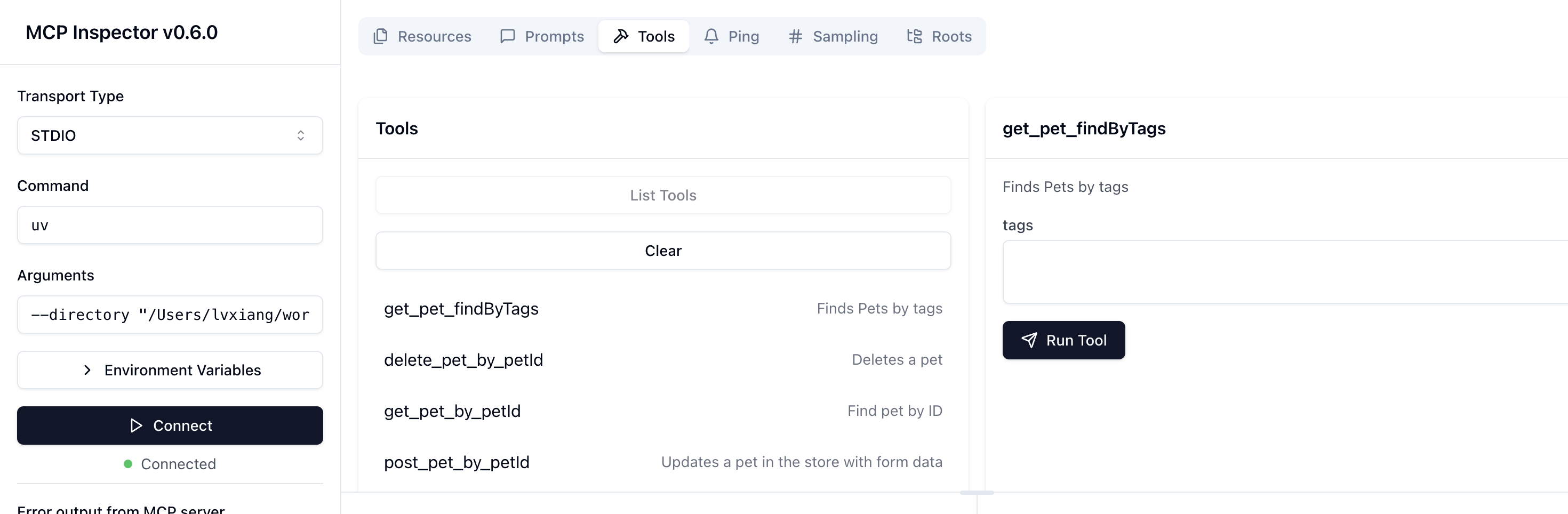
./testdata/openapi.ymlwill be converted into the following tools🔧
To disable the inspector and Claude.app integration, use:
ai-create-mcp -path ./myproject -name my-mcp-app -oaspath ./openapi.yaml -inspector=false -claudeapp=false
For a fully automated run (no prompts), enable -autoyes:
ai-create-mcp -path ./myproject -name my-mcp-app -oaspath ./openapi.yaml -autoyes
Configuration
The tool relies on the provided command-line flags for configuration. Ensure that:
- The
-oaspathpoints to a valid OAS file (e.g.,.yaml). - The
-pathdirectory is writable. - The
-nameadheres to valid naming conventions for your use case.
Contributing
Contributions are welcome! To contribute:
- Fork the repository.
- Create a new branch (
git checkout -b feature/your-feature). - Make your changes and commit them (
git commit -m "Add your feature"). - Push to the branch (
git push origin feature/your-feature). - Open a pull request.
License
This project is licensed under the MIT License. See the LICENSE file for details.
Contact
For questions or support, please open an issue on the GitHub repository.
Установка Ai Create
У этого сервера нет опубликованного пакета — он собирается из исходников. Открой репозиторий и следуй инструкции в README.
▸ github.com/xxlv/ai-create-mcpFAQ
Ai Create MCP бесплатный?
Да, Ai Create MCP бесплатный — установка в пару кликов через Unyly без оплаты.
Нужен ли API-ключ для Ai Create?
Нет, Ai Create работает без API-ключей и переменных окружения.
Ai Create — hosted или self-hosted?
Self-hosted: сервер запускается локально на твоей машине командой из раздела установки.
Как установить Ai Create в Claude Desktop, Claude Code или Cursor?
Открой Ai Create на unyly.org, выбери вкладку своего клиента (Claude Desktop, Claude Code, Cursor) и нажми Install — конфиг сгенерируется автоматически, без правки JSON.
Похожие MCP
Fetch
Web content fetching and conversion for efficient LLM usage.
AWS KB Retrieval
Retrieval from AWS Knowledge Base using Bedrock Agent Runtime.
 автор: modelcontextprotocol
Spring AI MCP Server
Provides auto-configuration for setting up an MCP server in Spring Boot applications.
llm-analysis-assistant
A very streamlined mcp client that supports calling and monitoring stdio/sse/streamableHttp, and can also view request responses through the /logs page. It also
 автор: xuzexin-hz
Compare Ai Create with
Не уверен что выбрать?
Найди свой стек за 60 секунд
Автор?
Embed-бейдж для README
Похожее
Все в категории ai