
Ai Shelf
БесплатноНе проверенAI Shelf — terminal profile CLI and TUI (shared data model with the desktop app)

Описание
AI Shelf — terminal profile CLI and TUI (shared data model with the desktop app)
README
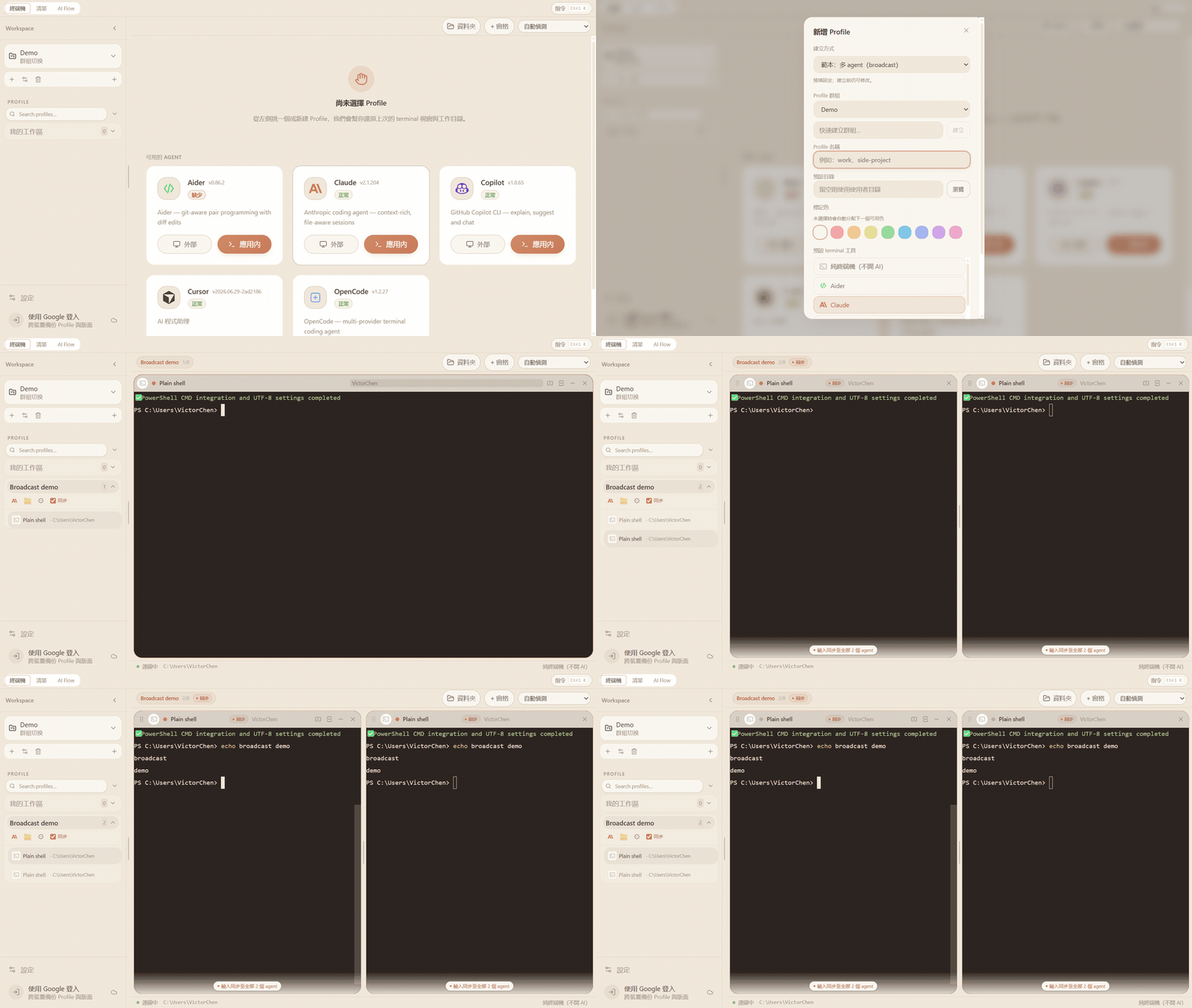
Unified toolkit to inspect, launch, and orchestrate AI CLIs — Claude Code, GitHub Copilot, and Cursor — in one place.
v3.7.0 — pnpm monorepo with an Electron desktop app, a lightweight inventory CLI (ai), and a terminal profile manager (ai-shelf). Profile is the shared data model for the desktop app and CLI — see docs/data-model.md.
What's in the repo
| Deliverable | Binary / entry | Role |
|---|---|---|
| Inventory CLI | ai |
Scan models, skills, MCP, config; run doctor/update/raw |
| Profile CLI | ai-shelf |
Manage profiles, CLI sessions, broadcast exec; TUI |
| Desktop app | pnpm electron |
Terminal launcher + inventory dashboard (Electron + React) |
The desktop app and ai-shelf share one SQLite database. Profile Groups split and organize Profiles (names, defaults, pane layouts) across both surfaces.
Features
Inventory (ai)
- Overview — capability matrix, summary stats, warnings, env-var presence
- Models — per-tool model chips with capability columns; long lists expand inline (
+N more) - Skills — per-tool skill cards + cross-tool skill matrix
- MCP — server inventory, sync status, cross-tool matrix, MCP sync (copy missing servers across tools)
- Config — config / instruction / MCP file paths, clickable to open
- Doctor — parallel health checks (binary, auth, config JSON)
- Update — version check and one-click update per tool and self
- JSON output —
--jsonon every inventory command
Terminal profiles (ai-shelf)
- Profile Groups — top-level categories used to split profiles
- Profiles — named terminal environments (default cwd, tool, accent color, broadcast input) under each profile group; same records as the desktop sidebar
- CLI sessions — optional headless PTY sessions scoped to a profile (
Profilesworkspace internally) - Broadcast exec —
profile exec <name> … --broadcastsends a command to all running CLI sessions in a profile - TUI — profile list + session management (
ai-shelf tui) - Legacy —
workspace/group/sessioncommands remain but are deprecated
Desktop app (Electron)
- Two modes — Terminal (default) and Inventory (7 tabs: Overview · Models · Skills · MCP · Config · Doctor · Update)
- Profiles sidebar — create/rename/delete profiles; each profile stores split-pane layout in SQLite
- Embedded terminals — xterm.js + node-pty; multi-pane split with drag resize; broadcast input across panes
- External launch — Windows Terminal, PowerShell 7+, PowerShell 5, or CMD
- Detached windows — optional pop-out chat and settings windows
- Dark theme — React + Tailwind CSS v4
Supported tools
| Tool | Binary | Inventory id |
|---|---|---|
| Claude Code | claude |
claude |
| GitHub Copilot CLI | copilot / gh copilot |
copilot |
| Cursor | agent |
cursor |
| OpenAI Codex CLI | codex |
codex |
| Google Gemini CLI | gemini |
gemini |
| Aider | aider |
aider |
| OpenCode | opencode |
opencode |
Desktop app
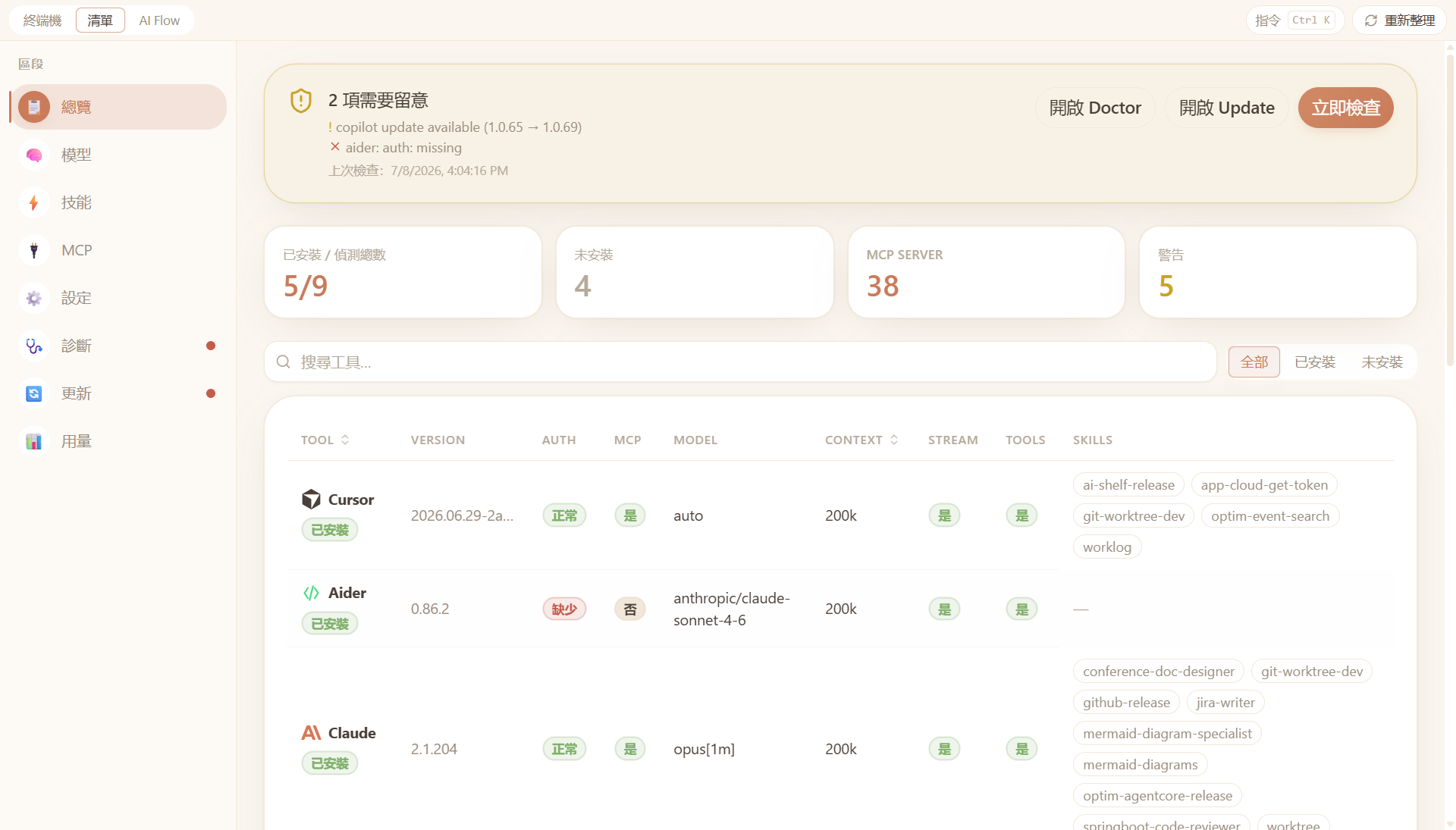
Switch between Terminal and Inventory in the header. Inventory mode has the tabbed dashboard above; Terminal mode is the embedded multi-pane launcher with a profiles sidebar.
→ Full page-by-page guide with screenshots · 繁體中文版
Installation
End-user distribution: The desktop app is only shipped as a Windows installer on GitHub Releases. There is no npm package for installing AI Shelf today — use the installer below, or build from source if you need the CLIs.
Windows desktop app (recommended)
- Download
AI-Shelf-Setup-<version>.exefrom GitHub Releases (installer only — not portable builds). - Run the installer. Windows may show SmartScreen (unknown publisher) — self-signed builds are not CA-trusted. Choose More info → Run anyway. See docs/WINDOWS_CODE_SIGNING.md.
- Launch AI Shelf from the Start menu or desktop shortcut.
The installed app includes the inventory UI and embedded terminals. You do not need Node.js on the machine.
See docs/RELEASE.md for maintainer release steps and uninstall notes.
CLIs (ai, ai-shelf) — from source only
The inventory CLI (ai) and profile CLI (ai-shelf) are not published to npm yet. To use them, clone the repo and build (see below). For most users, the GitHub installer is enough.
From source (monorepo)
git clone <repo-url> ai-shelf
cd ai-shelf
pnpm install          # rebuilds native modules (node-pty, better-sqlite3)
pnpm build
pnpm start            # ai inventory / doctor / …
pnpm exec ai-shelf profile list
pnpm electron         # desktop app
Requirements: Node.js ≥ 22, pnpm ≥ 10
Usage
Inventory CLI — ai
ai <command> [subcommand] [options]
ai inventory (alias: ai inv)
ai inventory            # full overview table
ai inventory models     # model + context info
ai inventory skills     # skills per tool
ai inventory mcp        # MCP server list
ai inventory config     # config & instruction file paths
ai inventory claude     # detail view for a single tool
Example output:
  AI Shelf

  TOOL             AUTH   MCP   MODEL                    CTX    STREAM   TOOLS   SKILLS
  ──────────────────────────────────────────────────────────────────────────────────────
  claude           ok     yes   claude-opus-4-5          200k   yes      yes     bash,edit,...
  copilot          ok     yes   gpt-4o                   128k   yes      yes     search,...
  cursor           ok     no    claude-3-5-sonnet         —     yes      yes     —

  MCP Servers: filesystem, github, postgres

  Config Files:
    ~/.claude.json
    ~/.config/gh/config.yml
ai doctor
ai doctor
ai doctor --json
Checks: binary in PATH, auth status, config JSON validity, MCP config JSON validity.
ai raw <tool> [args...]
ai raw claude --version
ai raw copilot auth status
ai update [target]
ai update              # all detected tools + self
ai update claude
ai update copilot
ai update cursor
ai update self
Global options
| Flag | Description |
|---|---|
--json |
Output as JSON |
-h, --help |
Show help |
-v, --version |
Show version |
Profile CLI — ai-shelf
Persistent data (Windows):
| Path | Purpose |
|---|---|
%APPDATA%/ai-shelf/config.yaml |
App config |
%APPDATA%/ai-shelf/workspaces.db |
SQLite database (profiles + layouts) |
%APPDATA%/ai-shelf/logs/app.log |
Logs |
See docs/data-model.md for how profiles map to storage. 繁體中文版
# Profiles (primary — shared with desktop app)
ai-shelf profile list
ai-shelf profile create <name> [--cwd <path>] [--tool <tool>] [--color <hex>]
ai-shelf profile update <profile> [--name] [--cwd] [--tool] [--broadcast|--no-broadcast]
ai-shelf profile delete <profile>
ai-shelf profile reorder <profile...>
ai-shelf profile exec <profile> <command...> [--broadcast] [--session <name>]

# Full-screen TUI
ai-shelf tui

# Legacy (deprecated)
ai-shelf workspace …
ai-shelf group …
ai-shelf session …
See packages/cli/STRUCTURE.md for package internals.
Development
pnpm install                 # postinstall rebuilds native addons for Electron

# TypeScript
pnpm dev                     # watch root src/ (inventory + electron main)
pnpm dev:cli                 # watch packages/cli
pnpm dev:renderer            # Vite dev server for React UI

# Build & run
pnpm build                   # CLI package + tsc + Vite renderer
pnpm start                   # node dist/cli.js  →  `ai` commands
pnpm electron                # build + launch desktop app
pnpm electron:dev            # electron without rebuild (after pnpm build)

# Native modules (node-pty for Electron)
pnpm rebuild:native          # current Electron ABI
pnpm rebuild:native:all      # all installed Electron versions

# Quality & packaging
pnpm test:e2e                # Playwright screenshot tests
pnpm gen:docs-assets         # refresh README/docs PNGs + GIF before release (Windows + ffmpeg)
pnpm lint
pnpm format / pnpm format:check
pnpm package:win             # standalone CLI exe (pkg)
pnpm dist:win                # Windows NSIS installer → release/AI-Shelf-Setup-<version>.exe
pnpm dist:win:portable       # dev-only portable exe (do not ship to users)
Project structure
ai-shelf/                 # root workspace (Electron app + inventory CLI)
├── src/
│   ├── cli.ts                    # `ai` entry — inventory, doctor, raw, update
│   ├── commands/                 # CLI command handlers
│   ├── inventory/                # Claude / Copilot / Cursor detectors
│   ├── electron/                 # Main process, preload, workspace-host
│   ├── renderer/                 # React UI (Terminal + Inventory modes)
│   │   ├── components/           # ChatTab, ProfileSidebar, *Tab, …
│   │   ├── hooks/                # useInventoryScan, useProfileWorkspace, …
│   │   └── terminal/             # split-tree, layout serialize, SQLite sync
│   └── utils/
├── packages/cli/                 # `ai-shelf` workspace manager
│   └── src/
│       ├── cli/                  # Commander commands
│       ├── core/                 # ports, entities, errors
│       ├── database/             # SQLite + migrations + repositories
│       ├── services/             # workspace, group, session, profile, exec
│       ├── runtime/              # PTY, process registry, event bus
│       └── tui/                  # neo-blessed terminal UI
├── docs/pages.md                 # Desktop UI walkthrough (EN)
├── docs/pages.zh-TW.md           # Desktop UI walkthrough (zh-TW)
├── tests/e2e/                    # Playwright tests
└── scripts/                      # gen-icon, rebuild-native
Tech stack
| Layer | Stack |
|---|---|
| Inventory CLI | Node.js, native parseArgs |
| Profile CLI | Commander, better-sqlite3, node-pty, RxJS, Zod, Pino |
| Desktop | Electron 41, React 19, Vite 8, Tailwind CSS 4, xterm.js |
| Tests | Playwright |
License
MIT
Установить Ai Shelf в Claude Desktop, Claude Code, Cursor
unyly install ai-shelfСтавит в Claude Desktop, Claude Code, Cursor и VS Code — сам разбирается с npx, uvx и сборкой из исходников.
Впервые? Поставь CLI: curl -fsSL https://unyly.org/install | sh
Или настроить вручную
Выполни в терминале:
claude mcp add ai-shelf -- npx -y ai-shelfFAQ
Ai Shelf MCP бесплатный?
Да, Ai Shelf MCP бесплатный — установка в пару кликов через Unyly без оплаты.
Нужен ли API-ключ для Ai Shelf?
Нет, Ai Shelf работает без API-ключей и переменных окружения.
Ai Shelf — hosted или self-hosted?
Self-hosted: сервер запускается локально на твоей машине командой из раздела установки.
Как установить Ai Shelf в Claude Desktop, Claude Code или Cursor?
Открой Ai Shelf на unyly.org, выбери вкладку своего клиента (Claude Desktop, Claude Code, Cursor) и нажми Install — конфиг сгенерируется автоматически, без правки JSON.
Похожие MCP
Fetch
Web content fetching and conversion for efficient LLM usage.
AWS KB Retrieval
Retrieval from AWS Knowledge Base using Bedrock Agent Runtime.
 автор: modelcontextprotocol
Spring AI MCP Server
Provides auto-configuration for setting up an MCP server in Spring Boot applications.
llm-analysis-assistant
A very streamlined mcp client that supports calling and monitoring stdio/sse/streamableHttp, and can also view request responses through the /logs page. It also
 автор: xuzexin-hz
Compare Ai Shelf with
Не уверен что выбрать?
Найди свой стек за 60 секунд
Автор?
Embed-бейдж для README
Похожее
Все в категории ai