
Apple Calendar
БесплатноНе проверенEnables Claude and other MCP clients to directly interact with macOS Calendar.app using AppleScript for local calendar management. Provides tools for listing, s

Описание
Enables Claude and other MCP clients to directly interact with macOS Calendar.app using AppleScript for local calendar management. Provides tools for listing, searching, creating, updating, and deleting calendar events without cloud APIs or CalDAV setup.
README

🎭 YAPPING — Apple Calendar MCP for Claude
your calendar, but yapping.
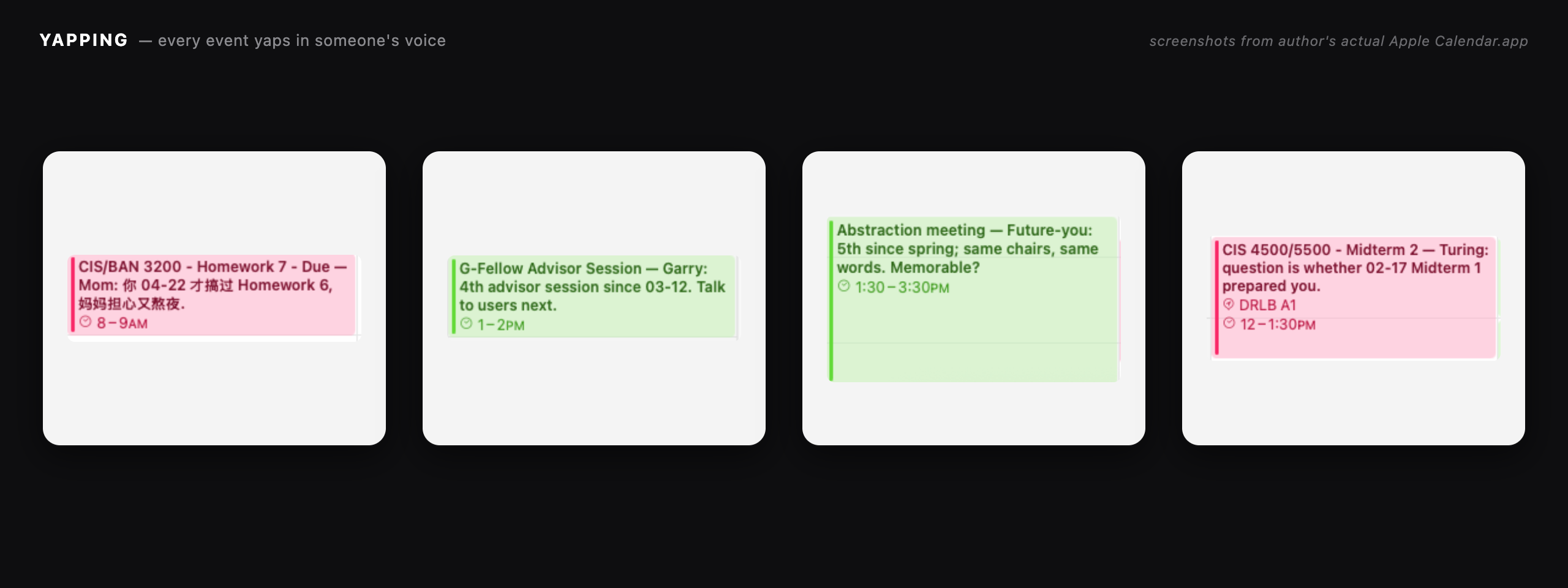
28 voices yap on every event you schedule. Your mom. Your future self. Garry Tan. LeBron James. Hilary Hahn. Alan Turing. Confucius. They all yap.





💬 open Claude Code · 📩 paste your event · 🔌 MCP · 🎭 28 voices yap as skills · 📅 calendar item · ☁️ sync everywhere
What is YAPPING?
YAPPING is an open-source Apple Calendar MCP server for Claude Desktop, Claude Code, and any MCP-compatible client. It gives Claude full read/write access to your macOS Calendar.app via AppleScript — plus 13 relational characters and 16 synthetic distillers (Mom, American Mom, Future-you, Garry Tan, Alan Turing, LeBron James, Hilary Hahn, Confucius, ...) who YAP on every calendar event with one-line reminders that reference your past calendar history AND web-researched domain facts. macOS-only, local-only, fully reversible.
GitHub · npm · Docs · Changelog · Security · Contributing
Table of contents
- What is YAPPING?
- How to install Apple Calendar MCP for Claude
- Customizing what YAPPING says
- Tools — 17 MCP server tools for macOS Calendar
- Calendar Memory & Character Reminders
- Define your own characters
- Distillers — synthetic voices of named people
- Configuration
- How YAPPING works (architecture)
- Security
- Development
- FAQ — Apple Calendar + MCP + Claude integration
What is YAPPING?
YAPPING is an Apple Calendar MCP server: a small Node.js binary that speaks the Model Context Protocol over stdio and exposes your macOS Calendar.app to Claude. It is open-source, local-only, has no network calls, and ships 17 MCP tools across CRUD, analytics, personas, character memory, and distillers. If you want Claude to actually read and write the calendar on your Mac — and to do it with personality — this is the MCP server for that.
How to install Apple Calendar MCP for Claude
Claude Desktop / Claude Code
- Add to your MCP config (
~/Library/Application Support/Claude/claude_desktop_config.jsonor~/.claude/claude_desktop_config.json):
{
  "mcpServers": {
    "yapping": {
      "command": "npx",
      "args": ["-y", "yapping-apple-calendar-mcp"]
    }
  }
}
- Grant Claude full access to Calendar.app: System Settings → Privacy & Security → Automation → Claude → Calendar (enable). See docs/permissions.md if it doesn't appear.
- Restart Claude.
- Ask: "What's on my calendar this week?"
(Replace the yapping key with whatever name you want to call the MCP server in chat.)
Customizing what YAPPING says
The character system is the heart of YAPPING — and it's designed to be customized. Three layers, in increasing order of effort:
- Pick from 13 built-in characters (Mom 妈 [Asian], American Mom, Friend, Coach, Therapist, Past-you, Future-you, Werner, Aurelius, Barkeep, Old friend, 夫子, Dog) — no setup required. Note: the Asian-mother
Momnow uses the short_label妈to distinguish it fromAmerican Momon calendar titles. - Define inline custom characters per call — pass
custom_characters: [...]toenrich_with_character_remindersfor a one-off render. - Persist your character roster at
~/.apple-calendar-mcp/characters.json— every future call merges these in alongside the built-ins. (The~/.apple-calendar-mcp/data path is preserved across renames so existing users keep their memory.)
Each character has a directive — a short system prompt for that voice. Tell Claude exactly who that person is to you, what they care about, what they would notice. The directive is the lever for tuning what gets said. See Define your own characters below for the full schema.
What YAPPING does
- 17 MCP tools across 5 categories (CRUD, Analytics, Personas, Character Memory, Distillers)
- 13 built-in relational characters — bring your own with
~/.apple-calendar-mcp/characters.json - 16 built-in distillers — synthetic voices of specific named people (Garry Tan, Naval, Karpathy, Ian (Hearts2Hearts), …)
- Persistent calendar memory across years; commentary references specific past events
- Fully reversible — every mutation embeds a sentinel-marked backup; revert with one tool call
See docs/examples.md for 8 real prompt → result walk-throughs.
The 9-stage YAPPING pipeline
YAPPING v0.5 reframes memory as a user model that grows from every input — screenshots, messages, URLs, free text — not just past calendar events. The MCP server provides 5 new tools that orchestrate a single 9-stage flow:
0. INPUT (screenshot / message / URL / free text)
1. EXTRACT          → extract_entities_from_input
2. RESEARCH         → research_entities → (Claude WebSearch/WebFetch) → cache_research_facts
3. MEMORY UPDATE    → update_memory_from_input
4. CALENDAR ACTION  → create_event / update_event / delete_event
5. CHARACTER SELECT → enrich_with_character_reminders (existing logic)
6. CONTEXT BUILD    → query_full_context_for_event
7. COMPOSE          → Claude voices the per-event sentence (anti-fabrication enforced)
8. APPLY            → apply_character_reminders
9. FEEDBACK LOOP    → mutated event back to memory
Memory schema v2 keys: events, people, topics, user_notes, external_facts. v1 files load unchanged. See docs/architecture.md for the full diagram.
Case study: heyday
A real stress test of Stages 2–3, run on a single ambiguous calendar entry.
Input. The user has one event titled heyday (Thu Apr 30, 10:30 AM – 5:45 PM, Courses calendar). Memory has 0 prior heyday entries — the word looks like a generic English noun ("the heyday of jazz"). The seven-hour block is the only signal that something specific is happening.
Without web research (old behavior). The voice (夫子) has nothing to anchor on, so it falls back to a placeholder:
heyday — 夫子: 子曰: heyday 初见于此, 君子慎其始, 不在数, 在精专.
A generic Confucian platitude. No information. The user could write that themselves.
With web research (new pipeline, Stages 2–3). Stage 1 extracts heyday as a topic. Stage 2 returns cached_facts: {} and needs_research: ["heyday"]. Claude (the orchestrator) runs WebSearch("heyday upenn") and surfaces the actual referent: Hey Day at the University of Pennsylvania — the junior-to-senior moving-up tradition since 1916, marked by red T-shirts, straw hats, canes, and a three-question pass-fail "exam" delivered by the Penn President. Claude calls cache_research_facts to persist that summary (7-day TTL).
Memory update (Stage 3). memory.topics["Hey Day"] now carries an external_summary describing the tradition. On every future event whose title overlaps, that summary is in scope.
Voice composition (Stage 7). Same 夫子 voice, now grounded:
heyday — 夫子: 子曰: 三年学问, 一日礼成. 红衫戴冠, 君子志学之毕也. 1916 至今同此礼.
Translation: "Confucius said: three years of study, one day of ceremony complete. Red tunic, capped — the gentleman marks the end of his studentship. Same rite since 1916."
Same character. Different information density. Every claim — three years, the red tunic, the cap, the 1916 date — traces back to the cached external fact. Nothing invented.
Takeaway. Voice is the wrapper; the facts come from your past calendar (memory) and from web research. Without facts, voice has nothing to say.
Why YAPPING knows things
A character only sounds knowing when there is something to know. YAPPING draws on four layered sources of context, all merged at Stage 6 (query_full_context_for_event) and handed to the LLM at Stage 7 for composition:
- Memory — your past calendar history. Events you've actually had, who showed up, which topics recur. Seeded by
seed_calendar_memoryfrom up to five years back. - External facts — web-researched domain knowledge. What is heyday? Who is Lingjie Liu? What is CS 580? Cached in
external_factswith a 7-day TTL, refreshed on demand. - People records. Named humans across all inputs — bios, roles, relationships — accumulated as you give Claude screenshots and messages.
- User notes — things you've told Claude in chat. Verbatim user statements with a source label, persisted so they outlast a single session.
All four feed the Stage 6 context build. Stage 7 composition reads from that bundle and composes one grounded sentence per event, in the assigned voice. If the bundle is empty, the LLM is instructed to say less, not invent more.
Tools — 22 MCP server tools for macOS Calendar
CRUD
list_calendars— every calendar (name + uid + account)list_events— events in a window across one or more calendarssearch_events— substring/CJK-aware search across calendarscreate_event— make an eventupdate_event— modify an event by uid (in-place or cross-calendar)delete_event— delete an event by uid
Analytics
time_per_calendar— total timed-event duration per calendar over a windowmortality_overlay— per-event % of an N-year waking life consumed (memento mori)
Personas
list_events_in_persona— wrap events with one persona's directive (Werner Herzog, Hemingway, etc.)list_events_in_mixed_personas— assign 36 distinct voices, one per event, with thematic mapping (DMV→Kafka, exam→Plath, recurring→noir detective)
Character Memory
seed_calendar_memory— populate~/.apple-calendar-mcp/memory.jsonfrom past N yearsquery_calendar_memory— read memory by person / topic / date / calendar / similarityenrich_with_character_reminders— for each event, attach a relational character + 3 memory_context items + a directiveapply_character_reminders— mutate Calendar.app titles with Claude-composed sentences (with backup)revert_character_reminders— restore originals from the embedded backup block
Distillers
list_distillers— enumerate synthetic voices distilled from public material of named people (Garry Tan, PG, Naval, Karpathy, Steve Jobs, Bezos, Munger, Alan Turing, LeBron James, Hilary Hahn, …)distill_voice_from_text— supply a corpus, get a draft Distiller object back for the LLM to fill in
9-stage pipeline (v0.5)
extract_entities_from_input— Stage 1: structured extraction schema (events / people / topics / user statements / intent)research_entities— Stage 2: cached external_facts + research directive for Claude to act on with WebSearch/WebFetchcache_research_facts— Stage 2 follow-up: persist Claude's web findings (7-day TTL)update_memory_from_input— Stage 3: bulk-merge extraction results into memory v2query_full_context_for_event— Stage 6: full context bundle (memory + people + topics + external facts + user notes) for one event
Calendar Memory & Character Reminders
A separate, opt-in track from the personas/voices/mortality stack. The premise: your calendar is more useful as a memory device than as a literary scratchpad. Instead of rewriting every title in Werner Herzog's voice, this track appends ONE sentence after each original title — pretending to be a reminder from a relational character (Mom, Friend, Coach, Therapist, Past-you, Future-you, etc.) — and grounds that sentence in your real prior calendar events.
Five tools. The MCP server has no LLM; sentence composition still happens at Claude (the client). The server provides the character directive, the memory_context, and a mutation/revert path.
seed_calendar_memory— fans out across writable calendars and snapshots events into~/.apple-calendar-mcp/memory.json(mode 0600, parent dir0700). Defaults to the last five years. Idempotent: re-seeding merges by UID, latest write wins, observations are unioned across writes.query_calendar_memory— read access.query_type ∈ { by_person, by_topic, by_date_range, by_calendar, similar_to, all }. Thesimilar_toquery takes a synthetic event and ranks past events by token-overlap (with a small bonus for same-calendar matches), newest-first.enrich_with_character_reminders— fetches events in a window, picks a relational character per event by trigger overlap (deterministic seeded fallback when nothing matches), and attachesmemory_context_itemsfromrecentSimilarEvents. Returns each event withcharacter_label,character_directive,memory_context, and arewrite_instruction, plus a top-levelrewrite_templatedescribing the format Claude must emit.apply_character_reminders— Claude composes one sentence per event and posts back{ uid, calendar, new_title, new_notes? }items. The tool stores the originaltitle/notes/locationinside the event's notes between two sentinel lines (---ORIGINAL_TITLE_BACKUP_v1---/---END_ORIGINAL_TITLE_BACKUP_v1---), and ALSO writes a JSON snapshot to~/.apple-calendar-mcp/last_apply_backup_<unix_ts>.json.dry_run: truereturns what would change without writing.revert_character_reminders— finds every event whose notes contain the backup sentinel within the requested window (defaults to roughly-5y..+1yif omitted) and restores the original title/notes/location, stripping the backup block.
Format on the calendar after apply_character_reminders runs:
{ORIGINAL_TITLE} — {character_label}: {one_sentence_referencing_memory}
Built-in character pool (12 characters): Mom, Friend, Coach, Therapist, Past-you, Future-you, Werner, Aurelius, Barkeep, Old friend, 夫子, Dog. See src/characters.ts for triggers and directives.
Define your own characters
The built-in pool is a starting point. The point of this system is that you define the characters that would actually leave you a note — your boss, your therapist, your dead grandmother, your fourth-grade teacher, the friend who keeps asking when you're moving back home. Two ways, both no-fork:
1. Persistent config file. Drop a JSON file at ~/.apple-calendar-mcp/characters.json (created the same way as memory.json: parent dir 0700, file 0600). Every enrich_with_character_reminders call automatically merges these in alongside the built-ins.
{
  "version": 1,
  "characters": [
    {
      "name": "My Boss",
      "short_label": "Boss",
      "directive": "Terse, slightly impatient, uses my last name. Reference one memory_context item with a 'remember when' or 'we agreed' phrasing. ONE sentence.",
      "triggers": ["meeting", "review", "1:1", "deadline"]
    },
    {
      "name": "Grandma",
      "short_label": "奶奶",
      "directive": "Gentle Cantonese grandmother, mixes Cantonese + English. Worries about whether you ate. Reference a past meal or family event from memory_context. ONE sentence.",
      "triggers": ["dinner", "lunch", "family", "home", "holiday"]
    }
  ]
}
Field reference: name (unique, ≤64 chars), short_label (≤16 chars, embedded in event title), directive (≤300 chars, must mention memory), triggers (lowercase substrings matched against event title/notes/location), optional default: true for fallback when nothing matches.
2. Inline per-call. Pass custom_characters directly in the tool call — useful for one-off renderings or when the calling agent is curating a pool dynamically. Up to 30 entries.
{
  "start_date": "2026-05-01T00:00:00Z",
  "end_date": "2026-05-08T00:00:00Z",
  "custom_characters": [
    {
      "name": "Younger Sister",
      "short_label": "Sister",
      "directive": "Pesters you with sibling-knowledge — lowercase, dry. Reference a memory_context item only she would notice (the time you skipped a flight, lied about gym attendance, etc.). ONE sentence.",
      "triggers": ["family", "flight", "gym", "home"]
    }
  ],
  "character_pool": ["Younger Sister", "Mom"],
  "use_persistent_config": true
}
Conflict resolution by name: inline > persistent config > built-in. So custom_characters: [{ "name": "Mom", ... }] overrides the built-in Mom for that call. Set use_persistent_config: false to ignore the on-disk file (e.g. for fully reproducible runs across machines).
Distillers — synthetic voices of named people
Where Characters are relational archetypes ("Mom", "Coach", "Past-you"), Distillers are synthetic voices distilled from the public writing, talks, and tweets of specific named people. Use them when you want a calendar entry that sounds like Garry Tan would have written it, or Paul Graham, or Naval, or Steve Jobs.
Built-in pool (17 distillers, all carry the disclaimer "Synthetic voice distilled from public material. Not endorsed by the named individual."):
Garry Tan, Paul Graham, Naval Ravikant, Sam Altman, Steve Jobs, Andrej Karpathy, Marc Andreessen, Jeff Bezos, Charlie Munger, Aristotle (virtue-ethical / teleological), Brian Chesky, Joan Didion, Alan Turing (CS history). K-pop / performers: Hilary Hahn (violinist discipline), LeBron James (athlete leadership), Ian (Hearts2Hearts) (K-pop idol). Plus an Old Founder archetype for fallback.
Use them in enrich_with_character_reminders via distiller_pool:
{
  "start_date": "2026-05-01T00:00:00Z",
  "end_date": "2026-05-08T00:00:00Z",
  "distiller_pool": ["Garry Tan", "Naval Ravikant"],
  "character_pool": ["Coach"]
}
Distillers and characters merge into one assignment pool; conflicts resolve by name with inline > persistent > built-in. Persist your own at ~/.apple-calendar-mcp/distillers.json ({ "version": 1, "distillers": [...] }, parent dir 0700, file 0600). To distill yourself or someone else from a text corpus, call distill_voice_from_text — the MCP server has no LLM, so the tool returns a placeholder Distiller and instructions for the calling LLM to fill in directive and signature_phrases.
Every Distiller carries an attribution field, every directive ends with "Synthetic voice; not endorsed.", and list_distillers repeats the disclaimer at the envelope level.
Configuration
- Memory:
~/.apple-calendar-mcp/memory.json(mode0600) - Custom characters:
~/.apple-calendar-mcp/characters.json(mode0600) - Custom distillers:
~/.apple-calendar-mcp/distillers.json(mode0600) - Snapshots:
~/.apple-calendar-mcp/last_apply_backup_*.json
The data directory path is kept at ~/.apple-calendar-mcp/ across renames (HECKLE in v0.2.0, YAPPING in v0.2.1, yapping-apple-calendar-mcp in v0.4.0), so existing users don't lose memory or custom characters.
See docs/permissions.md for macOS TCC setup.
How YAPPING works (architecture)
stdio transport, AppleScript-only, no network, no native bindings. Three-phase tool pattern: pure script-builder + pure parser + async wrapper. Calendar.app uid is the event identifier. RS/US separators for parse output. Escape discipline locked into escapeAppleScriptString.
Full architecture: docs/architecture.md. Decision records in docs/adr/.
Security
Local-only. No network. Threat surface: AppleScript injection (mitigated by escape discipline), stdio transport corruption (stderr-only logs), Calendar.app TCC scope (full read/write — be aware).
Development
git clone https://github.com/yongzhe-wang/yapping-apple-calendar-mcp.git
cd yapping-apple-calendar-mcp
pnpm install
pnpm test
pnpm build
pnpm check
pnpm dev— rebuild on changepnpm test— run the unit suite (no Calendar.app required)pnpm lint/pnpm lint:fix— oxlintpnpm format/pnpm format:check— oxfmtpnpm typecheck—tsc --noEmitpnpm knip— unused code/depspnpm check— typecheck + lint + format:check + knip (same gate as CI)
FAQ — Apple Calendar + MCP + Claude integration
How do I connect Apple Calendar to Claude?
Install this Apple Calendar MCP server with npx -y yapping-apple-calendar-mcp, register it in your claude_desktop_config.json under mcpServers, then grant Claude Calendar Automation in macOS System Settings → Privacy & Security → Automation. Restart Claude. Ask "what's on my calendar this week?" and Claude will use the MCP tools to read your macOS Calendar.app directly.
What is an MCP server?
An MCP server is a small program that speaks the Model Context Protocol — Anthropic's open standard for letting LLMs call tools. YAPPING is an MCP server for Apple Calendar: it exposes 17 calendar tools (list, search, create, update, delete, plus character/memory/distiller tools) so Claude can read and write your macOS Calendar.app.
Does this work with Claude Desktop AND Claude Code?
Yes. Both Claude Desktop and Claude Code load MCP servers from claude_desktop_config.json. The same config block works for both. Any other MCP-compatible client (Cline, Continue, Zed, custom agents) can also use YAPPING — it's a plain stdio MCP server.
Can I add my own characters or voices?
Yes — that's the point. Drop a JSON file at ~/.apple-calendar-mcp/characters.json (or distillers.json) and YAPPING merges your roster into every enrich_with_character_reminders call alongside the 12 built-in characters and 16 built-in distillers. You can also pass custom_characters: [...] inline per tool call. See Define your own characters.
Is YAPPING safe? Does it call any external API?
No external API. No network. YAPPING only spawns osascript (the macOS AppleScript runtime) and reads/writes files in ~/.apple-calendar-mcp/ (mode 0600). All event data stays on your Mac. The threat surface — AppleScript injection, stdio corruption, Calendar.app TCC scope — is documented in SECURITY.md.
How do I revert if I don't like the changes Claude made to my calendar?
Every apply_character_reminders call writes a sentinel-marked backup of the original title/notes/location into the event's notes field, and a JSON snapshot to ~/.apple-calendar-mcp/last_apply_backup_<unix_ts>.json. Call revert_character_reminders with the same date window and YAPPING restores the originals from the embedded backup block. Fully reversible.
Why does YAPPING require macOS?
Because it talks to Apple Calendar.app through AppleScript (osascript). AppleScript is a macOS-only IPC mechanism. There is no equivalent path on Linux or Windows, so the package declares "os": ["darwin"] in package.json.
Does it work with Google Calendar, Outlook, or other calendars?
Indirectly — if you've added your Google Calendar, Outlook, or iCloud account inside macOS Calendar.app, YAPPING reads and writes through Calendar.app, so events in those accounts are visible. YAPPING itself does not call Google/Microsoft APIs and has no concept of those services beyond the Calendar.app account name.
Status & roadmap
v0.4.0 — current. Renamed for SEO from apple-calendar-mcp → heckle-mcp → yapping-mcp → yapping-apple-calendar-mcp. 17 tools, 265 tests, all gates green on macos-latest.
Formerly published as apple-calendar-mcp, heckle-mcp, and yapping-mcp. The package is now yapping-apple-calendar-mcp as of v0.4.0; older names are no longer maintained but the data directory ~/.apple-calendar-mcp/ is preserved.
Contributing
See CONTRIBUTING.md. Drive-bys welcome. Add an injection-payload test if you touch escape paths.
License
MIT © Yongzhe Wang 2026
YAPPING — the Apple Calendar MCP server for Claude — was built in one day during a hackathon, then iterated for two more. The character memory system was the moment it stopped being a calendar and became something stranger — every event narrated by a voice from your past.
Установить Apple Calendar в Claude Desktop, Claude Code, Cursor
unyly install apple-calendar-mcpСтавит в Claude Desktop, Claude Code, Cursor и VS Code — сам разбирается с npx, uvx и сборкой из исходников.
Впервые? Поставь CLI: curl -fsSL https://unyly.org/install | sh
Или настроить вручную
Выполни в терминале:
claude mcp add apple-calendar-mcp -- npx -y github:yongzhe-wang/yapping-apple-calendar-mcpПошаговые гайды: как установить Apple Calendar
FAQ
Apple Calendar MCP бесплатный?
Да, Apple Calendar MCP бесплатный — установка в пару кликов через Unyly без оплаты.
Нужен ли API-ключ для Apple Calendar?
Нет, Apple Calendar работает без API-ключей и переменных окружения.
Apple Calendar — hosted или self-hosted?
Self-hosted: сервер запускается локально на твоей машине командой из раздела установки.
Как установить Apple Calendar в Claude Desktop, Claude Code или Cursor?
Открой Apple Calendar на unyly.org, выбери вкладку своего клиента (Claude Desktop, Claude Code, Cursor) и нажми Install — конфиг сгенерируется автоматически, без правки JSON.
Похожие MCP
Notion
Read and write pages in your workspace
 автор: Notion
Linear
Issues, cycles, triage — from Claude
 автор: Linear
Google Drive
Search and read your Drive files
 автор: Google
mindsdb/mindsdb
Connect and unify data across various platforms and databases with [MindsDB as a single MCP server](https://docs.mindsdb.com/mcp/overview).
 автор: mindsdb
fulcradynamics/fulcra-context-mcp
MCP server for accessing personal health and biometric data including sleep stages, heart rate, HRV, glucose, workouts, calendar, and location via the Fulcra Li
 автор: fulcradynamics
aymericzip/intlayer
A MCP Server that enhance your IDE with AI-powered assistance for Intlayer i18n / CMS tool: smart CLI access, access to the docs.
 автор: aymericzip
rinadelph/Agent-MCP
A framework for creating multi-agent systems using MCP for coordinated AI collaboration, featuring task management, shared context, and RAG capabilities.
 автор: rinadelph
WhenLabs-org/when
Developer toolkit: auto-detect stack for AI context files, catch port conflicts, validate .env schemas, spot docs drift, audit dependency licenses, and time cod
 автор: WhenLabs-org
Beltran12138/wecom-docs-mcp-server
WeCom (Enterprise WeChat) document operations via MCP: create, read, and edit Docs and Smartsheets (9 tools). Fills the doc-CRUD gap — existing WeCom MCP server
 автор: Beltran12138
madbonez/caldav-mcp
Universal MCP server for CalDAV protocol integration. Works with any CalDAV-compatible calendar server including Yandex Calendar, Google Calendar (via CalDAV),
 автор: madbonez
Compare Apple Calendar with
Не уверен что выбрать?
Найди свой стек за 60 секунд
Автор?
Embed-бейдж для README
Похожее
Все в категории productivity