
Aps Server Nodejs
БесплатноНе проверенProvides access to Autodesk Platform Services API, enabling interaction with ACC projects and issues through natural language.

Описание
Provides access to Autodesk Platform Services API, enabling interaction with ACC projects and issues through natural language.
README
Simple Model Context Protocol server built with Node.js, providing access to Autodesk Platform Services API, with fine-grained access control using Secure Service Accounts.
Development
Prerequisites
- Node.js
- APS application (must be of type Server-to-Server)
- Provisioned access to ACC
Setup
Secure Service Account
Our MCP server will need a secure service account and a private key. Instead of implementing the logic in this code sample, we will use https://ssa-manager.autodesk.io:
- Go to https://ssa-manager.autodesk.io, and log in with your APS client ID and secret
- Create a new secure service account using the Create Account With Name: button; don't forget to specify the first name and last name
- Make sure the new account is selected in the Accounts list
- Make note of the
serviceAccountIdandemailvalues under Account Details - Create a new private key using the Create Key button; a *.pem file will be automatically downloaded to your machine
- Make sure the new private key is selected in the Keys list
- Make note of the
kidvalue under Key Details
Autodesk Construction Cloud
- Make sure you've provisioned access to ACC for your APS application
- Invite the secure service account (the
emailvalue from earlier) as a new member to your selected ACC projects
Server
- Clone this repository
- Install dependencies:
yarn install - Create a .env file in the root folder of this project, and define the following environment variables:
APS_CLIENT_ID- your APS application client IDAPS_CLIENT_SECRET- your APS application client secretSSA_ID- your service account ID (theserviceAccountIdfield from earlier)SSA_KEY_ID- your private key ID (thekidfield from earlier)SSA_KEY_PATH- full path to your downloaded *.pem file
- The .env file might look something like this:
APS_CLIENT_ID="AhH9..."
APS_CLIENT_SECRET="1FS4..."
SSA_ID="ZCU2TJH5PK8A5KQ9"
SSA_KEY_ID="8a4ee790-3378-44f3-bbab-5acb35ec35ce"
SSA_KEY_PATH="/Users/brozp/aps-mcp-server-nodejs/8a4ee790-3378-44f3-bbab-5acb35ec35ce.pem"
Usage
MCP Inspector
- Run the Model Context Protocol Inspector:
npx @modelcontextprotocol/inspector - Hit
Connectto connect to the MCP server
Claude Desktop
- Make sure you have Claude Desktop installed
- Create a Claude Desktop config file if you don't have one yet:
- On macOS: ~/Library/Application Support/Claude/claude_desktop_config.json
- On Windows: %APPDATA%\Claude\claude_desktop_config.json
- Add this MCP server to the config, using the absolute path of the server.js file on your system, for example:
{
    "mcpServers": {
        "aps-mcp-server-nodejs": {
            "command": "node",
            "args": [
                "/path/to/aps-mcp-server-nodejs/server.js"
            ]
        }
    }
}
- Open Claude Desktop, and try some of the following test prompt:
- What ACC projects do I have access to?
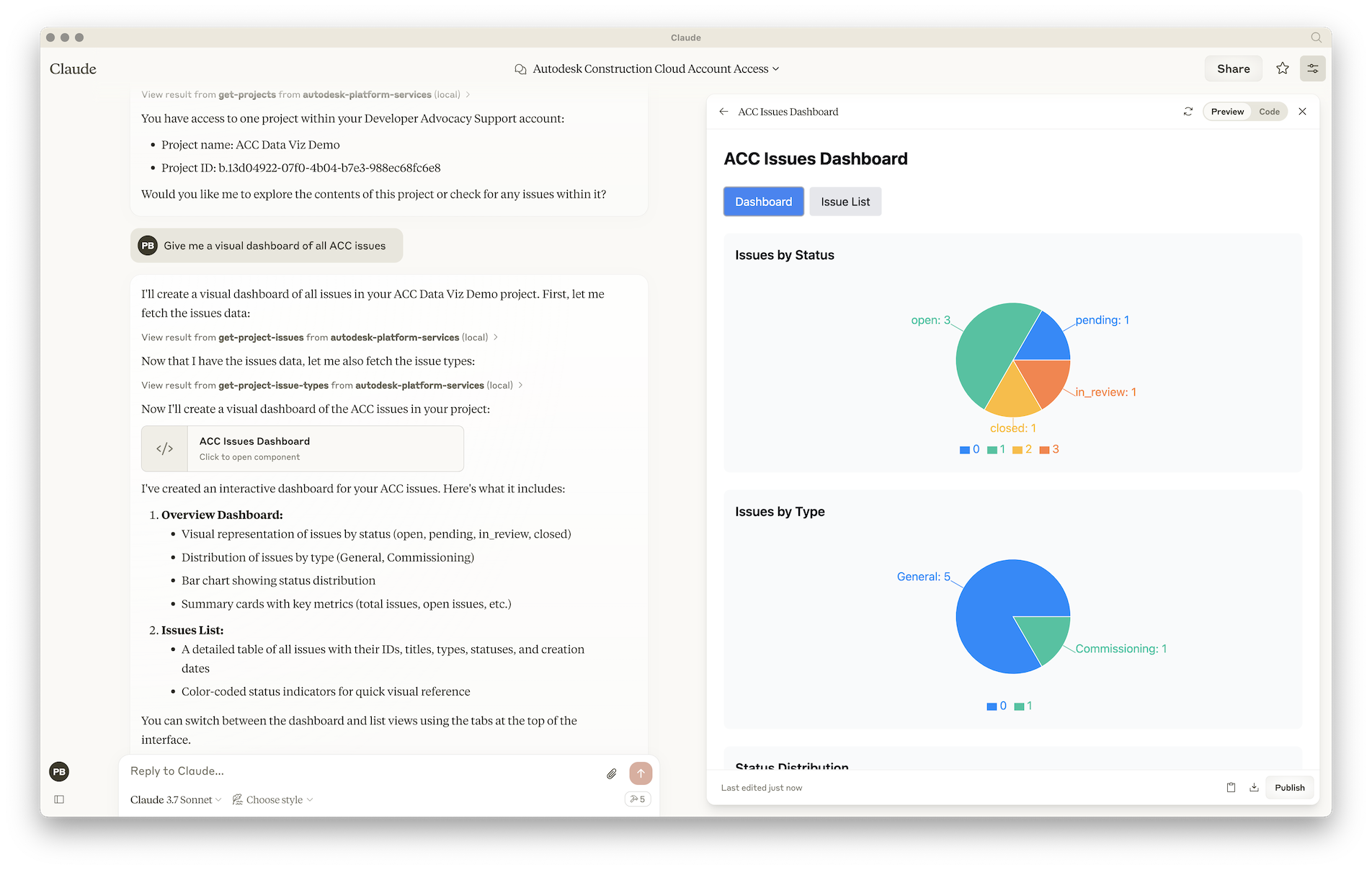
- Give me a visual dashboard of all issues in project XYZ
For more details on how to add MCP servers to Claude Desktop, see the official documentation.
Visual Studio Code & GitHub Copilot
- Make sure you have enabled MCP servers in Visual Studio Code
- Create .vscode/mcp.json file in your workspace, and add the following JSON to it:
{
    "servers": {
        "aps-mcp-server-nodejs": {
            "type": "stdio",
            "command": "node",
            "args": [
                "/path/to/aps-mcp-server-nodejs/server.js"
            ]
        }
    }
}
For more details on how to add MCP servers to Visual Studio Code, see the documentation
Cursor
- Create .cursor/mcp.json file in your workspace, and add the following JSON to it:
{
  "mcpServers": {
    "aps-mcp-server-nodejs": {
      "command": "node",
      "args": [
        "/path/to/aps-mcp-server-nodejs/server.js"
      ]
    }
  }
}
For more details on how to add MCP servers to Cursor, see the documentation
from github.com/autodesk-platform-services/aps-mcp-server-nodejs
Установка Aps Server Nodejs
У этого сервера нет опубликованного пакета — он собирается из исходников. Открой репозиторий и следуй инструкции в README.
▸ github.com/autodesk-platform-services/aps-mcp-server-nodejsFAQ
Aps Server Nodejs MCP бесплатный?
Да, Aps Server Nodejs MCP бесплатный — установка в пару кликов через Unyly без оплаты.
Нужен ли API-ключ для Aps Server Nodejs?
Нет, Aps Server Nodejs работает без API-ключей и переменных окружения.
Aps Server Nodejs — hosted или self-hosted?
Self-hosted: сервер запускается локально на твоей машине командой из раздела установки.
Как установить Aps Server Nodejs в Claude Desktop, Claude Code или Cursor?
Открой Aps Server Nodejs на unyly.org, выбери вкладку своего клиента (Claude Desktop, Claude Code, Cursor) и нажми Install — конфиг сгенерируется автоматически, без правки JSON.
Похожие MCP
GitHub
PRs, issues, code search, CI status
 автор: GitHub
Filesystem
Secure file operations with configurable access controls.
Memory
Knowledge graph-based persistent memory system.
Template MCP Server
A CLI tool to create a new Model Context Protocol server project with TypeScript support, dual transport options, and an extensible structure
 автор: mcpdotdirect
Compare Aps Server Nodejs with
Не уверен что выбрать?
Найди свой стек за 60 секунд
Автор?
Embed-бейдж для README
Похожее
Все в категории development