
Arenula
БесплатноНе проверенMCP server suite for the s&box game engine, enabling AI assistants to manipulate scenes, create objects, compile code, manage assets, and more via editor, API,

Описание
MCP server suite for the s&box game engine, enabling AI assistants to manipulate scenes, create objects, compile code, manage assets, and more via editor, API, and docs servers.
README
MCP server suite for the s&box game engine. Connects AI coding assistants to the s&box editor — reading scenes, creating objects, compiling code, managing assets, and more.
Designed following Anthropic's MCP best practices: omnibus tools with action enums, rich descriptions with negative guidance, trimmed responses, actionable errors.
Arenula — Latin for "grain of sand". One grain in the sandbox.
Response envelope
Mutation tools return JSON with these fields:
message— short human-readable confirmation.verified— (optional) read-back of state after the mutation, so callers can confirm the change actually stuck. E.g. aftercomponent.add:{ "component_exists": true, "component_type": "ModelRenderer" }. Afterterrain.configure_clutter:{ "clutter_assigned": "volcano_ground", "seed": 42, "mode": "Infinite" }. When this field is missing the caller should assume the mutation is unverified.warnings— (optional) array of per-field partial-success notes, each{ field, message, suggestion? }. Used where the main operation succeeded but some sub-step was skipped — e.g.networking.add_helperwith a mix of valid and invalid spawn-point IDs will return the helper wired up and a warning per bad ID.
Errors still return the standard { error, action, suggestion } body with isError: true. Any user-facing value that can't be resolved to a real engine resource now errors with an actionable suggestion rather than silently no-op'ing.
Servers
| Server | What it does | Runtime | Transport |
|---|---|---|---|
| Editor | Scene manipulation, compilation, assets, terrain | C# plugin inside s&box | SSE :8098 |
| API | Offline type/member reference (~1,800 types, ~15,000 members), PBR texture fetching | Node.js | stdio |
| Docs | Narrative docs from sbox.game (raw markdown via .md endpoints) |
Node.js | stdio |
Setup
1. Clone Arenula-MCP
Clone or download this repo somewhere on your machine. This is where the API and Docs servers will live — they don't need to be inside your s&box project.
C:\Projects\Arenula-MCP\       <-- can be anywhere you like
  editor/                      goes into your s&box project (step 2)
  api/                         stays here, runs from here
  docs/                        stays here, runs from here
2. Editor plugin
Copy editor/ into your s&box project's Libraries folder:
YourProject/
  Libraries/
    arenula_mcp/               <-- copy the contents of editor/ here
      Editor/
        Core/
        Handlers/
      sbox_mcp.sbproj
Open s&box — Arenula compiles automatically and starts the MCP server on port 8098.
3. Build API & Docs
From the Arenula-MCP root, install and build both Node.js servers:
npm run setup # installs dependencies and builds both servers
This builds api/dist/index.js and docs/dist/index.js — those are the files your AI client will point to.
4. Configure your AI client
Add a .mcp.json file to your s&box project root (or copy .mcp.json.example). Update the paths to where you cloned Arenula-MCP:
{
  "mcpServers": {
    "editor": {
      "type": "sse",
      "url": "http://localhost:8098/sse"
    },
    "api": {
      "command": "node",
      "args": ["C:/Projects/Arenula-MCP/api/dist/index.js"],
      "env": {
        "SBOX_API_URL": "https://cdn.sbox.game/releases/..."
      }
    },
    "docs": {
      "command": "node",
      "args": ["C:/Projects/Arenula-MCP/docs/dist/index.js"]
    }
  }
}
Replace C:/Projects/Arenula-MCP with wherever you cloned the repo. Get the latest API schema URL from sbox.game/api/schema (click Download, copy URL).
Tools appear as mcp__editor__*, mcp__api__*, mcp__docs__* in your AI client.
Editor Tools
23 omnibus tools, 182 actions. Each tool takes a required action parameter.
| Tool | Actions | Count |
|---|---|---|
| scene | summary, hierarchy, statistics, find, find_in_radius, get_details, prefab_instances | 7 |
| gameobject | create, destroy, duplicate, reparent, rename, enable, set_tags, set_transform, batch_transform | 9 |
| component | add, remove, set_property, set_enabled, get_properties, get_types, copy | 7 |
| compile | trigger, status, errors, generate_solution, wait | 5 |
| prefab | instantiate, get_structure, get_instances, break, update, create, save_overrides, revert, get_overrides | 9 |
| asset_query | browse, search, open, get_dependencies, get_model_info, get_material_properties, get_mesh_info, get_bounds, get_unsaved, get_status, get_json, get_references | 12 |
| asset_manage | create, delete, rename, move, save, reload, get_references | 7 |
| editor | select, get/set_selected, clear/frame_selection, get_play_state, start/stop_play, get_log, save_scene, save_scene_as, save_all, undo/redo, console_list, console_run, open_code_file, get/set_preferences | 19 |
| session | list, set_active, load_scene | 3 |
| lighting | create, configure, create_skybox, set_skybox | 4 |
| physics | add_collider, configure_collider, add_rigidbody, create_model_physics, create_character_controller, create_joint | 6 |
| audio | create, configure | 2 |
| effects | create, configure_particle, configure_post_processing, configure_sprite, configure_prop, configure_world_panel | 6 |
| camera | create, configure, capture_viewport, capture_tour, orbit_capture | 5 |
| mesh | create_block, create_plane, create_cylinder, create_wedge, create_arch, create_clutter, extrude_faces, remove_faces, add_face, clip_faces, scale_mesh, thicken_faces, bevel_edges, bevel_vertices, split_edges, quad_slice_faces, dissolve_edges, bridge_edges, connect_vertices, flip_faces, extend_edges, set_face_material, set_texture_params, vertex ops, get_info | 27 |
| navmesh | create_agent, create_area, create_link, generate, generate_tile, unload_tile, set_defer_generation, get_status, query_path | 9 |
| cloud | search, get_package, get_versions, mount | 4 |
| project | get_collision, set_collision_rule, get_input, get_info | 4 |
| terrain | create, configure, get_info, get_height, get_height_region, set_height, noise, erode, stamp, add/remove_material, get_material_at, blend_materials, set_hole, paint_material, import/export_heightmap, sync, configure_clutter, regenerate_clutter, clear_clutter | 21 |
| trace | ray, sphere_cast, box_cast, sample_grid, multi_ray | 5 |
| player | create, configure_movement, configure_camera, configure_body, configure_interaction | 5 |
| networking | add_helper, configure_object, get_status | 3 |
| schema | export, info, clear | 3 |
Architecture
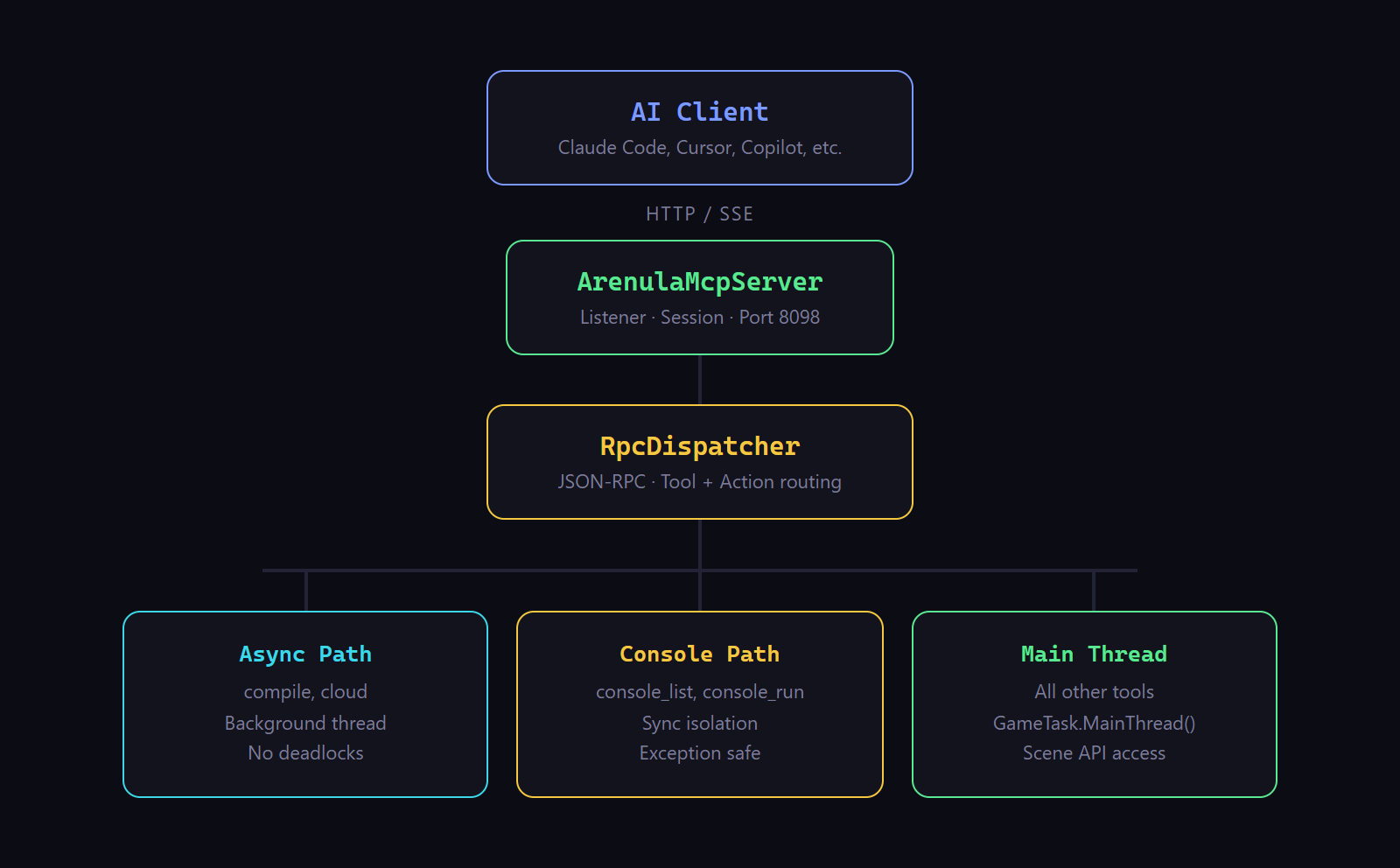
33 C# source files — 9 core infrastructure, 24 per-tool handlers (incl. ConsoleHandler).
Attribution
- Editor based on Ozmium MCP Server by ozmium7 (GPL-3.0)
- API based on sbox-api-mcp by sofianebel (MIT)
- Docs based on sbox-docs-mcp by sofianebel (MIT)
License
GPL-3.0 (Editor) · MIT (API, Docs)
Установка Arenula
У этого сервера нет опубликованного пакета — он собирается из исходников. Открой репозиторий и следуй инструкции в README.
▸ github.com/Nyx000/arenula-mcpFAQ
Arenula MCP бесплатный?
Да, Arenula MCP бесплатный — установка в пару кликов через Unyly без оплаты.
Нужен ли API-ключ для Arenula?
Нет, Arenula работает без API-ключей и переменных окружения.
Arenula — hosted или self-hosted?
Self-hosted: сервер запускается локально на твоей машине командой из раздела установки.
Как установить Arenula в Claude Desktop, Claude Code или Cursor?
Открой Arenula на unyly.org, выбери вкладку своего клиента (Claude Desktop, Claude Code, Cursor) и нажми Install — конфиг сгенерируется автоматически, без правки JSON.
Похожие MCP
GitHub
PRs, issues, code search, CI status
 автор: GitHub
Filesystem
Secure file operations with configurable access controls.
Memory
Knowledge graph-based persistent memory system.
Template MCP Server
A CLI tool to create a new Model Context Protocol server project with TypeScript support, dual transport options, and an extensible structure
 автор: mcpdotdirect
Compare Arenula with
Не уверен что выбрать?
Найди свой стек за 60 секунд
Автор?
Embed-бейдж для README
Похожее
Все в категории development