
Arkgate
БесплатноНе проверенArkGate — architecture co-pilot for AI TypeScript (write gate, CI gate, plan/loop)

Описание
ArkGate — architecture co-pilot for AI TypeScript (write gate, CI gate, plan/loop)
README
ArkGate — Architecture Co-pilot for AI TypeScript
One contract. One gate. One co-pilot.
Your AI writes most of the code. ArkGate keeps that code inside an architecture you can trust — and makes sure a “green” check means something real.


ArkGate 3.2.0 is current stable: contract health (advisory meta-lint of the contract + governance weight), on top of 3.1's policy-transition checks, atomic multi-file preflight, and optional structural convergence. Release notes.
The only flow (humans and agents)
If you remember nothing else:
1.  npx arkgate start          ← read-only preview: files + commands + projected coverage
    npx arkgate start --apply  ← apply exactly the previewed mutations
2.  Compact router             ← MCP/AGENTS routes place, validate, and architecture checks
    /ark-autopilot             ← optional full guided workflow after its skill pack is installed
3.  npx arkgate-check --doctor ← “where am I?” anytime (one status screen)
| Stuck on… | Do this |
|---|---|
| Gate failed after an edit | /ark-fix |
| “Where does this new file go?” | /ark-place |
| Contract globs / layers wrong | /ark-contract |
| Messy / spaghetti code (even if the gate is green) | /ark-explore then /ark-autopilot — below |
| New ArkGate version | /ark-upgrade |
Everything else is optional. You do not need to learn “modes”, 11 skills, or the runtime
kernel to get value. The compact router is enough for normal work; install /ark-autopilot only
when you want the full guided workflow.
What it is (30 seconds)
ArkGate = a machine-readable architecture file (ark.config.json) enforced at CI, with
host-specific protection while an agent writes:
Name note: this is the TypeScript architecture-enforcement package published as arkgate.
It is not affiliated with the separate Archgate CLI project.
| When | Tool |
|---|---|
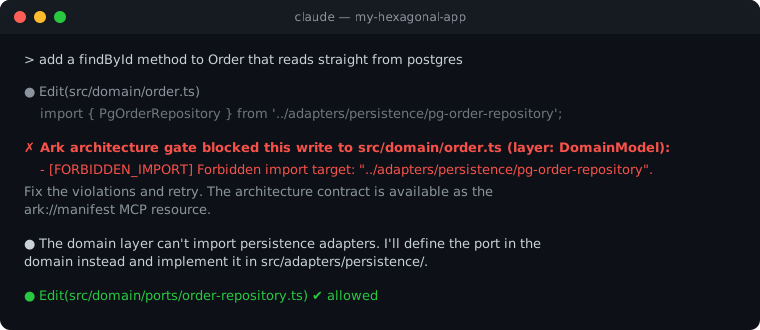
| While the AI writes | Hard PreToolUse block on Claude/Grok; advisory MCP on Cursor/Codex |
| Before merge | arkgate-check CI check; merge blocking requires it as a required status |
Optional later: the experimental runtime kernel (createArkKernel) if you want to evaluate
event/intent governance. It is not required for gate adoption.
It is not a web framework, ORM, or job runner.
Who it’s for
Same start for almost everyone: npx arkgate start → compact router (then
/ark-autopilot when you opt into the full skill pack).
| You are… | Same start, then… |
|---|---|
| Builder with AI | Use the compact router and doctor; add autopilot when you want guided remediation |
| Tech lead on a messy monorepo | Add autopilot (or deeper /ark-adopt for a focused brownfield pass) |
| Power user | Same flow; use ark-check --plan / --coverage when you want the raw sensor |
Not for: no TypeScript, “just one lint rule”, or looking for an app framework.
Status, not settings (“modes”)
ark-check --doctor may say Suggest / Adapt / Enforce. That is a status light, not a
mode you configure:
| Light | Means | Your move |
|---|---|---|
| Suggest | New/thin project | Finish start + autopilot |
| Adapt | Not fully protected yet | Keep autopilot / adopt until clean |
| Enforce | Contract coverage is honest and checked edges are clean | Keep write path + CI. If the tree is still a mess → Shape flow |
| Enforce · design-weak | Edges clean, but doctor still sees design smells (designSmells / patternBets) |
/ark-explore (shape-focus) → /ark-autopilot for dual-plan B — not “done” |
You arrive at Enforce. You never “turn on Enforce”.
Enforce does not mean the design is elegant — only that the contract’s import edges are honest.
Less spaghetti after the gate is green
A green check can still leave god modules, SQL in routes, and three patterns at once. That residual is Shape work — plan B, never auto-applied as mechanical-safe.
1.  /ark-explore              ← map + dual-plan B + extraction cards (no apply)
2.  /ark-autopilot            ← apply A (edges); B only with your ok, one pilot at a time
3.  npx arkgate-check --doctor
    npx arkgate-check --plan --json   ← designWeak + patternBets when residual remains
| If… | Skill |
|---|---|
| Need the map / “what’s the golden pattern?” | /ark-explore |
| Ready to execute the dual plan | /ark-autopilot |
| Contract still lies (false-green, wrong globs) | /ark-adopt first, then explore |
| One cluster only | /ark-fix (+ extraction card) |
| Only care about governed% / gates installed | /ark-coverage (not the Shape map) |
Phases: Align (honest contract) → Stabilize (real baseline) → Shape (golden pattern + pilot).
Details: docs/brownfield-adoption.md §6 · skills install: npx arkgate-check --install-agent-gates.
Upgrading from ark-runtime-kernel?
Same product, new package name. Config and /ark-* skills stay.
npm uninstall ark-runtime-kernel && npm install -D arkgate
npx arkgate-check --install-agent-gates --force
npx arkgate-check --doctor
Full checklist (CI, MCP, Codex, imports): migrate-from-ark-runtime-kernel.md.
Start in one minute
npm install -D arkgate typescript
npx arkgate start                 # read-only preview: exact mutations + projected coverage
npx arkgate start --apply         # apply the compact contract → active-host router → CI plan
# optional, after installing the full skill pack:
#   /ark-autopilot
npx arkgate-check --doctor        # status light + next action
Aliases ark / ark-check / ark-mcp still work. npm / pnpm / yarn. No install lifecycle scripts.
What /ark-autopilot does under the hood (optional detail)
- Setup if needed (
ark startpreviews; review, thenark start --apply). - Explore pass (decision-grade map of this product; field path when demos exist).
- Dual plan: A remediation from
--plan(mechanical-safe only by default); B pattern/evolution bets (never auto-applied as mechanical-safe). Empty plan ≠ “healthy” without explore/B. - Apply A → re-check; judgment only when you ask for full apply.
- Gates on + latest report (evolution vs frozen origin).
Standalone recon without applying: /ark-explore.
Manual / power-user CLI only
npx arkgate init
npx arkgate-check
npx arkgate-check --plan
npx arkgate-check --coverage
Other skills (only when you need them)
Install once: npx arkgate-check --install-agent-gates
(--tools claude,cursor,codex,grok to pick hosts.)
The compact router is the default; /ark-autopilot is the full guided option. The rest are
escapes, not a second curriculum. Full-install AGENTS.md includes a skill routing table
(trigger → skill). Skills are
dual-engine (CLI sensor + read real source) and end with a fixed completion contract;
critical handoffs say STOP and name the next skill (hosts must follow — markdown cannot chain calls).
When the host allows it, skills may fan out parallel subagents (disjoint scopes);
otherwise they fall back to sequential.
Write path (Track W): Prefer MCP ark_prepare_write when you have a snippet (place +
constrain + validate + optional autoPatch + judgmentBrief). PreToolUse hooks with
--hook-repair on Claude/Grok emit machine-readable repair payloads on deny (still hard block;
never silent write). Cursor/Codex MCP calls remain advisory. See
docs/ai-gates.md.
For a complete multi-file architecture-source candidate, use MCP ark_prepare_change or
ark preflight --changes change-set.json --json. Creates, updates, and deletes are evaluated as
one read-only graph, so an edge or cycle that appears only across the batch is rejected before any
project file is written. With --change-map map.json (or MCP changeMap), the same verdict also
classifies planned structure as satisfied, missing, contradictory, or unplanned. This is structural
convergence only: behavioral completion is always reported as not evaluated.
Every blocking diagnostic carries stable rule/location/evidence fields plus one deterministic
nextAction; human CLI/hook text prints that same action. A complete Codex ApplyPatch payload is
reconstructed and sent through the same atomic engine before per-file safety checks. Codex remains
honestly bypassable/advisory because not every Code Mode write dispatches the project hook. The
verdict depends only on the explicit contract and candidate—not AGENTS.md, skills, injected prose,
or an LLM.
| Need | Skill | Not |
|---|---|---|
| Only the apply loop for plan A (edges) | /ark-loop |
empty A + design residual → explore |
| Empty greenfield shape/scaffold | /ark-architect |
brownfield → adopt |
| Brownfield contract match / baseline / manifest | /ark-adopt |
map-only → explore |
| Map / dual-plan seed / spaghetti Shape plan (no apply) | /ark-explore |
fitness-only → coverage |
| New file placement | /ark-place |
— |
| Gate violation on a change | /ark-fix |
bulk → loop/autopilot |
| One design decision (2–3 options) | /ark-think |
full dual-plan → explore |
Edit ark.config.json safely |
/ark-contract |
— |
| Plain-language tour / HTML report | /ark-explain |
recon → explore |
| Ark fitness (governed%, gates, install gaps) | /ark-coverage |
full recon → explore |
| Evaluate experimental runtime | /ark-runtime |
— |
| Bump ArkGate + refresh active host | /ark-upgrade |
— |
Brownfield phases: Align (honest contract) → Stabilize (real baseline) → Shape (golden pattern + pilot). ENFORCE with empty plan A can still be design-weak — that residual is explore/autopilot B, not “done.”
Host enforcement support
| Host | Local write boundary | MCP validation | CI / merge path | Repair payload |
|---|---|---|---|---|
| Claude Code | Hard block for PreToolUse Write / Edit / MultiEdit |
Advisory; the agent must call it | Available arkgate-check --strict-merge check |
Emitted on hook deny; host must re-inject |
| Grok Build | Hard block for PreToolUse write / search_replace (plus aliases) |
Advisory; the agent must call it | Available arkgate-check --strict-merge check |
Emitted on hook deny; host must re-inject |
| Cursor | No hard hook; MCP/rules are advisory | Advisory; the agent must call it | Available arkgate-check --strict-merge check |
No hard-boundary payload |
| OpenAI Codex | No hard hook; MCP/rules are advisory | Advisory; the agent must call it | Available arkgate-check --strict-merge check |
No hard-boundary payload |
This table describes the supported profile after its files are installed and the host loads/trusts them. A hard local boundary covers only the listed hook operations; alternate tools, direct filesystem writes, and human edits still rely on CI. MCP validation is advisory because the agent must call it. The CI check blocks a merge only when the repository makes that status required. Repair payloads never write code silently: the host must re-inject the candidate and ArkGate revalidates it. Run arkgate-check --doctor for the evidence actually detected in the current repository.
Why the hard guarantee lives at the merge gate
The split above is a deliberate trade-off, not a gap. ArkGate validates at the earliest boundary
each host offers and enforces at the earliest boundary a repository can make non-bypassable: the
required merge status. Hard hooks (Claude Code, Grok Build) deny the listed write operations at
write time; advisory surfaces (MCP, rules) coach the agent while it works. But any local boundary
can be routed around — another tool, a direct filesystem write, a human edit — so the only
guarantee ArkGate claims for every path is the arkgate-check --strict-merge check, and only when
the repository makes that status required. Local checks optimize feedback speed; the merge gate
owns correctness.
A useful consequence: the contract doubles as a pressure sensor. Recurring violations or baseline
exceptions concentrated on one layer edge are evidence that the current design stopped fitting the
code — a reason to reshape the contract deliberately (start with /ark-explore), never to weaken
the gate.
Detailed setup: docs/ai-gates.md.
How it works (short)
ark.config.json
      │
      ├─► Write path (arkgate-mcp)  — hard hook or advisory MCP, by host
      ├─► CI check (arkgate-check)  — merge block only when status is required
      └─► Runtime kernel            — experimental opt-in; gates do not need it
- Presets: hexagonal, layered, feature-sliced, monorepo, ui-surface, vertical-slice, ddd-bounded-contexts (+ aliases clean-architecture / onion-architecture). Layers start optional; doctor suggests tightening populated cores. Cross-slice / cross-context bans use optional
peerIsolationrules. - Versioned config: generated contracts include
$schema+schemaVersion; CLI, MCP, and ESLint validate through the same loader. Unknown keys fail with their JSON path. Strict merge also compares the contract transition and blocks unacknowledged weakening with hashes and stable finding ids. See the configuration and editor guide. - Frameworks: Nest / Next / express / library layouts get sensible globs on init so day-one coverage is real.
- Brownfield: baseline ratchet, refuse to freeze a wrong contract,
/ark-adoptfor mature trees. - Agents:
ark startpreviews one compact active-host router (≤5 files / 25 KB);--applywrites those exact bytes. Full skills remain explicit via--install-agent-gates --skills-only; reports remain opt-in viaark-check --report. - Write protocol (2.10 / Track W): mechanical-safe autoPatch on the write gate (
import type); MCPark_prepare_write(place + validate + patch + judgmentBrief); opt-in hook--hook-repair(ARK_REPAIR_JSON); doctorwritePath(repair vs reject-only); loop-cost eval (npm run eval:loop-cost). Port-proof inject is judgment (arity change), not silent auto-apply. - Enforcement ladder (Phase T): doctor JSON exposes
writePath.enforcementLadderwith separatesupported,installed,active,bypassable, evidence, operation coverage, and required-status honesty. Hook repair JSON carries the operation-scoped ladder; MCP alone remains advisory. - Fail-closed CI (2.11):
--strict-mergecombines config coverage, shared gate-file presence, and bypass diagnostics for dynamic imports, TypeScript suppressions, explicitanycasts, InMemory runtime defaults, and disabled peer isolation.--strictis a compatibility alias. Neither requires an editor hook; use--require-write-hook claude|grokwhen that local guarantee is part of the check. - Release evidence: independent 3.0 audit baseline plus signed-tag, GitHub Release, and provenance-backed npm publication; see the 3.1.0 release notes.
- TypeScript: project compilers 5.x / 6.x / 7.x — gate falls back to a nested JS-API TypeScript when TS 7’s main export is version-only (docs/typescript-support.md).
Why not only ESLint / dependency-cruiser / Nx?
| ArkGate | Typical boundary linter | |
|---|---|---|
| CI import rules | ✅ | ✅ |
| Hard-block supported-host AI writes before they land | ✅ (Claude/Grok hooks) | ❌ |
Contract agents can read (ark://manifest) |
✅ | ❌ |
Placement tools (ark_place, …) |
✅ | ❌ |
| Honest governed % + adoption path | ✅ | ❌ |
Classified plan (mechanical-safe / judgment) |
✅ | ❌ |
| TypeScript 5 / 6 / 7 project compilers | ✅ | varies |
| Adoption scorecard (hosts / MCP / origin) | ✅ | ❌ |
| Editor ESLint same layer contract as CI | ✅ (arkgate/eslint) |
varies |
Common commands
npx arkgate start                         # guided read-only preview
npx arkgate start --apply                 # apply the compact active-host setup (≤5 files)
npx arkgate start --tools codex --apply   # select the host explicitly
npx arkgate start --install --apply       # also add arkgate to package.json (explicit only)
npx arkgate start --remove-host codex     # preview compact-host removal; add --apply to confirm
npx arkgate-check --doctor                # health + Adoption gaps (not just fitness)
npx arkgate-check --doctor --json         # adoption + explicit writePath.enforcementLadder
npx arkgate-check --strict                # fail-closed CI + installed-gate/safety checks
npx arkgate-check --plan                  # safe-to-auto-fix vs your call
npx arkgate-check --coverage              # Governed: N%
npx arkgate-check --report ark-report.html  # showcase HTML (opens in browser on local TTY; --no-open to skip)
npx arkgate-check --baseline              # only NEW violations fail
npx arkgate preflight --changes changes.json --json  # atomic read-only batch verdict
npx arkgate preflight --changes changes.json --change-map map.json --json  # intent hash + structural convergence
npx arkgate upgrade                       # package + gates/skills + MCP/Codex normalize
CI (example):
- run: npx arkgate-check --root . --config ark.config.json --strict
# or: uses: pedroknigge/arkgate@<tag-or-SHA>  # runs that checked-out revision
Optional experimental runtime kernel
Gates need no app code changes. The runtime API is currently experimental and is not a production-readiness claim. If you want to evaluate runtime intent/event contracts, use the separate experimental package:
import { createStrictArkKernelFromConfig } from '@arkgate/runtime';
// see the repository production-hardening and package-surface guides
The stable arkgate package does not bundle runtime implementation. The deprecated
arkgate/runtime forwarding shim requires @arkgate/runtime and is removed in ArkGate 4.
NestJS: @arkgate/runtime/nestjs (optional peer @nestjs/common).
Durability stance (built-in stores)
The kernel’s default stores (InMemoryEventBuffer, InMemoryAuditStore,
InMemoryReadModelStore, InMemoryWorkflowStore) are reference in-memory only:
fine for tests, demos, and single-process local work — they do not survive restarts
and are not production durability. Implement the store interfaces (or inject your own)
for real systems. Details: production-hardening.md.
Documentation
| Audience | Link |
|---|---|
| New builders (plain language) | docs/enthusiast/ |
| Package surface and configuration | package policy · contract |
| Wire agents + ESLint (CI-parity) | docs/ai-gates.md · threat model |
| TypeScript 5 / 6 / 7 support | docs/typescript-support.md |
Migrate from ark-runtime-kernel |
docs/migrate-from-ark-runtime-kernel.md |
| Messy existing repo | docs/brownfield-adoption.md |
| Agent / MCP tools | docs/agent-guide.md |
| Security reporting | SECURITY.md |
| Demos | docs/demos/ |
| Examples | examples/ |
| Latest release (3.1.0) | release notes · 3.0.0 baseline |
| Roadmap and decisions | ROADMAP.md · ADRs · Changelog |
Develop this repo
npm ci && npm run build
npx vitest run
npm run typecheck
npm run check:architecture   # Ark gates itself
Website: arkgate.online
npm: arkgate · formerly ark-runtime-kernel
Product: ArkGate — architecture co-pilot / gate for AI TypeScript (not a runtime kernel).
CLI: arkgate · arkgate-check · arkgate-mcp (aliases ark / ark-check / ark-mcp still work for one major).
MCP registry: io.github.pedroknigge/arkgate (server.json @ package version).
Source: github.com/pedroknigge/arkgate
Node ≥ 18 · MIT.
Ark doesn’t invent your product. It keeps AI-generated TypeScript inside an architecture you can trust — and tells you when it isn’t really enforcing anything yet.
Установить Arkgate в Claude Desktop, Claude Code, Cursor
unyly install arkgateСтавит в Claude Desktop, Claude Code, Cursor и VS Code — сам разбирается с npx, uvx и сборкой из исходников.
Впервые? Поставь CLI: curl -fsSL https://unyly.org/install | sh
Или настроить вручную
Выполни в терминале:
claude mcp add arkgate -- npx -y arkgateFAQ
Arkgate MCP бесплатный?
Да, Arkgate MCP бесплатный — установка в пару кликов через Unyly без оплаты.
Нужен ли API-ключ для Arkgate?
Нет, Arkgate работает без API-ключей и переменных окружения.
Arkgate — hosted или self-hosted?
Self-hosted: сервер запускается локально на твоей машине командой из раздела установки.
Как установить Arkgate в Claude Desktop, Claude Code или Cursor?
Открой Arkgate на unyly.org, выбери вкладку своего клиента (Claude Desktop, Claude Code, Cursor) и нажми Install — конфиг сгенерируется автоматически, без правки JSON.
Похожие MCP
Fetch
Web content fetching and conversion for efficient LLM usage.
AWS KB Retrieval
Retrieval from AWS Knowledge Base using Bedrock Agent Runtime.
 автор: modelcontextprotocol
Spring AI MCP Server
Provides auto-configuration for setting up an MCP server in Spring Boot applications.
llm-analysis-assistant
A very streamlined mcp client that supports calling and monitoring stdio/sse/streamableHttp, and can also view request responses through the /logs page. It also
 автор: xuzexin-hz
Compare Arkgate with
Не уверен что выбрать?
Найди свой стек за 60 секунд
Автор?
Embed-бейдж для README
Похожее
Все в категории ai