
Astrag
БесплатноНе проверенMCP server that fetches URLs and reduces token cost by 90%+ via DOM AST extraction, returning compact Markdown.

Описание
MCP server that fetches URLs and reduces token cost by 90%+ via DOM AST extraction, returning compact Markdown.
README
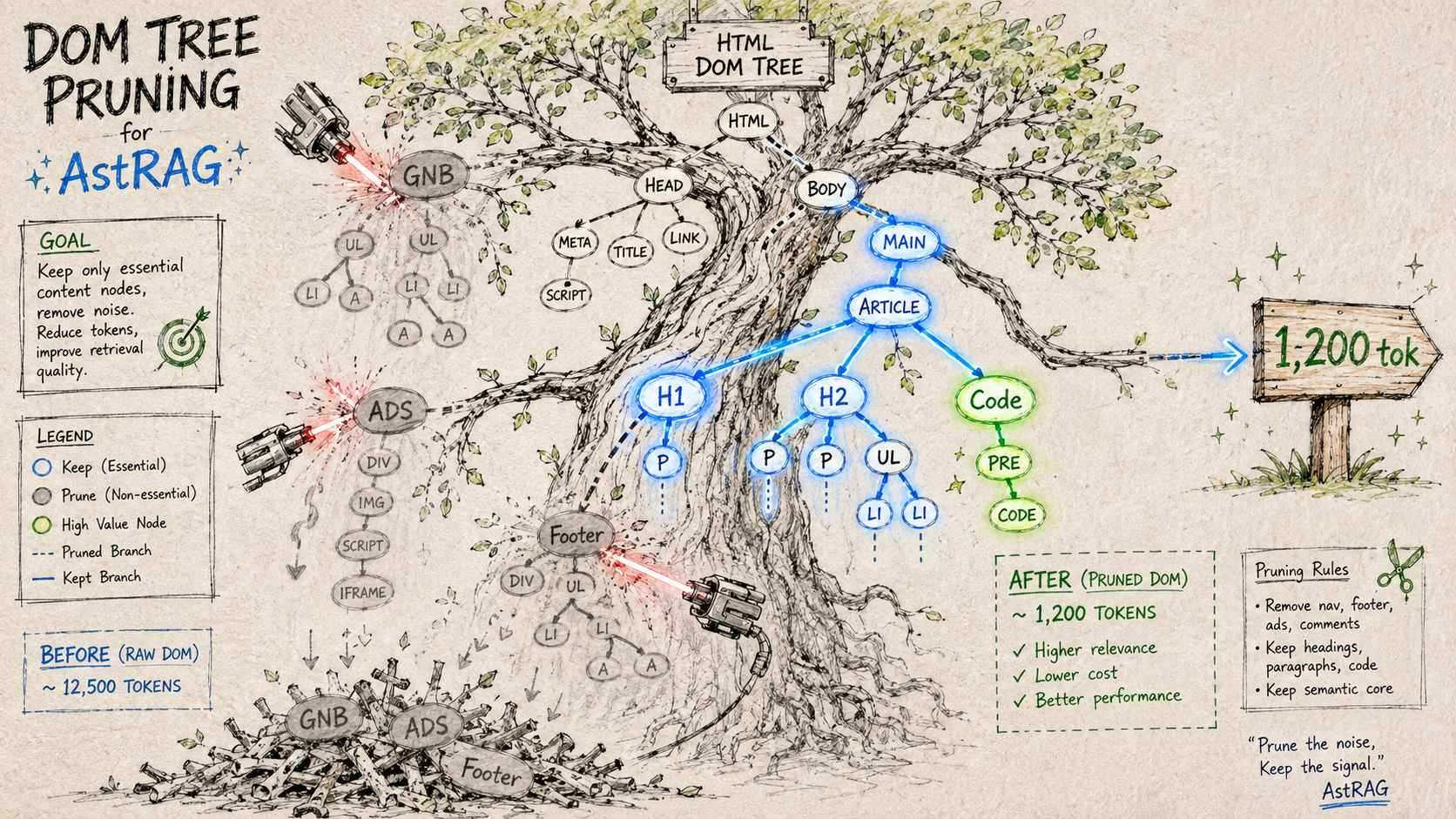
MCP server that cuts web page token cost by 97–99% via DOM AST extraction — no API key, no Vector DB, no embedding API required.
DomPruner fetches a URL, parses the DOM as an Abstract Syntax Tree, prunes noise subtrees (nav, ads, scripts, footers) by FQN path, and returns compact Markdown. Every response includes a token stats header so you can see the reduction at a glance.
> [DomPruner] stripe.com
> | Raw HTML  | 305,778 tokens |
> | Refined   |     988 tokens |
> | Reduction |        99.7%   |
> Fetch: 1,546ms · Parse: 8.2ms
Quick Start
No installation, no API key:
npx -y dompruner-mcp
Claude Code
Add to .mcp.json in your project root (or ~/.claude/.mcp.json for global):
{
  "mcpServers": {
    "dompruner": {
      "type": "stdio",
      "command": "npx",
      "args": ["-y", "dompruner-mcp"]
    }
  }
}
Run /mcp in Claude Code to verify — you should see dompruner with dompruner_fetch and dompruner_analyze listed.
Claude Desktop
Edit ~/Library/Application Support/Claude/claude_desktop_config.json (macOS) or %APPDATA%\Claude\claude_desktop_config.json (Windows):
{
  "mcpServers": {
    "dompruner": {
      "command": "npx",
      "args": ["-y", "dompruner-mcp"]
    }
  }
}
Restart Claude Desktop. Tools appear in the tool picker automatically.
Cursor / Windsurf / other MCP clients
Add the same mcpServers block to your client's MCP config file (.cursor/mcp.json, etc.):
{
  "mcpServers": {
    "dompruner": {
      "type": "stdio",
      "command": "npx",
      "args": ["-y", "dompruner-mcp"]
    }
  }
}
Environment Variables
| Variable | Required | Description |
|---|---|---|
BRAVE_API_KEY |
No | Enables dompruner_search via Brave Search API. Falls back to DuckDuckGo HTML scraping if unset. |
No other environment variables are needed.
Tools
dompruner_fetch
Fetch a URL and return DOM-refined Markdown.
dompruner_fetch(url?, query?)
| Parameter | Type | Required | Description |
|---|---|---|---|
url |
string | No* | Page to fetch and refine |
query |
string | No | Search intent — enables BM25+ section filtering |
*If url is omitted and only query is provided, DomPruner requests URL resolution from the host LLM via MCP sampling (createMessage). If the client does not support sampling, a guide is returned asking the LLM to search first and call dompruner_fetch again with the resolved URL.
Response format:
> [DomPruner] fastapi.tiangolo.com
> |           | Tokens |
> |-----------|--------|
> | Raw HTML  | 35,905 |
> | Refined   |  2,011 |
> | Reduction |  94.4% |
> Fetch: 83ms · Parse: 20.7ms

# First Steps

The simplest FastAPI file could look like this:
...
dompruner_analyze
Returns a token-reduction report and Semantic Anchor list without the full page content — useful for auditing a page before retrieval.
dompruner_analyze(url)
Reports: render type (SSR / SSG / CSR), raw vs refined token counts, reduction %, and the list of headings and meta anchors found.
dompruner_workflow prompt
The server registers an dompruner_workflow prompt that is delivered to the host LLM on connection. It sets the correct usage pattern:
- URL known → call
dompruner_fetch(url)directly - URL unknown → use native web search to resolve the URL, then call
dompruner_fetch(url)
DomPruner handles content refinement; URL discovery is the host LLM's job.
How It Works
URL
 └─▶ fetchPage()       — tiered fetch: direct → UA rotation → Playwright fallback
      │
      ├─▶ [SSG]  extractSsgMarkdown()
      │           walks __NEXT_DATA__ RSC tree → clean Markdown  (≥ 90% reduction)
      │           skips DOM parse entirely
      │
      └─▶ [SSR/CSR]  pre-strip <script>/<style>/<svg>  (80–92% size ↓)
                └─▶ parse5 DOM Tree
                     └─▶ FQN Router (L1)        keeps p / h1–h5 / li / pre / code
                          │                      prunes nav / footer / aside / form
                          └─▶ Heading Cluster (L2)  dev-doc structure detection
                               └─▶ CETD Engine (L3)  text-density scoring fallback
                                    └─▶ BM25+ Section Filter  query-aware ranking
                                         └─▶ Semantic Anchor  heading hierarchy + meta
                                              └─▶ Compact Markdown  ──▶  LLM context
Render Type Detection
| Type | Signal | Strategy |
|---|---|---|
| SSG | __NEXT_DATA__, window.__NUXT__, window.page |
RSC tree walk — DOM parse skipped |
| SSR | Body text density ≥ 2% | Full DOM AST pipeline (L1→L2→L3) |
| CSR | Body text density < 2% | DOM AST pipeline (partial content) |
Tiered Fetch
Plain HTTP fails silently on many documentation sites (HTTP 403, UA blocks, JS-gated content). DomPruner runs three tiers before giving up:
| Level | Trigger | Method |
|---|---|---|
| L1 | Default | Native fetch |
| L2 | 403 / 429 response | User-Agent rotation (3 browser UA strings) |
| L3 | CSR detected or L2 fails | playwright-core headless browser |
playwright-core is an optional peer dependency — install it only if you need L3:
npm install playwright-core
npx playwright install chromium
BM25+ Section Filter
When query is provided, the extracted sections are ranked by BM25+ score. Two weighting adjustments are applied:
- Heading boost (2.5×) — sections under a relevant heading rank higher, suppressing sidebar noise
- Depth decay (0.4) — deeply nested sections score lower than top-level content
- Ancestor preservation — parent headings of selected sections are always included for context
Result: only the most relevant sections enter the LLM context, within a configurable token budget.
Benchmark
Tested on 9 real-world sites across 4 categories. All numbers from live fetches.
Token estimation: Korean ÷ 2, others ÷ 4 chars per token.
| Site | Category | Raw HTML | Chunk RAG | DomPruner | DomPruner+BM25 | Reduction |
|---|---|---|---|---|---|---|
| Stripe API | API Docs | 305,767 | 1,255 | 1,495 | 988 | 99.7% |
| Anthropic API | API Docs | 236,773 | 1,255 | 2,255 | 979 | 99.6% |
| GitHub REST | API Docs | 71,434 | 1,255 | 500 | 500 | 99.3% |
| TypeScript Handbook | Language | 47,334 | 1,180 | 303 | 303 | 99.4% |
| MDN Fetch API | Language | 38,087 | 1,194 | 726 | 726 | 98.1% |
| React useState | Framework | 110,966 | 1,255 | 5,491 | 1,158 | 99.0% |
| FastAPI | Framework | 38,300 | 1,255 | 3,436 | 1,029 | 97.3% |
| Wikipedia REST | General | 44,816 | 1,255 | 3,283 | 1,158 | 97.4% |
| Wikipedia AST | General | 44,551 | 1,255 | 2,758 | 1,106 | 97.5% |
| AVERAGE | 1,240 | 2,250 | 883 | 98.6% |
DomPruner+BM25 delivers 29% fewer tokens than Chunk RAG on average.
vs Chunk RAG
| Chunk RAG | DomPruner+BM25 | |
|---|---|---|
| Avg output tokens | ~1,240 | ~883 (29% less) |
| Token reduction vs raw HTML | ~99% | ~99% |
| Heading / structure preservation | Query-dependent | Consistent |
| Extra infrastructure | Embedding API + Vector DB | None |
| Query required upfront | Yes | No (optional) |
| Processing overhead | ~100 ms+ (embed API) | ~1 ms |
| SSG sites (Next.js / Nuxt) | DOM scrape | RSC tree walk |
| Context breaks at chunk boundaries | Yes | No |
Architecture
src/
  mcp-server.ts          — MCP stdio transport + tool/prompt handlers
  pipeline.ts            — Orchestrator: fetch → parse → extract → rules → serialize
                           Includes 5-min TTL URL cache
  ast/
    fetcher.ts           — Tiered HTTP fetch (native → UA rotation → Playwright)
    parser.ts            — Pre-strip (<script>/<style>/<svg>) + parse5 DOM builder
    core-extractor.ts    — L1→L2→L3 extraction cascade
    fqn-router.ts        — L1: FQN semantic selector matching + noise pruning
    heading-cluster.ts   — L2: heading-block clustering for developer docs
    cetd.ts              — L3: Content/Tag-Density scoring fallback
    ssg-extractor.ts     — Next.js / Nuxt / Gatsby __NEXT_DATA__ RSC tree walk
    anchor.ts            — Semantic anchor extraction (title, meta description, h1–h3)
  middleware/
    serializer.ts        — FQNNode[] → Compact Markdown + token estimator
  rule-engine/
    registry.ts          — URL pattern → Rule set resolution and chaining
    types.ts             — Rule interface definitions
    builtin/
      section-bm25.ts    — BM25+ with heading boost + ancestor preservation
      http-endpoint.ts   — HTTP method/path/response block reformatter
      code-signature.ts  — Code block function/class signature extractor
Development
git clone https://github.com/dong7812/AST-RAG-MCP.git
cd AST-RAG-MCP
npm install
npm run dev    # tsx watch — no build step needed
npm run build  # tsc → dist/
To test a tool call locally:
echo '{"jsonrpc":"2.0","id":1,"method":"tools/call","params":{"name":"dompruner_fetch","arguments":{"url":"https://fastapi.tiangolo.com","query":"routing"}}}' \
  | npm run dev 2>/dev/null
Roadmap
- #1 — PDF & Office file extraction via Content-Type routing
- #2 — BFS site crawl via
dompruner_crawlMCP tool + sitemap.xml support - #3 — Image content extraction (local OCR / opt-in VLM captioning)
- #4 — Structured JSON output mode (deterministic HTML extraction + opt-in LLM schema)
License
MIT
Установка Astrag
У этого сервера нет опубликованного пакета — он собирается из исходников. Открой репозиторий и следуй инструкции в README.
▸ github.com/dong7812/dompruner-mcpFAQ
Astrag MCP бесплатный?
Да, Astrag MCP бесплатный — установка в пару кликов через Unyly без оплаты.
Нужен ли API-ключ для Astrag?
Нет, Astrag работает без API-ключей и переменных окружения.
Astrag — hosted или self-hosted?
Доступен hosted-вариант: Unyly запускает сервер в облаке, локальная установка не обязательна.
Как установить Astrag в Claude Desktop, Claude Code или Cursor?
Открой Astrag на unyly.org, выбери вкладку своего клиента (Claude Desktop, Claude Code, Cursor) и нажми Install — конфиг сгенерируется автоматически, без правки JSON.
Похожие MCP
GitHub
PRs, issues, code search, CI status
 автор: GitHub
Filesystem
Secure file operations with configurable access controls.
Memory
Knowledge graph-based persistent memory system.
Template MCP Server
A CLI tool to create a new Model Context Protocol server project with TypeScript support, dual transport options, and an extensible structure
 автор: mcpdotdirect
Compare Astrag with
Не уверен что выбрать?
Найди свой стек за 60 секунд
Автор?
Embed-бейдж для README
Похожее
Все в категории development