
Azure Diagram
БесплатноНе проверенMCP server that turns natural-language prompts into Microsoft Azure architecture diagrams (PNG) using Python Diagrams + Graphviz.

Описание
MCP server that turns natural-language prompts into Microsoft Azure architecture diagrams (PNG) using Python Diagrams + Graphviz.
README
License: MIT Python Made with Diagrams
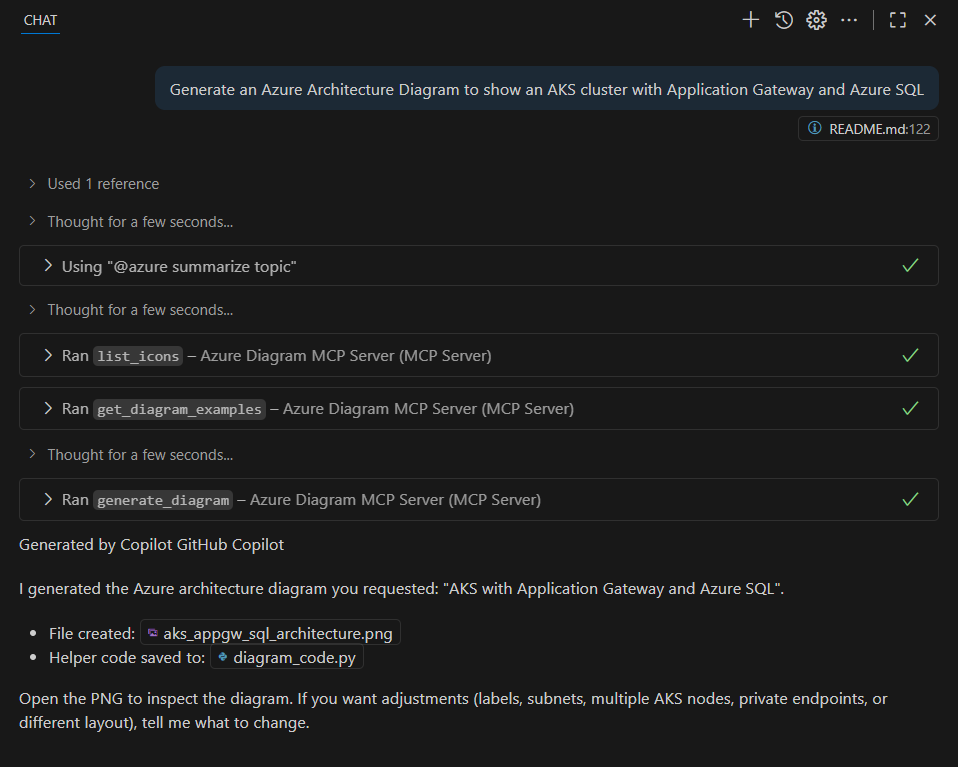
This tool lets you create Microsoft Azure architecture diagrams automatically. You write a short description (using GitHub Copilot in Visual Studio Code to generate it), and the server will turn it into a diagram image. It’s perfect for anyone who wants to quickly draw cloud diagrams without dragging shapes around.
What's included
This MCP server seamlessly creates diagrams using the Python diagrams package DSL. This server allows you to generate Microsoft Azure diagrams, sequence diagrams, flow diagrams, and class diagrams using Python code.
What it does
- Turn a short plain-English sentence into a clean Azure architecture diagram (PNG).
- Uses the Python
diagramspackage and Azure icons behind the scenes. - Saves images into the
diagrams/folder in this project.
Features
The Diagrams MCP Server provides the following capabilities:
- Generate Diagrams: Create Azure diagrams using Python code
- Multiple Diagram Types: Support for Azure architecture, sequence diagrams, flow charts, class diagrams, and more
- Customization: Customize diagram appearance, layout, and styling
What you’ll need
- Visual Studio Code installed → Download here
- GitHub Copilot → Enable here
- Python → we’ll install this in the steps below
- GraphViz (a small program that actually draws the diagrams) → Download here Don’t worry — we’ll go step by step!
Setup Steps or use .devcontainer
1. Install Python
Open a terminal (Command Prompt, PowerShell, or VS Code Terminal) and run:
winget install Python.Python.3.10
⚠️ Make sure the Python installation path is added to your system's environment variables so that python works in the terminal.
Typically, the installer does this automatically, but if not, you can follow this guide.
2. Install GraphViz
Download and install from: https://graphviz.org/download/
On Windows: pick the MSI installer.
On Mac: use Homebrew (brew install graphviz).
3. Get the MCP Server
Clone this repository (or download the ZIP and unzip it). Then open it in VS Code.
In the VS Code terminal, run:
pip install -r requirements.txt
4. MCP Configuration
Configure the MCP server in your MCP client configuration (e.g., for Visual Studio Code GitHub Copilot ~/.vscode/mcp.json):
{
  "mcpServers": {
    "Azure Diagram MCP Server": {
      "type": "stdio",
      "command": "python",
      "args": [
        "-m", "azure_diagram_mcp_server.server"
      ],
      "cwd": "PARENT_FOLDER_OF_CLONED_REPO",
    }
  }
}
or docker after a successful docker build -t azure-diagram-mcp-server .:
  {
    "mcpServers": {
      "Azure Diagram MCP Server": {
        "command": "docker",
        "args": [
          "run",
          "--rm",
          "--interactive",
          "--env",
          "azure-diagram-mcp-server:latest"
        ],
        "disabled": false,
        "autoApprove": []
      }
    }
  }
That’s it! 🎉 You now have everything installed.
Using it with GitHub Copilot
Open up
VS Code GitHub Copilot Agent ModeType the following into the chat:
Generate an Azure Architecture Diagram with an Azure Function connected to a SQL Database through a Load BalancerGitHub Copilot will want to execute the MCP Function
generate_diagram. Please click onAllowto continue.A PNG image will be created in the
diagramsfolder. Open it and admire your Azure diagram! 🚀
Example prompt ideas
Generate an Azure Architecture Diagram with an Azure Function connected to a SQL Database through a Load BalancerGenerate an Azure Architecture Diagram for a simple web app: Azure Front Door to App Service with Azure SQLGenerate an Azure Architecture Diagram to show an AKS cluster with Application Gateway and Azure SQL
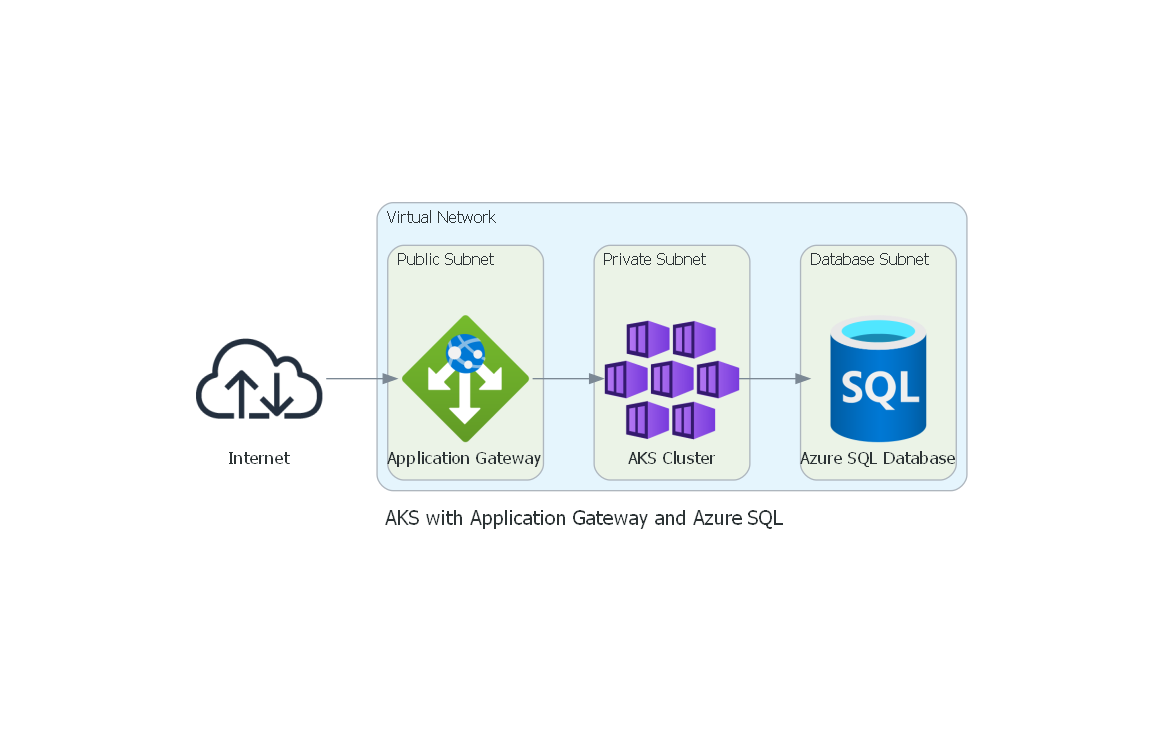
Example Diagram
Generate an Azure Architecture Diagram to show an AKS cluster with Application Gateway and Azure SQL
Troubleshooting
- No image appears? Make sure GraphViz is installed (see step 2).
- Copilot doesn’t run? Make sure the GitHub Copilot extension is enabled and that you allowed it to run MCP functions. Check the MCP server too.
- Still stuck? Restart VS Code and try again.
✨ That’s it! You can now create Azure diagrams in minutes with just a few words and GitHub Copilot.
Установка Azure Diagram
У этого сервера нет опубликованного пакета — он собирается из исходников. Открой репозиторий и следуй инструкции в README.
▸ github.com/dminkovski/azure-diagram-mcpFAQ
Azure Diagram MCP бесплатный?
Да, Azure Diagram MCP бесплатный — установка в пару кликов через Unyly без оплаты.
Нужен ли API-ключ для Azure Diagram?
Нет, Azure Diagram работает без API-ключей и переменных окружения.
Azure Diagram — hosted или self-hosted?
Self-hosted: сервер запускается локально на твоей машине командой из раздела установки.
Как установить Azure Diagram в Claude Desktop, Claude Code или Cursor?
Открой Azure Diagram на unyly.org, выбери вкладку своего клиента (Claude Desktop, Claude Code, Cursor) и нажми Install — конфиг сгенерируется автоматически, без правки JSON.
Похожие MCP
GitHub
PRs, issues, code search, CI status
 автор: GitHub
Filesystem
Secure file operations with configurable access controls.
Memory
Knowledge graph-based persistent memory system.
Template MCP Server
A CLI tool to create a new Model Context Protocol server project with TypeScript support, dual transport options, and an extensible structure
 автор: mcpdotdirect
Compare Azure Diagram with
Не уверен что выбрать?
Найди свой стек за 60 секунд
Автор?
Embed-бейдж для README
Похожее
Все в категории development