
Binance Smart Money Oi Monitor
БесплатноНе проверенBinance Smart Money (Smart Signal) + Open Interest anomaly monitor — 17 whale fields the public fapi can't give you, an MCP server for any terminal AI, a sharea

Описание
Binance Smart Money (Smart Signal) + Open Interest anomaly monitor — 17 whale fields the public fapi can't give you, an MCP server for any terminal AI, a shareable panel card, and a full-market Telegram alert bot. 7-layer 418 protection. A Bennie Strategy
README
npm version npm downloads CI license node
English · 简体中文
A Bennie Strategy project · npm package
binance-smart-money-oi-monitor· contact: X/Twitter @0xBenniee · Telegram @OxBennie🚀 New here? Read the 新手指南 / Getting-Started Guide — what it does, how to use each mode, and a real BILL walk-through.
Production-grade scraper for Binance Smart Signal (the "Smart Money" tab on
binance.com Futures) — pulls the full 17-field whale overview that the public
fapi API does not expose, with a 7-layer defense against 418 / 429 / 403
rate-limit bans.
This repo ships two halves of one workflow plus three ways to consume the data:
| Tool | Stack | What it does |
|---|---|---|
Smart Money tracker (root src/) |
TypeScript | Snapshots the 17-field whale overview + top-trader + OI to SQLite, serves an Express dashboard |
altmonitor (altmonitor/) |
Python | Full-market 1-minute price-move (±3%) + OI anomaly monitor with a Telegram bot |
altmonitor tells you WHEN a symbol moves (real-time Telegram price/OI/volume alert); the Smart Money tracker / MCP / panel tells you WHO is positioned and whether whales are in profit — pipe the alerted symbol straight into get_full_picture / render_panel.
Consume the Smart Money data three ways — as a Node library, over the HTTP JSON API, or through the bundled MCP server that exposes it as tools to any terminal AI (Claude Code, Codex, Gemini CLI, Cursor, …).
This is the URL that binance.com/zh-CN/smart-money/signal/<symbol> calls
behind the scenes:
https://www.binance.com/bapi/futures/v1/public/future/smart-money/signal/overview?symbol=BTCUSDT
No API key required. Works directly from most VPS regions — and if yours is
geo-restricted, set HTTPS_PROXY=http://host:port to route the Binance calls
through a proxy/VPS (added 1.9.3). But Binance enforces an undocumented per-IP
weight budget, and a single careless burst can cost you a 4-hour Retry-After.
This repo solves that.
Quick start
Fastest path — no clone and no build. Register the MCP server with your AI
client; npx downloads and runs the current package:
claude mcp add smartmoney -- npx -y binance-smart-money-oi-monitor@latest
Then ask your AI “what is the smart-money positioning on ETH?” It will call
get_full_picture. The seven live tools work immediately, hit Binance live,
and need no local database.
The four time-series tools (
get_change,get_profit_trend,scan_extreme,render_chart) need tracker history. Follow Run from a clone and point the tracker, dashboard, and MCP server to the same absoluteSMART_MONEY_DB_PATH.
All supported environment variables are documented in .env.example and the Env vars table.
What it can do
One data source (Binance Smart Signal + OI + top-trader + funding), consumed six ways. Everything below works today.
1. MCP server — 11 tools for any terminal AI (the zero-deploy path)
Register once (claude mcp add smartmoney -- npx -y binance-smart-money-oi-monitor@latest) and ask in natural language. Live tools hit Binance directly — no database, no setup:
| Tool | What it returns |
|---|---|
get_smart_money |
Per side (long/short): smart-money position (USD), whale-only position, avg entry price, and how many are in profit — the bapi-only fields fapi can't give |
get_top_trader |
Top-20% trader long/short ratio + Taker buy/sell ratio (shorter-horizon flow) |
get_open_interest |
Total OI (USD and coins) + 5m/15m/1h/4h velocity (change in open contracts) |
get_funding |
Funding rate → annualized % + USD paid/received per settlement / day / year |
get_full_picture |
One-shot combined read: smart-money + whales + top-trader + OI + funding + SM's share of total OI. The single most useful call |
render_panel |
A shareable dark HTML card (the binance.com Smart Signal look) — lang: zh|en |
render_push |
A Telegram-ready HTML "whale overview" message — lang: zh|en |
Time-series tools (need the tracker running — see below): get_change (per-side qty added/reduced over N min), get_profit_trend (how each side's in-profit % shifted), scan_extreme (market-wide most long/short-heavy coins), render_chart (3-panel position + whale-cost chart).
Plus a ready-made prompt workflow: whale-cost.
2. CLI — npm run <cmd> (from a clone)
analyze <SYM> (full terminal report) · change <SYM> [min] · trend <SYM> [min] · scan [limit] · chart <SYM> · doctor (environment/health check) · panel <SYM> (write an HTML card). All support --help; data commands support --json.
3. Shareable cards
render_panel → a self-contained dark HTML card to screenshot for social; render_push → the compact Telegram message body. Both render in Chinese or English (SMART_MONEY_CARD_LANG=zh|en or the per-call lang arg), with a baked-in data-not-advice disclaimer.
4. Tracker + local time-series
smart-money-tick snapshots the whale overview (+ top-trader + OI) to SQLite on an interval, over a watchlist or the full market. Point the tracker, MCP server, and dashboard at the same absolute SMART_MONEY_DB_PATH and the four time-series tools + CLIs read that history.
5. Optional web dashboard
npm run dashboard serves a local (127.0.0.1) sortable table of every tracked symbol — LSR, in-profit %, whale avg, SM-share-of-OI, OI — plus per-symbol 30-day history and a JSON API. Optional; the MCP server is the primary query path.
6. Opt-in Telegram alerts + altmonitor
Set SMART_MONEY_ALERT_TG_TOKEN + _CHAT_ID and the tracker pushes a Telegram alert when a watched symbol's smart-money position moves past a threshold (off by default). Separately, the Python altmonitor watches the whole market for ±3% price moves / OI anomalies / volume spikes and alerts in real time — it tells you WHEN something moves; the Smart Money tools tell you WHO is positioned.
Also usable as a plain Node library or over the HTTP JSON API.
What you get vs. public fapi
| Field | Public fapi/data |
This repo |
|---|---|---|
longShortRatio |
✅ via topLongShortPositionRatio |
✅ |
| Top 20% account/position long-short ratios | ✅ | ✅ (bonus: also pulled) |
| Taker buy/sell ratio | ✅ | ✅ (bonus: also pulled) |
| Total Open Interest (USD) + 5m/15m/1h/4h velocity | ✅ | ✅ (bonus: also pulled) |
longWhalesAvgEntryPrice / shortWhalesAvgEntryPrice |
❌ | ✅ |
longProfitTraders / shortProfitTraders (in-profit count) |
❌ | ✅ |
longProfitWhales / shortProfitWhales |
❌ | ✅ |
| Smart Money's share of total market OI (derived) | ❌ | ✅ |
The bold rows are what makes Smart Signal useful — they tell you not just
which side has more positions, but which side is actually making money right
now, and at what average entry. Public fapi can't tell you any of that.
Example data
Symbol            Long Profit%   Short Profit%   Whale Avg L/S
1000RATSUSDT      5%             92%             0.034 / 0.042
1000LUNCUSDT      71%            41%             0.085 / 0.092
Long/Short Profit% is the share of each side's traders currently in profit.
Whale Avg L/S are the average entry prices of long whales and short whales;
the dashboard's Spread column is the difference between the two. What any of
it means for price is up to you — this project reports the numbers, not a view.
Architecture
                    ┌──────────────────────────────────────────────────────┐
                    │                   library core                        │
                    │  getSmartMoneyOverview / getTopTraderSnapshot /       │
                    │  getOpenInterest — live Binance (bapi + fapi/data),   │
                    │  7-layer rate-limit guard                             │
                    └───────────────┬───────────────────────┬───────────────┘
                                    │                        │
        ┌───────────────────────────┘                        └────────────────────────┐
        │  TRACK A — cron → db → dashboard                    │  TRACK B — live, no DB   │
        ▼                                                     ▼  (hits Binance live,     │
┌─────────────────┐  cron 60m                                    no cron / no sqlite)    │
│ smart-money-tick│──┐                                       ┌──────────────────────────┐
└─────────────────┘  │                                       │  • Node import           │
┌─────────────────┐  │ writes snapshots                      │      import { … }        │
│ top-trader-tick │──┤                                       │  • MCP server            │
└─────────────────┘  │                                       │      (stdio, 11 tools)   │
┌─────────────────┐  │                                       │  • panel HTML            │
│ oi-tick         │──┘                                       │      (render_panel)      │
└─────────────────┘  │                                       └──────────────────────────┘
                     ▼
┌─────────────────────────────────────────────┐
│           sqlite (data/snapshots.db)         │
│   ob_smart_money_snapshots (21 columns)      │
│   ob_top_trader_snapshots  (12 columns)      │
│   ob_oi_snapshots                            │
└────────────────────┬─────────────────────────┘
                     │ read-only
                     ▼
            ┌───────────────────┐
            │ Express dashboard │   http://your-host:3001/
            │ + JSON API        │
            └───────────────────┘
- Track A (
cron → sqlite → Express): scheduled ticks persist snapshots to one sqlite file (two/three tables, 30-day retention), served by one server-side-rendered Express dashboard + JSON API (no JS framework). - Track B (live, no DB): the same library core is consumed directly —
as a Node import, over the MCP server (stdio, 11 tools — 7 live, 4 read the local DB), or via the
panel HTML (
render_panel). Each call hits Binance live and needs no cron and no database. - Shared core: both tracks call
getSmartMoneyOverview/getTopTraderSnapshot/getOpenInterest, so the same 7-layer rate-limit guard protects every path.
7 layers of 418/429 protection
The Smart Signal endpoint lives on Binance's web bapi gateway, which is more
aggressive than fapi. A single uncoordinated burst can earn a 3.85-hour
Retry-After (verified empirically). All seven layers below are wired up
by default:
- Real
Retry-Afterparsing — uses the exact seconds Binance returns, not a guess.parseInt(response.headers['retry-after']). - Weight budget tracker — reads
X-MBX-USED-WEIGHT-1Mfrom every fapi response; when utilization > 70%, the next call sleeps to the next minute window before firing. - Pre-flight ping — every cron entry pings
/fapi/v1/pingonce before the batch; on 418/403 it aborts immediately, no further requests fired. - Jittered spacing — smart-money batches use 12s ± 3s, top-trader uses 1s ± 200ms. Avoids forming a predictable cadence that WAFs flag.
- Exponential backoff — consecutive soft hits within 1 hour escalate the cooldown 5min → 15min → 60min.
- Process-wide circuit breaker —
isBinanceApiBlocked()short-circuits all downstream calls in the same process;getSmartMoneyOverview()andgetTopTraderSnapshot()return cached or null without firing. - Memory cache — 10min for smart-money, 5min for top-trader. Repeated calls to the same symbol within the window don't hit Binance at all.
There is no retry-on-failure path that ignores Retry-After. That is
intentional. The single fastest way to escalate a 5-minute soft block into a
multi-hour hard block is to retry-loop a 418 — don't.
Run from a clone
Clone the repository when you want the tracker, local time-series history, or the browser dashboard:
git clone https://github.com/0xBennie/binance-smart-money-oi-monitor.git
cd binance-smart-money-oi-monitor
npm install

# 1. One-shot pull (writes to data/snapshots.db)
npx tsx src/scripts/smart-money-tick.ts

# 2. Start the dashboard (reads from the same db)
PORT=3001 npx tsx src/scripts/smart-money-dashboard.ts
# → http://localhost:3001/

# 3. Optional: also pull top-trader supplement (Taker ratio + 5min LSR)
npx tsx src/scripts/top-trader-tick.ts
Env vars
Every variable is optional. Copy .env.example to .env, then
uncomment only what you need. Keep tokens out of Git.
| Var | Default | What |
|---|---|---|
SMART_MONEY_DB_PATH |
<cwd>/data/snapshots.db |
Absolute path to the shared SQLite DB. Tracker, dashboard, and time-series MCP tools must use the same file |
SMART_MONEY_WATCHLIST |
(none) | Comma-separated symbols, such as BTC,ETH,SOL; empty means the full market |
SMART_MONEY_WATCHLIST_FILE |
watchlist.json |
JSON array or { "symbols": [...] } file; entries are combined with SMART_MONEY_WATCHLIST |
SMART_MONEY_INTERVAL_MIN |
0 |
0 runs one sweep and exits; a positive value enables the self-scheduling daemon |
SMART_MONEY_POOL_MAX |
0 |
Maximum Smart Money symbols per sweep; 0 means all USDT perpetuals |
SMART_MONEY_SHARD_INDEX |
0 |
0-based shard index when sharding (see below) |
SMART_MONEY_SHARD_TOTAL |
1 |
Total shards. 1 = no sharding |
TOP_TRADER_POOL_MAX |
0 |
Maximum top-trader symbols; 0 means all |
TOP_TRADER_SHARD_INDEX |
0 |
0-based top-trader shard index |
TOP_TRADER_SHARD_TOTAL |
1 |
Total top-trader shards |
OI_POOL_MAX |
0 |
Maximum OI symbols; 0 means all |
OI_SHARD_INDEX |
0 |
0-based OI shard index |
OI_SHARD_TOTAL |
1 |
Total OI shards |
SMART_MONEY_DASHBOARD_HOST |
127.0.0.1 |
Dashboard bind host; 0.0.0.0 exposes it to the network |
SMART_MONEY_DASHBOARD_PORT |
3001 |
Dashboard listen port |
SMART_MONEY_DASHBOARD_CORS |
(off) | Exact allowed browser origin; wildcard CORS is not used |
PORT |
3001 |
Legacy dashboard-port fallback |
SMART_MONEY_CARD_LANG |
zh |
Default render_panel / render_push language: zh or en; a per-call lang overrides it |
SMART_MONEY_ALERT_TG_TOKEN |
(none) | Telegram bot token; alerts remain off unless token and chat ID are both set |
SMART_MONEY_ALERT_TG_CHAT_ID |
(none) | Telegram target chat ID |
SMART_MONEY_ALERT_WINDOW_MIN |
30 |
Alert lookback window in minutes |
SMART_MONEY_ALERT_QTY_PCT |
5 |
Absolute quantity-change percentage that triggers an alert |
HTTPS_PROXY / HTTP_PROXY |
(none) | Route all Binance calls through this proxy (e.g. http://host:port) — for geo-restricted regions. Direct connection when unset (added 1.9.3) |
NO_PROXY |
(none) | Comma-separated hosts to bypass the proxy for (standard NO_PROXY semantics) |
As a library
import {
  getSmartMoneyOverview,
  getTopTraderSnapshot,
  getOpenInterest,
  smartMoneyNotionalUsd,
  smartMoneyShareOfOI,
} from 'binance-smart-money-oi-monitor';

const sym = 'BTCUSDT';
const [sm, tt, oi] = await Promise.all([
  getSmartMoneyOverview(sym),         // 17 whale fields
  getTopTraderSnapshot(sym, '5m'),    // top-account/position LSR + Taker BSR
  getOpenInterest(sym),               // total market OI + 5m/15m/1h/4h velocity
]);

if (sm && oi) {
  console.log(`${sm.longWhales} long whales @ avg ${sm.longWhalesAvgEntryPrice}`);
  console.log(`${sm.longProfitTraders}/${sm.longTraders} longs in profit`);
  console.log(`Total OI: $${(oi.oiNowUsd / 1e6).toFixed(2)}M, 4h chg ${oi.oiChg4h == null ? 'n/a' : oi.oiChg4h.toFixed(2) + '%'}`);

  // Smart Money USD notional, derived from qty × avg-entry (NOT from the
  // undocumented `totalPositions` field whose unit is inconsistent).
  const smUsd = smartMoneyNotionalUsd(sm);
  const share = smartMoneyShareOfOI(sm, oi.oiNowUsd);
  console.log(`Smart Money notional: $${(smUsd / 1e6).toFixed(2)}M`);
  console.log(`Smart Money share of total OI: ${share == null ? 'n/a' : (share * 100).toFixed(1) + '%'}`);
}
Why a helper? Binance's undocumented
totalPositionsfield has inconsistent units across symbols (sometimes base-coin units, sometimes USD).smartMoneyNotionalUsd(sm)computes it deterministically fromlongTradersQty × longTradersAvgEntryPrice + shortTradersQty × shortTradersAvgEntryPrice— both fields have known units (base-coin × USD = USD). Don't dividetotalPositionsby anything; use the helper.
The library re-exports all rate-limit helpers
(isBinanceApiBlocked, preflightBinanceFapi, waitForBinanceWeightHeadroom)
so you can integrate the same circuit breaker into your other Binance calls
and share one weight budget across modules.
Install straight from GitHub:
npm install github:0xBennie/binance-smart-money-oi-monitor
HTTP JSON API
The dashboard process doubles as a read-only JSON API over whatever is in the
sqlite db — any HTTP client (including an AI agent that can fetch) can pull it:
npm run dashboard # PORT=3001 by default
| Route | Returns |
|---|---|
GET /api/snapshots |
Latest snapshot per symbol (smart-money joined with OI), enriched with profit % and SM-share-of-OI |
GET /api/symbol/:symbol/history?days=30 |
One symbol's snapshot history |
GET /health |
{ ok: true, port } liveness probe |
GET / |
Human-facing HTML dashboard (sortable table) |
GET /symbol/:symbol |
Single-symbol 30-day HTML view |
curl -s localhost:3001/api/snapshots | jq '.[0]'
The HTML dashboard includes symbol search, a match count, data/load timestamps, field tooltips and a compact legend. Its table scrolls horizontally on narrow screens, and an empty DB shows tracker-start guidance instead of a blank page.
The API serves what the cron has written to
data/snapshots.db. Run the tracker (npm run smart-money:tick) at least once first, or the responses are empty.
MCP server (use from any terminal AI)
The bundled MCP server exposes the live Smart Money / Top Trader / OI library (with the built-in rate-limit protection) as Model Context Protocol tools — no cron or local database needed. It works with any MCP-compatible client: Claude Code, Claude Desktop, Codex CLI, Gemini CLI, Cursor, Windsurf, Cline, Zed, Continue, …
Register it with one line — no clone, no build:
claude mcp add smartmoney -- npx -y binance-smart-money-oi-monitor@latest
Updating:
npxcaches packages. To force an update, remove and re-addsmartmoney, or clear the npx cache, then restart the client.
Equivalent JSON configuration:
{
  "mcpServers": {
    "smartmoney": {
      "command": "npx",
      "args": ["-y", "binance-smart-money-oi-monitor@latest"]
    }
  }
}
npx downloads the package, runs the binance-smart-money-oi-monitor bin (the MCP
server), and your AI gets the 11 tools below (7 live + 4 that read the local tracker
DB). The server is pure stdio JSON-RPC and loads no native module until you call
a DB-backed tool (get_change / get_profit_trend / scan_extreme / render_chart) — the seven live
tools stay native-free (no better-sqlite3/express loaded).
Time-series tools need a shared DB. Put an absolute
SMART_MONEY_DB_PATHin the MCP process environment and run the tracker with the same value. Otherwise each process can fall back to a differentcwd/data/snapshots.dband correctly report no history.
Running from a clone instead (no npm publish needed)
{
  "mcpServers": {
    "smartmoney": {
      "command": "npx",
      "args": ["tsx", "src/scripts/mcp-server.ts"],
      "cwd": "/absolute/path/to/binance-smart-money-oi-monitor",
      "env": {
        "SMART_MONEY_DB_PATH": "/absolute/path/to/binance-smart-money-oi-monitor/data/snapshots.db"
      }
    }
  }
}
or just npm run mcp to launch the stdio server in the foreground.
Tools exposed:
| Tool | Args | Returns |
|---|---|---|
get_smart_money |
symbol |
Per-side (long/short) smart-money + whale positions (USD), avg entry prices, in-profit counts — bapi-only |
get_top_trader |
symbol, period? |
Top-trader (top 20% margin) LSR + Taker buy/sell ratio |
get_open_interest |
symbol |
Total OI (USD + coins) + 5m/15m/1h/4h velocity |
get_full_picture |
symbol, period? |
Per-side smart-money + whale positions, top-trader flow, OI + SM's share of OI — the one-shot "what's the positioning on X" call |
get_funding |
symbol, notionalUsd? |
Funding rate → annualized % + the USD you pay/receive per settlement / day / year on a position (default $10k); detects the real 8h/4h/1h interval |
render_panel |
symbol, includeHtml?, lang? |
Shareable dark-HTML Smart Money card; lang is zh or en; returns { summary, html, disclaimer } |
render_push |
symbol, lang? |
Telegram parse_mode:HTML card in Chinese or English; returns the message plus a data-not-advice disclaimer |
get_change |
symbol, minutes? |
How much each side added/reduced over the last N min (qty, not USD) — from the local DB; needs the tracker running |
scan_extreme |
limit?, maxAgeMin? |
Market-wide most long-heavy / most short-heavy symbols by smart-money LSR — from the local DB |
render_chart |
symbol, hours? |
Time-series dark-HTML chart — 3 line panels: long position (qty), short position (qty), and 庄家(whale) avg entry vs mark price — from the local DB |
get_profit_trend |
symbol, minutes? |
How each side's % in profit (traders + whales) moved over N min — catches a flip from mostly-losing to mostly-winning; from the local DB |
The last four read the local snapshot DB (see Track over time); the rest hit Binance live and need no DB. Interpretive outputs include a data-not-advice disclaimer; raw metric tools do not duplicate it.
Example get_full_picture ETH result:
{
  "symbol": "ETHUSDT",
  "smartMoney": { "longShortRatio": 0.288, "shortProfitPct": 72, "notionalUsd": 1860314867 },
  "topTrader": { "topPositionLsr": 1.50, "takerBuySellRatio": 1.16 },
  "openInterest": { "oiNowUsd": 3610164191, "oiChg4h": 0.55 },
  "smartMoneyShareOfOI": 0.515
}
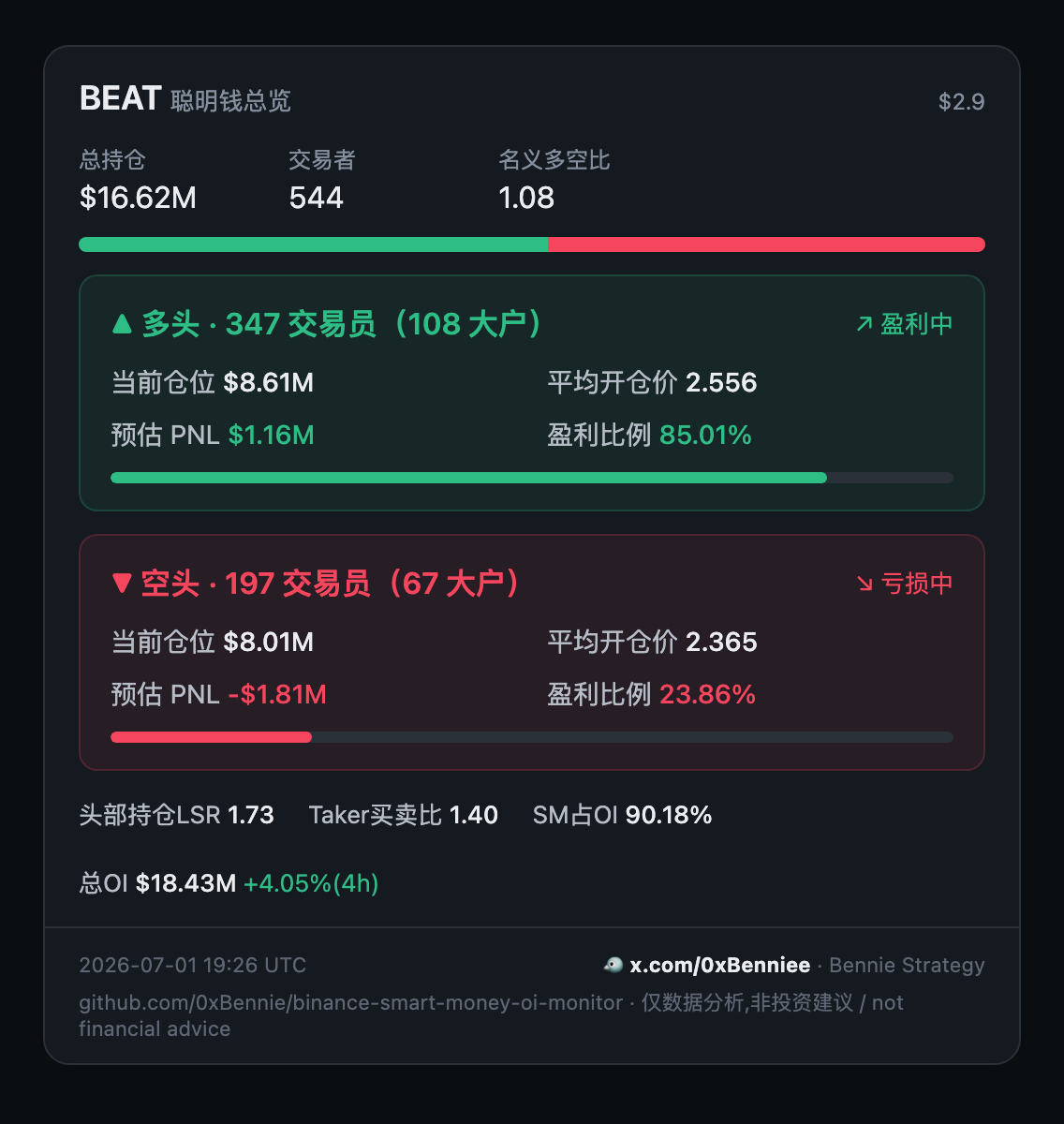
Generate a shareable panel
Turn any symbol's whale positioning into a self-contained dark HTML card (the binance.com Smart Signal look) — screenshot it for a post, or embed the string.
npm run panel -- BEAT # writes beatusdt-panel.html; open it & screenshot
Cards default to Chinese for backward compatibility. Set
SMART_MONEY_CARD_LANG=en, or pass lang: "en" to render_panel /
render_push, for expanded English labels.
Three ways, same card:
import { buildPanel, renderPanelHtml } from 'binance-smart-money-oi-monitor';
const html = renderPanelHtml((await buildPanel('BEAT'))!);   // as a library
The third way is the MCP tool render_panel (see the tools table above), so
your AI can generate a panel on demand. However you build it, the card is
dependency-free (no external assets), so it renders anywhere and screenshots
cleanly.
Track over time (local DB)
The single-symbol calls above are point-in-time. To answer "how much did shorts add/reduce in the last 15 min" or "which coins are the most one-sided right now", run the tracker so it accumulates snapshots locally — then query the history.
1. Auto-track a watchlist (self-scheduling daemon — no external cron):
SMART_MONEY_WATCHLIST=BEAT,BIRB,MAGMA SMART_MONEY_INTERVAL_MIN=15 npm run track
Or a watchlist.json (["BEAT","BIRB"] or {"symbols":[...]}) instead of the env var.
A watchlist of ≤ ~70 symbols refreshes safely every 15 min (12s/symbol spacing);
leave the watchlist empty for the full market (then use a longer interval / sharding).
It writes to data/snapshots.db (30-day retention).
Set
SMART_MONEY_DB_PATHto an absolute path so the tracker and the MCP server / dashboard read the same DB regardless of where each was started — otherwise each falls back to its owncwd/data/snapshots.dband the time-series tools quietly read an empty file. (docker composesets this for you.)
Installed via npm (not a clone)? The package ships several
bins — the MCP server (binance-smart-money-oi-monitor/-mcp) and the tracker (binance-smart-money-oi-monitor-track).npm run trackonly exists inside a clone, so from an installed package run the tracker bin vianpx:SMART_MONEY_WATCHLIST=BEAT,BILL \ SMART_MONEY_DB_PATH=/abs/path/snapshots.db \ SMART_MONEY_INTERVAL_MIN=15 \ npx binance-smart-money-oi-monitor-track
get_change/scan_extreme/render_chartstay empty until this runs against the sameSMART_MONEY_DB_PATHthe MCP server uses.
2. Query the accumulated history:
npm run change -- MAGMA 15 # human-readable table (qty deltas over ~15 min)
npm run trend -- MAGMA 120 # trader/whale in-profit percentage trend
npm run --silent change -- MAGMA 15 --json # machine-readable output without npm banners
npm run scan               # → most long-heavy / most short-heavy symbols by LSR
npm run chart -- BEAT 24   # → beat-chart.html: long/short position + avg entry over 24h
Same three as library calls (getChange, scanExtreme, buildChart/renderChartHtml)
and MCP tools (get_change, scan_extreme, render_chart). Position deltas use qty
(contract count), not USD — so a price move isn't mistaken for a position change.
CLI commands
From a clone (npm run <cmd>). binance-smart-money-oi-monitor --help / --version also work on the installed bin.
| Command | What |
|---|---|
npm run analyze -- <SYM> |
one-shot readable report for a coin (below) |
npm run panel -- <SYM> |
shareable dark-HTML Smart Money card |
npm run doctor |
diagnose Binance reachability / DB / native deps; final READY/NOT READY verdict is CI-gateable |
npm run track |
tracker daemon (SMART_MONEY_WATCHLIST, SMART_MONEY_INTERVAL_MIN) |
npm run change -- <SYM> [min] [--json] |
position-change table, or JSON; needs tracker history |
npm run trend -- <SYM> [min] [--json] |
in-profit trend table, or JSON; needs tracker history |
npm run scan · npm run chart -- <SYM> |
market scan / HTML chart; need tracker history |
npm run dashboard |
Express dashboard + JSON API (PORT=3001) |
npm run mcp |
MCP stdio server |
npm run analyze -- BEAT prints:
  BEAT  聪明钱分析   现价 $0.11
  ────────────────────────────────────────────────────
  多空比(名义)   1.12     总持仓 $16.6M · 544 人

                 多头 ▲                空头 ▼
  交易员/大户     347 / 108        197 / 67
  平均成本       2.556023       2.364990
  现价 vs 成本   +4.3%          +12.6%
  盈利占比       85%            24%
  预估 PNL       +$986,948      -$1,448,646
  …
Pool sizing & cron cadence
Default behavior is all USDT-PERPETUAL symbols (~500 contracts as of 2026). Pick a deployment mode that matches your tolerance for data freshness:
| Mode | Symbols | smart-money cron | top-trader cron | OI cron | Sharding |
|---|---|---|---|---|---|
| Light | 100 cap | 7 * * * * (1×/h) |
*/30 * * * * |
15,45 * * * * |
None |
| Standard | 200 cap | 7 * * * * (1×/h) |
*/30 * * * * |
15,45 * * * * |
None |
| Full, 2h refresh | ~500 all | 0 */2 * * * (1×/2h) |
*/30 * * * * |
15,45 * * * * |
None |
| Full, 1h refresh | ~500 all | 7,37 * * * * (2×/h, each does half) |
*/30 * * * * |
15,45 * * * * |
2 shards |
Read "1h refresh" as every symbol gets a fresh snapshot within 1h, achieved
by two cron entries at :07 and :37 each pulling half (shard 0/2 and 1/2).
The math: smart-money runs at 12s ± 3s spacing (web bapi is rate-sensitive). 500 symbols ≈ 100 min, so it cannot finish inside an hour without sharding. Top-trader and OI both use fapi/data at 1s spacing — 500 symbols ≈ 8 min, fits anywhere.
Sharding
Symbols are split deterministically by index % SHARD_TOTAL == SHARD_INDEX,
so each shard always pulls the same set (good for cache locality, and means
shards don't collide on the same symbol within a window).
Data Retention
The sqlite tables (ob_smart_money_snapshots, ob_top_trader_snapshots,
ob_oi_snapshots) are pruned to 30 days by the storage.cleanup() call
that runs at the end of every smart-money-tick execution. If you need
longer history, increase RETENTION_DAYS in src/storage.ts and rebuild,
or back the table up before the daily cron runs.
Disk usage estimate at default cadence (500 symbols, hourly smart-money + 30min top-trader + 30min OI): roughly 30–80 MB / month with WAL enabled.
Production deployment (pm2)
A. Standard — cap at 200, hourly
// ecosystem.config.js
module.exports = {
  apps: [
    {
      name: 'smart-money-tick',
      script: 'node_modules/.bin/tsx',
      args: 'src/scripts/smart-money-tick.ts',
      cron_restart: '7 * * * *',        // :07 every hour
      autorestart: false,
      env: { SMART_MONEY_POOL_MAX: '200' },
    },
    {
      name: 'top-trader-tick',
      script: 'node_modules/.bin/tsx',
      args: 'src/scripts/top-trader-tick.ts 5m',
      cron_restart: '*/30 * * * *',
      autorestart: false,
    },
    {
      name: 'oi-tick',
      script: 'node_modules/.bin/tsx',
      args: 'src/scripts/oi-tick.ts',
      cron_restart: '15,45 * * * *',    // offset from top-trader
      autorestart: false,
    },
    {
      name: 'smart-money-dashboard',
      script: 'node_modules/.bin/tsx',
      args: 'src/scripts/smart-money-dashboard.ts',
      autorestart: true,
      env: { PORT: '3001' },
    },
  ],
};
B. Full coverage with 1h refresh — 2-way sharding
Two pm2 entries, each pulls half the symbols at staggered times:
module.exports = {
  apps: [
    {
      name: 'smart-money-tick-a',
      script: 'node_modules/.bin/tsx',
      args: 'src/scripts/smart-money-tick.ts',
      cron_restart: '7 * * * *',        // :07
      autorestart: false,
      env: { SMART_MONEY_SHARD_INDEX: '0', SMART_MONEY_SHARD_TOTAL: '2' },
    },
    {
      name: 'smart-money-tick-b',
      script: 'node_modules/.bin/tsx',
      args: 'src/scripts/smart-money-tick.ts',
      cron_restart: '37 * * * *',       // :37 — 30 min offset from A
      autorestart: false,
      env: { SMART_MONEY_SHARD_INDEX: '1', SMART_MONEY_SHARD_TOTAL: '2' },
    },
    // ... top-trader-tick and dashboard same as Mode A
  ],
};
C. Full coverage, slower refresh — 2-hour cron, no sharding
Cheapest option if hourly freshness isn't required:
{
  name: 'smart-money-tick',
  args: 'src/scripts/smart-money-tick.ts',
  cron_restart: '0 */2 * * *',          // every 2 hours
  autorestart: false,
  // no env vars needed — defaults to all symbols
}
Why staggering matters
The circuit breaker lives in per-process module state. Two cron processes
running simultaneously cannot share isBinanceApiBlocked() state directly,
but each one ping-tests via preflightBinanceFapi() before issuing any
data requests — so if process A just got a 418, process B's preflight will
catch it and abort cleanly. Stagger the times anyway to give the IP weight
window time to drain between bursts.
Companion: altmonitor (price / OI / volume anomaly monitor)
The altmonitor bot lives in the GitHub repo (not the npm package).
altmonitor/ is a self-contained Python tool (the Python half of this repo) that watches every USDT-perpetual contract and fires Telegram alerts in three flavors:
- Price move — ±3% within a single 1-minute candle, annotated with the same-minute OI direction (price × OI quadrant), amplitude, and long/short ratio.
- OI surge — open interest jumps past a threshold over a 1-minute or 5-minute window.
- Volume burst (爆量) — a closed 1m candle's quote volume spikes to ≥ N× its own trailing median.
- Single WebSocket subscription to the full-market
@kline_1mstream (price + volume) - Background
fapi/v1/openInterestsweep every 60 s, kept in a timestamped ring buffer for 1m/5m deltas - Telegram commands (
/set_pump,/set_oi,/set_vol,/watch,/history,/stats, …) to retune live without a restart; config persists tostate.json - Optional SQLite alert history (all three alert types) for
/historyand/statsreview - Free public endpoints only — no API key, no quota burn
Fastest start — interactive wizard (validates your bot token, auto-discovers your
chat_id, writes .env, then offers to run locally / in Docker / deploy to your server):
cd altmonitor && pip install -r requirements.txt && python setup.py
Deploy to your own VPS in one command (tries SSH key then password, installs Docker,
syncs code + .env, runs, and pings you on Telegram when live):
python altmonitor/deploy.py # or pick "deploy to my server" at the end of setup.py
Or a one-command Docker deploy from the repo root. docker compose runs the
whole stack — altmonitor + the tracker + the dashboard (the last two
share one DB volume, so the dashboard/API sees what the tracker writes):
cp altmonitor/.env.example altmonitor/.env       # altmonitor: TG_BOT_TOKEN + TG_CHAT_ID
export SMART_MONEY_WATCHLIST=BEAT,BIRB,MAGMA      # tracker: coins to snapshot
docker compose up -d                             # build + run all, auto-restart
docker compose up -d altmonitor                  # …or just one service
Or run it directly:
cd altmonitor
python3 -m venv .venv && source .venv/bin/activate
pip install -r requirements.txt
cp .env.example .env          # fill TG_BOT_TOKEN + TG_CHAT_ID
python monitor.py
Full configuration, Telegram command reference, the Docker compose file, and the systemd unit are in altmonitor/README.md.
Troubleshooting
Full guide: TROUBLESHOOTING.md. The ones people hit most:
- A symbol returns
no data — may be unsupportedbut the perp exists → often just a transientbapiblip; retry once. If OI/funding for it work, it was a blip. Some low-volume perps genuinely have no Smart Signal whale data (OI/funding still work). - Everything returns
temporarily rate-limited/blocked→ the circuit breaker tripped (418/403); wait out the TTL in stderr, or run from a Binance-reachable region. get_change/scan_extreme/render_chartsay "no data" → they read the localdata/snapshots.db; register the MCP server with an absolutecwdand run the tracker from that same dir. The other seven (live) tools need no DB.npm publish→EOTP/ release workflow →ENEEDAUTH→ use an npm token with "Bypass 2FA" checked (or configure a Trusted Publisher); a plain token / passkey-2FA can't publish non-interactively.
What's not in this repo
- ❌ No trading. This is data only.
- ✅ Proxy is supported (since 1.9.3). Set
HTTPS_PROXY=http://host:port(and optionallyNO_PROXY) to tunnel the Binance calls through a proxy/VPS — handy from geo-restricted regions. If your IP still hits a hard 403 (CloudFront WAF), wait it out or switch IP/proxy; the protection layers exist to avoid ever getting there. - ❌ No on-chain data, no order book, no aggregated trades. For that, see the projects in Credits.
Author & contact
Built and maintained by Bennie Strategy.
- 🐦 X / Twitter: @0xBenniee (zero-x, double-e)
- 💬 Telegram: @OxBennie (capital O)
Both handles are correct — not typos. Questions, ideas, or want a feature? Reach out on either — issues and PRs welcome too.
Credits
- andychien555/binance-smart-money-tracker
— original reverse-engineering of the
bapi/futures/v1/public/future/smart-money/signal/overviewendpoint. Their version is built on Cloudflare Workers + R2 with a static SPA frontend; this repo is the Node + sqlite + express version with stronger rate-limit protection. Different architecture, same source insight. - y18929284608-byte/BNSmartMoneyMonitor and 6551Team/opentrade — parallel implementations that confirmed the endpoint contract.
License
MIT — see LICENSE.
Установить Binance Smart Money Oi Monitor в Claude Desktop, Claude Code, Cursor
unyly install binance-smart-money-oi-monitorСтавит в Claude Desktop, Claude Code, Cursor и VS Code — сам разбирается с npx, uvx и сборкой из исходников.
Впервые? Поставь CLI: curl -fsSL https://unyly.org/install | sh
Или настроить вручную
Выполни в терминале:
claude mcp add binance-smart-money-oi-monitor -- npx -y binance-smart-money-oi-monitorFAQ
Binance Smart Money Oi Monitor MCP бесплатный?
Да, Binance Smart Money Oi Monitor MCP бесплатный — установка в пару кликов через Unyly без оплаты.
Нужен ли API-ключ для Binance Smart Money Oi Monitor?
Нет, Binance Smart Money Oi Monitor работает без API-ключей и переменных окружения.
Binance Smart Money Oi Monitor — hosted или self-hosted?
Self-hosted: сервер запускается локально на твоей машине командой из раздела установки.
Как установить Binance Smart Money Oi Monitor в Claude Desktop, Claude Code или Cursor?
Открой Binance Smart Money Oi Monitor на unyly.org, выбери вкладку своего клиента (Claude Desktop, Claude Code, Cursor) и нажми Install — конфиг сгенерируется автоматически, без правки JSON.
Похожие MCP
Gmail
Read, send and search emails from Claude
 автор: Google
Slack
Send, search and summarize Slack messages
 автор: Slack
Runbear
No-code MCP client for team chat platforms, such as Slack, Microsoft Teams, and Discord.
Discord Server
A community discord server dedicated to MCP by [Frank Fiegel](https://github.com/punkpeye)
Compare Binance Smart Money Oi Monitor with
Не уверен что выбрать?
Найди свой стек за 60 секунд
Автор?
Embed-бейдж для README
Похожее
Все в категории communication