
Boardstate Server
БесплатноНе проверенEnables AI agents to compose and edit dashboards through MCP tools, allowing them to manage tabs, widgets, layout, and data bindings via a unified control plane

Описание
Enables AI agents to compose and edit dashboards through MCP tools, allowing them to manage tabs, widgets, layout, and data bindings via a unified control plane.
README
CI npm version License: MIT PRs Welcome
Your dashboard is data. Any AI can build it; any human can edit it.
▶ Live app — plug in your key — bring your own provider (GLM, Anthropic, OpenAI, Ollama, or any OpenAI-compatible endpoint) and watch the AI build your dashboard live, in your browser. Prefer no key? The component demo presses “Simulate agent” and composes the board with a scripted agent — then drag things around yourself.
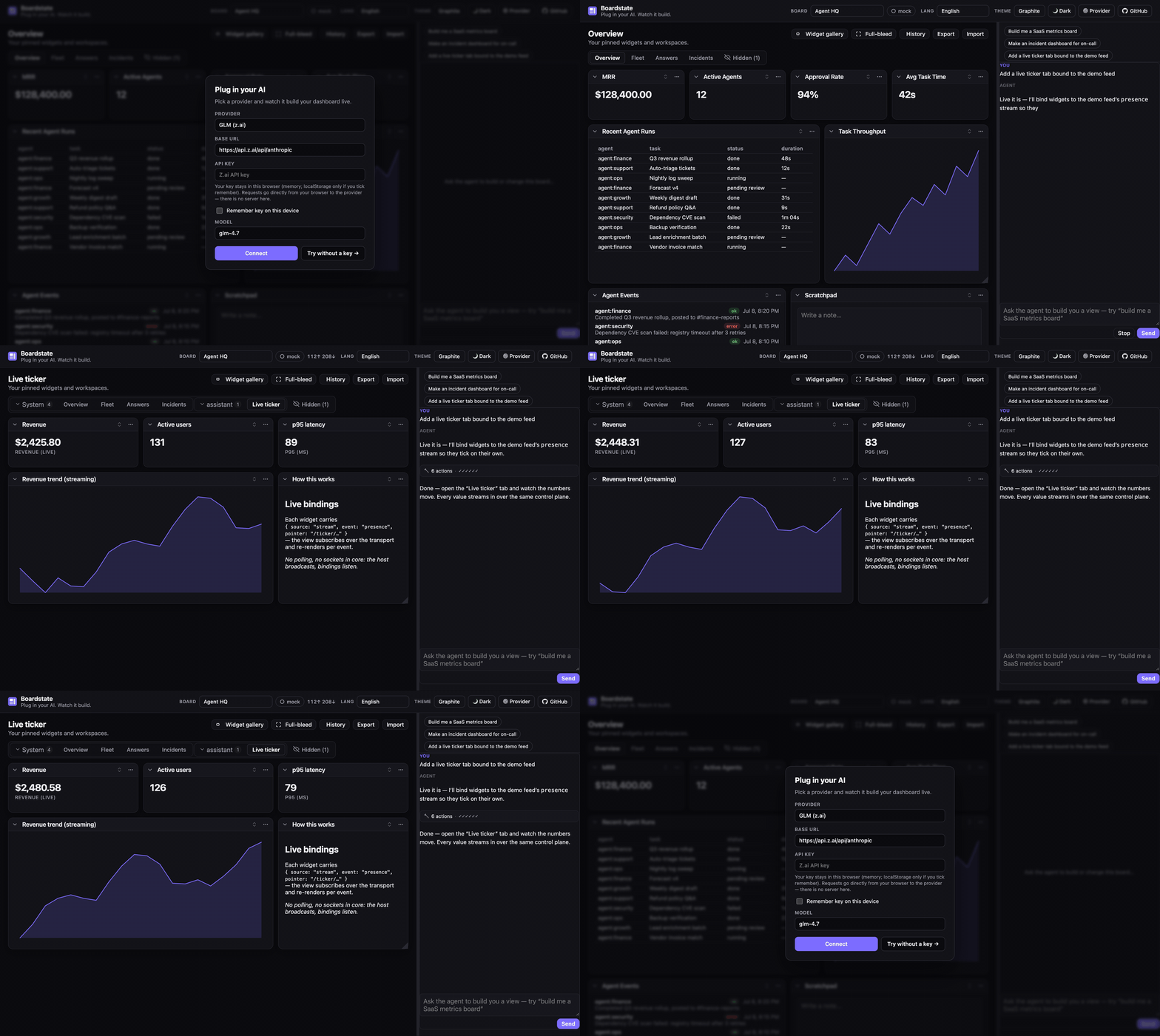
More demos: a real Claude over MCP, and the component demo's scripted agent
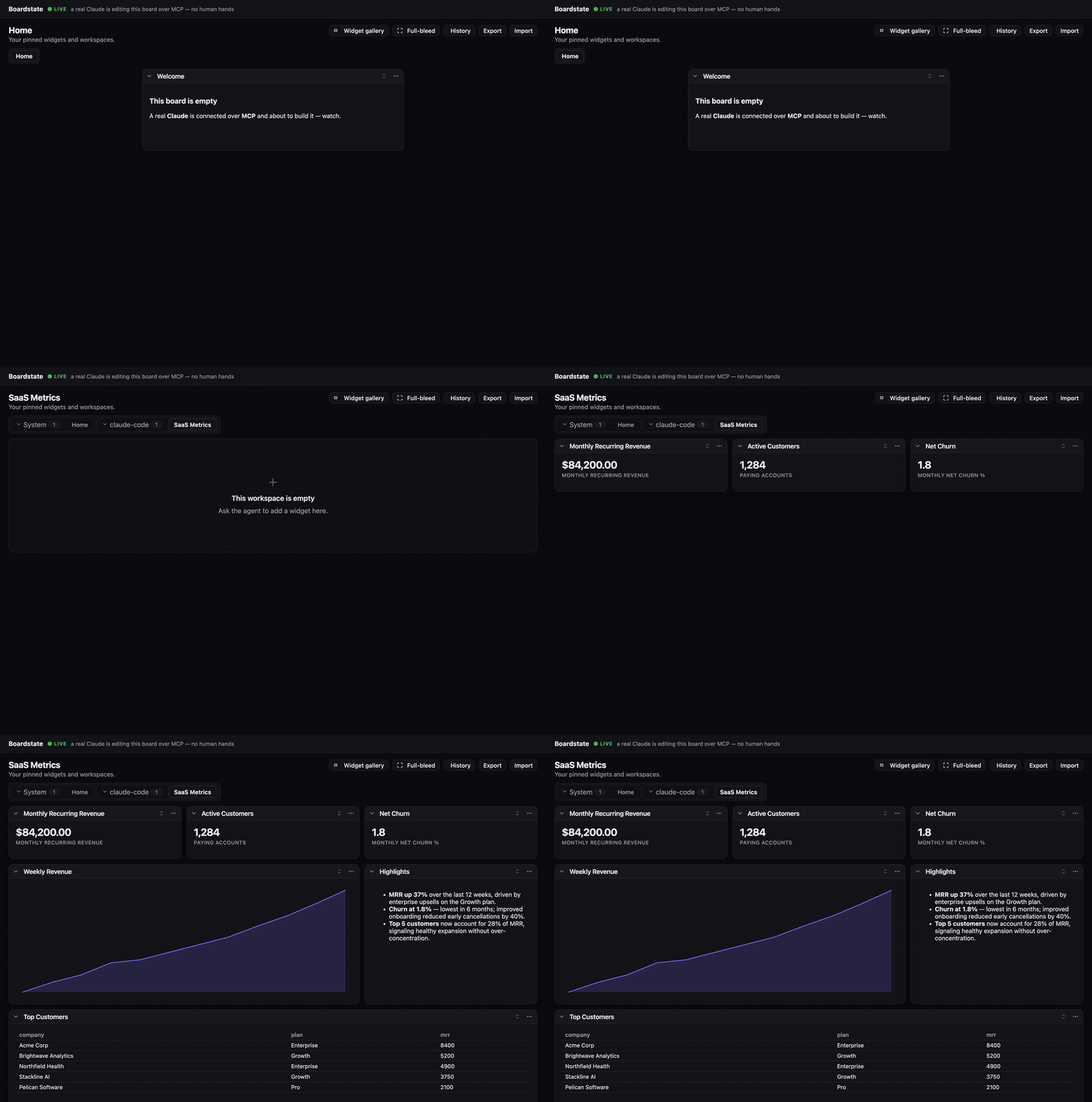
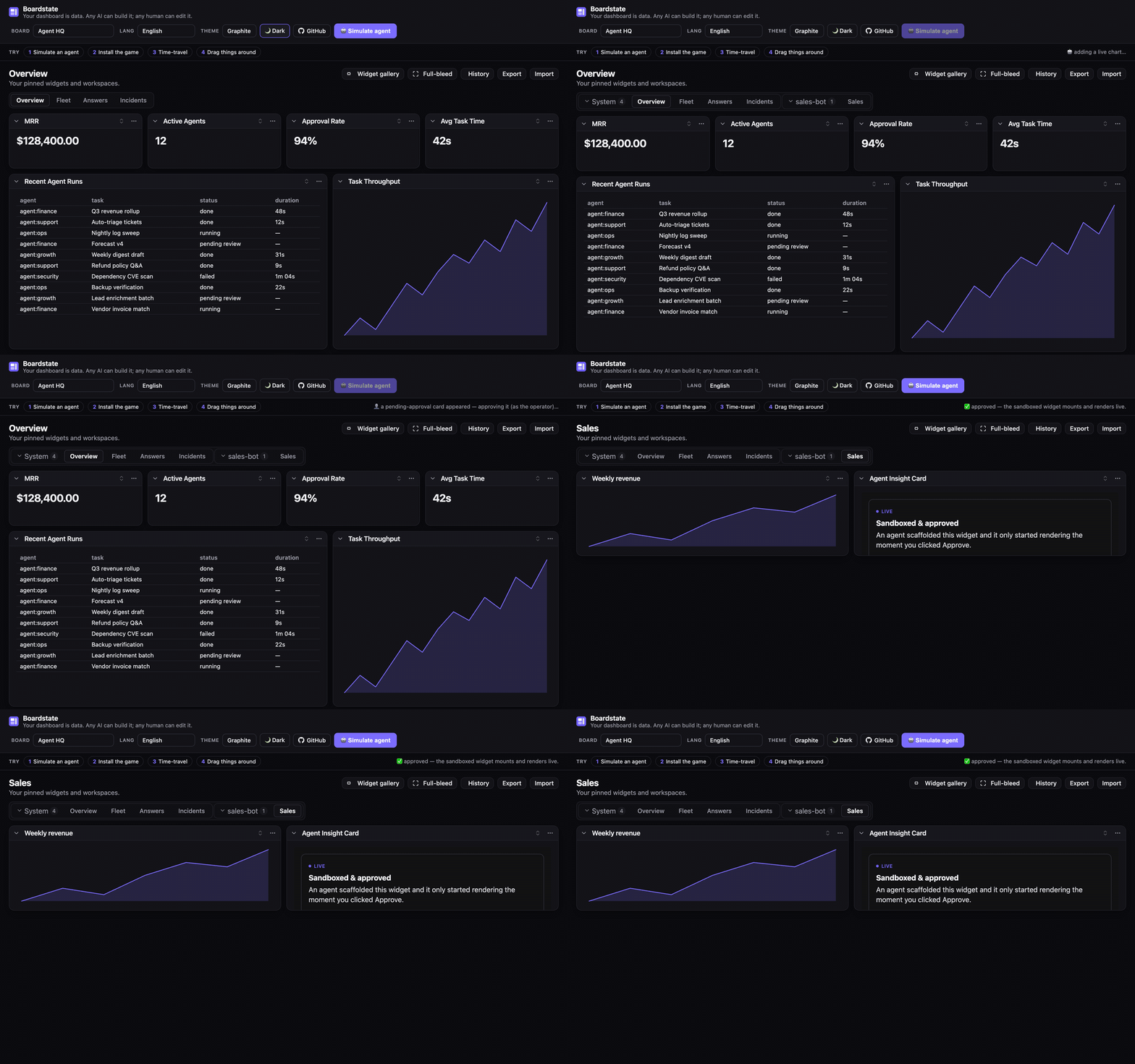
Boardstate is a protocol and runtime for agent-composable dashboards. The entire dashboard — tabs, widgets, layout, data bindings, even the registry of agent-authored custom widgets — is one validated JSON document: the board state. An AI agent composes it through tools, a human rearranges it with drag & drop, a script edits it over RPC — all through the same guarded control plane, with no privileged path. Agent-authored widgets render live inside a sandbox strict enough that foreign code is safe by construction, behind an explicit operator approval gate.
- 📄 The document is the API — diffable, undoable, exportable, importable, templatable, time-travelable.
- 🤖 Any AI, zero integration —
@boardstate/mcpexposes the full tool set to any MCP client (Claude, or anything else that speaks MCP). - 🧑🎨 Human parity is a protocol requirement — drag/drop, collapse, approve, undo: the same methods the agent uses.
- 🔒 A security ladder, not a warning label — trusted builtins vs. sandboxed customs (opaque origin, CSP
connect-src 'none', capability manifest, approval-gated mount, server-side 404 for anything unapproved). - 🔌 Your dashboard can DO things — Boardstate is also an MCP client: point it at OfficeCLI, Pipedream, Composio, or any MCP server and the board reads their tools as live data and runs their tools as operator-confirmed actions (see below).
Your dashboard can DO things
Boardstate is an MCP client, not just an MCP server. Give it an operator-authored
connector config (@boardstate/broker) and it connects outward to an external tool server —
importing that server's read-ish tools as board data (source:"mcp" bindings) and its
side-effecting tools as operator-confirmed actions (action buttons). The whole thing
runs behind the same capability gate as everything else:
- The agent discovers tools it needs (
boardstate_tool_search) and requests them — it can never grant them. - A card appears in the approvals widget; a human operator grants a subset.
- Read tools flow onto the board live; anything consequential parks as a pending action that a networked client physically cannot confirm — only the local operator can.
- Grants are revocable, and re-pend the instant a tool's surface changes under them.
pnpm build
node examples/operational-demo/demo.mjs   # keyless — a fake OfficeCLI double; no binary, no keys
Open the board and the loopback operator console it prints: approve the grant, watch a table
fill from a live workbook, click "Generate .docx", and confirm the action. OfficeCLI,
Pipedream, and Composio ship as first-party connector presets (docs/connectors/). The
broker, its network, and every secret stay node-side — @boardstate/core never learns an
external tool exists.
How it fits together
flowchart TB
  subgraph Authors["Who composes a dashboard — one validated control plane"]
    A1["🤖 AI agent · tools<br/>(dashboard_tab_create, _widget_scaffold, …)"]
    A2["👤 Human · UI<br/>(drag / drop / approve)"]
    A3["⌨️ Scripts · CLI / RPC"]
  end
  A1 --> CP
  A2 --> CP
  A3 --> CP
  CP["Control plane · dashboard.* methods<br/>(allowed-keys whitelists, full validation)"]
  CP --> STORE["🔒 Store<br/>serialized writes · atomic persistence<br/>undo ring · size caps"]
  STORE --> DOC[["workspace document<br/>the board state"]]
  STORE -- "boardstate.changed" --> UI["Host UI · <boardstate-view>"]
  UI --> B["✅ Builtin widgets — trusted tier"]
  UI --> C["🧩 Custom widgets — sandboxed tier<br/>opaque origin · no network · approval-gated"]
  C -. "postMessage bridge — parent resolves all data" .-> UI
Why agent-authored code is safe to run:
sequenceDiagram
  participant Agent as 🤖 Agent
  participant Store as Store
  participant Op as 👤 Operator
  participant Frame as Sandboxed iframe
  Agent->>Store: widget_scaffold (manifest + index.html)
  Store-->>Op: status "pending" — a card, NOT an iframe
  Op->>Store: Approve
  Store-->>Frame: assets served (unapproved → 404) + CSP connect-src 'none'
  Frame->>Store: only the bindings its manifest declared — via the parent
  Note over Frame: no origin · no network · no credentials
Features
The document is the whole product
Everything below operates on one validated JSON document (≤ 256 KB, schema v1). Because the
board is data, you get for free: undo (a 20-entry ring), export/import (a board is
a file you can email), templates (templates/ — Agent HQ, Showcase,
small-business, OSS-maintainer), provenance (every tab and widget records its createdBy
actor — human, system, or which agent), and diffability (review an agent's board the way
you review a PR). Mutations go through dashboard.* methods with per-method allowed-keys
whitelists — unknown keys are rejected at the wire, which catches contract drift before it
ships.
Widgets: a trusted tier and a sandboxed tier
17 builtin widgets cover the common jobs: stat-card, chart, table, markdown,
notes, iframe-embed, preview, activity, sessions, usage, cron, instances,
agent-status, chat (talk to the agent inside the board), approvals (the operator's
grant + pending-action console), action-form, and action-button (governed actions —
see below). Every builtin has a schema-valid example in the widget catalog
(boardstate_widget_catalog), honesty-gated in CI so the examples can never rot.
Custom widgets are agent- or user-authored HTML that renders live — safely, by
construction: opaque-origin iframe, connect-src 'none' (no network), a capability
manifest that declares exactly which bindings it may read, an operator approval gate before
first mount, and server-side 404s for unapproved assets. A scaffolded widget lands as a
pending card, not running code.
Data bindings: six sources, one model
Any widget can bind live data. A binding declares a source; the host resolves and refreshes it:
| Source | What it does |
|---|---|
static |
Inline JSON (≤ 8 KB) — fixtures, thresholds, copy |
file |
Reads from the host's state dir — reports, scratch data |
rpc |
Calls a whitelisted host method — anything your host exposes |
stream |
Subscribes to a host event stream — tickers, logs, agent output; updates push live |
computed |
Derives from other bindings with a pure expression — totals, deltas, ratios |
mcp |
Reads a granted external MCP tool through the connector broker (readOnly-only, side-effect-free) |
The agent layer
@boardstate/mcp— the full tool set for any MCP client;--servegives you a live page of the board being built, andboardstate_board_viewrenders it inside MCP-Apps clients like Claude Desktop.@boardstate/agent— the embeddable chat agent: streaming tool loop, provider adapters (Anthropic, or any OpenAI-compatible endpoint — GLM, OpenAI, Ollama, vLLM), the composition system prompt, and a definition-token budget so big tool catalogs can't blow the context.builtin:chat— the conversation lives on the board, next to what it's building.- The self-building loop —
boardstate_design_review+selfReview:"once": the agent screenshots the board it just built, critiques it, and fixes what it finds. - The conventions — living answers (answer visual questions with widgets, not prose) and composition patterns (which widget for which job). See AGENTS.md for the full agent guide.
Actions & the operate loop (the trust spine)
Side effects are first-class and governed. The capability broker tracks per-connector,
per-tool grants (requested → granted / denied / revoked): an agent can discover and
request tools (boardstate_tool_search) but never grant them; the operator approves a
subset in the approvals widget. Granted readOnly tools execute directly; mutations park
as pending actions that only the local operator can confirm — a networked client is refused
at the transport (OPERATOR_ONLY). Grants re-pend automatically if the external server
changes a tool's surface underneath them (anti-rug-pull, both directions), and every invoke
is rate-limited and audit-logged. Reads and actions are different verbs: a source:"mcp"
binding resolves through a pure-read verb that structurally cannot trigger a side effect.
Connectors
@boardstate/broker manages outbound MCP connections from an operator-authored config
(stdio or streamable HTTP; secrets as ${ENV} refs, resolved node-side only — never in the
document, never in the browser). First-party presets: OfficeCLI (native, stdio),
Pipedream and Composio (remote aggregators — thousands of SaaS tools behind one
connector). installConnectorWorkspace wires the whole stack into your host in one call.
Setup guides: docs/connectors/.
Hosts, transports, conformance
Run it your way: fully in-browser (the live demo persists to IndexedDB-like storage via the
core store), a Node host over the hardened WebSocket transport, or in-process. The
boardstate CLI drives the same control plane from your shell. If you build your own
host, @boardstate/conformance is the transport test suite that tells you it's actually
conformant — the reference implementation also ships as an OpenClaw plugin, the first
conformant host.
Batteries included
A complete default theme (Graphite, light + dark) plus two drop-in alternates and a
fully tokenized --bs-* custom-property system (THEME.md);
20-language localization with runtime switching; drag & drop with lift-and-carry
ergonomics; typed React wrappers; and a keyboard-reachable, prefers-color-scheme-honoring
reference UI.
Packages
| Package | What it is |
|---|---|
| @boardstate/schema | The document schema, validators, and the spec |
| @boardstate/core | Headless runtime: store, bindings, grid math, export/import, pub/sub, history |
| @boardstate/server | The dashboard.* control plane, agent tools, widget serving, CLI |
| @boardstate/host | Framework-free DOM host: sandbox mount, postMessage bridge, client store |
| @boardstate/lit | The reference view — <boardstate-view> and 16 builtin widgets, as custom elements |
| @boardstate/react | Typed React wrappers over the custom elements |
| @boardstate/mcp | MCP server: give any AI the full dashboard tool set |
| @boardstate/conformance | The transport conformance suite — run it against your host |
Installation
Pick the entry point that matches what you're building — each is one install:
| You want… | Install | Start here |
|---|---|---|
| Any AI building boards (Claude, etc.) | npx -y @boardstate/mcp (no install) |
Give an AI the board · AGENTS.md |
| The dashboard UI in your web app | npm i @boardstate/lit @boardstate/core |
Embed the view |
| …with React | npm i @boardstate/react |
React |
| A networked Node host (multi-client, WS) | npm i @boardstate/server |
Run a host |
| An embedded chat agent (bring your own key) | npm i @boardstate/agent |
AGENTS.md §2 |
| The board acting through external tools | npm i @boardstate/broker |
Connect outward · docs/connectors |
| A shell workflow / scripting | npx --package @boardstate/server boardstate |
CLI |
| To verify your own host implementation | npm i -D @boardstate/conformance |
ARCHITECTURE.md |
All packages are MIT, ESM, and published with npm provenance (Sigstore-attested). Requires Node ≥ 20 for the Node-side packages; the browser packages are framework-free custom elements (Lit under the hood).
Quick start
Zero-install: open the live demo. Locally:
git clone https://github.com/100yenadmin/boardstate && cd boardstate
pnpm install && pnpm build
pnpm --filter boardstate-example-standalone dev   # the 60-second demo
Either way, press “simulate agent”, and watch: a tab appears, charts bind, a custom widget lands as a pending card, you approve it, the sandboxed iframe mounts and renders live. Then drag things around — you and the agent are editing the same document.
Usage
Give an AI the board — the fastest path; any MCP client gets all 20 tools (full guide + tool catalog: AGENTS.md):
claude mcp add boardstate -- npx -y @boardstate/mcp   # Claude Code
npx @boardstate/mcp --serve 4400                      # + a live page of the board it builds
That's a real Claude session connected to @boardstate/mcp — every widget lands via a boardstate_* tool call (video).
Embed the view — <boardstate-view> is a custom element; hand it a transport:
import "@boardstate/lit/browser";
import "@boardstate/lit/styles.css";
import { createWsTransport } from "@boardstate/core";

const view = document.createElement("boardstate-view");
view.transport = createWsTransport(`ws://${location.host}/ws`);
view.connected = true;
document.getElementById("app").append(view);
React: import { BoardstateView } from "@boardstate/react" — the same element, typed.
Run a networked host — the dashboard.* control plane over WebSocket, with the
operator boundary enforced at the transport (see
examples/operational-demo/demo.mjs for a complete
~350-line host, and ARCHITECTURE.md for the seams):
import {
  createInProcessHost,
  registerBoardstateRpc,
  attachWsTransport,
  nodeRpcDeps,
} from "@boardstate/server/node";
Connect outward (the operate loop — external tools as data + governed actions):
node examples/operational-demo/demo.mjs # keyless demo: approve → table fills → park → confirm
Real connectors are a config file + env refs away — OfficeCLI, Pipedream, Composio guides in docs/connectors/.
Script it — the boardstate CLI drives the same control plane from your shell
(state dir: $BOARDSTATE_STATE_DIR, default ~/.boardstate — shared with the MCP server):
npx --package @boardstate/server boardstate tab add sales
npx --package @boardstate/server boardstate dashboard tabs list
Theming
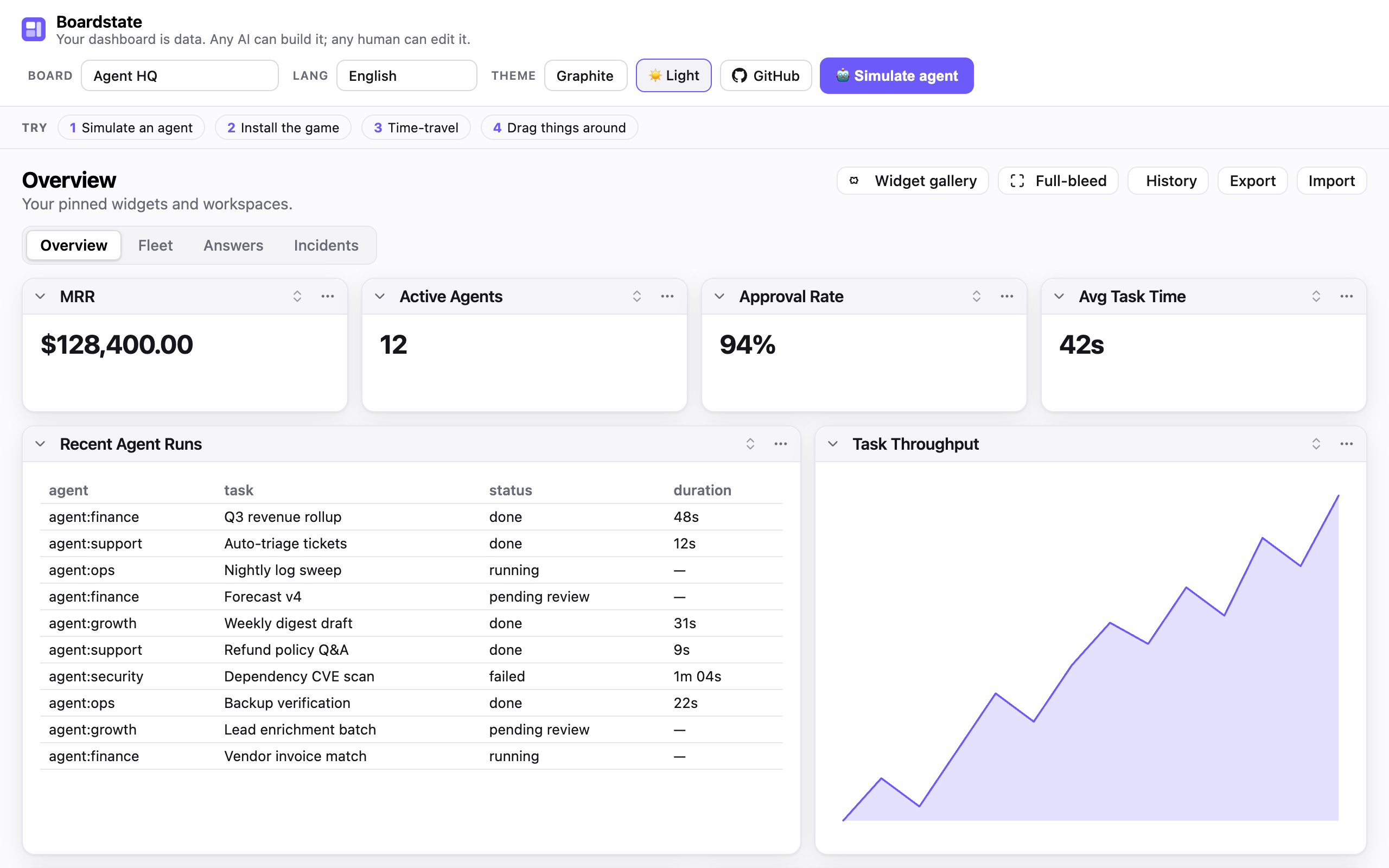
@boardstate/lit ships a complete, world-class default theme — Graphite (a
Linear / Vercel / Codex-family palette) — that looks great in light and dark
out of the box. Import it once; nothing else to configure.
import "@boardstate/lit";
import "@boardstate/lit/styles.css"; // the Graphite default — light + dark
Dark mode, free —
prefers-color-schemeis honored automatically; pin it withdata-theme="dark"/"light"on<html>when you want a toggle.Drop-in alternate themes — layer one after
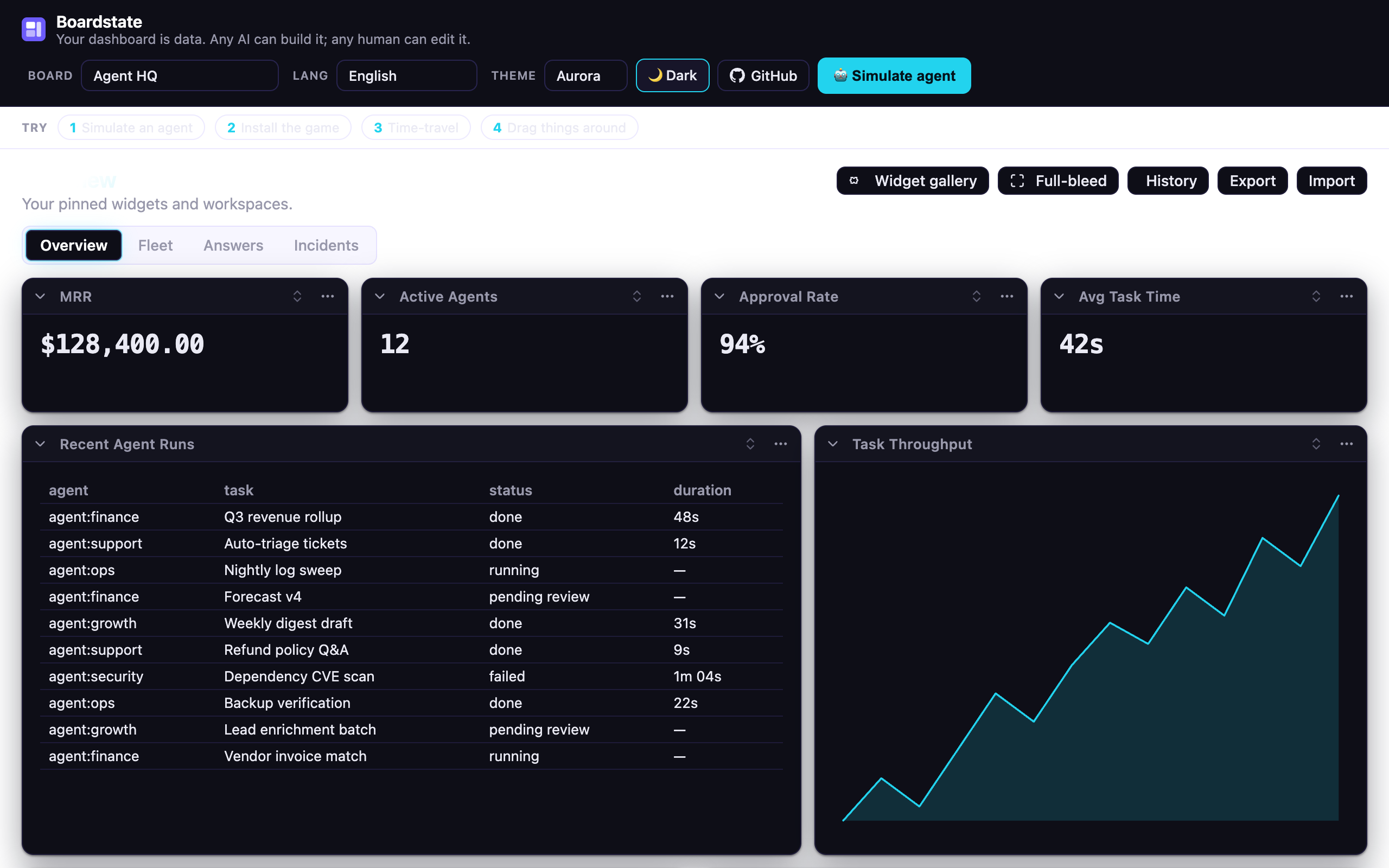
styles.cssto fully re-skin (each ships its own light + dark):import "@boardstate/lit/themes/aurora.css"; // futuristic — cyan accent + aurora wash import "@boardstate/lit/themes/vibrancy.css"; // macOS-native frosted glassTotal control — every value is a
--bs-*custom property; override one token or author a whole theme. See THEME.md for the token table and a build-your-own guide.
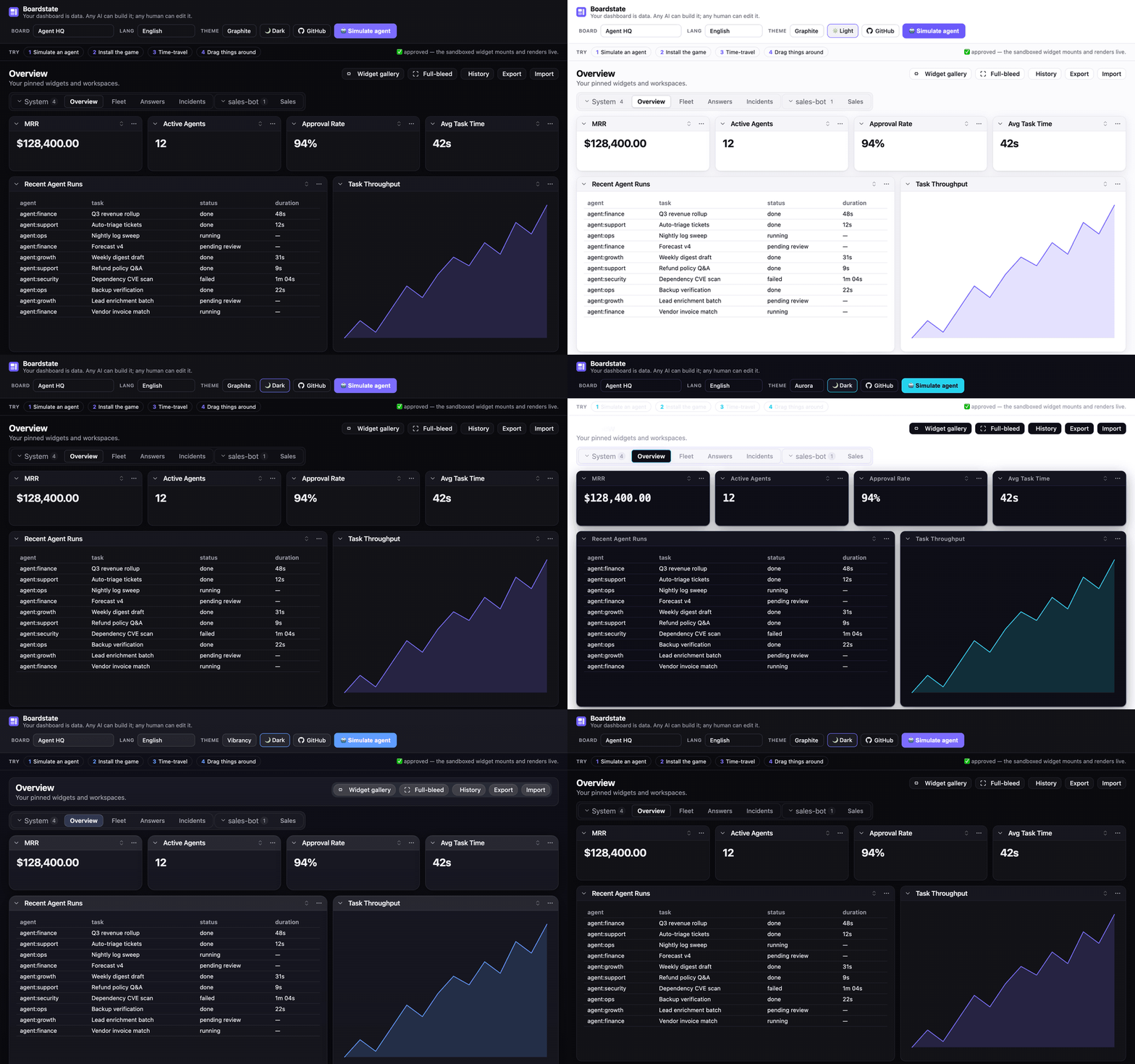
| Graphite (default, light) | Aurora | Vibrancy |
|---|---|---|
 |
 |
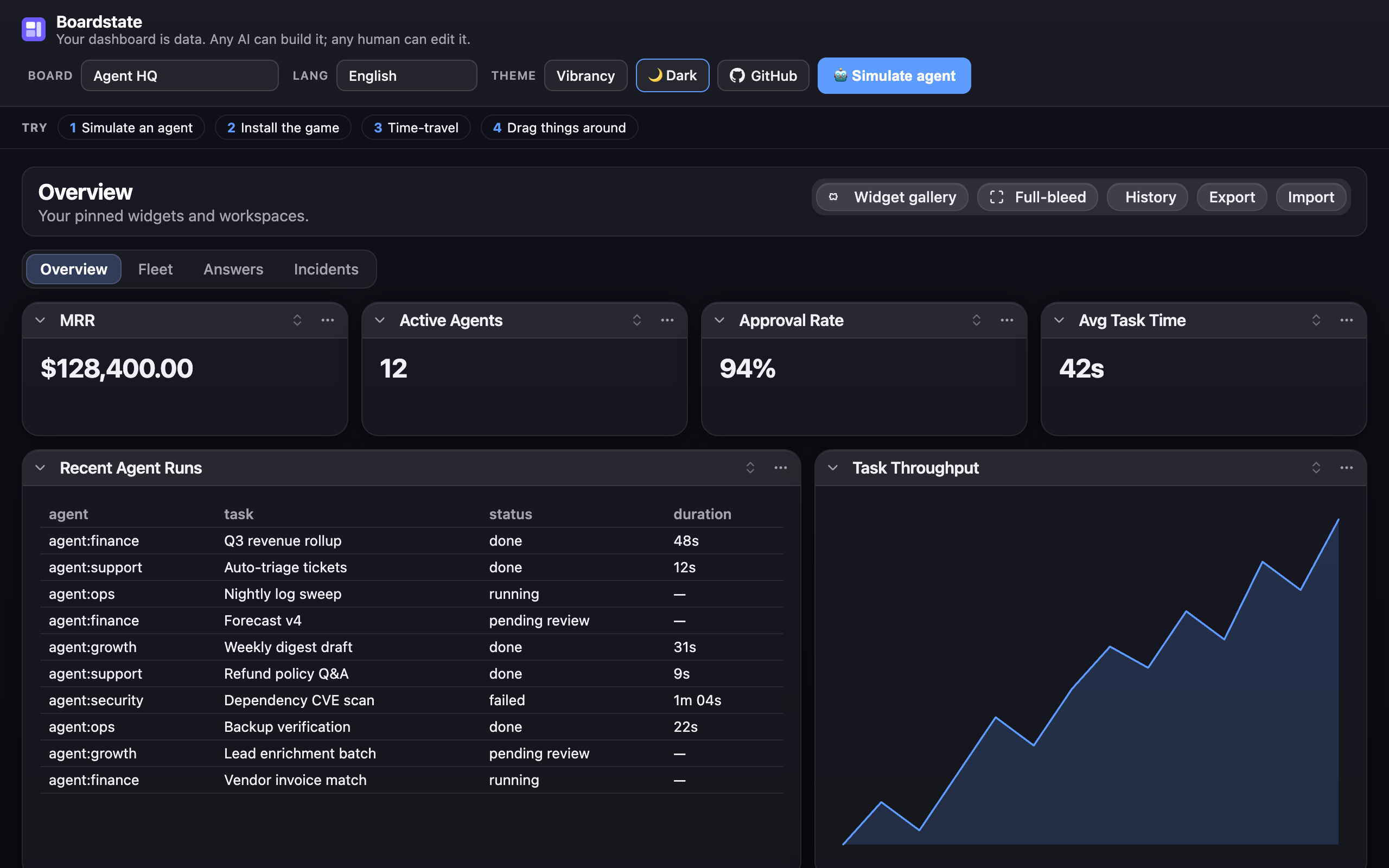 |
The live demo has the theme switcher + light/dark toggle in its header — the fastest way to see all three.
Localization
The view ships partial translations for 20 languages (Arabic, German, Spanish, Farsi, French, Hindi, Indonesian, Italian, Japanese, Korean, Dutch, Polish, Portuguese-BR, Russian, Thai, Turkish, Ukrainian, Vietnamese, and both Chinese scripts) — faithfully ported from the source project's catalogs; untranslated keys fall back to English. Pass a table to the view's strings property:
import { de } from "@boardstate/lit/locales/de";
view.strings = de; // or any BoardstateStrings partial of your own
The live demo's Lang menu switches all 20 at runtime.
Agents
Boardstate is agent-native in both directions — agents build the board (MCP server,
embedded chat agent), and the board acts through agent-requested, operator-granted
external tools. AGENTS.md is the complete guide: setting up each agent
surface (Claude Code / Claude Desktop config, the embeddable @boardstate/agent with
provider adapters, the connector grant loop), the full 20-tool catalog, the composition
conventions that make agent-built boards good, the security invariants agents operate
under — and the house rules for coding agents contributing to this repo. There's also a
ready-made agent skill —
.claude/skills/using-boardstate/SKILL.md —
copy it into your project's skills (or paste it into a bare-API harness's system prompt)
and your agent knows how to drive the board.
Learn more
- CHANGELOG.md — the release history by milestone: what each train shipped and why; per-package changelogs hold the granular record.
- AGENTS.md — the agent guide: setup, the tool catalog, conventions, and the invariants.
- docs/ROADMAP.md — where this is going: substrate → the agent layer (plug in a provider — GLM, Anthropic, any OpenAI-compatible endpoint — and the AI builds the board live), the streaming spec, and phased milestones. Pickup-ready for any contributor.
- SPEC.md — the protocol: document format,
dashboard.*methods, bridge protocol v1, capability & approval model, the security invariants. - docs/ARCHITECTURE.md — the implementation: package graph, the three seams (storage / transport / server-host), the request lifecycle, and how to build your own host.
- docs/composition-patterns.md — the agent's field guide: which builtin for which job, when to scaffold a custom widget, composition rules of thumb.
- docs/authoring.md — write a widget (builtin renderer or sandboxed custom).
- docs/living-answers.md — the agent convention: answer visual questions with live widgets, not prose.
- docs/design-review.md — the agent workflow for reviewing and refining a layout it built.
- templates/ — workspace templates (Agent HQ, the all-builtins Showcase, small-business, OSS-maintainer), starter custom widgets — including twenty48, a sandboxed game you can install from the demo's gallery, and a ready-to-use widget-gallery registry (
templates/registry/— the live demo's gallery points at its hosted copy; point yours athttps://100yenadmin.github.io/boardstate/registry/index.json). - docs/connectors.md — the outward direction: connector setup for OfficeCLI, Pipedream, and Composio, the grant model, and the operational demo.
- docs/demo-script.md — the acceptance walkthrough: a scripted Do/Observe tour proving every feature, for maintainers and PR reviewers.
- GitHub Discussions — questions, ideas, show-and-tell.
Status
Actively developed. The protocol is SPEC v0.2-draft — stable enough to build a host against, with @boardstate/conformance to prove your host is conformant. Every release ships to npm with provenance; the full history is in CHANGELOG.md.
License
MIT
Установка Boardstate Server
У этого сервера нет опубликованного пакета — он собирается из исходников. Открой репозиторий и следуй инструкции в README.
▸ github.com/100yenadmin/boardstateFAQ
Boardstate Server MCP бесплатный?
Да, Boardstate Server MCP бесплатный — установка в пару кликов через Unyly без оплаты.
Нужен ли API-ключ для Boardstate Server?
Нет, Boardstate Server работает без API-ключей и переменных окружения.
Boardstate Server — hosted или self-hosted?
Доступен hosted-вариант: Unyly запускает сервер в облаке, локальная установка не обязательна.
Как установить Boardstate Server в Claude Desktop, Claude Code или Cursor?
Открой Boardstate Server на unyly.org, выбери вкладку своего клиента (Claude Desktop, Claude Code, Cursor) и нажми Install — конфиг сгенерируется автоматически, без правки JSON.
Похожие MCP
Fetch
Web content fetching and conversion for efficient LLM usage.
AWS KB Retrieval
Retrieval from AWS Knowledge Base using Bedrock Agent Runtime.
 автор: modelcontextprotocol
Spring AI MCP Server
Provides auto-configuration for setting up an MCP server in Spring Boot applications.
llm-analysis-assistant
A very streamlined mcp client that supports calling and monitoring stdio/sse/streamableHttp, and can also view request responses through the /logs page. It also
 автор: xuzexin-hz
Compare Boardstate Server with
Не уверен что выбрать?
Найди свой стек за 60 секунд
Автор?
Embed-бейдж для README
Похожее
Все в категории ai