
Buglens
БесплатноНе проверенWordPress MCP Server for Shared Hosting — connect AI agents (Claude Code, Cursor, Codex, Gemini CLI) to WordPress sites without SSH. 15 MCP tools: file manageme

Описание
WordPress MCP Server for Shared Hosting — connect AI agents (Claude Code, Cursor, Codex, Gemini CLI) to WordPress sites without SSH. 15 MCP tools: file management, code search, WP-CLI bridge, visual bug tracking.
README




The only WordPress MCP server that works without SSH, root access, or Docker. Connect Claude Code, Cursor, Codex, Gemini CLI, or any MCP-compatible AI agent to your WordPress site — even on shared hosting. Just a WordPress plugin and one command.
BugLens is a WordPress MCP server and AI agent development bridge that gives your AI coding tools full filesystem access over HTTPS. Read files, write code, search across themes and plugins, diff changes, and run WP-CLI commands — all through the Model Context Protocol (MCP). It also includes a visual bug reporter that captures CSS selectors, computed styles, screenshots, and console errors — structured data optimized for AI agents to understand and fix issues in one shot.
WordPress development with AI agents on shared hosting — solved.
# Connect Claude Code to your WordPress site in 30 seconds:
BUGLENS_URL=https://yoursite.com BUGLENS_KEY=your_key \
  claude mcp add buglens -- npx -y buglens-mcp
The Problem
AI coding agents like Claude Code, Cursor, and Codex are incredible — but they need filesystem access to be useful. On a VPS or local machine, that's easy. On shared hosting (where most WordPress sites live), you're stuck: no SSH, no CLI, no way to let your AI read or edit files.
BugLens solves this. Install the plugin, enable the Bridge API, and your AI agent has full development access over HTTPS.
How It Works
┌──────────────────┐         HTTPS          ┌──────────────────────┐
│  Your Computer   │ ◄──────────────────── │  Any Hosting          │
│                  │                         │  (shared, VPS, local) │
│  AI Agent        │   MCP (stdio)           │                      │
│  (Claude, etc.)  │ ◄──────────┐           │  WordPress + BugLens │
│                  │            │           │    └── Bridge API     │
│                  │   buglens-mcp           │        read / write   │
│                  │   (npx, zero-install)   │        search / diff  │
└──────────────────┘                         │        tree / wp-cli  │
                                             └──────────────────────┘
- BugLens plugin exposes a secure REST API on your WordPress site
- buglens-mcp (npm package) runs locally and speaks MCP to your AI agent
- Your AI agent reads, writes, searches, and edits files — as if it had SSH access
Quick Start
1. Install the Plugin
In WordPress admin: Plugins > Add New > Search "BugLens" > Install > Activate
Or from GitHub:
cd /path/to/wordpress/wp-content/plugins/
git clone https://github.com/dd-jfranjic/buglens.git
2. Enable the Bridge
Go to BugLens > Bridge in WordPress admin. Enable the Bridge API and copy your API key.
3. Connect Your AI Agent
Claude Code:
BUGLENS_URL=https://yoursite.com BUGLENS_KEY=your_key \
  claude mcp add buglens -- npx -y buglens-mcp
Cursor / Claude Desktop / Windsurf / Gemini CLI:
{
  "mcpServers": {
    "buglens": {
      "command": "npx",
      "args": ["-y", "buglens-mcp"],
      "env": {
        "BUGLENS_URL": "https://yoursite.com",
        "BUGLENS_KEY": "your_key"
      }
    }
  }
}
That's it. Your AI agent can now read, write, and search files on your WordPress site.
Supported AI Agents
| AI Agent | Connection Method |
|---|---|
| Claude Code (Anthropic) | MCP Bridge (remote) or direct filesystem |
| Claude Desktop (Anthropic) | MCP Bridge (remote) |
| Cursor / Windsurf | MCP Bridge (remote) or local filesystem |
| Codex CLI (OpenAI) | MCP Bridge (remote) or direct filesystem |
| Gemini CLI (Google) | MCP Bridge (remote) or direct filesystem |
| VS Code Copilot | MCP Bridge (remote) |
| Cline / Continue / JetBrains | MCP Bridge (remote) |
What Your AI Agent Can Do
15 MCP Tools
Filesystem (12 tools):
| Tool | Description |
|---|---|
read_file |
Read file contents (with offset/limit for large files) |
write_file |
Write content to an existing file |
create_file |
Create a new file or directory |
delete_file |
Delete a file or empty directory |
rename_file |
Rename or move a file |
list_directory |
List directory contents |
search_files |
Search across files — like grep (regex, glob filters, context lines) |
file_info |
File metadata (size, permissions, modified date, MIME type) |
diff_file |
Compare content against the file on disk |
bulk_read |
Read up to 20 files at once |
directory_tree |
Recursive directory tree with depth and pattern filters |
wp_cli |
Execute WP-CLI commands (if available on the server) |
Bug Reports (3 tools):
| Tool | Description |
|---|---|
get_bug_reports |
List all reports (filterable by status) |
get_bug_report |
Full report details — selector, styles, screenshot, console errors |
update_bug_status |
Update report status (open, in_progress, resolved, closed) |
Bridge REST Endpoints
POST /wp-json/buglens/v1/fs/read       — read file contents
POST /wp-json/buglens/v1/fs/write      — write to existing file
POST /wp-json/buglens/v1/fs/create     — create new file/directory
POST /wp-json/buglens/v1/fs/delete     — delete file/empty directory
POST /wp-json/buglens/v1/fs/rename     — rename/move file
POST /wp-json/buglens/v1/fs/list       — list directory contents
POST /wp-json/buglens/v1/fs/search     — search across files (like grep)
POST /wp-json/buglens/v1/fs/info       — file metadata
POST /wp-json/buglens/v1/fs/diff       — compare content against file on disk
POST /wp-json/buglens/v1/fs/bulk-read  — read multiple files at once (max 20)
POST /wp-json/buglens/v1/fs/tree       — recursive directory tree
POST /wp-json/buglens/v1/fs/wp-cli     — execute WP-CLI command
POST /wp-json/buglens/v1/fs/token      — generate time-limited auth token
Visual Bug Reporter
BugLens also includes a visual bug reporting system designed for AI agent consumption.
How It Works
- Click the floating bug icon on any page
- Hover over elements — BugLens highlights them and shows tag/class info
- Click to select, describe the bug, submit
- Reports are auto-exported as Markdown in
wp-content/uploads/buglens/
What Gets Captured
| Traditional Bug Report | BugLens Report |
|---|---|
| "The button is broken" | button.cta-primary at x:450 y:680 200x48px |
| "It looks weird on mobile" | Viewport 375x667, computed font-size: 12px, overflow: hidden |
| "There's an error somewhere" | TypeError: Cannot read 'addEventListener' at line 42 |
| "I think it's on the contact page" | https://example.com/contact/#form-section |
| Blurry phone photo | Clean PNG with element highlighted, full page context |
| "The color seems off" | color: #333, background: rgba(0,0,0,0.8), opacity: 0.5 |
Data Captured Per Report
| Data | Description |
|---|---|
| CSS Selector | Unique selector for the selected element |
| Parent Chain | Full DOM path from body to element |
| outerHTML | Element's HTML (configurable limit) |
| Computed Styles | Key CSS properties (color, font, display, position, etc.) |
| Bounding Box | Position and dimensions on screen |
| Viewport | Browser viewport dimensions |
| Console Errors | JavaScript errors on the page |
| Screenshot | PNG with element highlighted |
| Context | Whether element is inside a modal/overlay |
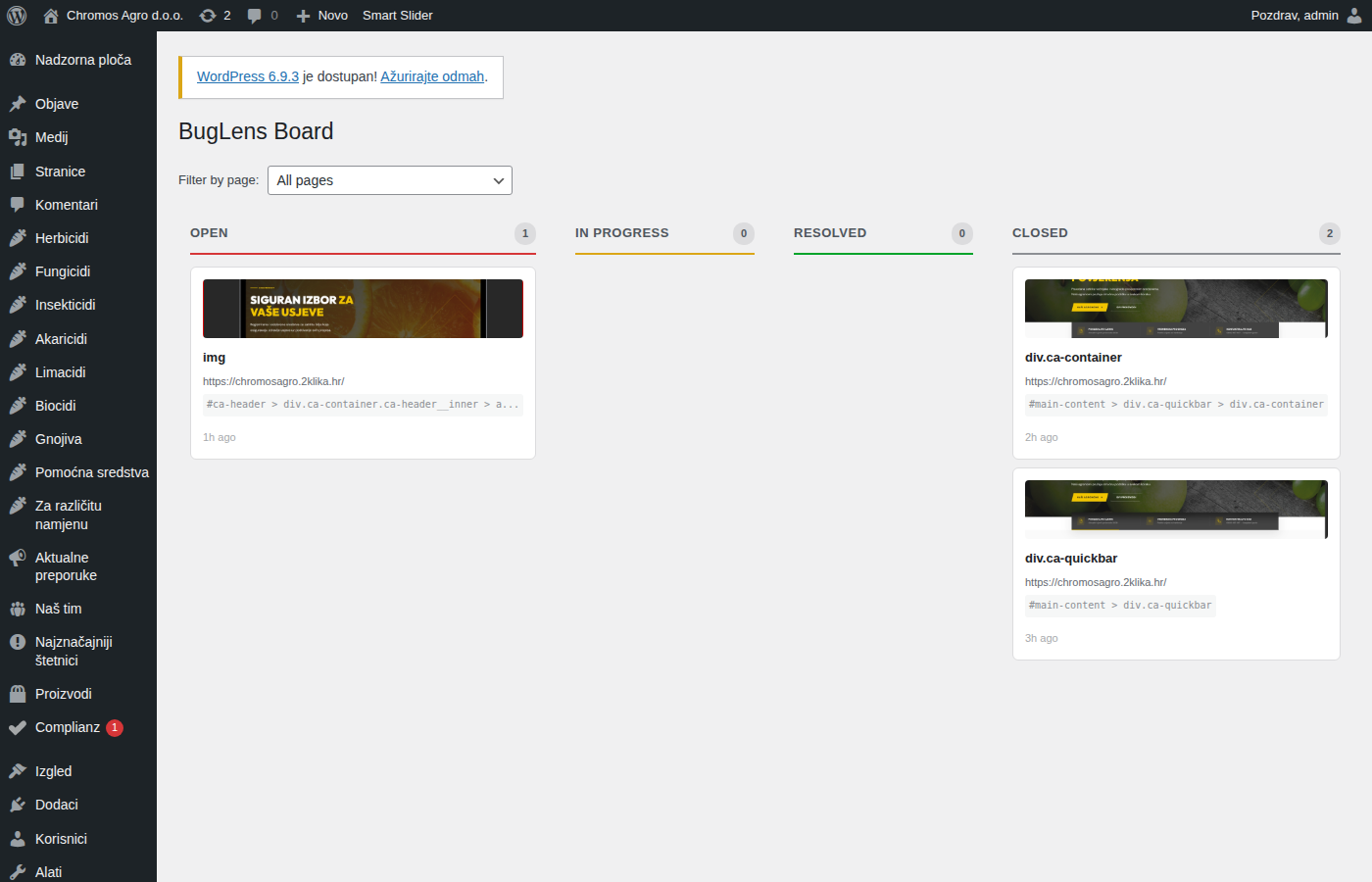
Admin Kanban Board
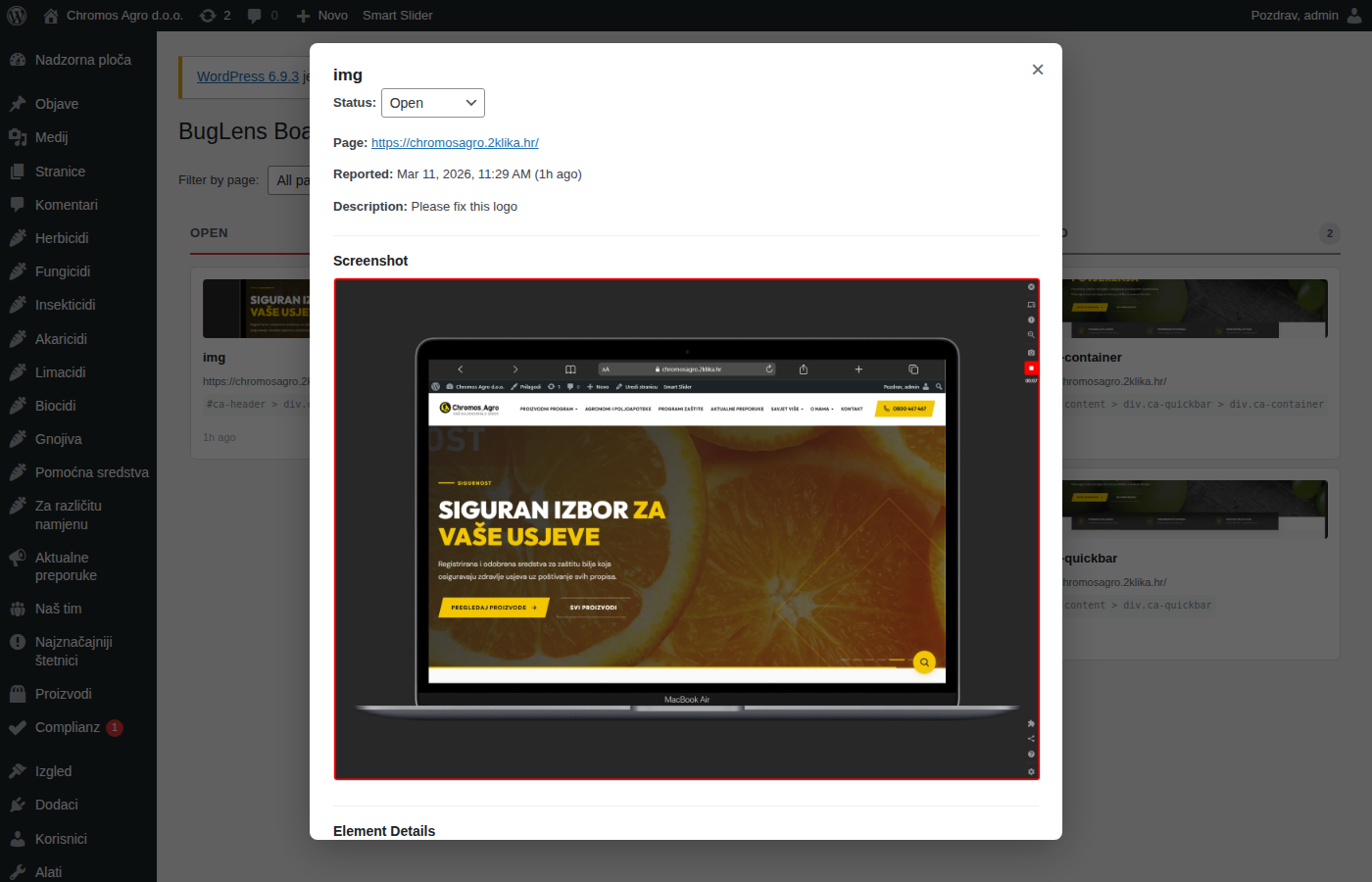
All reports live on a drag-and-drop Kanban board (Open > In Progress > Resolved > Closed). Click any card for full details including screenshot, styles, and HTML.
Reports REST API
GET    /wp-json/buglens/v1/reports              — list reports (paginated, filterable)
POST   /wp-json/buglens/v1/reports              — create report
GET    /wp-json/buglens/v1/reports/{id}          — full report details
PATCH  /wp-json/buglens/v1/reports/{id}          — update status
DELETE /wp-json/buglens/v1/reports/{id}          — delete report
GET    /wp-json/buglens/v1/reports/{id}/screenshot — screenshot URL
Screenshots
Frontend Widget
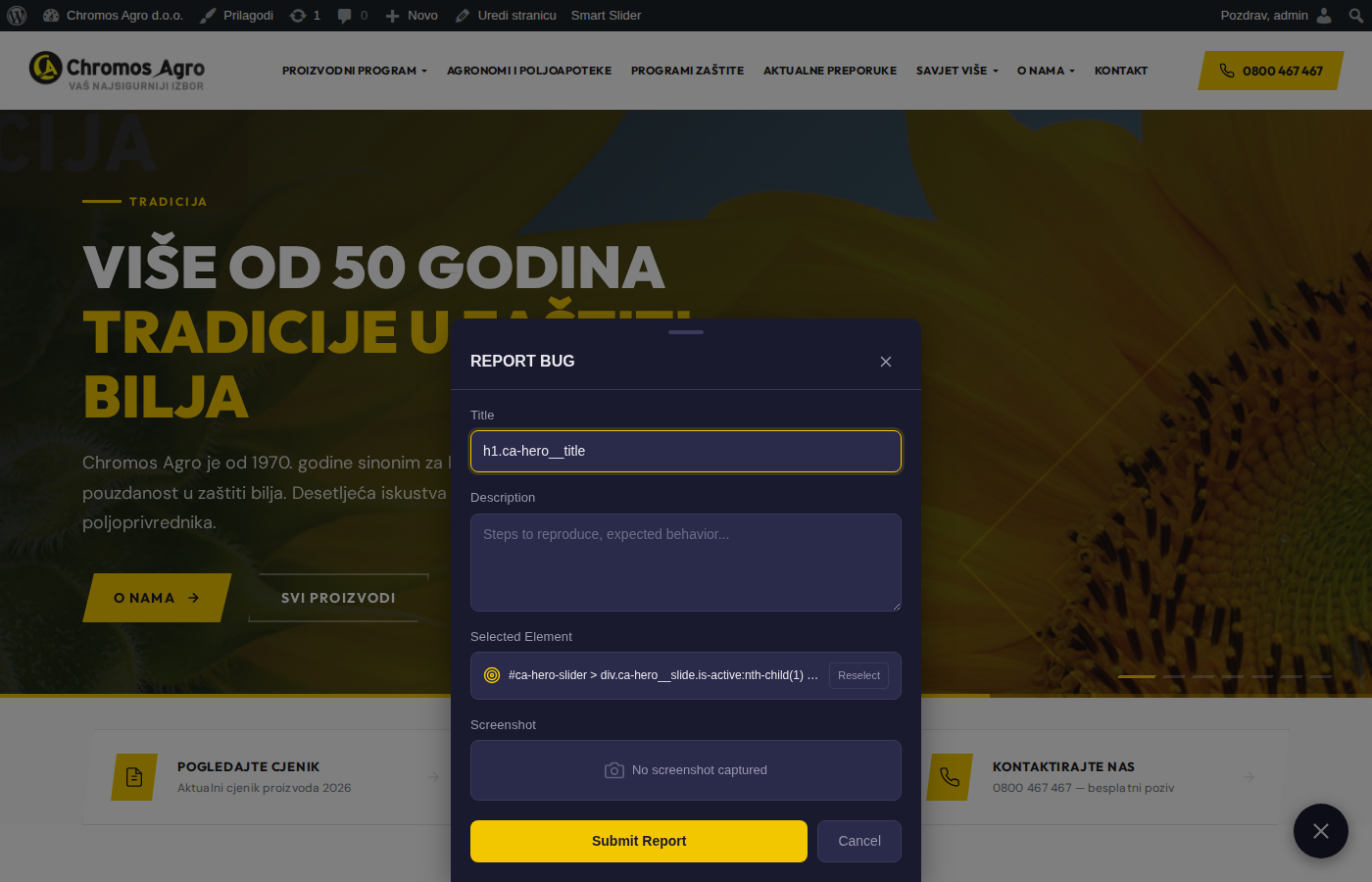
The golden bug icon appears on your site (configurable corner). Only visible to users you choose.

Element Selector Mode
Hover over any element — BugLens highlights it and shows its tag/class. Click to select.

Bug Report Form
After selecting, a slide-up form captures title, description, and all technical data automatically.
Admin Kanban Board
Drag-and-drop reports between status columns. Filter by page URL.
Report Detail Modal
Full picture: screenshot, selector, computed styles, outerHTML, console errors, bounding box.
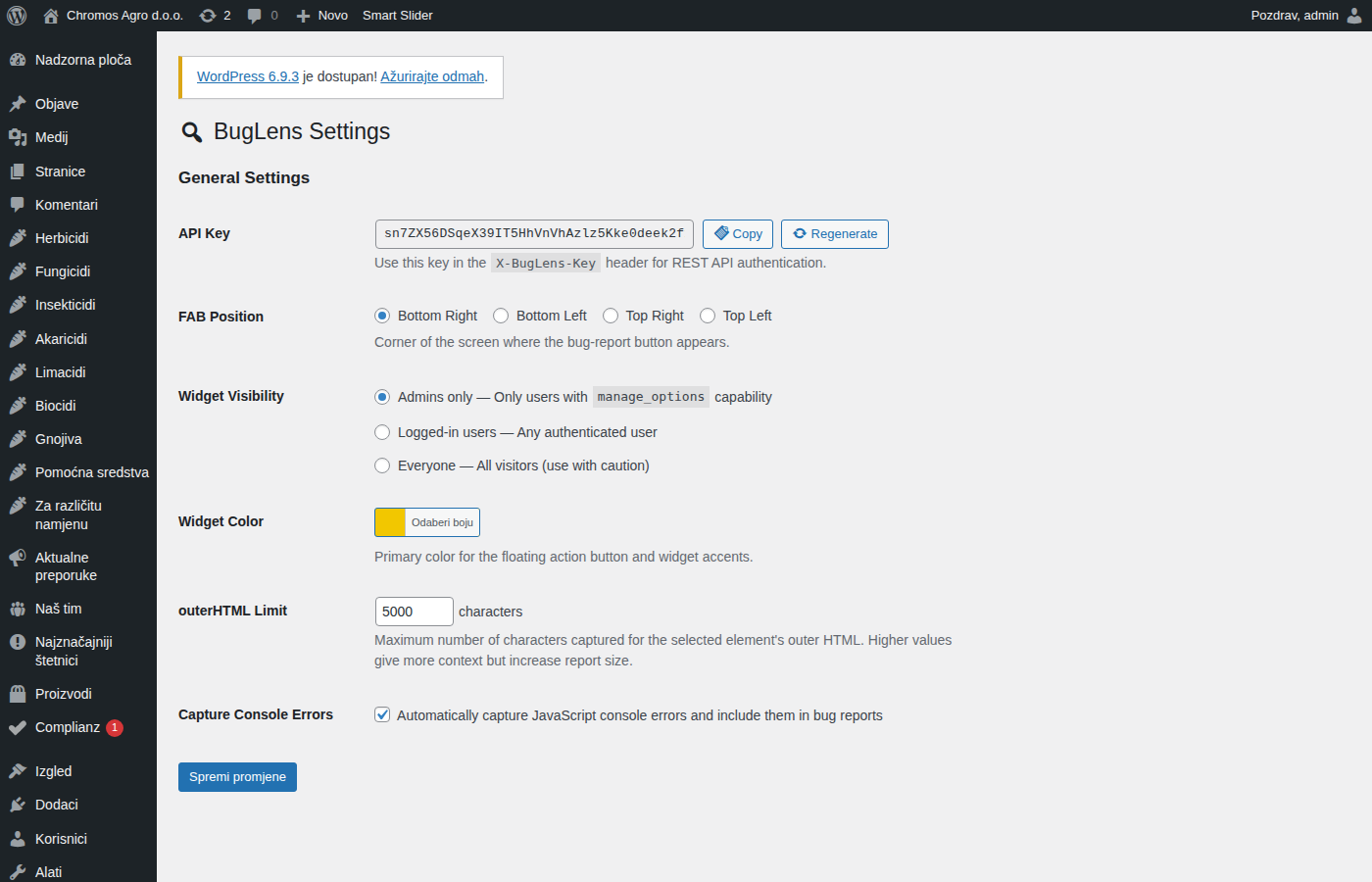
Bridge Settings
Connect your AI agent in seconds. Copy-paste config for 8+ AI tools.
Real-World Use Cases
"I maintain 12 client WordPress sites on shared hosting"
My clients are on GoDaddy, Bluehost, SiteGround — no SSH anywhere. Before BugLens, I'd download files via FTP, edit locally, upload back. Now I tell Claude Code: "read the header template, fix the mobile menu, write it back." It reads and writes directly via the Bridge. What used to take 20 minutes takes 2.
"Client QA without the back-and-forth"
I set BugLens visibility to 'Everyone' during review. The client clicks the bug icon, selects the broken element, writes "this should be bigger." I get a report with the exact selector, computed font-size, viewport size, and a screenshot. I paste it to Claude and the fix is immediate — no more "which button?" "what page?" "can you send a screenshot?"
"AI-powered WordPress development on shared hosting"
I connected Claude Code to my client's site via BugLens Bridge. Now I can search for all uses of a deprecated function across the entire theme, read the relevant files, write the fix, and verify with diff — all without SSH. It's like having CLI access through a WordPress plugin.
Security
Bridge Security (4 layers)
| Layer | Description | Default |
|---|---|---|
| API Key | 40-char key, timing-safe hash_equals() |
Always on |
| IP Whitelist | Restrict to specific IP addresses | Optional |
| Time-Limited Tokens | SHA-256 hashed tokens with expiry | Optional |
| Path Restrictions | Allow/block lists for file paths | Optional |
| Read-Only Mode | Disable all write operations | Optional |
Always-On Protections
- Path traversal prevention —
realpath()validation,..blocked - Blocked paths —
wp-config.php,.htaccess,.htpasswdblocked by default - Input sanitization —
sanitize_text_field(),absint(), JSON validation - Output escaping —
esc_html(),esc_attr(),esc_url(),wp_kses() - Capability checks —
manage_optionsrequired for admin features - Nonce verification — on all AJAX endpoints
- XSS prevention — safe DOM methods, no
innerHTML
Configuration
| Setting | Description | Default |
|---|---|---|
| API Key | Auto-generated 40-char key for authentication | Auto |
| FAB Position | Corner of screen for the floating button | Bottom Right |
| Widget Visibility | Who sees the bug report widget | Admins only |
| Widget Color | Primary color for the FAB and accents | #F2C700 |
| outerHTML Limit | Max characters captured for element HTML | 5000 |
| Console Errors | Auto-capture JS console errors | Enabled |
Plugin Structure
buglens/
├── buglens.php                         # Main plugin file
├── includes/
│   ├── class-buglens-bridge.php        # Bridge REST API (12 FS endpoints)
│   ├── class-buglens-bridge-security.php # 4-layer security
│   ├── class-buglens-rest-api.php      # Reports REST API (CRUD)
│   ├── class-buglens-cpt.php           # Custom Post Type + meta fields
│   ├── class-buglens-export.php        # Markdown + JSON export
│   ├── class-buglens-widget.php        # Frontend widget
│   └── class-buglens-admin.php         # Admin menus, settings, assets
├── admin/                              # Admin assets (JS, CSS, views)
├── public/                             # Frontend widget (JS, CSS)
└── mcp-server/                         # buglens-mcp npm package
    ├── package.json
    ├── bin/buglens-mcp.js              # CLI entry point
    └── src/
        ├── index.js                    # MCP server (15 tools)
        └── client.js                   # HTTP client for Bridge API
Requirements
- WordPress 6.0+
- PHP 8.0+
- Node.js 18+ (client-side, for
npx buglens-mcp)
Clean Uninstall
When deleted via WordPress admin, BugLens removes all data: reports, meta, options, screenshots, and export files. No orphaned data.
Development
No build step required. Vanilla JavaScript — no React, no webpack, no npm on the server side. Edit PHP/JS/CSS directly.
Coding Standards
- PHP: WordPress Coding Standards (WPCS)
- CSS: BEM naming with
buglens-prefix - JS: Vanilla ES5-compatible, no transpilation
- i18n: All strings wrapped in
__()/esc_html__()
License
GPL v2 or later. See LICENSE.
Credits
Built by 2klika for AI-assisted WordPress development.
Third-party libraries:
- html2canvas — Screenshot capture (MIT License)
- @modelcontextprotocol/sdk — MCP server SDK (MIT License)
Установка Buglens
У этого сервера нет опубликованного пакета — он собирается из исходников. Открой репозиторий и следуй инструкции в README.
▸ github.com/dd-jfranjic/buglensFAQ
Buglens MCP бесплатный?
Да, Buglens MCP бесплатный — установка в пару кликов через Unyly без оплаты.
Нужен ли API-ключ для Buglens?
Нет, Buglens работает без API-ключей и переменных окружения.
Buglens — hosted или self-hosted?
Self-hosted: сервер запускается локально на твоей машине командой из раздела установки.
Как установить Buglens в Claude Desktop, Claude Code или Cursor?
Открой Buglens на unyly.org, выбери вкладку своего клиента (Claude Desktop, Claude Code, Cursor) и нажми Install — конфиг сгенерируется автоматически, без правки JSON.
Похожие MCP
GitHub
PRs, issues, code search, CI status
 автор: GitHub
Filesystem
Secure file operations with configurable access controls.
Memory
Knowledge graph-based persistent memory system.
Template MCP Server
A CLI tool to create a new Model Context Protocol server project with TypeScript support, dual transport options, and an extensible structure
 автор: mcpdotdirect
Compare Buglens with
Не уверен что выбрать?
Найди свой стек за 60 секунд
Автор?
Embed-бейдж для README
Похожее
Все в категории development