
Canvas Assignment Assistant Server
БесплатноНе проверенEnables interaction with Canvas courses and assignments through natural language, allowing retrieval, search, and summarization of course and assignment informa

Описание
Enables interaction with Canvas courses and assignments through natural language, allowing retrieval, search, and summarization of course and assignment information.
README
Overview
This Model Context Protocol (MCP) server lets you interact with Canvas/Instructure courses and assignments, without leaving your LLM (e.g. Claude Desktop).
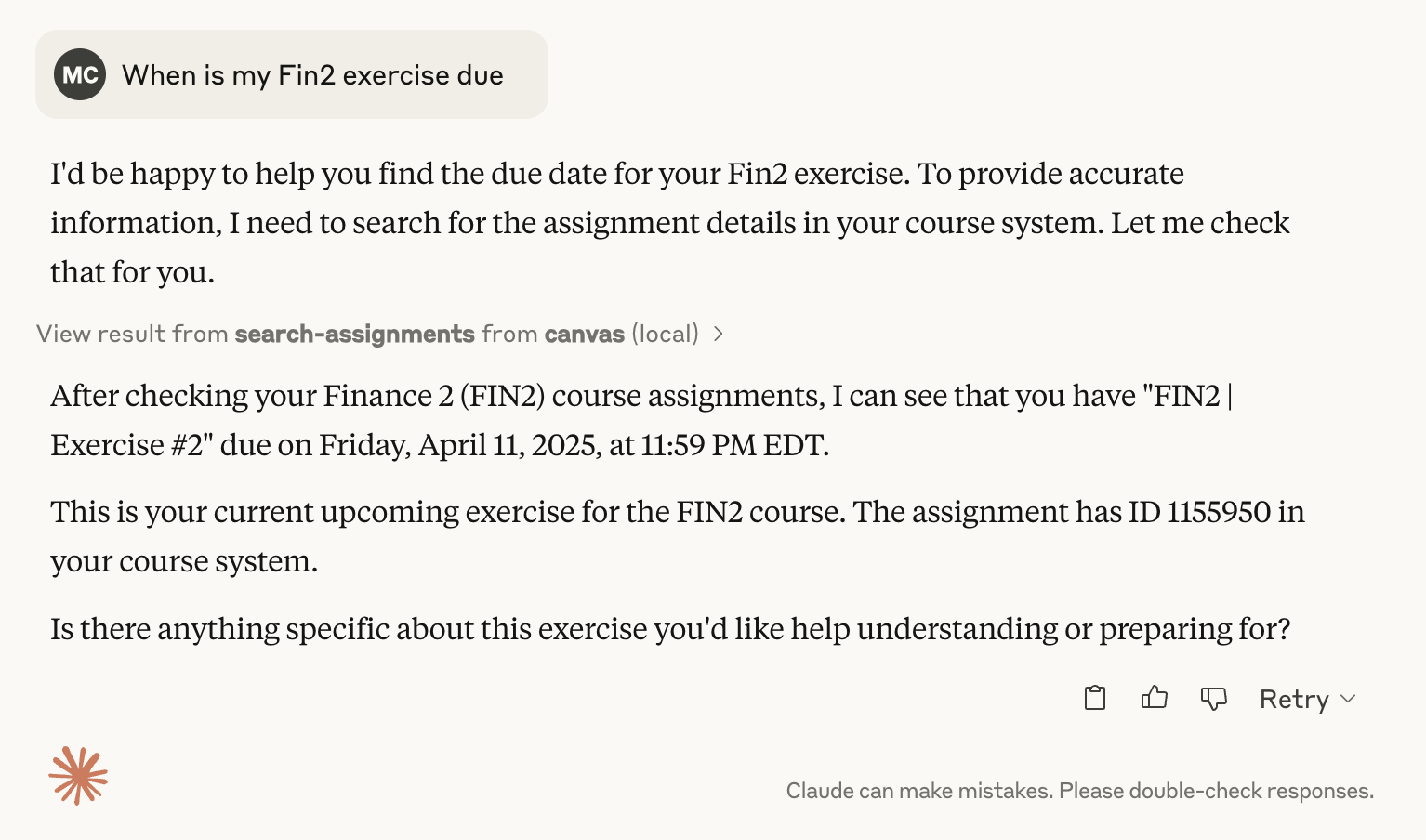
It allows you to retrieve, search, and summarize course and assignment information programmatically, for example to check due dates for upcoming assignments:
Features
Tools
List Courses
- Retrieve a list of courses
- Filter by course state (active, completed, or all)
Search Assignments
- Search across courses for assignments
- Filter by:
- Search query
- Due date range
- Specific course
- Include/exclude completed courses
Get Assignment Details
- Fetch detailed information about a specific assignment
- Multiple output formats (full HTML, plain text, markdown)
Resources
- Assignment Content: Retrieve full assignment details using a standardized URI format
Prerequisites
- An MCP-compatible client (Claude Desktop, Cursor, etc.)
- Canvas LMS account
- Canvas API Token
- Canvas Domain
Configuration
When you install the MCP bundle, you'll be prompted to configure:
- Canvas API Token: Your Canvas API access token (see instructions below)
- Canvas Domain: Your Canvas institution's domain (e.g.,
canvas.youruniversity.edu)
These values are stored securely by your MCP client and are not exposed in your configuration files.
Security Note
Keep your Canvas API token confidential. The bundle marks the token as sensitive, so it will be stored securely by your MCP client.
Installation
This MCP server is distributed as an MCP bundle (.mcpb file) for easy installation.
Option 1: Install from Bundle File (Recommended)
Download the bundle
Download the
canvas-mcp.mcpbfile from the releases page or build it yourself (see Option 2).Install in your MCP client
For Claude Desktop:
- Open Claude Desktop settings
- Navigate to the MCP servers section
- Click "Add Server" or "Install from Bundle"
- Select the
canvas-mcp.mcpbfile - When prompted, enter your Canvas API token and domain
For Cursor:
- Open Cursor settings
- Navigate to MCP configuration
- Install the bundle file
- Configure your Canvas API token and domain when prompted
Configure your credentials
When you first install the bundle, you'll be prompted to enter:
- Canvas API Token: Your Canvas API access token (see instructions below)
- Canvas Domain: Your Canvas institution's domain (e.g.,
canvas.youruniversity.edu)
Option 2: Build from Source
If you want to build the bundle yourself:
Clone the repository and install dependencies
git clone https://github.com/mbcrosiersamuel/canvas-mcp.git
cd canvas-mcp
npm install
Build the bundle
npm run packageThis will create a
canvas-mcp.mcpbfile that you can then install using Option 1.
How to Get Your Canvas API Token
- Log into Canvas
- Go to Account > Settings
- Scroll to the "Approved Integrations" section
- Click "New Access Token"
- Copy the generated token
For more details, see these instructions from Canvas.
MCP Tools
list_courses: Shows all active courses by default. Use flags to show completed or all coursessearch_assignments: Searches assignment titles and descriptionsget_assignment: Retrieves full assignment details
Troubleshooting
Common Issues
Token Invalid:
- Regenerate your Canvas API token
- Ensure token has appropriate permissions
Domain Incorrect:
- Double-check your Canvas institution domain
- Verify there are no typos
Disclaimer
This is an unofficial Canvas MCP, and is not affiliated with Canvas or Instructure. I'm also not a professional software engineer, and this project was vibe-coded using Claude, so please use it at your own risk :)
Thanks!
- Thanks to Luke Harries for inspiration and for part of the text of this Readme.
- Thanks to the Anthropic team for great instructions on how to use LLMs to create MCPs!
Установка Canvas Assignment Assistant Server
У этого сервера нет опубликованного пакета — он собирается из исходников. Открой репозиторий и следуй инструкции в README.
▸ github.com/mbcrosiersamuel/canvas-mcpFAQ
Canvas Assignment Assistant Server MCP бесплатный?
Да, Canvas Assignment Assistant Server MCP бесплатный — установка в пару кликов через Unyly без оплаты.
Нужен ли API-ключ для Canvas Assignment Assistant Server?
Нет, Canvas Assignment Assistant Server работает без API-ключей и переменных окружения.
Canvas Assignment Assistant Server — hosted или self-hosted?
Доступен hosted-вариант: Unyly запускает сервер в облаке, локальная установка не обязательна.
Как установить Canvas Assignment Assistant Server в Claude Desktop, Claude Code или Cursor?
Открой Canvas Assignment Assistant Server на unyly.org, выбери вкладку своего клиента (Claude Desktop, Claude Code, Cursor) и нажми Install — конфиг сгенерируется автоматически, без правки JSON.
Похожие MCP
LibreOffice Tools
Enables AI agents to read, write, and edit Office documents via LibreOffice with token-efficient design. Supports multiple formats including DOCX, XLSX, PPTX, a
 автор: passerbyflutter
dannote/figma-use
Full Figma control: create shapes, text, components, set styles, auto-layout, variables, export. 80+ tools.
 автор: dannote
Logo.dev
Search and retrieve company logos by brand or domain. Customize size, format, and theme to match your design needs. Accelerate design, prototyping, and content
 автор: NOVA-3951
PIX4Dmatic
Enables GUI automation for controlling PIX4Dmatic on Windows through MCP. Supports launching, focusing, capturing screenshots, sending hotkeys, clicking UI elem
 автор: jangjo123
Compare Canvas Assignment Assistant Server with
Не уверен что выбрать?
Найди свой стек за 60 секунд
Автор?
Embed-бейдж для README
Похожее
Все в категории design