
CareerPilot
БесплатноНе проверенAn AI job-hunt copilot that enables searching live job boards, shortlisting openings, tracking application pipelines, and generating tailored resumes and cover

Описание
An AI job-hunt copilot that enables searching live job boards, shortlisting openings, tracking application pipelines, and generating tailored resumes and cover letters from any MCP client.
README

An AI job-hunt copilot built on the Model Context Protocol — search live job boards, shortlist openings, track your application pipeline, and generate tailored resumes/cover letters, all from any MCP client (Claude Desktop, Claude Code, MCP Inspector).
Built as a learning project that deliberately exercises every major MCP concept in a real product.
Real data, no API keys
| Source | What it is |
|---|---|
| Remotive | Remote job board, free public API |
| RemoteOK | Remote job board, free public API |
| Hacker News "Who is hiring?" | Monthly hiring thread, via the free Algolia API |
Your shortlist, applications, and profile live in a local SQLite DB (~/.careerpilot/careerpilot.db).
MCP feature map
| MCP concept | Where it lives in this project | What it teaches |
|---|---|---|
| Tools | search_jobs, save_job, track_application, update_application, schedule_follow_up, set_profile |
Model-callable actions with typed schemas |
| Resources | careerpilot://pipeline, careerpilot://saved-jobs, careerpilot://profile |
App data exposed as readable context |
| Resource templates | careerpilot://applications/{app_id} |
Parameterized URIs |
| Prompts | tailor_resume, cover_letter, interview_prep |
Reusable, server-defined prompt workflows |
| Sampling | score_job_fit — the server asks the client's LLM to judge fit |
Server ↔ LLM inversion; server needs no API key |
| Elicitation | delete_application asks the user to confirm |
Mid-tool-call user input |
| Roots | find_resume scans client-granted folders |
Filesystem boundaries negotiated with the client |
| Subscriptions | pipeline & watches emit resources/updated on every change |
Push notifications to subscribed clients |
| Logging & progress | ctx.info() / ctx.report_progress() in search_jobs |
Server → client observability |
| Background notifications | watch_search + lifespan poller push updates with no request in flight |
Server-initiated protocol traffic |
| Streamable HTTP | careerpilot --http |
The production transport |
| Authorization | Bearer-token resource server (auth.py, 401 + WWW-Authenticate) |
The MCP auth spec's resource-server side |
| The client side | careerpilot-chat (host.py) — a full MCP host on the Anthropic API |
Handshake, tool loop, sampling/elicitation/roots handlers |
Quickstart
uv sync

# Interactive protocol playground (best way to learn):
uv run mcp dev src/careerpilot/server.py
# → opens MCP Inspector in the browser; poke every tool/resource/prompt,
#   and test sampling + elicitation from the Inspector UI
Claude Code: this repo ships a .mcp.json, so just open the project and approve the server.
Claude Desktop: claude_desktop_config.json →
{
  "mcpServers": {
    "careerpilot": {
      "command": "uv",
      "args": ["run", "--directory", "/Users/shwetarani/Developer/MCP_Project", "careerpilot"]
    }
  }
}
Then try, in plain language:
"Search for remote python jobs, save the best three, and track that I applied to the first one." "Read my pipeline and tell me who I should follow up with." "Use the cover letter prompt for job 2."
Architecture
┌─────────────────────┐   MCP (stdio → later Streamable HTTP)
│  MCP client + LLM   │◄────────────────────────────────────┐
│ (Claude Code, etc.) │                                     │
└──────────┬──────────┘                                     │
           │ tools / resources / prompts          sampling / elicitation / roots
           ▼                                     (server → client callbacks)
┌─────────────────────┐
│  CareerPilot server │  src/careerpilot/server.py   (FastMCP)
│  ├── sources.py     │  Remotive · RemoteOK · HN (httpx, concurrent)
│  └── db.py          │  SQLite: saved_jobs · applications · profile
└─────────────────────┘
Watched searches (stage 2)
you> watch this search: "python backend", remotive only
     -> Watch #1 created ... baseline: 10 current listings
A background poller re-runs every watch (default: every 15 min, tune with
CAREERPILOT_POLL_SECONDS) and pushes resources/updated notifications to any
client subscribed to careerpilot://watches — the server talks first, with no
request in flight. Review new finds in careerpilot://watches/{id}, then
mark_watch_reviewed.
Production transport: HTTP + auth (stage 3)
# Serve over Streamable HTTP with bearer-token auth
CAREERPILOT_TOKEN=$(openssl rand -hex 24) uv run careerpilot --http --port 8848
# MCP endpoint: http://127.0.0.1:8848/mcp   (requests without the token get 401)
auth.py implements the SDK's TokenVerifier — the resource server role in
the MCP authorization spec (401 + WWW-Authenticate, protected-resource
metadata, scope checks). Swap StaticTokenVerifier for a JWT verifier against
a real OAuth 2.1 IdP without touching the rest of the server.
docker build -t careerpilot .
docker run -p 8848:8848 -v careerpilot-data:/data -e CAREERPILOT_TOKEN=... careerpilot
Web dashboard
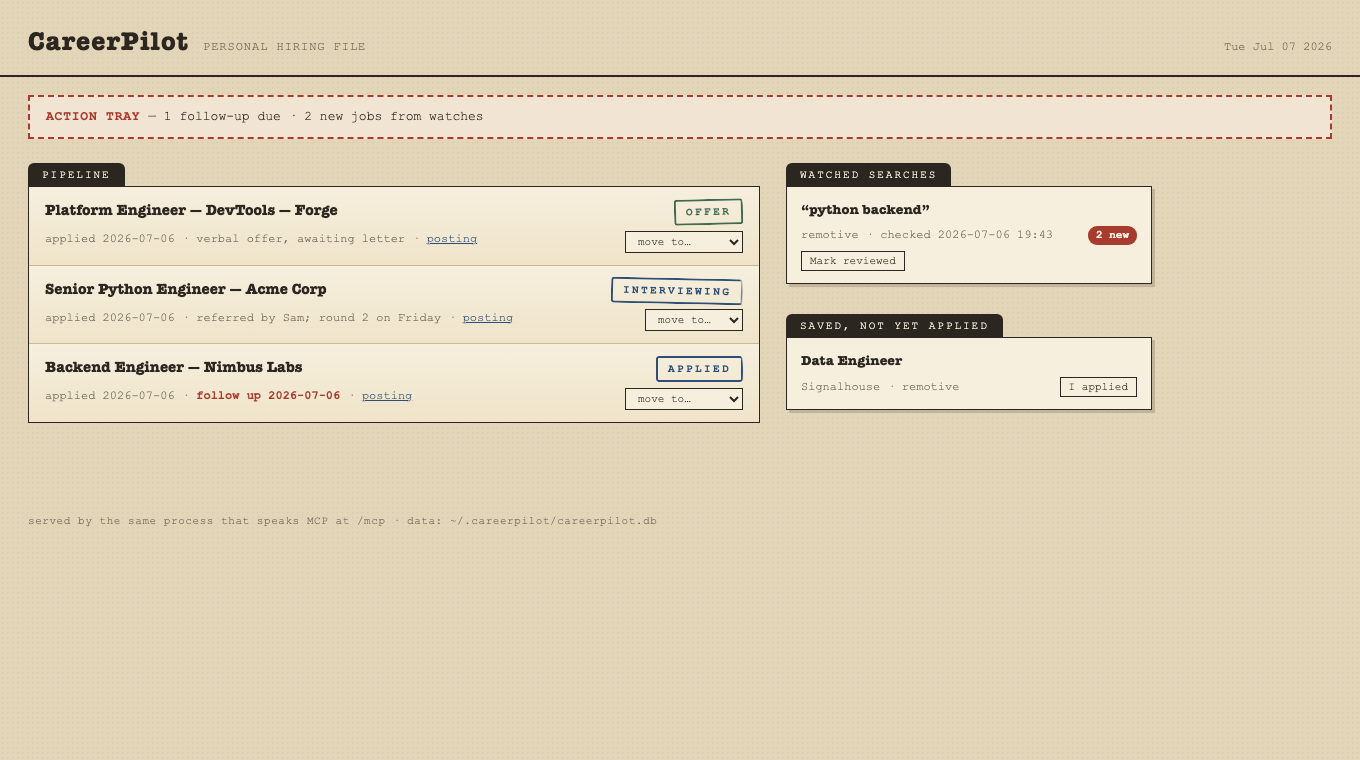
careerpilot --http also serves a dashboard at / — a "hiring file" view of your
pipeline styled as stamped paperwork: an action tray (follow-ups due, unreviewed watch
finds), the application drawer grouped in triage order, watch index cards, and one-click
"I applied" / "mark reviewed" / status changes. Same process, same SQLite, two front
doors: humans at /, LLMs at /mcp — and edits made in the browser push
resources/updated notifications to connected MCP clients.
uv run careerpilot --http # dashboard: http://127.0.0.1:8848/
When CAREERPILOT_TOKEN is set, the dashboard locks too: open
/?token=<your token> once and that browser stays unlocked (cookie);
the JSON API also accepts the same Authorization: Bearer header as /mcp.
The client side: your own MCP host (stage 4)
careerpilot-chat is a complete MCP host in ~250 lines (src/careerpilot/host.py) —
what Claude Desktop does, made visible:
export ANTHROPIC_API_KEY=sk-ant-...
uv run careerpilot-chat                                   # spawn local server (stdio)
uv run careerpilot-chat --url http://host:8848/mcp --token ...  # remote server
uv run careerpilot-chat --list                            # capability dump (no API key needed)
It negotiates capabilities, exposes the server's tools to Claude, runs the
agentic tool-call loop, answers the server's sampling requests by calling
the Anthropic API, surfaces elicitation at the terminal, grants roots (cwd),
and prints server logs and push notifications. /tools, /read <uri>,
/prompt <name> k=v, /quit inside the REPL.
Learning roadmap — complete ✅
- Stage 1 — Server fundamentals: tools, resources, templates, prompts, sampling, elicitation, roots, subscriptions, logging/progress over stdio
- Stage 2 — Watched searches: background poller pushes
resources/updatednotifications when new matching jobs appear - Stage 3 — Production transport: Streamable HTTP, bearer-token auth (MCP resource-server pattern), Dockerfile
- Stage 4 — The client:
careerpilot-chat, a minimal MCP host on the Anthropic API — handshake, tool-call loop, sampling/elicitation/roots handlers
Development
uv sync                                  # install
uv run mcp dev src/careerpilot/server.py # inspector
uv run careerpilot                       # run over stdio directly
CAREERPILOT_DB=/tmp/test.db uv run careerpilot  # throwaway database

# End-to-end protocol tests (spawn the real server, no mocks on the MCP layer)
uv run python tests/e2e_stdio_test.py     # stage 1: every MCP feature over stdio
uv run python tests/stage2_watches_test.py  # stage 2: poller + notifications
uv run python tests/stage3_http_test.py     # stage 3: HTTP transport + 401/auth
Установить CareerPilot в Claude Desktop, Claude Code, Cursor
unyly install careerpilotСтавит в Claude Desktop, Claude Code, Cursor и VS Code — сам разбирается с npx, uvx и сборкой из исходников.
Впервые? Поставь CLI: curl -fsSL https://unyly.org/install | sh
Или настроить вручную
Выполни в терминале:
claude mcp add careerpilot -- uvx --from git+https://github.com/rani700/careerpilot careerpilotFAQ
CareerPilot MCP бесплатный?
Да, CareerPilot MCP бесплатный — установка в пару кликов через Unyly без оплаты.
Нужен ли API-ключ для CareerPilot?
Нет, CareerPilot работает без API-ключей и переменных окружения.
CareerPilot — hosted или self-hosted?
Self-hosted: сервер запускается локально на твоей машине командой из раздела установки.
Как установить CareerPilot в Claude Desktop, Claude Code или Cursor?
Открой CareerPilot на unyly.org, выбери вкладку своего клиента (Claude Desktop, Claude Code, Cursor) и нажми Install — конфиг сгенерируется автоматически, без правки JSON.
Похожие MCP
Fetch
Web content fetching and conversion for efficient LLM usage.
AWS KB Retrieval
Retrieval from AWS Knowledge Base using Bedrock Agent Runtime.
 автор: modelcontextprotocol
Spring AI MCP Server
Provides auto-configuration for setting up an MCP server in Spring Boot applications.
llm-analysis-assistant
A very streamlined mcp client that supports calling and monitoring stdio/sse/streamableHttp, and can also view request responses through the /logs page. It also
 автор: xuzexin-hz
Compare CareerPilot with
Не уверен что выбрать?
Найди свой стек за 60 секунд
Автор?
Embed-бейдж для README
Похожее
Все в категории ai