

Описание
The Open-Source Cockpit for Traders
README
Carrac is a market-analysis workstation for swing and position traders. It charts crypto, equities, FX, commodities and macro series on one screen, runs a statistical engine over them, tracks trade ideas against live conditions, keeps a trade journal, writes a fact-checked daily market brief, and exposes all of it to AI agents through an MCP server. It is one Python codebase running as a web app and a background worker, with Postgres and Redis.
A reference release, not a maintained product: the system as it ran in production at v0.226.22.
git clone https://github.com/carrac-app/carrac.git && cd carrac && ./scripts/quickstart.sh
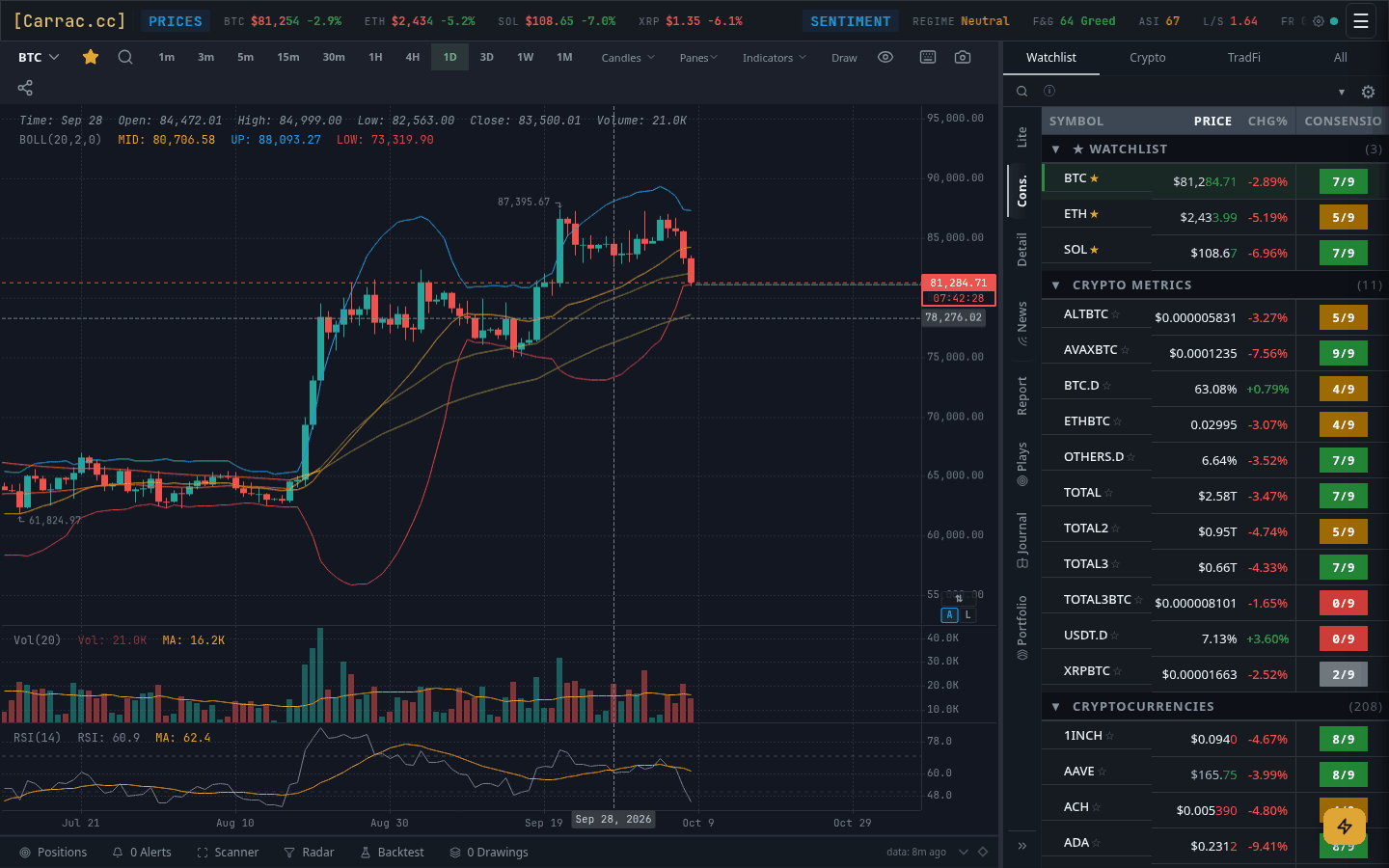
https://github.com/user-attachments/assets/00853742-2f2f-4182-8414-008fb4d57b2e
At a glance — 77 indicators · 77 MCP tools · 9 quantitative methods · 20 data providers · 9,395 tests
Capabilities
Data
| Source | What it supplies |
|---|---|
| Binance | Spot and futures candles, tickers, funding, open interest, long/short ratios; a live forced-liquidation stream. Spot data comes from Binance’s public market-data hosts, which answer from the US too; the futures data does not load from US addresses |
| Hyperliquid | Candles for coins listed only there; leaderboard (smart-money) data |
| Gate, MEXC, KuCoin, Bybit (via ccxt) | Candles for long-tail coins on neither Binance nor Hyperliquid; OKX and Bybit funding rates |
| Stooq, Yahoo Finance | Stocks, ETFs, indices, FX and commodities. Daily bars come from Stooq first, and from Yahoo when Stooq fails or has no matching series; intraday bars and symbol search come from Yahoo |
| Finnhub | Live US stock and ETF ticks (needs a key) |
| FRED | Macro series — money supply, policy rate, yields, inflation — and release dates (needs a key) |
| CFTC | Weekly Commitments of Traders positioning |
| CoinPaprika | Total market cap and dominance, gap-fill prices. Its free tier is non-commercial — see data sources |
| Collectors | Stablecoin supply from public Ethereum and Tron nodes, Bitcoin network stats (mempool.space), Fear and Greed (alternative.me), BTC ETF flows (Farside), Google Trends |
| Deribit | Options data — collected, but shown to admins only, because its terms bar redistribution |
Check each provider’s terms before commercial use (data sources).
The default universe is 221 crypto symbols and 116 traditional-market tickers (51 stocks, 29 ETFs, 17 indices, 10 FX pairs, 9 commodities). Every source is normalised into one candle format and cached on disk, in Redis and in process; each provider sits behind a circuit breaker with a fallback, and a reconciliation layer (instrument_master.py) tracks which tickers are meant to exist against what is actually on disk.
Indicators
77 indicators, declared once in static/js/indicator-registry.js: 24 trend and moving-average, 14 macro and quant, 13 levels and zones, 11 oscillators, 10 volume and flow, 5 market structure. Adding one to the registry makes it appear in every menu, mobile sheet, group editor and toggle map.
Three have their own implementation here:
- Consensio — Carrac's implementation of the Consensio Method, devised by D. Tyler Jenks of Lucid Investment Strategies. It reads only the order of three moving averages (3, 7 and 30 periods by default) and maps each of the six possible orderings to a per-timeframe signal from −3 to +3. Positive signals count as 1 to 3 positions, and the score shown in the watchlist and screener adds those positions across the 1D, 3D and 1W timeframes, giving 0 to 9. Because it is a truth table rather than a line, it changes state cleanly, which makes it usable as an alert or play condition.
- EMA Ribbon — a 30- and a 60-period EMA, with a trend called only when the gap is wider than 0.3 × ATR(60). Measuring the gap in volatility units, so that one threshold works on Bitcoin, a small-cap and an FX pair alike, is Carrac's own take on the familiar EMA-ribbon idea.
- CPR — the central pivot range, a public floor-trader pivot construction, with its support and resistance levels on daily, weekly and monthly periods. The "virgin" flag (central lines price has not touched all period and sits more than 1% from) is Carrac's addition.
Quant engine
The most distinctive part. Each question a trader asks of the market maps to one method, with the statistics done properly rather than eyeballed:
| Question | Method |
|---|---|
| Is this move unusual? | Robust z-scores (median and MAD, so one outlier does not hide the next) |
| What moves together? | Rolling Spearman correlations with Benjamini–Hochberg false-discovery correction |
| Does A lead B? | Lead-lag with significance from a circular-shift permutation test, a projected move and a confidence band |
| What regime are we in? | Two-state hidden Markov model plus changepoint detection |
| Is something odd right now? | Rule-based anomaly clusters: three or more metrics at extremes across two or more domains |
| Have we seen a day like this? | Cosine-similarity analogues, and what followed them |
| How does a shock travel? | Four hand-defined transmission chains, each link measured by lead-lag |
| How is the market positioned? | Weekly CFTC Commitments of Traders |
| What is driving things? | Three PCA composite factors: risk appetite, liquidity, credit stress |
Correlating hundreds of series produces "significant" pairs by chance; the false-discovery correction and the permutation test are there so that what survives is worth reading.
Where it surfaces
- Scanner — scores every tracked asset 0–12 on six criteria (trend, momentum, RSI, structure, nearby levels, macro) and groups the results into five bands and six setup archetypes, each row with its evidence. Daily scores are recorded so they can be checked against what happened next.
- Backtester — three models kept apart on purpose: a Hold-N signal test (hold a fixed number of bars, no stop), a full simulation (entries, exits, sizing, commission, slippage, intrabar stops and targets), and a historical analog query (what followed similar conditions). A Hold-N hit rate and a simulation win rate measure different things and are never compared.
- Plays and alerts — a play is a written thesis with conditions that confirm or invalidate it, evaluated continuously in the background; an alert is a single condition. 24 condition types cover price, candles, indicators, cross-asset comparisons, user formulas, derivatives and time. Formulas use Carrac's own small expression language rather than running user code. Delivery goes to web push, ntfy, Discord or Telegram.
- Journal — trades, playbooks and sessions, with expectancy, MFE/MAE and an equity curve; the portfolio is rebuilt from the journal. Trades are logged by hand or pulled read-only from Binance spot and Hyperliquid.
The daily brief
A deterministic step assembles a fact set — prices, levels, regime, calendar — and a language model writes the brief from it: daily, an afternoon update, weekly and week-ahead. Four independent defences sit between the draft and the reader:
- Hard rules in the prompt — no advice, no number that is not in the facts.
- Regex tripwires — advice phrasing, figures absent from the source, calendar and news claims.
- A publish gate that blocks on any high-severity finding.
- A second model that checks each claim against the source facts.
Built for agents
An MCP server exposes 77 tools — market data, quant output, the scanner, backtests, plays, alerts, drawings, the journal, reports — to any MCP client, each checked against the same tier rules as the web app. It also ships what an agent needs to use them well: glossaries for the indicators, the quant engine and the three backtest models; grounding rules (never advice, never a number that is not in a tool result); and a live facts resource with today's macro values, so a model does not fall back on its training data.
Operators hosting it for others should note that tool calls are logged with an optional one-line intent, a hashed caller reference and the outcome, and purged after 90 days.
On the phone
- Installable PWA. A web manifest (
static/manifest.json) installs it standalone, and a service worker (static/service-worker.js) serves static assets from a versioned cache. API calls go network-first, with an age-stamped cached copy as the offline fallback and a hard timeout on every fetch. - Built for touch. The same chart page has its own touch gestures, mobile
drawing tools and bottom sheets (
chart-gestures.js,mobile-chart.js,mobile-touch.js,mobile-draw.js). The indicator registry drives the mobile sheets as well as the desktop menus, so the two cannot drift apart. - Notifications. Alerts and plays are delivered as Web Push (VAPID, via
pywebpush), and tapping one opens the relevant page. They can also go to ntfy, Discord or Telegram. - Home-screen widgets. An Android widget (
android-widget/, Kotlin, Jetpack Glance and WorkManager) and an iOS widget for the Scriptable app (static/widget/carrac-widget.js). Each shows one of four views: watchlist, positions, sentiment or alerts. They read one endpoint,/api/widget/summary, with a per-device token the user creates in Settings, never the session. The Android build takes your server’s address from the Gradle propertycarracBaseUrl; the iOS script is served by your instance, already pointing at it.
In the terminal

carrac-tui is a separate Rust
client for the same API (MIT or Apache-2.0): charts, positions, plays, alerts,
reports and news as Unicode in a terminal, plus a key that hands the current
view to your own AI agent. It defaults to http://localhost:5002 and takes an
API key from Settings → Developer. Without any client, curl localhost:5002/btc
draws a chart straight from the server.
How it fits together
flowchart LR
    U[Browser / PWA] --> N[nginx]
    A[AI agent<br/>MCP client] --> N
    H[Home-screen widgets<br/>Android · iOS] -->|widget token| N
    N --> D
    subgraph APP [app container]
        D[ASGI dispatcher<br/>carrac/asgi.py]
        D -->|listed path + method| F[FastAPI<br/>async routes, MCP]
        D -->|everything else| L[Flask<br/>30 blueprints]
    end
    subgraph WK [worker container]
        W[python worker.py<br/>chart warming · backfill<br/>live feeds · schedulers]
    end
    F --> PG[(Postgres)]
    L --> PG
    F --> R[(Redis<br/>cache · sessions · rate limits)]
    L --> R
    W --> PG
    W --> R
    W --> P[Market data providers]
    L --> P
    C[host cron<br/>daily brief · quant collectors] --> LLM[LLM provider]
    C --> PG
    C --> P
One image runs as both the web app and the worker. The worker does everything a request should not wait for: pre-warming charts, collecting market data and running live feeds. In the web app, an ASGI dispatcher (carrac/asgi.py) routes each path and method to Flask or FastAPI from explicit tables, and both share one Redis-backed session.
docs/architecture.md covers request routing, caching, the worker, storage and the security model.
Scope
- No order execution. Carrac reads exchanges; it never places an order.
- No advice. Carrac describes markets; it does not tell anyone what to trade. Every prompt forbids advice, reports are screened for advice phrasing before they are saved, and the AI features assess a plan the user wrote rather than proposing entries, stops, targets or sizes.
- Exchange sync is read-only: Binance spot and Hyperliquid fills.
- The in-app AI assistant ships switched off; agents use the MCP server.
Running it
You need Docker with the Compose plugin, curl, openssl and about 4 GB free on the disk you clone onto (the script checks). No account or API key is needed. Then:
git clone https://github.com/carrac-app/carrac.git && cd carrac && ./scripts/quickstart.sh
The script generates the secrets, starts Postgres, Redis, the app and the
worker, waits for them, and runs a six-step smoke check before printing a
working login. The app is then at http://localhost:5002; if that port is
taken, set CARRAC_PORT (default 5002) for the script and for every later
docker compose -f docker-compose.dev.yml command, for example
CARRAC_PORT=5050 ./scripts/quickstart.sh. make dev runs the same script;
make dev-logs and make dev-down follow and stop it.
The quant collectors and the daily brief run from cron:
deploy/crontab.example has the entries (for the
quickstart stack, set COMPOSE_FILE=docker-compose.dev.yml in the crontab).
The quant views fill once the collectors have run; briefs also need an AI key
(docs/configuration.md).
Resetting the development stack
make dev-down keeps the database and Redis volumes. To remove everything,
including the image the quickstart built:
docker compose -f docker-compose.dev.yml down -v   # containers, network and both volumes
docker rmi "${CARRAC_DEV_IMAGE:-carrac-dev}"       # the image
./data is a bind mount owned by uid 1000, so down -v leaves it behind;
on a host where you are not uid 1000, deleting it needs sudo.
No API keys are needed to start. AI-written reports, email and some
market-data providers stay off until you supply their keys —
docs/configuration.md lists which variable turns on
what.
./scripts/configure.sh walks through those features and writes the keys
into .env for you (--list shows what is on; --set KEY=VALUE sets one
without questions). .env is read when a container is created, so re-create
the containers afterwards. For a stack started with the quickstart or make dev:
docker compose -f docker-compose.dev.yml up -d --force-recreate
For a stack you started by hand (below), use the plain docker compose up -d --force-recreate.
By hand, with Docker Compose
cp .env.example .env
Set the four values at the top of .env (two database passwords, a session
key, and the email you will sign in with — each has its generate command in
the file). If you will open the app over plain HTTP, such as
http://localhost, also set SESSION_COOKIE_SECURE=false; otherwise the
browser drops the login cookie and you stay signed out (the quickstart script
sets this for you). Then:
docker compose up -d
This starts Postgres, Redis, the app and the worker. Two maintainer services
are left out: a second app container (carrac-b) for rolling deploys behind a
reverse proxy, and autoheal, which mounts the Docker socket and so has
root-equivalent access to the host. Add --profile ops to start them.
The migrate service builds the schema on first boot. Open
http://localhost:5002, register with ADMIN_EMAIL, and sign in — that
account is created as admin and needs no email verification. Other accounts
must verify their email; without SMTP configured no mail goes out, so mark a
user verified from the app container:
docker compose exec carrac python -c "from user_db import user_db; \
  print(user_db.set_email_verified(user_db.get_user_by_email('[email protected]')['id']))"
docker compose logs -f carrac    # follow the app
docker compose down              # stop; add -v to discard the database too
.env is read when a container is created, so after editing it run
docker compose up -d --force-recreate; docker compose restart keeps the
old values. (For the quickstart stack, add -f docker-compose.dev.yml to the
command; the plain file is the production stack and would start a second one.)
Without Docker
Needs PostgreSQL 16 and, optionally, Redis 7 (the app falls back to an
in-memory cache without it; the readiness probe and worker heartbeat expect
it). The Python version is pinned in .python-version (3.11).
python3.11 -m venv .venv && source .venv/bin/activate
pip install -r requirements.lock           # what the image installs; requirements.txt is the loose spec
cp .env.example .env                       # set DATABASE_URL / REDIS_URL to your own instances
python scripts/alembic_stamp_if_fresh.py   # build/upgrade the schema
gunicorn -b 127.0.0.1:5000 -k uvicorn.workers.UvicornWorker carrac.asgi:asgi_app
The entry point is carrac.asgi:asgi_app; the background worker is
python worker.py.
Tests
The suite needs no database or cache server — it runs on SQLite. You need
Python 3.11 in a virtual environment at .venv/ with the runtime and dev
dependencies, and Node.js 18 or newer for eslint (fetched by npx on
first run) and the JavaScript tests.
python3.11 -m venv .venv && source .venv/bin/activate
pip install -r requirements.lock
make dev-install   # ruff, pytest, pytest-xdist, pip-audit (requirements-dev.txt)

make lint          # ruff + eslint
make test          # lint, the JS tests, then the full pytest suite
make test-quant    # the quantitative engine only
make help          # every developer target
The Makefile uses .venv/bin/python3 when it exists, otherwise python3 on
your PATH; point it elsewhere with make test PYTHON=/path/to/python.
make test runs pytest with four workers; a clean-clone run takes about four
to five minutes. Keep the virtual environment activated when running make
targets.
The default suite runs on SQLite. The separate tests/pg/ suite (the
pg-portability CI job) runs the write paths against the production schema in
PostgreSQL and guards against schema drift. Against a throwaway Postgres 16
with user, password and database carrac / carrac / carrac_test:
export DATABASE_URL=postgresql://carrac:carrac@localhost:5432/carrac_test
export TEST_DATABASE_URL=$DATABASE_URL CARRAC_TEST_DB=postgres TESTING=true SECRET_KEY=ci-portability-secret-key
psql "$DATABASE_URL" -v ON_ERROR_STOP=1 -f tests/schema/carrac_pg_schema.sql
pytest tests/pg/ -q -p no:xdist --tb=short    # 38 tests

# drift guard: the repo (baseline + migrations) must rebuild that same schema
psql "$DATABASE_URL" -c "CREATE DATABASE carrac_bootstrap;"
DATABASE_URL=postgresql://carrac:carrac@localhost:5432/carrac_bootstrap \
  sh -c 'python -m quant.schema && alembic upgrade head'
python scripts/check_schema_drift.py "$DATABASE_URL" \
  postgresql://carrac:carrac@localhost:5432/carrac_bootstrap
The test count above is what
pytest --collect-only -m "not integration and not slow" collects.
Python SDK tests, in a virtualenv of their own (the SDK and the app are both
named carrac and must not share one):
cd sdk-python && python3 -m venv .venv && .venv/bin/pip install -e .[dev] && .venv/bin/pytest.
Both SDKs (0.2.0) require a base URL (base_url / baseUrl, or CARRAC_BASE_URL); there is no default host.
To run the browser smoke against the local stack (variable names are read by
scripts/browser-smoke.py). <email> and <password> are the ones
./scripts/quickstart.sh printed, and 5000 is the port inside the container
(the host port is 5002). carrac-dev-carrac-1 is the app container of the
default quickstart project (docker ps shows it):
docker exec -i -e BROWSER_SMOKE_BASE=http://localhost:5000 \
  -e SMOKE_LOGIN_EMAIL=<email> -e SMOKE_LOGIN_PASSWORD=<password> \
  carrac-dev-carrac-1 python - < scripts/browser-smoke.py
Right after a fresh quickstart, give the worker about ten minutes to warm the market data first; until then the asset-table check fails with "loadData never completed".
The 12 admin and premium checks run only when SMOKE_ADMIN_EMAIL and
SMOKE_ADMIN_PASSWORD are also set (pass them with two more -e flags); the
quickstart account is an admin, so its login works for them.
On a default stack the smoke prints details drawer flag OFF here — drawer checks SKIPPED. That is expected: the per-asset details drawer is behind
DETAILS_DRAWER_ENABLED=1, and the checks it skips are reported as skipped,
not passed. Set the flag in .env, recreate the containers (see above) and run
the smoke again to include them.
Repository layout
carrac/            the web app: Flask blueprints, FastAPI routers (fastapi_app/),
                   MCP server (mcp/), scanner, plays, journal, drawings, reports,
                   tiers; content_db.py stores drawings, journal and report history
consensio/         Carrac's implementations of Consensio, EMA Ribbon and CPR, plus structure
quant/             statistical engine (engine/), nightly collectors (collectors/), API
morning_engine/    the daily and weekly brief: fact assembly, prompts, tripwires, gate
data_sources/      provider clients, circuit breakers, source health
static/  templates/  vanilla-JS frontend and Jinja templates — no build step
tests/             pytest and JS tests, including golden and parity suites
alembic/           database migrations
scripts/           quickstart, smoke tests, integrity checks, maintenance
sdk-python/  sdk-typescript/   MIT-licensed API clients
android-widget/    Android home-screen widget (Kotlin)
config/            asset lists, indicator guide, a Cloudflare real-IP nginx snippet
docs/              architecture, capabilities, configuration, decisions
worker.py          the background worker; database.py, cache_manager.py and
                   csv_cache.py are the market-data store and its caches
Documentation
- docs/architecture.md — how it fits together: routing, caching, the worker, storage, security
- docs/configuration.md — every environment variable, grouped by feature
Security: SECURITY.md. Contributing: CONTRIBUTING.md.
Licence
AGPL-3.0; the SDKs in sdk-python/ and sdk-typescript/ are MIT. The Carrac name and marks are not licensed, so please rename forks. Third-party attributions and the full disclaimer are in NOTICE.
Not financial advice. Trading involves risk, including loss of capital.
Built and owned by Gyula Pál with Claude Code. Terminal client: carrac-tui, a separate Rust TUI for the same API.
Установка Carrac
У этого сервера нет опубликованного пакета — он собирается из исходников. Открой репозиторий и следуй инструкции в README.
▸ github.com/carrac-app/carracFAQ
Carrac MCP бесплатный?
Да, Carrac MCP бесплатный — установка в пару кликов через Unyly без оплаты.
Нужен ли API-ключ для Carrac?
Нет, Carrac работает без API-ключей и переменных окружения.
Carrac — hosted или self-hosted?
Self-hosted: сервер запускается локально на твоей машине командой из раздела установки.
Как установить Carrac в Claude Desktop, Claude Code или Cursor?
Открой Carrac на unyly.org, выбери вкладку своего клиента (Claude Desktop, Claude Code, Cursor) и нажми Install — конфиг сгенерируется автоматически, без правки JSON.
Похожие MCP
Stripe
Payments, customers, subscriptions
 автор: Stripe
malamutemayhem/unclick-agent-native-endpoints
110+ tools for AI agents spanning social media, finance, gaming, music, AU-specific services, and utilities. Zero-config local tools plus platform connectors. n
 автор: malamutemayhem
whiteknightonhorse/APIbase
API hub covering travel (Amadeus, Sabre), Polymarket prediction markets, crypto and weather, paid per call via x402 in USDC.
 автор: whiteknightonhorse
trackerfitness729-jpg/sitelauncher-mcp-server
Deploy live HTTPS websites on subdomains or custom .xyz domains, paid in USDC on Base, with templates for crypto tokens and AI agent profiles.
 автор: trackerfitness729-jpg
embeddedlayers/mcp-analytics
Statistical analysis, forecasting and ML on CSV files or live data from Shopify, Stripe, GA4 and more, with interactive HTML reports.
 автор: embeddedlayers
carrierone/verilexdata-mcp
Pay-per-query x402 datasets: NPI healthcare, SEC filings, OFAC sanctions, crypto whales, Polymarket signals, patents and economic indicators.
 автор: carrierone
paracetamol951/P-Link-MCP
HTTP 402 (Payment Required) implementation using Solana.
 автор: paracetamol951
tipdotmd/tip-md-x402-mcp-server
Cryptocurrency tipping using the x402 payment protocol and CDP Wallet.
 автор: tipdotmd
laundromatic/shopgraph
Structured product data from the open web — Schema.org + AI extraction for e-commerce enrichment. Pay per call via Stripe. [shopgraph.dev](https://shopgraph.dev
 автор: laundromatic
mrslbt/xendit-mcp
Xendit payment gateway for Southeast Asia: invoices, disbursements, balance checks and bank transfers.
 автор: mrslbt
Compare Carrac with
Не уверен что выбрать?
Найди свой стек за 60 секунд
Автор?
Embed-бейдж для README
Похожее
Все в категории finance