
Claude Atlas
БесплатноНе проверенClaude Code plugin + MCP server for Atlassian Atlas — read, create (with goal/tag/Jira links), and update Atlas projects.

Описание
Claude Code plugin + MCP server for Atlassian Atlas — read, create (with goal/tag/Jira links), and update Atlas projects.
README
An MCP (Model Context Protocol) server that gives Claude Code access to Atlassian Atlas -- Atlassian's project tracking and teamwork directory.
What it does
claude-atlas exposes Atlas project data as MCP tools, allowing Claude Code to read and update your Atlas projects through natural conversation. It communicates with the Atlas GraphQL API using Basic Auth.
MCP Tools
| Tool | Description |
|---|---|
list_projects |
List all non-archived projects, sorted by most recently updated |
create_project |
Create a project with a name, description, and optional goal link, tag, and Jira issue link |
get_project |
Get details of a single project by ID (name, description, state, due date, owner, members) |
get_projects |
Get details of multiple projects by their IDs |
get_project_updates |
Get status updates and highlights for a project |
create_project_update |
Post a new status update with summary, status, and highlights |
archive_project |
Archive or unarchive a project |
atlas_graphql_query |
Execute a raw GraphQL query against the Atlas API |
Claude Code Skills
The server also ships with Claude Code slash command skills. They live in
.claude/skills/, so anyone who clones this repo gets them automatically — no
separate install. Each skill calls the atlas MCP tools, so the server must be
configured (see Setup below) for them to work.
/atlas-projects-- List and browse your Atlas projects in a formatted table/atlas-create-- Create one or more projects, optionally linked to a goal, tagged, and linked to Jira issues/atlas-status-- View the latest status updates for a project/atlas-update-- Compose and post a new status update to a project/atlas-my-updates-- List status updates for projects you own or contribute to/atlas-tag-- List projects filtered by a tag
Install as a plugin (recommended for sharing)
This repo is a Claude Code plugin marketplace, so anyone in the org can install the MCP server and all the skills in one step:
/plugin marketplace add razvan-sc/claude-atlas
/plugin install atlas@safetyculture-atlas
Skills are then available namespaced as /atlas:create, /atlas:projects,
/atlas:status, and so on. To pick up new versions after changes are pushed:
/plugin marketplace update safetyculture-atlas
Two per-user prerequisites still apply:
- uv must be installed — the bundled
atlasMCP server runs viauv run. - Each user needs their own
~/.atlas/config.json(see Setup below) — credentials are personal and are not bundled with the plugin.
Setup
1. Create a config file
mkdir -p ~/.atlas
cat > ~/.atlas/config.json << 'EOF'
{
  "email": "[email protected]",
  "api_token": "your-atlassian-api-token",
  "subdomain": "yoursite"
}
EOF
email-- Your Atlassian account emailapi_token-- An Atlassian API tokensubdomain-- Your Atlassian site name (theyoursitepart ofyoursite.atlassian.net)cloud_id(optional) -- Your Atlassian cloud ID. If omitted, it will be resolved automatically.
2. Install
pip install -e .
3. Add to Claude Code
Add the server to your .mcp.json:
{
  "mcpServers": {
    "atlas": {
      "command": "atlas"
    }
  }
}
4. Add to Claude Desktop
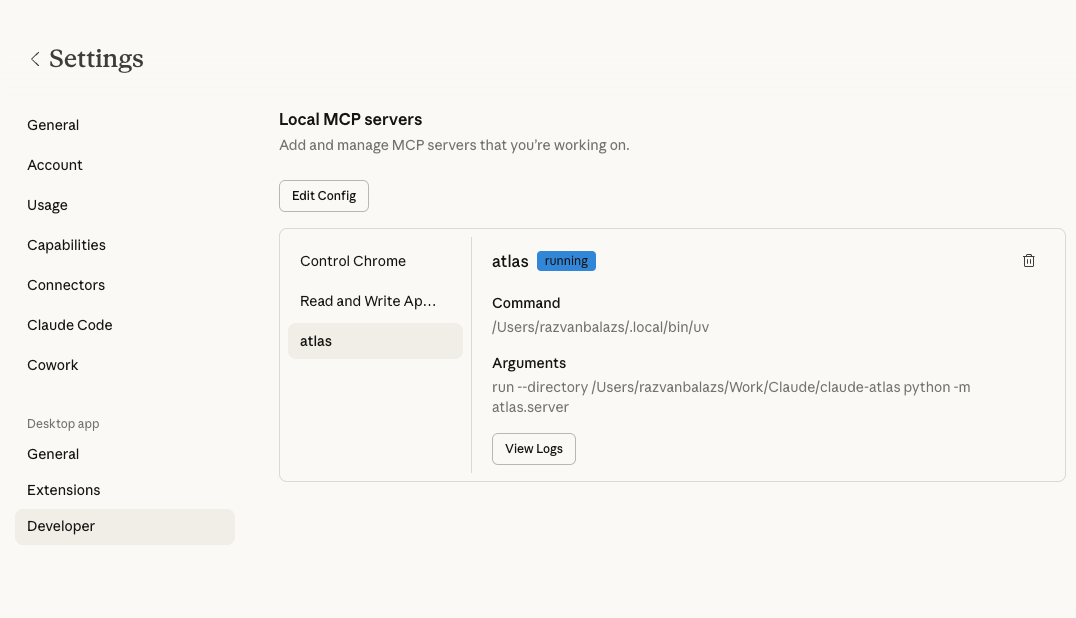
Open Settings → Developer in the Claude Desktop app, click Edit Config, and add the following to your claude_desktop_config.json:
{
  "mcpServers": {
    "atlas": {
      "command": "uv",
      "args": [
        "run",
        "--directory", "/path/to/claude-atlas",
        "python", "-m", "atlas.server"
      ]
    }
  }
}
Replace /path/to/claude-atlas with the absolute path to your local clone of this repo. After saving, restart Claude Desktop — the server should appear under Settings → Developer with a running status.
Development
Requires Python 3.10+.
# Install with dev dependencies
pip install -e ".[dev]"

# Run tests
pytest
Project structure
src/atlas/
  config.py          # Config loader (~/.atlas/config.json)
  graphql_client.py  # Async GraphQL client with Basic Auth
  queries.py         # GraphQL query and mutation strings
  server.py          # MCP tool definitions and server entrypoint
Установка Claude Atlas
У этого сервера нет опубликованного пакета — он собирается из исходников. Открой репозиторий и следуй инструкции в README.
▸ github.com/razvan-sc/claude-atlasFAQ
Claude Atlas MCP бесплатный?
Да, Claude Atlas MCP бесплатный — установка в пару кликов через Unyly без оплаты.
Нужен ли API-ключ для Claude Atlas?
Нет, Claude Atlas работает без API-ключей и переменных окружения.
Claude Atlas — hosted или self-hosted?
Self-hosted: сервер запускается локально на твоей машине командой из раздела установки.
Как установить Claude Atlas в Claude Desktop, Claude Code или Cursor?
Открой Claude Atlas на unyly.org, выбери вкладку своего клиента (Claude Desktop, Claude Code, Cursor) и нажми Install — конфиг сгенерируется автоматически, без правки JSON.
Похожие MCP
GitHub
PRs, issues, code search, CI status
 автор: GitHub
Filesystem
Secure file operations with configurable access controls.
Memory
Knowledge graph-based persistent memory system.
Template MCP Server
A CLI tool to create a new Model Context Protocol server project with TypeScript support, dual transport options, and an extensible structure
 автор: mcpdotdirect
Amap Maps Mcp Server
MCP server for using the AMap Maps API
 автор: duxiaohui
Supabase
Database, auth and storage
 автор: Supabase
Everything
Reference / test server with prompts, resources, and tools.
Git
Tools to read, search, and manipulate Git repositories.
Sequential Thinking
Dynamic and reflective problem-solving through thought sequences.
Time
Time and timezone conversion capabilities.
Compare Claude Atlas with
Не уверен что выбрать?
Найди свой стек за 60 секунд
Автор?
Embed-бейдж для README
Похожее
Все в категории development