
Claude Deep Research
БесплатноНе проверенExtends research capabilities by providing unified access to web and academic information through DuckDuckGo and Semantic Scholar integrations, enabling multi-s

Описание
Extends research capabilities by providing unified access to web and academic information through DuckDuckGo and Semantic Scholar integrations, enabling multi-stage workflows for exploration, synthesis, and analysis with proper citations.
README
An MCP (Model Context Protocol) server that enables comprehensive research capabilities for Claude and other MCP-compatible AI assistants. This server integrates web and academic search functionality, allowing AI models to access current information from multiple sources, follow relevant links, and provide well-structured research results.
Overview
Claude Deep Research is a powerful research tool that extends the capabilities of LLMs by providing:
- Web search integration through DuckDuckGo
- Academic research access through Semantic Scholar
- Content extraction from web pages
- Comprehensive analysis with structured formatting
- Visualization guidance for data representation
The server follows MCP design principles to provide a seamless integration with Claude and other AI assistants.
Features
- Unified Research Tool: Single interface for web and academic information
- Multi-Source Integration: Combines information from various sources into cohesive research
- Content Extraction: Pulls relevant information from web pages
- Academic Source Discovery: Finds scholarly articles related to your topic
- Smart Formatting: Properly formats research with citations
- Visual Framework: Provides guidance for creating effective data visualizations
- Structured Analysis: Organizes research using academic methodologies
Installation
Prerequisites
- Python 3.8 or higher
- pip or uv package manager
Quick Install
# Using pip
pip install mcp httpx beautifulsoup4

# Clone the repository
git clone https://github.com/yourusername/claude-deep-research.git
Configuration
The server works out of the box with default settings, but you can modify the following parameters in deep_research.py for customization:
# Configuration
USER_AGENT = "Mozilla/5.0 (Windows NT 10.0; Win64; x64) AppleWebKit/537.36 (KHTML, like Gecko) Chrome/91.0.4472.124 Safari/537.36"
MAX_CONTENT_SIZE = 8000  # Maximum characters in the final response
MAX_RESULTS = 3         # Maximum number of results to process
Usage
Running the Server
Modify your Claude desktop config and restart Claude. On a Mac this is at ~/Library/Application Support/Claude
  "search-scholar": {
      "command": "<Path to Python>/python",
      "args": [
        "<Path to deep research>/deep_research.py"
      ]
    }
Using with Claude Desktop
Once installed, you can access the server in Claude Desktop:
- Tool Access: Use the
deep_researchtool directly in conversation
Research Tool
The main deep_research tool accepts the following parameters:
query(required): The research question or topicsources(optional): Which sources to use: "web", "academic", or "both" (default)num_results(optional): Number of sources to examine (default 2, max 3)
Example prompts:
Can you research the latest developments in quantum computing?

I need comprehensive information about climate change mitigation strategies. Use the deep_research tool to help me.

Research the history and cultural significance of origami using academic sources.
Research Prompt
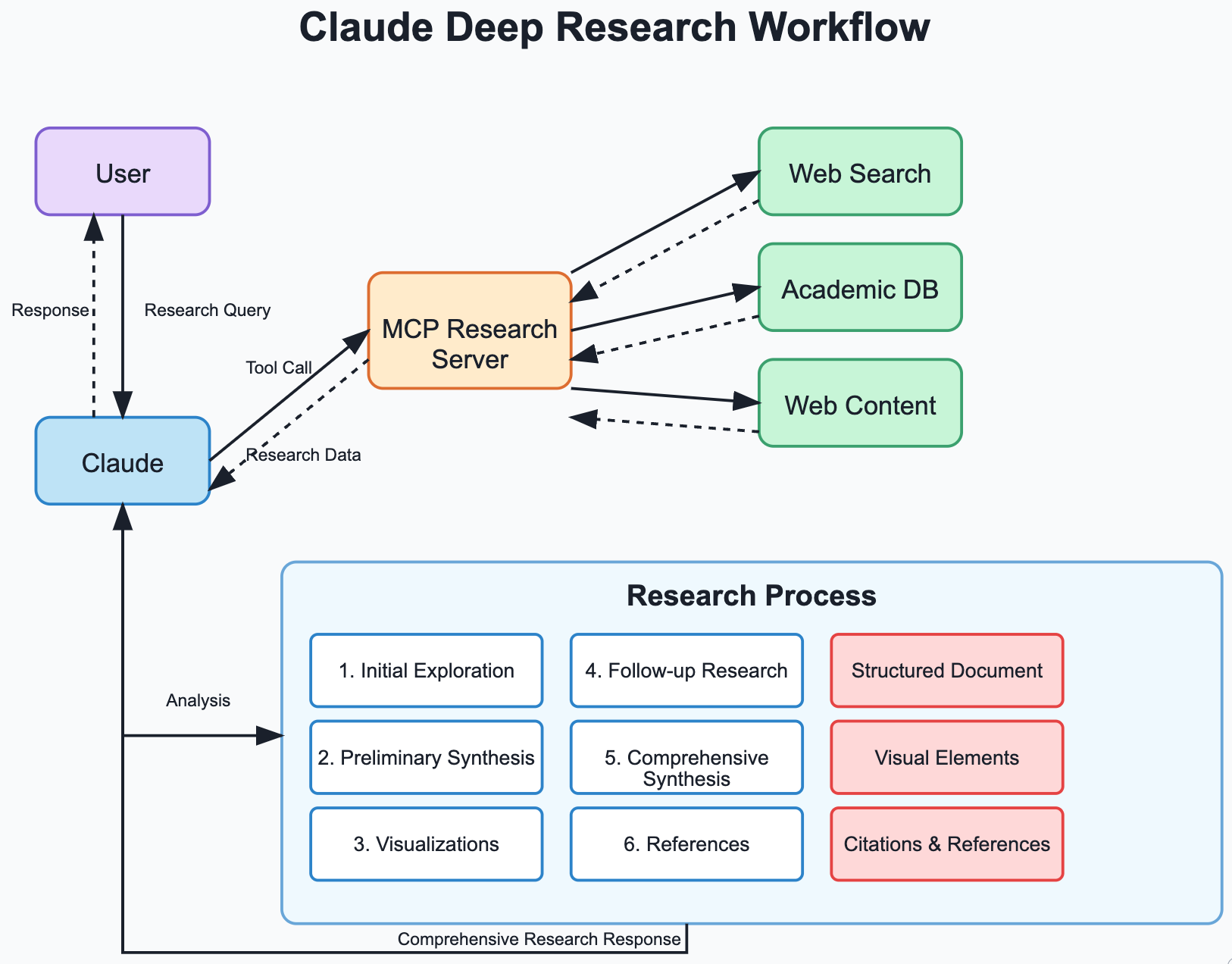
The server includes a structured research prompt that guides Claude through a comprehensive research process:
- Initial Exploration: Gathers information from multiple sources
- Preliminary Synthesis: Organizes findings with visualization
- Follow-up Research: Identifies and explores knowledge gaps
- Comprehensive Analysis: Integrates all information with visual elements
- Proper Citations: Formats references using APA style
Troubleshooting
Common Issues
- Server Connection Failures: Ensure you're using the correct path to the server file.
- Search Errors: Some searches may time out or return limited results. Try a more specific query.
- Web Access Issues: The server requires internet access to function properly.
- Content Formatting: Very large responses may be truncated to fit within size limits.
Logs
The server outputs logs to stderr that can help diagnose issues:
# View logs when running directly
python deep_research.py 2> server.log

# View logs from Claude Desktop (macOS/Linux)
tail -f ~/Library/Logs/Claude/mcp-server-deepresearch.log
Contributing
Contributions are welcome! Please feel free to submit a Pull Request.
Acknowledgments
- Built on the Model Context Protocol
- Uses DuckDuckGo for web search
- Uses Semantic Scholar for academic research
- Inspired by Anthropic's Claude
Made with ❤️ for extending AI capabilities through MCP
Установка Claude Deep Research
У этого сервера нет опубликованного пакета — он собирается из исходников. Открой репозиторий и следуй инструкции в README.
▸ github.com/mcherukara/claude-deep-researchFAQ
Claude Deep Research MCP бесплатный?
Да, Claude Deep Research MCP бесплатный — установка в пару кликов через Unyly без оплаты.
Нужен ли API-ключ для Claude Deep Research?
Нет, Claude Deep Research работает без API-ключей и переменных окружения.
Claude Deep Research — hosted или self-hosted?
Self-hosted: сервер запускается локально на твоей машине командой из раздела установки.
Как установить Claude Deep Research в Claude Desktop, Claude Code или Cursor?
Открой Claude Deep Research на unyly.org, выбери вкладку своего клиента (Claude Desktop, Claude Code, Cursor) и нажми Install — конфиг сгенерируется автоматически, без правки JSON.
Похожие MCP
Fetch
Web content fetching and conversion for efficient LLM usage.
AWS KB Retrieval
Retrieval from AWS Knowledge Base using Bedrock Agent Runtime.
 автор: modelcontextprotocol
Spring AI MCP Server
Provides auto-configuration for setting up an MCP server in Spring Boot applications.
llm-analysis-assistant
A very streamlined mcp client that supports calling and monitoring stdio/sse/streamableHttp, and can also view request responses through the /logs page. It also
 автор: xuzexin-hz
Compare Claude Deep Research with
Не уверен что выбрать?
Найди свой стек за 60 секунд
Автор?
Embed-бейдж для README
Похожее
Все в категории ai