
Cloud Custodian
БесплатноНе проверенGenerates, validates, and manages Cloud Custodian policies across AWS, GCP, and Azure using natural language prompts.

Описание
Generates, validates, and manages Cloud Custodian policies across AWS, GCP, and Azure using natural language prompts.
README
A Multi-Cloud Policy (MCP) generation and validation tool powered by Cloud Custodian and LLMs.
Overview
Cloud Custodian MCP is an assistant for generating, validating, and managing Cloud Custodian policies across AWS, GCP, and Azure. It leverages natural language prompts to create YAML policies, supports approval workflows (Slack/Email), and provides a web UI for interaction and execution history.
Demo
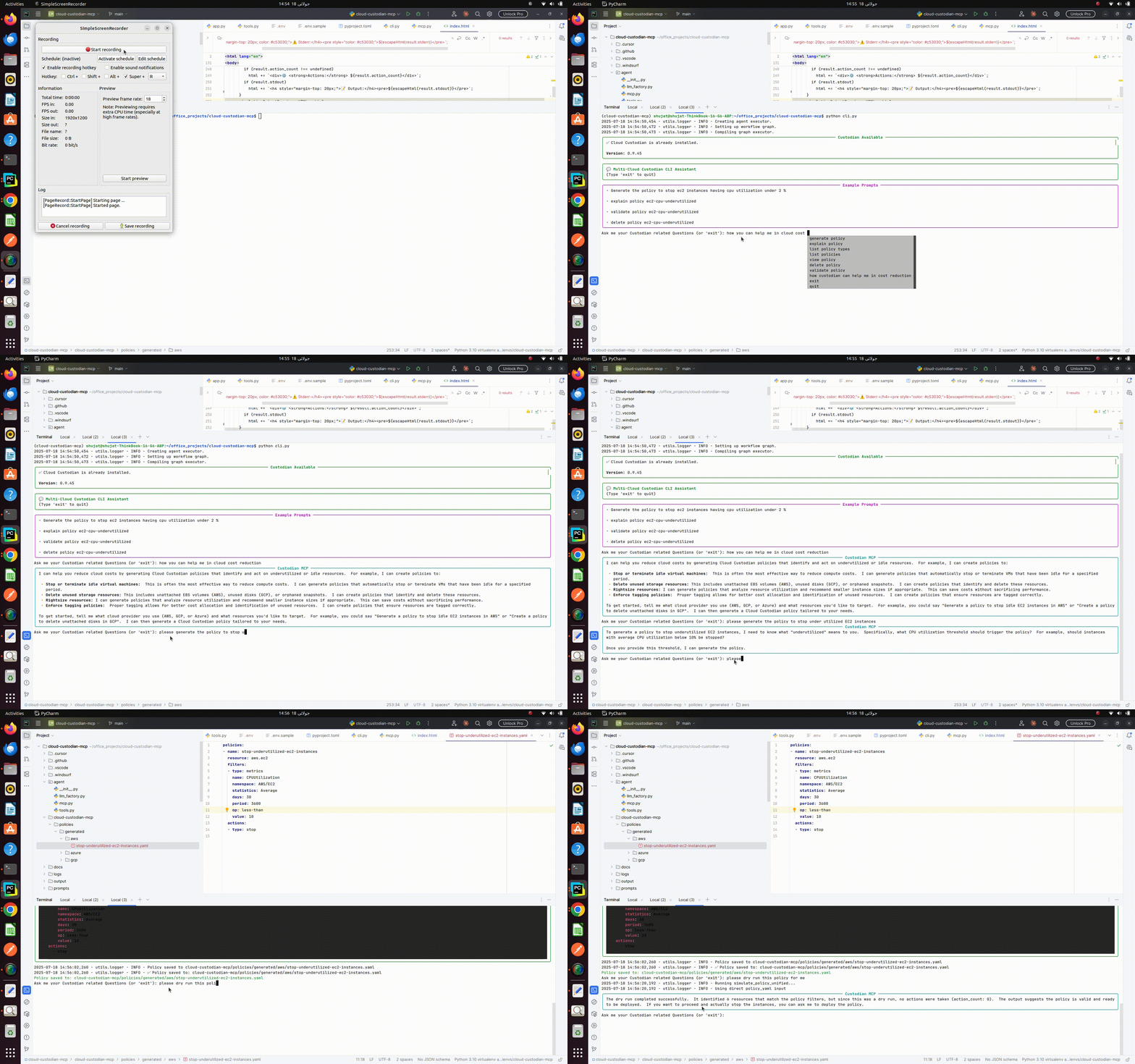
CLI Interface Demo:
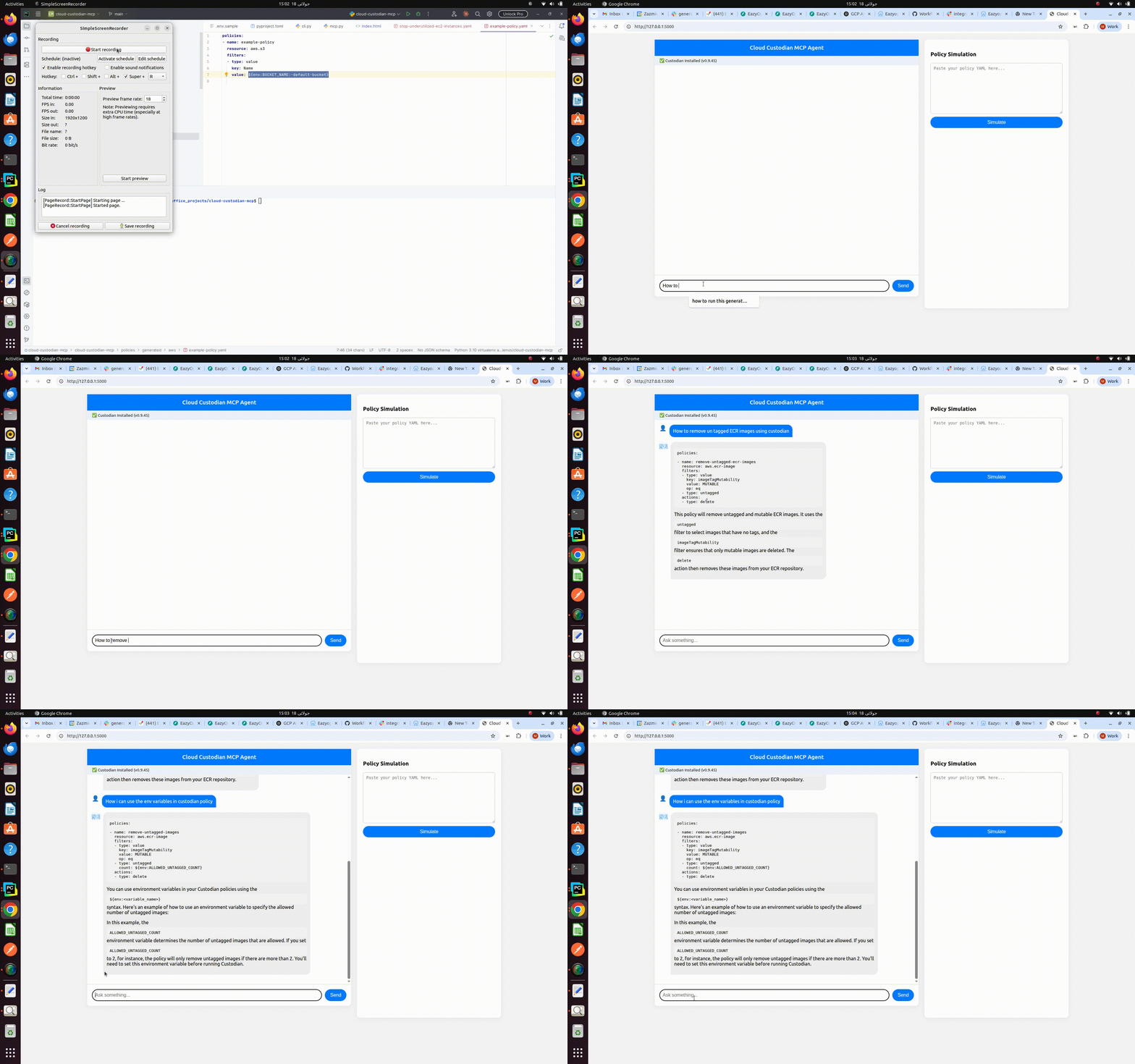
Web UI Demo:
Core Features
- 🌐 Multi-cloud support: Generate policies for AWS, GCP, and Azure resources.
- 🤖 Natural language to YAML: Turn plain English requests into valid Cloud Custodian policies.
- 📝 Policy explanation: Ask for explanations of any policy YAML.
- 🖥️ Web UI: Chat interface for prompt/response and execution history.
- 🗃️ Execution logging: SQLite-backed logs of policy runs and results.
Docker Setup
You can run both the UI and CLI versions of this application using Docker Compose. This is the recommended way to get started quickly and ensures all dependencies are handled for you.
1. Build the Docker Images
Build both the UI and CLI images with:
sudo docker compose build
This will create two separate images: one for the web UI and one for the CLI interface.
2. Run the CLI Interface
To start the CLI tool in an interactive shell, use:
sudo docker compose run cli
You will be dropped into a prompt where you can ask questions or generate policies, e.g.:
Ask me your Custodian related Questions (or 'exit'): how custodian can help me in cost reduction
...response...
Ask me your Custodian related Questions (or 'exit'): generate the policy for aws idle resources to stop ec2 instances having cpu utilization under 2 %
...YAML policy response...
3. Run the Web UI
To start the web UI, use:
sudo docker compose run ui
Then open http://localhost:5000 in your browser to access the application.
Note: Make sure to configure your
.envfile with the required API keys and settings before building the images.
Quick Start
Using Docker (Recommended)
- Ensure Docker is running: Make sure Docker Desktop or your Docker daemon is active.
- Create a
.envfile: Copy.env.sampleto.envand fill in yourGOOGLE_API_KEY.cp .env.sample .env - Build and run the containers:
docker-compose up --build - Open the UI: Visit http://localhost:5000 in your browser.
Local Development (Poetry)
Install dependencies:
poetry installActivate the virtual environment:
poetry shellLaunch the Flask app:
python3 app.pyOpen the UI: Visit http://localhost:5000 in your browser.
Run CLI Interface (Alternative):
python cli.pySample CLI Interactions:
CLI Example 1: General Cost Reduction Question
Command:
how custodian can help me in cost reductionResponse:
Cloud Custodian can help with cost reduction in several ways by automating policy enforcement. It can identify and remove unused or idle resources, enforce tagging policies for better cost allocation and reporting, and right-size resources based on usage patterns. Do you have any specific scenarios in mind? For example, are you interested in finding idle EC2 instances or enforcing tagging compliance?CLI Example 2: Generate AWS Policy
Command:
generate the policy for aws idle resources to stop ec2 instances having cpu utilization under 2 %Response:
policies:
  - name: stop-idle-ec2-instances
    resource: aws.ec2
    filters:
      - type: metric
        name: CPUUtilization
        statistics: Average
        op: less-than
        value: 2
        period: 3600
      - StateName: running
    actions:
      - stop
CLI Example 3: Dry Run a Policy
Command:
please dry run the policy for meYAML Policy Input:
policies:
  - name: stop-underutilized-instances
    resource: gcp.instance
    filters:
      - type: metrics
        name: compute.googleapis.com/instance/cpu/utilization
        op: lt
        value: 0.01
        days: 3
        aligner: ALIGN_MEAN
        reducer: REDUCE_MEAN
    actions:
      - type: stop
Response:
╭───────────────────────────────────────────────────────────────────────────────────────────────────── Custodian MCP ─────────────────────────────────────────────────────────────────────────────────────────────────────╮
│ The dry run completed successfully.  It processed 0 resources and recommended 0 actions.  The policy stop-underutilized-instances for gcp.instance resources found no instances that met the criteria for stopping.     │
╰─────────────────────────────────────────────────────────────────────────────────────────────────────────────────────────────────────────────────────────────────────────────────────────────────────────────────────────╯
Validate policies manually:
custodian validate policies/*.yml
Sample Prompts & Responses
1. Generate a Policy
Prompt:
generate the policy for GCP to stop the instances having cpu utilization less than 3 percent
Response:
policies:
  - name: stop-low-cpu-gce-instances
    resource: gcp.compute.instance
    filters:
      - type: metric
        metric: cpuUtilization.compute.googleapis.com/instance/cpu/utilization
        op: less-than
        value: 0.03
    actions:
      - type: stop
2. Explain the generated Policy
Prompt:
Explain this generated policy:
Response:
The generated policy searches for Google Compute Engine instances with CPU utilization less than 3% and stops them. Here's a breakdown:
* **`policies`**: This section defines a list of policies. In this case, there's only one.
* **`name: stop-low-cpu-gce-instances`**: This is the name of the policy. It's a descriptive name to help you identify it.
* **`resource: gcp.compute.instance`**: This specifies that the policy applies to Google Compute Engine instances.
* **`filters`**: This section defines the criteria for selecting instances.
* **`type: metric`**: This filter type checks against a specific metric.
* **`metric: cpuUtilization.compute.googleapis.com/instance/cpu/utilization`**: This is the specific metric being checked - CPU utilization for the instance.
* **`op: less-than`**: This specifies that the metric value should be less than the given value.
* **`value: 0.03`**: This is the threshold value. Instances with CPU utilization less than 0.03 (3%) will be selected.
* **`actions`**: This section defines what actions to take on the selected instances.
* **`type: stop`**: This action stops the selected instances.

This policy helps to save costs by stopping underutilized instances. Is there anything else I can help with?
3. List Available Policy Types
Prompt:
Accessing Generated Policies
All policies generated by the tool (via UI or CLI) are automatically saved in the cloud-custodian-mcp/generated folder. You can directly access the YAML files in this directory—they are ready to execute with Cloud Custodian or to use in your CI/CD pipelines and automation workflows.
This makes it easy to review, edit, or deploy generated policies as needed.
IDE Integration: Cursor & VSCode MCP Tools
You can enable this project as an interactive MCP tool in modern IDEs. See below for setup instructions for each IDE.
Cursor
Configuration:
- Add a
.cursor/mcp.jsonfile to your project root with the following content:{ "mcpServers": { "custodian-mcp": { "command": "poetry", "args": ["run", "python", "mcp_cursor_stdio.py"] } } }
- Add a
Restart Cursor:
- Fully close and reopen Cursor to detect the new MCP tool.
Using the Tool:
- Open the MCP panel in Cursor (via the command palette or sidebar).
- Select
custodian-mcpand enter your prompt.
VSCode (with MCP Extension)
Configuration:
- If your VSCode setup supports MCP tools (via an extension or built-in), add a
.vscode/mcp.jsonfile to your project root.{ "servers": { "custodian-mcp": { "type": "stdio", "command": "poetry", "args": ["run", "python", "mcp_stdio.py"] } } }
- If your VSCode setup supports MCP tools (via an extension or built-in), add a
Restart VSCode:
- Fully close and reopen VSCode to detect the new MCP tool.
Using the Tool:
- Open the MCP panel in VSCode (via the command palette or sidebar, depending on your extension).
- Select
custodian-mcp-vscodeand enter your prompt.
Configuration
The application is configured using environment variables. Create a .env file in the project root and add the following variables:
GOOGLE_API_KEY="your_google_api_key_here"
# Optional: for email notifications
EMAIL_SENDER="[email protected]"
SMTP_HOST="localhost"
SMTP_PORT=25
# Optional: for Slack notifications
SLACK_WEBHOOK_URL="your_slack_webhook_url_here"
A .env.sample file is provided as a template.
Architecture
The Cloud Custodian MCP application is designed with modularity and extensibility in mind. Key components include:
- Flask Web App (
app.py): Serves as the primary user interface, providing a chat-based interaction for policy generation and management. It exposes REST API endpoints for communication with the frontend and other services. - CLI (
cli.py): Offers a command-line interface for direct interaction with the policy generation agent and for managing policies (listing, viewing, deleting, validating). - Policy Generation Agent (
agent/mcp.py): The core intelligence of the application, leveraging a Language Model (LLM) to translate natural language prompts into Cloud Custodian YAML policies. It orchestrates the use of various tools. - LLM Factory (
agent/llm_factory.py): Centralizes the instantiation of Language Models, allowing for easy swapping or integration of different LLM providers (e.g., Google Gemini, OpenAI, etc.). - Tools (
agent/tools.py): A collection of functions exposed to the LLM agent, enabling it to perform specific actions like generating policies, explaining policies, listing policy types, and sending approval notifications. - Configuration (
config.py): Manages application-wide settings and sensitive information (like API keys) securely through environment variables. - Database (
db_init.py): Handles the initialization of the SQLite database used for storing execution history and policy approval requests. - Approval Manager (
utils/approval_manager.py): Manages the lifecycle of policy approval requests, recording them in a database and providing an interface for tracking their status. - Logging (
utils/logger.py): Provides a centralized and structured logging mechanism for the entire application, aiding in monitoring and debugging. - Utility Modules (
utils/yaml_utils.py,utils/notifications.py): Contain helper functions for common tasks such as YAML processing and sending notifications (email/Slack).
Contributing
Contributions are welcome! Please follow these steps:
- Fork the repository.
- Create a new branch for your feature or bug fix.
- Make your changes and ensure they adhere to the coding style.
- Write tests for your changes.
- Run the test suite to ensure all tests pass.
- Submit a pull request.
License
This project is licensed under the MIT License.
Running Tests & Coverage
To run the test suite:
poetry run pytest
To check test coverage:
poetry run pytest --cov
Test files are located in the tests/ directory. Please ensure all new features and bug fixes include appropriate tests.
Установка Cloud Custodian
У этого сервера нет опубликованного пакета — он собирается из исходников. Открой репозиторий и следуй инструкции в README.
▸ github.com/Eazy-Ops/cloud-custodian-mcpFAQ
Cloud Custodian MCP бесплатный?
Да, Cloud Custodian MCP бесплатный — установка в пару кликов через Unyly без оплаты.
Нужен ли API-ключ для Cloud Custodian?
Нет, Cloud Custodian работает без API-ключей и переменных окружения.
Cloud Custodian — hosted или self-hosted?
Self-hosted: сервер запускается локально на твоей машине командой из раздела установки.
Как установить Cloud Custodian в Claude Desktop, Claude Code или Cursor?
Открой Cloud Custodian на unyly.org, выбери вкладку своего клиента (Claude Desktop, Claude Code, Cursor) и нажми Install — конфиг сгенерируется автоматически, без правки JSON.
Похожие MCP
GitHub
PRs, issues, code search, CI status
 автор: GitHub
Filesystem
Secure file operations with configurable access controls.
Memory
Knowledge graph-based persistent memory system.
Template MCP Server
A CLI tool to create a new Model Context Protocol server project with TypeScript support, dual transport options, and an extensible structure
 автор: mcpdotdirect
Compare Cloud Custodian with
Не уверен что выбрать?
Найди свой стек за 60 секунд
Автор?
Embed-бейдж для README
Похожее
Все в категории development