
CoinMarketCap Portfolio Server
БесплатноНе проверенTransforms Claude AI into a personal crypto portfolio analyst, enabling wallet analysis, AI-powered recommendations, and portfolio tracking across 8+ blockchain

Описание
Transforms Claude AI into a personal crypto portfolio analyst, enabling wallet analysis, AI-powered recommendations, and portfolio tracking across 8+ blockchains through natural conversation.
README
Transform Claude AI into your personal crypto portfolio analyst.
Analyze wallets, get AI-powered recommendations, and track portfolios across 8+ blockchains—all through natural conversation with Claude.
🎯 What This Does
- 💼 Portfolio Analysis - Analyze any crypto wallet with one command
- 📊 Market Data - Get real-time prices and trends for 1000+ tokens
- 🤖 AI Recommendations - Get personalized investment advice from Claude
- 🌐 Multi-Chain - Supports Ethereum, Base, Solana, Polygon, Arbitrum, Optimism, Avalanche, BNB
🏗️ Architecture
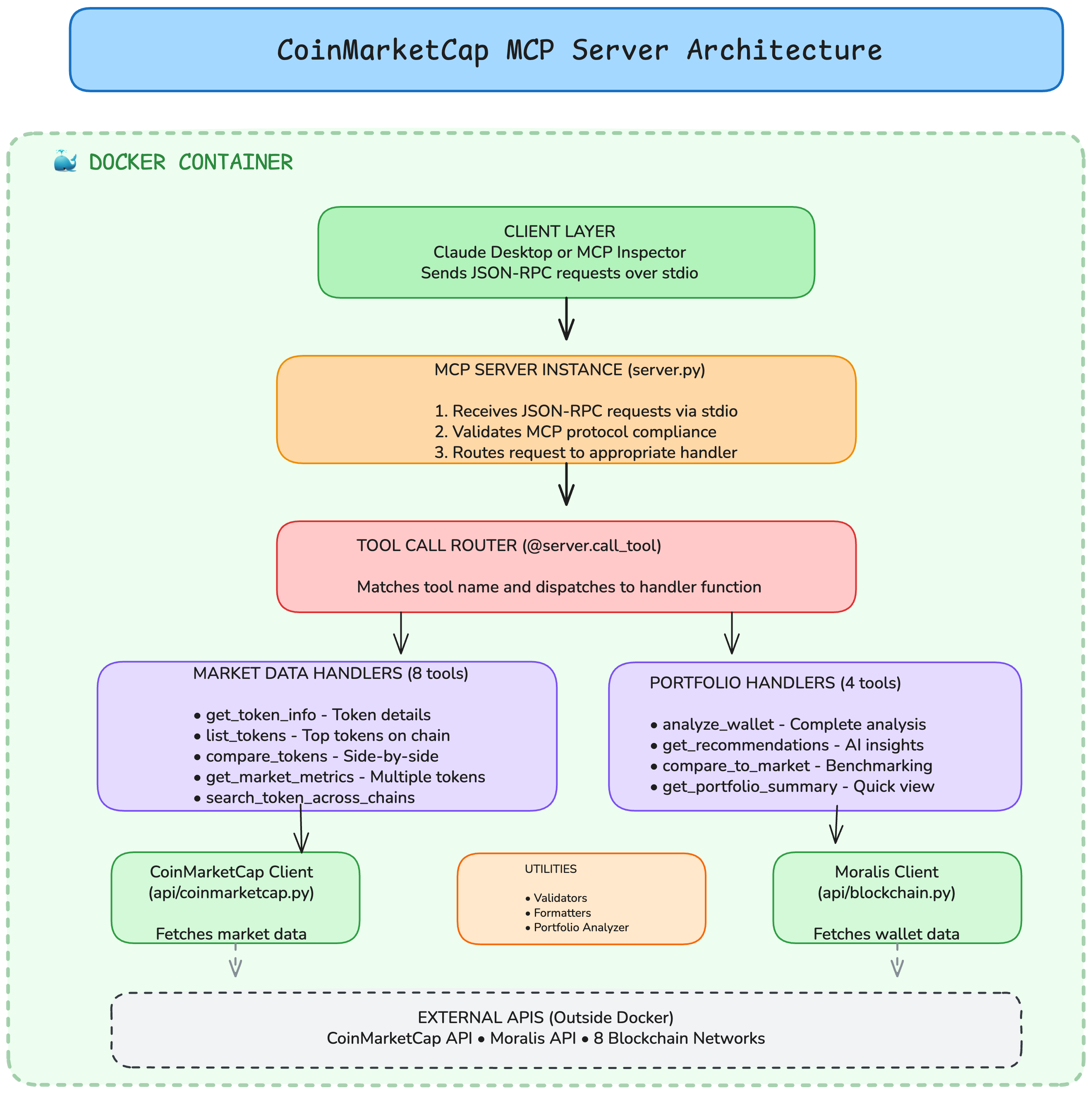
How it works:
- You ask Claude to analyze a wallet
- Claude calls the MCP server
- Server fetches data from Moralis & CoinMarketCap
- Claude provides insights with charts and recommendations
📸 Example Output
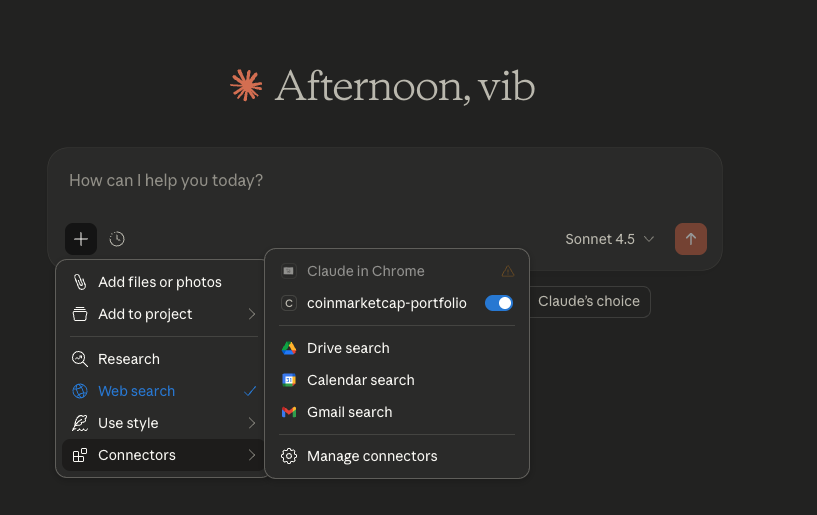
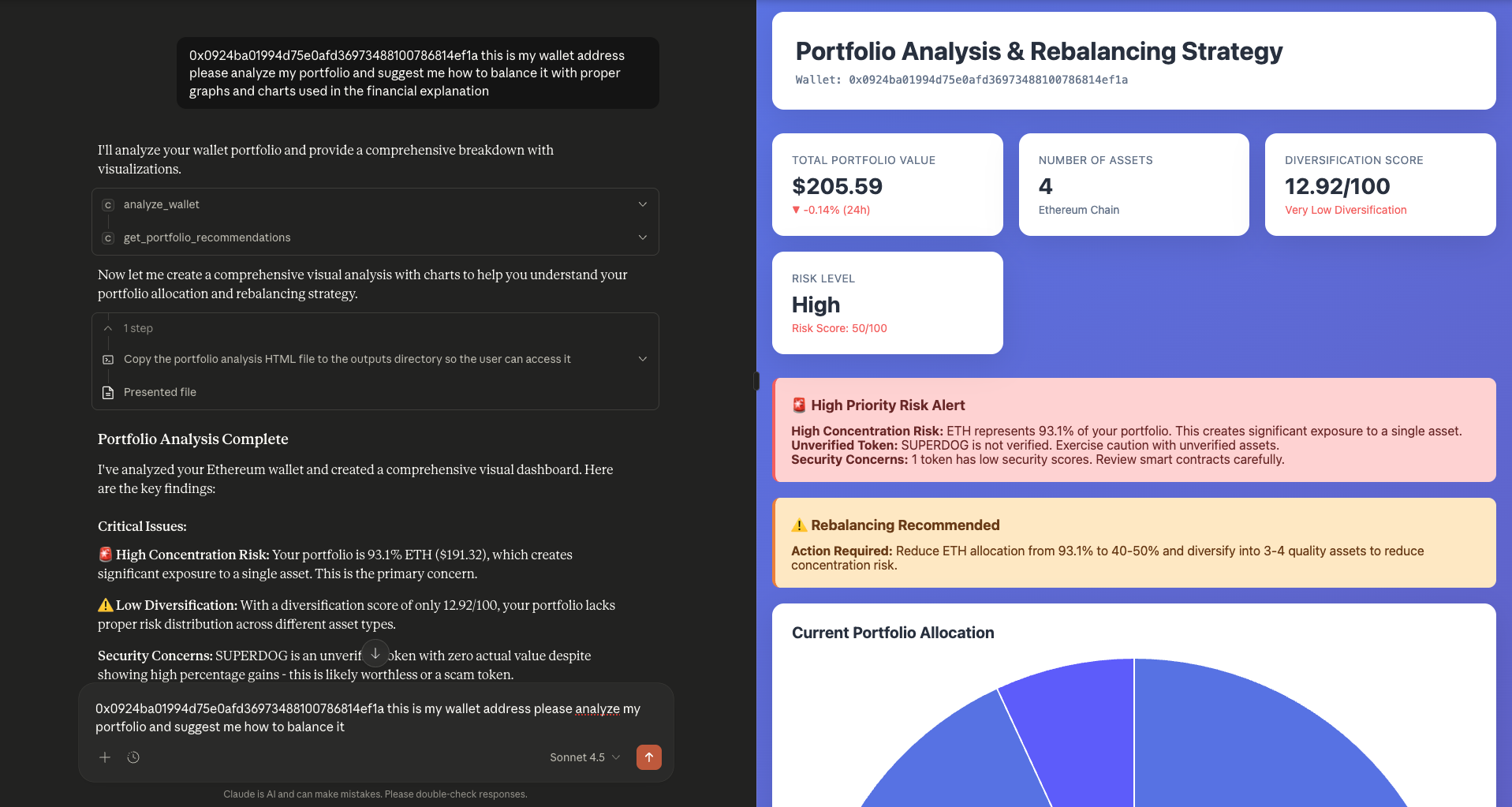
Claude analyzes your wallet and provides:
- ✅ Total portfolio value
- ✅ Asset allocation breakdown
- ✅ Risk assessment with alerts
- ✅ Rebalancing recommendations
- ✅ Visual charts and graphs
🚀 Quick Start (5 Minutes)
Prerequisites
- Python 3.12+
- Claude Desktop
- Moralis API Key (free - 40k requests/day)
Step 1: Clone & Install
# Clone repository
git clone https://github.com/vibhudixit123/coinmarketcap_mcp.git
cd coinmarketcap_mcp

# Create virtual environment
python3 -m venv venv
source venv/bin/activate  # On Windows: venv\Scripts\activate

# Install dependencies
pip install -r requirements.txt
Step 2: Configure API Key
# Copy environment template
cp .env.example .env

# Add your Moralis API key
nano .env
Add this line:
MORALIS_API_KEY=your_api_key_here
Get your free API key at moralis.io → Dashboard → Web3 APIs
Step 3: Test the Server
python -m src.server
You should see:
============================================================
CoinMarketCap MCP Server (Multi-Chain + Portfolio Edition)
Supported Chains: ethereum, base, polygon, arbitrum...
Total Tools: 12 (8 market + 4 portfolio)
============================================================
Moralis client initialized ✅
Press Ctrl+C if it works. Now configure Claude Desktop!
🖥️ Configure Claude Desktop
Step 1: Find Your Paths
# Get your Python path
which python3
# Example output: /Users/yourname/coinmarketcap_mcp/venv/bin/python3

# Get your project path
pwd
# Example output: /Users/yourname/coinmarketcap_mcp
Step 2: Edit Claude Desktop Config
On Mac:
nano ~/Library/Application\ Support/Claude/claude_desktop_config.json
On Windows:
notepad %APPDATA%\Claude\claude_desktop_config.json
Step 3: Add This Configuration
{
  "mcpServers": {
    "coinmarketcap-portfolio": {
      "command": "/Users/yourname/coinmarketcap_mcp/venv/bin/python3",
      "args": ["-m", "src.server"],
      "cwd": "/Users/yourname/coinmarketcap_mcp",
      "env": {
        "PYTHONPATH": "/Users/yourname/coinmarketcap_mcp",
        "MORALIS_API_KEY": "your_moralis_api_key_here"
      }
    }
  }
}
Replace:
/Users/yourname/...with YOUR paths from Step 1your_moralis_api_key_herewith YOUR Moralis API key
Step 4: Restart Claude Desktop
- Quit Claude Desktop completely (Cmd+Q on Mac, close on Windows)
- Open Claude Desktop
- Look for 🔨 hammer icon at the bottom
✅ If you see the hammer icon, it worked!
💬 Try It Out
Ask Claude:
"What blockchain networks do you support?"

"What's the price of ETH?"

"Analyze wallet 0x742d35Cc6634C0532925a3b844Bc9e7595f0bEb on Ethereum"

"Give me investment recommendations for my portfolio"
🛠️ Available Tools
Market Data (8 tools)
get_token_info- Get token detailslist_tokens- Top tokens on any chaincompare_tokens- Compare multiple tokenssearch_token_across_chains- Find token everywhere
Portfolio Analysis (4 tools)
analyze_wallet- Complete portfolio breakdownget_portfolio_recommendations- AI investment advicecompare_portfolio_to_market- Benchmark performanceget_portfolio_summary- Quick overview
🐳 Docker
If you prefer Docker:
# Build
docker build -t coinmarketcap-mcp .

# Run
docker run -e MORALIS_API_KEY=your_key coinmarketcap-mcp

# Or use docker-compose
docker-compose up
🌐 Host it as a remote MCP server (multi-user)
You can run this as a public, hosted MCP server that anyone can connect to.
It runs the MCP Streamable HTTP transport at /mcp and is multi-user by
design: the server stores no Moralis key. Each user supplies their own
Moralis API key on every request via the X-Moralis-Key header — so you never
pay for their usage and there's nothing to abuse.
The market-data tools use a public CoinMarketCap endpoint and need no key. Only the 4 portfolio tools need a Moralis key, taken from the caller's header.
Run the HTTP transport locally
MCP_TRANSPORT=http PORT=8000 python -m src.server
# Health check:  curl http://localhost:8000/health
# MCP endpoint:  http://localhost:8000/mcp
Deploy to Render (free tier)
- Push this repo to GitHub.
- In Render: New → Blueprint, select the repo. The included
render.yaml builds the Dockerfile and sets
MCP_TRANSPORT=http. (NoMORALIS_API_KEYis set on the server — that's intentional.) - Deploy. Your server is live at
https://<your-app>.onrender.com/mcp.
Any Docker host (Railway, Fly.io, a VPS) works too — just set MCP_TRANSPORT=http
and expose the port. Render injects PORT automatically.
How users connect (with their own key)
Clients that support remote MCP servers with custom headers (e.g. Cursor, Cline):
{
  "mcpServers": {
    "coinmarketcap": {
      "url": "https://<your-app>.onrender.com/mcp",
      "headers": { "X-Moralis-Key": "THEIR_OWN_MORALIS_KEY" }
    }
  }
}
For Claude Desktop, connect through the mcp-remote bridge:
{
  "mcpServers": {
    "coinmarketcap": {
      "command": "npx",
      "args": [
        "mcp-remote", "https://<your-app>.onrender.com/mcp",
        "--header", "X-Moralis-Key:THEIR_OWN_MORALIS_KEY"
      ]
    }
  }
}
Each user gets their own free Moralis key at moralis.io.
🐛 Troubleshooting
"Module not found" error
Add PYTHONPATH to your Claude config:
"env": {
  "PYTHONPATH": "/full/path/to/coinmarketcap_mcp"
}
No hammer icon in Claude Desktop
- Check config file location is correct
- Verify Python path:
which python3 - Test server manually:
python -m src.server - View logs:
tail -f ~/Library/Logs/Claude/mcp*.log
"MORALIS_API_KEY not found"
Make sure the key is in both:
.envfile in project directory- Claude Desktop config JSON
📦 What You Get
✅ 12 AI Tools for Claude to use
✅ 8 Blockchain Networks supported
✅ Real-time Data from Moralis & CoinMarketCap
✅ Portfolio Analysis with risk assessment
✅ AI Recommendations for rebalancing
✅ Visual Dashboards with charts
✅ Docker Support for easy deployment
🤝 Contributing
Pull requests welcome! For major changes, please open an issue first.
📄 License
MIT License - see LICENSE file
🙏 Credits
- Moralis - Blockchain API
- CoinMarketCap - Market data
- Anthropic - Claude AI & MCP
Установка CoinMarketCap Portfolio Server
У этого сервера нет опубликованного пакета — он собирается из исходников. Открой репозиторий и следуй инструкции в README.
▸ github.com/Alg0-labs/crypto-portfolio-mcpFAQ
CoinMarketCap Portfolio Server MCP бесплатный?
Да, CoinMarketCap Portfolio Server MCP бесплатный — установка в пару кликов через Unyly без оплаты.
Нужен ли API-ключ для CoinMarketCap Portfolio Server?
Нет, CoinMarketCap Portfolio Server работает без API-ключей и переменных окружения.
CoinMarketCap Portfolio Server — hosted или self-hosted?
Self-hosted: сервер запускается локально на твоей машине командой из раздела установки.
Как установить CoinMarketCap Portfolio Server в Claude Desktop, Claude Code или Cursor?
Открой CoinMarketCap Portfolio Server на unyly.org, выбери вкладку своего клиента (Claude Desktop, Claude Code, Cursor) и нажми Install — конфиг сгенерируется автоматически, без правки JSON.
Похожие MCP
Stripe
Payments, customers, subscriptions
 автор: Stripe
malamutemayhem/unclick-agent-native-endpoints
110+ tools for AI agents spanning social media, finance, gaming, music, AU-specific services, and utilities. Zero-config local tools plus platform connectors. n
 автор: malamutemayhem
whiteknightonhorse/APIbase
Unified API hub for AI agents with 56+ tools across travel (Amadeus, Sabre), prediction markets (Polymarket), crypto, and weather. Pay-per-call via x402 micropa
 автор: whiteknightonhorse
trackerfitness729-jpg/sitelauncher-mcp-server
Deploy live HTTPS websites in seconds. Instant subdomains ($1 USDC) or custom .xyz domains ($10 USDC) on Base chain. Templates for crypto tokens and AI agent pr
 автор: trackerfitness729-jpg
Compare CoinMarketCap Portfolio Server with
Не уверен что выбрать?
Найди свой стек за 60 секунд
Автор?
Embed-бейдж для README
Похожее
Все в категории finance