
Competitor Hunter
БесплатноНе проверенAI-powered competitor analysis agent that scrapes product pages and extracts structured data using LLMs, integrated via MCP for use with Claude Desktop and othe

Описание
AI-powered competitor analysis agent that scrapes product pages and extracts structured data using LLMs, integrated via MCP for use with Claude Desktop and other clients.
README
AI-Powered Competitor Analysis Agent | Automated web scraping and structured data extraction using MCP, LangGraph, and Playwright
License: MIT Python 3.10+ Code style: black
📖 Introduction
Competitor Hunter is a production-ready AI agent that automates competitor analysis by scraping product pages and extracting structured information using Large Language Models. Built on the Model Context Protocol (MCP), it seamlessly integrates with Claude Desktop and other MCP-compatible clients.
Key Capabilities
- 🔍 Intelligent Web Scraping: Automated browser-based content extraction with anti-detection features
- 🤖 LLM-Powered Extraction: Structured data extraction using OpenAI-compatible APIs
- 📊 Structured Output: Pydantic-validated product information (pricing, features, SWOT analysis)
- 🔄 LangGraph Workflow: Robust state management and error handling
- 🔌 MCP Integration: Native support for Claude Desktop and MCP clients
🏗️ Architecture
The system follows Hexagonal Architecture with clear separation of concerns. Workflow: User Request → MCP Server → LangGraph Workflow → Browser Scraping → LLM Extraction → Structured Data Response.
✨ Core Features
- 🤖 AI-Powered: Intelligent extraction using LLM with automatic SWOT analysis
- 📊 Structured Output: Pydantic-validated data models (pricing, features, summary)
- 🛡️ Anti-Detection: Random User-Agents, intelligent scrolling, auto-screenshots
- 🔌 MCP Native: Seamless integration with Claude Desktop and Cursor IDE
- 📦 CLI Tool: Professional command-line interface via
competitor-huntercommand - Async/Await: Full asynchronous programming for optimal performance
🚀 Quick Start
Prerequisites
- Python 3.10+ (3.11 or 3.12 recommended)
- UV or Poetry (dependency manager)
- Playwright browsers (installed automatically)
Installation
Clone the repository:
git clone https://github.com/your-username/competitor-hunter.git
cd competitor-hunter
Install dependencies (using UV):
uv syncOr using Poetry:
poetry installOr using pip:
python -m venv venv
source venv/bin/activate  # On Windows: venv\Scripts\activate
pip install -e ".[dev]"
Install Playwright browsers:
playwright install chromium
Configuration
Create a .env file in the project root:
# OpenAI API Configuration
OPENAI_API_KEY=your_openai_api_key_here
OPENAI_BASE_URL=https://api.openai.com/v1  # Optional: for custom endpoints
OPENAI_MODEL_NAME=gpt-4o                    # Optional: default is gpt-4o

# Browser Configuration
HEADLESS_MODE=true                          # Set to false for debugging

# Database Configuration
DB_PATH=data/competitors.db                 # SQLite database path
💡 Tip: Copy .env.example to .env and fill in your values:
cp .env.example .env
📸 Screenshots & Examples
Analysis Results
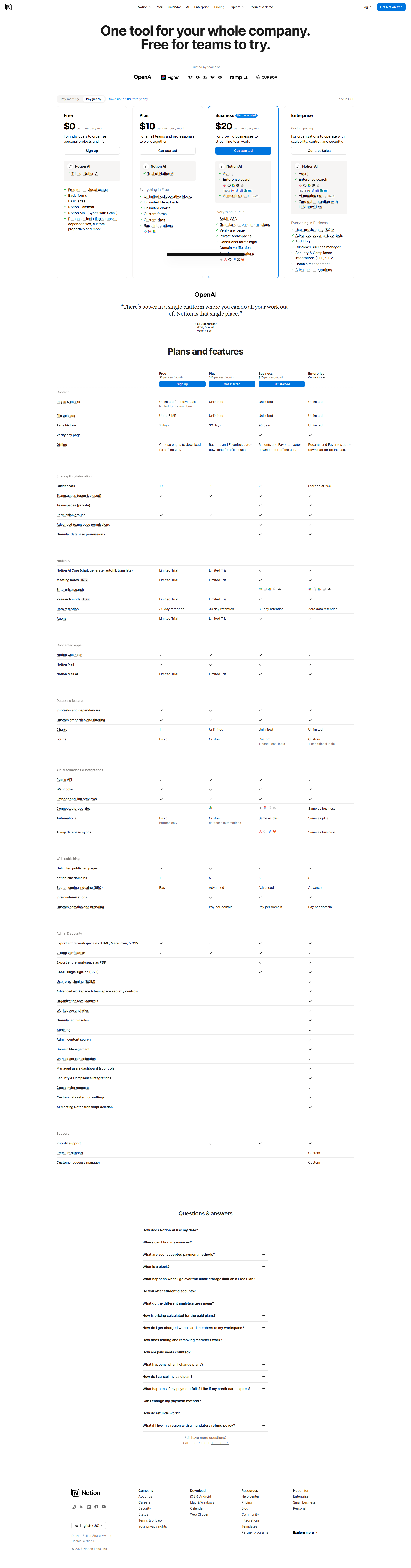
Screenshot of Notion pricing page analysis
CLI Output Example
$ competitor-hunter https://www.notion.so/pricing
🔍 正在分析: https://www.notion.so/pricing

✅ 分析完成!

======================================================================
📦 产品名称: Notion
🔗 URL: https://www.notion.so/pricing
🕒 更新时间: 2024-06-13 00:00:00+00:00
======================================================================

💰 定价方案 (4 个):
   • Free: 0 USD / monthly
   • Plus: 10 USD / monthly
   • Business: 20 USD / monthly
   • Enterprise: Custom USD / custom

✨ 核心功能 (13 个):
   1. AI automation
   2. Enterprise search
   3. Meeting notes
   ...

💾 结果已保存到: reports/product_Notion.json
JSON Output Structure
The analysis results are saved as structured JSON files:
{
  "product_name": "Notion",
  "url": "https://www.notion.so/pricing",
  "pricing_tiers": [
    {
      "name": "Free",
      "price": "0",
      "currency": "USD",
      "billing_cycle": "monthly"
    },
    {
      "name": "Plus",
      "price": "10",
      "currency": "USD",
      "billing_cycle": "monthly"
    }
  ],
  "core_features": [
    "AI automation",
    "Docs",
    "Knowledge Base"
  ],
  "summary": "## 产品概述\nNotion 是一款集文档编辑...",
  "last_updated": "2024-06-13T00:00:00Z"
}
📚 Usage
Method 1: CLI Command (Easiest)
After installation, use the competitor-hunter command:
# Analyze a single website
competitor-hunter https://www.notion.so/pricing

# Specify output file
competitor-hunter https://example.com output.json

# Batch analysis
competitor-hunter https://site1.com https://site2.com https://site3.com
Results are automatically saved to the reports/ directory with proper UTF-8 encoding.
Method 2: MCP Server Mode (Recommended for AI Assistants)
Run the MCP server to enable integration with Claude Desktop or Cursor:
python -m src.competitor_hunter.interface.mcp_server.server
Claude Desktop Integration
Add the following configuration to your Claude Desktop claude_desktop_config.json:
macOS: ~/Library/Application Support/Claude/claude_desktop_config.json
Windows: %APPDATA%\Claude\claude_desktop_config.json
{
  "mcpServers": {
    "competitor-hunter": {
      "command": "python",
      "args": [
        "-m",
        "src.competitor_hunter.interface.mcp_server.server"
      ],
      "cwd": "/path/to/competitor-hunter"
    }
  }
}
Cursor IDE Integration
Create .cursor/mcp.json in your project root:
{
  "mcpServers": {
    "competitor-hunter": {
      "command": "python",
      "args": [
        "-m",
        "src.competitor_hunter.interface.mcp_server.server"
      ],
      "cwd": "${workspaceFolder}"
    }
  }
}
After restarting, you can use the tool directly in chat:
Analyze this competitor: https://www.notion.so/pricing
Method 3: Python Library
Use the LangGraph workflow directly in your Python code:
import asyncio
from competitor_hunter.core import graph, AgentState, cleanup_resources

async def analyze(url: str):
    # Initialize state
    initial_state: AgentState = {
        "url": url,
        "scraped_content": None,
        "product": None,
        "error": None,
    }

    # Run workflow
    result = await graph.ainvoke(initial_state)

    # Check results
    if result.get("error"):
        print(f"Error: {result['error']}")
        return None

    product = result["product"]
    print(f"Product: {product.product_name}")
    print(f"Pricing Tiers: {len(product.pricing_tiers)}")
    print(f"Features: {product.core_features}")

    return product

# Use
product = await analyze("https://www.notion.so/pricing")
await cleanup_resources()
Output Structure
All analysis results are saved to the reports/ directory:
reports/
├── product_Notion.json
├── product_Example_Domain.json
└── ...
Each JSON file contains:
- Product name and URL
- Pricing tiers (name, price, currency, billing cycle)
- Core features list
- Markdown-formatted summary with SWOT analysis
- Last updated timestamp
🧪 Development
Running Tests
# Run all tests
pytest tests/ -v

# Run specific test file
pytest tests/test_crawler.py -v

# Run with coverage
pytest tests/ --cov=src/competitor_hunter --cov-report=html
Code Quality
# Format code
black src/ tests/

# Lint code
ruff check src/ tests/

# Type checking (if using mypy)
mypy src/
Project Structure
competitor-hunter/
├── src/
│   └── competitor_hunter/
│       ├── cli.py             # CLI command-line interface
│       ├── main.py            # Application entry point
│       ├── config.py          # Configuration management
│       ├── core/               # Domain models & LangGraph workflow
│       │   ├── models.py       # Pydantic models (CompetitorProduct, etc.)
│       │   └── graph.py        # LangGraph workflow definition
│       ├── infrastructure/     # External services
│       │   ├── browser/        # Playwright browser service
│       │   └── llm/            # LLM extractor service
│       └── interface/          # Entry points
│           └── mcp_server/     # MCP server implementation
├── config/                     # Configuration files
│   └── app.yaml.example        # Configuration template
├── docker/                     # Docker configuration
│   ├── Dockerfile              # Docker image definition
│   └── docker-compose.yml     # Docker Compose configuration
├── examples/                   # Example scripts
├── tests/                      # Test suite
├── reports/                    # Analysis results (gitignored)
├── data/                       # SQLite database (gitignored)
├── logs/                       # Screenshots & logs (gitignored)
├── pyproject.toml              # Project dependencies & CLI entry points
└── README.md                   # This file
📦 Dependencies
Core Dependencies
- mcp: Model Context Protocol server implementation
- langgraph: Workflow orchestration
- langchain: LLM integration framework
- playwright: Browser automation
- pydantic: Data validation and serialization
- html2text: HTML to Markdown conversion
- loguru: Structured logging
Development Dependencies
- pytest: Testing framework
- pytest-asyncio: Async test support
- ruff: Fast Python linter
- black: Code formatter
🤝 Contributing
Contributions are welcome! Please feel free to submit a Pull Request.
- Fork the repository
- Create your feature branch (
git checkout -b feature/amazing-feature) - Commit your changes (
git commit -m 'Add some amazing feature') - Push to the branch (
git push origin feature/amazing-feature) - Open a Pull Request
📄 License
This project is licensed under the MIT License - see the LICENSE file for details.
🙏 Acknowledgments
- Built with LangGraph for workflow orchestration
- Powered by Playwright for browser automation
- Integrated with Model Context Protocol (MCP) for AI agent communication
📞 Support
For issues, questions, or contributions, please open an issue on GitHub.
Made with ❤️ for competitive intelligence
Установить Competitor Hunter в Claude Desktop, Claude Code, Cursor
unyly install competitor-hunterСтавит в Claude Desktop, Claude Code, Cursor и VS Code — сам разбирается с npx, uvx и сборкой из исходников.
Впервые? Поставь CLI: curl -fsSL https://unyly.org/install | sh
Или настроить вручную
Выполни в терминале:
claude mcp add competitor-hunter -- uvx --from git+https://github.com/Duang777/competitor-hunter competitor-hunterFAQ
Competitor Hunter MCP бесплатный?
Да, Competitor Hunter MCP бесплатный — установка в пару кликов через Unyly без оплаты.
Нужен ли API-ключ для Competitor Hunter?
Нет, Competitor Hunter работает без API-ключей и переменных окружения.
Competitor Hunter — hosted или self-hosted?
Self-hosted: сервер запускается локально на твоей машине командой из раздела установки.
Как установить Competitor Hunter в Claude Desktop, Claude Code или Cursor?
Открой Competitor Hunter на unyly.org, выбери вкладку своего клиента (Claude Desktop, Claude Code, Cursor) и нажми Install — конфиг сгенерируется автоматически, без правки JSON.
Похожие MCP
Fetch
Web content fetching and conversion for efficient LLM usage.
AWS KB Retrieval
Retrieval from AWS Knowledge Base using Bedrock Agent Runtime.
 автор: modelcontextprotocol
Spring AI MCP Server
Provides auto-configuration for setting up an MCP server in Spring Boot applications.
llm-analysis-assistant
A very streamlined mcp client that supports calling and monitoring stdio/sse/streamableHttp, and can also view request responses through the /logs page. It also
 автор: xuzexin-hz
Compare Competitor Hunter with
Не уверен что выбрать?
Найди свой стек за 60 секунд
Автор?
Embed-бейдж для README
Похожее
Все в категории ai