
Convex Mcp Gateway
БесплатноНе проверенAuth-aware Convex component that exposes selected Convex functions as MCP tools.

Описание
Auth-aware Convex component that exposes selected Convex functions as MCP tools.
README
Auth-aware MCP server for Convex. Expose selected Convex functions as MCP tools, bring your own JWT issuer, declare scopes/roles per tool, get an audit log and OAuth 2.1 protected-resource discovery for free.
Built as a Convex Component.
Convex Component tests npm license
Features
- Type-safe tool registration:
defineMcpQuery/defineMcpMutation/defineMcpActiondeclare a Convex function as an MCP tool with end-to- end-typedargsand (optional)returnsvalidators. Declare the list once and pass it astoolstohandleMcpRequest, the registry auto-syncs on connect (no separate registration mutation), or callgateway.register(...)for imperative/dynamic catalogs - MCP 2025-06-18 Streamable HTTP: sessions,
Acceptnegotiation,MCP-Protocol-Versionvalidation, identity-boundDELETE, single- frame SSE - MCP resources:
defineMcpResource/defineMcpResourceTemplateserveresources/list,resources/read, andresources/templates/list(RFC 6570). CentralauthorizeResourcehook, opt-in resource audit, runtime shape validation, and opt-inresources/subscribecapability. See Resources & templates - One authorize callback: gates
tools/calland filterstools/listwithmode: "list" | "call"; uses your existingctx.auth.getUserIdentity() - OAuth 2.1 protected-resource discovery: RFC 9728 metadata,
RFC 6750
WWW-Authenticateheaders, multi-tenant ready - Optional OAuth bridge: RFC 8414 AS metadata wrap + RFC 7591 DCR for browser MCP clients (claude.ai) against IdPs without DCR support
requireAuthfor all-private servers: opt-in 401-challenge on anonymous requests so browser clients (claude.ai) begin the OAuth flow instead of seeing an emptytools/listand never prompting a logininitializeInstructions: optional server-level guidance returned in the MCPinitializeresult'sinstructionsfield, surfaced to the LLM without bloating individual tool descriptions- Audit log: one row per call with per-tool argument redaction (verbatim / dropped / dotted-path redacted)
- Wire-error sanitization: generic message on the wire, full detail
in audit;
ConvexErrorpasses through for deliberate user-facing messages convex-testhelper:convex-mcp-gateway/testexports a one-lineregister(t)that hooks the component into aconvexTestinstance so your host tests can exercise the full/mcp/round-trip in-process. See Testing
What it does
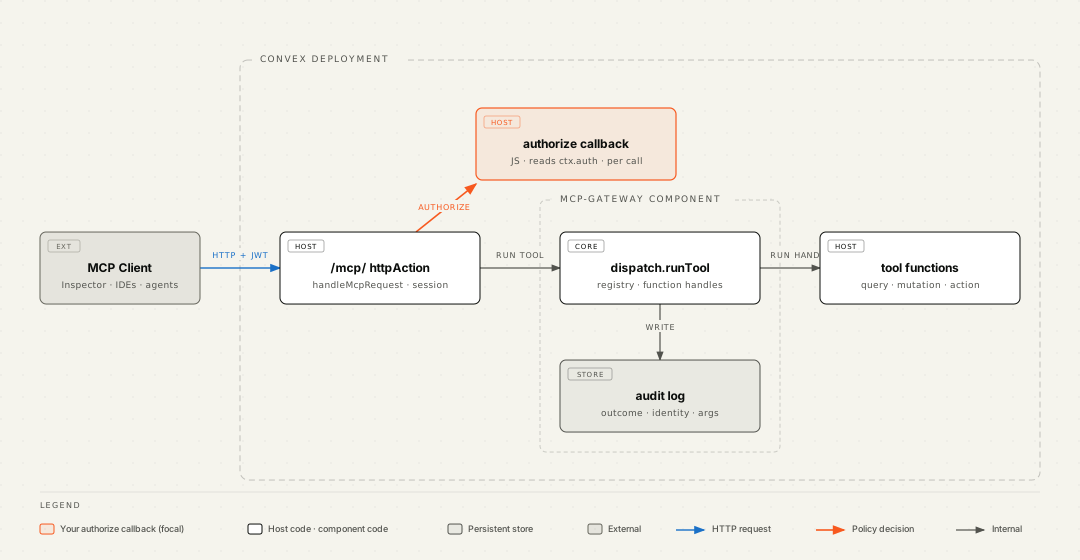
You mount the gateway in a single httpAction and pass an authorize
JS callback that decides per call whether the request goes through.
The gateway handles the JSON-RPC envelope, the Streamable-HTTP session
lifecycle, the OAuth discovery doc, the WWW-Authenticate headers, and
the audit log. Your existing Convex auth (Clerk, Auth0, Pocket-ID,
custom JWT issuer) just works.
A standalone editorial-styled version of the diagram is at docs/diagrams/architecture.html; in-depth sequence and data-flow diagrams live in docs/architecture.md.
Try it
The companion repo convex-mcp-gateway-demo is a notes app that registers five tools (public, identity-gated, role-gated) and shows the audit log live. Three run modes including a local-backend setup that needs no Convex account:
git clone https://github.com/tfohlmeister/convex-mcp-gateway-demo
cd convex-mcp-gateway-demo
pnpm install && pnpm local:start    # in one terminal
pnpm convex:dev && pnpm convex:run mcp:registerDefaults && pnpm dev
Quickstart
pnpm add convex-mcp-gateway
// convex/convex.config.ts
import { defineApp } from "convex/server";
import mcpGateway from "convex-mcp-gateway/convex.config";

const app = defineApp();
app.use(mcpGateway);
export default app;
// convex/mcp.ts, declare your tools once
import { v } from "convex/values";
import { defineMcpQuery } from "convex-mcp-gateway";
import { api } from "./_generated/api.js";

export const tools = [
  defineMcpQuery({
    name: "invoices_summary",
    description: "Public invoice counter.",
    fn: api.invoices.summary,
    args: {},
    metadata: { public: true },
  }),
  defineMcpQuery({
    name: "invoices_list",
    description: "List invoices for the authenticated user.",
    fn: api.invoices.list,
    args: { status: v.optional(v.string()) },
  }),
];
// convex/http.ts, mount the gateway with your authorize callback
import { httpRouter } from "convex/server";
import { McpGateway, type McpAuthorizerHandler } from "convex-mcp-gateway";
import { components } from "./_generated/api.js";
import { httpAction } from "./_generated/server.js";
import { tools } from "./mcp.js";

const gateway = new McpGateway(components.mcpGateway);

const authorize: McpAuthorizerHandler = async (ctx, { toolMetadata }) => {
  const meta = (toolMetadata ?? {}) as { public?: boolean };
  if (meta.public) return { allowed: true };
  const identity = await ctx.auth.getUserIdentity();
  if (!identity) return { allowed: false, reason: "Unauthorized" };
  return { allowed: true };
};

const http = httpRouter();
// Pass `tools` and the registry syncs on each connect, no separate
// registration mutation to run.
const mcp = httpAction(async (ctx, req) =>
  gateway.handleMcpRequest(ctx, req, { authorize, tools }),
);
// Mount both /mcp/ and /mcp, some clients (claude.ai) strip the
// trailing slash from the configured URL before POSTing.
for (const path of ["/mcp/", "/mcp"]) {
  http.route({ path, method: "POST", handler: mcp });
  http.route({ path, method: "GET", handler: mcp });
  http.route({ path, method: "DELETE", handler: mcp });
}
export default http;
npx convex dev --once
# No registration step: passing `tools` to handleMcpRequest syncs the
# registry on the initialize below.

# Talk to it (Streamable HTTP, initialize first, then send commands).
SESSION=$(curl -sSD - -X POST "$CONVEX_SITE_URL/mcp/" \
  -H 'content-type: application/json' \
  -H 'accept: application/json, text/event-stream' \
  -d '{"jsonrpc":"2.0","id":1,"method":"initialize","params":{"protocolVersion":"2025-06-18"}}' \
  | awk '/^[Mm]cp-[Ss]ession-[Ii]d:/ {print $2}' | tr -d '\r')

curl -X POST "$CONVEX_SITE_URL/mcp/" \
  -H 'content-type: application/json' \
  -H 'accept: application/json, text/event-stream' \
  -H "mcp-session-id: $SESSION" \
  -d '{"jsonrpc":"2.0","id":2,"method":"tools/list"}'
The anonymous client sees only invoices_summary (the public: true
tool); calling invoices_list without a Bearer returns HTTP 401 with a
WWW-Authenticate header pointing at your discovery endpoint. Any
spec-compliant MCP client (the official MCP Inspector, IDE plugins,
agent runtimes) handles the session and OAuth handshakes
automatically. See Getting Started for
the full walkthrough.
If your server has no public tools and you connect it to a browser
client like claude.ai, add requireAuth: true to the
handleMcpRequest options. Without it, anonymous initialize /
tools/list return 200 (empty) and the client never starts OAuth, it
only reacts to a 401. See
OAuth: all-private servers.
To give the model server-level guidance — how to use the server as a whole,
not any single tool — pass initializeInstructions to handleMcpRequest. It
populates the initialize result's instructions field and is omitted when
unset, so the default response shape is unchanged. It's a best-effort hint
(per the spec clients MAY use it; some ignore it), so keep it short and don't
rely on it for hard constraints.
Resources
Alongside tools, the gateway serves MCP resources (read-only content).
Declare a concrete resource with defineMcpResource and pass it to the
same handleMcpRequest call as your tools:
// convex/mcp.ts
import { defineMcpResource } from "convex-mcp-gateway";
import { api } from "./_generated/api.js";

export const resources = [
  defineMcpResource({
    uri: "invoices://summary",
    name: "invoice-summary",
    title: "Invoice summary",
    mimeType: "application/json",
    // Read handlers receive the resolved caller identity; anonymous
    // resource requests are rejected before this runs.
    read: async (ctx, { uri, identity }) => {
      const summary = await ctx.runQuery(api.invoices.summary, {});
      return [
        {
          uri,
          mimeType: "application/json",
          text: JSON.stringify({ ...summary, caller: identity.subject }),
        },
      ];
    },
  }),
];
// convex/http.ts — add `resources` to the same mount as `tools`
const mcp = httpAction(async (ctx, req) =>
  gateway.handleMcpRequest(ctx, req, { authorize, tools, resources }),
);
Supported methods: resources/list, resources/read,
resources/templates/list (RFC 6570 templates via
defineMcpResourceTemplate), and opt-in resources/subscribe /
resources/unsubscribe. A central authorizeResource hook gates
list/read, resource operations are auditable, and reads run only for
authenticated callers. A complete, runnable example (concrete resource +
template + per-resource auth + audit + subscription) is wired into
example/convex; see
Resources & templates for the full guide.
Documentation
- Getting Started: install, register, call, in five minutes
- Architecture: component model, data flow, sequence diagrams
- Authorization: authorizer contract,
mode: "list"vs"call", scope/role recipes - Resources & templates: concrete resources
vs RFC 6570 templates,
resources/templates/list, read resolution - OAuth 2.1 setup: RFC 9728 discovery, host-side
mount, multi-tenant,
requireAuthfor all-private servers - OAuth bridge mode: opt-in DCR + AS metadata wrap + userinfo token validation, for browser MCP clients (claude.ai) against IdPs that don't support Dynamic Client Registration (Pocket-ID, etc.)
- Audit log: reading, filtering, redacting, pruning
- Recipe: Better Auth on Convex:
opaque-token
resolveIdentity, split-domain discovery, and browser login continuation for@convex-dev/better-authas the IdP - Testing: convex-test patterns, identity injection, swappable authorizers
Design choices, briefly
- One authorize callback, deny-by-default. The component has no
notion of scopes, roles, JWT claims, or tenants. You pass a single JS
callback to
handleMcpRequestthat decides per call (it runs host-side wherectx.authworks). Until you pass it, nothing reaches your tools. - Scope-aware
tools/list. The catalog visible to a caller equals the set of tools they could actually invoke; the same authorizer filters both with amode: "list"discriminator. - Audit never alters dispatch. Every audit write is best-effort;
failures log and swallow. A successful tool mutation always returns
ok: true. - Identity propagation is free. Convex validates inbound Bearer
tokens against your
auth.config.tsbefore any function runs; the same identity flows into the authorizer and the tool handler. - OAuth discovery is opt-in. Configure an authorization server, and
401s carry
WWW-Authenticateheaders per RFC 6750 and the RFC 9728 path-prefix metadata URL.
Local development
pnpm install
pnpm check                              # codegen + typecheck + tests + lint

# Iterate against a local Convex backend:
pnpm local:start                        # downloads the pinned binary, writes .env.local
                                        # runs on :3310 / :3311 (no Docker)
The local backend uses upstream test fixture credentials checked into
get-convex/convex-backend, public, deterministic, safe to commit.
See docs/testing.md for convex-test patterns and
CONTRIBUTING.md for the contribution workflow.
Roadmap
By design the gateway is the resource-server half of MCP's OAuth profile only; it will not ship a bundled authorization server (that duplicates what every IdP already does and would put two security-critical surfaces in one component). Bring your own OAuth 2.1 / OIDC issuer. On the radar beyond that:
- Capability tokens for agent-spawning workflows (small JWT helper,
not a full AS:
gateway.signCapabilityToken({ tools, runId, ttl })plus authorizer-side validation) mcpPromptMCP primitive (themcpResourceprimitive has shipped, see Resources & templates)- Pre-baked multi-tenant patterns (per-tenant URL, RFC 8707 audience binding)
- RFC 8693 token exchange for cross-domain identity
See the repo's GitHub issues for finer-grained tracking.
Security
If you discover a vulnerability, please follow SECURITY.md (do not file a public issue).
License
Установить Convex Mcp Gateway в Claude Desktop, Claude Code, Cursor
unyly install convex-mcp-gatewayСтавит в Claude Desktop, Claude Code, Cursor и VS Code — сам разбирается с npx, uvx и сборкой из исходников.
Впервые? Поставь CLI: curl -fsSL https://unyly.org/install | sh
Или настроить вручную
Выполни в терминале:
claude mcp add convex-mcp-gateway -- npx -y convex-mcp-gatewayFAQ
Convex Mcp Gateway MCP бесплатный?
Да, Convex Mcp Gateway MCP бесплатный — установка в пару кликов через Unyly без оплаты.
Нужен ли API-ключ для Convex Mcp Gateway?
Нет, Convex Mcp Gateway работает без API-ключей и переменных окружения.
Convex Mcp Gateway — hosted или self-hosted?
Self-hosted: сервер запускается локально на твоей машине командой из раздела установки.
Как установить Convex Mcp Gateway в Claude Desktop, Claude Code или Cursor?
Открой Convex Mcp Gateway на unyly.org, выбери вкладку своего клиента (Claude Desktop, Claude Code, Cursor) и нажми Install — конфиг сгенерируется автоматически, без правки JSON.
Похожие MCP
Fetch
Web content fetching and conversion for efficient LLM usage.
AWS KB Retrieval
Retrieval from AWS Knowledge Base using Bedrock Agent Runtime.
 автор: modelcontextprotocol
Spring AI MCP Server
Provides auto-configuration for setting up an MCP server in Spring Boot applications.
llm-analysis-assistant
A very streamlined mcp client that supports calling and monitoring stdio/sse/streamableHttp, and can also view request responses through the /logs page. It also
 автор: xuzexin-hz
Compare Convex Mcp Gateway with
Не уверен что выбрать?
Найди свой стек за 60 секунд
Автор?
Embed-бейдж для README
Похожее
Все в категории ai