
Cubiczan/trust-ledger-os
БесплатноНе проверенTrust and risk control plane for AI teams, with phases, routes and a package catalog.

Описание
Trust and risk control plane for AI teams, with phases, routes and a package catalog.
README
Trust Ledger OS is a trust and risk control plane for AI teams. Every high-impact change is reviewed, traced, and recorded before it reaches customers or cash.
License: MIT Next.js TypeScript PRISMtrace
Release Workflow npm package PyPI package MCP server
Product screenshots
Trust Ledger OS desktop overview explaining the review workflow and its supporting tool stack.
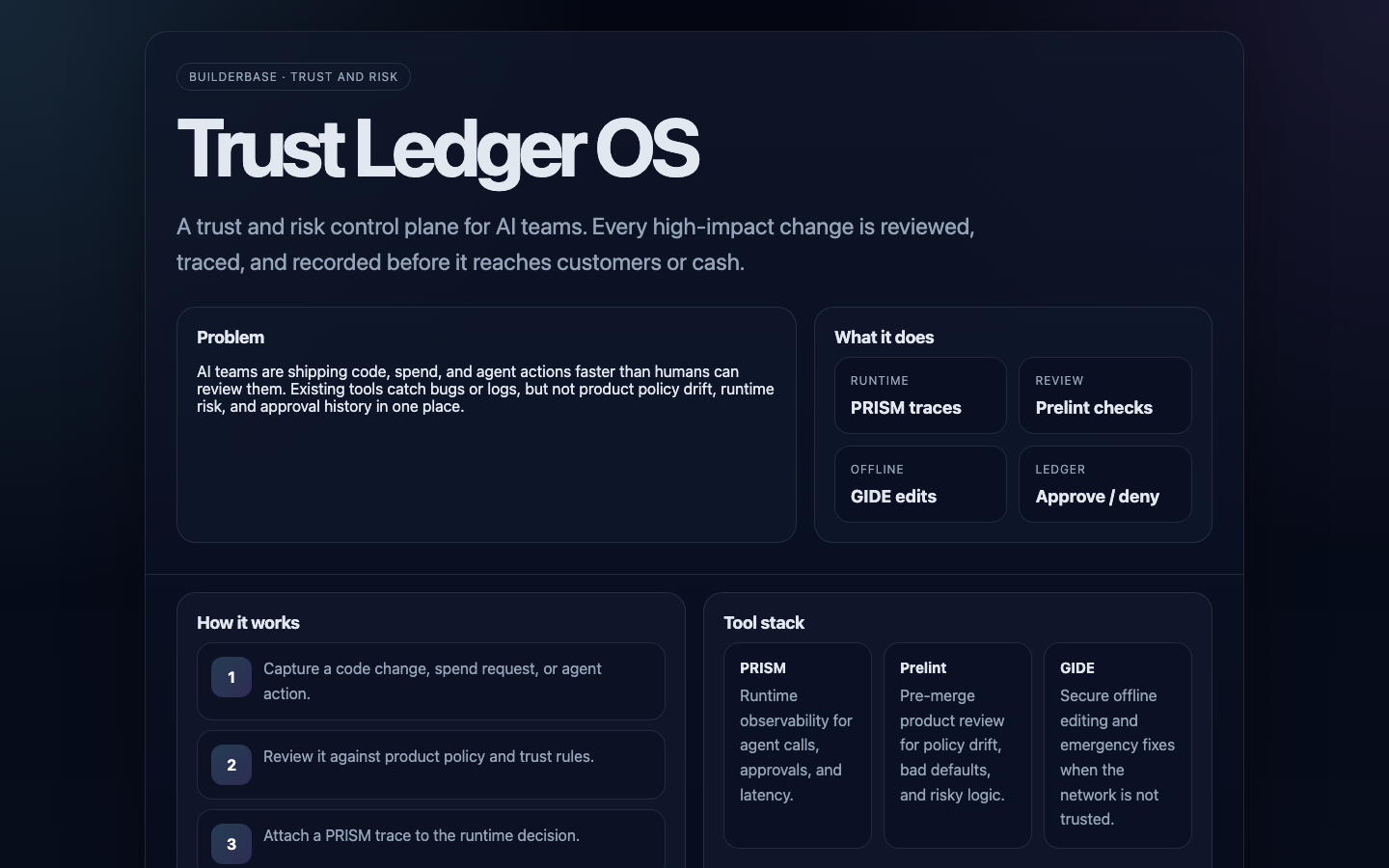
Existing UI capture stored in this repository; displayed values may be demo or sample data.
Overview
The repo combines a public landing page with four scaffolded implementation phases. The same roadmap is mirrored into reusable package boundaries so the app, docs, and future library work stay aligned.
Mirrors:
icohangar-ops/trust-ledger-osCubiczan/trust-ledger-os
Core Roles
- PRISM: runtime observability for agent calls, approvals, and latency.
- Prelint: pre-merge product review for policy drift, bad defaults, and risky logic.
- GIDE: secure offline editing and emergency fixes when the network is not trusted.
What It Does
- Capture a code change, spend request, or agent action.
- Review it against product policy and trust rules.
- Attach a PRISM trace to the runtime decision.
- Produce an approve, deny, or counter outcome.
- Store the decision in a ledger future runs can reuse.
Live Routes
/landing page and roadmap/foundationphase 1 scaffold/framework-benchmarkphase 2 scaffold/research-reasoningphase 3 scaffold/production-controlsphase 4 scaffold/decisionsdecision ledger (CHP decision substrate) ·GET /api/decisionslive read
Phase Packages
foundation-kit/: shared agent glossary, decision tree, model/tool matrix, and prompt skeletons.framework-benchmark-suite/: framework profiles, comparison cases, and scoring rubric.research-reasoning-kit/: research pipeline stages and reusable reasoning patterns.production-controls-kit/: eval harness, drift monitoring, guardrails, and release gate scaffold.decision-substrate/: CHP decision records — R0 gate, deterministic foundation scoring (guardrails 40 / bounded result 30 / parity 30), configurable per-domain floors (general 70, finance 100, blockchain/DeFi 85), substrate-enforced human locks (TRUST_LEDGER_CHP_REQUIRE_HUMAN_LOCK, default on), and an append-only JSONL ledger sealed with SHA-256body_sha256revalidated on every read. TypeScript port of the primitive proven in erp-control-plane; canonical JSON via@cubiczan/chp.
Distribution Surfaces
packages/npm/: npm-friendly manifest and catalog export, published as@cubiczan/[email protected].packages/python/: PyPI-friendly manifest and catalog export, published astrust-ledger-os==0.1.2.packages/mcp/: MCP-ready tool and resource catalog, published as[email protected].
Package Commands
- npm package build:
npm --prefix packages/npm run build - MCP package build:
npm --prefix packages/mcp run build - MCP server run:
npm --prefix packages/mcp start - Python CLI:
PYTHONPATH=packages/python/src python3 -m trust_ledger_os.cli --manifest - Vercel Python entrypoint:
src.trust_ledger_os.vercel_app:appfrompackages/python
Release Workflow
- GitHub Actions workflow:
.github/workflows/release.yml - Trigger it with a
v*tag orworkflow_dispatch - Required secrets for publish mode:
NPM_TOKENPYPI_API_TOKEN
- The workflow builds the Next app, the npm and MCP packages, and the Python package before publishing.
Demo Assets
The 2-minute video plan and FFmpeg render command are in docs/TRUST_LEDGER_OS_VIDEO.md.
Generated assets live in public/demo:
trust-ledger-os-demo.mp401-hero-desktop.png02-how-it-works.png03-tool-stack.png04-builderbase-fit.png05-demo-deliverables.png06-hero-mobile.png
Implementation Roadmap
- Foundation kit: shared agent glossary, model/tool matrix, and when-to-use-an-agent guidance.
- Framework benchmark: compare LangGraph, OpenAI Agents SDK, AutoGen, PydanticAI, and LlamaIndex.
- Research and reasoning: fundamental analysis, deep search, and reusable reasoning templates.
- Production controls: eval harnesses, drift checks, tracing, guardrails, and approval gates.
Getting Started
npm install
npm run dev
Build
npm run build
Development Notes
- Keep shared data in the package folders, not in the page components.
- Import from each package
src/entry until the package exports are formalized. - Add new phase work as reusable types and data first, then wire routes and docs.
- Treat
README.mdanddocs/TRUST_LEDGER_OS.mdas the roadmap source of truth.
Repo Layout
trust-ledger-os/
├── app/
├── decision-substrate/
├── docs/
├── foundation-kit/
├── framework-benchmark-suite/
├── production-controls-kit/
├── research-reasoning-kit/
├── package.json
├── README.md
└── tsconfig.json
Установка Cubiczan/trust-ledger-os
У этого сервера нет опубликованного пакета — он собирается из исходников. Открой репозиторий и следуй инструкции в README.
▸ github.com/Cubiczan/trust-ledger-osFAQ
Cubiczan/trust-ledger-os MCP бесплатный?
Да, Cubiczan/trust-ledger-os MCP бесплатный — установка в пару кликов через Unyly без оплаты.
Нужен ли API-ключ для Cubiczan/trust-ledger-os?
Нет, Cubiczan/trust-ledger-os работает без API-ключей и переменных окружения.
Cubiczan/trust-ledger-os — hosted или self-hosted?
Self-hosted: сервер запускается локально на твоей машине командой из раздела установки.
Как установить Cubiczan/trust-ledger-os в Claude Desktop, Claude Code или Cursor?
Открой Cubiczan/trust-ledger-os на unyly.org, выбери вкладку своего клиента (Claude Desktop, Claude Code, Cursor) и нажми Install — конфиг сгенерируется автоматически, без правки JSON.
Похожие MCP
Gmail
Read, send and search emails from Claude
 автор: Google
Slack
Send, search and summarize Slack messages
 автор: Slack
Runbear
No-code MCP client for team chat platforms, such as Slack, Microsoft Teams, and Discord.
Discord Server
A community discord server dedicated to MCP by [Frank Fiegel](https://github.com/punkpeye)
Klavis AI
Open Source MCP Infra. Hosted MCP servers and MCP clients on Slack and Discord.
Work90210/APIFold
Turn any REST API into a hosted MCP server, with ready-made public servers for GitHub, Stripe, Slack, OpenAI, Notion and more.
 автор: Work90210
arikusi/deepseek-mcp-server
DeepSeek AI chat and reasoning with multi-turn sessions, function calling, thinking mode and cost tracking.
 автор: arikusi
hashgraph-online/hashnet-mcp-js
Discover, register and chat with AI agents on the Hashgraph network via the Registry Broker.
 автор: hashgraph-online
profullstack/mcp-server
Developer utilities: SEO optimization, document conversion, domain lookup, email validation, QR codes, weather data, social media posting and security scanning.
 автор: profullstack
WayStation-ai/mcp
Connect MCP hosts to apps such as Notion, Slack, Monday and Airtable.
 автор: waystation-ai
Compare Cubiczan/trust-ledger-os with
Не уверен что выбрать?
Найди свой стек за 60 секунд
Автор?
Embed-бейдж для README
Похожее
Все в категории communication