
Customer Service Data Analyst Server
БесплатноНе проверенExposes five tools for querying and analyzing a customer-support dataset, including listing categories/intents, filtering, counting, and summarizing records.

Описание
Exposes five tools for querying and analyzing a customer-support dataset, including listing categories/intents, filtering, counting, and summarizing records.
README





A LangGraph ReAct agent that answers questions about the Bitext customer-support dataset (26,872 tagged support messages across 11 categories and 27 intents). It routes each question, calls typed tools over the data, remembers the conversation and a per-user profile across restarts, and exposes its tools over the Model Context Protocol.
It handles three kinds of question:
| Type | Example | What happens |
|---|---|---|
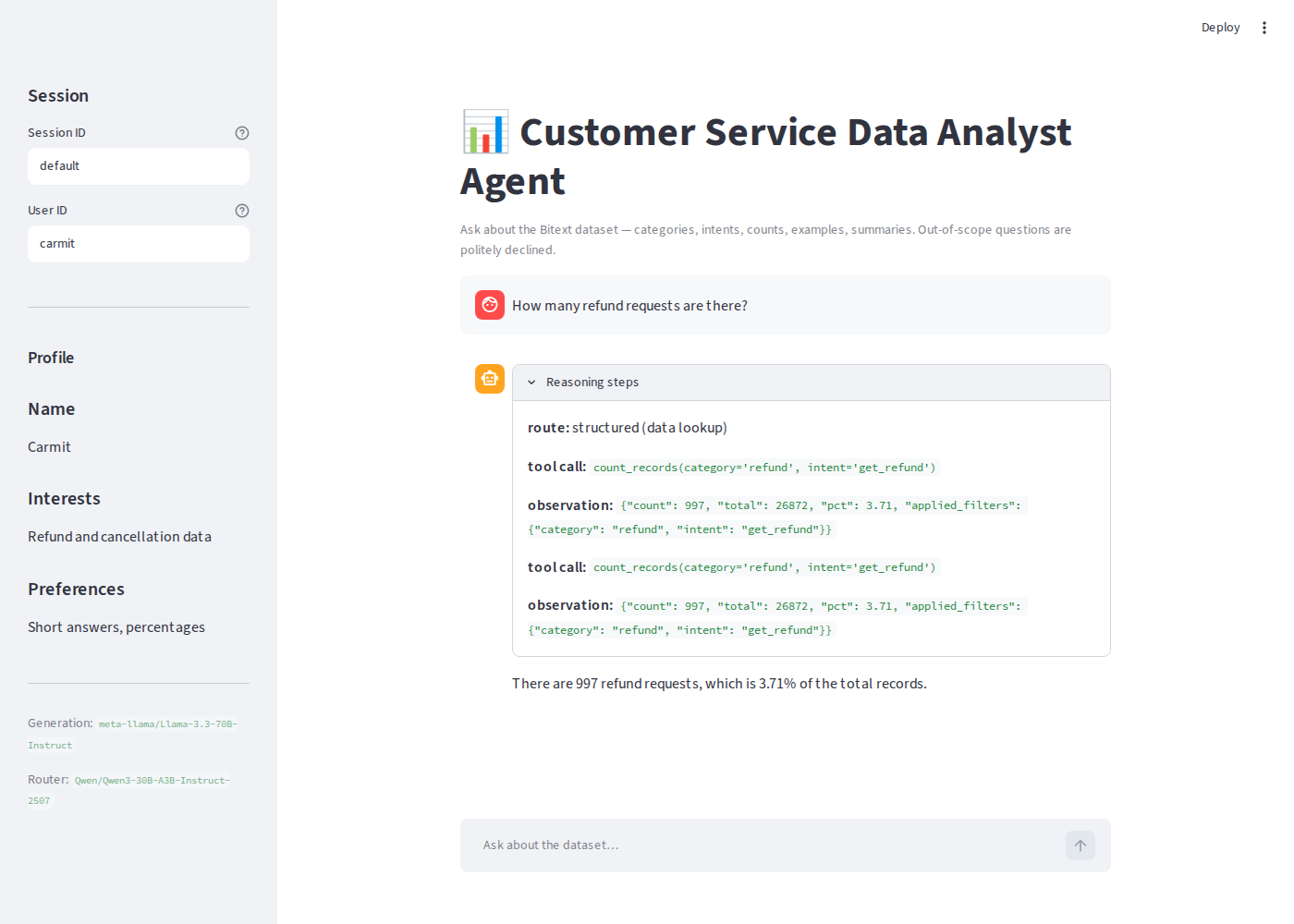
| Structured | "How many refund requests are there?" | chains tools → 997 (3.71%) |
| Unstructured | "Summarize the FEEDBACK category." | samples rows → a grounded summary |
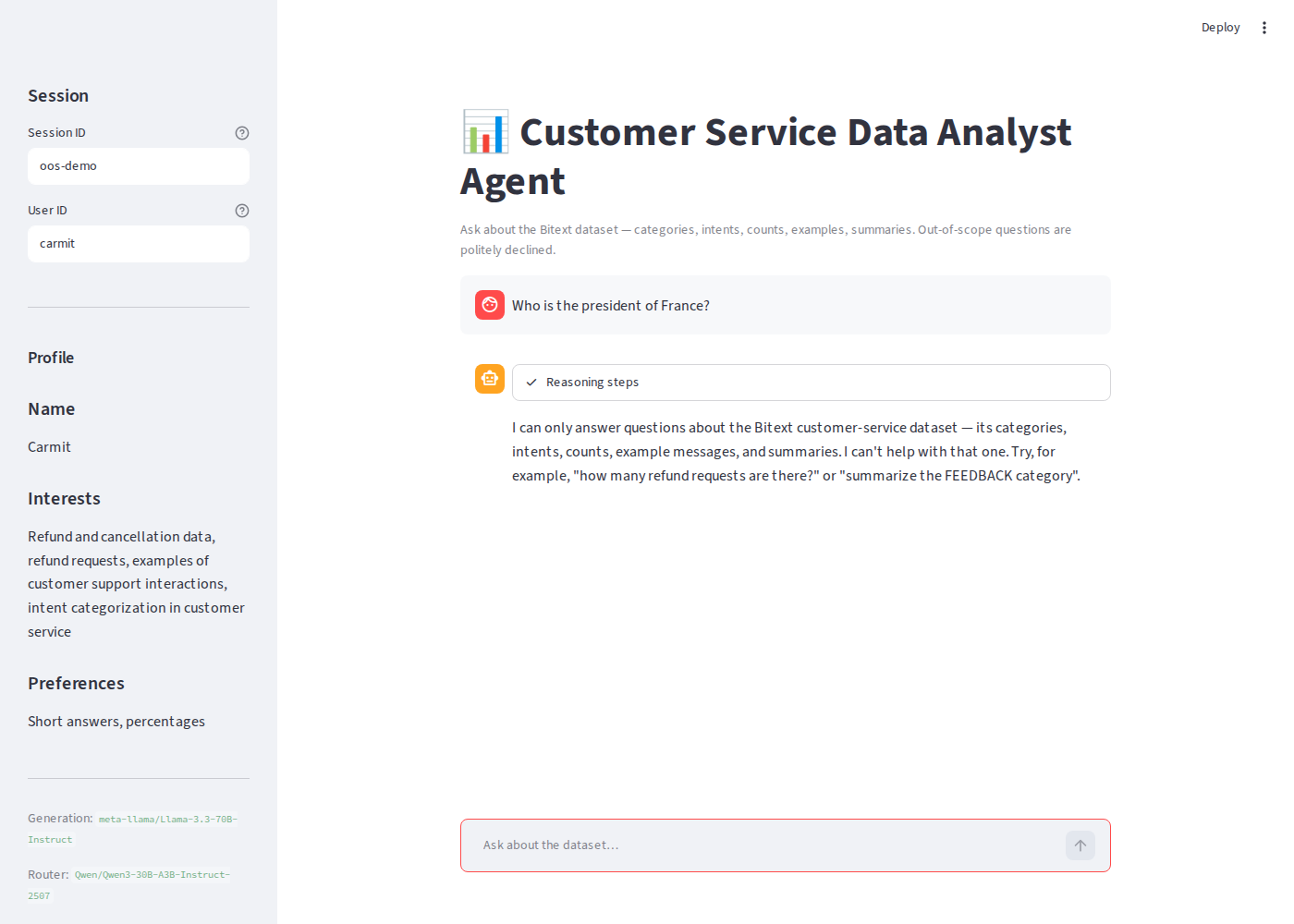
| Out-of-scope | "Who is the president of France?" | politely declined, never answered from general knowledge |
Built by Carmit Shaemesh Haas for Nebius Academy Assignment 3.
Demo
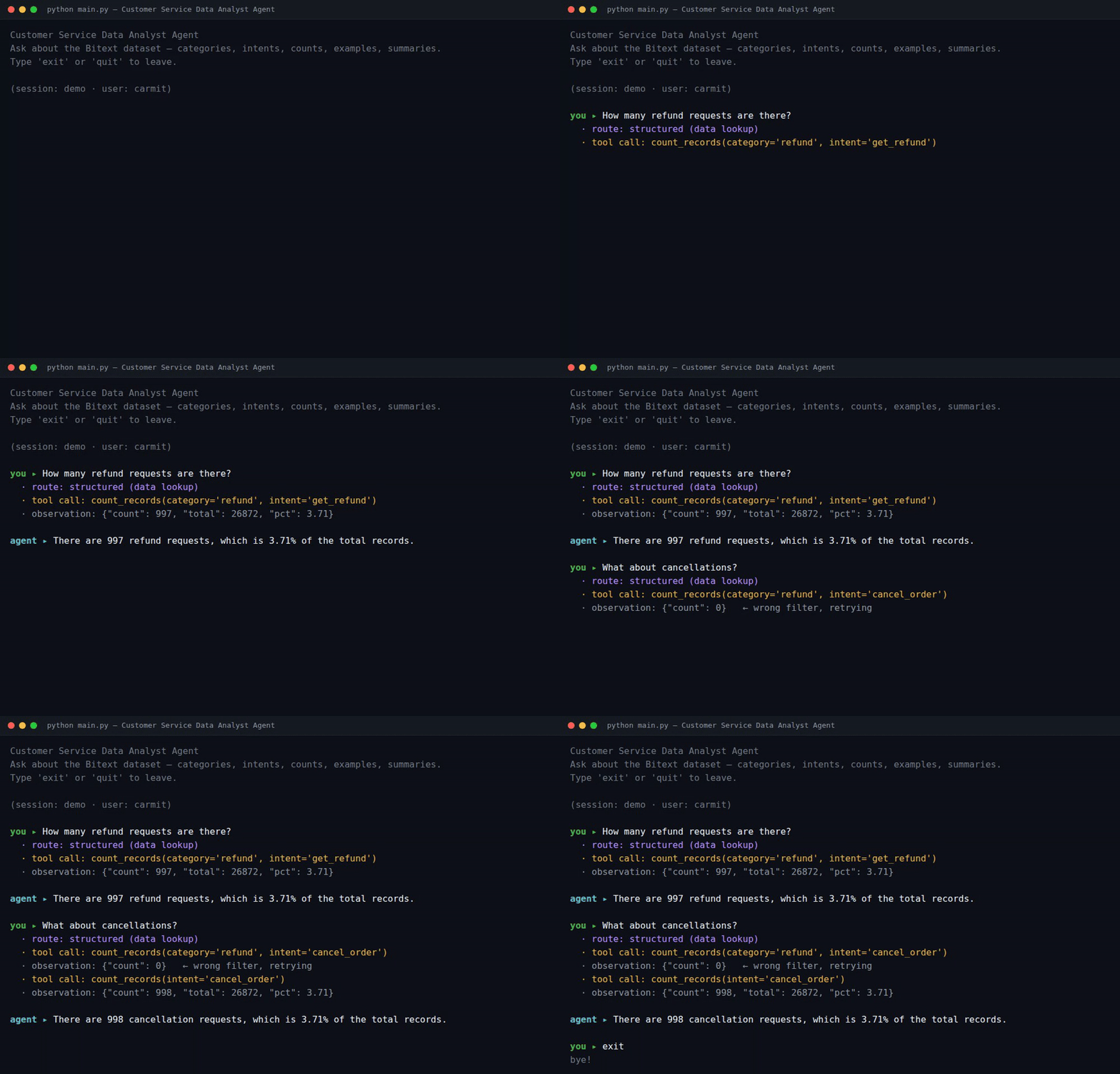
The CLI prints every step of the agent's reasoning. Below, it answers a question and then resolves a follow-up ("what about cancellations?") — noticing a wrong filter and retrying:
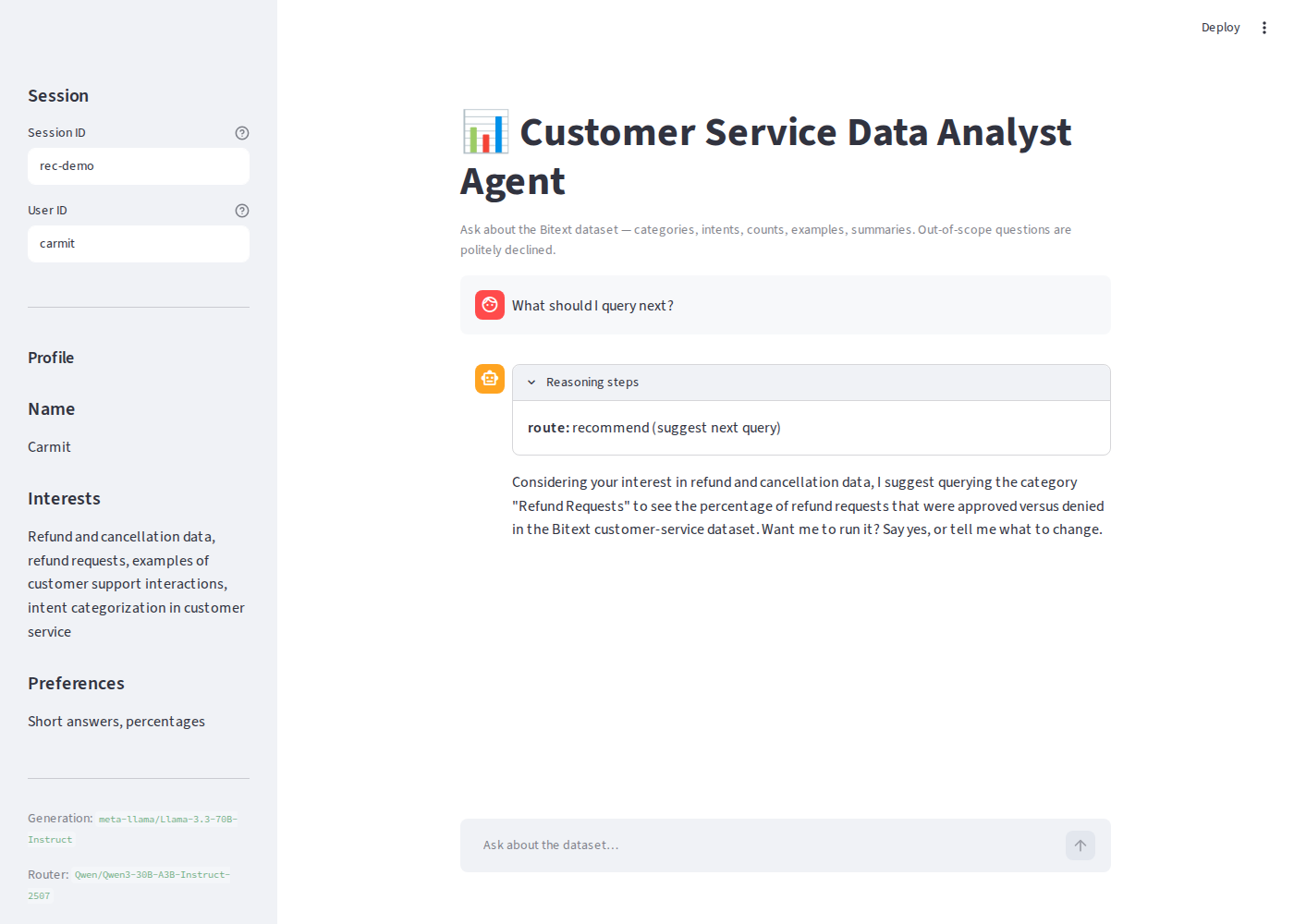
The Streamlit UI shows the same reasoning in a chat, with a session switcher and the live user profile in the sidebar.
| A structured question | The query recommender | An out-of-scope decline |
|---|---|---|
 |
 |
 |
Architecture
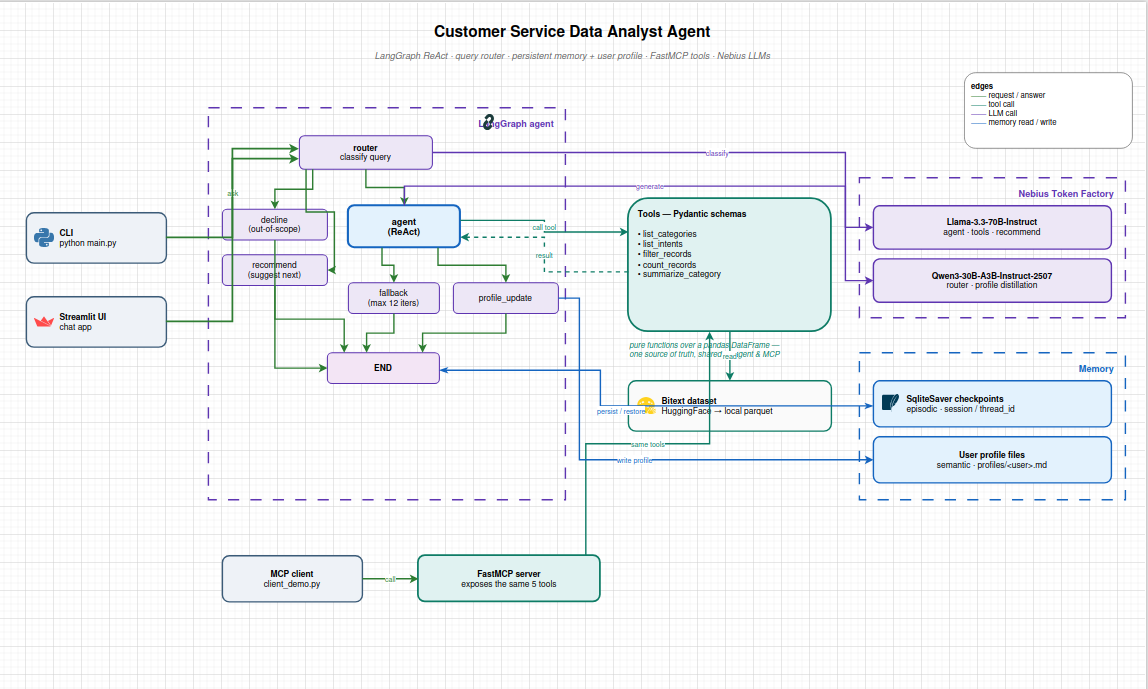
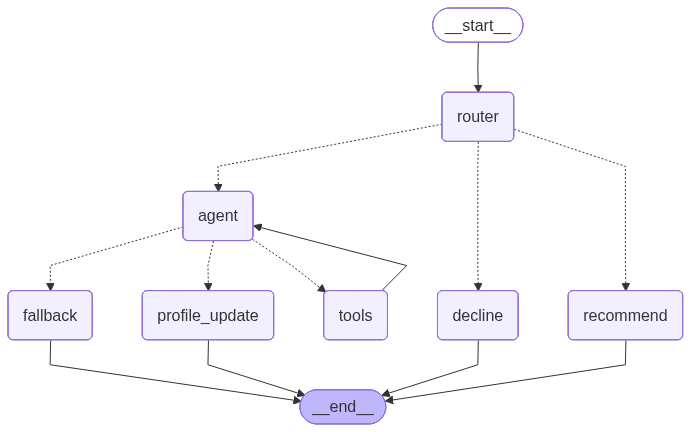
The agent is a LangGraph graph. A dedicated router classifies every question before any tool is chosen; out-of-scope questions are refused structurally (they never reach the generation model's general knowledge). In-scope questions enter the ReAct loop, and a profile-update step distills what it learned about the user.
The compiled LangGraph itself (auto-rendered from the code):
The editable source for the system diagram is docs/architecture.drawio.
Pieces:
- Router (
src/cs_agent/agent/router.py) — labels a questionstructured,unstructured,out_of_scope, orrecommend, using the small model with typed structured output (and a plain-text fallback). - Tools (
src/cs_agent/tools/) — five Pydantic-typed tools (list_categories,list_intents,filter_records,count_records,summarize_category) implemented as pure functions over a pandas DataFrame. The agent and the MCP server both call these same functions, so they can never drift apart. - Memory — two kinds:
- Episodic: a LangGraph SqliteSaver checkpoint per
--session, so a conversation resumes after a restart and follow-ups ("what about refunds?") resolve. - Semantic: a per-user profile in
profiles/<user>.md(name, interests, preferences), distilled after each answered turn and injected into the prompt.
- Episodic: a LangGraph SqliteSaver checkpoint per
- Guardrails — a
declinenode for out-of-scope questions and a graceful fallback afterMAX_ITERATIONS(12) so the loop never spins forever. - MCP — a FastMCP server (
mcp_server/server.py) exposes the same five tools to any MCP client.
Model choice
Both models run on Nebius Token Factory (OpenAI-compatible). The agent uses two, on purpose:
| Role | Model | Why |
|---|---|---|
| Generation, tool calling, summaries, recommendations | meta-llama/Llama-3.3-70B-Instruct |
reliable OpenAI-style function calling and grounded writing |
| Routing + profile distillation | Qwen/Qwen3-30B-A3B-Instruct-2507 |
a Mixture-of-Experts model with ~3B active parameters: much cheaper and faster than the 70B, and strong at short classification and merge tasks |
Routing and profile-merging are easy, high-volume jobs, so they go to the small fast model;
the heavier reasoning and writing go to the large one. Both IDs live in
src/cs_agent/config.py and can be overridden via .env.
Quickstart (clone to running in ~5 minutes)
Prerequisites: Python 3.11+, a Nebius Token Factory
API key, and uv (recommended) or pip.
# 1. clone
git clone https://github.com/CarmitHaas/customer-service-agent-carmit-haas.git
cd customer-service-agent-carmit-haas

# 2. install (creates a venv and installs the package + deps)
uv sync
#   --- or with pip ---
# python -m venv .venv && source .venv/bin/activate
# pip install -e .

# 3. add your API key
cp .env.example .env
# edit .env and set NEBIUS_API_KEY=...

# 4. run the CLI
uv run python main.py --session demo --user carmit
On first run the dataset (~27k rows) is downloaded from Hugging Face once and cached to
data/bitext.parquet, so later runs start instantly and work offline.
Using the CLI
uv run python main.py --session demo --user carmit
--session names the conversation (resume it later with the same value); --user selects
the persistent profile. Every tool call and observation is printed as it happens. Try:
How many refund requests are there?
What categories exist in the dataset?
What is the distribution of intents in the ACCOUNT category?
Summarize the FEEDBACK category.
What should I query next?          # the recommender: suggests, you confirm, it runs
What do you remember about me?      # answered from your profile
Who is the president of France?     # politely declined
To see memory survive a restart: ask something, exit, relaunch with the same
--session, and ask a follow-up like "what about shipping?".
Using the Streamlit app
uv run streamlit run src/cs_agent/ui/streamlit_app.py
Chat in the browser; the reasoning steps appear in a collapsible panel and the sidebar has the session switcher and the live profile.
MCP server
Start the server (stdio transport):
uv run python mcp_server/server.py
Connect a client and call a tool. A runnable example is in mcp_server/client_demo.py:
import asyncio
from fastmcp import Client

async def main():
    async with Client("mcp_server/server.py") as client:
        tools = await client.list_tools()
        print([t.name for t in tools])
        result = await client.call_tool("count_records", {"intent": "get_refund"})
        print(result.data)   # {'count': 997, 'total': 26872, 'pct': 3.71, ...}

asyncio.run(main())
Run it directly:
uv run python mcp_server/client_demo.py
Project layout
customer-service-agent-carmit-haas/
├── main.py                       # CLI entry point
├── src/cs_agent/
│   ├── config.py                 # endpoint, model IDs, paths, MAX_ITERATIONS
│   ├── data.py                   # cached dataset loader
│   ├── tools/
│   │   ├── schemas.py            # Pydantic input/return models + tool descriptions
│   │   └── analytics.py          # pure analysis functions (single source of truth)
│   ├── agent/
│   │   ├── state.py              # graph state
│   │   ├── llm.py                # Nebius model factories
│   │   ├── router.py             # query router node
│   │   ├── tool_bindings.py      # tools as LangChain @tool
│   │   ├── graph.py              # the LangGraph wiring
│   │   ├── profile.py            # per-user profile
│   │   └── persistence.py        # SqliteSaver checkpointer
│   └── ui/streamlit_app.py       # Streamlit chat (Bonus A)
├── mcp_server/
│   ├── server.py                 # FastMCP server (Task 3)
│   └── client_demo.py            # minimal MCP client
├── tests/test_analytics.py       # tool tests (no API key needed)
└── docs/                         # diagrams + screenshots
Tests
uv run pytest
The tests cover the pure analysis tools against known dataset facts and need no API key.
Notes
- Out-of-scope refusal is enforced structurally (a dedicated
declinenode), not just by a prompt instruction, so the model can't be talked into answering off-topic questions. - The recommender proposes with a no-tools model, so it can suggest but never execute; a
pending_suggestionflag makes the suggest → refine → confirm loop deterministic.
License
MIT — see LICENSE.
from github.com/CarmitHaas/customer-service-agent-carmit-haas
Установить Customer Service Data Analyst Server в Claude Desktop, Claude Code, Cursor
unyly install customer-service-data-analyst-mcp-serverСтавит в Claude Desktop, Claude Code, Cursor и VS Code — сам разбирается с npx, uvx и сборкой из исходников.
Впервые? Поставь CLI: curl -fsSL https://unyly.org/install | sh
Или настроить вручную
Выполни в терминале:
claude mcp add customer-service-data-analyst-mcp-server -- uvx customer-service-agentFAQ
Customer Service Data Analyst Server MCP бесплатный?
Да, Customer Service Data Analyst Server MCP бесплатный — установка в пару кликов через Unyly без оплаты.
Нужен ли API-ключ для Customer Service Data Analyst Server?
Нет, Customer Service Data Analyst Server работает без API-ключей и переменных окружения.
Customer Service Data Analyst Server — hosted или self-hosted?
Self-hosted: сервер запускается локально на твоей машине командой из раздела установки.
Как установить Customer Service Data Analyst Server в Claude Desktop, Claude Code или Cursor?
Открой Customer Service Data Analyst Server на unyly.org, выбери вкладку своего клиента (Claude Desktop, Claude Code, Cursor) и нажми Install — конфиг сгенерируется автоматически, без правки JSON.
Похожие MCP
GitHub
PRs, issues, code search, CI status
 автор: GitHub
Filesystem
Secure file operations with configurable access controls.
Memory
Knowledge graph-based persistent memory system.
Template MCP Server
A CLI tool to create a new Model Context Protocol server project with TypeScript support, dual transport options, and an extensible structure
 автор: mcpdotdirect
Compare Customer Service Data Analyst Server with
Не уверен что выбрать?
Найди свой стек за 60 секунд
Автор?
Embed-бейдж для README
Похожее
Все в категории development