
DaemonsMCP
БесплатноНе проверенDaemonsMCP is a comprehensive C# MCP service that provides LLMs with secure, full-featured access to explore, read, and write to local codebases. Built on MCPSh

Описание
DaemonsMCP is a comprehensive C# MCP service that provides LLMs with secure, full-featured access to explore, read, and write to local codebases. Built on MCPSharp for reliable transport and JSON-RPC communication, it gives your AI assistant the ability to see, navigate, understand, and modify your project files just like a developer would.
README
Give LLMs hands-on control of your codebase 🐁🗨️✋
DaemonsMCP is a comprehensive C# MCP (Model Context Protocol) service that provides LLMs with secure, full-featured access to explore, read, and write to local codebases. Built on MCPSharp for reliable transport and JSON-RPC communication, it gives your AI assistant the ability to see, navigate, understand, and modify your project files just like a developer would.
✅ V2.4.0 - PackedTables Architecture - Complete CRUD operations with GUI configuration, hot reload file watching, code intelligence, and project management capabilities!
🚀 Key Features
- 🔍 Codebase Exploration: Browse projects, directories, and files with intuitive tools
- 📝 Full Write Operations: Create, update, and delete files and directories
- 🛡️ Enterprise Security: Multi-layer security validation with configurable permissions
- 💾 Automatic Backups: Timestamped backups for all destructive operations
- 📁 Multi-Project Support: Manage multiple codebases from a single service
- ⚡ High Performance: Compiled C# with MCPSharp for fast, reliable responses
- 🌐 Cross-Platform: Robust path normalization for Windows, Linux, and macOS
- 🧠 Code Intelligence: Advanced C# code analysis and manipulation with Microsoft.CodeAnalysis
- 📊 Project Management: Hierarchical nodes, todo lists, and project organization
- 🗃️ File-Based Database: PackedTables.NET for efficient local storage
- 🔄 Hot Reload: RepositoryFileWatcher detects external changes automatically
- 🎨 GUI Configuration: DaemonsConfigViewer app for easy setup and management
🎉 What's New in V2.4.0
🏗️ Major Architecture Overhaul
PackedTables.NET Integration
- Replaced JSON-based configuration with high-performance PackedTables.NET binary storage
- Centralized configuration in
ProgramData/DaemonsMCP(no more scattered.daemonsfolders in project roots) - Three specialized data files:
Projects.pktbs,Settings.pktbs,Storage.pktbs - Faster reads/writes with efficient binary serialization
- Proper schema management and data integrity
Dependency Injection Everywhere
- Full
Microsoft.Extensions.DependencyInjectionimplementation across all components - Singleton
IndexServicefor efficient resource management - Clean separation of concerns with repository pattern
- Testable, maintainable architecture
🎨 New DaemonsConfigViewer Application

Visual Configuration Management
- Modern WinForms GUI for managing all DaemonsMCP settings
- Tree-based navigation for projects and nodes
- Live property editing with validation
- Hot Reload Detection: Visual indicator when external changes occur (e.g., Claude modifies data)
- Integrated PackedTables viewer for direct data inspection
- Project import from legacy
daemonsmcp.jsonfiles
Cross-Application Synchronization
RepositoryFileWatchermonitors.pktbsfiles for changes- ConfigViewer shows reload prompt when DaemonsMCP (via Claude) modifies data
- Bidirectional updates: Changes in ConfigViewer immediately available to Claude
- Prevents data loss with smart conflict detection
🔄 Hot Reload & File Watching
RepositoryFileWatcher Service
- Monitors configuration files for external changes
- Debounced updates (500ms) to prevent excessive reloads
- Automatic repository re-initialization on change detection
- Queue-based processing for batch changes
- Thread-safe implementation
Benefits:
- Update projects in ConfigViewer, Claude sees changes instantly
- Claude creates nodes, ConfigViewer detects and offers reload
- Multiple tools can work on the same data safely
- No need to restart services after configuration changes
📊 Enhanced Project Management
Centralized Storage Location
- Windows:
C:\ProgramData\DaemonsMCP - Linux/macOS:
~/.local/share/DaemonsMCP - All configuration in one place (no repository pollution)
- Easy backup and migration
- Shared across all projects
Improved Node System
- Better recursive operations with depth control
- Enhanced filtering (type, status, name, details)
- More efficient tree operations
- Proper rank management for ordering
🛠️ Development Improvements
Code Intelligence Enhancements
- More accurate class boundary detection
- Better XML documentation capture
- Improved namespace resolution
- Background indexing with FileSystemWatcher (5-second debounce)
- Queue-based batch processing
Tool Refinements
- Standardized
OperationResult<T>response format across all tools - Consistent error handling and messaging
- Better path validation and normalization
- Improved cross-platform compatibility
🐛 Major Bug Fixes
V3 Regression Fixes (prevented runaway scenarios)
- Fixed file watcher infinite loop when nodes updated
- Resolved race conditions in hot reload system
- Prevented recursive save operations
- Added update guards to ConfigViewer
Path Handling
- Fixed directory listing failures on restricted paths
- Improved Windows/Linux path separator handling
- Better root path validation
Performance
- Eliminated redundant PackedTables saves
- Optimized file watching with proper debouncing
- Reduced memory footprint for large codebases
🔧 Breaking Changes from V2.x
Migration Required:
daemonsmcp.json→Projects.pktbs(use ConfigViewer import feature)- Project
.daemonsfolders → CentralizedProgramData/DaemonsMCP - Manual reconfiguration recommended for cleanest upgrade
Deprecated:
- JSON-based configuration (still readable via import)
- Per-project data storage (moved to centralized location)
New Requirements:
- .NET 9.0 SDK (upgraded from .NET 8)
- One-time configuration migration
📈 Performance Metrics
Compared to V2.x:
- Configuration Load: 3x faster (binary vs JSON parsing)
- Write Operations: 40% faster with PackedTables
- Memory Usage: 25% reduction with proper DI lifecycle
- File Watching: Near-instant detection (vs 1-2 second delays)
📚 Documentation
For detailed tool documentation, see TOOLS.md - Complete reference for all 26 MCP tools.
⚡ Quick Start
Get DaemonsMCP V2.4.0 up and running with Claude Desktop in 10 minutes!
Prerequisites
✅ .NET 9.0 SDK installed
✅ Claude Desktop installed
✅ Git for cloning (or download ZIP)
Step 1: Download & Build (3 minutes)
# Clone the repository
git clone https://github.com/mmeents/DaemonsMCP.git
cd DaemonsMCP

# Build the release version
dotnet build --configuration Release
Build Output Locations:
- Windows:
DaemonsMCP\bin\Release\ et9.0-windows7.0\DaemonsMCP.exe - Linux/macOS:
DaemonsMCP/bin/Release/net9.0/DaemonsMCP
Step 2: Configure Projects (5 minutes)
DaemonsMCP V2.4.0 uses PackedTables for configuration storage.
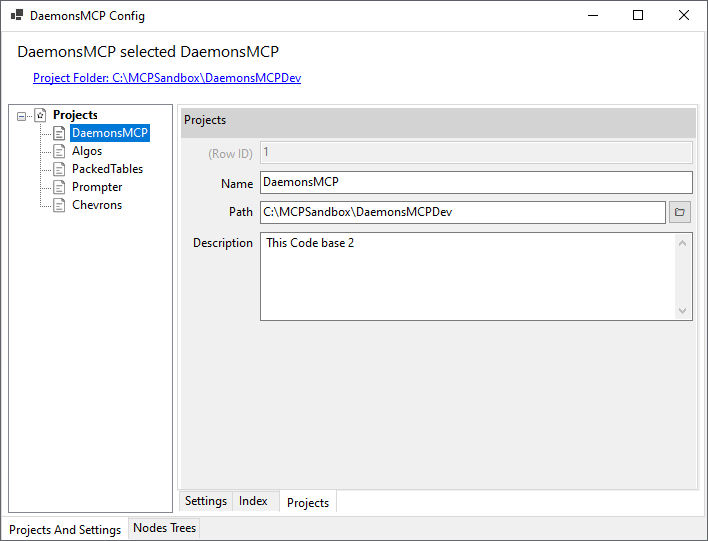
Use DaemonsConfigViewer GUI
Run the ConfigViewer app:
cd DaemonsConfigViewer
dotnet run
Add your projects using the GUI:
- Right Click on Projects → Add Project
- Enter project name, description, and path
- Save
Configure security settings as needed (see Security section below)
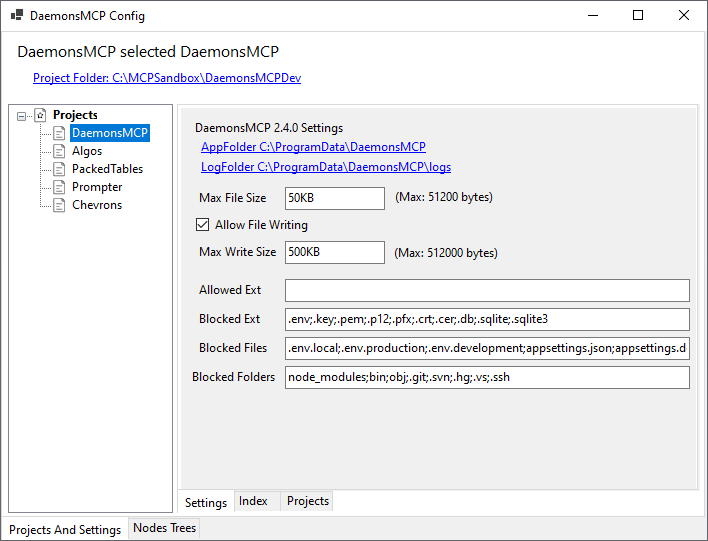
Default location: C:\ProgramData\DaemonsMCP (Windows) or ~/.local/share/DaemonsMCP (Linux/macOS)
Step 3: Configure Claude Desktop (2 minutes)
Find Your Config File
Windows:
%APPDATA%\Claude\claude_desktop_config.json
macOS:
~/Library/Application Support/Claude/claude_desktop_config.json
Linux:
~/.config/Claude/claude_desktop_config.json
Add DaemonsMCP Server
Edit or create the config file:
Windows:
{
  "mcpServers": {
    "daemonsmcp": {
      "command": "C:\path\to\DaemonsMCP\DaemonsMCP\bin\Release\
et9.0-windows7.0\DaemonsMCP.exe",
      "args": []
    }
  }
}
Linux/macOS:
{
  "mcpServers": {
    "daemonsmcp": {
      "command": "/path/to/DaemonsMCP/DaemonsMCP/bin/Release/net9.0/DaemonsMCP",
      "args": []
    }
  }
}
⚠️ Important: Use the full absolute path to the executable!
Step 4: Test Connection
- Restart Claude Desktop completely (close all windows, restart app)
- Open a new conversation in Claude Desktop
- Test with a simple command:
What projects do you have access to?
Expected Response: Claude should return a list of your configured projects showing names, descriptions, and paths.
Step 5: Verify Functionality
Test Reading
Read the README to understand the DaemonsMCP project
Test Code Intelligence
Index the C# code and show me the first 10 classes
Test Project Management
Show me the project documentation with 2 levels of depth
🔧 Configuration
Using DaemonsConfigViewer GUI
The DaemonsConfigViewer app provides a visual interface for managing all DaemonsMCP settings:
Features:
- ✅ Add/edit/remove projects visually
- ✅ Configure security settings with validation
- ✅ View and manage project nodes hierarchically
- ✅ Hot reload detection - shows when external changes occur
- ✅ Built-in PackedTables viewer for direct data inspection
Hot Reload: When DaemonsMCP (via Claude) makes changes to Storage.pktbs, ConfigViewer detects the change and shows a reload button. Click to refresh the UI with latest data.
Configuration Files
DaemonsMCP V2.4.0 uses three main configuration files:
1. Projects.pktbs
- Project definitions (name, path, description)
- Index paths and backup locations
- Managed via DaemonsConfigViewer
2. Settings.pktbs
- Security settings (allowed/blocked extensions)
- File size limits
- Write protection rules
- Validation settings
3. Storage.pktbs
- Project management nodes
- Todo lists
- Documentation structure
- Custom hierarchical data
Default Location:
- Windows:
C:\ProgramData\DaemonsMCP - Linux/macOS:
~/.local/share/DaemonsMCP
Security Configuration
Write Operations Control
- Enable/Disable: Toggle write operations on/off
- Default: Enabled (allows file creation and modification)
File Extension Filtering
Allowed Extensions (Whitelist):
- Source code:
.cs,.js,.ts,.py,.rb,.php - Documentation:
.md,.txt,.rst - Config:
.json,.xml,.yml,.yaml - Web:
.html,.css,.sql
Blocked Extensions (Blacklist):
- Executables:
.exe,.dll,.so - Scripts:
.bat,.cmd,.sh,.ps1 - Archives:
.zip,.tar,.gz
Processing: Blocked list takes priority. If not in allowed list, it's blocked (whitelist approach).
File Size Limits
- Max Read Size: 50KB (prevents context overflow)
- Max Write Size: 5MB (prevents accidental huge files)
- Format: Use
50KB,5MB,1GBnotation
Write-Protected Paths
Default Protected:
.git- Git repository data.vs,.vscode- IDE settingsbin,obj- Build outputsnode_modules,packages- Dependencies
Effect: Blocks any write operations to these directories
Security Profiles
Development (Permissive):
- Write: Enabled
- Extensions: Broad (.cs, .js, .py, .md, .json, .html, .css, etc.)
- Max Read: 50KB
- Max Write: 10MB
- Protected: .git, bin, obj only
Production (Restrictive):
- Write: Disabled (read-only)
- Extensions: Minimal (.cs, .md, .txt, .json)
- Max Read: 5MB
- Max Write: 0
- Protected: All system directories
📋 Prerequisites
- .NET 9.0 SDK or later
- Windows, Linux, or macOS (cross-platform compatible)
- MCP-compatible client (Claude Desktop, Continue, etc.)
🔧 Architecture
DaemonsMCP V2.4.0 features a modern enterprise architecture designed for performance, reliability, and maintainability.
Core Components
MCPSharp Foundation
- Robust JSON-RPC transport layer
- Automatic request/response handling
- Error handling and logging
- Standard MCP protocol compliance
Dependency Injection Container
- Full
Microsoft.Extensions.DependencyInjectionsupport - Singleton services for shared resources
- Scoped services for request handling
- Proper lifecycle management
PackedTables.NET Data Layer
- High-performance binary file format
- Schema-based table management
- ACID-like guarantees for file operations
- Efficient serialization with MessagePack
- Support for complex types and relationships
Microsoft.CodeAnalysis
- Full C# syntax tree parsing
- Semantic analysis
- Symbol resolution
- Code generation capabilities
Service Architecture
┌─────────────────────────────────────────┐
│         MCP Server (MCPSharp)           │
│  ┌───────────────────────────────────┐  │
│  │   Tool Handlers (26 tools)        │  │
│  └───────────────────────────────────┘  │
└─────────────────┬───────────────────────┘
                  │
    ┌─────────────┴─────────────┐
    │                           │
┌───▼────────────┐   ┌──────────▼──────────┐
│  IndexService  │   │ ProjectRepository   │
│  (Singleton)   │   │ SettingsRepository  │
│                │   │ StorageRepository   │
│ - File watch   │   │                     │
│ - Code parse   │   │ - Projects.pktbs    │
│ - Queue mgmt   │   │ - Settings.pktbs    │
└───┬────────────┘   │ - Storage.pktbs     │
    │                └─────────────────────┘
    │
┌───▼─────────────────────┐
│  RepositoryFileWatcher  │
│  - Debounced updates    │
│  - Cross-app sync       │
└─────────────────────────┘
Data Flow
1. LLM → DaemonsMCP
Claude Request → MCPSharp → Tool Handler → Service Layer → PackedTables → Response
2. IndexService Processing
File Change → FileSystemWatcher → 5s Debounce → Queue →
→ ProcessFileAsync → CodeAnalysis → Extract Data → PackedTables Save
3. Hot Reload Cycle
ConfigViewer Update → Save to .pktbs → RepositoryFileWatcher →
→ 500ms Debounce → Reload Repository → DaemonsMCP sees changes
Storage Structure
Each Project Index:
ProjectRoot/.daemons/
├── ProjectName_index.pktbs   # Classes, methods, files
└── backups/                  # Automatic backups
    └── ProjectName_index.pktbs_20241005_143022
Shared Configuration:
C:\ProgramData\DaemonsMCP\  (Windows)
~/.local/share/DaemonsMCP   (Linux/macOS)
├── Projects.pktbs          # Project configurations
├── Settings.pktbs          # Security settings
└── Storage.pktbs           # Nodes and todos
Security Layers
Layer 1: Path Validation
- Sandbox enforcement (all paths must be within project roots)
- Path normalization (cross-platform compatibility)
- Symlink detection and blocking
Layer 2: File Type Filtering
- Whitelist + blacklist combination
- Extension validation on every operation
- MIME type checking for binary files
Layer 3: Size Limits
- Read size limits (prevent context overflow)
- Write size limits (prevent DoS)
- Configurable per security profile
Layer 4: Write Protection
- Protected path checking
- Backup creation for destructive ops
- Atomic file operations where possible
Layer 5: Operation Logging
- All write operations logged
- Backup tracking
- Audit trail for security review
🛡️ Security
DaemonsMCP includes enterprise-grade security features:
- Project Sandboxing: Access limited to configured directories
- File Type Filtering: Whitelist/blacklist file extensions
- Write Protection: Configurable protected paths
- Size Limits: Separate read/write size restrictions
- Automatic Backups: All destructive operations create backups
- Explicit Confirmations: Required for dangerous operations
- Hot Reload Safety: Prevents runaway update loops
🛠️ Development Tools
DaemonsConfigViewer
Visual configuration and management tool for humans
Features:
- Project Management: Add, edit, remove projects with validation
- Security Config: Visual editing of all security settings
- Node Tree Visualization: Hierarchical view of project management nodes
- Hot Reload Detection: Visual indicator when external changes detected
- Property Editing: Type-safe editing with PackedTables.Tabs controls
- Built-in PackedTables Viewer: Direct inspection of
.pktbsfiles
Hot Reload Workflow:
- Claude creates a node via DaemonsMCP tools
- ConfigViewer's
RepositoryFileWatcherdetectsStorage.pktbschange - UI shows "Reload" prompt in status bar
- User clicks reload to see updated nodes
- Vice versa: ConfigViewer changes immediately available to Claude
Technology:
- WinForms with modern flat design
- PackedTables.Tabs for property editing
- Real-time file watching
- Tree-based navigation
PackedTables.NET Viewer
Direct database inspection and editing tool
Capabilities:
- Open any
.pktbsfile directly - View all tables and their schemas
- Browse and edit rows
- Export data to CSV/JSON
- Import data from external sources
- Schema inspection and validation
Use Cases:
- Debug configuration issues
- Bulk data operations
- Schema migrations
- Data recovery from backups
- Understanding data structures
🚀 Available Tools
DaemonsMCP V2.4.0 provides 26 MCP tools across 4 categories:
File & Directory Operations (9 tools)
readme- Get living documentationlist-projects- List configured projectslist-project-directories- List directories in projectcreate-project-directory- Create new directorydelete-project-directory- Remove directorylist-project-files- List files in directoryget-project-file- Read file contentscreate-project-file- Create new fileupdate-project-file- Modify existing filedelete-project-file- Remove file
Code Intelligence (8 tools)
resync-index- Rebuild code indexstatus-index- Check indexer statuschange-status-index- Enable/disable indexerlist-classes- Browse indexed classesget-class- Get class details and codeadd-update-class- Modify class codelist-class-methods- Browse methods in classesget-class-method- Get method detailsadd-update-method- Modify method code
Project Management (7 tools)
list-item-types- Get available node typesadd-update-item-type- Create/modify typeslist-status-types- Get available statusesadd-update-status-type- Create/modify statuseslist-nodes- Browse node hierarchyget-nodes-by-id- Get specific nodesadd-update-nodes- Create/modify nodesadd-update-nodes-list- Batch node operationsremove-node- Delete nodes with strategysave-project-repo- Persist changes
Todo Management (2 tools)
make-todo-list- Create todo listget-next-todo- Get next pending taskmark-todo-done- Complete taskrestore-todo- Revert completionmark-todo-cancel- Cancel task
See TOOLS.md for complete documentation with examples
🤝 Contributing
Contributions welcome! See our contributing guidelines for details.
Areas of interest:
- Performance optimizations
- Additional MCP tool implementations
- Security enhancements
- Documentation improvements
- Integration examples
- Language support beyond C#
- Alternative storage backends
- Advanced code intelligence features
📝 License
This project is licensed under the MIT License - see the LICENSE.md file for details.
🙏 Acknowledgments
- Built on the Model Context Protocol (MCP) specification
- Powered by MCPSharp for robust JSON-RPC transport
- PackedTables.NET for efficient binary data storage
- Microsoft.CodeAnalysis (Roslyn) for C# parsing
- Special thanks to the MCP community and Claude Desktop!
📞 Support
- Issues: GitHub Issues
- Discussions: GitHub Discussions
- Documentation: docs/
Ready to give your LLM complete development superpowers? Star ⭐ this repo and let's build the future of AI-assisted development together!
Установка DaemonsMCP
У этого сервера нет опубликованного пакета — он собирается из исходников. Открой репозиторий и следуй инструкции в README.
▸ github.com/mmeents/DaemonsMCPFAQ
DaemonsMCP MCP бесплатный?
Да, DaemonsMCP MCP бесплатный — установка в пару кликов через Unyly без оплаты.
Нужен ли API-ключ для DaemonsMCP?
Нет, DaemonsMCP работает без API-ключей и переменных окружения.
DaemonsMCP — hosted или self-hosted?
Self-hosted: сервер запускается локально на твоей машине командой из раздела установки.
Как установить DaemonsMCP в Claude Desktop, Claude Code или Cursor?
Открой DaemonsMCP на unyly.org, выбери вкладку своего клиента (Claude Desktop, Claude Code, Cursor) и нажми Install — конфиг сгенерируется автоматически, без правки JSON.
Похожие MCP
wenb1n-dev/SmartDB_MCP
A universal database MCP server supporting simultaneous connections to multiple databases. It provides tools for database operations, health analysis, SQL optim
 автор: wenb1n-dev
Postgres Server
This server enables interaction with PostgreSQL databases through the Model Context Protocol, optimized for the AWS Bedrock AgentCore Runtime. It provides tools
 автор: madhurprash
Postgres
Query your database in natural language
 автор: Anthropic
PostgreSQL
Read-only database access with schema inspection.
автор: modelcontextprotocolCompare DaemonsMCP with
Не уверен что выбрать?
Найди свой стек за 60 секунд
Автор?
Embed-бейдж для README
Похожее
Все в категории data