
Daz3d
БесплатноНе проверенMCP server and skills that let AI agents control Daz Studio

Описание
MCP server and skills that let AI agents control Daz Studio
README

Daz3D-MCP
Let AI agents (Claude Code, Codex, Cursor, Antigravity, Gemini CLI, Claude Desktop, VS Code and any other MCP client) control Daz Studio: open and save scenes, find installed content, build characters (shape, clothing, hair, poses), set up cameras, lights and materials, render with Iray, install content from other stores, import OBJ and FBX models, animate figures (keyframes, presets, Mixamo FBX and mocap BVH), and run DazScript.
Independent open source project. Not affiliated with or endorsed by Daz 3D. Leer en español
New project. It is tested on Daz Studio 6.26 on Windows 11 with an NVIDIA card, but expect rough edges. Please report problems in Issues.
Examples
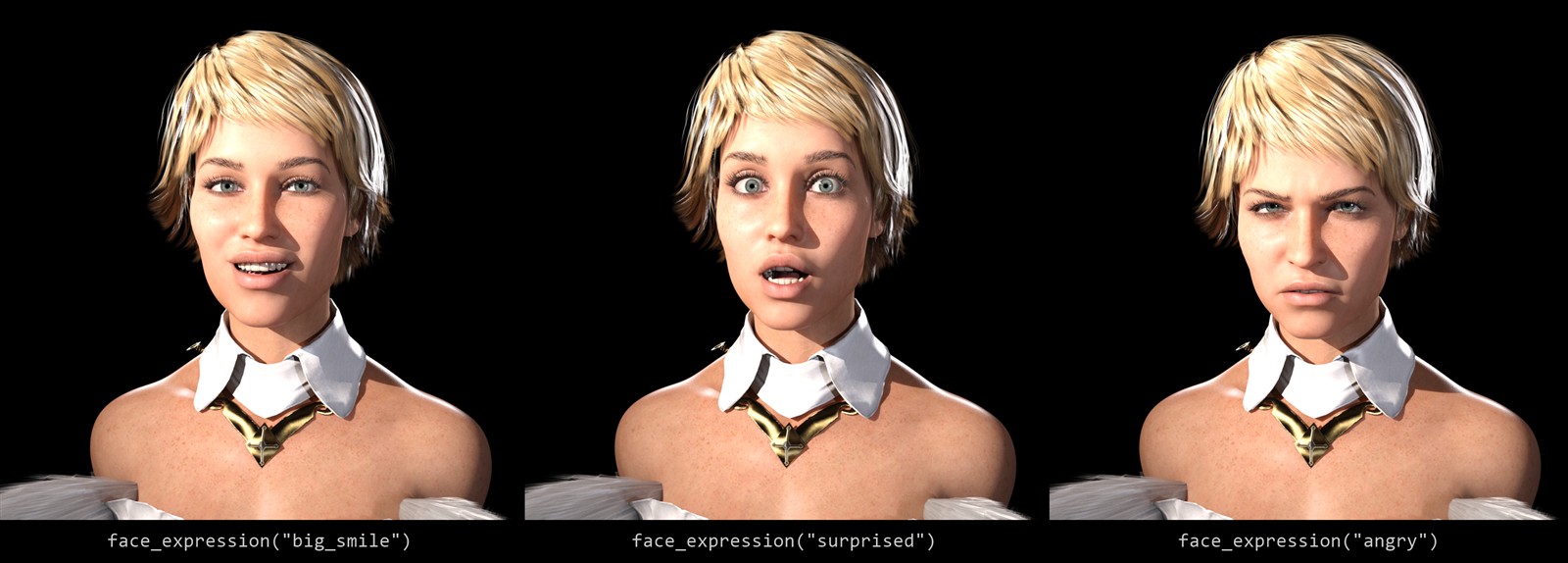
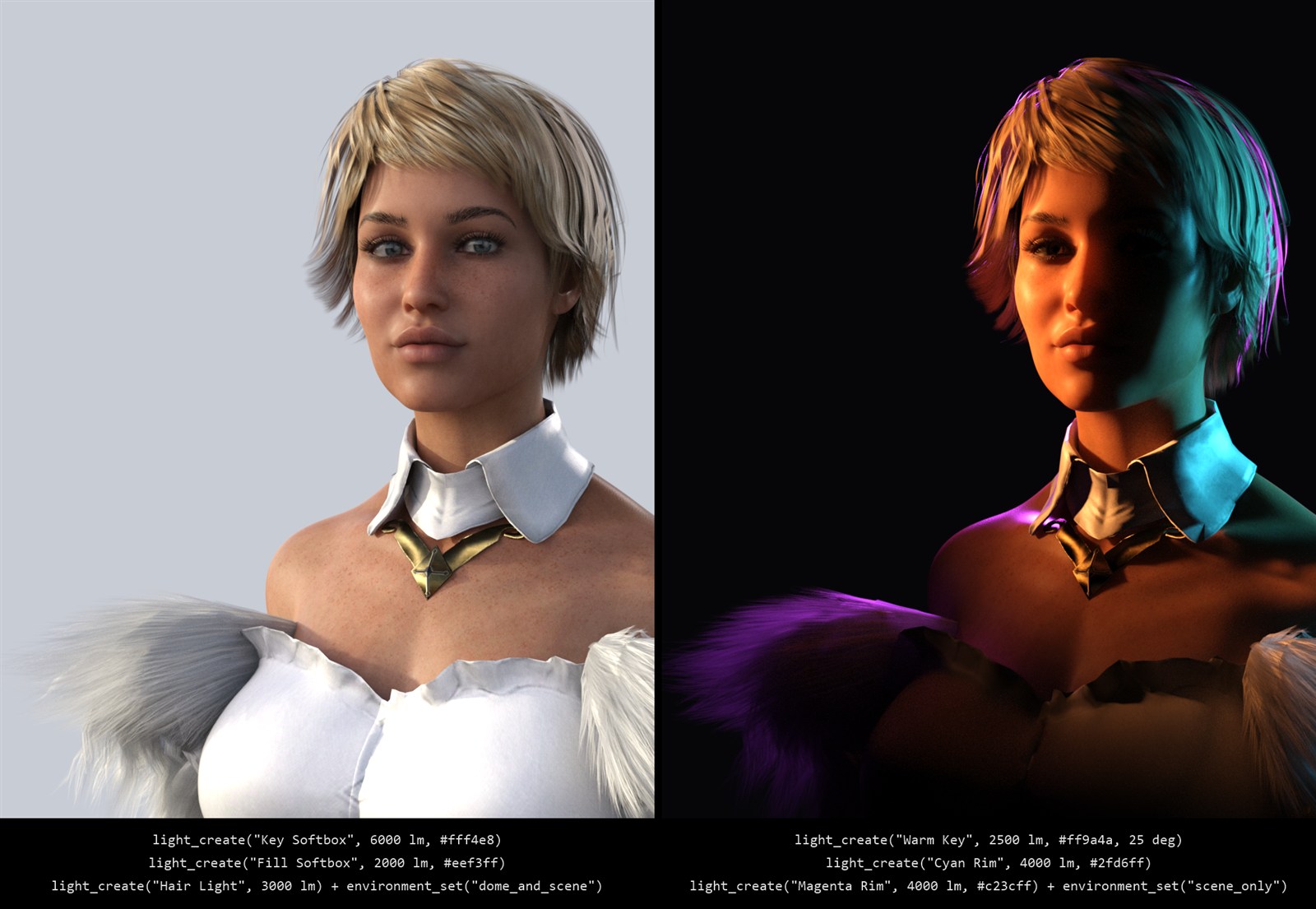
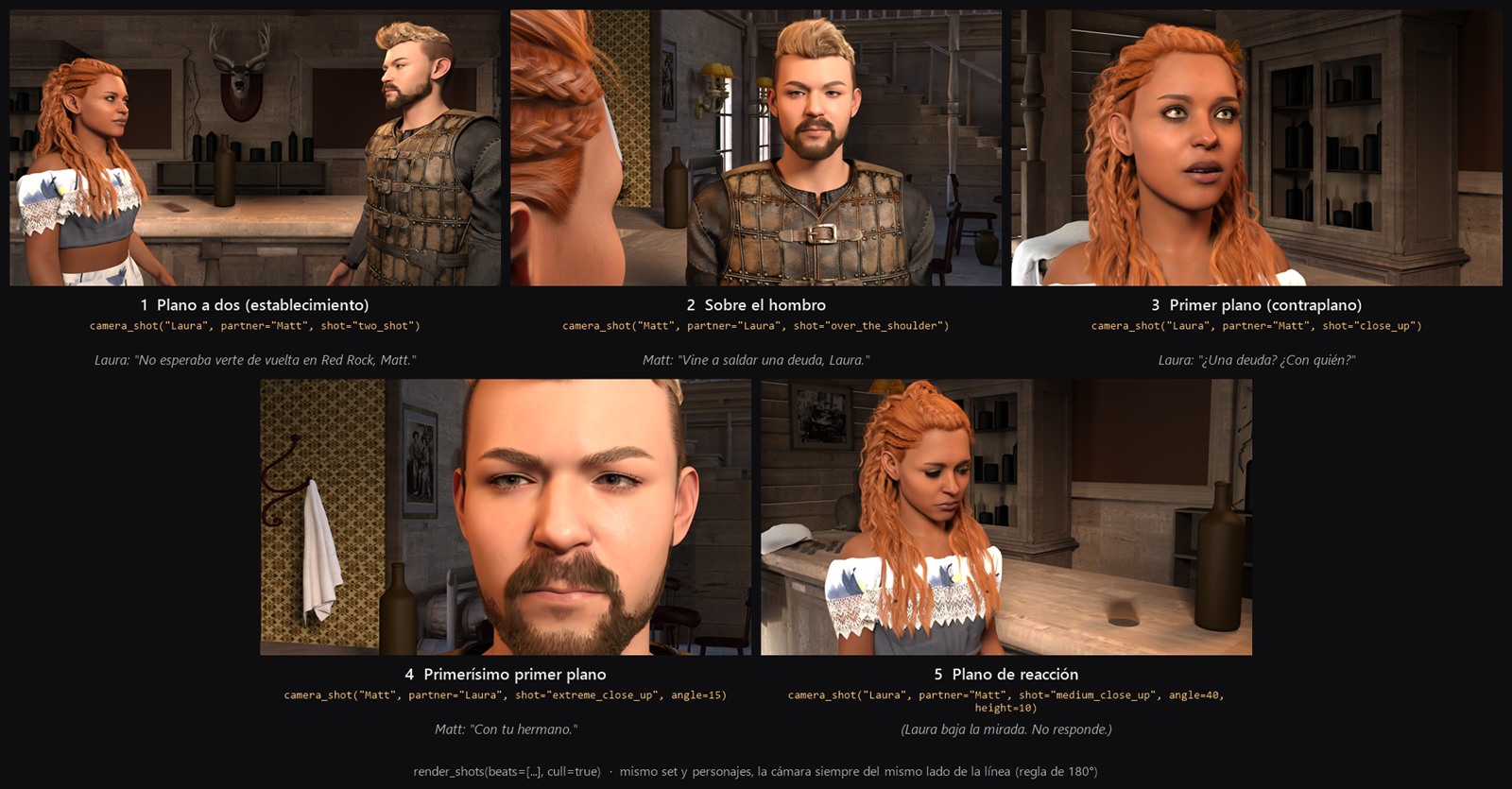
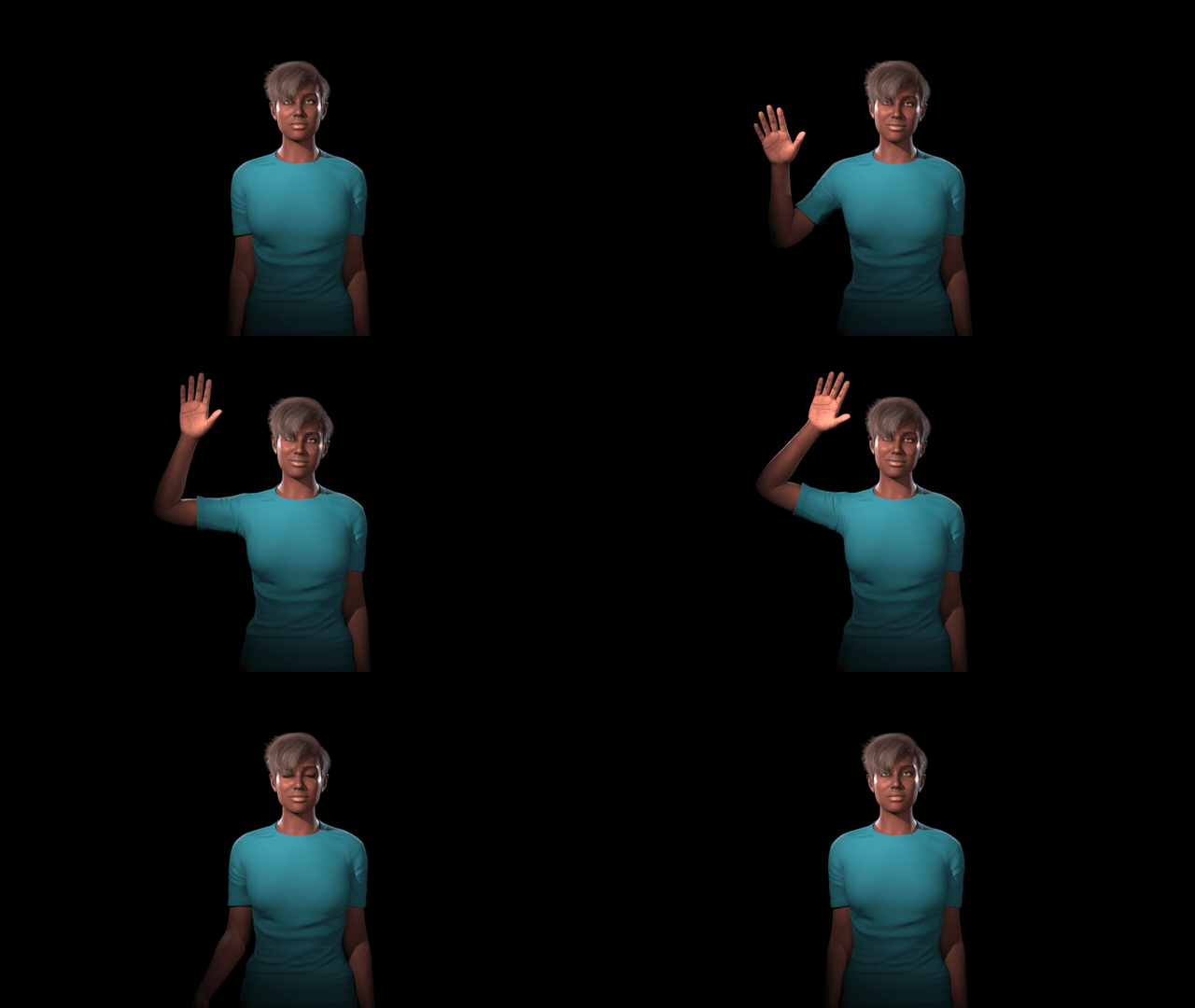
Every image here was rendered in Daz Studio by an AI agent using these tools.
Faces and expressions
face_expression puts named expressions on Genesis 9 and 8.1 figures;
eyes_look_at and eye_color take care of the eyes.
Lighting
light_create and environment_set build anything from a soft studio setup to
a low-key neon portrait.
Dialogue scenes
camera_shot frames close-ups, over-the-shoulder shots and two shots that keep
the 180 degree rule, and render_shots renders a whole conversation, one image
per line, for visual novels, comics and storyboards.
Animation
anim_keys_set, animation presets and Mixamo FBX or BVH import animate
figures; render_animation renders every frame to an MP4 or GIF.
Requirements
Windows 10 or 11, 64-bit. There is no macOS version and none is planned: Daz Studio renders with NVIDIA Iray, and Macs cannot use NVIDIA cards.
An NVIDIA graphics card (RTX recommended). Iray only renders on NVIDIA GPUs, and only when the scene fits in the card's memory. On AMD or Intel graphics Iray falls back to the CPU: very slow, without the AI denoiser, and big scenes can run out of memory and hang Daz Studio. Only
render,render_shotsandrender_animationneed the GPU; everything else works on any card.Daz Studio 6 (free), installed in its default folder. Daz Studio 4.24 is not supported yet.
uv, which runs the MCP server and installs Python for it if needed. In PowerShell:
powershell -ExecutionPolicy ByPass -c "irm https://astral.sh/uv/install.ps1 | iex"Open a new terminal afterwards so
uvxis on the PATH.An MCP client: Claude Code, Claude Desktop, Codex, Cursor, Gemini CLI, Antigravity, Windsurf, VS Code (Copilot) or any other.
Install
1. Close Daz Studio, then install the bridge plugin into it:
uvx daz3d-mcp setup
It finds Daz Studio, downloads the plugin that matches this version from the
GitHub release and copies
it to C:\Program Files\DAZ 3D\DAZStudio6\plugins\. That folder is protected,
so Windows asks for administrator permission once (accept the prompt).
2. Register the MCP server and the skills in your agents:
uvx daz3d-mcp install --all
It configures every supported agent it finds on this computer and copies the
skills (guides that teach the agent how to use Daz) into the agents that read
them. For one agent only, use --client NAME (claude-code, codex,
cursor, antigravity, gemini-cli, claude-desktop, windsurf, vscode).
3. Open Daz Studio, restart your agents, and check:
uvx daz3d-mcp doctor
It says what is missing and how to fix it. Then ask your agent something like "Describe the scene open in Daz and show me a capture."
Adding it by hand
install does this for you; use it for clients install does not know.
Every client runs the same command, uvx daz3d-mcp:
Claude Code:
claude mcp add --scope user daz3d -- uvx daz3d-mcpCodex (
~/.codex/config.toml):[mcp_servers.daz3d] command = "uvx" args = ["daz3d-mcp"] startup_timeout_sec = 60 tool_timeout_sec = 600Claude Desktop, Cursor, Windsurf, Gemini CLI, Antigravity and most other clients (
mcpServersin their JSON settings):{ "mcpServers": { "daz3d": { "command": "uvx", "args": ["daz3d-mcp"] } } }Claude Desktop keeps its file in
%LOCALAPPDATA%\Claude-Data\<folder>\claude_desktop_config.json(older versions:%APPDATA%\Claude\claude_desktop_config.json).VS Code (
mcp.json): the same entry under"servers", with"type": "stdio".
Clients without skills support get the same guides through the MCP itself
(the daz_guide tool, prompts and resources).
Update
uvx keeps the version it downloaded. To move to the latest one, close Daz Studio and your agents, then:
uv cache clean daz3d-mcp
uvx daz3d-mcp setup
setup installs the plugin that matches the new version.
Uninstall
uvx daz3d-mcp uninstall
removes the MCP entries and skills it added. Delete
C:\Program Files\DAZ 3D\DAZStudio6\plugins\dsp_dazmcp_bridge.dll (with Daz
Studio closed) to remove the plugin, and %USERPROFILE%\.daz3d-mcp for the
settings, token and content index.
Troubleshooting
uvxis not recognized: open a new terminal after installing uv.setupsays Daz Studio is open: close it; Windows does not let a plugin in use be replaced.- The permission prompt was refused: run
uvx daz3d-mcp setupagain, or from a terminal opened as Administrator. - The agent does not see the tools: restart the agent after
install, and runuvx daz3d-mcp doctor. - No plugin at all:
uvx daz3d-mcp setup --no-pluginuses an experimental mode that asks the running Daz Studio to execute script files. It is slower but needs nothing installed in Daz.
How it works
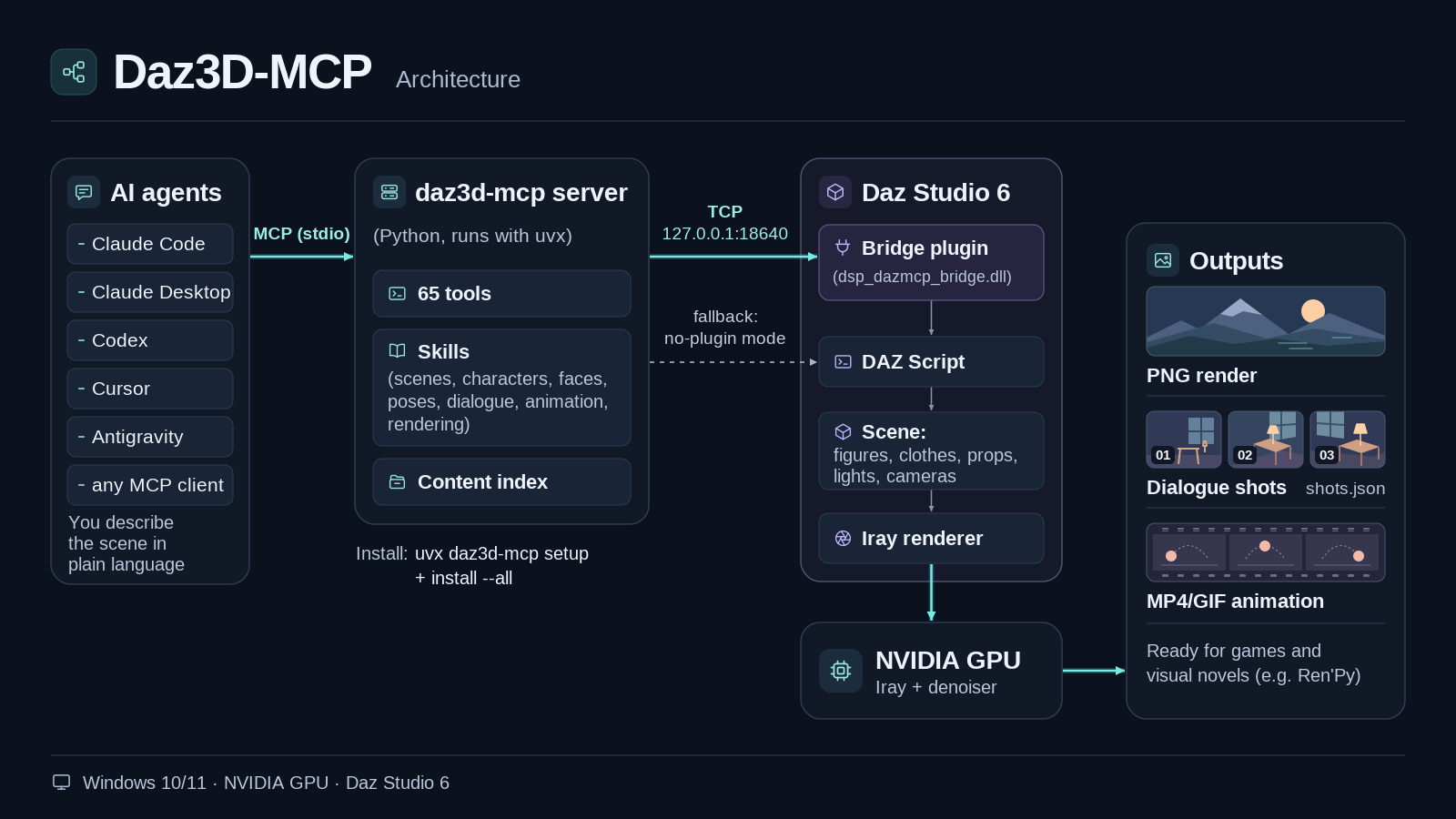
- Bridge plugin (
bridge/, C++): a tiny server inside Daz Studio. It only listens on127.0.0.1, needs a token and runs DazScript on the main thread. - DazScript library (
scripts/): one script per tool; it does the real work. - MCP server (
src/daz3d_mcp/, Python): the tools agents call. - Skills (
skills/):SKILL.mdguides that teach agents how to use Daz.
Tools
| Tool | What it does |
|---|---|
daz_status |
Checks the connection; Daz version and open scene |
daz_dialog |
Sees and answers pop-up dialogs Daz stops on (overwrite?, replace?); needs plugin 0.2+ |
scene_info |
Figures, clothing, props, cameras and lights with position, rotation, size |
scene_new |
Clears the scene (refuses to lose unsaved work unless told) |
scene_open |
Opens or merges a .duf scene |
scene_save |
Saves as .duf (never overwrites another file unless told) |
viewport_capture |
Returns a PNG of the viewport, optionally from a camera or frame |
content_libraries |
Lists the content libraries and how many files the index holds |
content_search |
Finds installed figures, characters, clothing, hair, poses, materials, props, lights |
content_thumbnail |
Shows a content file's thumbnail |
content_load |
Loads content; fits clothing and hair, applies poses, characters and materials to a target |
node_set |
Moves, rotates, scales, shows/hides, renames or selects a node |
node_delete |
Deletes nodes (and what is fitted to a figure) |
figure_info |
A figure's generation, height, clothing, morphs in use, posed bones and surfaces |
morph_list / morph_set |
Finds and sets shape dials and the figure's pose and face controls |
face_expression |
Named expressions (smile, sad, angry, surprised, wink...) on Genesis 9 and 8.1, or face dials by name |
eyes_look_at |
Aims the eyes (and part of the head turn) at a camera, another figure or a point |
eye_color |
Iris color only, the whites stay white; Genesis 9's 16 iris images; one color per eye |
pose_bones / pose_reset |
Rotates bones (reports dials held at joint limits) / back to the default pose |
prop_surfaces |
Measures where a figure can sit, lie or stand on a prop: height, size, which way a seat faces |
place_on |
Puts a posed figure on a seat, bed or step: faces it out, against the backrest, hips on the cushion |
fit_check |
Per body part: how deep it goes into furniture (and which way is out) or how far it floats |
wearable_fit |
Fits clothing or hair to a figure, or unfits it |
package_inspect / package_install |
Looks inside a .zip from another store and installs its content into a library |
package_list / package_uninstall |
Lists installed packages / removes exactly the files one installed |
content_add_library |
Adds a folder to Daz Studio's content libraries |
mesh_inspect / import_mesh |
Reads an OBJ or FBX (size, units, textures) / imports it at the right size, without dialogs |
wearable_from_mesh |
Turns an imported garment into clothing that follows a figure (Transfer Utility) |
wearable_refit |
Checks and repairs clothing and shoes made for another Genesis generation after Auto-Fit, one item or everything a figure wears: rebuilds pieces left in the old generation's bones or shape (Transfer Utility with the clone), and for shoes poses the feet as the shoe's file asks, keeps the shoe's shape, restores its weights, stands the figure on its soles |
wearable_adjust |
Mesh smoothing and collision of clothing (fixes skin poking through) |
anim_timeline |
Frame rate, frame range, current frame, and what is animated |
anim_keys_set / anim_keys_get / anim_keys_delete |
Keyframes on bones, the hip, nodes, morphs and any number property |
anim_key_pose |
Keys the current pose (from pose_bones or a pose preset) at some frames |
anim_sample |
World positions of bones at some frames, to check a motion |
anim_preview |
Viewport images of several frames |
anim_foot_contact |
Finds feet through the floor, floating and sliding; can fix the hip height |
anim_retime / anim_offset |
Faster, slower or a set length / later, moved, turned or put on a spot |
anim_preset_list / anim_preset_save / anim_preset_apply |
Animation presets: built-in, your own (looping, repeated) and bought .duf ones |
anim_file_inspect / anim_import |
Reads a BVH or binary FBX (Mixamo, CMU...) and adapts it to a Genesis figure with a bone map |
camera_create / camera_set |
Adds or changes a camera; can frame nodes automatically |
camera_shot |
Frames a film shot on a face (close-up, over the shoulder, two shot) keeping the 180 degree rule |
light_create / light_set |
Adds or changes spot, point and distant lights |
environment_set |
Iray dome, HDRI and sun-sky |
material_list / material_set |
Reads and changes surfaces (colors, roughness, texture maps) |
render_settings |
Image size and Iray limits |
render |
Renders to a file and returns the image |
render_shots |
Renders a conversation as a series of shots (faces, gazes and camera per line) for visual novels |
render_cull |
Leaves out of the render what a camera cannot see (out of frame, behind it, clothing under clothing), keeping what still shapes the light; cull=true on render, render_shots and render_animation does it per shot |
render_animation |
Renders every frame of the animation and joins them into an MP4 or GIF |
run_script |
Runs DazScript for anything else (can be disabled) |
daz_guide |
Returns the skills as text for agents without skills support |
Skills: daz-basics, scene-building, characters, faces, furniture-poses, dialogue-scenes, rendering, render-culling, cross-generation-clothing, third-party-assets, animation.
Try it: "Open ~/Documents/scene.duf in Daz, describe the scene and show me a capture." Or: "Build a scene with two Genesis 9 characters, dressed and posed, talking to each other, and render it." Or: "Install ~/Downloads/jacket.zip, dress Ana with it, then import ~/Downloads/cape.fbx and make it clothing that follows her." Or: "Make Ana walk four steps toward the camera, then put ~/Downloads/Dancing.fbx from Mixamo on Leo starting at frame 60."
Content search runs in the MCP server on an index of the library files
(~/.daz3d-mcp/content-index.json, rebuilt every 24 hours or with
refresh_index=true), so Daz Studio is never frozen by a search.
Settings
~/.daz3d-mcp/settings.json (created by setup):
| Key | Default | Meaning |
|---|---|---|
allow_run_script |
true |
Allow the free-form run_script tool |
transport |
"auto" |
auto, http (plugin only) or file (no-plugin mode) |
daz_executable |
detected | Daz Studio binary, for no-plugin mode |
timeout |
600 |
Seconds to wait for one request |
render_timeout |
3600 |
Seconds to wait for one render |
render_dir |
~/.daz3d-mcp/renders |
Where renders go when no path is given |
ffmpeg |
detected | ffmpeg used by render_animation for videos (PATH, then the one Daz Studio ships) |
content_libraries |
[] |
Extra library folders to search |
content_index_max_age_hours |
24 |
When to rebuild the content index |
install_library |
~/Documents/DAZ 3D/Third Party Library |
Where package_install puts packages |
max_package_gb |
20 |
Largest package (unpacked) package_install accepts |
dialog_rules |
[] |
Answers to Daz dialogs given in advance, e.g. [{"match": "outside the limits", "button": "Turn Limits Off"}] (plugin 0.2+) |
rotation_convention |
measured | How Daz turns bones; the first anim_import measures it and caches it in ~/.daz3d-mcp/animation.json |
Security
The bridge listens on 127.0.0.1 only, requires the random token stored in
~/.daz3d-mcp/token (readable only by you) and rejects browser requests.
run_script gives an agent the same power as a DazScript you run yourself;
set allow_run_script to false if you do not want that.
Development
uv run --group dev pytest            # Python + DazScript tests (Node.js runs the scripts against a fake Daz)
npm install --prefix tests/fake_daz  # once, for the ES5 syntax checks
Building the bridge: see bridge/README.md. The bridge protocol is documented in docs/protocol.md.
Versioning
The package version lives only in pyproject.toml; daz3d_mcp.__version__
(shown by daz_status and daz3d-mcp --version) is read from it. Bump it with
uv, which also updates uv.lock, then add the release to
CHANGELOG.md and CHANGELOG.es.md:
uv version --bump patch   # 0.5.0 -> 0.5.1
uv version --bump minor   # 0.5.0 -> 0.6.0
From 1.0.0 on, versions follow Semantic Versioning: patch for fixes, minor for new tools or skills, major for breaking changes (a tool removed or renamed, an argument that changes meaning).
The bridge plugin has its own version in bridge/src/version.h; bump it only
when the plugin changes, and bump DAZMCP_PROTOCOL_VERSION (and
PROTOCOL_VERSION in src/daz3d_mcp/__init__.py) only when the HTTP format
changes.
Publishing a release
setup downloads the plugin from the GitHub release v<version> of the exact
package version, so every release needs the plugin attached, even when the
plugin did not change. Publish the GitHub release before PyPI, so setup
works as soon as the package appears.
Bump the version and fill in both changelogs; run the tests.
Build the bridge if it changed (bridge/README.md).
Commit, tag and push:
git tag v1.2.3andgit push origin main v1.2.3.Create the GitHub release
v1.2.3from that tag, with the changelog section as notes, and attachbuild/bridge/Release/dsp_dazmcp_bridge.dllrenamed todazmcp_bridge-ds6-windows-x64.dll.Build and upload the package (a PyPI API token, or
UV_PUBLISH_TOKEN):uv build uv publish
License
Apache 2.0. See LICENSE. The Daz Studio SDK is not included.
Установить Daz3d в Claude Desktop, Claude Code, Cursor
unyly install daz3dСтавит в Claude Desktop, Claude Code, Cursor и VS Code — сам разбирается с npx, uvx и сборкой из исходников.
Впервые? Поставь CLI: curl -fsSL https://unyly.org/install | sh
Или настроить вручную
Выполни в терминале:
claude mcp add daz3d -- uvx daz3d-mcpПошаговые гайды: как установить Daz3d
FAQ
Daz3d MCP бесплатный?
Да, Daz3d MCP бесплатный — установка в пару кликов через Unyly без оплаты.
Нужен ли API-ключ для Daz3d?
Нет, Daz3d работает без API-ключей и переменных окружения.
Daz3d — hosted или self-hosted?
Self-hosted: сервер запускается локально на твоей машине командой из раздела установки.
Как установить Daz3d в Claude Desktop, Claude Code или Cursor?
Открой Daz3d на unyly.org, выбери вкладку своего клиента (Claude Desktop, Claude Code, Cursor) и нажми Install — конфиг сгенерируется автоматически, без правки JSON.
Похожие MCP
Opencode Omniroute Plugin
OpenCode plugin for the OmniRoute AI Gateway. Drives dynamic model discovery, /connect auth flow, and multi-instance OmniRoute providers via the official @openc
 автор: GitHub Actions
Roblox Studio
Enables AI coding tools to control Roblox Studio for workspace exploration, instance manipulation, and script management. It provides tools for playtesting, sce
 автор: paralov
Antigravity Drawio
MCP server that enables AI assistants to create, parse, render, and validate Draw.io diagrams programmatically.
 автор: S-SUJAN-S
Fetch
Web content fetching and conversion for efficient LLM usage.
Mcp
ModelContextProtocol server for enhancing JSON Resumes
 автор: mcpflow.io
Vault
Bitwarden/Vaultwarden MCP server — BYOK vault access with 6 tools, Send-based reveal, TOTP, and safe agent-write
 автор: agbergsmann
AWS KB Retrieval
Retrieval from AWS Knowledge Base using Bedrock Agent Runtime.
 автор: modelcontextprotocol
Spring AI MCP Server
Provides auto-configuration for setting up an MCP server in Spring Boot applications.
llm-analysis-assistant
A very streamlined mcp client that supports calling and monitoring stdio/sse/streamableHttp, and can also view request responses through the /logs page. It also
 автор: xuzexin-hz
MCP-Agent
A simple, composable framework to build agents using Model Context Protocol by [LastMile AI](https://www.lastmileai.dev)
 автор: lastmile-ai
Compare Daz3d with
Не уверен что выбрать?
Найди свой стек за 60 секунд
Автор?
Embed-бейдж для README
Похожее
Все в категории ai