
DblCheck
БесплатноНе проверенAI-assisted network intent validation framework for multi-vendor environments. Continuously checks live network state against design intent and invokes a Claude

Описание
AI-assisted network intent validation framework for multi-vendor environments. Continuously checks live network state against design intent and invokes a Claude agent to diagnose, explain, and document failures and inconsistencies between expected vs. actual state.
README

| Platforms |         |
| Transport |   |
| Integrations |      |
| Avg. Cost per Agent Session |  |
📖 Table of Contents
- 📜 dblCheck
🔭 Overview
AI-assisted network intent validation framework for multi-vendor environments.
Continuously checks live network state against design intent and invokes a Claude agent to diagnose, explain, and document failures and inconsistencies between expected vs. actual state.
🔑 Therefore, the key is having and maintaining an up-to-date network intent schema - and dblCheck does the rest.
▫️ Key characteristics:
- Intent-driven validation - Define expected state in NetBox config contexts
- AI root-cause diagnosis - Claude agent investigates failures using 8 read-only MCP tools
- Read-only - Agent queries and investigates devices, never configures
- Real-time dashboard - Live validation results and streamed AI diagnosis
- Daemon mode - Scheduled validation runs, always-on monitoring
- HashiCorp Vault - All secrets (device creds, NetBox token, Jira key etc.) stored in Vault
- NetBox - Network inventory and expected state loaded automatically
- Jira - Network state drift and deviations logged to Jira
- 711 tests - 21 suites (17 unit + 3 integration + 1 live device SSH), CI via GitHub Actions
▫️ Supported models:
- Haiku 4.5
- Sonnet 4.6
- Opus 4.6 (default, best reasoning)
▫️ Operational Costs:
- Periodic network state validation: programmatic, no cost
- Agent diagnosis: ~$0.19 per run (only on detected drift)
▫️ Operational Flow:
- See operations.md
▫️ Operational Guardrails:
- See guardrails.md
⭐ What's New in v1.3
- See CHANGELOG.md
⚒️ Core Tech Stack
| Tool | |
|---|---|
| Claude Agent | ✓ |
| FastMCP | ✓ |
| Python | ✓ |
| Scrapli | ✓ |
| HashiCorp Vault | ✓ |
| NetBox | ✓ |
| Jira | ✓ |
📋 Validation Scope
| Protocol | What's Checked |
|---|---|
| OSPF | Neighbor state (FULL), area config, process config |
| EIGRP | Neighbor state, interfaces, topology |
| BGP | Peer state (Established), prefix counts |
| Interfaces | Up/down state, expected operational status |
🛠️ Installation & Usage
▫️ Prerequisites:
- Python 3.11+
- HashiCorp Vault
- NetBox
- Jira (optional)
▫️ Step 1 - Install:
git clone https://github.com/pdudotdev/dblCheck /opt/dblcheck
cd /opt/dblcheck
python3 -m venv dbl
dbl/bin/pip install -r requirements.txt
▫️ Step 2 - Vault:
Start Vault (dev mode, lab use):
vault server -dev -dev-root-token-id=<your-root-token>
export VAULT_ADDR=http://127.0.0.1:8200
export VAULT_TOKEN=<your-root-token>
Or initialize and unseal an existing Vault:
vault operator init -key-shares=1 -key-threshold=1   # first-time setup
vault operator unseal                                  # after every restart
🔑 Save the unseal key output from
vault operator initsomewhere safe - you'll need it every time Vault restarts or seals. Without it, a sealed Vault cannot be recovered.
⚠️ dblCheck requires Vault to be running and unsealed before any run. If Vault is unavailable, credential lookups fall back to env vars (see
.env.example).
Store secrets:
vault kv put secret/dblcheck/router username=<user> password=<pass>
vault kv put secret/dblcheck/netbox token=<token>
vault kv put secret/dblcheck/jira token=<token>
vault kv put secret/dblcheck/dashboard token=<token>
# vault kv put secret/dblcheck/anthropic api_key=<key>
▫️ Step 3 - Configure .env:
- See example
cp .env.example .env
▫️ Step 4 - Claude auth:
Option A - Anthropic account:
claude auth login
Option B - API key via Vault.
▫️ Step 5 - Register the MCP server:
claude mcp add dblcheck -s user -- /opt/dblcheck/dbl/bin/python server/MCPServer.py
🦾 Operating Mode
Daemon (systemd service)
dblCheck runs as a systemd daemon that validates the network on a schedule and serves a live dashboard.
▫️ Install the service:
sudo deploy/install.sh
Detects your install path and user automatically - no manual editing required.
▫️ Manage with:
systemctl start | stop | restart | status dblcheck
▫️ Dashboard:
http://<IP|localhost>:5556
Shows live validation results and streams AI diagnosis output when failures are found. Port is configurable via DASHBOARD_PORT in .env.
⚠️ NOTE: The daemon validates every 300 seconds by default. Change with INTERVAL=<seconds> in .env.
Recommendation: Runs are sequential — a new validation never starts while the previous one is still running. However, setting
INTERVALtoo low increases SSH load on network devices. Validation itself (polling devices and checking assertions) has no API cost. The AI diagnosis agent is only invoked when unexpected failures are detected — that is the only time API costs occur. For most environments, 120–300 seconds is a good range. Each run has a hard timeout of 600 seconds (10 minutes).
🔄 Test Network Topology
▫️ Network diagram:
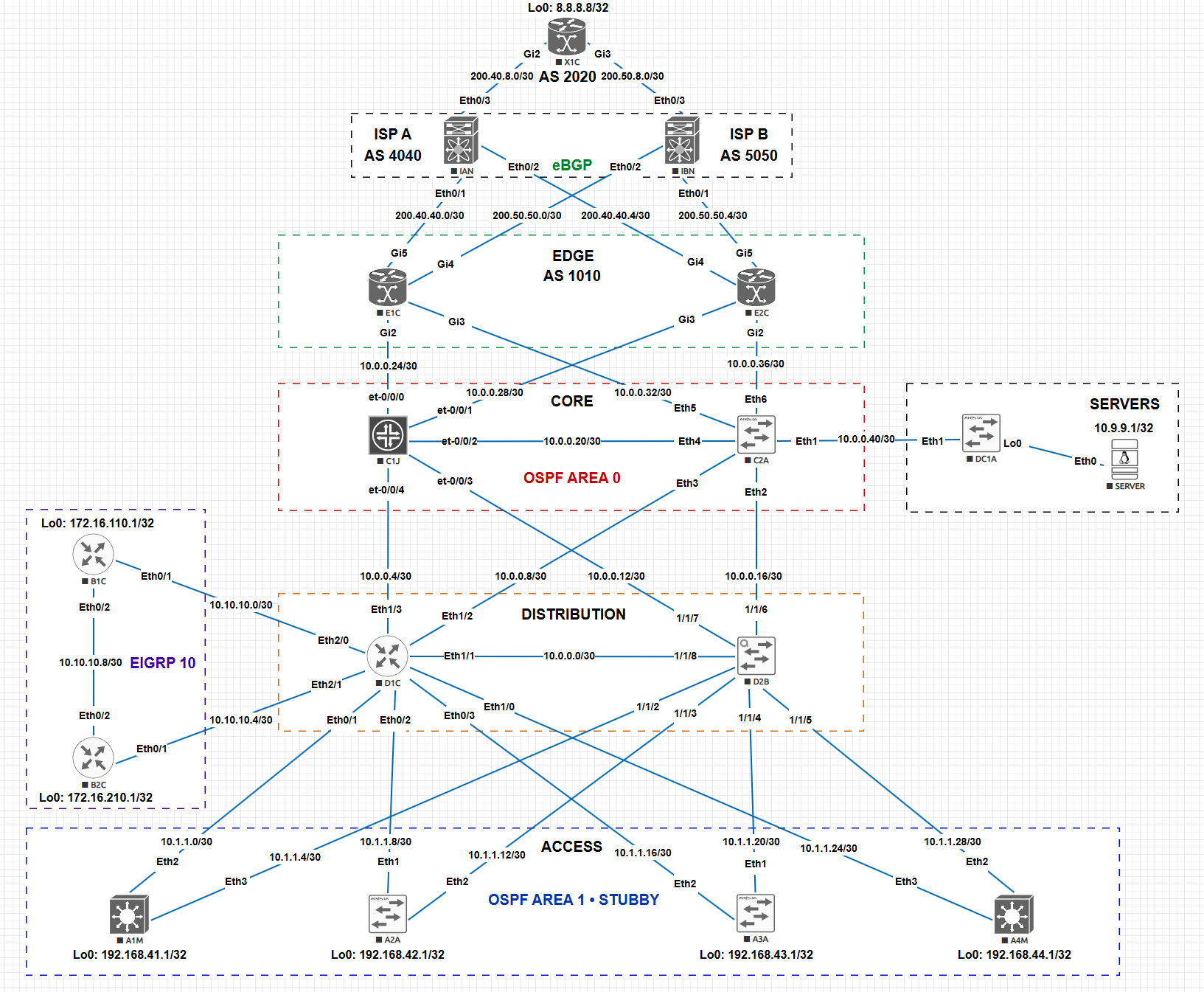
▫️ Lab environment:
- 16 devices defined in TOPOLOGY.yml
- 5 × Cisco IOS nodes
- 3 × Cisco IOS-XE nodes
- 4 × Arista cEOS nodes
- 2 × MikroTik CHR nodes
- 1 × Juniper JunOS node
- 1 x Aruba AOS-CX node
- OSPF multi-area, EIGRP, BGP
- Device credentials stored in Vault
- Network inventory and state in NetBox
⬆️ Planned Upgrades
- New protocols supported
♻️ Repository Lifecycle
New features are being added periodically (protocols, integrations, optimizations).
Stay up-to-date:
- Watch and Star this repository
📄 Disclaimer
You are responsible for defining your own network intent (NetBox config contexts), building your test environment, and meeting the necessary conditions (Python 3.11+, Claude CLI, HashiCorp Vault, etc.).
📜 License
Licensed under the GNU General Public License v3.0.
📧 Collaborations
Interested in collaborating?
- Email:
- Reach out at [email protected]
- LinkedIn:
- Let's discuss via LinkedIn
Установка DblCheck
У этого сервера нет опубликованного пакета — он собирается из исходников. Открой репозиторий и следуй инструкции в README.
▸ github.com/pdudotdev/dblCheckFAQ
DblCheck MCP бесплатный?
Да, DblCheck MCP бесплатный — установка в пару кликов через Unyly без оплаты.
Нужен ли API-ключ для DblCheck?
Нет, DblCheck работает без API-ключей и переменных окружения.
DblCheck — hosted или self-hosted?
Self-hosted: сервер запускается локально на твоей машине командой из раздела установки.
Как установить DblCheck в Claude Desktop, Claude Code или Cursor?
Открой DblCheck на unyly.org, выбери вкладку своего клиента (Claude Desktop, Claude Code, Cursor) и нажми Install — конфиг сгенерируется автоматически, без правки JSON.
Похожие MCP
GitHub
PRs, issues, code search, CI status
 автор: GitHub
Filesystem
Secure file operations with configurable access controls.
Memory
Knowledge graph-based persistent memory system.
Template MCP Server
A CLI tool to create a new Model Context Protocol server project with TypeScript support, dual transport options, and an extensible structure
 автор: mcpdotdirect
Compare DblCheck with
Не уверен что выбрать?
Найди свой стек за 60 секунд
Автор?
Embed-бейдж для README
Похожее
Все в категории development