
Defense.com
БесплатноНе проверенQueries Defense.com's XDR threat intelligence platform for open threats, risk scores, remediation assignments, and detection events with natural language and 20

Описание
Queries Defense.com's XDR threat intelligence platform for open threats, risk scores, remediation assignments, and detection events with natural language and 200+ source type aliases.
README
Claude Desktop native extension for Defense.com threat intelligence
This is a native Claude Desktop extension that gives Claude direct access to your Defense.com threat intelligence data. No terminal or configuration files required.
Features
- One-click installation via Claude Desktop
- Complete threat intelligence toolset (16 tools)
- Source type alias mapping (200+ friendly aliases like "pentest", "m365", "vuln scan")
- Interactive security training sessions
- Parallel sub-resource fetching for performance
Installation
Option 1: One-Click Install (Recommended)
The easiest way to install - no terminal or config files needed:
- Download the
.mcpbextension file from Releases - Double-click the file to open it with Claude Desktop
- Click "Install" in the installation dialog
- Enter your API token when prompted (see Getting your API Token)
That's it! The extension is now ready to use.
Alternative: Drag and Drop
- Open Claude Desktop
- Go to Settings (gear icon)
- Drag the
.mcpbfile into the Settings window - Click Install and enter your API token
Verifying Installation
Once installed, you should see the extension in Claude Desktop:
Step 1: Check Extension is Installed
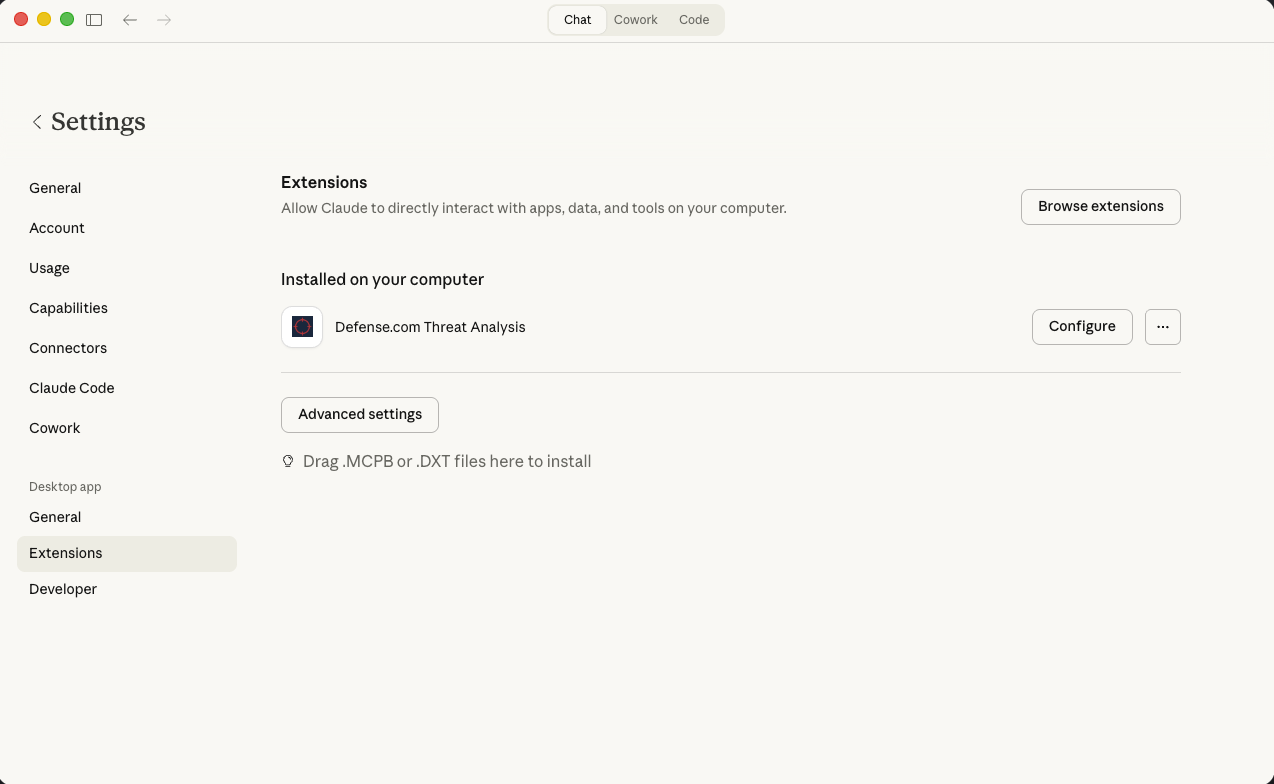 Navigate to Settings > Extensions. You should see "Defense.com Threat Analysis" listed under "Installed on your computer".
Step 2: Configure Your API Token
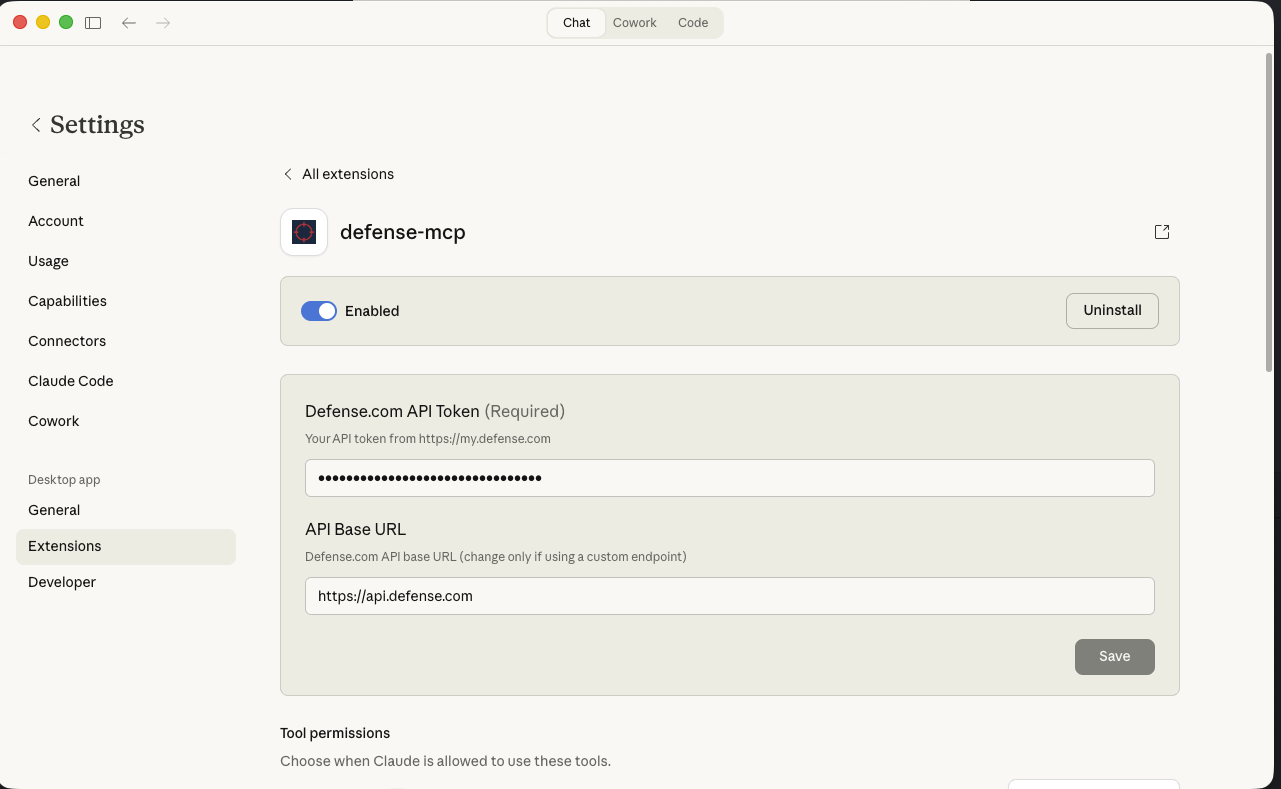 Click Configure to enter your Defense.com API Token (required) and optionally modify the API Base URL.
Step 3: Verify All Tools Are Available
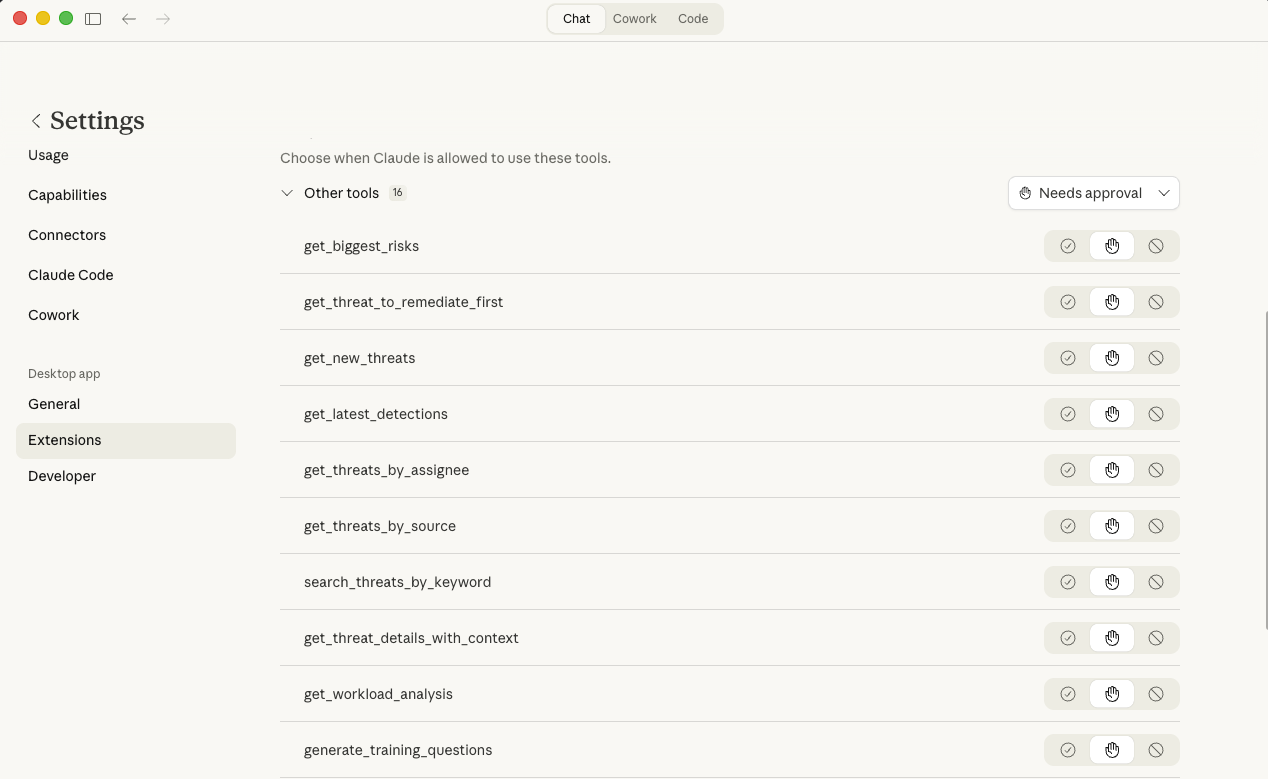 Scroll down to see all 16 available tools. You can configure tool permissions to control when Claude is allowed to use each tool.
Option 2: Manual Configuration (Advanced)
For developers or users who prefer manual setup:
Click to expand manual configuration instructions
Build from Source
npm install
npm run build
npx @anthropic-ai/mcpb pack
This creates a .mcpb file you can install via drag-and-drop, or you can configure Claude Desktop manually:
Edit Claude Desktop Config
Edit your Claude Desktop config file:
Configuration file locations:
- macOS:
~/Library/Application Support/Claude/claude_desktop_config.json - Windows:
%APPDATA%\Claude\claude_desktop_config.json - Linux:
~/.config/Claude/claude_desktop_config.json
{
  "mcpServers": {
    "Defense MCP": {
      "command": "node",
      "args": ["/absolute/path/to/desktop-extension/dist/index.js"],
      "env": {
        "DEFENSE_API_TOKEN": "your_token_here",
        "DEFENSE_API_BASE_URL": "https://api.defense.com"
      }
    }
  }
}
Remember to:
- Replace
your_token_herewith your actual Defense API token - Update the absolute path to point to your
dist/index.jsfile - Restart Claude Desktop after making changes
Getting your API Token
- Log into your Defense.com Portal
- Go to Account → API Keys
- Click Add API Key
- Copy the generated token
Your API token is stored securely in your operating system's keychain.
Using the Extension
Once installed, you can ask Claude natural language questions about your security data.
Example Prompts
Example 1: Risk Assessment
"What are my biggest security risks right now?"
Claude will call get_biggest_risks to retrieve critical and high severity threats, sorted by risk score and number of affected assets. You'll get a prioritized list with remediation guidance.
Example 2: Source-Based Threat Analysis
"Show me all phishing threats from the last 30 days that are still open"
Claude will call get_threats_by_source with source_type="phishing", days=30, and state="detected". The tool recognizes 200+ aliases, so "phishing", "phish", "email phishing", and "social engineering" all work.
Example 3: Interactive Security Training
"Start a security training session on ransomware for beginners"
Claude will call start_training_session with session_type="ransomware" and difficulty="beginner". You'll receive quiz questions about ransomware threats. Use follow-up prompts like "submit answer A" or "give me a hint" to continue.
More Examples
- "Show me new threats from the last 7 days"
- "Who has the most threats assigned to them?"
- "Get full details on threat ID abc-123"
- "What's my team's current threat workload?"
- "Generate 5 advanced training questions about vulnerability management"
Available Tools
Threat Intelligence Tools
| Tool | Description |
|---|---|
get_biggest_risks |
Top critical/high severity threats |
get_new_threats |
Recent threats from last N days |
get_threat_to_remediate_first |
Highest priority unremediated threat |
get_latest_detections |
Latest detection events |
get_threats_by_assignee |
Threats assigned to a person |
get_threats_by_source |
Filter by source type (supports aliases) |
search_threats_by_keyword |
Search by keyword |
get_threat_details_with_context |
Complete threat details with assets/users |
Workload Tools
| Tool | Description |
|---|---|
get_workload_analysis |
Dashboard view of threat workload |
Training Tools
| Tool | Description |
|---|---|
generate_training_questions |
Create security training questions |
get_training_for_threat |
Training content for specific threat |
get_security_awareness_brief |
Security briefing from current threats |
start_training_session |
Begin interactive training |
submit_training_answer |
Submit answer, get next question |
get_training_hint |
Hint for current question |
get_training_session_status |
Check session progress |
Source Type Aliases
When filtering threats by source, you can use friendly names:
| Say this... | Gets threats from... |
|---|---|
| "pentest", "pen test" | Penetration tests |
| "m365", "office365" | Microsoft 365 |
| "vuln scan", "cve" | Vulnerability scans |
| "phishing" | Phishing campaigns |
| "endpoint", "edr" | Endpoint protection |
| "threat intel", "ti" | Threat intelligence |
See src/config.ts for the complete mapping (200+ aliases).
Troubleshooting
Extension Not Working
- Check the extension is enabled: Go to Claude Desktop Settings → Extensions → ensure Defense MCP is toggled on
- Verify your API token: Try regenerating it from the Defense.com Portal
- Restart Claude Desktop: Sometimes a restart is needed after installation
"No tools available" Error
- Check that all tools are enabled in Claude Desktop's tools menu
- Try disabling and re-enabling the extension
Authentication Errors
- Your API token may have expired - regenerate it from Defense.com Portal
- Ensure the token has read permissions for threat data
Development
Instructions for developers
Building
npm install
npm run build
npx @anthropic-ai/mcpb pack
Running Locally
DEFENSE_API_TOKEN=your_token npm start
Dependencies
@modelcontextprotocol/sdk- MCP SDK for Claude Desktop integrationzod- Runtime type validation (bundled with MCP SDK)
Learn More
Установка Defense.com
У этого сервера нет опубликованного пакета — он собирается из исходников. Открой репозиторий и следуй инструкции в README.
▸ github.com/defensedotcom/defense-mcp-claude-extensionFAQ
Defense.com MCP бесплатный?
Да, Defense.com MCP бесплатный — установка в пару кликов через Unyly без оплаты.
Нужен ли API-ключ для Defense.com?
Нет, Defense.com работает без API-ключей и переменных окружения.
Defense.com — hosted или self-hosted?
Self-hosted: сервер запускается локально на твоей машине командой из раздела установки.
Как установить Defense.com в Claude Desktop, Claude Code или Cursor?
Открой Defense.com на unyly.org, выбери вкладку своего клиента (Claude Desktop, Claude Code, Cursor) и нажми Install — конфиг сгенерируется автоматически, без правки JSON.
Похожие MCP
GitHub
PRs, issues, code search, CI status
 автор: GitHub
Filesystem
Secure file operations with configurable access controls.
Memory
Knowledge graph-based persistent memory system.
Template MCP Server
A CLI tool to create a new Model Context Protocol server project with TypeScript support, dual transport options, and an extensible structure
 автор: mcpdotdirect
Compare Defense.com with
Не уверен что выбрать?
Найди свой стек за 60 секунд
Автор?
Embed-бейдж для README
Похожее
Все в категории development