
Depth Pro Server
БесплатноНе проверенEnables AI assistants to perform monocular depth estimation on images using Apple's Depth Pro model, with tools for single or batch processing and GPU managemen

Описание
Enables AI assistants to perform monocular depth estimation on images using Apple's Depth Pro model, with tools for single or batch processing and GPU management.
README
🔬 Depth Pro Docker
Production-ready Docker deployment for Apple's Depth Pro model
Zero-shot monocular metric depth estimation • 2.25MP depth map in 0.3s
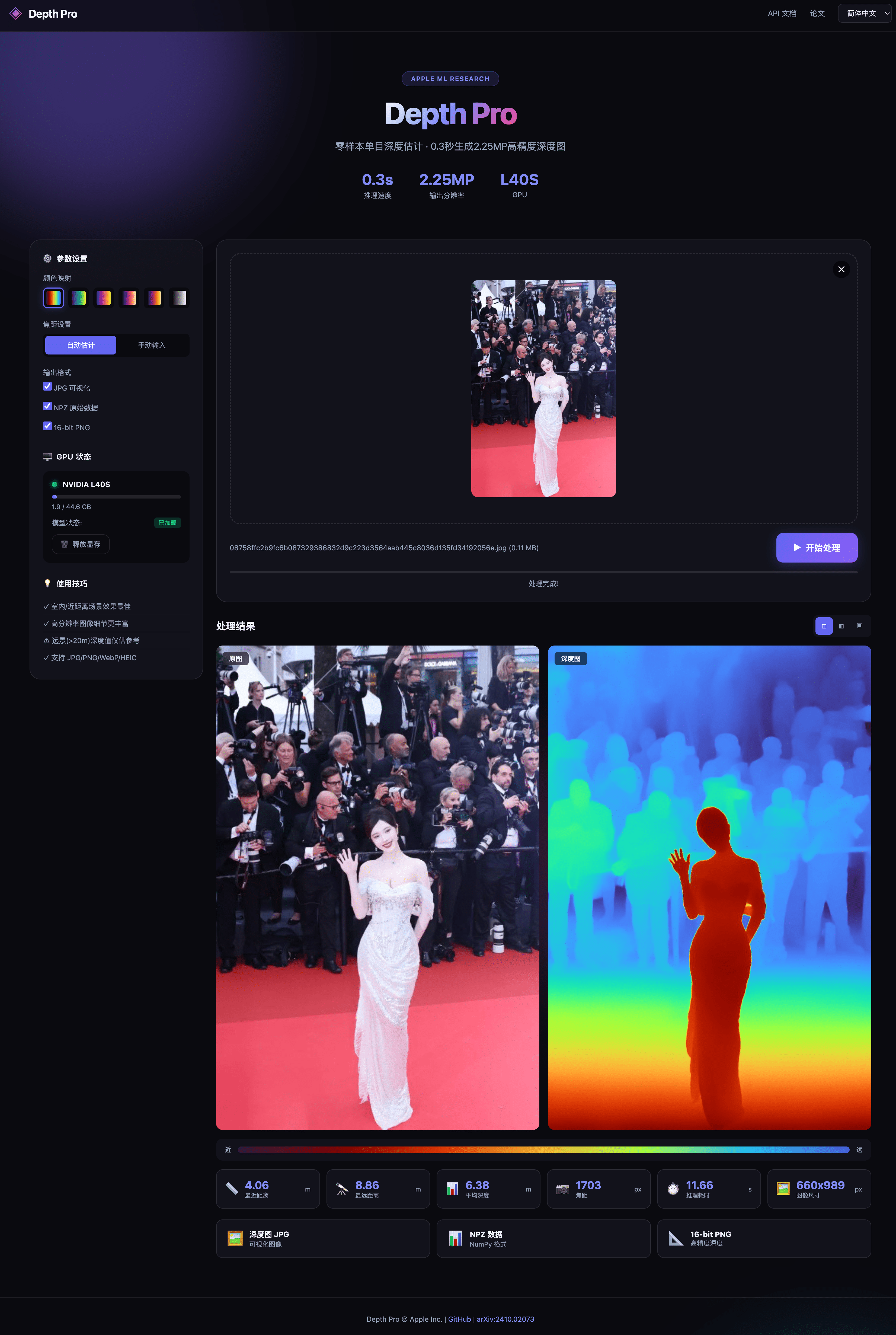
✨ Features
| Feature | Description |
|---|---|
| 🚀 One-Click Deploy | Docker Compose for instant deployment |
| 🎨 Modern Web UI | Beautiful interface with multiple colormaps |
| 🔌 REST API | Full-featured API with Swagger docs |
| 🤖 MCP Server | Model Context Protocol support for AI assistants |
| 📊 Multiple Outputs | JPG visualization, NPZ data, 16-bit PNG |
| 🎛️ Manual Focal Length | Override auto focal length estimation |
| 🌐 Multi-language | Chinese, English, Japanese UI |
| 💾 GPU Management | Auto memory offload, status monitoring |
🚀 Quick Start
# One command to run (All-in-One image, no downloads needed!)
docker run -d --name depth-pro --gpus all -p 8500:8500 neosun/depth-pro:latest

# Open browser
open http://localhost:8500
📦 Installation
Prerequisites
- Docker 24.0+ with NVIDIA Container Toolkit
- NVIDIA GPU with 8GB+ VRAM (16GB+ recommended)
- CUDA 12.1 compatible driver
Method 1: Docker Run (Recommended)
All-in-One image includes model weights (~5GB), no additional downloads required!
# Pull and run (model included in image)
docker run -d \
  --name depth-pro \
  --gpus all \
  -p 8500:8500 \
  -e GPU_IDLE_TIMEOUT=60 \
  neosun/depth-pro:latest
Method 2: Docker Compose
# Create docker-compose.yml
cat > docker-compose.yml << 'EOF'
services:
  depth-pro:
    image: neosun/depth-pro:latest
    container_name: depth-pro
    ports:
      - "8500:8500"
    environment:
      - GPU_IDLE_TIMEOUT=60
    deploy:
      resources:
        reservations:
          devices:
            - driver: nvidia
              count: 1
              capabilities: [gpu]
    restart: unless-stopped
EOF

# Start service
docker compose up -d
Method 3: Local Development
# Create conda environment
conda create -n depth-pro python=3.9 -y
conda activate depth-pro

# Install dependencies
pip install -e .
pip install flask flask-cors flasgger gunicorn

# Download model
source get_pretrained_models.sh

# Run server
python app.py
⚙️ Configuration
Environment Variables
| Variable | Default | Description |
|---|---|---|
PORT |
8500 |
Server port |
GPU_IDLE_TIMEOUT |
60 |
Seconds before GPU memory release |
NVIDIA_VISIBLE_DEVICES |
0 |
GPU device index |
docker-compose.yml
services:
  depth-pro:
    image: neosun/depth-pro:latest
    container_name: depth-pro
    ports:
      - "8500:8500"
    environment:
      - PORT=8500
      - GPU_IDLE_TIMEOUT=60
    deploy:
      resources:
        reservations:
          devices:
            - driver: nvidia
              count: 1
              capabilities: [gpu]
    restart: unless-stopped
    healthcheck:
      test: ["CMD", "curl", "-f", "http://localhost:8500/health"]
      interval: 30s
      timeout: 10s
      retries: 3
📖 Usage
Web Interface
Visit http://localhost:8500 for the interactive UI:
- Upload an image (JPG/PNG/WebP/HEIC)
- Select colormap (Turbo, Viridis, Plasma, etc.)
- Optionally set manual focal length
- Click "Process" and download results
REST API
Depth Estimation
curl -X POST http://localhost:8500/api/predict \
  -F "[email protected]" \
  -F "colormap=turbo" \
  -F "focal_length=1000"
Response:
{
  "task_id": "abc12345",
  "focal_length_px": 1000.0,
  "min_depth_m": 0.5,
  "max_depth_m": 10.2,
  "mean_depth_m": 3.4,
  "image_size": "1920x1080",
  "depth_image_base64": "...",
  "download_jpg": "/api/download/abc12345/color.jpg",
  "download_npz": "/api/download/abc12345/depth.npz",
  "download_16bit": "/api/download/abc12345/depth16.png"
}
GPU Status
curl http://localhost:8500/api/gpu/status
Release GPU Memory
curl -X POST http://localhost:8500/api/gpu/offload
API Documentation
Swagger UI available at: http://localhost:8500/apidocs/
MCP Server (for AI Assistants)
Add to your Claude Desktop config:
{
  "mcpServers": {
    "depth-pro": {
      "command": "docker",
      "args": ["exec", "-i", "depth-pro", "python3", "mcp_server.py"]
    }
  }
}
Available MCP tools:
estimate_depth- Process single imagebatch_estimate_depth- Process multiple imagesget_gpu_status- Check GPU statusrelease_gpu- Free GPU memory
📁 Project Structure
depth-pro-docker/
├── app.py                 # Flask web server
├── mcp_server.py          # MCP server for AI assistants
├── gpu_manager.py         # GPU memory management
├── Dockerfile             # Container build file
├── docker-compose.yml     # Docker Compose config
├── checkpoints/           # Model weights (download separately)
│   └── depth_pro.pt
├── src/depth_pro/         # Core model code
├── templates/             # HTML templates
├── static/                # CSS/JS assets
└── docs/                  # Documentation
🛠️ Tech Stack
- Model: Apple Depth Pro (DINOv2 + Multi-scale ViT)
- Backend: Flask + Gunicorn
- Frontend: Vanilla JS + Modern CSS
- Container: Docker + NVIDIA Container Toolkit
- GPU: PyTorch + CUDA 12.1
📝 Limitations
- Far-field scenes (>20m) may have inaccurate absolute depth values
- Best suited for indoor and close-range outdoor scenes
- Relative depth ordering is generally reliable even for far scenes
🤝 Contributing
Contributions are welcome! Please read CONTRIBUTING.md first.
- Fork the repository
- Create feature branch (
git checkout -b feature/amazing) - Commit changes (
git commit -m 'Add amazing feature') - Push to branch (
git push origin feature/amazing) - Open a Pull Request
📄 License
This project is based on Apple's Depth Pro and is licensed under the Apple Sample Code License.
🙏 Acknowledgements
- Apple ML Research - Original Depth Pro model
- Depth Pro Paper - Research paper
⭐ Star History
📱 Follow Me

Установка Depth Pro Server
У этого сервера нет опубликованного пакета — он собирается из исходников. Открой репозиторий и следуй инструкции в README.
▸ github.com/neosun100/depth-pro-dockerFAQ
Depth Pro Server MCP бесплатный?
Да, Depth Pro Server MCP бесплатный — установка в пару кликов через Unyly без оплаты.
Нужен ли API-ключ для Depth Pro Server?
Нет, Depth Pro Server работает без API-ключей и переменных окружения.
Depth Pro Server — hosted или self-hosted?
Self-hosted: сервер запускается локально на твоей машине командой из раздела установки.
Как установить Depth Pro Server в Claude Desktop, Claude Code или Cursor?
Открой Depth Pro Server на unyly.org, выбери вкладку своего клиента (Claude Desktop, Claude Code, Cursor) и нажми Install — конфиг сгенерируется автоматически, без правки JSON.
Похожие MCP
Opencode Omniroute Plugin
OpenCode plugin for the OmniRoute AI Gateway. Drives dynamic model discovery, /connect auth flow, and multi-instance OmniRoute providers via the official @openc
 автор: GitHub Actions
Roblox Studio
Enables AI coding tools to control Roblox Studio for workspace exploration, instance manipulation, and script management. It provides tools for playtesting, sce
 автор: paralov
Antigravity Drawio
MCP server that enables AI assistants to create, parse, render, and validate Draw.io diagrams programmatically.
 автор: S-SUJAN-S
Fetch
Web content fetching and conversion for efficient LLM usage.
AWS KB Retrieval
Retrieval from AWS Knowledge Base using Bedrock Agent Runtime.
 автор: modelcontextprotocol
Spring AI MCP Server
Provides auto-configuration for setting up an MCP server in Spring Boot applications.
llm-analysis-assistant
A very streamlined mcp client that supports calling and monitoring stdio/sse/streamableHttp, and can also view request responses through the /logs page. It also
 автор: xuzexin-hz
MCP-Agent
A simple, composable framework to build agents using Model Context Protocol by [LastMile AI](https://www.lastmileai.dev)
 автор: lastmile-ai
Spring AI MCP Client
Provides auto-configuration for MCP client functionality in Spring Boot applications.
mcp.natoma.ai
A Hosted MCP Platform to discover, install, manage and deploy MCP servers by [Natoma Labs](https://www.natoma.ai)
Compare Depth Pro Server with
Не уверен что выбрать?
Найди свой стек за 60 секунд
Автор?
Embed-бейдж для README
Похожее
Все в категории ai