
Dev Slackathon Agent
БесплатноНе проверенA Slack-native fact-checker that turns claims into chart-rich verdict cards using Anthropic Claude, MCP, and the Datatype variable font.

Описание
A Slack-native fact-checker that turns claims into chart-rich verdict cards using Anthropic Claude, MCP, and the Datatype variable font.
README

Veritype is a Slack agent that listens for factual claims, offers to fact-check them with one tap, and replies in thread with a crisp, source-weighted verdict card rendered through the Datatype variable font.
📺 Watch the 3-minute demo · Slack Agent Builder Challenge · Track: New Slack Agent

Table of contents
- Project description
- Components / tech used
- Agent type declaration
- Setup instructions
- What it looks like
1. Project description
Slack is where modern teams trade information at high speed, and high-speed information is also how
half-true claims spread. Someone drops a stat in #general, three people emoji-react, and by the
afternoon it is treated as fact. Veritype closes that loop, in-channel, in seconds.
Veritype is a Slack-native fact-checking agent. It quietly listens to channels it has been invited to, runs a fast claim-classifier over each message, and when it spots a verifiable, public-interest claim it offers (privately to the speaker, no public noise) "want me to fact-check that?" One tap fires a research agent that fans out web searches, weighs sources, and replies in thread with a verdict card.
That verdict card is the bit that nobody else does. Veritype renders it through the
Datatype OpenType variable font. Datatype turns
plain-text expressions like {b:20,45,70,82} into real bar charts via ligature substitution. We
use that to give every verdict three inline charts the team can read at a glance:
{b:…}: a bar chart of source-quality weights (primary docs first, blogs last).{p:…}: a stack of pie charts for the support / refute / context breakdown.{l:…}: a sparkline for how the claim's salience has trended over time.
The whole card is rendered headlessly in Puppeteer and posted to Slack as an image attachment, with a Block Kit mrkdwn fallback for screen readers, search, and threads on the mobile client.
| Today | With Veritype |
|---|---|
| Claim drops in channel, no one challenges it | Bot offers a 1-tap fact-check, privately |
| Person who pushes back has to Google for ten minutes | Verdict arrives in 5 to 8 seconds with weighted citations |
| "Source?" reply derails the thread for the rest of the day | Card stays in thread, sources are one click away, channel stays calm |
| The team's track record on disputed claims is invisible | Workspace dashboard tracks claims, verdicts, latency, channel coverage |
Why this fits Slack Agent Builder Challenge
We hit two of the three required platform pillars:
- MCP server integration: Veritype's fact-check brain is exposed as a Model Context Protocol
server (
src/mcp/server.ts). The Slack bot is one client of it. Any other MCP-aware client (Claude Desktop, IDE extensions, agent frameworks) can call the same three tools. - Real-Time Search API: The researcher agent uses Anthropic's
web_search_20250305tool to pull and read live sources. We never invent citations.
Track: New Slack Agent, with the Most Innovative and Best UX awards in mind.
2. Components / tech used
| Component | Role | Path |
|---|---|---|
| Slack Bolt app | Socket-mode app, slash command /veritype, message listener, button handlers |
src/slack/app.ts |
| Slack Block Kit blocks | Verdict block layout, mrkdwn fallback, action buttons | src/slack/blocks.ts |
| Claim screener (Haiku) | Triage layer that decides whether a message contains a verifiable claim | src/core/screener.ts |
| Researcher (Opus + web_search) | Web-search-grounded research agent that produces the verdict, confidence, and weighted sources | src/core/researcher.ts |
| Datatype card template | Print-perfect HTML card with Datatype font embedded for inline bar / pie / sparkline charts | src/core/cardTemplate.ts |
| Puppeteer card renderer | Rasterizes the HTML card to a PNG suitable for posting to Slack | src/core/renderer.ts |
| MCP server | Exposes screen_message, verify_claim, and render_verdict_card over stdio MCP |
src/mcp/server.ts |
| React / Vite dashboard | Workspace home, library, playground, MCP info, settings: all in a Slack-skinned UI for demo/screenshots | src/web/ |
| Datatype font (Apache 2.0) | The variable font that makes {b:…} / {l:…} / {p:…} render as inline charts |
assets/fonts/ · public/fonts/ |
| Sample fixtures | Three pre-baked reports (mostly_true, false, misleading) used by the playground and CLI renderer |
src/core/sample.ts |
3. Agent type declaration
Veritype is built as a Coded Agent. Everything is TypeScript: the claim screener, the research loop, the renderer, the Slack handlers, the MCP server. There is no no-code component.
The agent runs a two-model pipeline:
claude-haiku-4-5: fast, cheap classifier that screens every channel message.claude-opus-4-7: research-grade synthesizer withweb_search_20250305enabled and a JSON output contract, withclaude-sonnet-4-6as fallback.
The MCP server (src/mcp/server.ts) exposes the same brain to any other MCP client, so a teammate
in Claude Desktop can call verify_claim and get the identical, source-weighted answer the Slack
bot would deliver.
4. Setup instructions
Prerequisites
- Node.js 20+
- An Anthropic API key with access to Claude Opus 4.7 + the
web_search_20250305tool - A Slack app in your workspace with Socket Mode enabled (instructions below)
1. Clone and install
git clone https://github.com/<your-org>/veritype.git
cd veritype
npm install
2. Configure environment
cp .env.example .env
Fill in:
ANTHROPIC_API_KEY: your Anthropic key.SLACK_BOT_TOKEN:xoxb-…from your Slack app's OAuth & Permissions page.SLACK_APP_TOKEN:xapp-…from your app's Basic Information → App-Level Tokens, with theconnections:writescope.SLACK_SIGNING_SECRET: your app's signing secret (Basic Information → App Credentials).
3. Create the Slack app
Full click-by-click walkthrough lives in docs/SLACK-SETUP.md. TL;DR:
- Go to api.slack.com/apps → Create New App → From a manifest and paste docs/slack-app-manifest.yaml.
- Generate an app-level token (
xapp-...) withconnections:writescope. - Install the app to your workspace, grab the bot token (
xoxb-...). - Paste all four tokens into
.env, then runnpm run setup:checkto validate.
4. Run locally
# in one terminal
npm run dev:slack    # starts the Bolt app in Socket Mode

# in another terminal (optional, for the dashboard / screenshots)
npm run dev:web      # Vite dev server on http://127.0.0.1:5173
Type /veritype Iceland runs on 100% renewable electricity in any channel the bot is a member of.
Within ~6 seconds the verdict card lands in thread.
5. Use as an MCP server (optional)
Build once, then point any MCP client at the bundle:
npm run build:slack # compiles src/ → dist/
In ~/.claude/claude_desktop_config.json (or any MCP client config):
{
  "mcpServers": {
    "veritype": {
      "command": "node",
      "args": ["/absolute/path/to/veritype/dist/mcp/server.js"],
      "env": { "ANTHROPIC_API_KEY": "sk-ant-..." }
    }
  }
}
The three exposed tools are screen_message, verify_claim, and render_verdict_card.
6. Render a sample card without Slack
npm run render:card -- mostly_true
# wrote docs/screenshots/sample-mostly_true.png
This is the fastest way to confirm the font, Puppeteer, and template are working before touching the Slack side.
5. What it looks like
Try the live demo
npm install
npm run dev:web      # opens at http://127.0.0.1:5173/?tab=stream
The channel stream tab is fully interactive. Type a message in the composer (or tap one of the
preset claims) and Veritype actually screens it, offers an ephemeral verification, then posts a
verdict card. With no ANTHROPIC_API_KEY set, the demo runs in fixture mode (still real Slack
UX, deterministic verdicts). Set the key and the same flow goes live: real Haiku 4.5 screener,
real Opus 4.7 + web_search research.
In-channel: the proactive offer
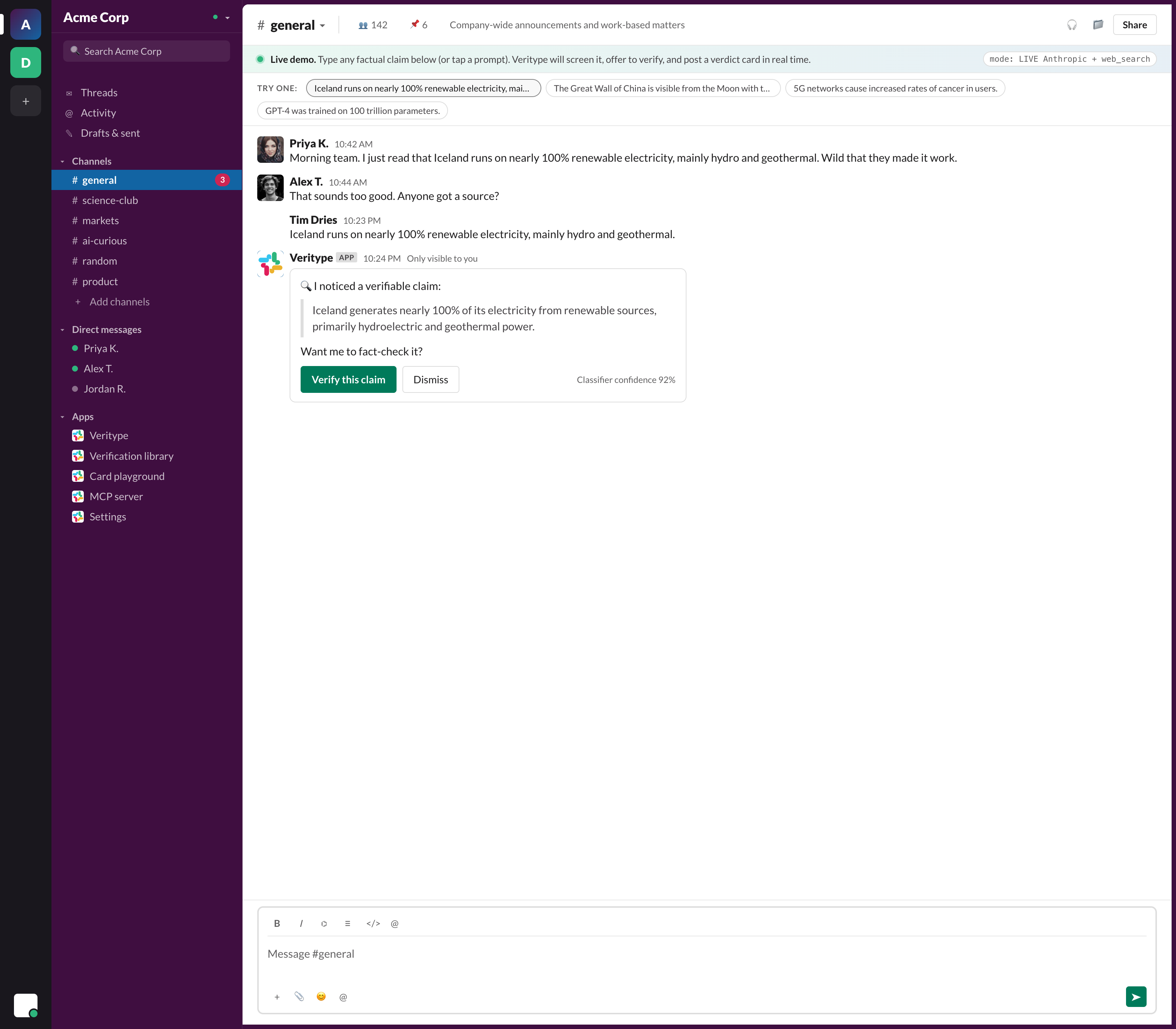
Veritype screens each new message through Haiku 4.5. When it spots a verifiable, public-interest claim, it posts an ephemeral "want me to verify this?" only the message author can see, with the screener's confidence score for transparency.
One tap, verdict in thread
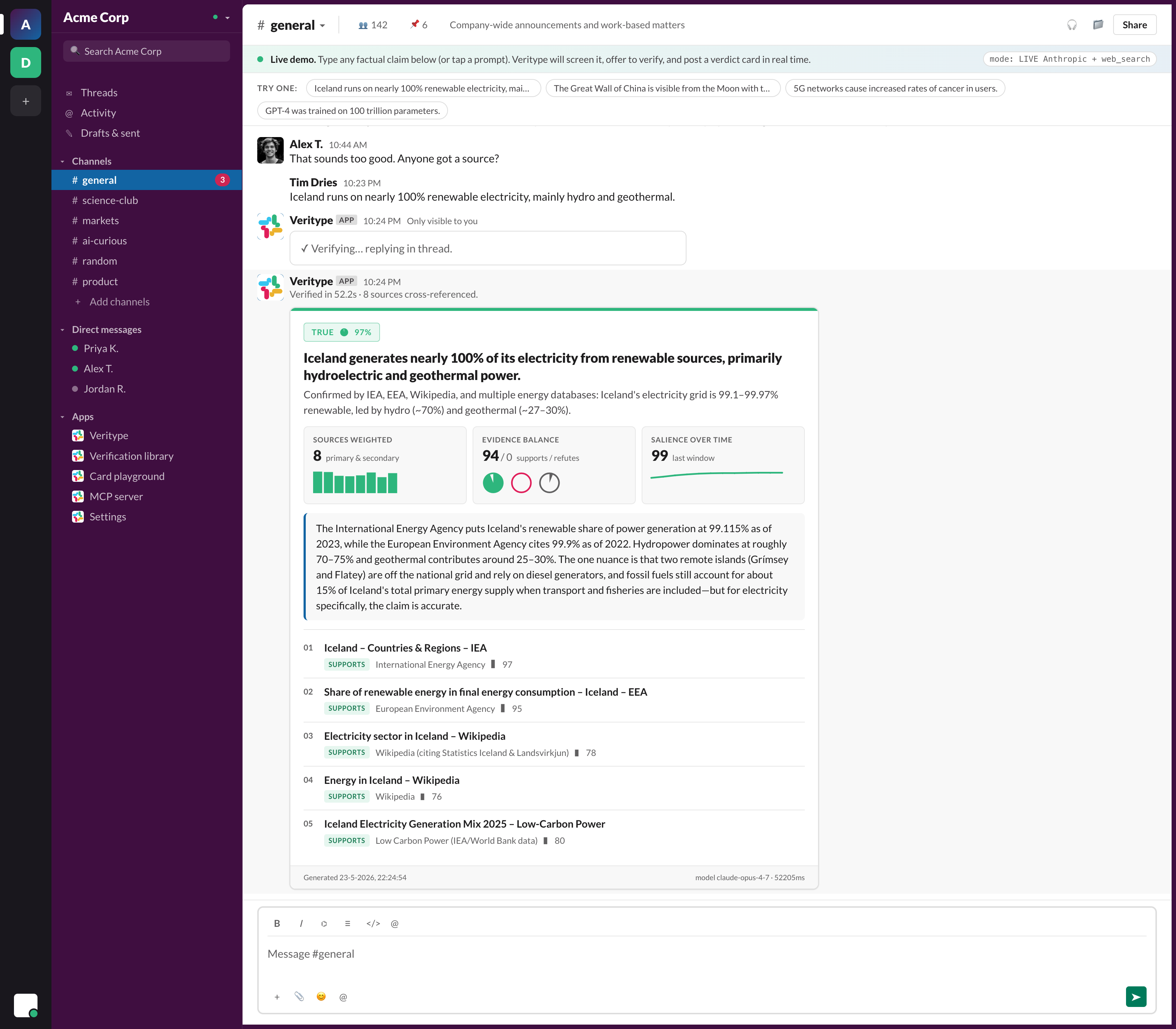
Click "Verify this claim" and the agent fans out, weighs sources, and replies in thread with the Datatype-rendered card. Real time. Real sources. Real verdict.
The verdict card
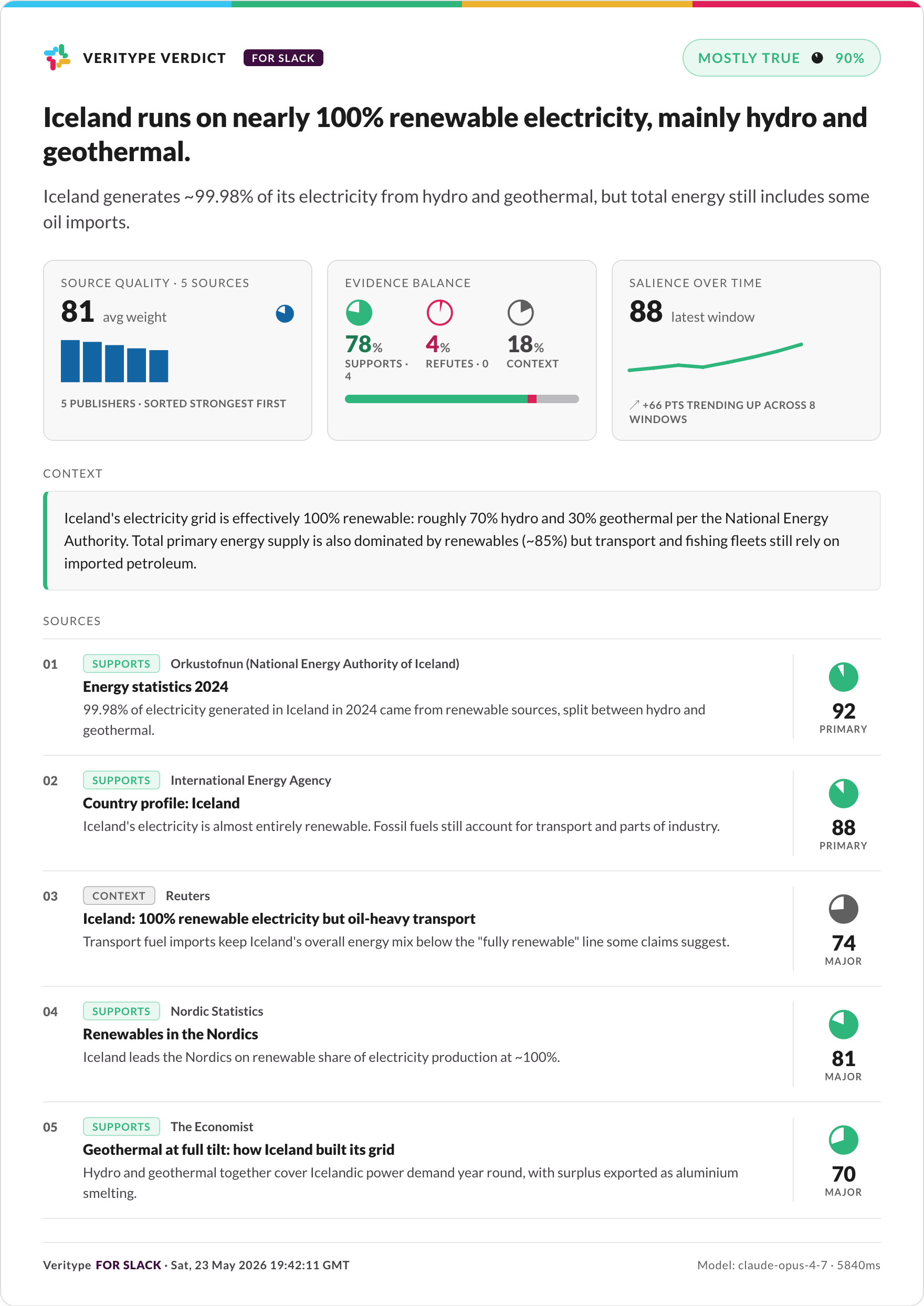
One tap, a few seconds, and the bot replies in thread with a verdict card. The pill at the top shows the verdict and a confidence pie. Three metrics below give source-weight bars, an evidence balance (supports / refutes / context as three inline pies), and a salience sparkline. Every source is rated, dated, stance-tagged, and links to the original.
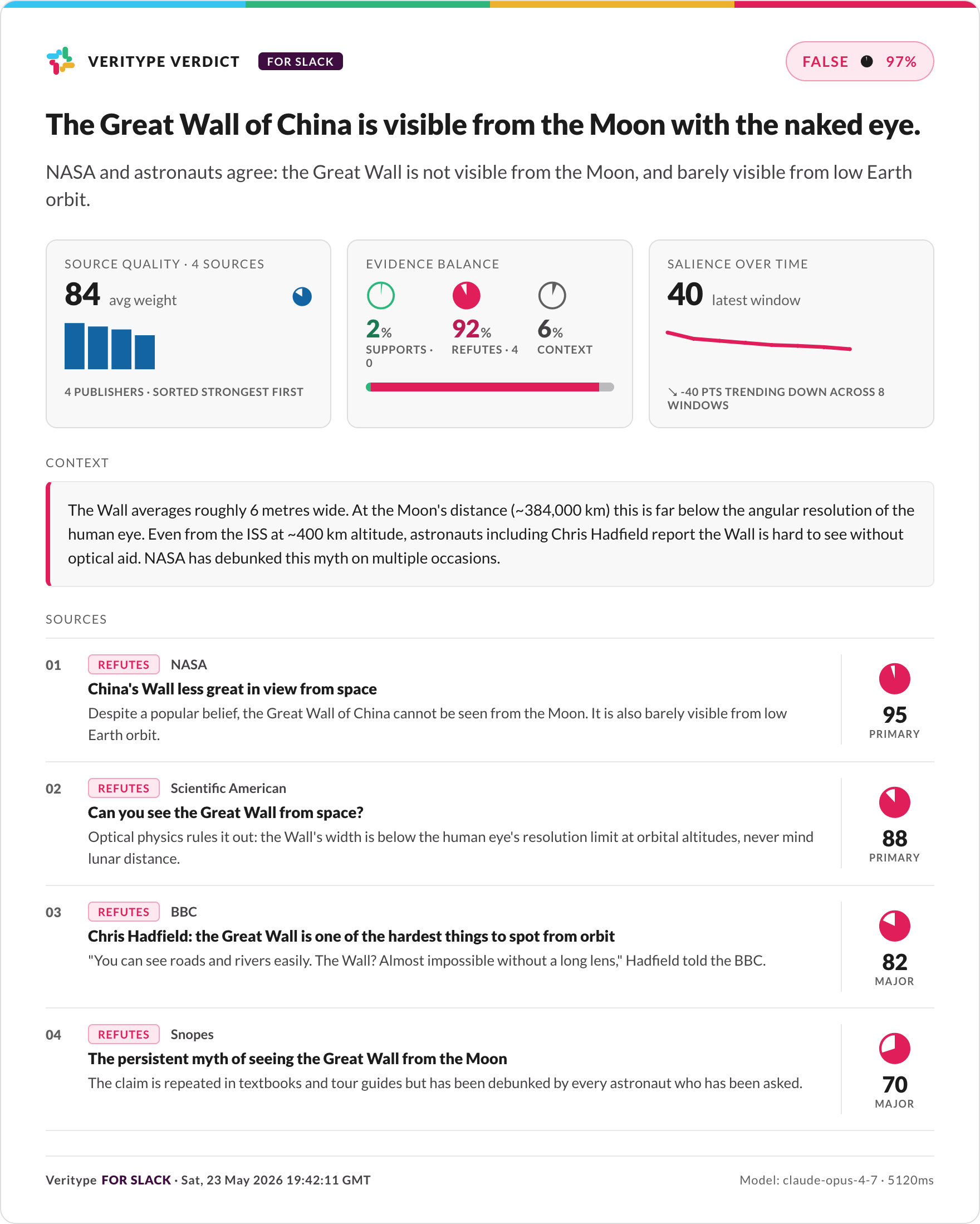
The same template handles every verdict level: here is a false claim with a red accent and a support/refute mix dominated by refutation:
Workspace home
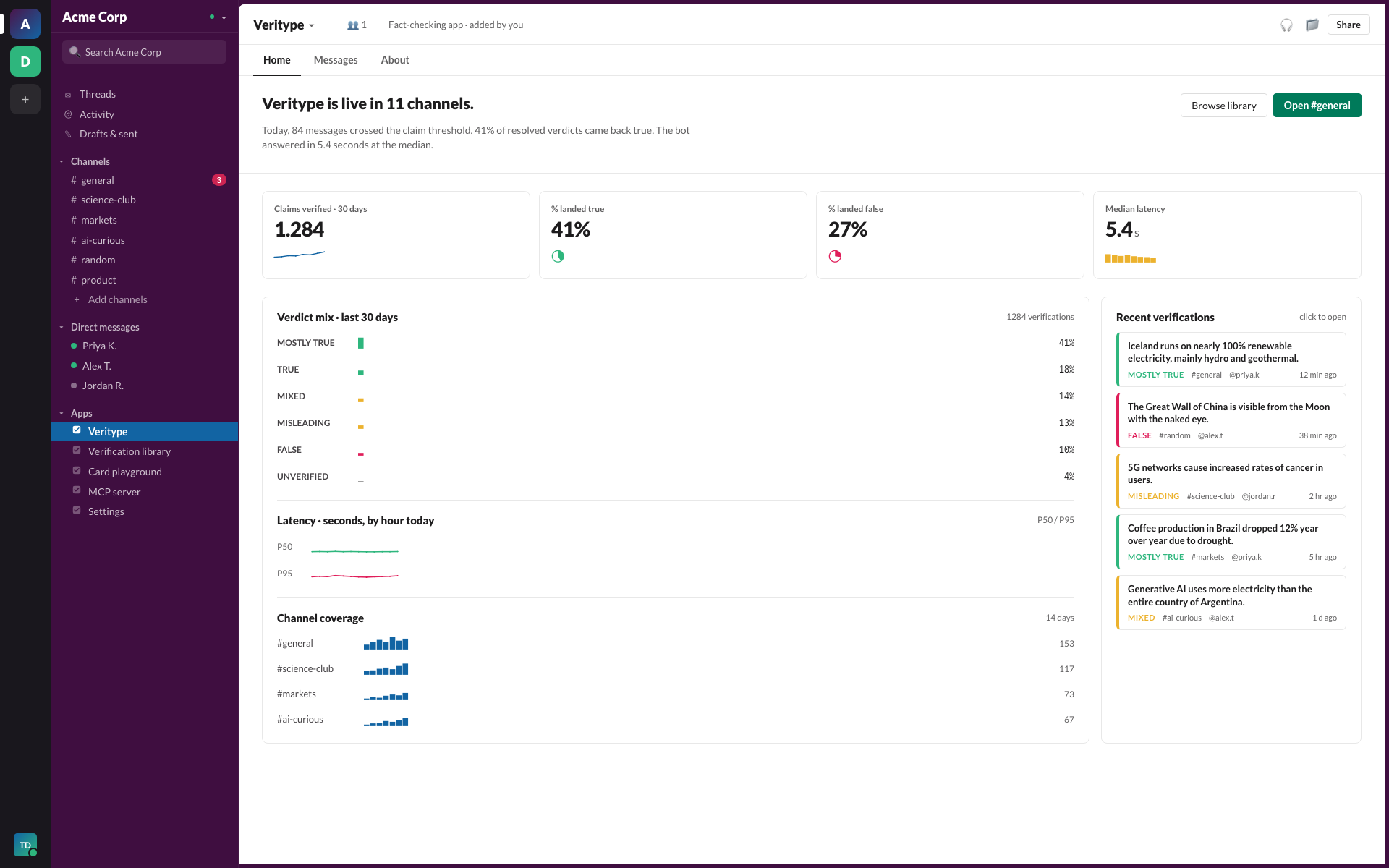
Open the Veritype app in Slack to see the workspace home. KPIs at the top track claims verified, true/false share, and median latency, all rendered with Datatype charts. Below: verdict mix, latency over time, channel coverage, and recent verifications.
Verification library
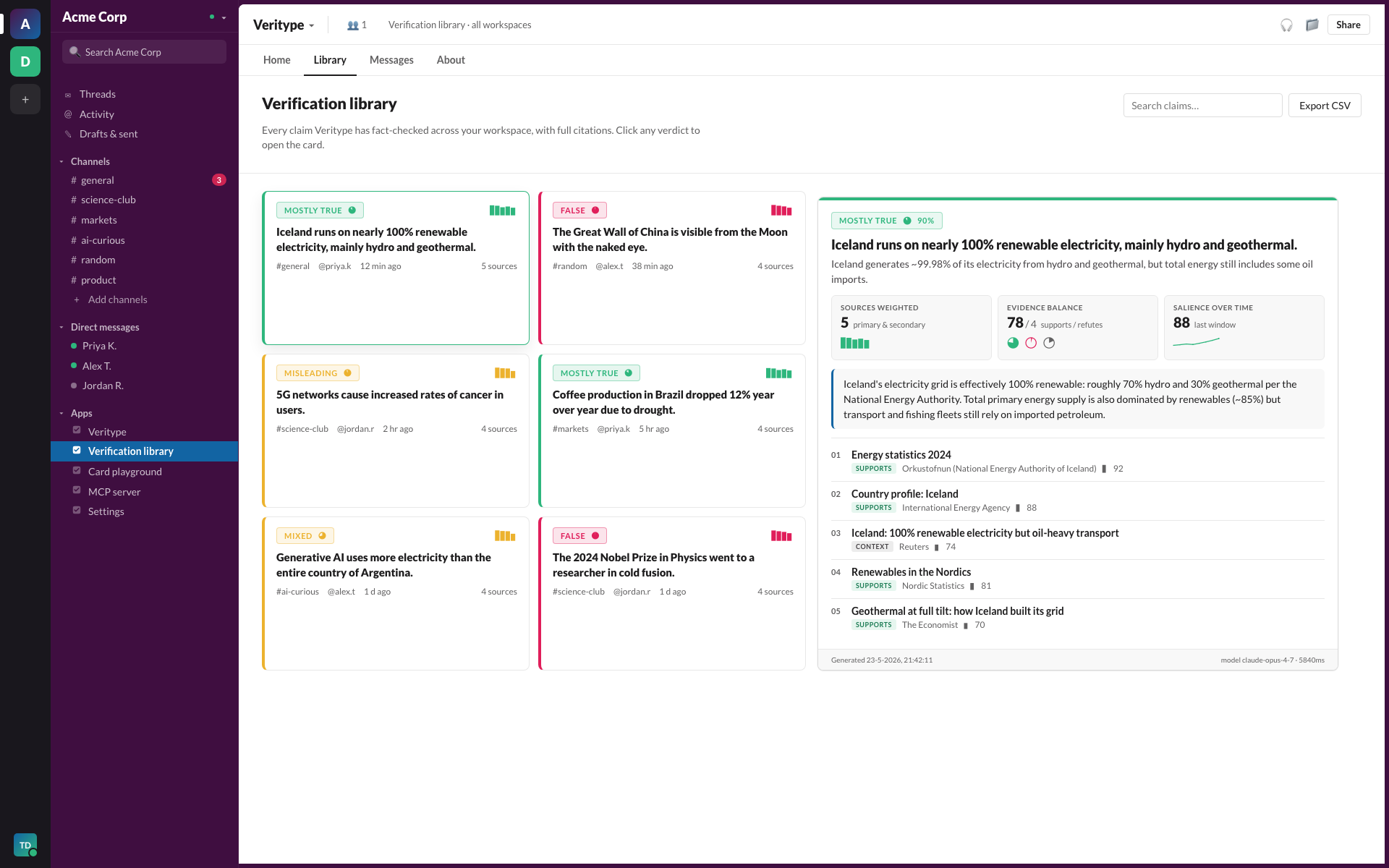
Every claim Veritype has fact-checked, across every channel, with full citations. Filter by channel, person, verdict, or just full-text search. Click a card to open the full verdict.
Card playground
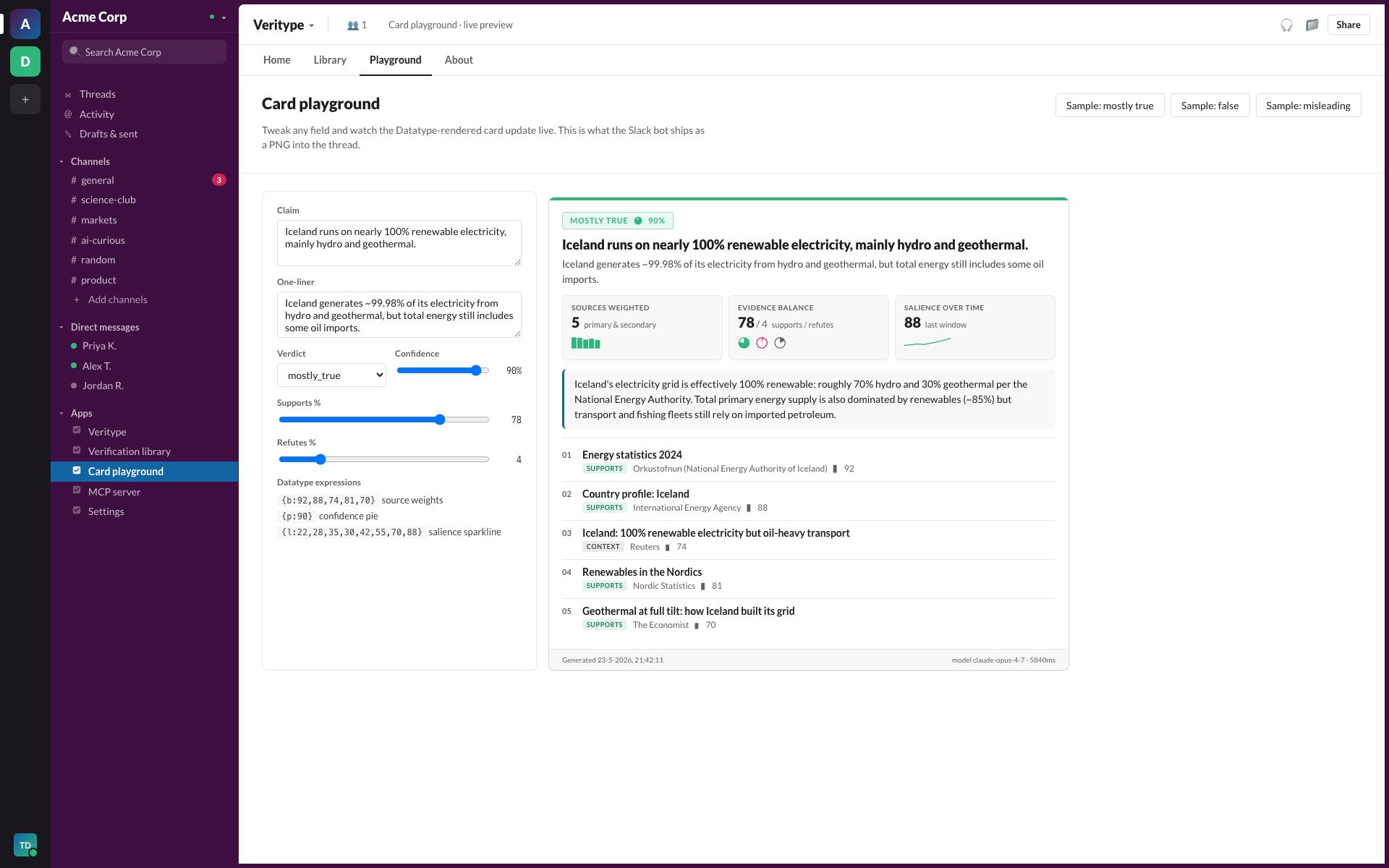
Tweak any field in a sample report and watch the Datatype card update live. This is the same template the bot ships into Slack threads: handy for visually testing edge cases before shipping to production.
MCP server
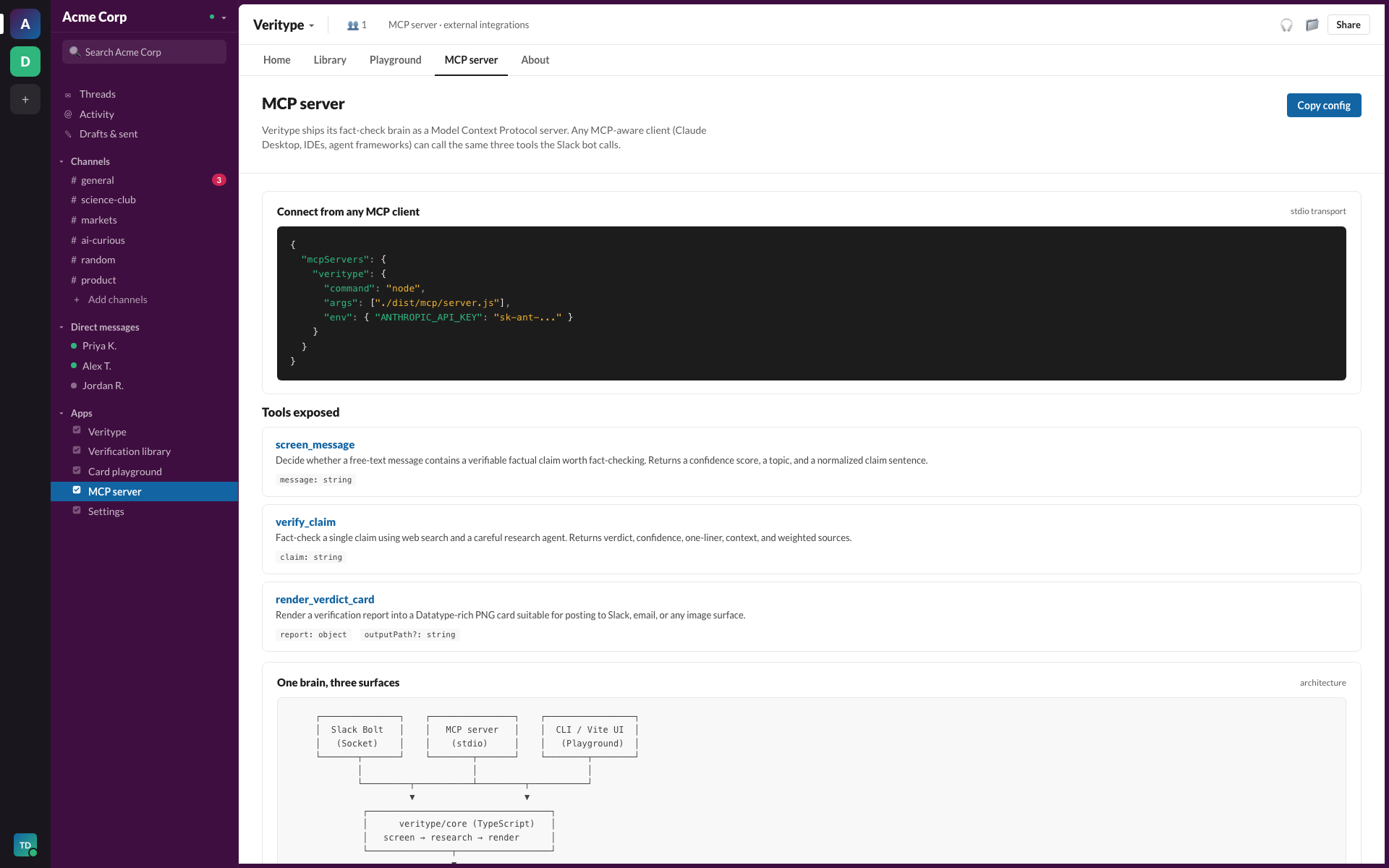
The fact-check brain is also an MCP server. Drop the config into Claude Desktop and the same three tools the Slack bot calls become available to your local Claude.
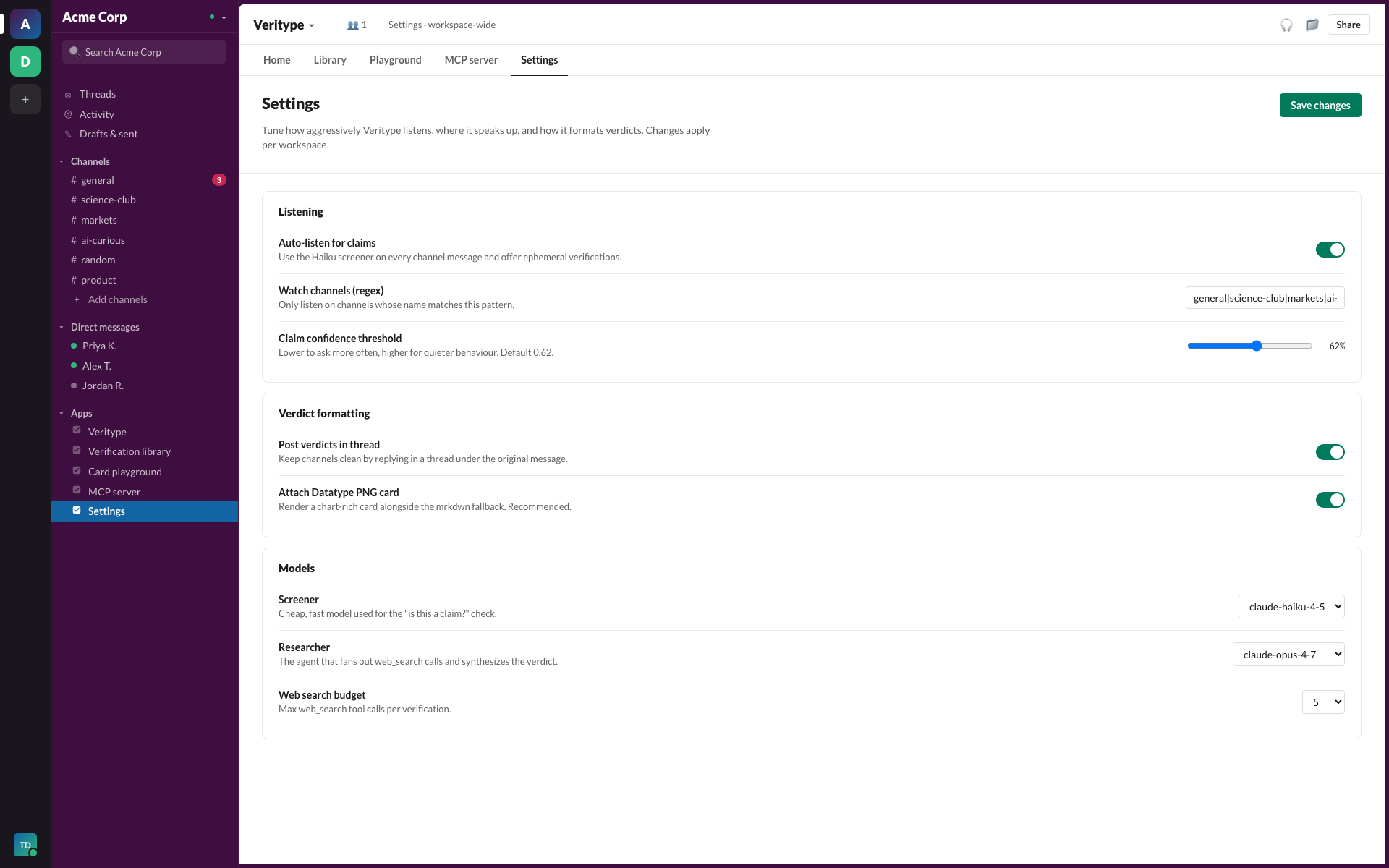
Settings
Per-workspace tuning: auto-listen toggle, channel allow-list regex, claim threshold, model choice, web-search budget, and verdict formatting.
Repo layout
src/
  core/           shared brain (screener, researcher, renderer, types, samples)
  slack/          Bolt app + Block Kit blocks
  mcp/            stdio MCP server wrapping the same core
  web/            Vite + React dashboard (Slack-skinned, used for demos and screenshots)
assets/
  fonts/          Datatype woff2 (Regular / Medium / SemiBold / Bold): Apache 2.0
docs/
  screenshots/    in-app screenshots, sample verdict cards
  manual/         operator manual sources + rendered PDF
deck/             pitch deck (.pptx + .pdf)
License
MIT for the code in this repo. The Datatype font (assets/fonts/) is Apache 2.0; see
franktisellano/datatype for the source.
Установка Dev Slackathon Agent
У этого сервера нет опубликованного пакета — он собирается из исходников. Открой репозиторий и следуй инструкции в README.
▸ github.com/tdries/dev-slackathon-agentFAQ
Dev Slackathon Agent MCP бесплатный?
Да, Dev Slackathon Agent MCP бесплатный — установка в пару кликов через Unyly без оплаты.
Нужен ли API-ключ для Dev Slackathon Agent?
Нет, Dev Slackathon Agent работает без API-ключей и переменных окружения.
Dev Slackathon Agent — hosted или self-hosted?
Self-hosted: сервер запускается локально на твоей машине командой из раздела установки.
Как установить Dev Slackathon Agent в Claude Desktop, Claude Code или Cursor?
Открой Dev Slackathon Agent на unyly.org, выбери вкладку своего клиента (Claude Desktop, Claude Code, Cursor) и нажми Install — конфиг сгенерируется автоматически, без правки JSON.
Похожие MCP
Gmail
Read, send and search emails from Claude
 автор: Google
Slack
Send, search and summarize Slack messages
 автор: Slack
Runbear
No-code MCP client for team chat platforms, such as Slack, Microsoft Teams, and Discord.
Discord Server
A community discord server dedicated to MCP by [Frank Fiegel](https://github.com/punkpeye)
Klavis AI
Open Source MCP Infra. Hosted MCP servers and MCP clients on Slack and Discord.
Work90210/APIFold
Turn any REST API into a hosted MCP server, with ready-made public servers for GitHub, Stripe, Slack, OpenAI, Notion and more.
 автор: Work90210
arikusi/deepseek-mcp-server
DeepSeek AI chat and reasoning with multi-turn sessions, function calling, thinking mode and cost tracking.
 автор: arikusi
hashgraph-online/hashnet-mcp-js
Discover, register and chat with AI agents on the Hashgraph network via the Registry Broker.
 автор: hashgraph-online
profullstack/mcp-server
Developer utilities: SEO optimization, document conversion, domain lookup, email validation, QR codes, weather data, social media posting and security scanning.
 автор: profullstack
WayStation-ai/mcp
Connect MCP hosts to apps such as Notion, Slack, Monday and Airtable.
 автор: waystation-ai
Compare Dev Slackathon Agent with
Не уверен что выбрать?
Найди свой стек за 60 секунд
Автор?
Embed-бейдж для README
Похожее
Все в категории communication