loading…
en/
Browse all
Dice Server
FreeNot checkedProvides dice rolling and coin flipping functionality for AI assistants via the Model Context Protocol. It enables users to roll single or multiple dice with co

About
Provides dice rolling and coin flipping functionality for AI assistants via the Model Context Protocol. It enables users to roll single or multiple dice with configurable sides and perform randomized coin tosses.
README
A Model Context Protocol (MCP) server that provides dice rolling and coin flipping functionality for AI assistants like Claude.
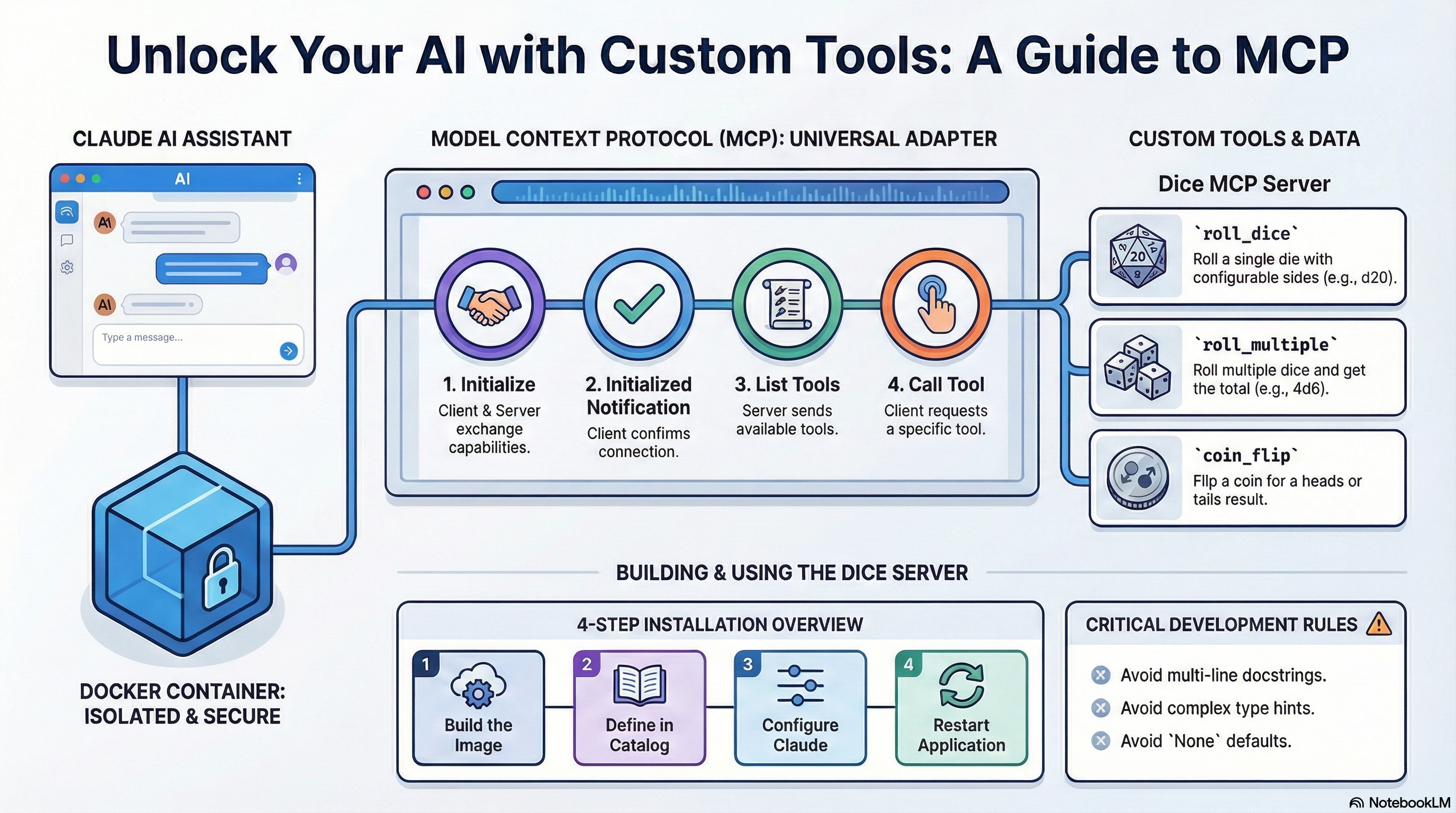
Table of Contents
- What is MCP?
- How MCP Communication Works
- Available Tools
- Prerequisites
- Installation
- Testing
- Usage Examples
- Project Structure
- Development Guide
- Best Practices
- Implementation Patterns
- Output Formatting Guidelines
- Troubleshooting
- Security Considerations
- License
- Acknowledgements
What is MCP?
The Model Context Protocol (MCP) is an open standard that allows AI assistants to securely connect to external tools and data sources. Think of it as a universal adapter that lets Claude use custom tools you create.
MCP servers run in Docker containers, providing:
- Isolation — Secure sandboxed environment
- Portability — Works on any system with Docker
- Standardization — Consistent protocol across all tools
How MCP Communication Works
MCP uses JSON-RPC 2.0 over stdio (standard input/output). Communication happens through a structured conversation between the client (Claude Desktop) and your server.
The 3-Step Handshake
Before any tools can be used, the client and server must complete an initialization handshake:
Step 1: Initialize (Client → Server)
{"jsonrpc":"2.0","method":"initialize","params":{"protocolVersion":"2024-11-05","capabilities":{},"clientInfo":{"name":"test","version":"1.0"}},"id":0}
"Hey server, I'm a client. Here's my protocol version and capabilities."
The server responds with its own capabilities and version info.
Step 2: Initialized Notification (Client → Server)
{"jsonrpc":"2.0","method":"notifications/initialized"}
"Got it! We're connected and ready to work."
Step 3: List Tools (Client → Server)
{"jsonrpc":"2.0","method":"tools/list","id":1}
"What tools do you have available?"
The server responds with all available tools, their parameters, and descriptions.
Visual Flow
┌──────────────────┐                    ┌──────────────────┐
│  Claude Desktop  │                    │  Your MCP Server │
│    (Client)      │                    │  (dice-mcp)      │
└────────┬─────────┘                    └────────┬─────────┘
         │                                       │
         │  1. initialize                        │
         │──────────────────────────────────────>│
         │                                       │
         │  Response: capabilities               │
         │<──────────────────────────────────────│
         │                                       │
         │  2. notifications/initialized         │
         │──────────────────────────────────────>│
         │                                       │
         │  3. tools/list                        │
         │──────────────────────────────────────>│
         │                                       │
         │  Response: [roll_dice, roll_multiple, │
         │            coin_flip]                 │
         │<──────────────────────────────────────│
         │                                       │
         │  4. tools/call (when you ask Claude)  │
         │──────────────────────────────────────>│
         │                                       │
         │  Response: "🎲 Rolled d20: 17"        │
         │<──────────────────────────────────────│
Why Docker + stdio?
| Component | Purpose |
|---|---|
| Docker | Isolated container for security and portability |
| stdio | Communication via stdin/stdout pipes |
-i flag |
Keeps stdin open so messages can flow both ways |
--rm flag |
Automatically remove container when it exits |
Claude Desktop handles all of this automatically — you just say "roll a d20" and it manages the JSON-RPC behind the scenes!
Available Tools
| Tool | Parameters | Description |
|---|---|---|
roll_dice |
sides (default: "6") |
Roll a single die with configurable sides |
roll_multiple |
count (default: "2"), sides (default: "6") |
Roll multiple dice and get total |
coin_flip |
None | Flip a coin for heads or tails |
Common Dice Notation
| Dice | Sides | Common Use |
|---|---|---|
| d4 | 4 | Damage dice |
| d6 | 6 | Standard dice |
| d8 | 8 | Weapon damage |
| d10 | 10 | Percentile |
| d12 | 12 | Barbarian damage |
| d20 | 20 | Attack rolls, skill checks |
| d100 | 100 | Percentile rolls |
Prerequisites
- Docker Desktop with MCP Toolkit enabled
- Docker MCP CLI plugin (
docker mcpcommand)
Installation
Step 1: Save the Files
# Create project directory
mkdir dice-mcp-server
cd dice-mcp-server

# Save these files in the directory:
# - Dockerfile
# - requirements.txt
# - dice_server.py
# - README.md
# - CLAUDE.md
# - ACKNOWLEDGEMENTS.md
Step 2: Build Docker Image
docker build -t dice-mcp-server .
Step 3: Create Custom Catalog
# Create catalogs directory if it doesn't exist
mkdir -p ~/.docker/mcp/catalogs

# Create or edit custom.yaml
nano ~/.docker/mcp/catalogs/custom.yaml
Add this content to custom.yaml:
version: 2
name: custom
displayName: Custom MCP Servers
registry:
  dice:
    description: "Roll dice and flip coins with configurable options"
    title: "Dice Roller"
    type: server
    dateAdded: "2025-01-09T00:00:00Z"
    image: dice-mcp-server:latest
    ref: ""
    readme: ""
    toolsUrl: ""
    source: ""
    upstream: ""
    icon: ""
    tools:
      - name: roll_dice
      - name: roll_multiple
      - name: coin_flip
    metadata:
      category: productivity
      tags:
        - dice
        - random
        - games
      license: MIT
      owner: local
Nano Save Tips:
Ctrl + O→ SaveEnter→ Confirm filenameCtrl + X→ Exit
Step 4: Update Registry
nano ~/.docker/mcp/registry.yaml
Add this entry under the existing registry: key:
registry:
  # ... existing servers ...
  dice:
    ref: ""
Step 5: Configure Claude Desktop
Find your Claude Desktop config file:
| OS | Path |
|---|---|
| macOS | ~/Library/Application Support/Claude/claude_desktop_config.json |
| Windows | %APPDATA%\Claude\claude_desktop_config.json |
| Linux | ~/.config/Claude/claude_desktop_config.json |
Ensure your config includes the custom catalog:
{
  "mcpServers": {
    "mcp-toolkit-gateway": {
      "command": "docker",
      "args": [
        "run",
        "-i",
        "--rm",
        "-v", "/var/run/docker.sock:/var/run/docker.sock",
        "-v", "[YOUR_HOME]/.docker/mcp:/mcp",
        "docker/mcp-gateway",
        "--catalog=/mcp/catalogs/docker-mcp.yaml",
        "--catalog=/mcp/catalogs/custom.yaml",
        "--config=/mcp/config.yaml",
        "--registry=/mcp/registry.yaml",
        "--tools-config=/mcp/tools.yaml",
        "--transport=stdio"
      ]
    }
  }
}
Replace [YOUR_HOME] with your home directory path:
- macOS:
/Users/your_username - Windows:
C:\\Users\\your_username - Linux:
/home/your_username
Note: JSON does not support comments. Remove any // comments if present.
Step 6: Restart Claude Desktop
- Quit Claude Desktop completely
- Start Claude Desktop again
- Your dice tools should now appear!
Testing
Verify Docker Image
docker images | grep dice
Test MCP Protocol
echo '{"jsonrpc":"2.0","method":"initialize","params":{"protocolVersion":"2024-11-05","capabilities":{},"clientInfo":{"name":"test","version":"1.0"}},"id":0}
{"jsonrpc":"2.0","method":"notifications/initialized"}
{"jsonrpc":"2.0","method":"tools/list","id":1}' | docker run -i --rm dice-mcp-server
Expected output includes your three tools: roll_dice, roll_multiple, and coin_flip.
Verify Server in Docker MCP
docker mcp server list
Test in Claude Desktop
Just ask Claude:
- "Roll a dice"
- "Roll a d20"
- "Roll 4d6"
- "Flip a coin"
Usage Examples
Once installed, you can ask Claude things like:
| Request | Tool Used |
|---|---|
| "Roll a dice" | roll_dice |
| "Roll a d20 for initiative" | roll_dice(sides="20") |
| "Roll 4d6 for stats" | roll_multiple(count="4", sides="6") |
| "Flip a coin to decide" | coin_flip |
Project Structure
dice-mcp-server/
├── Dockerfile           # Docker container configuration
├── requirements.txt     # Python dependencies
├── dice_server.py       # Main MCP server code
├── README.md            # This file
├── CLAUDE.md            # Implementation guidelines
└── ACKNOWLEDGEMENTS.md  # Credits and thanks
Development Guide
Adding New Tools
- Add a new function to
dice_server.pywith the@mcp.tool()decorator - Use single-line docstrings only
- Default parameters to empty strings (
param: str = "") - Always return a formatted string
- Update
custom.yamlwith the new tool name - Rebuild:
docker build -t dice-mcp-server .
Local Testing Without Docker
pip install "mcp[cli]>=1.2.0"
python dice_server.py
Testing MCP Protocol Locally
# Set environment variables for testing
export SOME_VAR="test-value"

# Run directly
python dice_server.py

# Test MCP protocol
echo '{"jsonrpc":"2.0","method":"tools/list","id":1}' | python dice_server.py
Best Practices
Critical Rules for MCP Server Development
These rules prevent common errors that break Claude Desktop integration:
| Rule | Description |
|---|---|
❌ NO @mcp.prompt() |
Prompt decorators break Claude Desktop |
❌ NO prompt parameter |
Don't pass prompt to FastMCP() |
| ❌ NO complex type hints | Avoid Optional, Union, List[str], etc. |
❌ NO None defaults |
Use param: str = "" not param: str = None |
| ✅ Single-line docstrings | Multi-line docstrings cause gateway panic errors |
| ✅ Default to empty strings | Always use param: str = "" |
| ✅ Return strings | All tools must return formatted strings |
| ✅ Use Docker | Server must run in a Docker container |
| ✅ Log to stderr | Use the logging configuration provided |
| ✅ Handle errors gracefully | Return user-friendly error messages |
Code Generation Checklist
Before deploying your MCP server, verify:
- No
@mcp.prompt()decorators used - No
promptparameter inFastMCP() - No complex type hints
- ALL tool docstrings are SINGLE-LINE only
- ALL parameters default to empty strings (
"") notNone - All tools return strings
- Check for empty strings with
.strip()not just truthiness - Error handling in every tool
- Security handled via Docker secrets (if needed)
- Catalog includes
version: 2,name,displayName, andregistrywrapper - Registry entries are under
registry:key withref: "" - Date format is ISO 8601 (
YYYY-MM-DDTHH:MM:SSZ) - Claude config JSON has no comments
Implementation Patterns
✅ Correct Tool Implementation
@mcp.tool()
async def fetch_data(endpoint: str = "", limit: str = "10") -> str:
    """Fetch data from API endpoint with optional limit."""
    # Check for empty strings, not just truthiness
    if not endpoint.strip():
        return "❌ Error: Endpoint is required"

    try:
        # Convert string parameters as needed
        limit_int = int(limit) if limit.strip() else 10
        # Implementation
        return f"✅ Fetched {limit_int} items"
    except ValueError:
        return f"❌ Error: Invalid limit value: {limit}"
    except Exception as e:
        return f"❌ Error: {str(e)}"
❌ Incorrect Tool Implementation
# DON'T DO THIS:
@mcp.tool()
async def bad_example(
    endpoint: Optional[str] = None,  # ❌ Optional type hint
    limit: int = 10                   # ❌ Non-string parameter
) -> dict:                            # ❌ Non-string return type
    """
    This is a multi-line docstring.   # ❌ Multi-line docstring
    It will cause gateway panic errors.
    """
    return {"result": "data"}          # ❌ Returns dict, not string
API Integration Pattern
async with httpx.AsyncClient() as client:
    try:
        response = await client.get(url, headers=headers, timeout=10)
        response.raise_for_status()
        data = response.json()
        # Process and format data
        return f"✅ Result: {formatted_data}"
    except httpx.HTTPStatusError as e:
        return f"❌ API Error: {e.response.status_code}"
    except Exception as e:
        return f"❌ Error: {str(e)}"
System Command Pattern
import subprocess

try:
    result = subprocess.run(
        command,
        capture_output=True,
        text=True,
        timeout=10,
        shell=True  # Only if needed
    )
    if result.returncode == 0:
        return f"✅ Output:\n{result.stdout}"
    else:
        return f"❌ Error:\n{result.stderr}"
except subprocess.TimeoutExpired:
    return "⏱️ Command timed out"
File Operations Pattern
try:
    with open(filename, 'r') as f:
        content = f.read()
    return f"✅ File content:\n{content}"
except FileNotFoundError:
    return f"❌ File not found: {filename}"
except Exception as e:
    return f"❌ Error reading file: {str(e)}"
Output Formatting Guidelines
Use emojis for visual clarity in your tool responses:
| Emoji | Use Case |
|---|---|
| ✅ | Success operations |
| ❌ | Errors or failures |
| ⏱️ | Time-related information |
| 📊 | Data or statistics |
| 🔍 | Search or lookup operations |
| ⚡ | Actions or commands |
| 🔒 | Security-related information |
| 📁 | File operations |
| 🌐 | Network operations |
| ⚠️ | Warnings |
| 🎲 | Dice/random operations |
| 🪙 | Coin flip operations |
Formatting Multi-line Output
return f"""📊 Results:
- Field 1: {value1}
- Field 2: {value2}
- Field 3: {value3}

Summary: {summary}"""
Troubleshooting
Tools Not Appearing in Claude
- Verify Docker image built successfully:
docker images | grep dice - Check that
custom.yamlis properly formatted (YAML is whitespace-sensitive) - Ensure Claude Desktop config includes
--catalog=/mcp/catalogs/custom.yaml - Verify registry entry is under the
registry:key, not at root level - Restart Claude Desktop completely (quit and reopen)
"Request before initialization" Error
This is expected when testing with a simple echo command. The MCP protocol requires the full handshake sequence. Claude Desktop handles this automatically.
Gateway Panic Errors
Usually caused by:
- Multi-line docstrings (use single-line only)
@mcp.prompt()decorators (remove them)promptparameter inFastMCP()(remove it)
Container Won't Start
Check Docker logs:
docker logs $(docker ps -lq)
Authentication Errors (for API-based servers)
- Verify secrets with
docker mcp secret list - Ensure secret names match in code and catalog
- Check environment variable names match
Security Considerations
| Practice | Description |
|---|---|
| Non-root user | Container runs as mcpuser (UID 1000) |
| No hardcoded secrets | Use Docker Desktop secrets for API keys |
| Stderr logging | Sensitive data never logged to stdout |
| Input validation | All inputs sanitized before use |
| Error handling | Graceful failures with user-friendly messages |
License
MIT License
Acknowledgements
See ACKNOWLEDGEMENTS.md for credits and thanks.
Resources
How to install
Run in your terminal:
claude mcp add dice-mcp-server -- npx 
