
Docs Server
БесплатноПоддерживаетсяStdio proxy for the hosted assistant-ui documentation MCP server

Описание
Stdio proxy for the hosted assistant-ui documentation MCP server
README

Product · Documentation · Examples · Discord · Contact Sales







The UX of ChatGPT in your React app 💬🚀
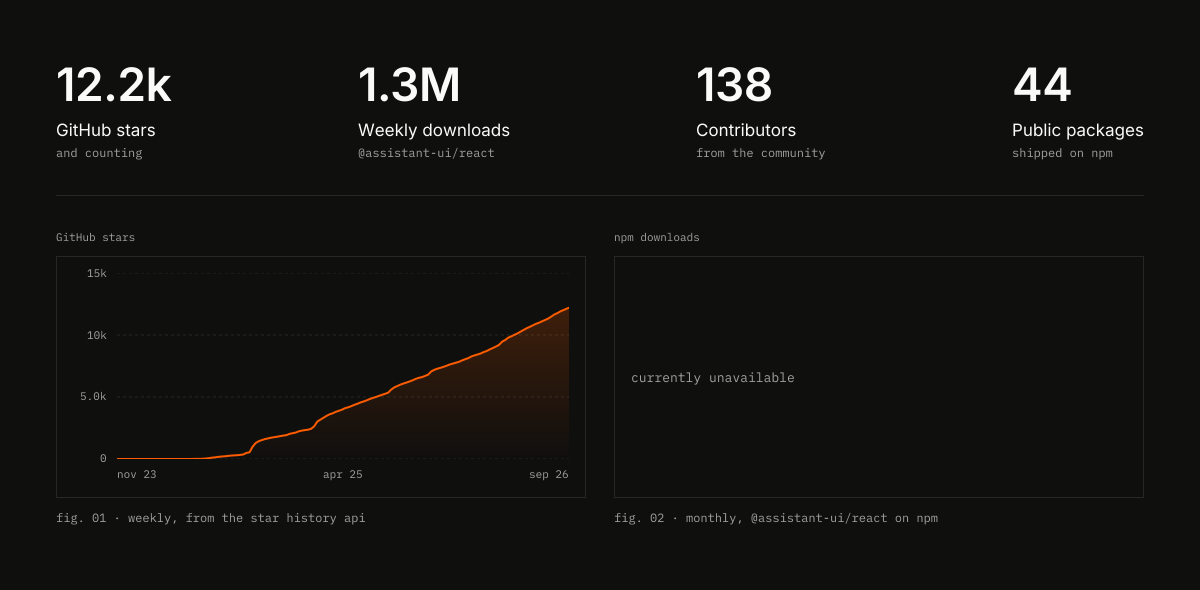
assistant-ui is an open-source TypeScript/React library to build production-grade AI chat experiences fast.

Installation
The fastest path is the CLI, which scaffolds a Next.js app or adds the styled components to an existing project:
npx assistant-ui@latest create   # new project
npx assistant-ui@latest init     # add to existing project
Or install the packages directly:
npm install @assistant-ui/react @assistant-ui/ai-sdk ai

Usage
"use client";

import { AssistantRuntimeProvider } from "@assistant-ui/react";
import { useChatRuntime } from "@assistant-ui/ai-sdk";
import { Thread } from "@/components/assistant-ui/elements/thread.aui";

export function Chat() {
  const runtime = useChatRuntime();
  return (
    <AssistantRuntimeProvider runtime={runtime}>
      <Thread />
    </AssistantRuntimeProvider>
  );
}
useChatRuntime connects to the Vercel AI SDK out of the box. Swap it for useLangGraphRuntime, useDataStreamRuntime, or any custom runtime to integrate with your own backend.
What you get
- Composable primitives: build any chat UX from
Thread,Message,Composer,ThreadList,ActionBar, and friends. Style every pixel yourself, or start from a polished shadcn/ui theme that the CLI copies into your project. - Production UX out of the box: streaming, auto-scroll, retries, attachments, markdown, code highlighting, voice dictation, keyboard shortcuts, and accessibility.
- Generative UI: render tool calls and JSON as React components, collect inline human approvals, and expose safe frontend actions to the model.
- Strong TypeScript: typed runtime APIs, tool schemas, message parts, and adapters end to end.

Backends
| Integration | Package |
|---|---|
| Vercel AI SDK | @assistant-ui/ai-sdk |
| LangGraph / LangChain | @assistant-ui/react-langgraph, @assistant-ui/react-langchain |
| AG-UI / A2A protocols | @assistant-ui/react-ag-ui, @assistant-ui/react-a2a |
| Google ADK / OpenCode | @assistant-ui/react-google-adk, @assistant-ui/react-opencode |
| Custom data-stream backend | @assistant-ui/react-data-stream |
| Managed thread history, telemetry, and file storage | assistant-cloud |
Broad model support out of the box (OpenAI, Anthropic, Google Gemini, Mistral, Perplexity, AWS Bedrock, Azure, Fireworks, Ollama) plus community providers via the AI SDK, and easy extension to any custom HTTP backend.
Customization
Instead of a single monolithic chat component, you compose primitives and bring your own styles. The CLI ships a great starter in your choice of Base UI (the default) or Radix UI flavor; you control everything else.

Used in production by


…and many more.
Demos

|
|
Community & Support
License
MIT, with optional Assistant Cloud for managed thread persistence and analytics.
Backed by Y Combinator.
Установить Docs Server в Claude Desktop, Claude Code, Cursor
unyly install docs-serverСтавит в Claude Desktop, Claude Code, Cursor и VS Code — сам разбирается с npx, uvx и сборкой из исходников.
Впервые? Поставь CLI: curl -fsSL https://unyly.org/install | sh
Или настроить вручную
Выполни в терминале:
claude mcp add docs-server -- npx -y @assistant-ui/mcp-docs-serverПошаговые гайды: как установить Docs Server
FAQ
Docs Server MCP бесплатный?
Да, Docs Server MCP бесплатный — установка в пару кликов через Unyly без оплаты.
Нужен ли API-ключ для Docs Server?
Нет, Docs Server работает без API-ключей и переменных окружения.
Docs Server — hosted или self-hosted?
Self-hosted: сервер запускается локально на твоей машине командой из раздела установки.
Как установить Docs Server в Claude Desktop, Claude Code или Cursor?
Открой Docs Server на unyly.org, выбери вкладку своего клиента (Claude Desktop, Claude Code, Cursor) и нажми Install — конфиг сгенерируется автоматически, без правки JSON.
Изменения
Версии и запрашиваемые доступы со временем.
- Новая версия опубликована
- Новая версия опубликована
- Новая версия опубликована
- Новая версия опубликована
- Новая версия опубликована
- Новая версия опубликована
- Новая версия опубликована
- Новая версия опубликована
Похожие MCP
LibreOffice Tools
Enables AI agents to read, write, and edit Office documents via LibreOffice with token-efficient design. Supports multiple formats including DOCX, XLSX, PPTX, a
 автор: passerbyflutter
Figma
Extract design specs and assets
 автор: Figma
dannote/figma-use
Figma control: create shapes, text and components, and set styles, auto-layout, variables and exports.
 автор: dannote
Logo.dev
Search and retrieve company logos by brand or domain. Customize size, format, and theme to match your design needs. Accelerate design, prototyping, and content
 автор: NOVA-3951
Design Inspiration Server
Searches top design platforms like Dribbble and Behance to provide UI inspiration, color palettes, and layout patterns via the Serper API. It allows users to re
 автор: YonasValentin
PIX4Dmatic
Enables GUI automation for controlling PIX4Dmatic on Windows through MCP. Supports launching, focusing, capturing screenshots, sending hotkeys, clicking UI elem
 автор: jangjo123
mcp-dockmaster
An Open-Sourced UI to install and manage MCP servers for Windows, Linux and macOS.
ariekogan/ateam-mcp
Build, validate and deploy multi-agent AI solutions on the ADAS platform: design skills with tools and manage the solution lifecycle.
 автор: ariekogan
thinkchainai/mcpbundles
Create custom tool bundles, connect providers with OAuth or API keys, and use one MCP server across many integrations, with a UI for bundles and credentials.
 автор: thinkchainai
jau123/MeiGen-AI-Design-MCP
Image generation and editing with a curated prompt library, prompt enhancement and routing across local ComfyUI, MeiGen Cloud and OpenAI-compatible APIs.
 автор: jau123
Compare Docs Server with
Не уверен что выбрать?
Найди свой стек за 60 секунд
Автор?
Embed-бейдж для README
Похожее
Все в категории design