
Dompruner
БесплатноНе проверенMCP server that fetches URLs and returns token-efficient Markdown by pruning DOM noise, reducing LLM context costs by up to 99% without API keys or vector datab

Описание
MCP server that fetches URLs and returns token-efficient Markdown by pruning DOM noise, reducing LLM context costs by up to 99% without API keys or vector databases.
README
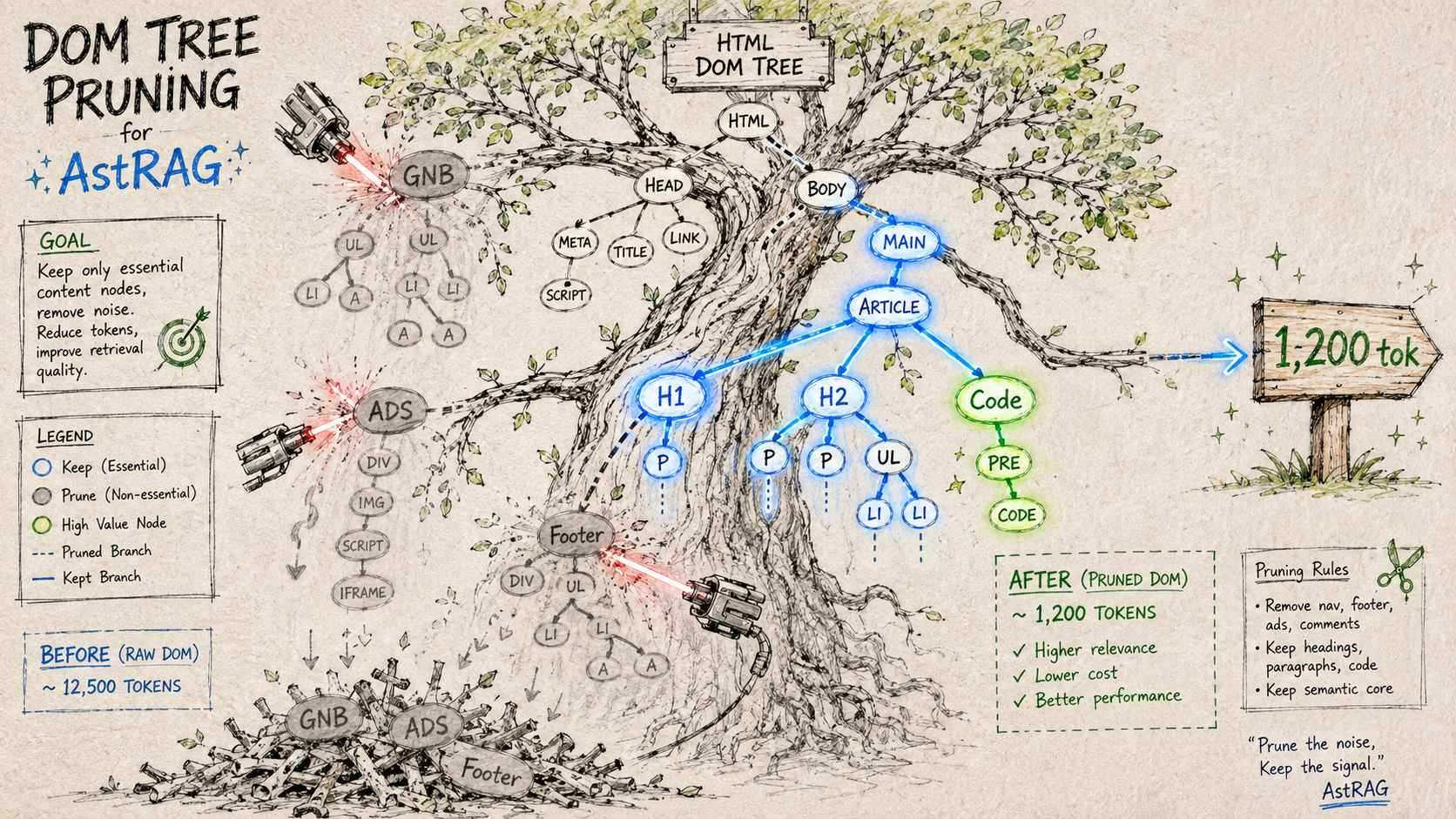
MCP server that cuts web page token cost by 97–99% via DOM AST extraction — no API key, no Vector DB, no embedding API required.
DomPruner fetches a URL, parses the DOM as an Abstract Syntax Tree, prunes noise subtrees (nav, ads, scripts, footers) by FQN path, and returns compact Markdown. Every response includes a token stats header so you can see the reduction at a glance.
> [DomPruner] stripe.com
> | Raw HTML  | 305,778 tokens |
> | Refined   |     988 tokens |
> | Reduction |        99.7%   |
> Fetch: 1,546ms · Parse: 8.2ms
Quick Start
No installation, no API key:
npx -y dompruner-mcp
Claude Code
Add to .mcp.json in your project root (or ~/.claude/.mcp.json for global):
{
  "mcpServers": {
    "dompruner": {
      "type": "stdio",
      "command": "npx",
      "args": ["-y", "dompruner-mcp"]
    }
  }
}
Run /mcp in Claude Code to verify — you should see dompruner with dompruner_fetch and dompruner_analyze listed.
Claude Desktop
Edit ~/Library/Application Support/Claude/claude_desktop_config.json (macOS) or %APPDATA%\Claude\claude_desktop_config.json (Windows):
{
  "mcpServers": {
    "dompruner": {
      "command": "npx",
      "args": ["-y", "dompruner-mcp"]
    }
  }
}
Restart Claude Desktop. Tools appear in the tool picker automatically.
Cursor / Windsurf / other MCP clients
Add the same mcpServers block to your client's MCP config file (.cursor/mcp.json, etc.):
{
  "mcpServers": {
    "dompruner": {
      "type": "stdio",
      "command": "npx",
      "args": ["-y", "dompruner-mcp"]
    }
  }
}
Environment Variables
| Variable | Required | Description |
|---|---|---|
BRAVE_API_KEY |
No | Enables dompruner_search via Brave Search API. Falls back to DuckDuckGo HTML scraping if unset. |
No other environment variables are needed.
Tools
dompruner_fetch
Fetch a URL and return DOM-refined Markdown.
dompruner_fetch(url?, query?)
| Parameter | Type | Required | Description |
|---|---|---|---|
url |
string | No* | Page to fetch and refine |
query |
string | No | Search intent — enables BM25+ section filtering |
*If url is omitted and only query is provided, DomPruner requests URL resolution from the host LLM via MCP sampling (createMessage). If the client does not support sampling, a guide is returned asking the LLM to search first and call dompruner_fetch again with the resolved URL.
Response format:
> [DomPruner] fastapi.tiangolo.com
> |           | Tokens |
> |-----------|--------|
> | Raw HTML  | 35,905 |
> | Refined   |  2,011 |
> | Reduction |  94.4% |
> Fetch: 83ms · Parse: 20.7ms

# First Steps

The simplest FastAPI file could look like this:
...
dompruner_analyze
Returns a token-reduction report and Semantic Anchor list without the full page content — useful for auditing a page before retrieval.
dompruner_analyze(url)
Reports: render type (SSR / SSG / CSR), raw vs refined token counts, reduction %, and the list of headings and meta anchors found.
dompruner_workflow prompt
The server registers an dompruner_workflow prompt that is delivered to the host LLM on connection. It sets the correct usage pattern:
- URL known → call
dompruner_fetch(url)directly - URL unknown → use native web search to resolve the URL, then call
dompruner_fetch(url)
DomPruner handles content refinement; URL discovery is the host LLM's job.
How It Works
URL
 └─▶ fetchPage()       — tiered fetch: direct → UA rotation → Playwright fallback
      │
      ├─▶ [SSG]  extractSsgMarkdown()
      │           walks __NEXT_DATA__ RSC tree → clean Markdown  (≥ 90% reduction)
      │           skips DOM parse entirely
      │
      └─▶ [SSR/CSR]  pre-strip <script>/<style>/<svg>  (80–92% size ↓)
                └─▶ parse5 DOM Tree
                     └─▶ FQN Router (L1)        keeps p / h1–h5 / li / pre / code
                          │                      prunes nav / footer / aside / form
                          └─▶ Heading Cluster (L2)  dev-doc structure detection
                               └─▶ CETD Engine (L3)  text-density scoring fallback
                                    └─▶ BM25+ Section Filter  query-aware ranking
                                         └─▶ Semantic Anchor  heading hierarchy + meta
                                              └─▶ Compact Markdown  ──▶  LLM context
Render Type Detection
| Type | Signal | Strategy |
|---|---|---|
| SSG | __NEXT_DATA__, window.__NUXT__, window.page |
RSC tree walk — DOM parse skipped |
| SSR | Body text density ≥ 2% | Full DOM AST pipeline (L1→L2→L3) |
| CSR | Body text density < 2% | DOM AST pipeline (partial content) |
Tiered Fetch
Plain HTTP fails silently on many documentation sites (HTTP 403, UA blocks, JS-gated content). DomPruner runs three tiers before giving up:
| Level | Trigger | Method |
|---|---|---|
| L1 | Default | Native fetch |
| L2 | 403 / 429 response | User-Agent rotation (3 browser UA strings) |
| L3 | CSR detected or L2 fails | playwright-core headless browser |
playwright-core is an optional peer dependency — install it only if you need L3:
npm install playwright-core
npx playwright install chromium
BM25+ Section Filter
When query is provided, the extracted sections are ranked by BM25+ score. Two weighting adjustments are applied:
- Heading boost (2.5×) — sections under a relevant heading rank higher, suppressing sidebar noise
- Depth decay (0.4) — deeply nested sections score lower than top-level content
- Ancestor preservation — parent headings of selected sections are always included for context
Result: only the most relevant sections enter the LLM context, within a configurable token budget.
Benchmark
Tested on 9 real-world sites across 4 categories. All numbers from live fetches.
Token estimation: Korean ÷ 2, others ÷ 4 chars per token.
| Site | Category | Raw HTML | Chunk RAG | DomPruner | DomPruner+BM25 | Reduction |
|---|---|---|---|---|---|---|
| Stripe API | API Docs | 305,767 | 1,255 | 1,495 | 988 | 99.7% |
| Anthropic API | API Docs | 236,773 | 1,255 | 2,255 | 979 | 99.6% |
| GitHub REST | API Docs | 71,434 | 1,255 | 500 | 500 | 99.3% |
| TypeScript Handbook | Language | 47,334 | 1,180 | 303 | 303 | 99.4% |
| MDN Fetch API | Language | 38,087 | 1,194 | 726 | 726 | 98.1% |
| React useState | Framework | 110,966 | 1,255 | 5,491 | 1,158 | 99.0% |
| FastAPI | Framework | 38,300 | 1,255 | 3,436 | 1,029 | 97.3% |
| Wikipedia REST | General | 44,816 | 1,255 | 3,283 | 1,158 | 97.4% |
| Wikipedia AST | General | 44,551 | 1,255 | 2,758 | 1,106 | 97.5% |
| AVERAGE | 1,240 | 2,250 | 883 | 98.6% |
DomPruner+BM25 delivers 29% fewer tokens than Chunk RAG on average.
vs Chunk RAG
| Chunk RAG | DomPruner+BM25 | |
|---|---|---|
| Avg output tokens | ~1,240 | ~883 (29% less) |
| Token reduction vs raw HTML | ~99% | ~99% |
| Heading / structure preservation | Query-dependent | Consistent |
| Extra infrastructure | Embedding API + Vector DB | None |
| Query required upfront | Yes | No (optional) |
| Processing overhead | ~100 ms+ (embed API) | ~1 ms |
| SSG sites (Next.js / Nuxt) | DOM scrape | RSC tree walk |
| Context breaks at chunk boundaries | Yes | No |
Architecture
src/
  mcp-server.ts          — MCP stdio transport + tool/prompt handlers
  pipeline.ts            — Orchestrator: fetch → parse → extract → rules → serialize
                           Includes 5-min TTL URL cache
  ast/
    fetcher.ts           — Tiered HTTP fetch (native → UA rotation → Playwright)
    parser.ts            — Pre-strip (<script>/<style>/<svg>) + parse5 DOM builder
    core-extractor.ts    — L1→L2→L3 extraction cascade
    fqn-router.ts        — L1: FQN semantic selector matching + noise pruning
    heading-cluster.ts   — L2: heading-block clustering for developer docs
    cetd.ts              — L3: Content/Tag-Density scoring fallback
    ssg-extractor.ts     — Next.js / Nuxt / Gatsby __NEXT_DATA__ RSC tree walk
    anchor.ts            — Semantic anchor extraction (title, meta description, h1–h3)
  middleware/
    serializer.ts        — FQNNode[] → Compact Markdown + token estimator
  rule-engine/
    registry.ts          — URL pattern → Rule set resolution and chaining
    types.ts             — Rule interface definitions
    builtin/
      section-bm25.ts    — BM25+ with heading boost + ancestor preservation
      http-endpoint.ts   — HTTP method/path/response block reformatter
      code-signature.ts  — Code block function/class signature extractor
Development
git clone https://github.com/dong7812/AST-RAG-MCP.git
cd AST-RAG-MCP
npm install
npm run dev    # tsx watch — no build step needed
npm run build  # tsc → dist/
To test a tool call locally:
echo '{"jsonrpc":"2.0","id":1,"method":"tools/call","params":{"name":"dompruner_fetch","arguments":{"url":"https://fastapi.tiangolo.com","query":"routing"}}}' \
  | npm run dev 2>/dev/null
Roadmap
- #1 — PDF & Office file extraction via Content-Type routing
- #2 — BFS site crawl via
dompruner_crawlMCP tool + sitemap.xml support - #3 — Image content extraction (local OCR / opt-in VLM captioning)
- #4 — Structured JSON output mode (deterministic HTML extraction + opt-in LLM schema)
License
MIT
Установка Dompruner
У этого сервера нет опубликованного пакета — он собирается из исходников. Открой репозиторий и следуй инструкции в README.
▸ github.com/dong7812/dompruner-mcpFAQ
Dompruner MCP бесплатный?
Да, Dompruner MCP бесплатный — установка в пару кликов через Unyly без оплаты.
Нужен ли API-ключ для Dompruner?
Нет, Dompruner работает без API-ключей и переменных окружения.
Dompruner — hosted или self-hosted?
Доступен hosted-вариант: Unyly запускает сервер в облаке, локальная установка не обязательна.
Как установить Dompruner в Claude Desktop, Claude Code или Cursor?
Открой Dompruner на unyly.org, выбери вкладку своего клиента (Claude Desktop, Claude Code, Cursor) и нажми Install — конфиг сгенерируется автоматически, без правки JSON.
Похожие MCP
Fetch
Web content fetching and conversion for efficient LLM usage.
AWS KB Retrieval
Retrieval from AWS Knowledge Base using Bedrock Agent Runtime.
 автор: modelcontextprotocol
Spring AI MCP Server
Provides auto-configuration for setting up an MCP server in Spring Boot applications.
llm-analysis-assistant
A very streamlined mcp client that supports calling and monitoring stdio/sse/streamableHttp, and can also view request responses through the /logs page. It also
 автор: xuzexin-hz
Compare Dompruner with
Не уверен что выбрать?
Найди свой стек за 60 секунд
Автор?
Embed-бейдж для README
Похожее
Все в категории ai