
Elastic Security
БесплатноНе проверенInteractive security operations dashboards for alert triage, threat hunting, and case management.

Описание
Interactive security operations dashboards for alert triage, threat hunting, and case management.
README
Quick Demo
https://github.com/user-attachments/assets/cb62a569-1ef0-4fb0-90c7-587b98fb2049
An MCP App that brings interactive blue-team security operations directly into Claude, VS Code, and other MCP-compatible AI hosts. Built on the Model Context Protocol with interactive UI extensions that render inline in the conversation.
What are MCP Apps? MCP Apps extend the Model Context Protocol to let tool servers return interactive HTML interfaces — dashboards, forms, visualizations — that render inside the AI conversation. The LLM calls a tool, and instead of just returning text, an interactive UI appears alongside the response.
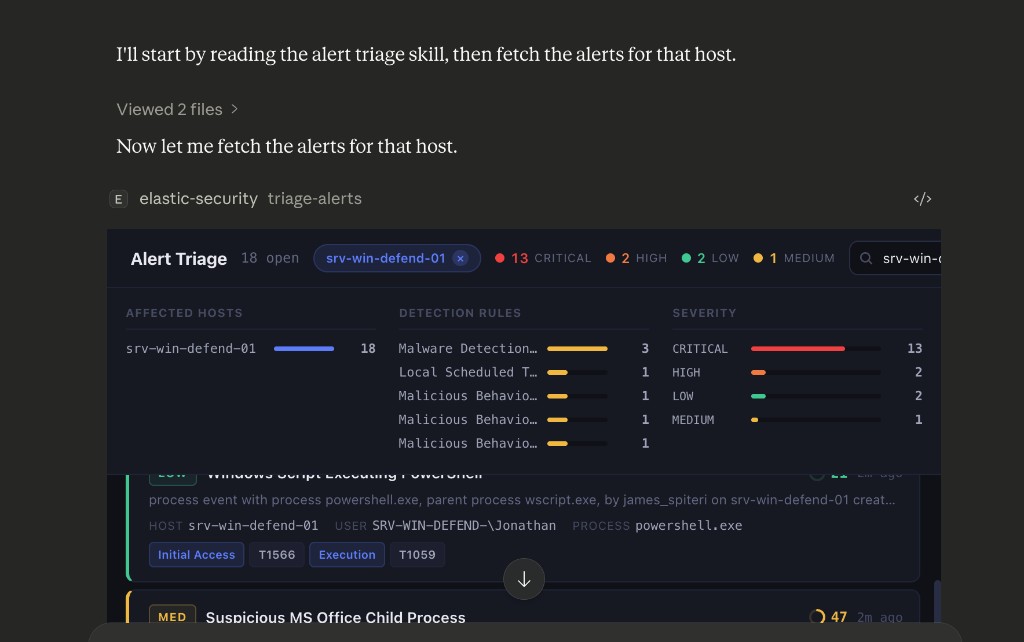
What This Does
This project provides six interactive security operations tools, each with a rich React-based UI that renders inline when Claude (or another MCP host) calls the tool:
| Tool | What It Does |
|---|---|
| Alert Triage | Fetch, filter, and triage security alerts with AI verdict cards, process tree, and network investigation |
| Attack Discovery | AI-powered correlated attack chain analysis with confidence scoring, entity risk, and MITRE mapping |
| Case Management | Create, search, and manage SOC investigation cases with AI-assisted actions |
| Detection Rules | Browse, tune, and manage detection rules with KQL search and noisy rules analysis |
| Threat Hunt | ES|QL workbench with clickable entities and a D3 investigation graph |
| Sample Data | Generate ECS security events for demos across 4 attack chain scenarios |
See docs/features.md for a full breakdown of each tool's capabilities.
Quick Start
[!TIP] Just want to try it? Download example-mcp-app-security.mcpb and double-click it. No Node.js, no cloning, no config files.
Claude Desktop handles the rest — during install, fill in your Elasticsearch URL, Kibana URL, and API key. See Creating an API key if you need to generate one first.
For the API key's permissions, see Required permissions (stateful) or Serverless permissions (Elastic Cloud Serverless Security projects). The stateful Quickstart uses Kibana's built-in editor (full-featured) or viewer (read-only) role plus a small companion role for index access — fastest unless you need a fully scripted custom role.
For other hosts (Cursor, VS Code, Claude Code) or building from source, see Installation below.
How It Works
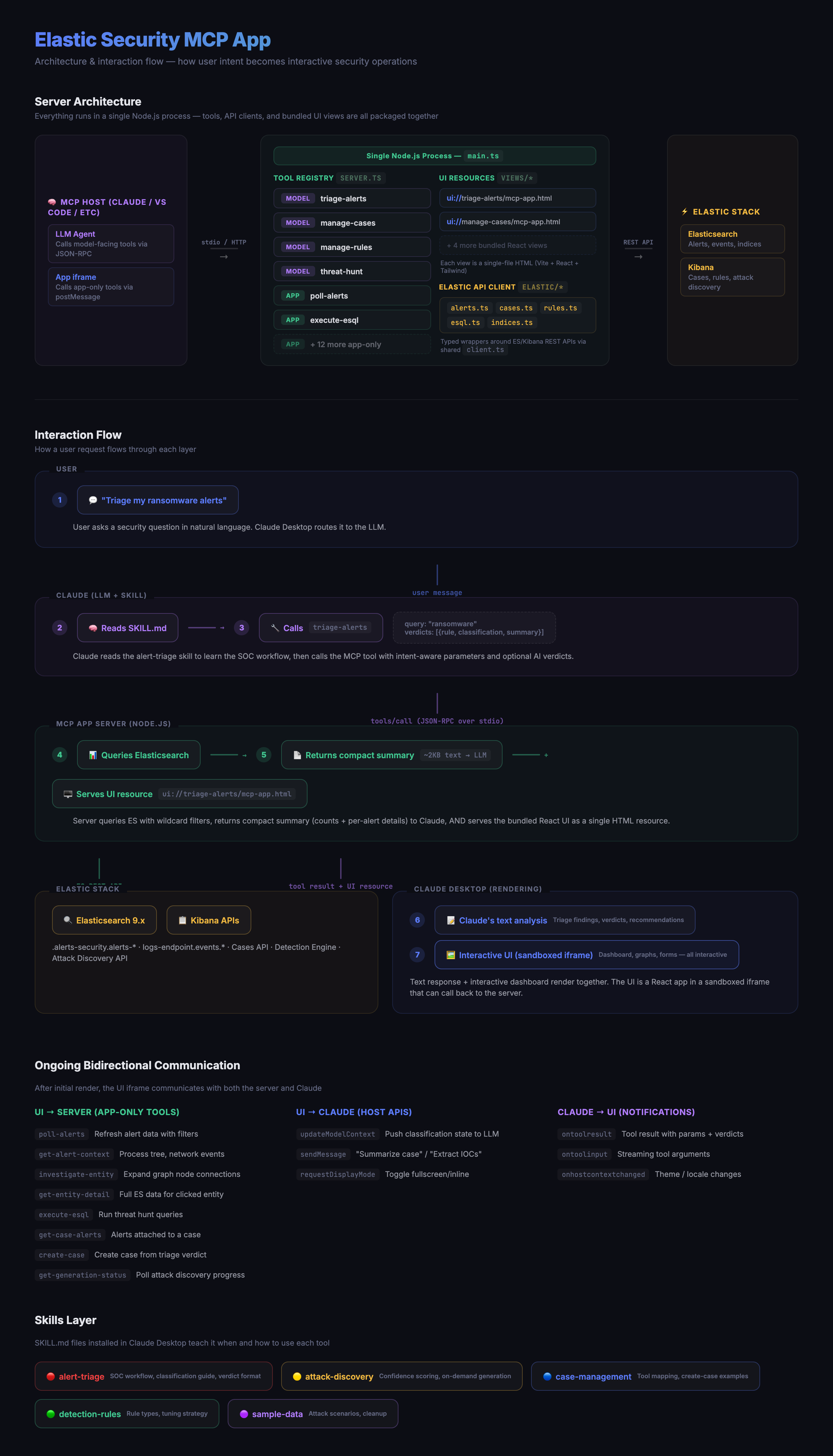
When a user asks Claude to triage alerts or run a threat hunt, Claude calls a model-facing tool on this server. The tool returns a compact text summary to Claude and an interactive React UI that renders inline in the conversation. The UI then calls app-only tools directly for all subsequent interactions — keeping the LLM context small while the UI has full data access.
See docs/architecture.md for details on how views are built, how the UI communicates with the server, and key design decisions.
Telemetry
The MCP App emits anonymised usage events via @elastic/ebt. Shipping is mirrored to the user's Kibana telemetry opt-in — nothing leaves the process unless Kibana reports optIn === true. See docs/telemetry.md for the event catalog, what's collected, and how to opt out.
Skills
The skills/ directory contains Claude Skills — SKILL.md files that teach Claude when and how to use the tools. See docs/setup-skills.md for installation instructions.
Installation
| Guide | Description |
|---|---|
| Add to Claude Desktop | Install the MCP app via one-click .mcpb or manual config |
| Add to Cursor | Connect the MCP app via npx or a locally running server |
| Add to VS Code | Connect the MCP app via npx or a locally running server |
| Add to Claude Code | Register the MCP app via the claude mcp add CLI |
| Add to Claude.ai | Expose the MCP app via a cloudflared tunnel |
| Build and run locally | Build the MCP server from source and run it on your machine |
| Install skills | Install skills via npx, local clone, or zip upload |
| Updating | How to update to a newer release |
Development
npm run dev          # Watch mode
npm run typecheck    # Type-check only
npm run build:views  # Build views only
npm run build:server # Build server only
Inspired By
- Elastic Agent Skills — SOC triage methodology and tool patterns
- MCP Apps Specification — Interactive UI extensions for MCP
License
Elastic-2.0
Установить Elastic Security в Claude Desktop, Claude Code, Cursor
unyly install elastic-securityСтавит в Claude Desktop, Claude Code, Cursor и VS Code — сам разбирается с npx, uvx и сборкой из исходников.
Впервые? Поставь CLI: curl -fsSL https://unyly.org/install | sh
Или настроить вручную
Выполни в терминале:
claude mcp add elastic-security -- npx -y orПошаговые гайды: как установить Elastic Security
FAQ
Elastic Security MCP бесплатный?
Да, Elastic Security MCP бесплатный — установка в пару кликов через Unyly без оплаты.
Нужен ли API-ключ для Elastic Security?
Нет, Elastic Security работает без API-ключей и переменных окружения.
Elastic Security — hosted или self-hosted?
Self-hosted: сервер запускается локально на твоей машине командой из раздела установки.
Как установить Elastic Security в Claude Desktop, Claude Code или Cursor?
Открой Elastic Security на unyly.org, выбери вкладку своего клиента (Claude Desktop, Claude Code, Cursor) и нажми Install — конфиг сгенерируется автоматически, без правки JSON.
Похожие MCP
GitHub
PRs, issues, code search, CI status
 автор: GitHub
Filesystem
Secure file operations with configurable access controls.
Memory
Knowledge graph-based persistent memory system.
Template MCP Server
A CLI tool to create a new Model Context Protocol server project with TypeScript support, dual transport options, and an extensible structure
 автор: mcpdotdirect
Compare Elastic Security with
Не уверен что выбрать?
Найди свой стек за 60 секунд
Автор?
Embed-бейдж для README
Похожее
Все в категории development