
Excalimaid
БесплатноНе проверенConverts Mermaid diagrams into Excalidraw diagrams, serves them locally, and opens the result in your browser.

Описание
Converts Mermaid diagrams into Excalidraw diagrams, serves them locally, and opens the result in your browser.
README
Converts Mermaid diagrams into Excalidraw diagrams, serves them locally, and opens the result in your browser. Includes an MCP server for AI assistants. All processing is done locally, no data is sent to external servers.
Installation
npm install -g excalimaid
Usage
CLI
Open a Mermaid diagram in Excalidraw:
excalimaid 'graph TD
A-->B'
Or pipe via stdin:
cat diagram.mmd | excalimaid
Tip
Add to your ~/.zshrc or ~/.bashrc to open whatever Mermaid diagram is in your clipboard:
alias mmd='pbpaste | excalimaid'
Then just copy a Mermaid diagram and run mmd.
MCP Server
Excalimaid provides an MCP server for AI assistants:
excalimaid mcp
Tool: open-diagram
Opens a Mermaid diagram in Excalidraw. Supports Flowchart, Sequence, and Class diagrams.
{
  "name": "open-diagram",
  "arguments": {
    "mermaid": "graph TD\nA-->B"
  }
}
Starts a local HTTP server on the default port 17532 (configurable via EXCALIMAID_PORT), opens your browser, and returns the URL.
The server auto-shuts down after 5 minutes of inactivity.
MCP Setup
Configure excalimaid in your MCP client:
OpenCode (opencode.json):
{
  "$schema": "https://opencode.ai/config.json",
  "mcp": {
    "excalimaid": {
      "type": "local",
      "command": ["npx", "-y", "excalimaid@latest", "mcp"],
      "enabled": true
    }
  }
}
Claude or Cursor
{
  "mcpServers": {
    "excalimaid": {
      "command": "npx",
      "args": ["-y", "excalimaid@latest", "mcp"]
    }
  }
}
Once configured, the open-diagram tool will be available to your AI assistant.
Configuration
| Variable | Description | Default |
|---|---|---|
EXCALIMAID_PORT |
Port for the local HTTP server | 17532 |
EXCALIMAID_IDLE_TIMEOUT |
Idle timeout in minutes before the server shuts down | 5 |
Example:
EXCALIMAID_PORT=8080 excalimaid 'graph TD
A-->B'
How it works
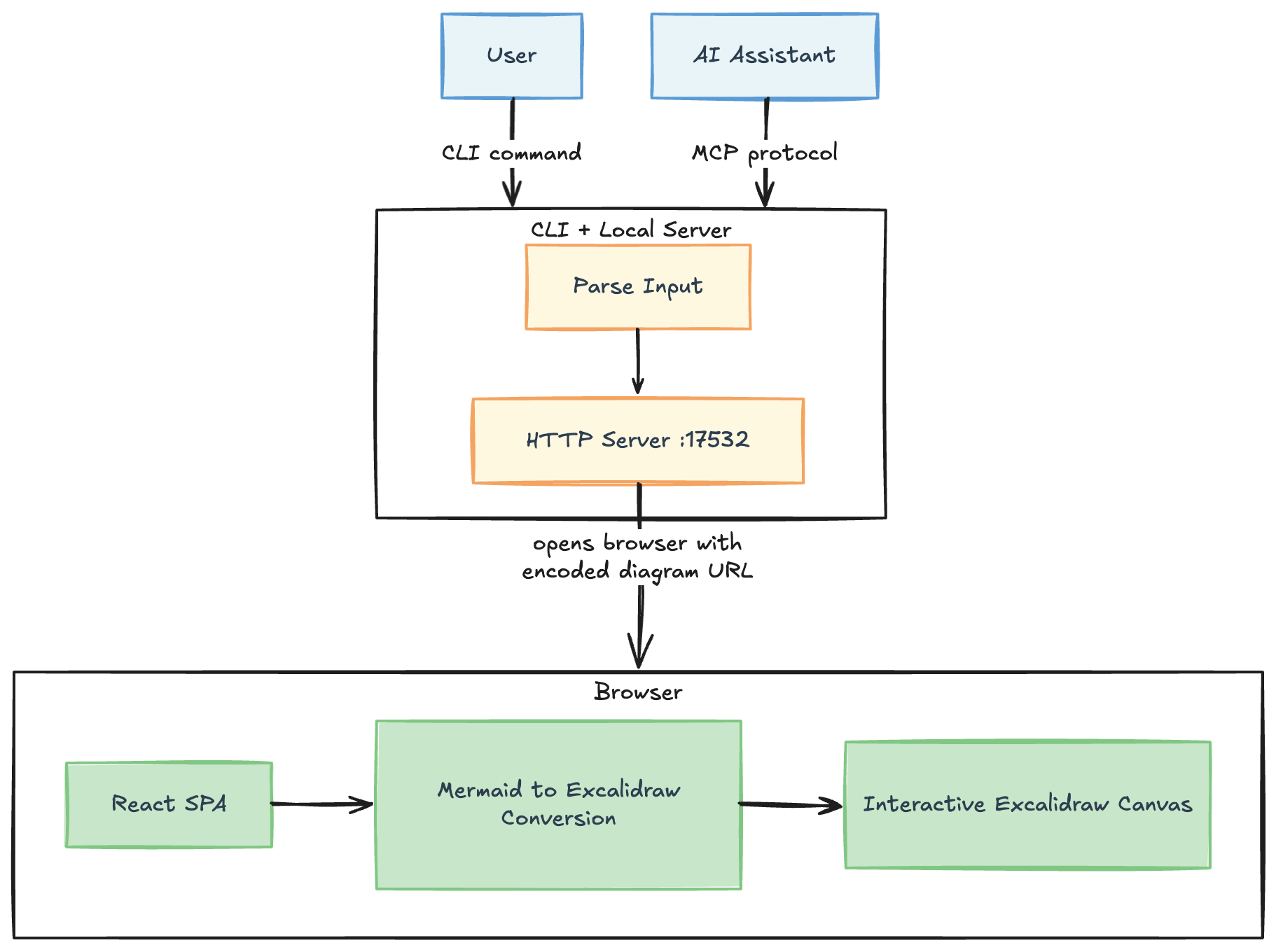 Made with the tool itself, obviously
- The script base64-encodes the Mermaid syntax and passes it as a
?mermaid=query parameter - It serves the
dist/directory via a minimal HTTP server on the default port 17532 - The React app decodes the parameter and converts it to Excalidraw elements using
@excalidraw/mermaid-to-excalidraw - The result is rendered in a full-screen Excalidraw canvas
Development
Clone and setup for local development:
git clone https://github.com/mklinovsky/excalimaid.git
cd excalimaid
pnpm install
pnpm run build
Link globally to use the local version:
pnpm link --global
Now you can run excalimaid from anywhere using your local build.
Установить Excalimaid в Claude Desktop, Claude Code, Cursor
unyly install excalimaidСтавит в Claude Desktop, Claude Code, Cursor и VS Code — сам разбирается с npx, uvx и сборкой из исходников.
Впервые? Поставь CLI: curl -fsSL https://unyly.org/install | sh
Или настроить вручную
Выполни в терминале:
claude mcp add excalimaid -- npx -y excalimaidFAQ
Excalimaid MCP бесплатный?
Да, Excalimaid MCP бесплатный — установка в пару кликов через Unyly без оплаты.
Нужен ли API-ключ для Excalimaid?
Нет, Excalimaid работает без API-ключей и переменных окружения.
Excalimaid — hosted или self-hosted?
Self-hosted: сервер запускается локально на твоей машине командой из раздела установки.
Как установить Excalimaid в Claude Desktop, Claude Code или Cursor?
Открой Excalimaid на unyly.org, выбери вкладку своего клиента (Claude Desktop, Claude Code, Cursor) и нажми Install — конфиг сгенерируется автоматически, без правки JSON.
Похожие MCP
Playwright
Browser automation, scraping, screenshots
 автор: Microsoft
Puppeteer
Browser automation and web scraping.
 автор: modelcontextprotocol
opentabs-dev/opentabs
Plugin-based MCP server + Chrome extension that gives AI agents access to web applications through the user's authenticated browser session. 100+ plugins with a
 автор: opentabs-dev
robhunter/agentdeals
1,500+ developer infrastructure deals, free tiers, and startup programs across 54 categories. Search deals, compare vendors, plan stacks, and track pricing chan
 автор: robhunter
Compare Excalimaid with
Не уверен что выбрать?
Найди свой стек за 60 секунд
Автор?
Embed-бейдж для README
Похожее
Все в категории browse