
F1 Server
БесплатноНе проверенA real-time Formula 1 analytics server that lets you ask natural language questions about races, lap times, tyre strategies, pit stops, and more using live data

Описание
A real-time Formula 1 analytics server that lets you ask natural language questions about races, lap times, tyre strategies, pit stops, and more using live data from the OpenF1 API.
README
A real-time Formula 1 analytics server built with the Model Context Protocol (MCP). Ask Claude natural language questions about F1 races, lap times, tyre strategies, pit stops, and more — powered by live data from the OpenF1 API.
"What tyre strategy did the top 3 drivers use in the 2026 Monaco Race?" "Who set the fastest lap at the 2026 Australian GP?" "Was there a safety car at the 2024 British GP?"
🏗️ Architecture
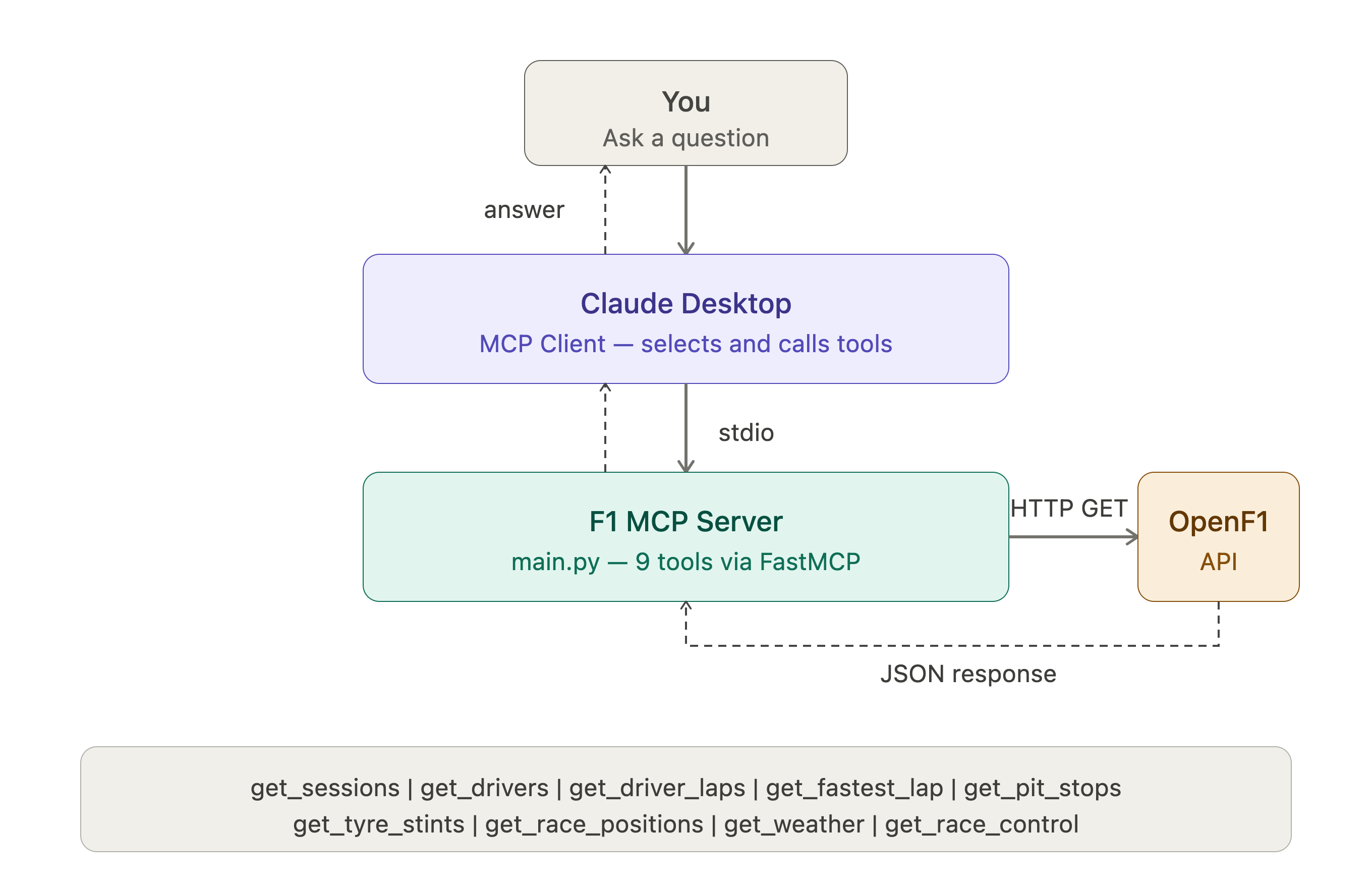
⚙️ How It Works
Claude Desktop acts as the MCP client. On startup, it boots the F1 MCP server as a local subprocess and communicates via stdio (standard input/output). When you ask a natural language question, Claude reads the tool definitions and docstrings, decides which tools to call (and in what order), fires the OpenF1 API requests, and synthesizes the response — all automatically.
No API key required. No authentication. Just live F1 data.
🛠️ Tools
| Tool | Description |
|---|---|
get_sessions |
Find all sessions for a year/country (Race, Qualifying, Practice, Sprint) |
get_drivers |
List all drivers in a session with number, name, and team |
get_driver_laps |
All lap times and sector times for a specific driver |
get_fastest_lap |
Fastest lap across all drivers in a session |
get_pit_stops |
Pit stop laps and durations for a session |
get_tyre_stints |
Full tyre strategy — compound, stint number, lap range |
get_race_positions |
Final finishing positions for all drivers |
get_weather |
Track temp, air temp, humidity, wind, and rainfall |
get_race_control |
Safety cars, flags, penalties, and incidents |
💬 Example Queries
What sessions are available for the 2026 season?
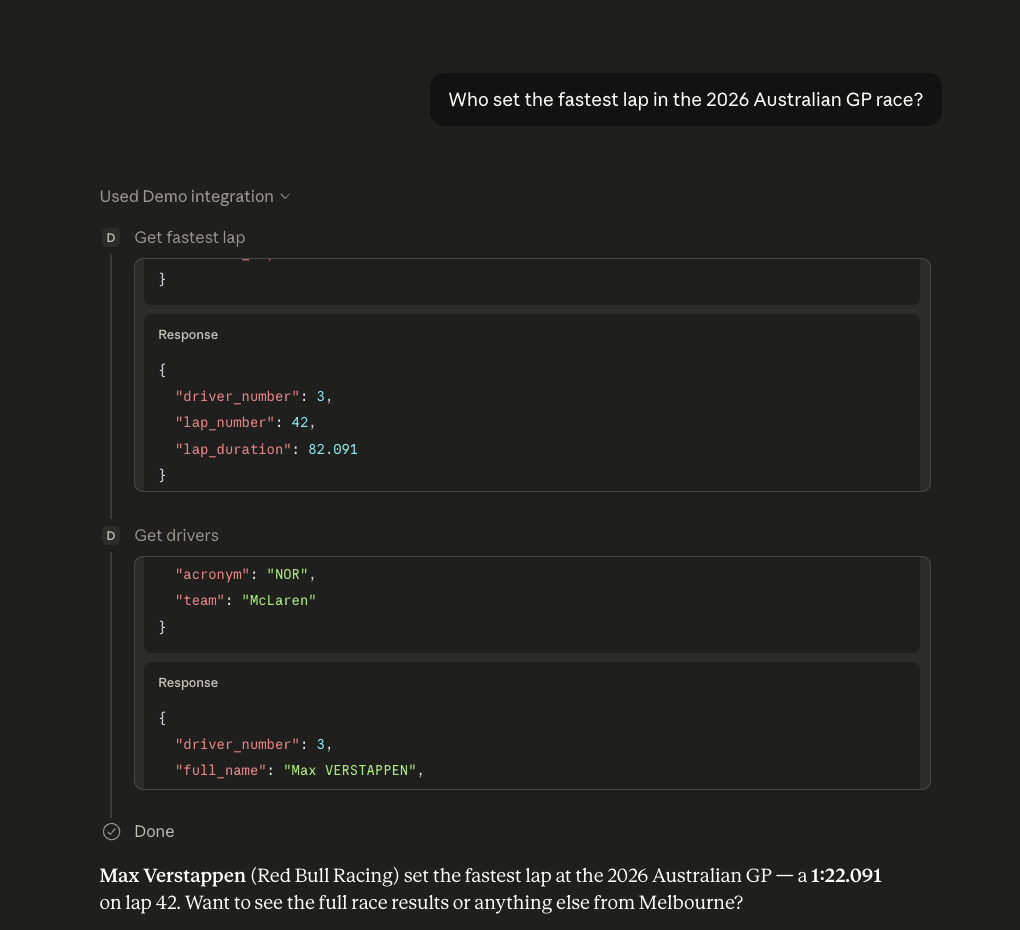
Who set the fastest lap in the 2026 Australian GP?
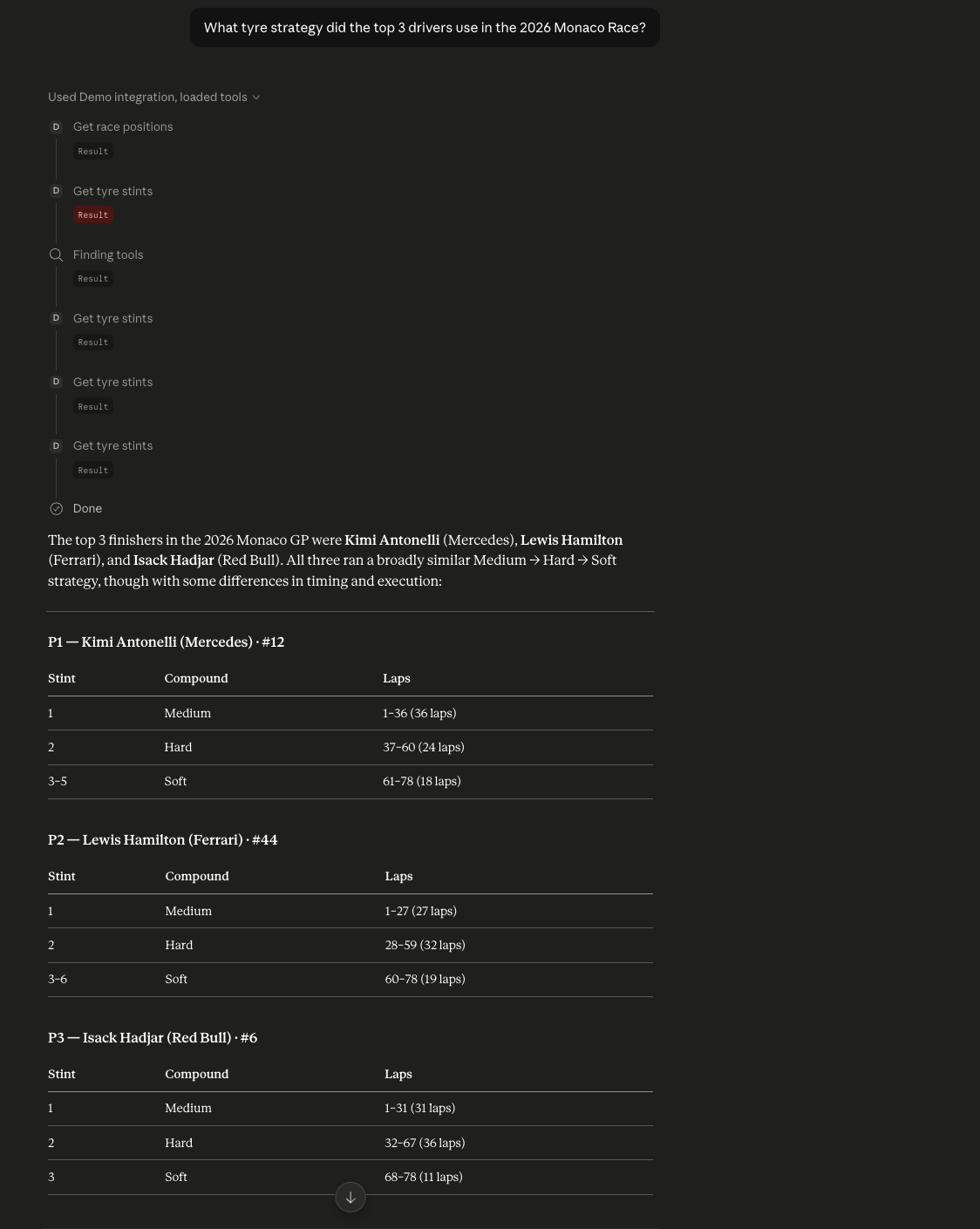
What tyre strategy did the top 3 use in the 2026 Monaco Race?
Did it rain during the 2024 British GP qualifying?
Were there any safety cars in the 2024 Monaco Race?
What were Hamilton's lap times in the 2026 Monaco Race?
How long were Verstappen's pit stops in the 2024 Abu Dhabi GP?
📸 Screenshots
Sessions Query
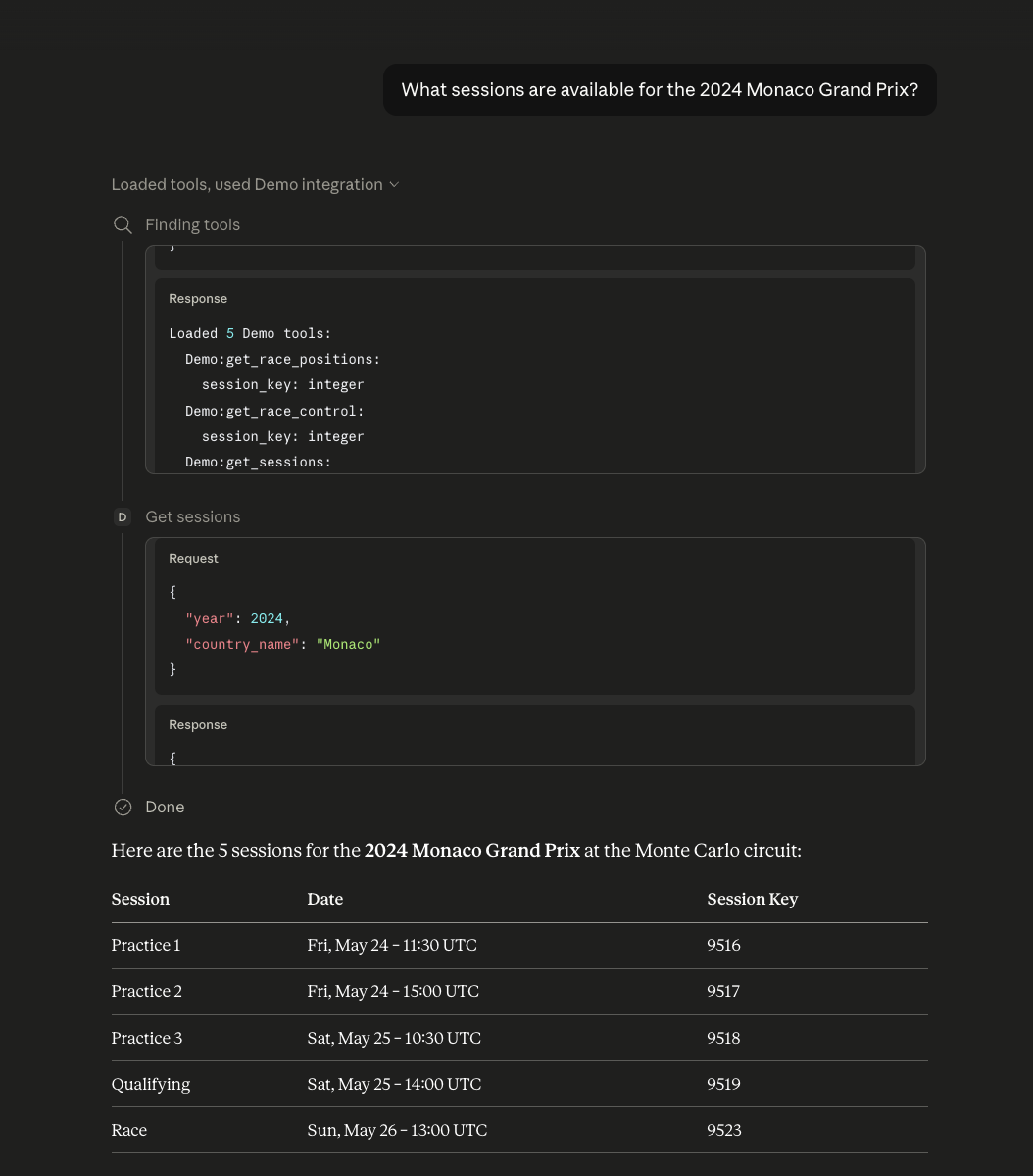
Fastest Lap — Auto Tool Chaining
Tyre Strategy — Multi-Tool Chain
🚀 Setup
Prerequisites
- Python 3.10+
- uv package manager
- Claude Desktop
Installation
# Clone the repo
git clone https://github.com/kevinjohnson/F1-MCP-Server.git
cd F1-MCP-Server

# Install dependencies
uv add "mcp[cli]" requests

# Register with Claude Desktop
uv run mcp install main.py
Then fully quit and reopen Claude Desktop. The F1 Assistant will appear under Connectors.
Common Issue
If the server shows as "Server not found", make sure main.py ends with:
if __name__ == "__main__":
    mcp.run()  # No transport argument — stdio only
📡 Data Source
All data comes from OpenF1 — a free, open-source API providing real-time and historical F1 telemetry from 2023 onwards.
- No API key required for historical data
- Rate limit: 3 req/s, 30 req/min (free tier)
- Data available from 2023 season onwards
🧠 Why MCP?
Claude can't access live data or external APIs on its own. MCP (Model Context Protocol) bridges that gap — it lets you define tools as Python functions that Claude can call autonomously. The key insight: Claude reads your docstrings to decide when and how to use each tool, enabling it to chain multiple API calls together without any explicit instructions.
In this project, a single question like "What tyre strategy did the top 3 use?" triggers Claude to automatically: find the session key → get race positions → resolve driver numbers → fetch tyre stints for each driver — all from one natural language prompt.
📁 Project Structure
F1-MCP-Server/
├── main.py          # MCP server with all 9 tools
├── pyproject.toml   # uv project config
├── images/          # Screenshots and architecture diagram
└── README.md
🔭 Potential Extensions
- Add
get_car_telemetry— throttle, brake, DRS, gear data per lap - Add
get_overtakes— position change events during a race - Add
get_championship_standings— driver and constructor standings - Cache session keys locally to reduce API calls
- Add a
compare_driverstool for head-to-head lap time analysis
Built by Kevin Johnson · Powered by OpenF1 · Built with MCP
Установка F1 Server
У этого сервера нет опубликованного пакета — он собирается из исходников. Открой репозиторий и следуй инструкции в README.
▸ github.com/Kevin29Johnson/f1-mcp-serverFAQ
F1 Server MCP бесплатный?
Да, F1 Server MCP бесплатный — установка в пару кликов через Unyly без оплаты.
Нужен ли API-ключ для F1 Server?
Нет, F1 Server работает без API-ключей и переменных окружения.
F1 Server — hosted или self-hosted?
Self-hosted: сервер запускается локально на твоей машине командой из раздела установки.
Как установить F1 Server в Claude Desktop, Claude Code или Cursor?
Открой F1 Server на unyly.org, выбери вкладку своего клиента (Claude Desktop, Claude Code, Cursor) и нажми Install — конфиг сгенерируется автоматически, без правки JSON.
Похожие MCP
GitHub
PRs, issues, code search, CI status
 автор: GitHub
Filesystem
Secure file operations with configurable access controls.
Memory
Knowledge graph-based persistent memory system.
Template MCP Server
A CLI tool to create a new Model Context Protocol server project with TypeScript support, dual transport options, and an extensible structure
 автор: mcpdotdirect
Compare F1 Server with
Не уверен что выбрать?
Найди свой стек за 60 секунд
Автор?
Embed-бейдж для README
Похожее
Все в категории development