
FBEM
БесплатноНе проверенAn MCP server that enables AI agents to post Reels and Photos to Facebook by capturing and replaying the native web API through a Chrome extension.

Описание
An MCP server that enables AI agents to post Reels and Photos to Facebook by capturing and replaying the native web API through a Chrome extension.
README
Crawl/snapshot Facebook's native composer web API and publish Reels / Photos through a Chrome extension — exposed to any agent as an MCP server.
FBEM drives the same internal web API a logged-in human uses on facebook.com (NOT the Graph API, which suppresses reach on API-published posts). It learns the exact upload shape by passively snapshotting the requests you make by hand, then replays that template with fresh media + fresh volatile tokens — so it is self-healing and needs no reverse-engineering when Facebook rotates its payload.
Any MCP-capable agent (Claude Code / Claude Desktop / Cursor / …) can plug in and
call post_reel, post_photos, switch_profile, get_identity, health, and
capture_status. Adding a new tool is one file — see CONTRIBUTING.md.
⚠️ Local tool, loopback-only. The bridge binds
127.0.0.1and is unauthenticated by design. It runs on your machine against your logged-in browser session. Never expose it to a network. Use it only on accounts you own and in line with Facebook's terms.
Architecture
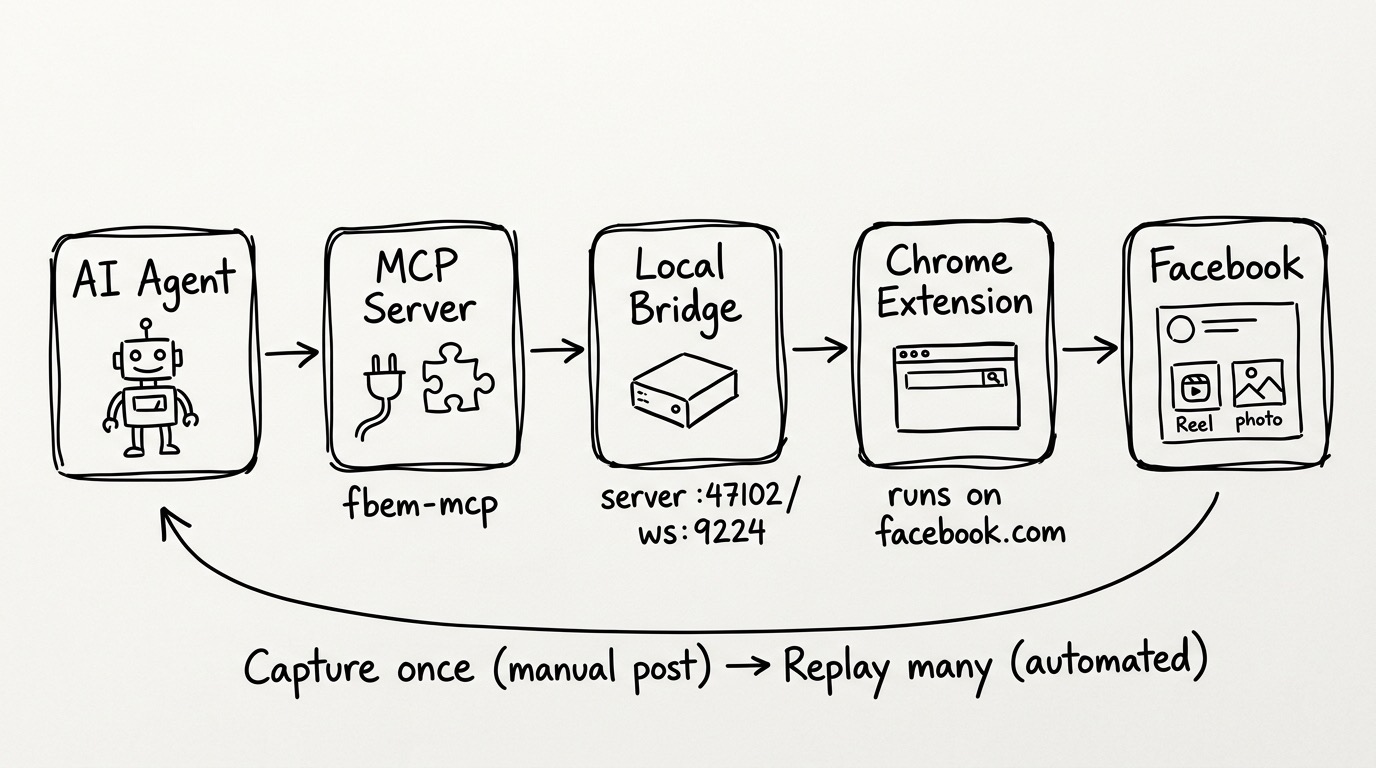
  any MCP agent  (Claude Code / Desktop / Cursor / …)
       │  stdio  (MCP protocol)
       ▼
  fbem-mcp ──HTTP(loopback :47102)──► fbem-bridge ──WS(:9224)──► Chrome extension
  (FastMCP;                           (FastAPI +                  (crawler + replay,
   tools/ = one file per tool)         WS server)                  injected in-page)
                                                                       │ runs inside
                                                                       ▼
                                                                 facebook.com tab
                                                                 (your live session)
fbem-bridge(persistent) holds the WebSocket to the extension, serves media over loopback, and stores captured templates. Run it once; leave it up.fbem-mcp(spawned by the agent) is a thin stdio layer that calls the bridge over HTTP. Because it's separate, every agent can spawn its own MCP process without fighting over the extension's WebSocket port.- Chrome extension has three jobs, all inside the page's own context:
- Crawler — monkeypatches
fetch/XHRto passively snapshot the genuine native upload requests when you post by hand. Never blocks or mutates them. - Tokens — scrapes fresh volatile tokens (
fb_dtsg,lsd,jazoest, …). - Replay — reproduces a captured template with new media + fresh tokens.
- Crawler — monkeypatches
How it works: capture-then-replay
Replay is template-driven and only activates after one real capture per kind.
- Start the bridge and load the extension; open a logged-in facebook.com tab.
- Post one item by hand (a Reel, a photo/album, a page switch).
- The crawler snapshots the real requests (the
rupload/photo upload + theComposerStoryCreateMutationpublish) and POSTs them to the bridge, which folds them intotemplate.json. - From then on, the matching MCP tool replays automatically — fresh video/photo, fresh tokens, same proven shape.
When Facebook rotates its payload and replay starts failing, just re-capture (repeat steps 2–3). No code change is ever required.
Quickstart
1. Install
git clone https://github.com/crisng95/fbem.git FBEM && cd FBEM
python3.11 -m venv .venv
.venv/bin/pip install -e .
2. Run the bridge (leave it running)
.venv/bin/fbem-bridge # HTTP :47102 + WS :9224, loopback only
3. Load the Chrome extension
chrome://extensions → enable Developer mode → Load unpacked → select the
extension/ directory. See extension/README.md. Keep a
logged-in www.facebook.com tab open — replay runs inside it.
4. Seed a template (one manual post)
With everything running, post one Reel (and one photo/album) by hand. Confirm:
curl -s http://127.0.0.1:47102/api/health | python3 -m json.tool
# look for: extension_connected: true, has_template: true, has_photo_template: true
Already have captured templates elsewhere? Point the bridge at that captures directory and skip re-snapshotting entirely:
FBEM_CAPTURES_DIR=/path/to/existing/captures fbem-bridge
5. Plug the MCP into your agent
Claude Code:
claude mcp add fbem -- /abs/path/to/FBEM/.venv/bin/fbem-mcp
Claude Desktop (claude_desktop_config.json):
{
  "mcpServers": {
    "fbem": { "command": "/abs/path/to/FBEM/.venv/bin/fbem-mcp" }
  }
}
Any MCP client: run the command fbem-mcp, transport stdio.
The agent can now call the tools below. (The bridge from step 2 must stay running.)
MCP tools
| Tool | What it does |
|---|---|
post_reel |
Publish a Reel from a local .mp4. Args: video_path, caption, page_id?, scheduled_publish_time?. |
post_photos |
Publish a photo (1 file) or album (N files) from local .jpg/.png. Args: image_paths[], caption, page_id?, scheduled_publish_time?. |
switch_profile |
Switch the acting page/profile so later posts go out AS that page. Args: target_id. |
get_identity |
Read which page/profile the tab currently posts AS (read-only). |
health |
Bridge + extension health (connection, templates, tab TTL). |
capture_status |
Crawler/snapshot status: what's captured, what's ready to post, and exactly what to (re)snapshot if not. |
When do I need to (re)snapshot?
- First run / a kind never captured → yes: post that kind once by hand.
- Reel vs Photo vs Switch are separate templates → capturing a Reel does not enable photo posting; capture each kind once.
- Already captured and working → no. Templates persist in
FBEM_CAPTURES_DIR. - Facebook rotated its payload (replay errors like
story_create=null,no_template_captured, repeated 502s) → re-capture that one kind by hand.
Ask the agent to call capture_status any time — it reports exactly what's ready
and what to do.
Configuration
All optional; sensible loopback defaults. See .env.example.
| Env | Default | Purpose |
|---|---|---|
FBEM_HTTP_PORT |
47102 |
Bridge HTTP API port |
FBEM_WS_PORT |
9224 |
Extension WebSocket port |
FBEM_WS_HOST |
127.0.0.1 |
WS bind host (must be loopback) |
FBEM_HOME |
~/.fbem |
Base dir for state |
FBEM_CAPTURES_DIR |
$FBEM_HOME/captures |
Captured templates (contain live tokens) |
FBEM_MEDIA_DIR |
$FBEM_HOME/media |
Media served to the extension |
FBEM_BRIDGE_URL |
http://127.0.0.1:47102 |
Where the MCP reaches the bridge |
FBEM_TAB_TTL_S |
7200 |
Advanced: tab auto-reload window (seconds) that keeps tokens fresh |
FBEM_TAB_ACTIVE_WINDOW_S |
90 |
Advanced: how recently a capture must arrive to count the tab as "active" (seconds) |
FBEM_PUBLISH_OP_RE |
(built-in regex) | Advanced: override the regex matching the Reel publish mutation (set only if FB renames the op) |
Security
- Loopback-only & unauthenticated by design. Startup refuses a non-loopback
FBEM_WS_HOST. Never port-forward or proxy it. - Captures contain live FB tokens (
fb_dtsg,lsd, cookies).captures/is git-ignored — never commit it. TreatFBEM_CAPTURES_DIRas a secret. - No tokens in code. The callback secret is random per process; volatile FB tokens are scraped live from the page at replay time.
Project layout
fbem/
  bridge/        persistent backend (FastAPI :47102 + extension WS :9224)
    server.py · ws_server.py · bridge_client.py · capture_store.py · config.py · run.py
  mcp/           the MCP server (any-agent pluggable)
    server.py · registry.py · bridge_api.py
    tools/       ONE FILE PER TOOL  ← the contribution surface
      _template.py · post_reel.py · post_photos.py · switch_profile.py
      get_identity.py · health.py · capture_status.py
extension/       Chrome MV3 (crawler snapshot + replay)
docs/PROTOCOL.md the decoded native upload protocol
Contributing
Adding a tool is one file. Copy fbem/mcp/tools/_template.py, write a typed async
function, done — it's auto-discovered. See CONTRIBUTING.md.
License
MIT.
Установка FBEM
У этого сервера нет опубликованного пакета — он собирается из исходников. Открой репозиторий и следуй инструкции в README.
▸ github.com/crisng95/fbemFAQ
FBEM MCP бесплатный?
Да, FBEM MCP бесплатный — установка в пару кликов через Unyly без оплаты.
Нужен ли API-ключ для FBEM?
Нет, FBEM работает без API-ключей и переменных окружения.
FBEM — hosted или self-hosted?
Self-hosted: сервер запускается локально на твоей машине командой из раздела установки.
Как установить FBEM в Claude Desktop, Claude Code или Cursor?
Открой FBEM на unyly.org, выбери вкладку своего клиента (Claude Desktop, Claude Code, Cursor) и нажми Install — конфиг сгенерируется автоматически, без правки JSON.
Похожие MCP
Playwright
Browser automation, scraping, screenshots
 автор: Microsoft
Puppeteer
Browser automation and web scraping.
 автор: modelcontextprotocol
opentabs-dev/opentabs
Plugin-based MCP server + Chrome extension that gives AI agents access to web applications through the user's authenticated browser session. 100+ plugins with a
 автор: opentabs-dev
robhunter/agentdeals
1,500+ developer infrastructure deals, free tiers, and startup programs across 54 categories. Search deals, compare vendors, plan stacks, and track pricing chan
 автор: robhunter
Compare FBEM with
Не уверен что выбрать?
Найди свой стек за 60 секунд
Автор?
Embed-бейдж для README
Похожее
Все в категории browse