
Fermat (Mathematical Computing)
БесплатноНе проверенProvides mathematical computation and plotting capabilities through matplotlib for data visualization, NumPy for numerical operations, and SymPy for symbolic ma

Описание
Provides mathematical computation and plotting capabilities through matplotlib for data visualization, NumPy for numerical operations, and SymPy for symbolic mathematics, enabling matrix operations, statistical calculations, equation solving, and calculus problems.
README
This project provides a FastMCP server for mathematical computations, including numerical and symbolic calculations, as well as plotting.
Modules
1. mpl_mcp - Matplotlib Integration
| Feature | Description |
|---|---|
plot_barchart |
Plots bar charts of given data values |
plot_scatter |
Creates scatter plots from data points |
plot_chart |
Plots line, scatter, or bar charts |
plot_stem |
Creates stem plots for discrete data |
plot_stack |
Generates stacked area/bar charts |
eqn_chart |
Plots mathematical equations |
2. numpy_mcp - NumPy Integration
| Category | Operations |
|---|---|
| Basic Math | add, sub, mul, div, power, abs, exp, log, sqrt |
| Trigonometric | sin, cos, tan |
| Statistics | mean, median, std, var, min, max, argmin, argmax, percentile |
| Linear Algebra | dot, matmul, inv, det, eig, solve, svd |
| Matrix Operations | create, zeros, ones, full, arange, linspace |
| Array Manipulation | reshape, flatten, concatenate, transpose, stack |
3. sympy_mcp - SymPy Integration
| Category | Operations |
|---|---|
| Algebra | simplify, expand, factor, collect |
| Calculus | diff, integrate, limit, series |
| Equations | solve, solveset, linsolve, nonlinsolve |
| Matrix Operations | create, det, inv, rref, eigenvals |
Setup
Requirements
Python 3.12 or higher (To install Python3.12 follow Python Download)
uv (To install uv follow uv Installation)
Clone the repository
git clone https://github.com/abhiphile/fermat-mcp
Visual Studio Code, Windsurf
You can find the mcp.json file in the
MCP: Open User Configuration or MCP: Open Workspace Configuration
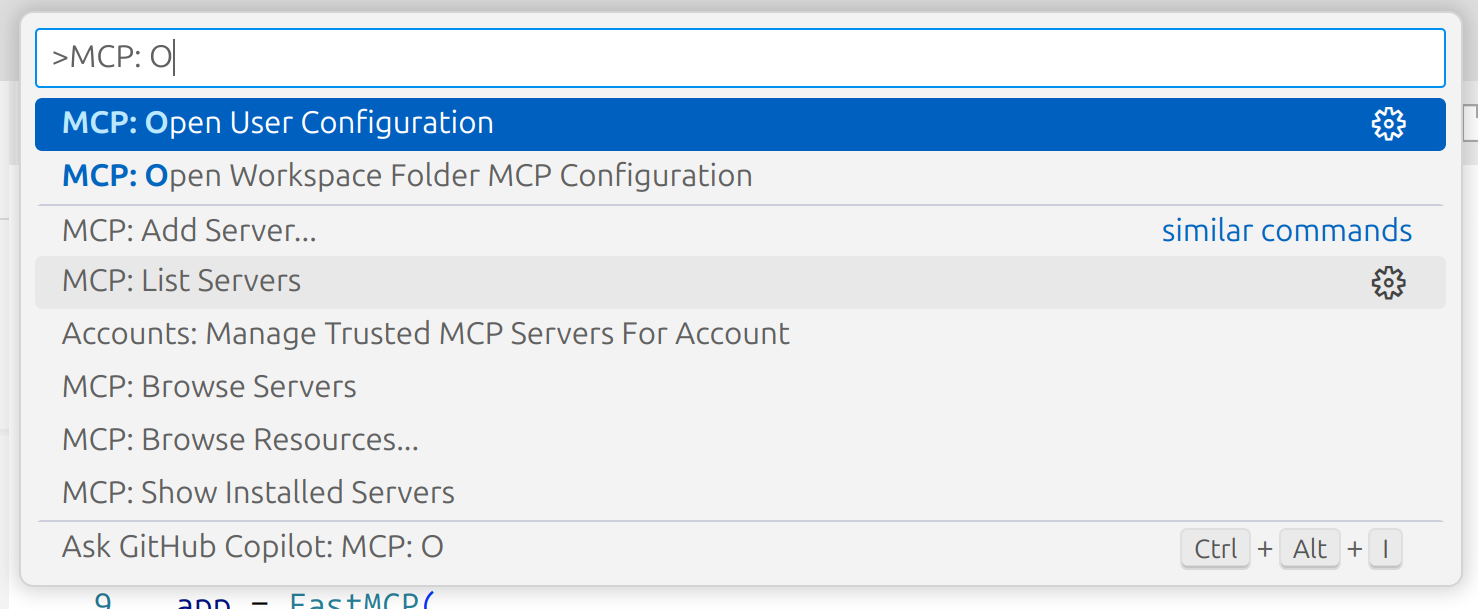
Add the following to your mcp.json:
{
  "mcpServers": {
    "fmcp": {
      "command": "bash",
      "args": ["MCP_SERVER_ABSOLUTE_PATH/setup.sh"],
      "description": "fmcp server is for mathematical computations, including numerical and symbolic calculations, as well as plotting."
    }
  }
}
Claude (Anthropic)
If you're using Claude or the Anthropic MCP client, add this working MCP configuration to your mcp.json (update the directory path to your local clone):
{
  "mcpServers": {
    "fmcp": {
      "command": "uv",
      "args": [
        "--directory",
        "/home/ty/Repositories/fermat-mcp",
        "run",
        "server.py"
      ]
    }
  }
}
Gemini CLI
Open your Gemini settings JSON located in ~/.gemini/settings.json where ~ is your home directory.
Add the following to your settings.json:
{
  "mcpServers": {
    "fmcp": {
      "command": "bash",
      "args": ["MCP_SERVER_ABSOLUTE_PATH/setup.sh"],
      "description": "fmcp server is for mathematical computations, including numerical and symbolic calculations, as well as plotting."
    }
  }
}
Installing via Smithery
To install Fermat MCP for local usage automatically via Smithery:
npx -y @smithery/cli install @abhiphile/fermat-mcp --client gemini
Example Usage
- Using Gemini CLI
╭──────────────────────────────────────────────────────────────────────────────────────────────────────────────╮
│  > Can you use fmcp server and using numpy method find the eigen values of this 8*8 matrix,                  |
│    2 1 3 1 1 8 4 2                                                                                           |
│    6 6 0 7 1 4 6 1                                                                                           │
│    9 2 1 8 7 9 9 0                                                                                           │
│    2 5 6 6 9 8 0 1                                                                                           │
│    1 3 6 2 3 8 8 1                                                                                           │
│    9 4 2 2 1 2 2 9                                                                                           │
│    8 6 4 4 2 0 2 8                                                                                           │
│    0 0 0 6 6 7 5 6                                                                                           │
╰──────────────────────────────────────────────────────────────────────────────────────────────────────────────╯

 ╭─────────────────────────────────────────────────────────────────────────────────────────────────────────────────────────────────────────╮
 │ ✔  numpy_mcp_numerical_operation (fmcp MCP Server) {"a":[[2,1,3,1,1,8,4,2],[6,6,0,7,1,4,6,1],[9,2,1,8,7,9,9,0],[2,5,6,6,9,8,0,1],[1,3,… │
 │                                                                                                                                         │
 │    {"eigenvalues":["32.077244457548815+0j","-11.531090644775198+0j","-6.6653982146786195+0j","0.6715984762411508+3.37024850             │
 │    10270413j","0.6715984762411508-3.3702485010270413j","4.541270555490195+2.776364664923869j","4.541270555490195-2.77636466             │
 │    4923869j","3.6935063384423428+0j"],"eigenvectors":[["-0.23263835483680192+0j","-0.2264723575289234+0j","-0.4308391916391             │
 │    0195+0j","-0.012346573390129022+0.17748655663058255j","-0.012346573390129022-0.17748655663058255j","-0.21221572277027187             │
 │    +0.3524396218277479j","-0.21221572277027187-0.3524396218277479j","0.3451499664861578+0j"],["-0.31955742545335186+0j","-0             │
 │    .2569860493445581+0j","0.05691886770041556+0j","-0.35591013681869693-0.2242364092694275j","-0.35591013681869693+0.224236             │
 │    4092694275j","0.1932161673963751-0.39527849111641133j","0.1932161673963751+0.39527849111641133j","-0.7979681696063214+0j             │
 │    "],["-0.46626263247473404+0j","-0.4684914620112376+0j","0.5469400556350749+0j","0.34325164099973565+0.06607019711949293j             │
 │    ","0.34325164099973565-0.06607019711949293j","0.21312270185159682+0.28822307710358636j","0.21312270185159682-0.288223077             │
 │    10358636j","0.42707422750984786+0j"],["-0.41589316441674523+0j","0.2291771012892302+0j","0.09410792992600435+0j","0.6375             │
 │    92441360358+0j","0.637592441360358+-0j","0.46446646137729414+0j","0.46446646137729414+-0j","0.08171661775583623+0j"],["-             │
 │    0.35812884189789035+0j","-0.26551071423139044+0j","-0.649979374400915+0j","-0.2999153430497845+0.20110182336747695j","-0             │
 │    .2999153430497845-0.20110182336747695j","0.04424367733961273-0.020400357434930304j","0.04424367733961273+0.0204003574349             │
 │    30304j","-0.037276545325188024+0j"],["-0.3042416233100104+0j","0.4027405071320744+0j","0.2343447346668298+0j","-0.119224             │
 │    87219398595+0.10317726668781271j","-0.11922487219398595-0.10317726668781271j","-0.3387759141362585+0.15790241128043445j"             │
 │    ,"-0.3387759141362585-0.15790241128043445j","0.11473144194899779+0j"],["-0.35389732755448017+0j","0.5359362131480812+0j"             │
 │    ,"0.13989902586074168+0j","-0.16008513226461316-0.26111873108374495j","-0.16008513226461316+0.26111873108374495j","0.055             │
 │    729749650881726-0.22748184206919145j","0.055729749650881726+0.22748184206919145j","-0.19838514696566653+0j"],["-0.327615             │
 │    5213691367+0j","-0.30122843153433887+0j","0.07858579556736099+0j","0.00042251379361638556-0.11670182367986544j","0.00042             │
 │    251379361638556+0.11670182367986544j","-0.18590228871569267-0.2479130526139182j","-0.18590228871569267+0.247913052613918             │
 │    2j","-0.03374593856285834+0j"]]}                                                                                                     │
 ╰─────────────────────────────────────────────────────────────────────────────────────────────────────────────────────────────────────────╯
✦ Of course, I can do that. Here are the eigenvalues for the given matrix:

  32.077244457548815
  -11.531090644775198
  -6.6653982146786195
  0.6715984762411508 + 3.3702485010270413j
  0.6715984762411508 - 3.3702485010270413j
  4.541270555490195 + 2.776364664923869j
  4.541270555490195 - 2.776364664923869j
  3.6935063384423428
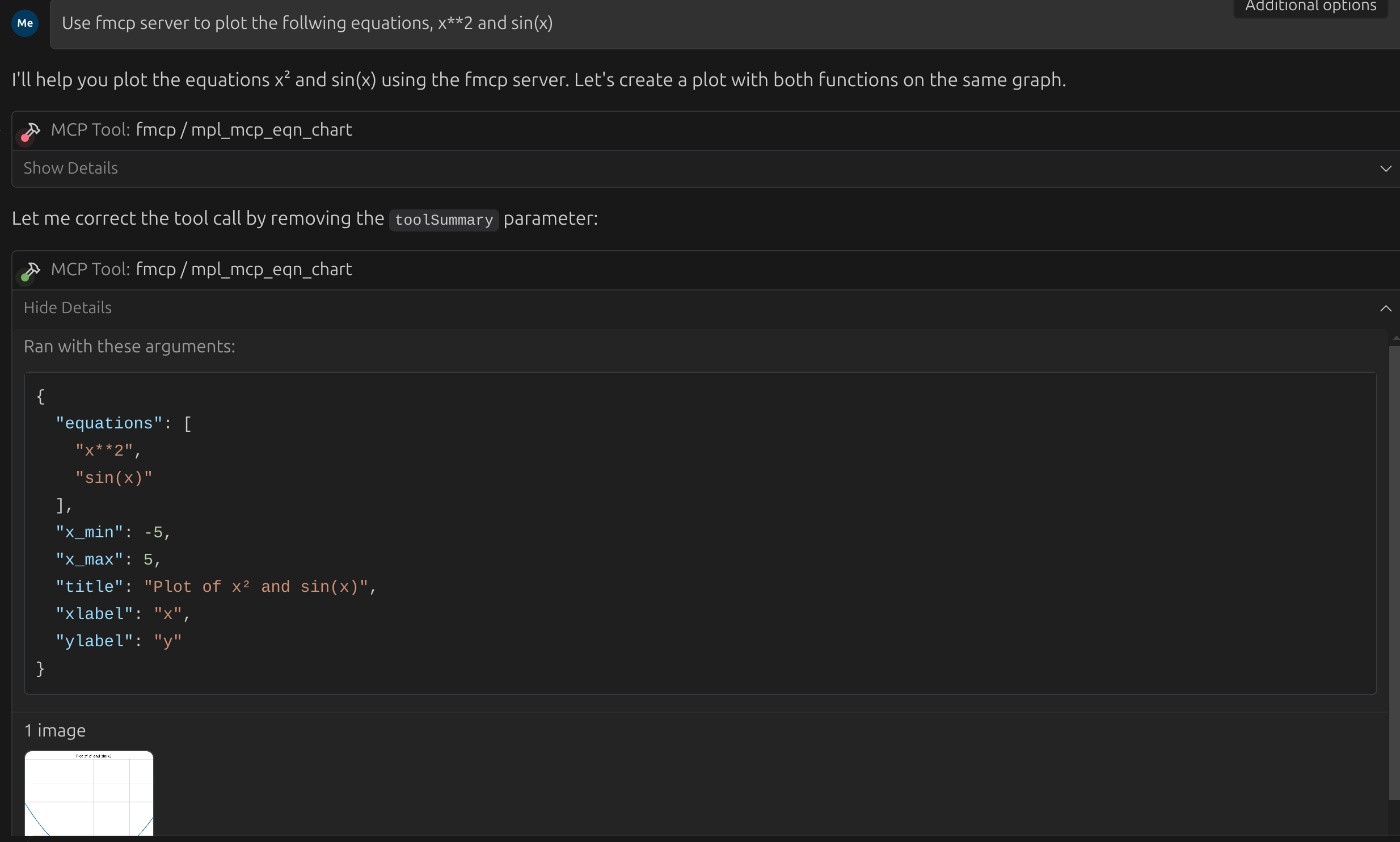
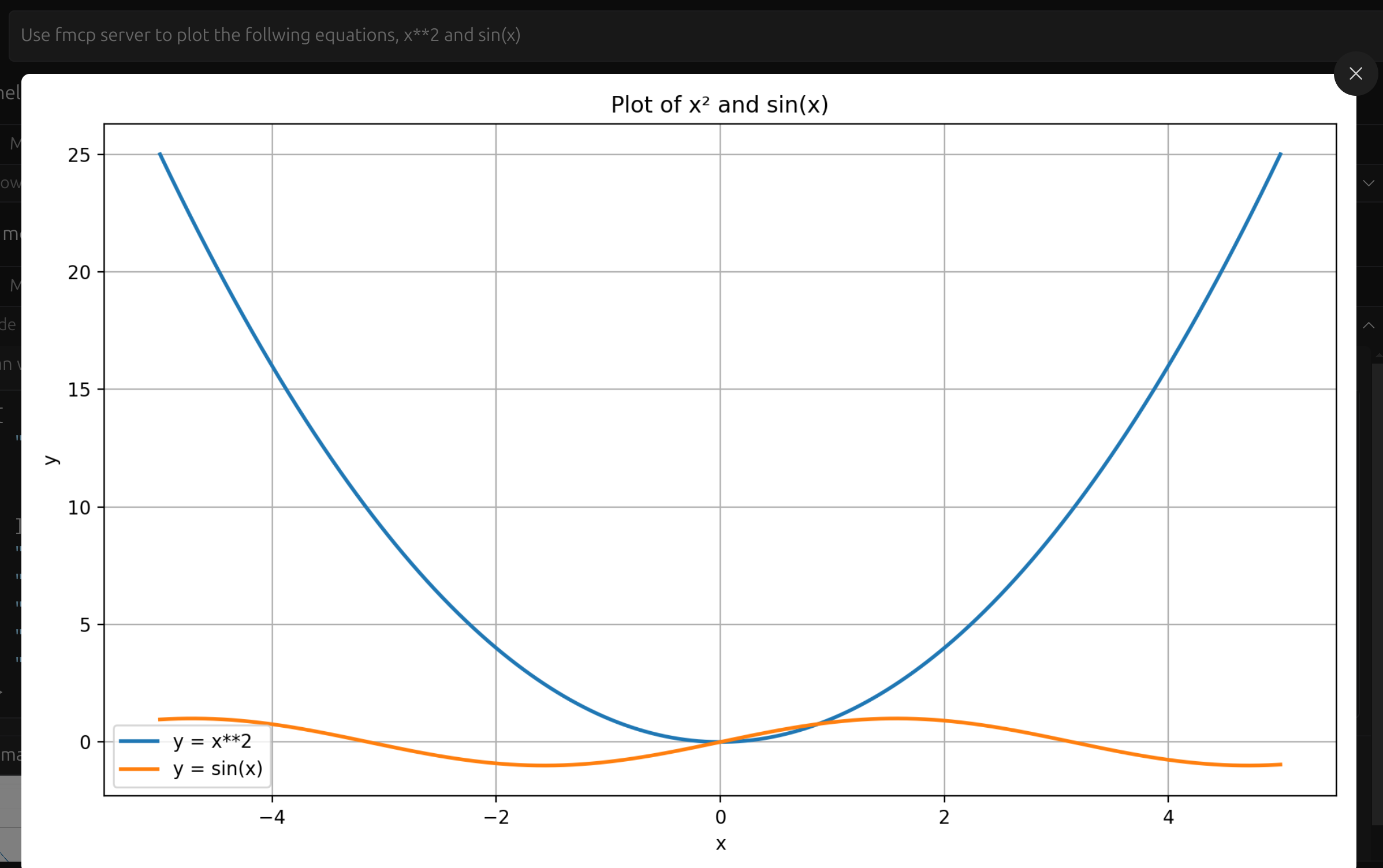
- Using Visual Studio Code, Windsurf
Here the task was to plot both x**2 and sin(x) in the same plot.
Установка Fermat (Mathematical Computing)
У этого сервера нет опубликованного пакета — он собирается из исходников. Открой репозиторий и следуй инструкции в README.
▸ github.com/abhiphile/fermat-mcpFAQ
Fermat (Mathematical Computing) MCP бесплатный?
Да, Fermat (Mathematical Computing) MCP бесплатный — установка в пару кликов через Unyly без оплаты.
Нужен ли API-ключ для Fermat (Mathematical Computing)?
Нет, Fermat (Mathematical Computing) работает без API-ключей и переменных окружения.
Fermat (Mathematical Computing) — hosted или self-hosted?
Self-hosted: сервер запускается локально на твоей машине командой из раздела установки.
Как установить Fermat (Mathematical Computing) в Claude Desktop, Claude Code или Cursor?
Открой Fermat (Mathematical Computing) на unyly.org, выбери вкладку своего клиента (Claude Desktop, Claude Code, Cursor) и нажми Install — конфиг сгенерируется автоматически, без правки JSON.
Похожие MCP
GitHub
PRs, issues, code search, CI status
 автор: GitHub
Filesystem
Secure file operations with configurable access controls.
Memory
Knowledge graph-based persistent memory system.
Template MCP Server
A CLI tool to create a new Model Context Protocol server project with TypeScript support, dual transport options, and an extensible structure
 автор: mcpdotdirect
Compare Fermat (Mathematical Computing) with
Не уверен что выбрать?
Найди свой стек за 60 секунд
Автор?
Embed-бейдж для README
Похожее
Все в категории development