
FILM FINDER Server
БесплатноНе проверенA simple MCP server for fetching movie and TV show data from TMDB and OMDB APIs. Provides natural language capability for users to search, compare, and analyze

Описание
A simple MCP server for fetching movie and TV show data from TMDB and OMDB APIs. Provides natural language capability for users to search, compare, and analyze movies through AI assistants.
README
A simple MCP (Model Context Protocol) server for fetching movie and TV show data from TMDB and OMDB APIs. Provides natural language capability for users to search, compare, and analyze movies through AI assistants.
What is Model Context Protocol?
MCP allows AI assistants (like Claude in Cursor) to access external tools and data sources. This server exposes movie databases as MCP tools.
- Official guide: https://modelcontextprotocol.io/docs/getting-started/intro
What it does
- Get popular movies and TV shows
- Search movie details by ID or title
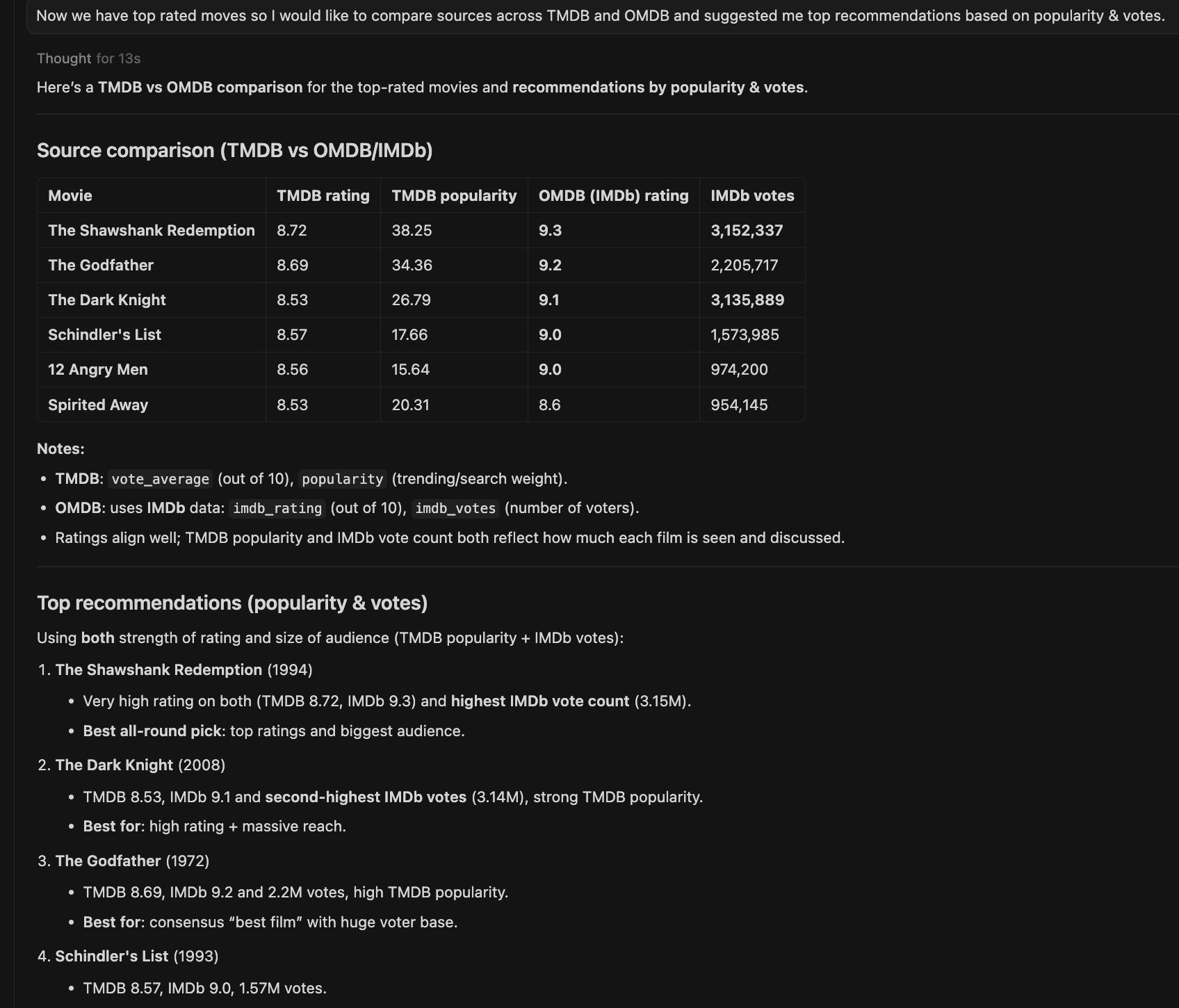
- Compare ratings across TMDB and OMDB
- Basic caching for faster responses
Setup
Get API keys:
Add keys to
.cursor/mcp.json:
{
  "mcpServers": {
    "film-finder": {
      "command": "uv",
      "args": ["run", "--directory", "/path/to/film-finder-mcp/tmdb-mcp", "python", "src/server.py"],
      "env": {
        "TMDB_API_KEY": "your_tmdb_key",
        "OMDB_API_KEY": "your_omdb_key"
      }
    }
  }
}
- Install dependencies:
uv sync
Testing
Use MCP Inspector for testing:
npx @modelcontextprotocol/inspector uv run python src/server.py
Then open http://localhost:5173 (or the URL shown in terminal).
What is MCP Inspector?
A web-based developer tool for testing MCP servers during development. You can call tools, test prompts, and view resources without needing a full AI assistant setup.
Available Tools
Movies:
get_popular_movies- Popular movies by language/pageget_top_rated_movies- Highest rated moviesget_movie_details- TMDB details by movie IDget_movie_details_by_title- OMDB search by titleget_movie_recommendation- Discover movies by genre/language
TV Shows:
get_popular_tv_shows- Popular TV showsget_top_rated_tv_shows- Highest rated showsget_tv_show_details- Details for specific show
Other:
authenticate_api_key- Validate TMDB API keygenerate_recommendation_explanation- AI-powered movie recommendations
Prompts
Pre-configured prompts to guide AI responses:
movie_recommendation_prompt- Guide for recommending moviestv_show_recommendation_prompt- Guide for TV show suggestionsmovie_analysis_prompt- Compare and analyze moviescompare_movie_sources_prompt- Compare TMDB vs OMDB data
Resources
Static and dynamic data exposed by the server:
tmdb://config- TMDB API configuration (languages, genres)omdb://config- OMDB API configurationtmdb://movie/{movie_id}- Dynamic movie details by IDtmdb://movie/top_rated- Top rated movies list
Use MCP Inspector's Resources tab to explore these.
Caching
Results are cached using Python's cachetools with TTL (Time To Live):
| Data Type | Cache Duration | Reason |
|---|---|---|
| Popular movies/shows | 3 hours | Changes daily |
| Movie details | 24 hours | Static metadata |
| Top rated | 6 hours | Rarely changes |
Example Usage in Cursor
Once configured in .cursor/mcp.json, ask Claude or any other LLM:
- "What are the top rated movies right now?"
- "Compare The Godfather ratings on TMDB vs OMDB"
- "Recommend me some movies similar to Inception"
The AI will automatically use your MCP tools to fetch and analyze movie data.
Troubleshooting
Server won't start:
- Check that API keys are set in
.cursor/mcp.json - Verify
uv syncran successfully - Look for errors in terminal logs
- Run from terminal
uv run python src/server.pyand check for logging.
Project Structure
film-finder-mcp/
├── src/
│   ├── server.py           # Main MCP server
│   └── tools/
│       ├── tmdb_client.py  # TMDB API client with caching
│       ├── omdb_client.py  # OMDB API client
│       └── base_config.py  # Configuration and logging
├── test_my_http_client.py  # Test file
├── pyproject.toml           # Dependencies
├── images/                  # Screenshots
└── README.md                # You are here
Notes
This is a learning project to understand MCP server development. The code works but could be improved with better error handling, more comprehensive tests, and additional features!
Установка FILM FINDER Server
У этого сервера нет опубликованного пакета — он собирается из исходников. Открой репозиторий и следуй инструкции в README.
▸ github.com/rajatk10/film-finder-mcpFAQ
FILM FINDER Server MCP бесплатный?
Да, FILM FINDER Server MCP бесплатный — установка в пару кликов через Unyly без оплаты.
Нужен ли API-ключ для FILM FINDER Server?
Нет, FILM FINDER Server работает без API-ключей и переменных окружения.
FILM FINDER Server — hosted или self-hosted?
Доступен hosted-вариант: Unyly запускает сервер в облаке, локальная установка не обязательна.
Как установить FILM FINDER Server в Claude Desktop, Claude Code или Cursor?
Открой FILM FINDER Server на unyly.org, выбери вкладку своего клиента (Claude Desktop, Claude Code, Cursor) и нажми Install — конфиг сгенерируется автоматически, без правки JSON.
Похожие MCP
Fetch
Web content fetching and conversion for efficient LLM usage.
AWS KB Retrieval
Retrieval from AWS Knowledge Base using Bedrock Agent Runtime.
 автор: modelcontextprotocol
Spring AI MCP Server
Provides auto-configuration for setting up an MCP server in Spring Boot applications.
llm-analysis-assistant
A very streamlined mcp client that supports calling and monitoring stdio/sse/streamableHttp, and can also view request responses through the /logs page. It also
 автор: xuzexin-hz
Compare FILM FINDER Server with
Не уверен что выбрать?
Найди свой стек за 60 секунд
Автор?
Embed-бейдж для README
Похожее
Все в категории ai