loading…
en/
Browse all
Flompt
FreeNot checkedVisual AI prompt builder that decomposes any raw prompt into 12 semantic blocks and recompiles them into Claude-optimized XML. Exposes decompose_prompt and comp

About
Visual AI prompt builder that decomposes any raw prompt into 12 semantic blocks and recompiles them into Claude-optimized XML. Exposes decompose_prompt and compile_prompt tools via MCP.
README

flompt
flow + prompt = flompt
Turn any AI prompt into a visual flow. Decompose, edit as a flowchart, recompile.










🎥 Demo
Try it live at flompt.dev, free, no account needed.
Paste any prompt. The AI breaks it into typed blocks. Drag, reorder, compile to Claude-optimized XML.
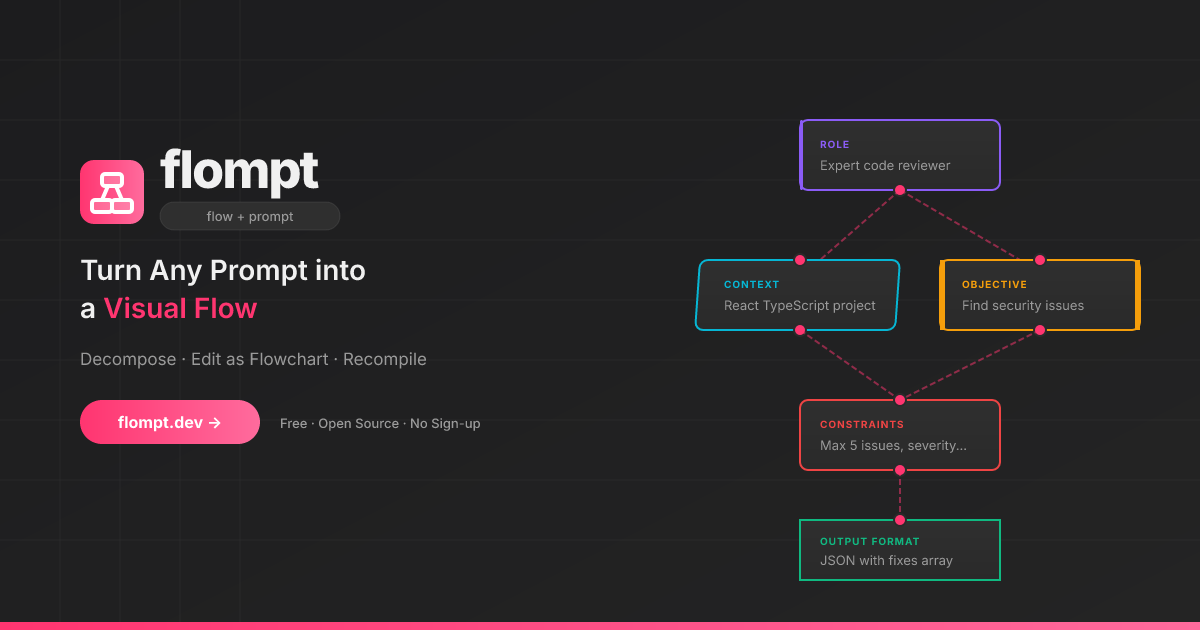
✨ What is flompt?
flompt is a visual prompt engineering tool.
Instead of writing one long block of text, flompt lets you:
- Paste any prompt and let the AI break it into structured blocks
- Drag, connect, and reorder blocks in a flowchart editor
- Compile to a Claude-optimized, machine-ready XML prompt
🧩 Block Types
16 specialized blocks that map directly to Claude's prompt engineering best practices:
| Block | Purpose | Claude XML |
|---|---|---|
| Document | External content grounding | <documents><document> |
| Role | AI persona & expertise | <role> |
| Tools | Callable functions the agent can use | <tools> |
| Audience | Who the output is written for | <audience> |
| Context | Background information | <context> |
| Environment | System context: OS, paths, date, runtime | <environment> |
| Objective | What to DO | <objective> |
| Goal | End goal & success criteria | <goal> |
| Input | Data you're providing | <input> |
| Constraints | Rules & limitations | <constraints> |
| Guardrails | Hard limits and safety refusals | <guardrails> |
| Examples | Few-shot demonstrations | <examples><example> |
| Chain of Thought | Step-by-step reasoning | <thinking> |
| Output Format | Expected output structure | <output_format> |
| Response Style | Verbosity, tone, prose, markdown (structured UI) | <format_instructions> |
| Language | Response language | <language> |
Blocks are automatically ordered following Anthropic's recommended prompt structure.
🚀 Try It Now
flompt.dev, free and open-source, no account needed.
🧩 Browser Extension
Use flompt directly inside ChatGPT, Claude, and Gemini without leaving your tab.
- Injects an Enhance button into the AI chat input
- Bidirectional sync between the sidebar and the chat
- Works on ChatGPT, Claude, and Gemini
🤖 Claude Code Integration (MCP)
flompt exposes its core capabilities as native tools inside Claude Code via the Model Context Protocol (MCP).
Once configured, you can call decompose_prompt, compile_prompt, and list_block_types directly from any Claude Code conversation, no browser, no copy-paste.
Installation
Option 1: CLI (recommended)
claude mcp add --transport http --scope user flompt https://flompt.dev/mcp/
The --scope user flag makes flompt available in all your Claude Code projects.
Option 2: ~/.claude.json
{
  "mcpServers": {
    "flompt": {
      "type": "http",
      "url": "https://flompt.dev/mcp/"
    }
  }
}
Available Tools
Once connected, 3 tools are available in Claude Code:
decompose_prompt(prompt: str)
Breaks down a raw prompt into structured blocks (role, objective, context, constraints, etc.).
- Uses Claude or GPT on the server if an API key is configured
- Falls back to keyword-based heuristic analysis otherwise
- Returns a list of typed blocks + full JSON to pass to
compile_prompt
Input:  "You are a Python expert. Write a function that parses JSON and handles errors."
Output: ✅ 3 blocks extracted:
          [ROLE] You are a Python expert.
          [OBJECTIVE] Write a function that parses JSON…
          [CONSTRAINTS] handles errors
        📋 Full blocks JSON: [{"id": "...", "type": "role", ...}, ...]
compile_prompt(blocks_json: str)
Compiles a list of blocks into a Claude-optimized XML prompt.
- Takes the JSON from
decompose_prompt(or manually crafted blocks) - Reorders blocks following Anthropic's recommended structure
- Returns the final XML prompt with an estimated token count
Input:  [{"type": "role", "content": "You are a Python expert", ...}, ...]
Output: ✅ Prompt compiled (142 estimated tokens):

        <role>You are a Python expert.</role>
        <objective>Write a function that parses JSON and handles errors.</objective>
list_block_types()
Lists all 16 available block types with descriptions and the recommended canonical ordering. Useful when manually crafting blocks.
Typical Workflow
1. decompose_prompt("your raw prompt here")
   → get structured blocks as JSON

2. (optionally edit the JSON to add/remove/modify blocks)

3. compile_prompt("<json from step 1>")
   → get Claude-optimized XML prompt, ready to use
Technical Details
| Property | Value |
|---|---|
| Transport | Streamable HTTP (POST) |
| Endpoint | https://flompt.dev/mcp/ |
| Session | Stateless (each call is independent) |
| Auth | None required |
| DNS rebinding protection | Enabled (flompt.dev explicitly allowed) |
🛠️ Self-Hosting (Local Dev)
Requirements
- Python 3.12+
- Node.js 18+
- An Anthropic or OpenAI API key (optional, heuristic fallback works without one)
Setup
Backend:
cd backend
python -m venv .venv && source .venv/bin/activate
pip install -r requirements.txt
cp .env.example .env   # add your API key
uvicorn app.main:app --reload --port 8000
App (Frontend):
cd app
cp .env.example .env   # optional: add PostHog key
npm install
npm run dev
Blog:
cd blog
npm install
npm run dev   # available at http://localhost:3000/blog
| Service | URL |
|---|---|
| App | http://localhost:5173 |
| Backend API | http://localhost:8000 |
| API Docs (Swagger) | http://localhost:8000/docs |
| MCP endpoint | http://localhost:8000/mcp/ |
⚙️ AI Configuration
flompt supports multiple AI providers. Copy backend/.env.example to backend/.env:
# Anthropic (recommended)
ANTHROPIC_API_KEY=sk-ant-...
AI_PROVIDER=anthropic
AI_MODEL=claude-3-5-haiku-20241022

# or OpenAI
OPENAI_API_KEY=sk-...
AI_PROVIDER=openai
AI_MODEL=gpt-4o-mini
Without an API key, flompt uses a keyword-based heuristic decomposer and still compiles structured XML.
🚢 Production Deployment
This section documents the exact production setup running at flompt.dev. Everything lives in /projects/flompt.
Architecture
Internet
   │
   ▼
Caddy (auto-TLS, reverse proxy)    ← port 443/80
   ├── /app*         → Vite SPA static files (app/dist/)
   ├── /blog*        → Next.js static export (blog/out/)
   ├── /api/*        → FastAPI backend (localhost:8000)
   ├── /mcp/*        → FastAPI MCP server (localhost:8000, no buffering)
   ├── /docs*        → Reverse proxy to GitBook
   └── /             → Static landing page (landing/)
         ↓
   FastAPI (uvicorn, port 8000)
         ↓
   Anthropic / OpenAI API
Both Caddy and the FastAPI backend are managed by supervisord, itself watched by a keepalive loop.
1. Prerequisites
# Python 3.12+ with pip
python --version

# Node.js 18+
node --version

# Caddy binary placed at /projects/flompt/caddy
# (not committed to git, download from https://caddyserver.com/download)
curl -o caddy "https://caddyserver.com/api/download?os=linux&arch=amd64"
chmod +x caddy

# supervisor installed in a Python virtualenv
pip install supervisor
2. Environment Variables
Backend (backend/.env):
ANTHROPIC_API_KEY=sk-ant-...       # or OPENAI_API_KEY
AI_PROVIDER=anthropic              # or: openai
AI_MODEL=claude-3-5-haiku-20241022 # model to use for decompose/compile
App frontend (app/.env):
VITE_POSTHOG_KEY=phc_...           # optional analytics
VITE_POSTHOG_HOST=https://eu.i.posthog.com
Blog (blog/.env.local):
NEXT_PUBLIC_POSTHOG_KEY=phc_...
NEXT_PUBLIC_POSTHOG_HOST=https://eu.i.posthog.com
3. Build
All assets must be built before starting services. Use the deploy script or manually:
Full deploy (build + restart + health check):
cd /projects/flompt
./deploy.sh
Build only (no service restart):
./deploy.sh --build-only
Restart only (no rebuild):
./deploy.sh --restart-only
Manual build steps:
# 1. Vite SPA → app/dist/
cd /projects/flompt/app
npm run build
# Output: app/dist/ (pre-compressed with gzip, served by Caddy)

# 2. Next.js blog → blog/out/
cd /projects/flompt/blog
rm -rf .next out   # clear cache to avoid stale builds
npm run build
# Output: blog/out/ (full static export, no Node server needed)
4. Process Management
Production processes are managed by supervisord (supervisord.conf):
| Program | Command | Port | Log |
|---|---|---|---|
flompt-backend |
uvicorn app.main:app --host 0.0.0.0 --port 8000 |
8000 | /tmp/flompt-backend.log |
flompt-caddy |
caddy run --config /projects/flompt/Caddyfile |
443/80 | /tmp/flompt-caddy.log |
Both programs have autorestart=true and startretries=5, they automatically restart on crash.
Start supervisord (first boot or after a full restart):
supervisord -c /projects/flompt/supervisord.conf
Common supervisorctl commands:
# Check status of all programs
supervisorctl -c /projects/flompt/supervisord.conf status

# Restart backend only (e.g. after a code change)
supervisorctl -c /projects/flompt/supervisord.conf restart flompt-backend

# Restart Caddy only (e.g. after a Caddyfile change)
supervisorctl -c /projects/flompt/supervisord.conf restart flompt-caddy

# Restart everything
supervisorctl -c /projects/flompt/supervisord.conf restart all

# Stop everything
supervisorctl -c /projects/flompt/supervisord.conf stop all

# Read real-time logs
tail -f /tmp/flompt-backend.log
tail -f /tmp/flompt-caddy.log
tail -f /tmp/flompt-supervisord.log
5. Keepalive Watchdog
keepalive.sh is an infinite bash loop (running as a background process) that:
- Checks every 30 seconds whether supervisord is alive
- If supervisord is down, kills any zombie process occupying port 8000 (via inode lookup in
/proc/net/tcp) - Restarts supervisord
- Logs all events to
/tmp/flompt-keepalive.log
Start keepalive (should be running at all times):
nohup /projects/flompt/keepalive.sh >> /tmp/flompt-keepalive.log 2>&1 &
echo $!   # note the PID
Check if keepalive is running:
ps aux | grep keepalive.sh
tail -f /tmp/flompt-keepalive.log
Note:
keepalive.shuses the same Python virtualenv path as supervisord. If you reinstall supervisor in a different venv, updateSUPERVISORDandSUPERVISORCTLpaths at the top ofkeepalive.sh.
6. Caddy Configuration
Caddyfile handles all routing for flompt.dev. Key rules (in priority order):
/blog*      → Static Next.js export at blog/out/
/api/*      → FastAPI backend at localhost:8000
/health     → FastAPI health check
/mcp/*      → FastAPI MCP server (flush_interval -1 for streaming)
/mcp        → 308 redirect to /mcp/ (avoids upstream 307 issues)
/docs*      → Reverse proxy to GitBook (external)
/app*       → Vite SPA at app/dist/ (gzip precompressed)
/           → Static landing page at landing/
Reload Caddy after a Caddyfile change:
supervisorctl -c /projects/flompt/supervisord.conf restart flompt-caddy
# or directly:
/projects/flompt/caddy reload --config /projects/flompt/Caddyfile
Caddy auto-manages TLS certificates via Let's Encrypt, no manual SSL setup needed.
7. Health Checks
The deploy script runs these checks automatically. You can run them manually:
# Backend API
curl -s https://flompt.dev/health
# → {"status":"ok","service":"flompt-api"}

# Landing page
curl -s -o /dev/null -w "%{http_code}" https://flompt.dev/
# → 200

# Vite SPA
curl -s -o /dev/null -w "%{http_code}" https://flompt.dev/app
# → 200

# Blog
curl -s -o /dev/null -w "%{http_code}" https://flompt.dev/blog/en
# → 200

# MCP endpoint (requires Accept header)
curl -s -o /dev/null -w "%{http_code}" \
  -X POST https://flompt.dev/mcp/ \
  -H "Content-Type: application/json" \
  -H "Accept: application/json, text/event-stream" \
  -d '{"jsonrpc":"2.0","method":"tools/list","id":1}'
# → 200
8. Updating the App
After a backend code change:
cd /projects/flompt
git pull
supervisorctl -c supervisord.conf restart flompt-backend
After a frontend change:
cd /projects/flompt
git pull
cd app && npm run build
# No service restart needed, Caddy serves static files directly
After a blog change:
cd /projects/flompt
git pull
cd blog && rm -rf .next out && npm run build
# No service restart needed
After a Caddyfile change:
supervisorctl -c /projects/flompt/supervisord.conf restart flompt-caddy
Full redeploy from scratch:
cd /projects/flompt && ./deploy.sh
9. Log Files Reference
| File | Content |
|---|---|
/tmp/flompt-backend.log |
FastAPI/uvicorn stdout + stderr |
/tmp/flompt-caddy.log |
Caddy access + error logs |
/tmp/flompt-supervisord.log |
supervisord daemon logs |
/tmp/flompt-keepalive.log |
keepalive watchdog events |
🏗️ Tech Stack
| Layer | Technology |
|---|---|
| Frontend | React 18, TypeScript, React Flow v11, Zustand, Vite |
| Backend | FastAPI, Python 3.12, Uvicorn |
| MCP Server | FastMCP (streamable HTTP transport) |
| AI | Anthropic Claude / OpenAI GPT (pluggable) |
| Reverse Proxy | Caddy (auto-TLS via Let's Encrypt) |
| Process Manager | Supervisord + keepalive watchdog |
| Blog | Next.js 15 (static export), Tailwind CSS |
| Extension | Chrome & Firefox MV3 (content script + sidebar) |
| i18n | 10 languages: EN FR ES DE PT JA TR ZH AR RU |
🌍 Features
- 🎨 Visual flowchart editor with drag-and-drop blocks (React Flow)
- 📋 Dual-view editor: toggle between canvas and card list at any time
- 👁️ Hide/show any block; hidden blocks are excluded from the assembled prompt
- 📑 Duplicate any block in one click from the List View
- 🤖 AI-powered decomposition: paste a prompt, get structured blocks
- 🔄 Async job queue for non-blocking decomposition with live progress
- 🦾 XML output structured following Anthropic best practices
- 🧩 Browser extension for ChatGPT, Claude, and Gemini (Chrome + Firefox)
- 🔌 Claude Code MCP: native tool integration via Model Context Protocol
- 📱 Responsive with full touch support
- 🌙 Dark theme
- 🌐 10 languages: EN, FR, ES, DE, PT, JA, TR, ZH, AR, RU, each with a dedicated indexed page for SEO
- 💾 Auto-save via local Zustand persistence
- ⌨️ Keyboard shortcuts
- 📋 Export as TXT or JSON
- 🔓 MIT licensed, self-hostable
🤝 Contributing
Contributions are welcome: bug reports, features, translations, and docs!
Read CONTRIBUTING.md to get started. The full changelog is in CHANGELOG.md.
📄 License
If flompt saves you time, a ⭐ on GitHub helps a lot.

How to install
Run in your terminal:
claude mcp add flompt -- npx 
