
FluxGit Server
БесплатноНе проверенSafety-first Git MCP server: 22 read-only tools designed for agent context budgets; writes are proposals approved by a human in the FluxGit desktop app.

Описание
Safety-first Git MCP server: 22 read-only tools designed for agent context budgets; writes are proposals approved by a human in the FluxGit desktop app.
README
The Git MCP server that lets your AI agent read everything and change nothing without your approval.
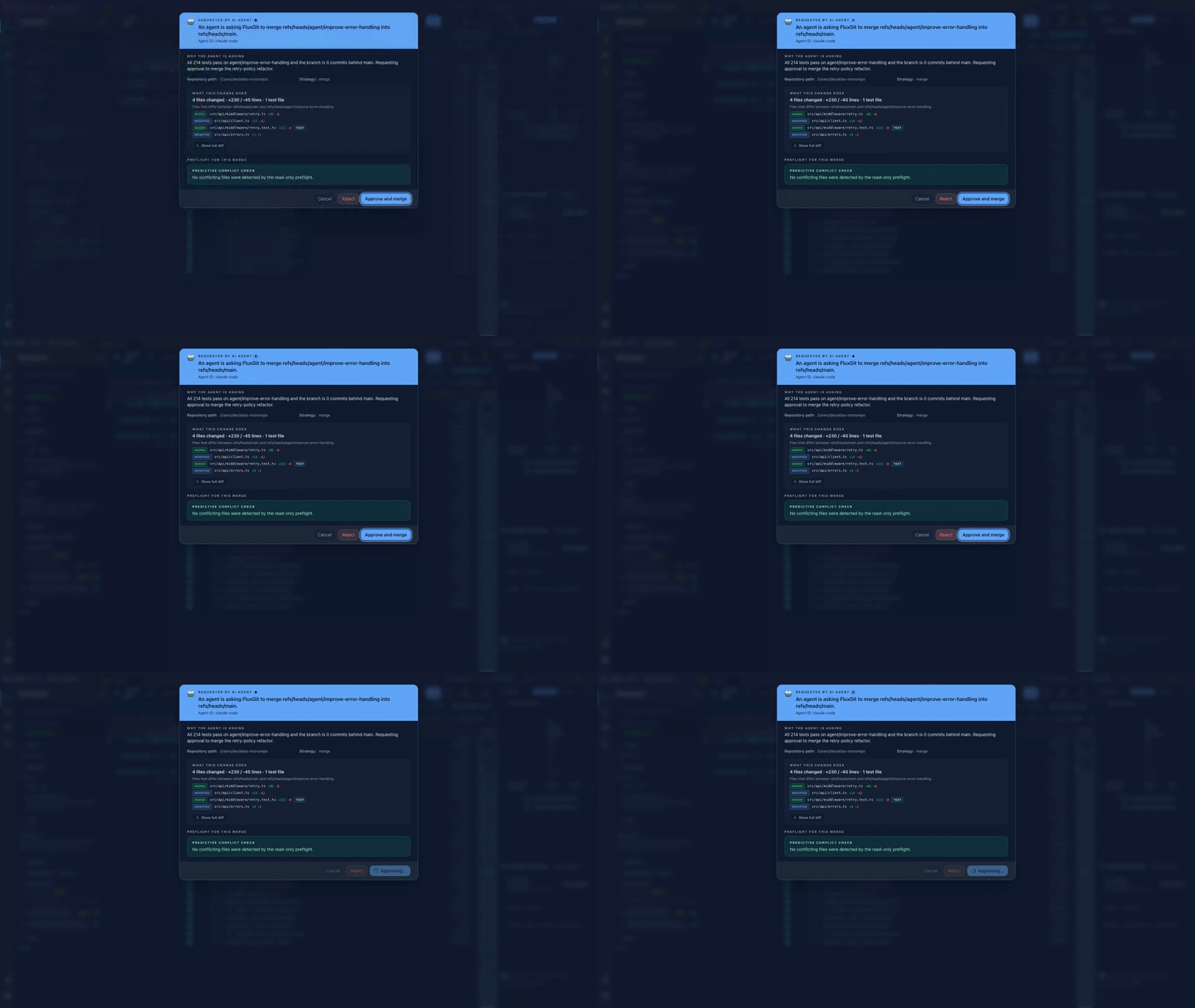
Reads are open. Every write is a proposal you review and approve (or reject) in the FluxGit desktop app before a single ref moves.
What it is
fluxgit-mcp-sidecar is a Rust MCP server that gives MCP-compatible agents (Claude Code, Cursor, Codex, and any other MCP host) rich, structured Git context (branch state, diffs, reflog, conflicts, lost commits) without ever letting them silently mutate your repository. Reads are unrestricted. Writes never execute from the agent directly: the agent proposes, FluxGit renders an approval card with a full preview, and the change runs through FluxGit's safety pipeline (restore points + audit) only after you click approve. That is the whole idea: approve-before-it-runs, not clean-up-after.
30-second quickstart
One-line install (puts fluxgit-mcp-sidecar on your PATH):
cargo install --git https://github.com/fluxgit-hq/fluxgit-mcp-server fluxgit-mcp-sidecar
Then point any MCP host at it. No client-specific install required:
{
  "mcpServers": {
    "fluxgit": {
      "command": "/absolute/path/to/fluxgit-mcp-sidecar",
      "env": {
        "FLUXGIT_GATEWAY_ADDR": "127.0.0.1:14660",
        "FLUXGIT_MCP_AUDIT_LOG": "/optional/path/to/audit.jsonl"
      }
    }
  }
}
FLUXGIT_GATEWAY_ADDR connects the sidecar to the FluxGit desktop app and unlocks the write-approval flow plus real semantic diffs; without it the read-only tier still works standalone against local git. FLUXGIT_MCP_AUDIT_LOG enables an append-only, optionally Ed25519-signed audit log of every call (arguments are hashed, never stored verbatim).
What your agent gets
23 read-only tools, built for context budgets. Instead of shelling out 6-10 raw git commands and flooding the context window, an agent opens a session with one repo.brief call: branch, ahead/behind, in-progress operation, working-tree summary, stashes, submodule drift, recent commits and detected conventions. In a measured comparison that single call returned the same situational awareness for 607 tokens where the equivalent raw git output ran 1,886 — about a third of the context. diff.semantic adds precision: real per-file, per-token structural hunks instead of a text patch the agent has to re-parse. The full catalog is in What's exposed below.
11 write tools, every one gated by a human. merge, rebase, reset, discard, patch, commit, push and branch, plus a multi-step plan and a cancel — all of them are proposals. Each requires a free-text reason, dispatches to the FluxGit app as the approval card shown above, and only executes after you approve. Destructive modes force stronger confirmation; completed merges, rebases and resets return a restore point, so the change stays reversible from FluxGit's Safety Timeline.
Free shell vs FluxGit desktop — stated honestly
- Free shell (this repo, Apache-2.0, no account): the free-tier read-only tools — 13 of them, from
repo.status,repo.refs,repo.history,repo.reflog,diff.text,conflict.read,commit.details,worktree.listandsubmodule.statusup torepo.brief/repo.scope— run standalone against your localgit. Nothing to buy, nothing to sign up for. - With the FluxGit desktop app running: the 11 write tools become approvable actions,
diff.semanticserves real structural payloads from FluxGit's diff engine, and the FluxGit-only tools (safety timeline, restore points) light up. Without the app they degrade honestly: FluxGit-required tools returngateway_not_configuredand write tools returnwrite_handshake_pending(code 10003), never a fake success.
Made for the agents you already use
- Claude Code → fluxgit.com/for/claude-code
- Cursor → fluxgit.com/for/cursor
- Codex → fluxgit.com/for/codex
Why this exists
AI coding agents are increasingly asked to navigate real repositories: explain branch state, summarize diffs, find lost commits, recommend safe next steps. To do this well, an agent needs Git context that is richer than git status and structured enough to reason over. To do this safely, an agent must never be able to silently mutate refs, force-push, discard work, or apply patches without a human approving the consequence.
Other MCP Git servers face a choice: stay strictly read-only (limited utility) or expose write tools directly (dangerous — agents hallucinate, prompts can be poisoned, mistakes are destructive). This sidecar chooses neither. Reads are unrestricted; writes go through a write-with-UI-handshake protocol that the FluxGit desktop app implements: the agent proposes, FluxGit shows the preview, the user approves in the app, FluxGit executes through its safety pipeline with restore points and audit.
What's exposed
23 read-only tools
| Tool | Purpose |
|---|---|
repo.brief |
One-call situational awareness — branch, ahead/behind, in-progress operation, working-tree summary, stashes, aggregated submodule drift, recent commits, detected conventions and next-step hints. The recommended first call of an agent session; replaces 6-10 raw git calls and is token-budgeted by design |
repo.scope |
Monorepo scoping — one subtree's working-tree changes, recent commits, churn (commits + authors over a window) and CODEOWNERS owners in a single call |
repo.status |
Working tree, current branch, dirty paths |
repo.refs |
Branches, tags, remotes, stashes |
repo.branchStack |
Current branch vs upstream / base / related |
repo.history |
Paginated commit history |
repo.reflog |
Movement timeline with recovery hints |
repo.conflictPreflight |
Predict merge/rebase outcome before running |
conflict.read |
Active conflict as structured data — in-progress operation, ours/theirs producing commits, per-file stage classification, base/ours/theirs contents (size-capped, binary-flagged) and marker region line ranges. No more parsing <<<<<<< soup |
commit.details |
Single commit metadata + changed files |
worktree.changes |
Per-path working tree change summary |
worktree.list |
All worktrees (main + linked) with branch/detached, HEAD SHA and locked/prunable flags — the read-only base for parallel agent worktrees |
submodule.status |
Submodule list and state |
diff.text |
Standard text patch (git diff compatible) |
diff.semantic |
Capability-negotiated semantic explanation |
diff.semanticFallbacks |
Paths that fell back from semantic to text |
fleet.radar |
Multi-repo attention queue |
safety.timeline |
Synthesized safety events from restore points + reflog |
safety.eventDetails |
Drill-down into one timeline event |
flux.latestRestorePoint |
Newest FluxGit restore point |
flux.restorePoints |
List of restore points |
flux.restorePointDetails |
One restore point with before/after refs |
operation.status |
Re-check a proposal's status by previewId (poll after the initial 60s window; returns rejectionReason or the completion result) |
11 write-with-UI-handshake tools
All 10 operation.preview.* proposals dispatch through the FluxGit gateway when configured (the original 5 as of 2026-05-28; plan, worktree, commit, push and branch added since). The sidecar POSTs the proposal to the gateway's handshake server, the FluxGit app renders an "🤖 Requested by AI agent" approval card per operation type, and the sidecar polls until the user approves, rejects, or the proposal expires. When the gateway is not reachable, the sidecar returns write_handshake_pending (code 10003) so the agent can recommend the user perform the action in FluxGit UI.
| Tool | Purpose | Gateway dispatch |
|---|---|---|
operation.preview.merge |
Propose a merge for human review | POST /v1/mcp/operation/preview/merge → approval card in FluxGit |
operation.preview.rebase |
Propose a rebase (interactive optional) | POST /v1/mcp/operation/preview/rebase → rewrites-history warning card |
operation.preview.discard |
Propose discarding working-tree changes | POST /v1/mcp/operation/preview/discard → irrecoverable-warning card with path list |
operation.preview.reset |
Propose soft / mixed / hard reset | POST /v1/mcp/operation/preview/reset → mode-aware card (hard mode forces strong confirmation) |
operation.preview.patch |
Propose applying an agent-generated patch | POST /v1/mcp/operation/preview/patch → monospace patch preview + applyToIndex toggle |
operation.preview.plan |
Propose a 1-10 step sequence (any of the five operations above) approved as one unit | POST /v1/mcp/operation/preview/plan → numbered step card; destructive steps require an explicit checkbox; execution stops at the first failure and the result reports per-step status |
operation.preview.worktree |
Propose creating an isolated worktree for a parallel task (non-destructive; never touches history) | POST /v1/mcp/operation/preview/worktree → approval card with branch + target path + reason; runs through the same worktree-create action a manual click uses |
operation.preview.commit |
Propose staging + committing with a message (non-destructive; amend not supported) | POST /v1/mcp/operation/preview/commit → approval card lists the exact files that will be staged and committed; runs through the normal commit pipeline (hooks, signing, policy); completion returns the new SHA |
operation.preview.push |
Propose pushing a branch to a remote (optional set-upstream; force-with-lease shows a HIGH-risk warning) | POST /v1/mcp/operation/preview/push → approval card with remote + branch + force warning when applicable; runs the guarded push flow |
operation.preview.branch |
Propose creating (and optionally checking out) a branch from a start point | POST /v1/mcp/operation/preview/branch → approval card with name + start point + checkout choice |
operation.cancel |
Cancel the agent's own still-pending proposal by previewId | POST cancel; the card disappears from the user's queue like an expired proposal |
All write proposals require a free-text reason so the user sees the agent's justification in the approval modal. All reuse the same gateway state machine (pending → approved → completed, terminal states rejected | failed | expired) and the same Tauri bridge in the UI. When an approved merge/rebase/reset executes, the completion result includes the captured restore point (beforeCommit/afterCommit/canUndo) so the agent can tell the user the change is reversible from FluxGit's Safety Timeline.
Write protocol details
Every operation.preview.* call follows the same wire protocol. Example for operation.preview.merge:
1. Sidecar POSTs the proposal:
POST /v1/mcp/operation/preview/merge HTTP/1.1
Host: 127.0.0.1:59647
Content-Type: application/json

{
  "previewId": "1f3c5b9a-...-uuid",
  "agentId": "external-mcp-sidecar",
  "operationType": "merge",
  "repoPath": "/Users/dev/projects/checkout",
  "sourceRef": "feature/cart-redesign",
  "targetRef": "main",
  "reason": "Cart redesign work is complete; tests pass on the feature branch.",
  "strategy": "merge",
  "requestedAt": "2026-05-28T11:42:09.512Z"
}
2. Gateway responds 202 Accepted:
{ "previewId": "1f3c5b9a-...-uuid", "status": "pending", "expiresAt": "2026-05-28T11:47:09.512Z" }
3. Sidecar polls every 1s for up to 60s:
GET /v1/mcp/operation/status/1f3c5b9a-...-uuid HTTP/1.1
Host: 127.0.0.1:59647
4. Gateway returns terminal state once user acts:
{
  "previewId": "1f3c5b9a-...-uuid",
  "operationType": "merge",
  "status": "completed",
  "result": {
    "commitSha": "9a8b7c6d...",
    "restorePointId": "rp_2026_05_28_1142",
    "conflicts": []
  }
}
The sidecar returns the result to the agent as isError: false. Any terminal status other than completed (rejected, failed, expired) returns isError: true with the structured payload, so the agent can report the rejection reason cleanly without inventing an outcome.
The same pattern applies to all 10 operation.preview.* tools. Only the request body fields and the result shape differ; the polling, state machine, and error semantics are shared. The full per-operation contract ships with the FluxGit desktop app and is summarized at fluxgit.com/features/mcp-agent-git.
Boundary: free shell vs FluxGit-powered
The sidecar speaks MCP without FluxGit installed. Standard Git inspection works (status, refs, history, reflog, diff.text, etc). The tools that require FluxGit return JSON-RPC error code 10001 with an upgradeHint pointing the agent at the install/configure flow.
Tier classification:
- Free shell — work with local
gitonly:repo.brief,repo.scope,repo.status,repo.refs,repo.branchStack,repo.history,repo.reflog,commit.details,worktree.changes,worktree.list,submodule.status,diff.text,conflict.read. - Hybrid — work locally with documented fallback, enriched by FluxGit:
fleet.radar,diff.semantic,diff.semanticFallbacks,repo.conflictPreflight. - FluxGit-required — return
gateway_not_configuredwithout FluxGit because synthesizing them from local refs alone would mislead the agent:safety.timeline,safety.eventDetails,flux.latestRestorePoint,flux.restorePoints,flux.restorePointDetails. - Write handshake — route through FluxGit UI approval via the gateway handshake server (as of 2026-05-28); return
write_handshake_pending(code 10003) only when the gateway is unreachable or polling times out: the 10operation.preview.*tools above, plusoperation.cancel.
Build from a clone
# Build
cargo build --release

# Run as MCP server (stdin/stdout transport)
./target/release/fluxgit-mcp-sidecar
See 30-second quickstart above for the one-line install and the MCP host config block.
Semantic diff contract
diff.semantic is the most-used tool for AI agents and the easiest to misuse. The rule is strict:
A result may only be called semantic if
data.supportedis exactlytrue.
When the FluxGit semantic engine is not available (FluxGit app not running, gateway address not configured, or the repository not registered in FluxGit), diff.semantic returns:
{
  "tool": "diff.semantic",
  "readOnly": true,
  "data": {
    "supported": false,
    "fallback": "diff.text",
    "reason": "Semantic diff is not available in local sidecar fallback mode.",
    "textDiffArguments": { "repoPath": "...", "base": "...", "head": "...", "path": "..." }
  }
}
With the FluxGit app running and the repository registered in FluxGit, the same call is served by the FluxGit diff-engine through the gateway's read-only bridge and returns supported: true with per-file semantic hunks:
{
  "tool": "diff.semantic",
  "readOnly": true,
  "source": "fluxgit-gateway",
  "data": {
    "supported": true,
    "engine": "fluxgit-diff-engine",
    "files": [
      {
        "path": "src/main.rs",
        "fallbackToText": false,
        "hunks": [{
          "header": "fn main",
          "lines": [{
            "type": "modified", "oldLine": 3, "newLine": 3,
            "content": "let x = 2;", "oldContent": "let x = 1;",
            "changedTokens": ["2"], "oldChangedTokens": ["1"]
          }]
        }]
      },
      {
        "path": "logo.bin",
        "fallbackToText": true,
        "hunks": [],
        "reason": "The semantic engine could not parse this file (unsupported language, binary or unreadable source); use a text diff for it.",
        "textDiffArguments": { "repoPath": "...", "base": "...", "head": "...", "path": "logo.bin" }
      }
    ],
    "changedFiles": 2,
    "filesTruncated": false
  }
}
Honesty is per file, not just per call: files the engine could not parse arrive with fallbackToText: true, a reason, and ready-to-use textDiffArguments — never as synthesized semantic hunks. diff.semanticFallbacks follows the same split and, when connected, lists the engine's real per-file fallback records.
Connected agents must:
- Call
diff.semantic. - Read
data.supported. - If
true, use the semantic payload and label results as semantic — except entries withfallbackToText: true, which must be presented as text fallbacks. - If
false, calldiff.textwithdata.textDiffArgumentsand present results as a text-diff fallback. - Never infer function- or class-level moves from a text patch alone.
Allowed wording: "FluxGit reported a text-diff fallback for this file".
Prohibited wording: "This is a semantic diff" when supported=false.
Audit log
Every tools/call is optionally appended to a JSONL file pointed at by FLUXGIT_MCP_AUDIT_LOG:
{
  "ts": "...",
  "tool": "repo.status",
  "tier": "free" | "fluxgit" | "fluxgit-write-handshake",
  "ok": true,
  "argumentsHash": "sha256:...",
  "repoScope": "...",
  "summary": "...",
  "signature": "base64url-ed25519",
  "signatureKeyId": "1a2b3c4d5e6f7a8b"
}
Sensitive paths and identifiers are hashed, never stored verbatim.
Per-entry Ed25519 signatures (shipped 2026-05-28)
Audit signing is opt-in. When FLUXGIT_MCP_AUDIT_SIGN_KEY points to a PEM PKCS8 Ed25519 private key, every appended entry is signed with that key. Two extra top-level fields are added:
signature— base64url (no padding) Ed25519 signature over the canonical JSON of the entry without the signature field.signatureKeyId— 16-char hex prefix of the matching public key, so rotated keys can co-exist in the same JSONL.
Canonical JSON rule (verifier must match exactly): recursively sort every object's keys lexicographically by UTF-8 byte order; arrays preserve order; strip the signature and signatureKeyId fields; serialize with serde_json's default compact form (no whitespace, no newlines); sign / verify those bytes.
If the env var is unset, audit entries are written in the legacy unsigned format. If the env var points to a missing or invalid key, the sidecar logs a warning to stderr and falls back to unsigned audit — auditing never refuses to record events.
Verifying an audit log
The sidecar binary doubles as a verifier:
fluxgit-mcp-sidecar verify-audit /path/to/mcp.jsonl --pubkey /path/to/install.pub.pem
Output reports the number of verified, failed, unsigned, and malformed entries, plus the 1-indexed line numbers of any failures. Exit code is 0 when every signed entry verifies, 3 when at least one entry failed verification or was malformed, 2 on usage error. Unsigned entries are counted separately and do not fail the run.
Programmatic verification uses the public verify_audit_event_signature(&event_value, &public_key) function on the sidecar crate, so audit-proof tooling can be embedded anywhere. A MissingSignature error means the entry is unsigned (caller's choice how to treat it); Ok(false) means the signature is present but does not verify under the supplied key.
Protocol details
- MCP protocol version:
2024-11-05 - Transport: stdin/stdout (newline-delimited JSON-RPC 2.0). Legacy Content-Length framing also supported.
- Capabilities:
tools(listChanged: false). - 34 tools in
tools/list. Read-only tools advertised withannotations.readOnlyHint: true. Write-handshake tools advertised withannotations.readOnlyHint: false.
Error codes:
| Code | Meaning |
|---|---|
-32600 |
Invalid request (malformed JSON-RPC) |
-32602 |
Invalid params or unknown tool |
-32603 |
Internal error |
10001 |
Gateway not configured — install/start FluxGit to use FluxGit-required tools |
10002 |
Gateway configured but transport not wired (early-milestone state) |
10003 |
Write-with-UI-handshake pending — no handshake server reachable, or polling timed out before the user acted |
Status
This is a working MCP server. The read-only surface is implemented and tested. The write-with-UI-handshake protocol is live as of 2026-05-28: all 10 operation.preview.* tools dispatch through the gateway handshake server, render an "🤖 Requested by AI agent" approval card in the FluxGit app, and complete through the existing safety pipeline (restore points + audit). Clients see structured terminal results (completed | rejected | failed | expired) instead of a placeholder error. The contract is forward-stable.
Roadmap
- End-to-end demo video — public recording of the agent-proposes → user-approves → FluxGit-executes loop, captured from a live install. See
product/mcp/DEMO_SCRIPT.mdfor the script. - Audit log exportable CSV/JSON — shipped: per-entry Ed25519 signing (2026-05-28). Remaining: exportable CSV/JSON and retention policy for the FluxGit app's audit panel.
- HTTP / SSE transport — for cloud / shared MCP host deployments.
- MCP registry entry — submission to the official MCP server registry once the public release ships.
License
Apache-2.0. See LICENSE.
Related
- FluxGit — the desktop app that produces the FluxGit-powered context.
- MCP for agents — feature page — capabilities, write-handshake contract and roadmap.
Установка FluxGit Server
У этого сервера нет опубликованного пакета — он собирается из исходников. Открой репозиторий и следуй инструкции в README.
▸ github.com/fluxgit-hq/fluxgit-mcp-serverFAQ
FluxGit Server MCP бесплатный?
Да, FluxGit Server MCP бесплатный — установка в пару кликов через Unyly без оплаты.
Нужен ли API-ключ для FluxGit Server?
Нет, FluxGit Server работает без API-ключей и переменных окружения.
FluxGit Server — hosted или self-hosted?
Self-hosted: сервер запускается локально на твоей машине командой из раздела установки.
Как установить FluxGit Server в Claude Desktop, Claude Code или Cursor?
Открой FluxGit Server на unyly.org, выбери вкладку своего клиента (Claude Desktop, Claude Code, Cursor) и нажми Install — конфиг сгенерируется автоматически, без правки JSON.
Похожие MCP
GitHub
PRs, issues, code search, CI status
 автор: GitHub
Filesystem
Secure file operations with configurable access controls.
Memory
Knowledge graph-based persistent memory system.
Template MCP Server
A CLI tool to create a new Model Context Protocol server project with TypeScript support, dual transport options, and an extensible structure
 автор: mcpdotdirect
Compare FluxGit Server with
Не уверен что выбрать?
Найди свой стек за 60 секунд
Автор?
Embed-бейдж для README
Похожее
Все в категории development