
Fsolar Mcp
БесплатноНе проверенFelicity Solar battery MCP server + REST API — exposes live battery data to Claude Code and any MCP client

Описание
Felicity Solar battery MCP server + REST API — exposes live battery data to Claude Code and any MCP client
README
Live Felicity Solar battery data for Claude, REST APIs, Node.js apps, and event-driven pipelines — all from one package.
Connects to the Felicity Solar cloud and exposes per-cell voltages, SOC, SOH, temperatures, BMS counters, balancing state, and computed health metrics.
Usage modes
| Mode | When to use |
|---|---|
| MCP server → Claude | Ask Claude natural-language questions about your batteries |
| Standalone REST API | Query battery data over HTTP from any language or tool |
| JS / TS library | Embed directly in a Node.js or Next.js app — no separate server |
| Event-driven | React to battery events (alerts, periodic snapshots) via webhooks or EventEmitter |
MCP server → Claude
The same fsolar-mcp process serves both MCP and REST from one port.
Claude Code (CLI)
Start the server manually, then register it:
npm install -g fsolar-mcp
[email protected] FELICITY_PASS=yourpass fsolar-mcp
claude mcp add felicity --transport sse http://localhost:3010/sse
Or let Claude Code auto-launch it on demand — no separate terminal needed. Run once to register:
claude mcp add felicity \
  -e [email protected] \
  -e FELICITY_PASS=yourpass \
  -- npx fsolar-mcp
Credentials tip: the
-e KEY=valflags appear in shell history. To avoid that, store credentials in.envand use the JSON config approach (Claude Desktop / Cursor sections below) — credentials stay in the config file, not the command line.
Claude Code launches a fresh fsolar-mcp process for each session (via stdio) and kills it when done. Each process starts its own poller, so get_balance_trend needs ~10 min of uptime before trend data is available.
Ask Claude things like "what's the battery SOC?", "is any cell imbalanced?", or "show me the cell voltages for Bat2".
Claude Desktop
Open Claude Desktop → Settings → Developer → Edit Config and add:
- macOS:
~/Library/Application Support/Claude/claude_desktop_config.json - Windows:
%APPDATA%\Claude\claude_desktop_config.json
{
  "mcpServers": {
    "felicity": {
      "command": "npx",
      "args": ["fsolar-mcp"],
      "env": {
        "FELICITY_USER": "[email protected]",
        "FELICITY_PASS": "yourpassword"
      }
    }
  }
}
Restart Claude Desktop — a hammer icon appears in the toolbar when the server is connected.
Cursor
Add to .cursor/mcp.json in your project root (or the global ~/.cursor/mcp.json):
{
  "mcpServers": {
    "felicity": {
      "command": "npx",
      "args": ["fsolar-mcp"],
      "env": {
        "FELICITY_USER": "[email protected]",
        "FELICITY_PASS": "yourpassword"
      }
    }
  }
}
Any MCP client (SSE transport)
Start the server, then point your client at the SSE endpoint:
http://localhost:3010/sse
The MCP message endpoint is http://localhost:3010/messages?sessionId=<id> (handled automatically by the SDK).
Auth note: when
FELICITY_API_KEYis set,/sserequires the same auth header as every other endpoint. Add"X-API-Key": "your-key"to your MCP client's SSE headers config.
MCP tools
| Tool | Description |
|---|---|
get_all_batteries |
Live status of all batteries — SOC, power, voltage, temperature, charging state |
get_battery |
Detailed status of one battery by alias (Bat1) or serial number |
get_cell_voltages |
Individual cell voltages (mV) — useful for detecting cell imbalance |
get_fleet_summary |
Compact health summary: total energy, worst cell delta, temperatures |
get_balance_trend |
Cell delta trend over the last ~60 min (improving / stable / degrading) |
get_snapshots |
Raw snapshots for the last ~60 min (one per ~10 min) |
get_health |
Per-battery health: cell delta status, temperature, SOH, outlier cells, C-rate |
get_autonomy |
Fleet autonomy: hours until pack hits minSoc, hours to full, SOC-at-sunrise projection |
get_alerts |
Active alert list ranked by severity (CRIT/WARN/INFO) |
get_energy_history |
Daily charge/discharge kWh totals up to 90 days — peak power and net balance |
get_cell_stats |
Per-cell voltage statistics: mean, stddev, min/max, deviation from pack average, trend |
get_module_health |
Per-module voltage aggregates (min/max/mean/delta) with outlier-cell flags |
get_limit_headroom |
Headroom to BMS protection limits — voltage and current headroom per battery |
get_lifetime_stats |
Cycle count, full-charge events, under-voltage events, remaining LFP cycle life |
get_capacity_estimate |
Estimated real capacity vs rated capacity per battery |
get_power_stats |
Peak/average charge and discharge kW, C-rate, fraction above 0.5C |
get_cost_savings |
Estimated monetary savings from discharged energy × tariff |
Standalone REST API
The same fsolar-mcp process exposes a plain HTTP API on the same port. No MCP client needed — any language or tool that can make HTTP requests works.
npm install -g fsolar-mcp
[email protected] FELICITY_PASS=yourpass fsolar-mcp
Endpoint reference
| Method | Path | Description |
|---|---|---|
GET |
/batteries |
All batteries — SOC, power, voltage, temperature, charging state |
GET |
/batteries/:id |
One battery by alias (Bat1) or serial number |
GET |
/batteries/:id/cell-stats |
Per-cell voltage statistics from intraday snapshots |
GET |
/batteries/:id/module-health |
Per-module voltage aggregates with outlier flags |
GET |
/alerts |
Active alert list ranked by severity (?id= to filter one battery) |
GET |
/energy |
Daily charge/discharge kWh history up to 90 days |
GET |
/limit-headroom |
Voltage/current headroom to BMS limits (?id= to filter) |
GET |
/lifetime-stats |
Cycle count, full-charges, under-voltage events (?id= to filter) |
GET |
/capacity |
Estimated vs rated capacity with degradation % (?id= to filter) |
GET |
/power-stats |
Peak/average power and C-rate statistics from snapshots |
GET |
/cost-savings |
Energy savings estimate (?tariff= override, else FELICITY_TARIFF_KWH) |
GET |
/events |
Real-time SSE stream — snapshot events every 30 s; state on connect |
GET |
/snapshots/intraday |
Download intraday snapshot store (JSON file) |
GET |
/snapshots/daily |
Download daily snapshot store (JSON file) |
GET |
/snapshots/state |
Download latest persisted state (JSON file) |
DELETE |
/snapshots/intraday |
Clear intraday snapshot history |
DELETE |
/snapshots/daily |
Clear daily snapshot history |
DELETE |
/snapshots/all |
Clear all snapshot stores |
POST |
/hooks |
Register a webhook URL |
GET |
/hooks |
List registered webhooks |
GET |
/hooks/:id/deliveries |
Delivery log for a hook (last 50, newest first) |
DELETE |
/hooks/:id |
Remove a webhook |
GET |
/health |
Server health — uptime, version, last poll error |
GET |
/sse |
MCP SSE transport endpoint (requires auth when FELICITY_API_KEY is set) |
Examples
# all batteries
curl http://localhost:3010/batteries

# one battery
curl http://localhost:3010/batteries/Bat1

# download snapshot history for analysis
curl http://localhost:3010/snapshots/intraday -o intraday.json
curl http://localhost:3010/snapshots/daily    -o daily.json

# register a webhook for all events
curl -X POST http://localhost:3010/hooks \
  -H 'Content-Type: application/json' \
  -d '{"url": "https://your-server.com/webhook"}'
GET /batteries response shape:
{
  "batteries": [
    {
      "alias": "Bat1",
      "soc": 87,
      "soh": 98,
      "chargingState": "charging",
      "power": 1240,
      "voltage": 53.2,
      "current": 23.3,
      "cellDelta": 12,
      "tempMin": 28,
      "tempMax": 31,
      "remainingKwh": 8.7,
      "isBalancing": false,
      "cellVoltages": [3310, 3312, 3308, "…16 cells total"]
    }
  ],
  "fetchedAt": "2025-06-01T12:00:00.000Z",
  "fromCache": true,
  "pollError": null
}
GET /batteries/:id response shape:
{
  "battery": { "…full battery object including modules…" },
  "fetchedAt": "2025-06-01T12:00:00.000Z",
  "fromCache": true
}
Pass X-Last-Fetched-At: <ISO timestamp> to bypass the cache when you already hold fresh data.
JS / TS library
Import the client directly in your app — no separate server or network hop required. The library handles RSA login, token refresh, and caching internally.
import { FelicityClient, MemoryCacheAdapter } from 'fsolar-mcp'

const client = new FelicityClient({
  user: process.env.FELICITY_USER,
  pass: process.env.FELICITY_PASS,
  cache: new MemoryCacheAdapter(),
  ttl: 30,  // cache TTL in seconds
})

const { batteries } = await client.getBatteries()
const { battery }   = await client.getBattery('Bat1')
To also start the background poller (keeps data fresh, enables snapshots and events):
import { FelicityClient, MemoryCacheAdapter, startPoller } from 'fsolar-mcp'

const client = new FelicityClient({ user, pass, cache: new MemoryCacheAdapter(), ttl: 30 })
startPoller(client)   // polls every FELICITY_POLL_MS (default 30 s)
TypeScript types are generated from source — the package ships dist/index.d.ts automatically. No separate @types package needed.
TypeScript
The package is written in TypeScript. All types are exported from the package root:
import type {
  Battery, BatteryModule,
  BatteryHealth, AutonomyResult, AutonomyPerBattery, AutonomyOptions,
  BatterySnapshot, BalanceTrend,
  BatteriesResult, BatteryResult,
  FelicityClientOptions,
  MaterializedState,
  SnapshotPayload,
  CacheAdapter,
  // Analytics
  Alert, EnergyDay, CellStat, PowerStats,
  // Persistent energy store
  DailyEnergy,
} from 'fsolar-mcp'

import { ChargingState, HealthStatus, TrendDirection, HookEvent,
         AlertSeverity } from 'fsolar-mcp'
import { DailyEnergyStore, dailyEnergyStore } from 'fsolar-mcp'
Battery
The core data object — one per physical battery pack. Returned inside BatteriesResult and BatteryResult.
interface Battery {
  // Identity
  sn:    string               // serial number
  alias: string               // human name (Bat1, Bat2, …)
  model: string               // model string from BMS
  status: "NM" | "AL" | "FL" | "OF"  // Normal / Alarm / Fault / Offline

  // State of charge / health
  soc: number                 // % state of charge
  soh: number                 // % state of health

  // Electrical
  voltage: number             // pack voltage (V)
  current: number             // pack current (A)
  power:   number             // pack power (W) — positive = charging, negative = discharging
  chargingState: ChargingState  // "charging" | "discharging" | "standby"

  // Energy
  remainingKwh:   number      // estimated remaining energy (kWh)
  capacityAh:     number      // rated capacity (Ah)
  ratedEnergyKwh: number | null  // rated energy (kWh) from BMS — null if not reported

  // Cell voltages (16 cells, mV)
  cellVoltages:   number[]
  cellVoltageMin: number | null
  cellVoltageMax: number | null
  cellDelta:      number | null  // spread max−min (mV) — primary imbalance indicator
  minCellNum:     number | null  // 1-based index of weakest cell
  maxCellNum:     number | null  // 1-based index of strongest cell

  // Temperature (°C) — 4 physical sensors; 3276.7 °C sentinel filtered out
  cellTemps: number[]
  tempMin:   number
  tempMax:   number

  // Module breakdown (4 modules × 4 cells)
  modules: BatteryModule[]

  // BMS protection limits
  chargeVoltLimit:    number | null  // max charge voltage (V)
  dischargeVoltLimit: number | null  // min discharge voltage (V)
  chargeCurrLimit:    number | null  // max charge current (A)
  dischargeCurrLimit: number | null  // max discharge current (A)

  // BMS lifecycle counters
  batCycleIndex:        number | null  // total charge cycles
  batFullCount:         number | null  // times reached full charge
  batUnderVoltageCount: number | null  // under-voltage events
  warningCount:         number

  // Metadata
  isBalancing:   boolean        // bit 6 of bmsState — BMS actively balancing cells
  bmsState:      number | null  // raw BMS state register
  dataTime:      string | null  // ISO timestamp of last Felicity API report
  reportFreqSec: number | null  // reporting interval (s)
  wifiSignal:    number         // dBm
}
BatteryModule
One of the 4 modules inside a pack (each has 4 cells).
interface BatteryModule {
  index: number    // 1–4
  cells: number[]  // 4 cell voltages (mV)
  temp:  number | null  // physical sensor for this module (°C)
  min:   number    // lowest cell in this module (mV)
  max:   number    // highest cell in this module (mV)
  delta: number    // max − min spread within this module (mV)
}
BatteriesResult
Returned by client.getBatteries().
interface BatteriesResult {
  batteries: Battery[]
  fetchedAt: string                      // ISO timestamp of the fetch
  fromCache: boolean
  trend:     Record<string, BalanceTrend>  // keyed by serial number
}
BatteryResult
Returned by client.getBattery(id).
interface BatteryResult {
  battery:   Battery | null  // null when id not found
  fetchedAt: string
  fromCache: boolean
}
BatteryHealth
Returned per battery by computeHealth(batteries, snapshots). Keyed by serial number.
interface BatteryHealth {
  alias:           string
  cellDeltaStatus: "ok" | "warn" | "crit" | null  // null when cellDelta unavailable
  cellDelta:       number | null  // live spread (mV)
  dischargeDelta:  number | null  // median spread during discharge snapshots (mV) — more reliable than live
  tempStatus:      "ok" | "warn" | "crit" | null
  tempMax:         number | null
  sohStatus:       "ok" | "warn" | null  // SOH never reaches "crit"
  soh:             number | null
  outliers:        number[]    // 1-based cell indices persistently below pack average
  avgCRate:        number | null  // average C-rate over last ~6 snapshots
}
AutonomyResult
Returned by computeAutonomy(batteries, snapshots, opts).
interface AutonomyResult {
  totalRemainingKwh:     number       // sum of remainingKwh across all batteries
  totalCapacityKwh:      number       // sum of rated (or back-calculated) capacity
  dischargeRateKw:       number       // fleet rate used for all estimates
  estimatedHours:        number       // hours until fleet hits minSocPct
  estimatedHoursToFull:  number | null  // hours until fully charged; null if not charging
  estimatedSocAtSunrise: number | null  // % SOC at next sunrise; null if sunriseAt not given
  hoursToSunrise:        number | null
  estimatedDischargeKwh: number | null  // kWh discharged between now and sunrise
  estimatedRemainingKwh: number | null  // kWh remaining at sunrise
  perBattery:            AutonomyPerBattery[]
}

interface AutonomyPerBattery {
  sn:                   string
  alias:                string
  remainingKwh:         number
  estimatedHours:       number
  estimatedHoursToFull: number | null
}

interface AutonomyOptions {
  sunriseAt?:          string | Date | null  // ISO string or Date — enables sunrise fields
  packCapacityKwh?:    number | null         // explicit override; otherwise derived from BMS
  minSocPct?:          number                // reserve floor (default 5)
  defaultDischargeKw?: number                // fallback when no history (default 1.5)
}
BalanceTrend
Returned by snapshotStore.getTrend(sn) and snapshotStore.getAllTrends(batteries).
interface BalanceTrend {
  direction:              "improving" | "stable" | "degrading"
  deltaChange:            number    // mV change newest − oldest (negative = improving)
  history:                number[]  // cellDelta values oldest → newest
  balancingCount:         number    // snapshots where isBalancing = true
  snapshotCount:          number
  currentBalancingStreak: number    // consecutive trailing snapshots with balancing on
}
BatterySnapshot
One entry in the snapshot store — written every FELICITY_SNAPSHOT_MS (default 10 min).
interface BatterySnapshot {
  ts:        string  // ISO timestamp
  batteries: Array<{
    sn:          string
    alias:       string
    soc:         number
    soh:         number
    power:       number
    cellDelta:   number | null
    cellMin:     number | null
    cellMax:     number | null
    maxCellNum:  number | null
    minCellNum:  number | null
    voltages:    number[]
    temps:       number[]
    tempMax:     number
    tempMin:     number
    isBalancing: boolean
    warningCount:   number
    batCycleIndex:  number | null
  }>
}
MaterializedState
Returned by readState() — pre-computed state written by the poller on every tick. Zero-latency read; no recomputation needed.
interface MaterializedState {
  updatedAt: string                        // ISO timestamp of last poller tick
  batteries: Battery[]
  health:    Record<string, BatteryHealth>
  trend:     Record<string, BalanceTrend>
  autonomy:  AutonomyResult
}
SnapshotPayload
Emitted by snapshotEmitter and delivered to snapshot webhook subscribers.
interface SnapshotPayload {
  batteries: Battery[]
  health:    Record<string, BatteryHealth>
  ts:        string  // ISO emission timestamp
}
Alert
Returned as an array by computeAlerts(batteries, health) and by GET /alerts.
interface Alert {
  severity: "crit" | "warn" | "info"
  battery:  string           // alias
  code:     string           // machine-readable key e.g. "cell_delta_crit"
  message:  string           // human-readable description
}

const AlertSeverity = { CRIT: "crit", WARN: "warn", INFO: "info" } as const
EnergyDay
One day's energy totals — returned by computeEnergyHistory(snapshots) and GET /energy.
interface EnergyDay {
  date:            string  // "YYYY-MM-DD"
  kwhCharged:      number
  kwhDischarged:   number
  kwhNet:          number  // charged − discharged (positive = net import)
  peakChargeKw:    number
  peakDischargeKw: number
  snapshotCount:   number
}
DailyEnergyStore
Persistent 90-day energy accumulator — singleton exported as dailyEnergyStore.
class DailyEnergyStore {
  update(entries: DailyEnergy[]): void  // merge new entries; old days are never overwritten
  get(): DailyEnergy[]                  // sorted by date ascending
}
CellStat / PowerStats
Returned by computeCellStats(snapshots, sn) and computePowerStats(snapshots, batteries).
interface CellStat {
  cell:          number   // 1-based index
  module:        number   // 1-based module number
  mean:          number   // average voltage (mV)
  stddev:        number   // standard deviation (mV)
  min:           number
  max:           number
  meanDeviation: number   // mean − pack average (mV)
  trend:         "improving" | "stable" | "degrading"
}

interface PowerStats {
  totalSamples:      number
  chargeSamples:     number
  dischargeSamples:  number
  peakChargeKw:      number
  avgChargeKw:       number
  peakDischargeKw:   number
  avgDischargeKw:    number
  avgCRate:          number | null   // null when no ratedEnergyKwh available
  pctAboveHalfC:     number | null
}
Enums
All discriminant strings are exported as frozen const objects — use them instead of bare strings for autocomplete and compile-time safety.
import { ChargingState, HealthStatus, TrendDirection, HookEvent } from 'fsolar-mcp'

// ChargingState
ChargingState.CHARGING    // "charging"
ChargingState.DISCHARGING // "discharging"
ChargingState.STANDBY     // "standby"

// HealthStatus
HealthStatus.OK    // "ok"
HealthStatus.WARN  // "warn"
HealthStatus.CRIT  // "crit"

// TrendDirection
TrendDirection.IMPROVING  // "improving"
TrendDirection.STABLE     // "stable"
TrendDirection.DEGRADING  // "degrading"

// HookEvent
HookEvent.CELL_DELTA_CRIT     // "cell_delta_crit"
HookEvent.CELL_DELTA_WARN     // "cell_delta_warn"
HookEvent.TEMP_CRIT           // "temp_crit"
HookEvent.TEMP_WARN           // "temp_warn"
HookEvent.SOH_WARN            // "soh_warn"
HookEvent.LOW_SOC             // "low_soc"
HookEvent.FULL                // "full"
HookEvent.ONLINE              // "online"
HookEvent.OFFLINE             // "offline"
HookEvent.OUTLIER             // "outlier"
HookEvent.BMS_WARNINGS        // "bms_warnings"
HookEvent.UNDERVOLTAGE_EVENTS // "undervoltage_events"
HookEvent.STALE_DATA          // "stale_data"
HookEvent.ALERT               // "alert"  — fleet catch-all
HookEvent.SNAPSHOT            // "snapshot"
Types match their string values — battery.chargingState === ChargingState.CHARGING compiles and narrows correctly.
Event-driven: webhooks & emitter
React to battery state changes without polling. Two delivery mechanisms — use one or both.
HTTP webhooks
Register a URL to receive POST requests when events fire:
POST /hooks         body: { url, events? }   # register
GET  /hooks         # list registered hooks
DELETE /hooks/:id   # remove a hook
# receive all events
curl -X POST http://localhost:3010/hooks \
  -H 'Content-Type: application/json' \
  -d '{"url": "https://your-server.com/webhook"}'

# receive only critical cell alerts and periodic snapshots
curl -X POST http://localhost:3010/hooks \
  -H 'Content-Type: application/json' \
  -d '{"url": "https://your-server.com/webhook", "events": ["cell_delta_crit", "snapshot"]}'
Real-time SSE stream
Connect any browser or HTTP client to GET /events for a live push feed:
const es = new EventSource('http://localhost:3010/events', {
  headers: { 'X-API-Key': 'your-key' }
})
es.addEventListener('state',    (e) => console.log('initial:', JSON.parse(e.data)))
es.addEventListener('snapshot', (e) => console.log('tick:',    JSON.parse(e.data)))
event: state— sent once on connect with the last persistedMaterializedStateevent: snapshot— sent every poll tick (~30 s) with{ batteries, health, ts }- Reconnects automatically using
retry: 5000in the stream header
EventEmitter (same-process)
Subscribe directly in Node.js without an HTTP round-trip:
import { startPoller, snapshotEmitter } from 'fsolar-mcp'

snapshotEmitter.on('snapshot', ({ batteries, health, ts }) => {
  // fires every poll tick (~30 s by default)
  console.log(batteries[0].soc, health)
})

startPoller(client)
The startPoller onTick callback is useful for integrating poll errors into a larger application:
startPoller(client, {
  onTick: (err, batteries) => {
    if (err) myMonitoring.recordError(err)
    else     myMonitoring.recordSuccess(batteries!.length)
  },
})
Hook events
| Event | Trigger | Payload extras | Cooldown |
|---|---|---|---|
cell_delta_crit |
Cell delta ≥ 200 mV | sn, alias, value, threshold |
1 h |
cell_delta_warn |
Cell delta ≥ 120 mV | sn, alias, value, threshold |
4 h |
temp_crit |
tempMax ≥ 50 °C | sn, alias, value, threshold |
1 h |
temp_warn |
tempMax ≥ 40 °C | sn, alias, value, threshold |
4 h |
soh_warn |
SOH < 90 % | sn, alias, value, threshold |
24 h |
low_soc |
SOC ≤ FELICITY_LOW_SOC_PCT % (default 20) |
sn, alias, value, threshold |
2 h |
full |
SOC = 100 % + standby | sn, alias |
8 h |
online |
Battery appears after absence | sn, alias |
1 h |
offline |
Battery disappears | sn, alias |
1 h |
outlier |
Persistent outlier cells detected | sn, alias |
24 h |
bms_warnings |
BMS active warning count > 0 | sn, alias |
4 h |
undervoltage_events |
Cumulative under-voltage counter > 0 | sn, alias |
24 h |
stale_data |
Last BMS report > 30 min old | sn, alias |
2 h |
alert |
Fleet catch-all — any alert active or new alerts appeared | alerts[], newAlerts[], count, newCount |
1 h (bypassed for new alerts) |
snapshot |
Time-based (every FELICITY_TELEMETRY_MS, default 5 min) |
full SnapshotPayload |
none |
Thresholds match computeHealth constants (HEALTH_CELL_DELTA_CRIT, HEALTH_TEMP_WARN, etc. — see docs/ALGORITHMS.md).
The alert event is diff-based: it fires immediately when a new alert code appears (bypassing the 1 h cooldown), and then on the cooldown schedule while the same alerts persist. The newAlerts[] field contains only the newly-appeared alerts since the last tick; alerts[] is the full current list.
Configuration
| Variable | Required | Default | Description |
|---|---|---|---|
FELICITY_USER |
Yes | — | Felicity Solar account email |
FELICITY_PASS |
Yes | — | Felicity Solar account password |
FELICITY_PORT |
No | 3010 |
HTTP server port |
FELICITY_API_KEY |
No | — | If set, all REST + MCP SSE requests must supply Authorization: Bearer <key> or X-API-Key: <key> |
FELICITY_CORS_ORIGIN |
No | localhost origins only | Allowed CORS origin. Set to * to open fully, or an explicit origin to lock down |
FELICITY_RATE_LIMIT |
No | 60 |
Max REST requests per minute per IP. Set to 0 to disable |
FELICITY_POLL_MS |
No | 30000 |
Felicity API poll interval (ms) |
FELICITY_TOKEN_TTL_H |
No | 6 |
Felicity auth token lifetime in hours before proactive refresh |
FELICITY_LOW_SOC_PCT |
No | 20 |
SOC % threshold that triggers the low_soc webhook event |
FELICITY_TARIFF_KWH |
No | — | Electricity tariff in currency/kWh used by the get_cost_savings MCP tool |
FELICITY_TELEMETRY_MS |
No | 300000 |
Snapshot emitter / webhook interval (ms) |
FELICITY_SNAPSHOT_ENABLED |
No | true |
Enable background snapshot store |
FELICITY_SNAPSHOT_MS |
No | 600000 |
Snapshot store interval (ms, min 60 000) |
FELICITY_SNAPSHOT_DAYS |
No | 3 |
Intra-day snapshot retention (days) |
FELICITY_DAILY_DAYS |
No | 90 |
Daily snapshot retention (days) |
SNAPSHOT_DIR |
No | os.tmpdir() |
Directory for all persisted JSON files: battery-snapshots.json, battery-daily.json, battery-state.json, battery-energy.json, battery-hooks.json, battery-hook-cooldowns.json, battery-hook-retries.json |
What you can build
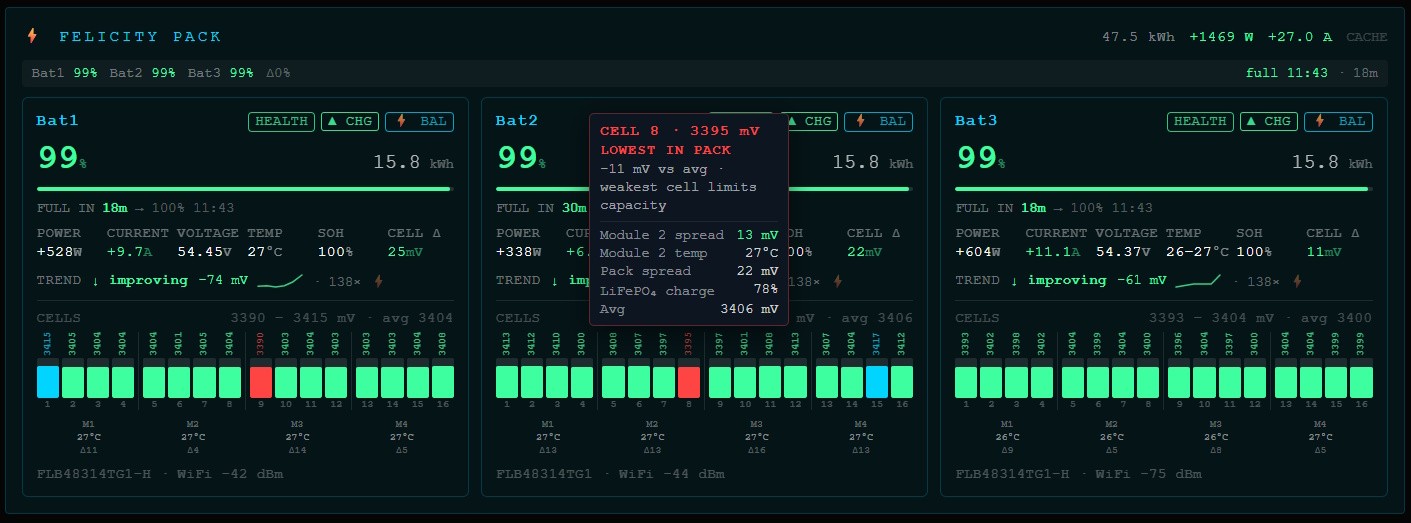
Real-time fleet view — per-cell voltages, SOC, power flow, SOH, balancing state and temperature for every battery in the pack.
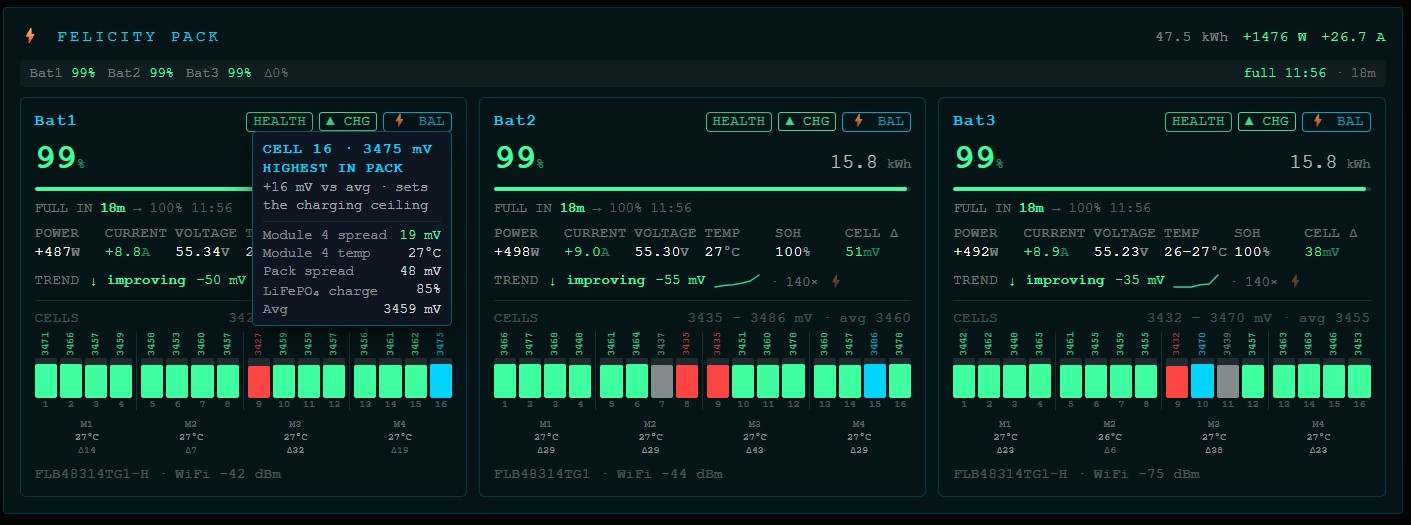
Cell-level inspection — voltage, deviation from pack average, module spread, LiFePO4 charge %, weakest/strongest cell.
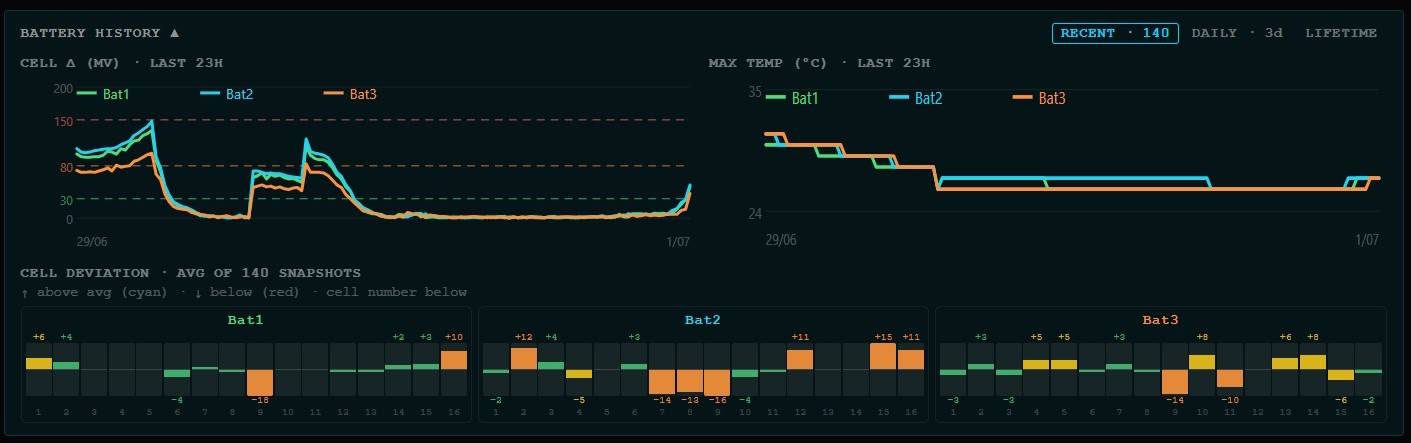
Historical trends — cell-delta and temperature over the last 24 h, per-cell deviation heatmap, daily SOH trend, lifetime cycle-count with projected remaining battery life.
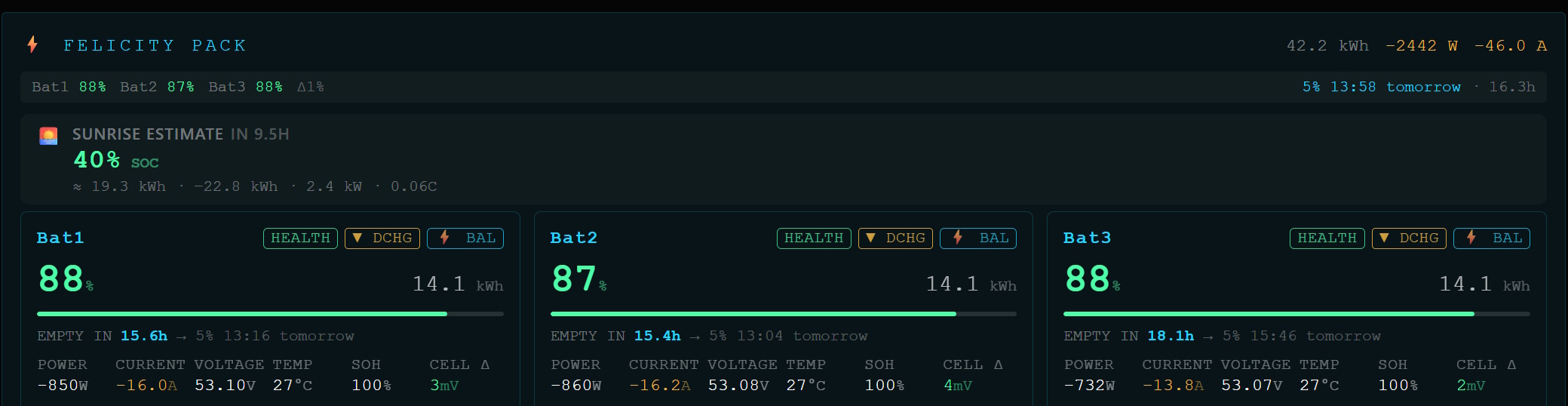
Discharging view — live power flow and SOC during active discharge across the fleet.
Algorithms & metrics
Formulas, thresholds, hook event conditions, and snapshot behaviour: docs/ALGORITHMS.md.
How it works
The Felicity cloud API requires passwords to be RSA-encrypted (public key extracted from the Android APK). The client handles login, token refresh, and caching automatically. A background poller keeps data fresh so MCP tool calls and REST requests are instant.
Setup from source
git clone https://github.com/RicardoSantos/mcp-fsolar
cd mcp-fsolar
npm install
npm run build          # compile TypeScript → dist/
cp .env.example .env   # fill in your credentials
node dist/server.js
node probe.js # dump raw API responses for every device
License
MIT
Установить Fsolar Mcp в Claude Desktop, Claude Code, Cursor
unyly install fsolar-mcpСтавит в Claude Desktop, Claude Code, Cursor и VS Code — сам разбирается с npx, uvx и сборкой из исходников.
Впервые? Поставь CLI: curl -fsSL https://unyly.org/install | sh
Или настроить вручную
Выполни в терминале:
claude mcp add fsolar-mcp -- npx -y fsolar-mcpFAQ
Fsolar Mcp MCP бесплатный?
Да, Fsolar Mcp MCP бесплатный — установка в пару кликов через Unyly без оплаты.
Нужен ли API-ключ для Fsolar Mcp?
Нет, Fsolar Mcp работает без API-ключей и переменных окружения.
Fsolar Mcp — hosted или self-hosted?
Self-hosted: сервер запускается локально на твоей машине командой из раздела установки.
Как установить Fsolar Mcp в Claude Desktop, Claude Code или Cursor?
Открой Fsolar Mcp на unyly.org, выбери вкладку своего клиента (Claude Desktop, Claude Code, Cursor) и нажми Install — конфиг сгенерируется автоматически, без правки JSON.
Похожие MCP
GitHub
PRs, issues, code search, CI status
 автор: GitHub
Filesystem
Secure file operations with configurable access controls.
Memory
Knowledge graph-based persistent memory system.
Template MCP Server
A CLI tool to create a new Model Context Protocol server project with TypeScript support, dual transport options, and an extensible structure
 автор: mcpdotdirect
Compare Fsolar Mcp with
Не уверен что выбрать?
Найди свой стек за 60 секунд
Автор?
Embed-бейдж для README
Похожее
Все в категории development