
Fused UDF
БесплатноНе проверенPython-based framework for connecting Claude and other LLMs to executable Python code through User Defined Functions, enabling data scientists to extend their m

Описание
Python-based framework for connecting Claude and other LLMs to executable Python code through User Defined Functions, enabling data scientists to extend their models with custom Python capabilities.
README
Fused MCP Agents: Setting up MCP Servers for Data



Documentation 🌪️ Read the announcement 🔥 Join Discord
MCP servers allow LLMs like Claude to make HTTP requests, connecting them to APIs & executable code. We built this repo for ourselves & anyone working with data to easily pass any Python code directly to your own desktop Claude app.
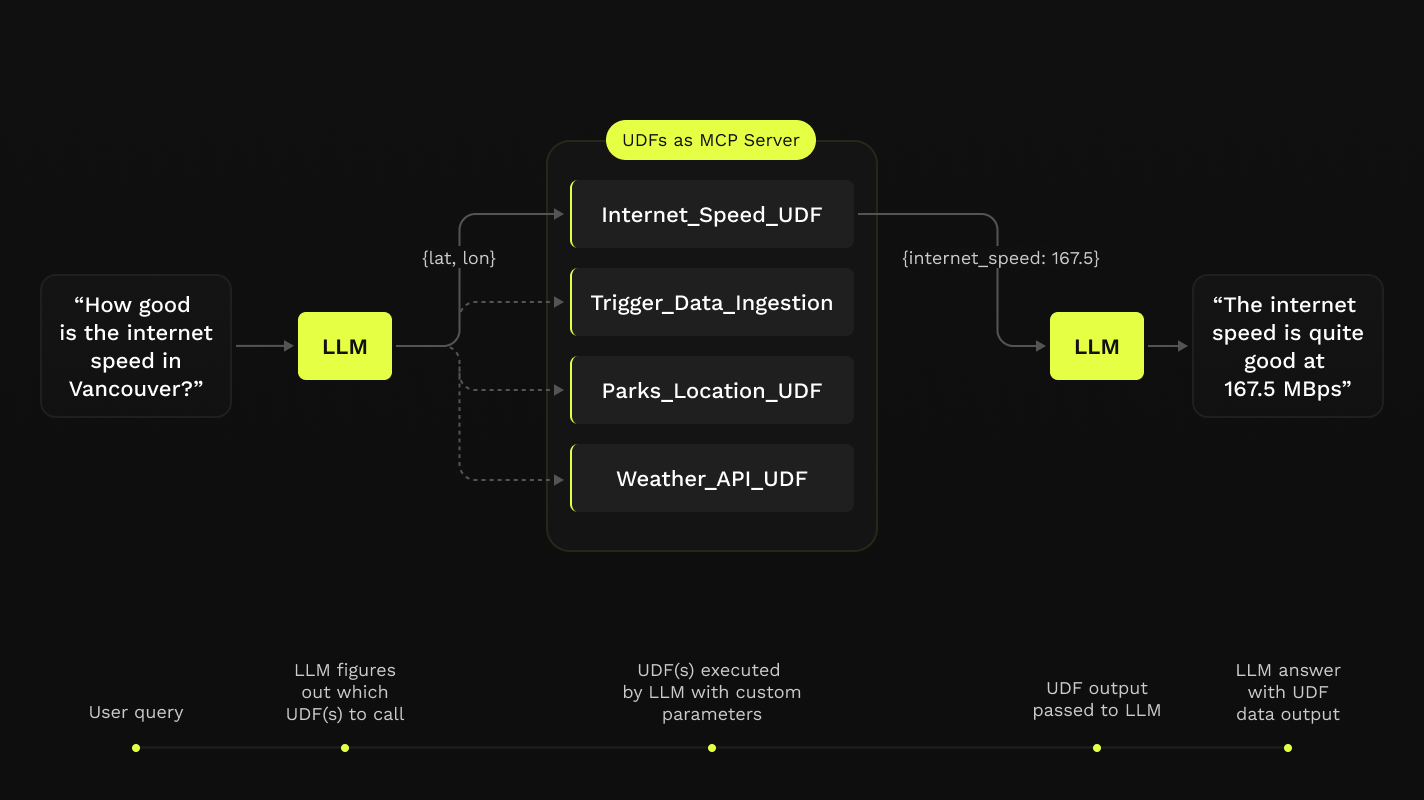
This repo offers a simple step-by-step notebook workflow to setup MCP Servers with Claude's Desktop App, all in Python built on top of Fused User Defined Functions (UDFs).

Requirements
- Python 3.11
- Latest Claude Desktop app installed (macOS & Windows)
If you're on Linux, the desktop app isn't available so we've made a simple client you can use to have it running locally too!
You do not need a Fused account to do any of this! All of this will be running on your local machine.
Installation
Clone this repo in any local directory, and navigate to the repo:
git clone https://github.com/fusedio/fused-mcp.git
cd fused-mcp/
Install uv if you don't have it:
macOS / Linux:
curl -LsSf https://astral.sh/uv/install.sh | shWindows:
powershell -ExecutionPolicy ByPass -c "irm https://astral.sh/uv/install.ps1 | iex"Test out the client by asking for its info:
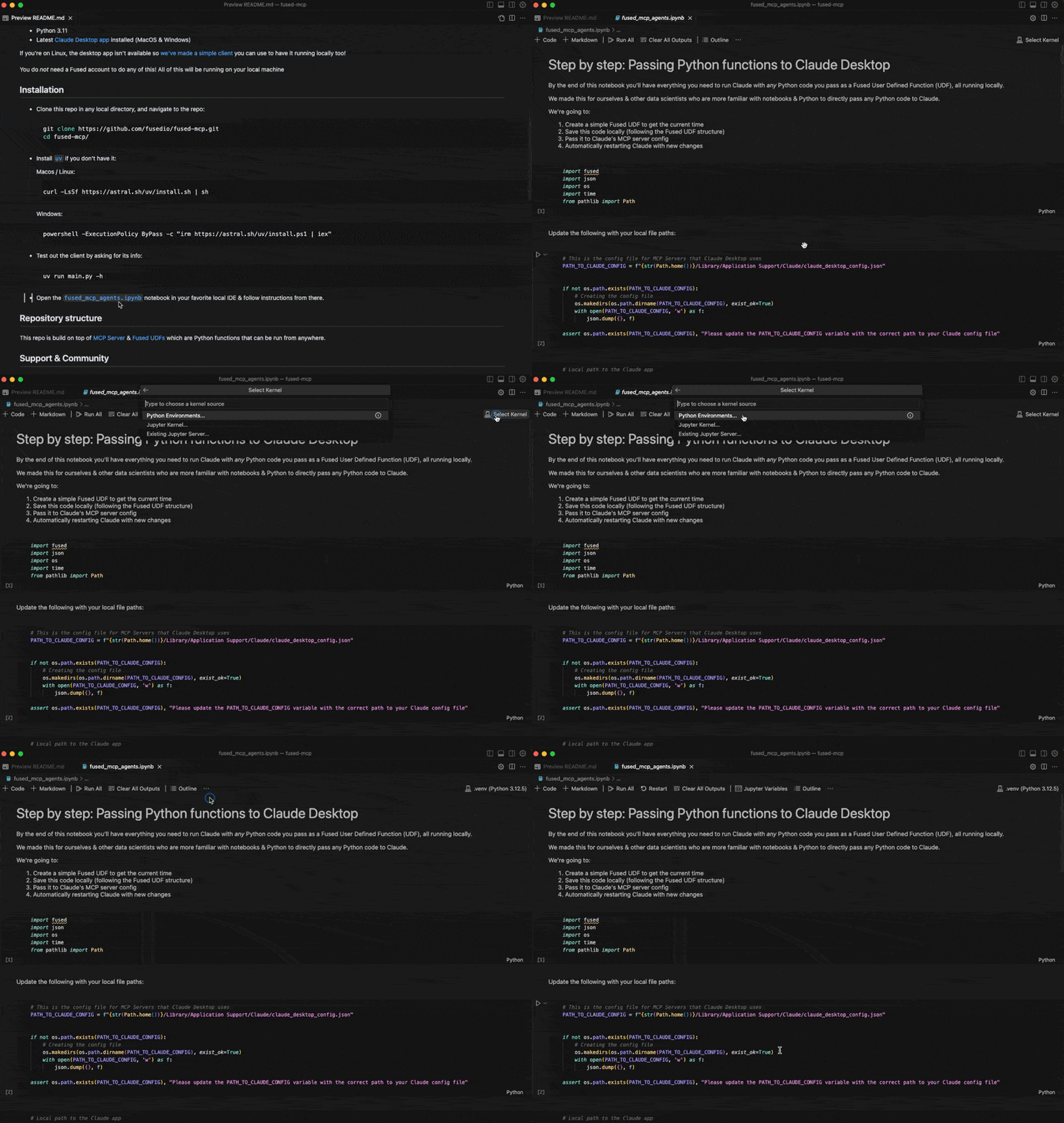
uv run main.py -hStart by following our getting-started notebook fused_mcp_agents.ipynb in your favorite local IDE to get set up and then make your way to the more advanced notebook to make your own Agents & functions
Repository structure
This repo is build on top of MCP Server & Fused UDFs which are Python functions that can be run from anywhere.
Support & Community
Feel free to join our Discord server if you want some help getting unblocked!
Here are a few common steps to debug the setup:
- Running
uv run main.py -hshould return something like this:
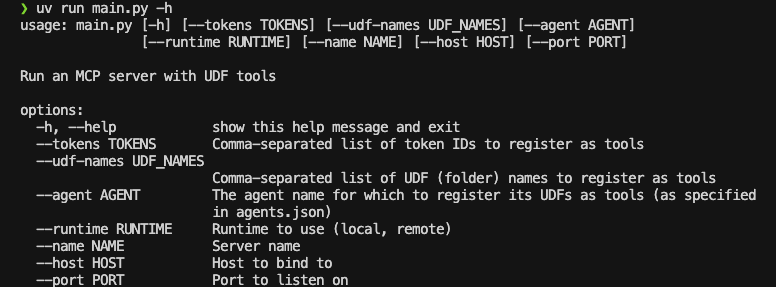
- You might need to pass global paths to some functions to the
Claude_Desktop_Config.json. For example, by default we only passuv:
{
    "mcpServers": {
        "qgis": {
            "command": "uv",
            "args": ["..."]
        }

    }
}
But you might need to pass the full path to uv, which you can simply pass to common.generate_local_mcp_config in the notebook:
# in fused_mcp_agents.ipynb
import shutil

common.generate_local_mcp_config(
    config_path=PATH_TO_CLAUDE_CONFIG,
    agents_list = ["get_current_time"],
    repo_path= WORKING_DIR,
    uv_path=shutil.which('uv'),
)
Which would create a config like this:
{
    "mcpServers": {
        "qgis": {
            "command": "/Users/<YOUR_USERNAME>/.local/bin/uv",
            "args": ["..."]
        }

    }
}
- If Claude runs without showing any connected tools, take a look at the MCP Docs for troubleshooting the Claude Desktop setup
Contribute
Feel free to open PRs to add your own UDFs to udfs/ so others can play around with them locally too!
Using a local Claude client (without Claude Desktop app)
If you are unable to install the Claude Desktop app (e.g., on Linux), we provide a small example local client interface to use Claude with the MCP server configured in this repo:
NOTE: You'll need an API key for Claude here as you won't use the Desktop App
Create an Anthropic Console Account
Create an Anthropic API Key
Create a
.env:touch .envAdd your key as
ANTHROPIC_API_KEYinside the.env:# .env ANTHROPIC_API_KEY = "your-key-here"Start the MCP server:
uv run main.py --agent get_current_timeIn another terminal session, start the local client, pointing to the address of the server:
uv run client.py http://localhost:8080/sse
Установка Fused UDF
У этого сервера нет опубликованного пакета — он собирается из исходников. Открой репозиторий и следуй инструкции в README.
▸ github.com/fusedio/fused-mcpFAQ
Fused UDF MCP бесплатный?
Да, Fused UDF MCP бесплатный — установка в пару кликов через Unyly без оплаты.
Нужен ли API-ключ для Fused UDF?
Нет, Fused UDF работает без API-ключей и переменных окружения.
Fused UDF — hosted или self-hosted?
Self-hosted: сервер запускается локально на твоей машине командой из раздела установки.
Как установить Fused UDF в Claude Desktop, Claude Code или Cursor?
Открой Fused UDF на unyly.org, выбери вкладку своего клиента (Claude Desktop, Claude Code, Cursor) и нажми Install — конфиг сгенерируется автоматически, без правки JSON.
Похожие MCP
GitHub
PRs, issues, code search, CI status
 автор: GitHub
Filesystem
Secure file operations with configurable access controls.
Memory
Knowledge graph-based persistent memory system.
Template MCP Server
A CLI tool to create a new Model Context Protocol server project with TypeScript support, dual transport options, and an extensible structure
 автор: mcpdotdirect
Compare Fused UDF with
Не уверен что выбрать?
Найди свой стек за 60 секунд
Автор?
Embed-бейдж для README
Похожее
Все в категории development