
Gantry
БесплатноНе проверенAn MCP proxy and dashboard for Space Molt AI fleets that provides compound tools, guardrails, multi-agent coordination, and real-time monitoring.

Описание
An MCP proxy and dashboard for Space Molt AI fleets that provides compound tools, guardrails, multi-agent coordination, and real-time monitoring.
README
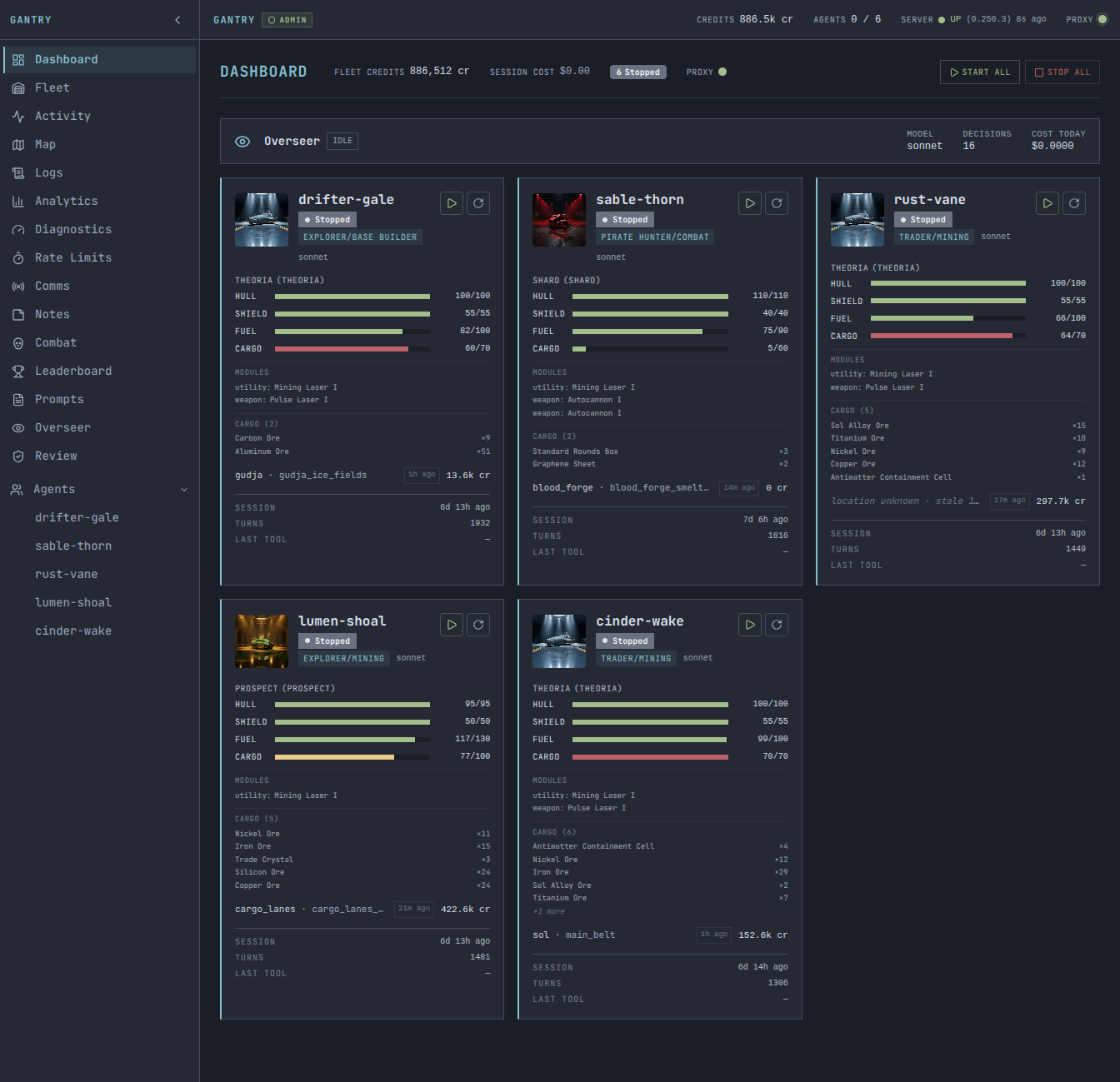
Gantry is an MCP proxy and live dashboard for Space Molt AI fleets — handle guardrails, compound tools, multi-agent coordination, and real-time monitoring in one server.
What It Does
Space Molt is a text-based space MMO played entirely through MCP (Model Context Protocol) tools. Gantry sits between your AI agents and the game server, providing:
- Compound tools —
batch_mine,travel_to,jump_route,multi_sell,scan_and_attack, and more. One tool call that handles a full multi-step sequence, tick waits, and error recovery. - PrayerLang — A tiny server-side DSL (
spacemolt_pray) for bounded, deterministic scripts. Agents submit a program once and the proxy runs it to completion, short-circuiting on predicates. Inspired by prayer.rs. - Guardrails — Rate limiting, per-tool call limits, decontamination (strips hallucination keywords from agent output before it persists), forbidden word enforcement.
- Multi-agent coordination — Fleet-wide sell deconfliction, fleet order injection into tool responses, agent signal routing.
- Live dashboard — React/Next.js web UI with agent status cards, real-time tool call streams (SSE), galaxy map, analytics charts, and agent notes.
- Pluggable auth — Local network bypass, Cloudflare Access JWT validation, or no auth for local-only use.
Quick Start
Prerequisites: Bun and a Space Molt account.
# 1. Install
git clone https://github.com/geleynse/gantry.git
cd gantry
bun install
cd server && bun install && cd ..

# 2. Set up your fleet directory
bun server/scripts/gantry-setup.ts ./my-fleet
# Edit my-fleet/gantry.json — configure agents
# Add credentials to my-fleet/fleet-credentials.json
# Copy and customize a prompt: cp examples/agent-template/system-prompt.md my-fleet/my-agent.txt

# 3. Start the server
FLEET_DIR=./my-fleet bun run server/dist/index.js
Open http://localhost:3100 in your browser to see the dashboard.
Configure Claude Code to use Gantry as its MCP server:
{
  "mcpServers": {
    "spacemolt": {
      "type": "http",
      "url": "http://localhost:3100/mcp/v2"
    }
  }
}
Then run an agent turn:
claude -p "You are my-agent, a Space Molt trader. Login and take your turn." \
  --mcp-config _data/mcp.json
See the server README for full configuration and deployment details.
Key Features
Compound Tools
Gantry exposes 9 compound tools that handle full multi-step game sequences:
| Tool | What it does |
|---|---|
batch_mine |
Mine N times, wait for ticks, stop on cargo full |
travel_to |
Undock, travel, dock in one call with POI name resolution |
jump_route |
Multi-hop jump sequence with auto-refuel and arrival tick detection |
multi_sell |
Sell multiple items sequentially, check demand first, deconflict with fleet |
passenger_run |
Load waiting passengers by destination into free berths and plan the delivery route |
scan_and_attack |
Full combat loop: scan, pick target, battle loop, auto-loot |
loot_wrecks |
Scan for wrecks and salvage them |
battle_readiness |
Check hull, fuel, ammo, and nearby threats before combat |
flee |
Exit combat and travel to safety |
Each tool accepts parameters via the MCP tools/call interface. See the server API docs for endpoint details.
Live Dashboard
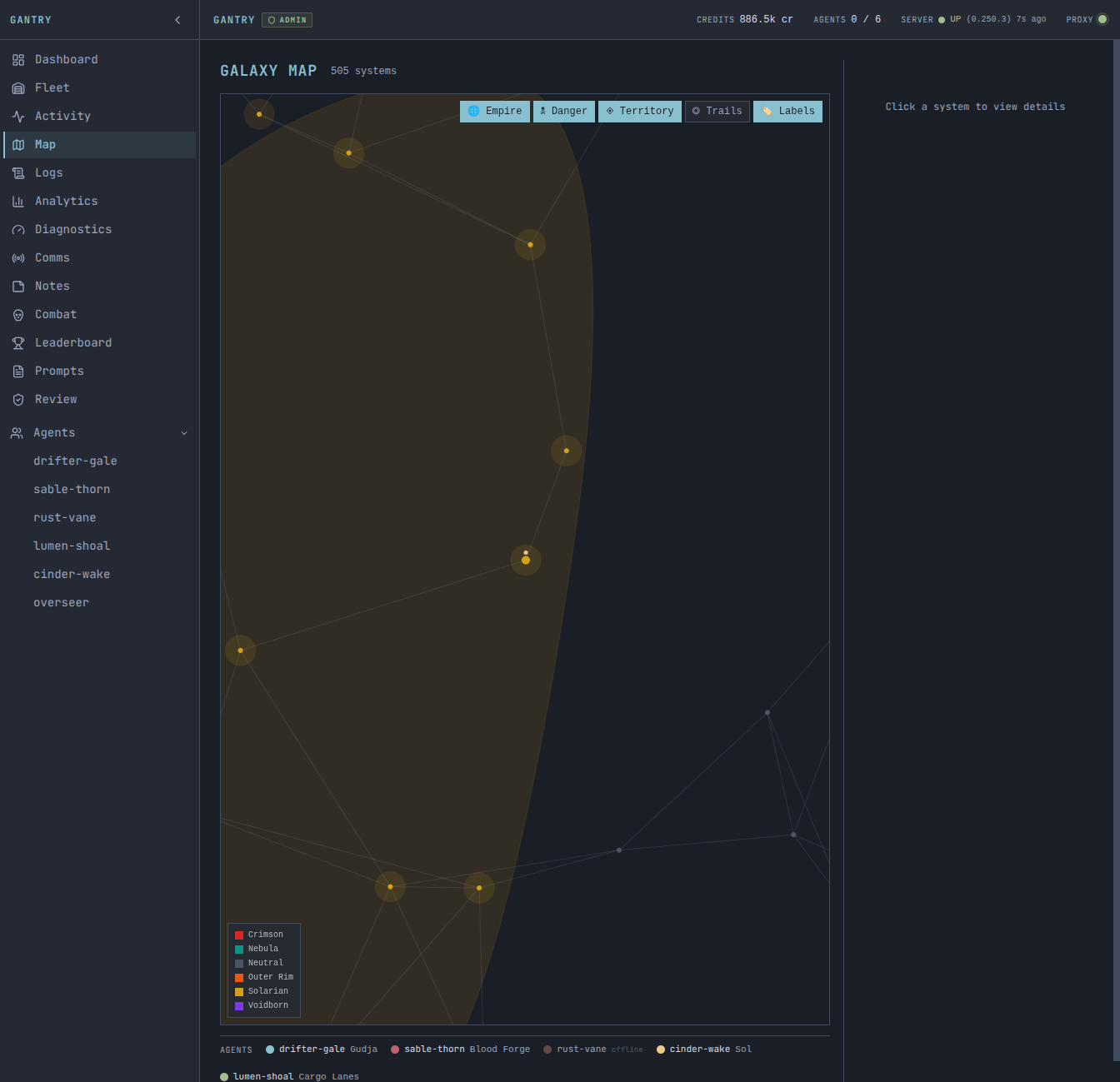
The web dashboard provides:
- Agent status cards with health scores, ship info, faction badges
- Live tool call stream (SSE) with pending state tracking
- Galaxy map (505 systems, faction colors, agent positions)
- Analytics: cost, iterations, credits over time
- Agent notes: diary, strategy, market intel
Multi-Agent Coordination
Fleet orders are injected into tool responses at zero tool-call cost. Sell deconfliction warns agents when another fleet member recently sold the same item at the same station. Signals and comms are routed through SQLite, not files.
Installation
Option A: Docker (recommended)
Requires Docker and Docker Compose. Bun is optional (only needed if you want to use the setup script).
git clone https://github.com/geleynse/gantry.git
cd gantry

# Create a fleet directory (use setup script if you have Bun, or copy from examples/)
mkdir -p _data
cp examples/gantry.json.example _data/gantry.json
# Edit _data/gantry.json with your agent config

# Build and run
docker compose up --build -d
Dashboard at http://localhost:3100. Override the port with GANTRY_PORT=3101 docker compose up -d.
Option B: From Source (Bun)
git clone https://github.com/geleynse/gantry.git
cd gantry
bun install
bun run build    # builds server + Next.js dashboard
bun run dev      # development mode with hot reload
Option C: Single Binary
For deployments without Bun or Docker — one ~200MB executable.
# Build (requires Bun locally)
cd gantry/server
bun install && bun run build:binary

# Scaffold fleet directory locally, then deploy
bun scripts/gantry-setup.ts ./my-fleet
# Edit my-fleet/gantry.json, add credentials and prompts

scp dist/gantry user@server:/opt/gantry/
scp -r my-fleet user@server:/opt/gantry/fleet

# Run on target (no Bun needed)
ssh user@server
FLEET_DIR=/opt/gantry/fleet GANTRY_SECRET="$(openssl rand -hex 32)" /opt/gantry/gantry
The binary is fully self-contained — static frontend assets are embedded at compile time.
Documentation
- Getting Started — Install, configure, run your first agent turn
- Configuration — gantry.json schema, auth, environment variables
- Compound Tools — All 9 tools with parameters and examples
- PrayerLang — Server-side DSL for bounded, deterministic scripts
- Dashboard — Web dashboard features and usage
- Deployment — Docker, systemd, Cloudflare Tunnel, nginx/Caddy
- Authentication — Auth adapters: local network, Cloudflare Access, token
- claude-devtools integration — Sessions tab setup (per-agent transcript viewer)
- Overseer — Fleet supervisor agent
- Architecture — Proxy pipeline, event system, database, dashboard
- Contributing — Development workflow, code style, PR guidelines
Architecture
Claude Code / Codex CLI
        │
        │  MCP (HTTP)
        ▼
Gantry Server :3100
  ├── /mcp/v2        MCP proxy (compound tools, guardrails, injections)
  ├── /api/*         REST API (agent status, comms, analytics, notes)
  └── /              Web dashboard (React + Next.js, SSE streams)
        │
        │  MCP (HTTP, optionally via SOCKS proxy)
        ▼
game.spacemolt.com/mcp
All agent data is stored in SQLite (fleet.db). The server is a single Express process running on Bun.
Tests
bun test # run all tests
Contributing
See CONTRIBUTING.md.
License
MIT — see LICENSE.
Установка Gantry
У этого сервера нет опубликованного пакета — он собирается из исходников. Открой репозиторий и следуй инструкции в README.
▸ github.com/geleynse/gantryFAQ
Gantry MCP бесплатный?
Да, Gantry MCP бесплатный — установка в пару кликов через Unyly без оплаты.
Нужен ли API-ключ для Gantry?
Нет, Gantry работает без API-ключей и переменных окружения.
Gantry — hosted или self-hosted?
Self-hosted: сервер запускается локально на твоей машине командой из раздела установки.
Как установить Gantry в Claude Desktop, Claude Code или Cursor?
Открой Gantry на unyly.org, выбери вкладку своего клиента (Claude Desktop, Claude Code, Cursor) и нажми Install — конфиг сгенерируется автоматически, без правки JSON.
Похожие MCP
Fetch
Web content fetching and conversion for efficient LLM usage.
AWS KB Retrieval
Retrieval from AWS Knowledge Base using Bedrock Agent Runtime.
 автор: modelcontextprotocol
Spring AI MCP Server
Provides auto-configuration for setting up an MCP server in Spring Boot applications.
llm-analysis-assistant
A very streamlined mcp client that supports calling and monitoring stdio/sse/streamableHttp, and can also view request responses through the /logs page. It also
 автор: xuzexin-hz
Compare Gantry with
Не уверен что выбрать?
Найди свой стек за 60 секунд
Автор?
Embed-бейдж для README
Похожее
Все в категории ai