
GhostWall Server
БесплатноНе проверенEnables offline multi-agent security orchestration by providing tools for network traffic analysis, log correlation, threat scoring, and firewall mitigation via

Описание
Enables offline multi-agent security orchestration by providing tools for network traffic analysis, log correlation, threat scoring, and firewall mitigation via JSON-RPC.
README
React TypeScript Node.js Vite Express Vercel License: MIT
GhostWall is a full-stack, completely offline, AI-powered Cyber Threat Detection Framework. Designed with a premium, high-visibility security dashboard, GhostWall serves as a mock defensive operations console. It demonstrates how multi-agent security orchestrations (ADK) can scan network traffic, correlate audit logs, evaluate threat payloads, and trigger active firewall blocks—entirely locally and without external API dependencies.
🔗 Live Demo URL: https://ghostwall.vercel.app (Build ready for Vercel deployment)
📊 Visual Walkthrough & Screenshots
💻 System Security HUD
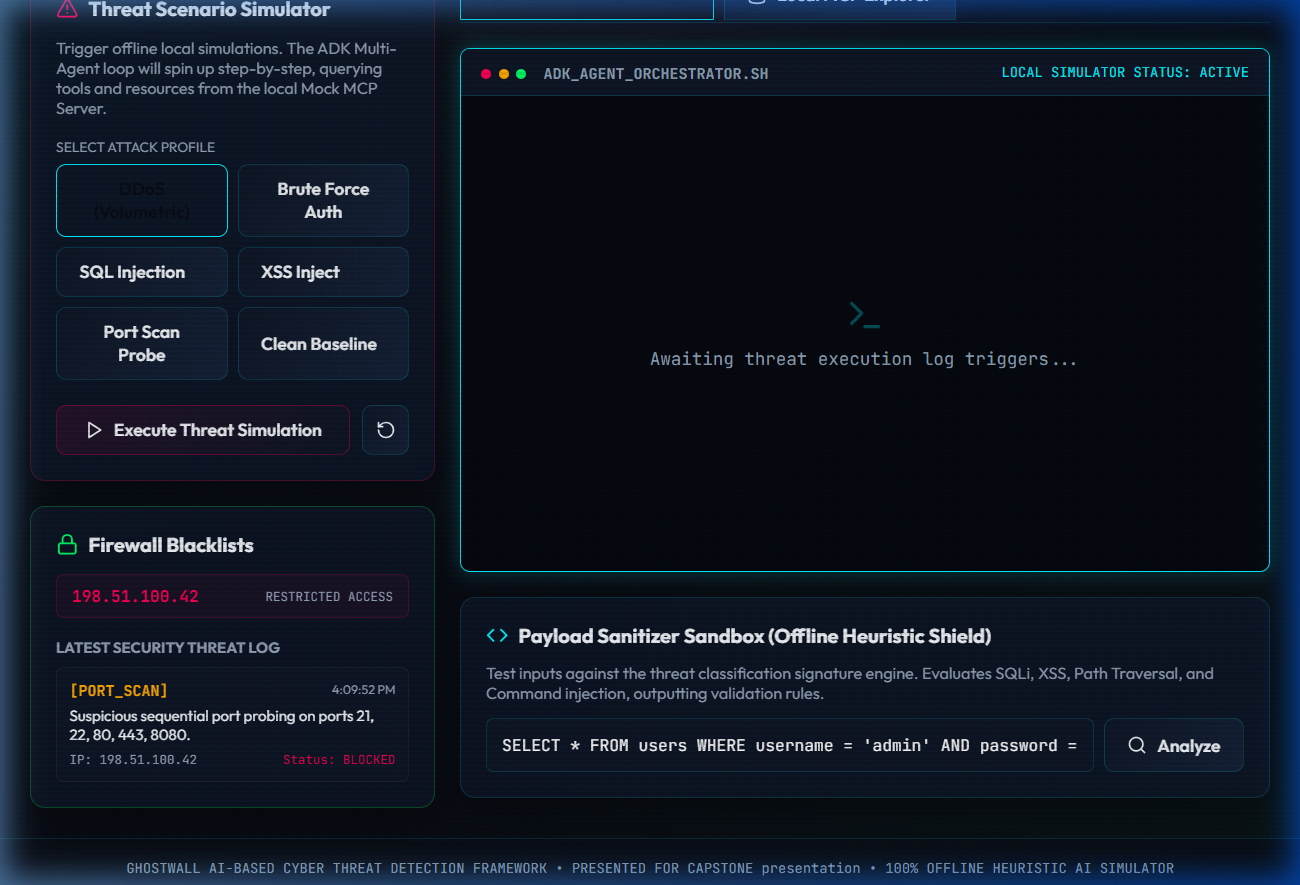
The main dashboard features glassmorphic control cards, a system health score index, real-time restricted IP counters, and throughput meters.
📹 Real-Time Agentic Response Simulation
Watch the local multi-agent system respond step-by-step to a volumetric DDoS attack and sanitize inputs in the payload scanner:

🎯 Key Features
- ADK Multi-Agent System: Orchestrates specialized security agents working in a collaborative pipeline.
- Model Context Protocol (MCP): Implements an offline JSON-RPC MCP structure to register resources and tools that agents can query and trigger.
- Threat Simulator: Interactively trigger simulated attack vectors (DDoS, Brute Force, SQL Injection, XSS, Port Scans) and witness immediate real-time defensive reactions.
- Payload Sanitizer Sandbox: An interactive playground demonstrating strict static sanitization methods (SQLi, XSS, Traversal, Command Injection) with zero risk of code execution.
- CLI Utility Skills: Built-in script tools for directory log scanning and independent payload validation.
- Modern Obsidian Styling: Sleek cyberpunk theme featuring glowing neon status indicators, interactive SVG icons, and a custom command-line log viewer.
🛠️ Tech Stack
- Frontend: React 18, Vite 5, Lucide Icons, Vanilla HSL CSS Variables (Obsidian glassmorphism design system)
- Backend: Node.js, Express, Body Parser, CORS
- Type Safety: TypeScript 5
- Deployment: Vercel (integrated with Serverless Functions for full-stack compatibility)
- Orchestration: ADK (Agent Development Kit) simulation engine
🏗️ System Architecture
GhostWall models a standard SOC (Security Operations Center) pipeline:
flowchart TD
    User([User Simulation Trigger]) -->|Select DDoS/SQLi/Brute Force| App[GhostWall Dashboard Client]
    App -->|POST /api/simulation/run| Express[Express.js Serverless Backend]

    subgraph Multi-Agent System [ADK Orchestration Engine]
        Express --> Manager[AgentManager]
        Manager -->|Step 1| NetAgent[Network Traffic Analyzer Agent]
        Manager -->|Step 2| LogAgent[Log Parser & Correlation Agent]
        Manager -->|Step 3| ThreatAgent[Threat Scoring Agent]
        Manager -->|Step 4| MitAgent[Response Mitigation Agent]
    end

    subgraph Local MCP Server [Model Context Protocol Server]
        NetAgent -->|Call Tool| Tool1[network_traffic_analyzer]
        LogAgent -->|Call Tool| Tool2[log_correlator]
        ThreatAgent -->|Call Tool| Tool3[payload_sanitize_validator]
        MitAgent -->|Call Tool| Tool4[firewall_mitigator]

        Manager -->|Read Resource| Resource1[ghostwall://threats/logs]
        Manager -->|Read Resource| Resource2[ghostwall://system/status]
    end

    Tool4 -->|Enforce Rule| Blacklist[(Firewall Blacklist / Memory Logs)]
    Blacklist -->|Report Status| App
🤖 Agent Directory & Roles
- Network Traffic Analyzer Agent: Scans connections for volumetric patterns (e.g. DDoS volume threshold anomalies).
- Log Parser & Correlation Agent: Links authentication failures with scanning events to spot multi-stage campaigns.
- Threat Classification & Scoring Agent: Inspects exploit payloads and assigns risk index scores (0-100).
- Automated Response Mitigation Agent: Determines containment actions (
BLOCK_IP,RATE_LIMIT,ISOLATE_SUBNET).
📂 Project Directory Structure
├── api/
│   └── index.ts                 # Vercel serverless entry point
├── assets/
│   ├── initial_dashboard_view.png
│   └── ghostwall_threat_simulation_demo.webp
├── server/
│   ├── index.ts                 # Express application & API routing
│   ├── mcp-server.ts            # Mock MCP JSON-RPC Server
│   ├── adk/
│   │   ├── agent-manager.ts     # Multi-agent orchestrator loop
│   │   ├── network-agent.ts     # Network security agent
│   │   ├── log-agent.ts         # Correlation agent
│   │   ├── threat-agent.ts      # Scoring agent
│   │   └── mitigation-agent.ts  # Firewall mitigation agent
│   └── scripts/
│       ├── log-collector.ts     # CLI Log Analyzer skill script
│       └── payload-validator.ts # Standalone static payload scanner
├── src/
│   ├── App.tsx                  # Dashboard interface component
│   ├── main.tsx                 # React DOM bootstrapper
│   ├── index.css                # Obsidian cyber theme CSS styles
│   └── vite-env.d.ts            # Vite client type bindings
├── index.html                   # HTML entry (Outfit & JetBrains Fonts)
├── package.json                 # Project dependencies & build automation
├── tsconfig.json                # TypeScript compilation config
├── vercel.json                  # Vercel deployment rewrite routes
└── vite.config.ts               # Vite configuration with proxy settings
🚀 Quick Setup & Installation
Prerequisites
- Node.js (v18+)
- npm (v9+)
Local Development
Clone the repository and install dependencies:
git clone https://github.com/anshikasingh28072006/GhostWall.git
cd GhostWall
npm install
Run the full application locally:
npm run devThis concurrent script launches the React client on http://localhost:3000 and proxy-binds to the Express backend API on http://localhost:3001.
CLI Security Tools
You can execute standalone tools directly in your terminal:
# Run log parser skill
npx ts-node server/scripts/log-collector.ts

# Run payload validator skill
npx ts-node server/scripts/payload-validator.ts "SELECT * FROM users WHERE 1=1"
⚡ Vercel Deployment Instructions
GhostWall is deployed as a 100% client-side static React application. There is no backend server setup or API key configuration needed:
- Push Changes to GitHub: Ensure all local changes are committed and pushed to your repo.
- Import Project to Vercel:
- Go to Vercel Dashboard and click Add New -> Project.
- Import the
GhostWallrepository.
- Configure Settings:
- Framework Preset: Vite
- Root Directory:
./(leave default) - Build Command:
npm run build(runstsc && vite build) - Output Directory:
dist
- Deploy: Click Deploy. Vercel will build the React bundle and deploy the static site instantly.
🔮 Future Improvements
- Add a live interactive threat map visualizing blocked geo-IP markers.
- Implement exportable CSV reports for compliance auditing.
- Expand signature lists to include SQLi-to-shell patterns.
- Integrate WebSockets for live logging feeds.
👥 Author & Contact
- Author: Anshika Singh
- GitHub: @anshikasingh28072006
- Role: Cyber Security Analyst & Developer
Установка GhostWall Server
У этого сервера нет опубликованного пакета — он собирается из исходников. Открой репозиторий и следуй инструкции в README.
▸ github.com/anshikasingh28072006/GhostWallFAQ
GhostWall Server MCP бесплатный?
Да, GhostWall Server MCP бесплатный — установка в пару кликов через Unyly без оплаты.
Нужен ли API-ключ для GhostWall Server?
Нет, GhostWall Server работает без API-ключей и переменных окружения.
GhostWall Server — hosted или self-hosted?
Self-hosted: сервер запускается локально на твоей машине командой из раздела установки.
Как установить GhostWall Server в Claude Desktop, Claude Code или Cursor?
Открой GhostWall Server на unyly.org, выбери вкладку своего клиента (Claude Desktop, Claude Code, Cursor) и нажми Install — конфиг сгенерируется автоматически, без правки JSON.
Похожие MCP
Fetch
Web content fetching and conversion for efficient LLM usage.
AWS KB Retrieval
Retrieval from AWS Knowledge Base using Bedrock Agent Runtime.
 автор: modelcontextprotocol
Spring AI MCP Server
Provides auto-configuration for setting up an MCP server in Spring Boot applications.
llm-analysis-assistant
A very streamlined mcp client that supports calling and monitoring stdio/sse/streamableHttp, and can also view request responses through the /logs page. It also
 автор: xuzexin-hz
Compare GhostWall Server with
Не уверен что выбрать?
Найди свой стек за 60 секунд
Автор?
Embed-бейдж для README
Похожее
Все в категории ai