
GitHub Portfolio Server
БесплатноНе проверенEnables AI agents to query a GitHub user's public profile, repositories, language breakdowns, and README content

Описание
Enables AI agents to query a GitHub user's public profile, repositories, language breakdowns, and README content
README
An MCP (Model Context Protocol) server that exposes tools for AI agents to query a GitHub user's public profile, repositories, languages, and README content.
Tools
| Tool | Description |
|---|---|
list_repos |
List all public repositories with optional fork filtering and sorting |
get_repo_details |
Get detailed info about a repo including its full README |
get_languages |
Get language breakdown (with percentages) for a repository |
get_profile |
Get the GitHub user's public profile (bio, location, stats) |
search_repos |
Search repos by keyword across names, descriptions, and topics |
get_tech_stack_summary |
Aggregate languages and topics across all original repos |
Resources
| Resource | URI | Description |
|---|---|---|
| Profile | github://bdbrown4/profile |
Full GitHub profile JSON |
| README | github://{owner}/{repo}/readme |
README content for any repo |
Setup
npm install
npm run build
Usage with Claude Desktop
Add to your claude_desktop_config.json:
{
  "mcpServers": {
    "github-portfolio": {
      "command": "node",
      "args": ["C:/dev/github-portfolio-mcp-server/dist/index.js"]
    }
  }
}
Usage with VS Code (GitHub Copilot)
Add to your .vscode/mcp.json or user settings:
{
  "servers": {
    "github-portfolio": {
      "command": "node",
      "args": ["C:/dev/github-portfolio-mcp-server/dist/index.js"]
    }
  }
}
Optional: Higher Rate Limits
Set a GitHub Personal Access Token to avoid the 60 req/hour unauthenticated limit:
{
  "mcpServers": {
    "github-portfolio": {
      "command": "node",
      "args": ["C:/dev/github-portfolio-mcp-server/dist/index.js"],
      "env": {
        "GITHUB_TOKEN": "ghp_your_token_here"
      }
    }
  }
}
Example
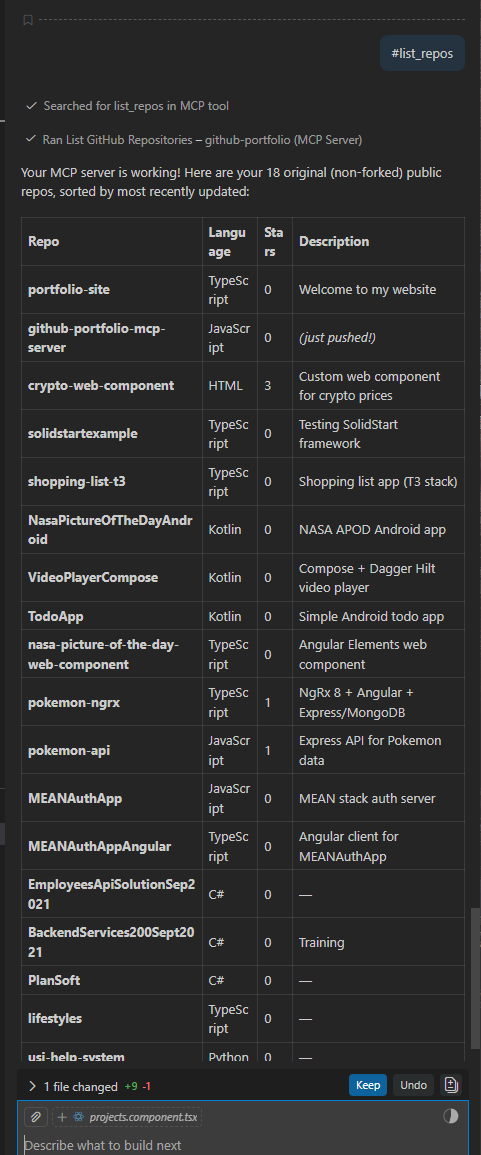
Here's the list_repos tool in action inside VS Code with GitHub Copilot, listing all 18 original (non-forked) public repos sorted by most recently updated:
Development
npm run dev    # Watch mode — recompiles on change
npm run build  # One-time compile
npm start      # Run the server (stdio)
Установка GitHub Portfolio Server
У этого сервера нет опубликованного пакета — он собирается из исходников. Открой репозиторий и следуй инструкции в README.
▸ github.com/bdbrown4/github-portfolio-mcp-serverFAQ
GitHub Portfolio Server MCP бесплатный?
Да, GitHub Portfolio Server MCP бесплатный — установка в пару кликов через Unyly без оплаты.
Нужен ли API-ключ для GitHub Portfolio Server?
Нет, GitHub Portfolio Server работает без API-ключей и переменных окружения.
GitHub Portfolio Server — hosted или self-hosted?
Доступен hosted-вариант: Unyly запускает сервер в облаке, локальная установка не обязательна.
Как установить GitHub Portfolio Server в Claude Desktop, Claude Code или Cursor?
Открой GitHub Portfolio Server на unyly.org, выбери вкладку своего клиента (Claude Desktop, Claude Code, Cursor) и нажми Install — конфиг сгенерируется автоматически, без правки JSON.
Похожие MCP
GitHub
PRs, issues, code search, CI status
 автор: GitHub
Filesystem
Secure file operations with configurable access controls.
Memory
Knowledge graph-based persistent memory system.
Template MCP Server
A CLI tool to create a new Model Context Protocol server project with TypeScript support, dual transport options, and an extensible structure
 автор: mcpdotdirect
Compare GitHub Portfolio Server with
Не уверен что выбрать?
Найди свой стек за 60 секунд
Автор?
Embed-бейдж для README
Похожее
Все в категории development