
Grix
БесплатноНе проверенgrep with a trigram index: exact, ripgrep-compatible code search from a live index — plus an MCP server for AI coding agents. Not RAG.

Описание
grep with a trigram index: exact, ripgrep-compatible code search from a live index — plus an MCP server for AI coding agents. Not RAG.
README
English | 日本語
grix is a grep that uses a trigram index.
It indexes a directory tree once, then uses that index to narrow searches to a small set of candidate files. It runs the real regex on those candidates, so within the features it supports it returns the same lines as ripgrep — exact, not semantic, not RAG.
It pays off most when the same tree is searched over and over — including by AI
coding agents. grix mcp is a Model Context Protocol server, so Claude Code,
Cursor, and any MCP client can search through the index instead of re-reading
files.
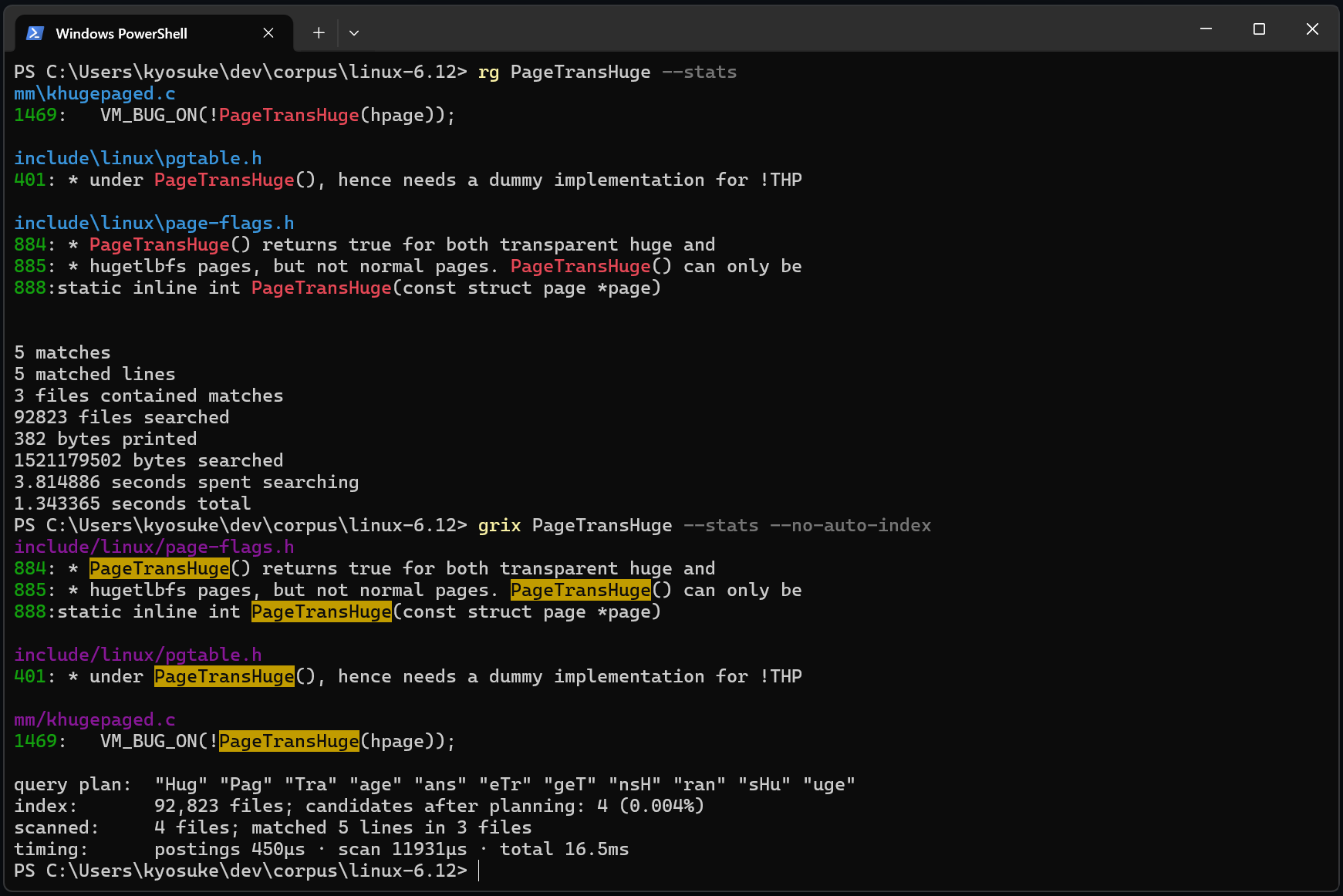
Why
ripgrep is fast, but it reads the files again on every search. That is fine on a small repository, but on a large tree a single search can take seconds. With a cold cache or a network drive you wait even longer.
In real work you tend to search the same tree many times. Refactoring, code review, and AI coding agents can run grep tens or hundreds of times in one session. Instead of reading every file each time, grix looks the candidates up in the index.
It is not approximate search. There is no embedding or semantic matching; the final step always runs the real regex against the actual file contents. If grix and ripgrep ever return different lines for a supported search, that is a bug in grix. There is a property test that checks indexed search and a full scan return the same results, and the benchmark script stops if the two tools' match counts differ.
Install
cargo install grix              # build from source
cargo binstall grix             # fetch a prebuilt binary
brew install kyo5uke/tap/grix   # macOS / Linux
Prebuilt binaries (including Windows) are also on the Releases page.
Usage
cd your-repo
grix 'fn main'            # first run answers via a full scan while the
                          # index builds in the background; later runs
                          # refresh + use the index
grix 'fn main' src/       # limit the search to a directory or file
grix -C2 'fn main'        # show 2 lines of context around each match
grix -t rust 'fn main'    # filter by file type (or -g '*.rs')
grix --no-auto-index 'fn main'  # use the index as-is, no refresh (fastest, may be stale)
By default each search refreshes the index first, so results are always up to
date. Unchanged files are not re-read (matched by size and mtime), and changes
land in a small sidecar overlay instead of rewriting the index, so a refresh
costs a directory walk plus whatever actually changed. For the fastest path
that uses the existing index as-is, pass --no-auto-index.
Watch mode — instant and always fresh
grix watch # leave running in a terminal (or background it)
grix watch keeps the index current in the background using filesystem events,
reindexing only what changes. While it runs, searches skip the per-search walk
entirely and are still up to date — you get the --no-auto-index speed without
the staleness. Stop it with Ctrl-C; if it ever dies, searches just resume
refreshing themselves.
No config file. Nothing to download, no model.
The index is stored under your cache directory.
- Windows:
%LOCALAPPDATA%\grix - Linux/macOS:
~/.cache/grix
It never writes anything inside the repository.
Benchmarks
Measured on the Linux kernel source v6.12. The tree is 92,823 files, about 1.4GB.
The machine is Windows 11, NVMe, ripgrep 15.1.0.
Reproduce with bench/run.sh.
Every pattern is checked for identical match counts between ripgrep and grix
before it is timed.
grix is timed with --no-auto-index (using the index as-is, without the
pre-search refresh). That is the query speed itself, and is also what a normal
search costs when the tree hasn't changed.
| pattern | matched lines | ripgrep | grix | speedup |
|---|---|---|---|---|
PageTransHuge (rare literal) |
5 | 2.31 s | 14 ms | 168× |
EXPORT_SYMBOL (common literal) |
38,267 | 2.30 s | 174 ms | 13.2× |
static\s+int\s+\w+_probe (regex) |
10,081 | 2.95 s | 339 ms | 8.7× |
spinlock (-i) |
17,086 | 2.43 s | 217 ms | 11.2× |
zzqqxx_does_not_exist (no match) |
0 | 2.30 s | 15 ms | 153× |
The index is 129 MiB — mid-frequency trigrams are bitmap-encoded and near-universal ones stored as counts only, ~20% smaller than plain varint postings with zero effect on results. A from-scratch build takes about 7 seconds with a warm filesystem cache (cold-cache builds are I/O-bound and vary with the disk).
An unchanged grix index takes about 0.3 seconds — a parallel directory
walk and nothing else; nothing is written. Changing one file costs about
the same: the change goes into a small sidecar overlay and the main index
is left alone.
There are Linux numbers too. These are from a stock GitHub Actions runner with 4 cores, measured on v0.3.2 (before the current index engine, so expect them to improve). The log is public.
| pattern | ripgrep | grix | speedup |
|---|---|---|---|
PageTransHuge (rare literal) |
338 ms | 7.6 ms | 44.6× |
EXPORT_SYMBOL (common literal) |
355 ms | 63 ms | 5.6× |
static\s+int\s+\w+_probe (regex) |
390 ms | 99 ms | 4.0× |
spinlock (-i) |
409 ms | 71 ms | 5.8× |
zzqqxx_does_not_exist (no match) |
335 ms | 7.6 ms | 44.0× |
Directory walks cost more on Windows, so the gap varies by environment. Either way it helps a lot when you search a large tree repeatedly.
How it works
A trigram is three consecutive bytes.
A file that contains hello must contain hel, ell, and llo.
So if you have an index from trigrams to the files that contain them, you can narrow the candidates by intersecting a few sorted lists instead of reading a gigabyte of files every time.
grix extracts trigram constraints from the regex pattern.
abc.*defbecomesabcANDdefabc|xyzbecomesabcORxyz
This is based on Russ Cox's trigram planner for Google Code Search.
After narrowing with the index, grix runs the real regex against the current contents of those files. So an out-of-date index never shows a line that is not there. It can only miss lines added since the last index update.
grix --explain shows the trigram plan for any pattern.
There is more detail in ARCHITECTURE.md.
ripgrep compatibility
The output format, exit codes, gitignore handling, binary detection, and line semantics follow ripgrep.
The main supported forms are:
- default output:
path:line:text - heading style on a tty
- exit codes: 0 / 1 / 2
--json--color
The everyday ripgrep flags are all covered:
-i, -S, -F, -e (repeatable), -w, -v, -o, -l, -c, -m,
-A, -B, -C, -g, -t, -T, -U, -r/--replace, --hidden,
--no-ignore/-u/-uu, --files, --type-list, --, --json,
--no-heading, --color
Hidden files are in the index (marked, excluded by default), so --hidden
is instant too. --no-ignore reaches files the index deliberately skips,
so it searches at grep speed. .git is never searched, with or without
--hidden.
Each one is verified against ripgrep's actual output on the Linux kernel
tree (including the corner cases: -w uses rg's surrounded-by semantics,
-c counts matches under -U/-o, and so on).
If grix and ripgrep disagree on matched lines within the supported set, please open an issue.
Using it with AI coding agents
AI coding agents run grep against the same tree over and over — often hundreds
of times in one session. grix turns each of those into an index lookup instead
of a full re-read, and grix mcp exposes that as a tool the agent calls
directly.
MCP server
grix mcp is a Model Context Protocol
server over stdio. It exposes two tools — code_search (regex search, returns
path:line:text) and list_matching_files (cheap recon) — and keeps the index
fresh in the background while it runs, so every search is instant and current.
It speaks standard MCP, so any MCP client works. The config is the same everywhere — only the file it goes in differs:
{
  "mcpServers": {
    "grix": { "command": "grix", "args": ["mcp"] }
  }
}
- Claude Code:
claude mcp add grix -- grix mcp - Cursor:
.cursor/mcp.json(project) or~/.cursor/mcp.json(global) - Windsurf:
~/.codeium/windsurf/mcp_config.json - Cline / Roo Code: the MCP servers JSON in the extension's settings
- Zed:
settings.jsonundercontext_servers - Anything else: drop the snippet into the client's MCP config
Run the server from the repository you want searched (its working directory is the search root). Results are exactly what grep would print, so the agent gets precise call sites, not approximate matches.
Or just the CLI
Without MCP, point the agent at the command:
Use `grix <pattern>` instead of grep / rg for code search.
--json returns one JSON object per match line; basic usage is argument-
compatible with ripgrep, so simple searches drop in directly.
Prior art
- Google Code Search: Russ Cox's trigram planner is the basis for this project. Essay: Regular Expression Matching with a Trigram Index
- zoekt: a server-side trigram search engine. grix aims at the local, zero-setup version of the idea.
- qgrep, ugrep-indexer: earlier indexed grep CLIs, with different designs (archive-based, batch indexing).
- ripgrep: the search tool grix matches its output and behavior against.
License
MIT
Установка Grix
У этого сервера нет опубликованного пакета — он собирается из исходников. Открой репозиторий и следуй инструкции в README.
▸ github.com/kyo5uke/grixFAQ
Grix MCP бесплатный?
Да, Grix MCP бесплатный — установка в пару кликов через Unyly без оплаты.
Нужен ли API-ключ для Grix?
Нет, Grix работает без API-ключей и переменных окружения.
Grix — hosted или self-hosted?
Self-hosted: сервер запускается локально на твоей машине командой из раздела установки.
Как установить Grix в Claude Desktop, Claude Code или Cursor?
Открой Grix на unyly.org, выбери вкладку своего клиента (Claude Desktop, Claude Code, Cursor) и нажми Install — конфиг сгенерируется автоматически, без правки JSON.
Похожие MCP
GitHub
PRs, issues, code search, CI status
 автор: GitHub
Filesystem
Secure file operations with configurable access controls.
Memory
Knowledge graph-based persistent memory system.
Template MCP Server
A CLI tool to create a new Model Context Protocol server project with TypeScript support, dual transport options, and an extensible structure
 автор: mcpdotdirect
Amap Maps Mcp Server
MCP server for using the AMap Maps API
 автор: duxiaohui
Supabase
Database, auth and storage
 автор: Supabase
Everything
Reference / test server with prompts, resources, and tools.
Git
Tools to read, search, and manipulate Git repositories.
Sequential Thinking
Dynamic and reflective problem-solving through thought sequences.
Time
Time and timezone conversion capabilities.
Compare Grix with
Не уверен что выбрать?
Найди свой стек за 60 секунд
Автор?
Embed-бейдж для README
Похожее
Все в категории development