
Httap
БесплатноНе проверенAn MCP server that enables AI agents to intercept, inspect, and modify HTTP traffic, with tools for searching, filtering, and managing captured requests and int

Описание
An MCP server that enables AI agents to intercept, inspect, and modify HTTP traffic, with tools for searching, filtering, and managing captured requests and interceptors.
README
httap is a powerful HTTP proxy for your terminal. Intercept, inspect & rewrite HTTP traffic — from your shell or your AI agent.
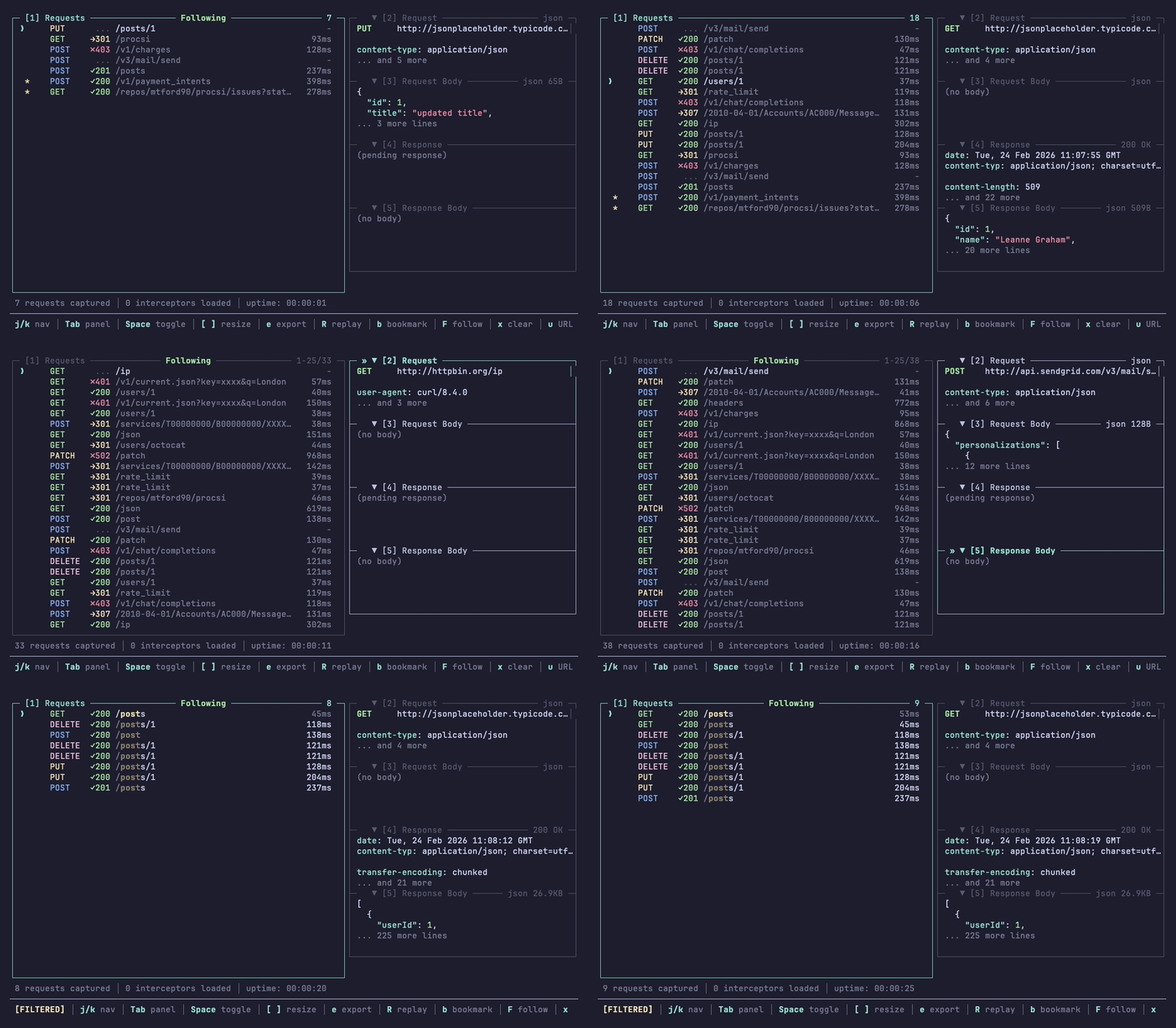
Feature Highlights
- Project-scoped — each project gets its own
.httap/directory with isolated daemon, database, CA cert and interceptors. No cross-project bleed. - Multiple surfaces — powerful CLI for scripting, a lazygit-style TUI for browsing traffic, an MCP server for AI agents, and a Node.js API for programmatic access.
- Interceptors — mock, modify or observe traffic by writing TypeScript. Your AI agent can write these for you, so you can express complex scenarios in natural language.
Quick Start
npm install -g @mtford/httap

# Configure environment e.g. HTTP_PROXY
eval "$(httap on)"

# Send a request
curl https://api.example.com/users

# Open UI
httap tui

# Add MCP server to your AI tool
claude mcp add httap -- httap mcp
Browser Interception
Launch any browser pre-configured to route through httap — no manual proxy setup, no certificate warnings:
# Auto-detect and launch your default browser
httap browser

# Open a specific URL
httap browser https://example.com

# Choose a specific browser
httap browser --browser firefox
httap browser --browser brave
Each browser session gets its own isolated profile and is automatically attributed in the TUI (e.g. source: chrome). Close the browser or press Ctrl+C to stop — the temp profile is cleaned up automatically.
Supported browsers:
| Engine | Browsers |
|---|---|
| Chromium | Chrome, Brave, Edge, Vivaldi, Arc, Chromium |
| Firefox | Firefox, Zen Browser, LibreWolf |
Project Scoping
httap doesn't use a global system proxy. Each project gets its own .httap/ directory in the project root (detected by .git or an existing .httap/):
your-project/
├── .httap/
│   ├── interceptors/   # TypeScript interceptor files
│   ├── config.json     # Optional project config
│   ├── proxy.port      # Proxy TCP port
│   ├── control.sock    # IPC socket
│   ├── requests.db     # Captured traffic
│   ├── ca.pem          # CA certificate
│   └── daemon.pid      # Process ID
└── src/...
Separate daemon, database, certificates etc. You can run httap in multiple projects at the same time without them interfering with each other.
For non-project contexts or custom setups, use --config to point directly at a data directory (no .httap appended):
httap --config /tmp/my-httap-data on
See CLI Reference for the full resolution order (--config > --dir > auto-detect).
MCP Integration
httap has a built-in MCP server that gives AI agents full access to your captured traffic and interceptor system.
Setup
Claude Code:
claude mcp add httap -- httap mcp
Codex:
codex mcp add httap -- httap mcp
Cursor — add to .cursor/mcp.json:
{
  "mcpServers": {
    "httap": {
      "command": "httap",
      "args": ["mcp"]
    }
  }
}
Other MCP clients (Windsurf, etc.) — add to your client's MCP config:
{
  "mcpServers": {
    "httap": {
      "command": "httap",
      "args": ["mcp"]
    }
  }
}
The proxy must be running (eval "$(httap on)") — the MCP server connects to the same daemon as the TUI.
Available Tools
| Tool | Description |
|---|---|
httap_get_status |
Daemon status, proxy port, request count |
httap_list_requests |
Search and filter captured requests |
httap_get_request |
Full request details by ID (headers, bodies, timing) |
httap_search_bodies |
Full-text search through body content |
httap_query_json |
Extract values from JSON bodies via JSONPath |
httap_count_requests |
Count matching requests |
httap_clear_requests |
Delete all captured requests |
httap_list_sessions |
List active proxy sessions |
httap_list_interceptors |
List loaded interceptors with status and errors |
httap_reload_interceptors |
Reload interceptors from disk |
See full MCP documentation for filtering, output formats, and examples.
Interceptors
TypeScript files in .httap/interceptors/ that intercept HTTP traffic as it passes through the proxy. They can return mock responses, modify upstream responses, or just observe.
import type { Interceptor } from "@mtford/httap/interceptors";

export default {
  name: "mock-users",
  match: (req) => req.path === "/api/users",
  handler: async () => ({
    status: 200,
    headers: { "content-type": "application/json" },
    body: JSON.stringify([{ id: 1, name: "Alice" }]),
  }),
} satisfies Interceptor;
See full interceptors documentation for modify, observe, querying past traffic, handler context, and how they work.
How It Works
┌─────────────────────────────────────────────────────────────┐
│  Your Shell                                                 │
│  ┌─────────────────────────────────────────────────────┐   │
│  │  curl, wget, node, python...                        │   │
│  │          │                                          │   │
│  │          ▼                                          │   │
│  │  HTTP_PROXY=localhost:54321                         │   │
│  └─────────────────────────────────────────────────────┘   │
│                          │                                  │
└──────────────────────────┼──────────────────────────────────┘
                           ▼
┌─────────────────────────────────────────────────────────────┐
│  httap daemon                                                │
│  ┌─────────────┐    ┌─────────────┐    ┌─────────────┐     │
│  │ MITM Proxy  │───▶│   SQLite    │◀───│ Control API │     │
│  │  (mockttp)  │    │  requests   │    │ (unix sock) │     │
│  └─────────────┘    └─────────────┘    └─────────────┘     │
└─────────────────────────────────────────────────────────────┘
                           ▲
                           │
┌──────────────────────────┼──────────────────────────────────┐
│  httap tui                │                                  │
│  ┌───────────────────────┴─────────────────────────────┐   │
│  │ ● POST /api/users   │ POST https://api.example.com  │   │
│  │   GET  /health      │ Status: 200 │ Duration: 45ms  │   │
│  │   POST /login       │                               │   │
│  │                     │ Request Headers:              │   │
│  │                     │   Content-Type: application/  │   │
│  └─────────────────────┴───────────────────────────────┘   │
└─────────────────────────────────────────────────────────────┘
eval "$(httap on)" starts a daemon, sets HTTP_PROXY/HTTPS_PROXY in your shell, and captures everything that flows through. eval "$(httap off)" unsets them. The TUI connects to the daemon via Unix socket.
Environment Variables
eval "$(httap on)" sets these in your shell (eval "$(httap off)" unsets them):
| Variable | Purpose |
|---|---|
HTTP_PROXY |
Proxy URL for HTTP clients |
HTTPS_PROXY |
Proxy URL for HTTPS clients |
SSL_CERT_FILE |
CA cert path (curl, OpenSSL) |
REQUESTS_CA_BUNDLE |
CA cert path (Python requests) |
CURL_CA_BUNDLE |
CA cert path (curl/Python fallback) |
NODE_EXTRA_CA_CERTS |
CA cert path (Node.js) |
DENO_CERT |
CA cert path (Deno) |
CARGO_HTTP_CAINFO |
CA cert path (Rust Cargo) |
GIT_SSL_CAINFO |
CA cert path (Git) |
AWS_CA_BUNDLE |
CA cert path (AWS CLI) |
CGI_HTTP_PROXY |
Proxy URL (PHP CGI, HTTPoxy-safe) |
HTTAP_SESSION_ID |
UUID identifying the current session |
HTTAP_LABEL |
Session label (when -l flag used) |
Additionally, httap on sets PYTHONPATH, RUBYOPT, and PHP_INI_SCAN_DIR to load runtime-specific override scripts that ensure edge-case HTTP clients trust the proxy CA.
Configuration
Create .httap/config.json to override defaults:
{
  "maxStoredRequests": 5000,
  "maxBodySize": 10485760,
  "maxLogSize": 10485760,
  "pollInterval": 2000
}
See full configuration documentation for details on each setting.
Supported HTTP Clients
Anything that respects HTTP_PROXY works. httap sets the right CA cert env vars for each runtime automatically.
Works automatically (env vars only):
| Client | Support |
|---|---|
| curl | Automatic |
| wget | Automatic |
Go (net/http) |
Automatic |
| Rust (reqwest) | Automatic |
.NET (HttpClient) |
Automatic |
| Deno | Automatic (DENO_CERT) |
| Bun | Automatic (SSL_CERT_FILE) |
| Git | Automatic (GIT_SSL_CAINFO) |
| AWS CLI | Automatic (AWS_CA_BUNDLE) |
| Cargo | Automatic (CARGO_HTTP_CAINFO) |
Works with httap overrides (injection scripts):
| Client | Mechanism |
|---|---|
| Node.js (fetch, axios, etc.) | NODE_OPTIONS --require preload script |
| Python (requests, httplib2) | PYTHONPATH sitecustomize.py |
| Ruby (Net::HTTP, gems) | RUBYOPT -r OpenSSL CA patch |
| PHP (curl, streams) | PHP_INI_SCAN_DIR custom INI |
Not currently supported (needs system-level config):
| Runtime | Reason |
|---|---|
| Java/JVM | Needs -javaagent or JVM trust store config |
| Swift | Uses macOS Keychain only |
| Dart/Flutter | Requires code changes for proxy |
| Elixir/Erlang | Requires code changes for proxy |
TUI
j/k to navigate, Tab to switch panels, / to filter, e to export, Enter to inspect bodies, q to quit. Mouse support included.
See full TUI documentation for all keybindings and export features.
Documentation
- CLI Reference — all commands, flags, and examples
- Interceptors — mock, modify, observe, query traffic, handler context
- MCP Integration — tools, filtering, output formats, examples
- TUI — keybindings, export features
- Configuration —
.httap/config.jsonoptions
Development
git clone https://github.com/mtford90/httap.git
cd httap
npm install

npm run build        # Compile TypeScript
npm test             # Run all tests
npm run typecheck    # Type checking only
npm run lint         # ESLint
npm run dev          # Watch mode
Troubleshooting
Certificate errors
httap sets common CA environment variables automatically, but some tools need manual configuration:
cat .httap/ca.pem
Daemon won't start
Check if something else is using the socket:
httap status
httap daemon stop
eval "$(httap on)"
Requests not appearing
Your HTTP client needs to respect proxy environment variables.
There are workarounds implemented for node - e.g. fetch override. Other libraries in different environments may need a similar treatment.
Acknowledgements
httap is built on top of MockTTP by Tim Perry, the same MITM proxy engine that powers HTTP Toolkit.
Licence
MIT
Установка Httap
У этого сервера нет опубликованного пакета — он собирается из исходников. Открой репозиторий и следуй инструкции в README.
▸ github.com/mtford90/httapFAQ
Httap MCP бесплатный?
Да, Httap MCP бесплатный — установка в пару кликов через Unyly без оплаты.
Нужен ли API-ключ для Httap?
Нет, Httap работает без API-ключей и переменных окружения.
Httap — hosted или self-hosted?
Self-hosted: сервер запускается локально на твоей машине командой из раздела установки.
Как установить Httap в Claude Desktop, Claude Code или Cursor?
Открой Httap на unyly.org, выбери вкладку своего клиента (Claude Desktop, Claude Code, Cursor) и нажми Install — конфиг сгенерируется автоматически, без правки JSON.
Похожие MCP
Fetch
Web content fetching and conversion for efficient LLM usage.
AWS KB Retrieval
Retrieval from AWS Knowledge Base using Bedrock Agent Runtime.
 автор: modelcontextprotocol
Spring AI MCP Server
Provides auto-configuration for setting up an MCP server in Spring Boot applications.
llm-analysis-assistant
A very streamlined mcp client that supports calling and monitoring stdio/sse/streamableHttp, and can also view request responses through the /logs page. It also
 автор: xuzexin-hz
Compare Httap with
Не уверен что выбрать?
Найди свой стек за 60 секунд
Автор?
Embed-бейдж для README
Похожее
Все в категории ai