
Iflow Mcp Agentic RAG With MCP Server 1
БесплатноНе проверенAgentic RAG with MCP Server - Powerful tools for entity extraction, query refinement, and relevance checking

Описание
Agentic RAG with MCP Server - Powerful tools for entity extraction, query refinement, and relevance checking
README
✨ Overview
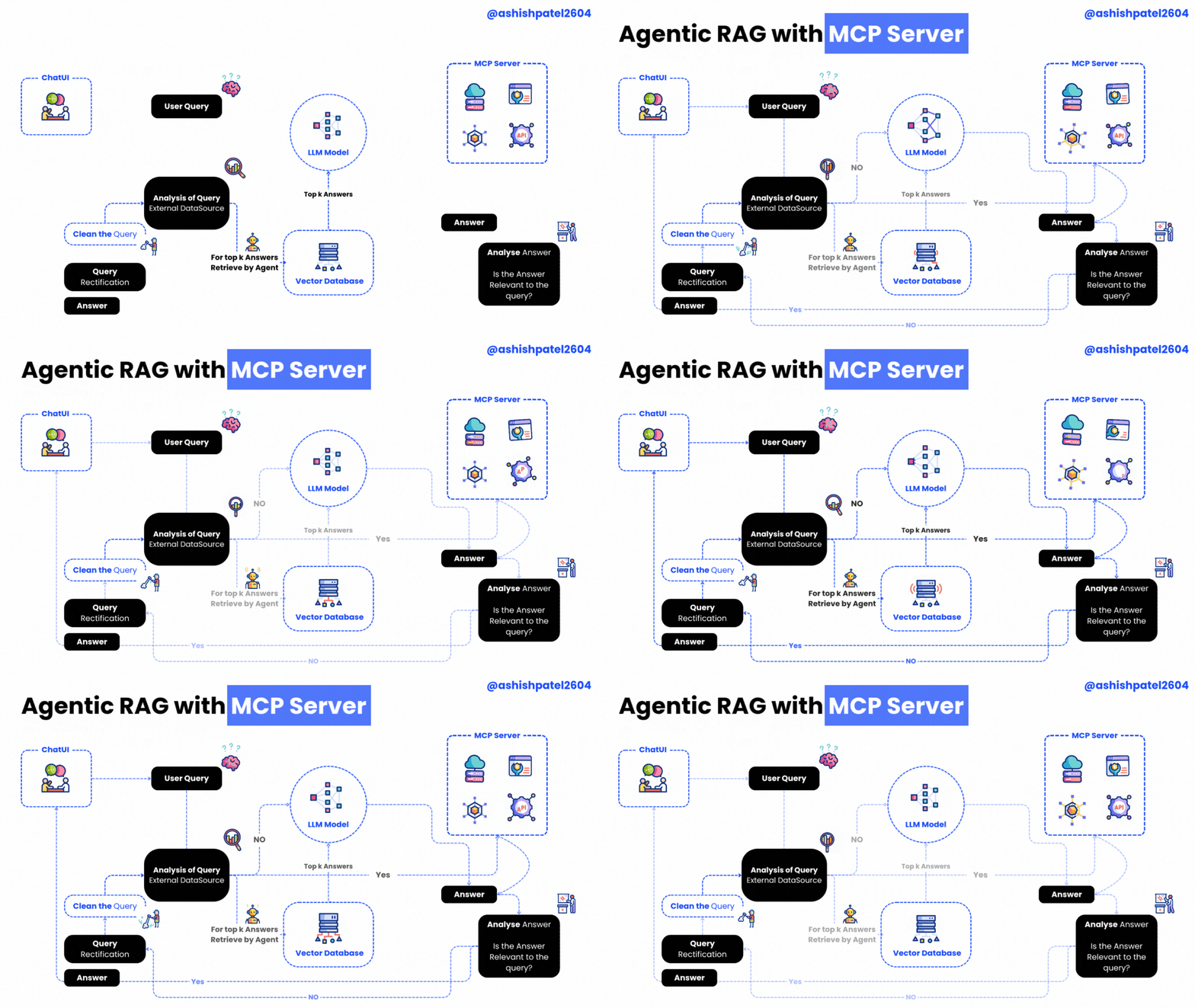
Agentic RAG with MCP Server is a powerful project that brings together an MCP (Model Context Protocol) server and client for building Agentic RAG (Retrieval-Augmented Generation) applications.
This setup empowers your RAG system with advanced tools such as:
- 🕵️♂️ Entity Extraction
- 🔍 Query Refinement
- ✅ Relevance Checking
The server hosts these intelligent tools, while the client shows how to seamlessly connect and utilize them.
🖥️ Server — server.py
Powered by the FastMCP class from the mcp library, the server exposes these handy tools:
| Tool Name | Description | Icon |
|---|---|---|
get_time_with_prefix |
Returns the current date & time | ⏰ |
extract_entities_tool |
Uses OpenAI to extract entities from a query — enhancing document retrieval relevance | 🧠 |
refine_query_tool |
Improves the quality of user queries with OpenAI-powered refinement | ✨ |
check_relevance |
Filters out irrelevant content by checking chunk relevance with an LLM | ✅ |
🤝 Client — mcp-client.py
The client demonstrates how to connect and interact with the MCP server:
- Establish a connection with
ClientSessionfrom themcplibrary - List all available server tools
- Call any tool with custom arguments
- Process queries leveraging OpenAI or Gemini and MCP tools in tandem
⚙️ Requirements
- Python 3.9 or higher
openaiPython packagemcplibrarypython-dotenvfor environment variable management
🛠️ Installation Guide
# Step 1: Clone the repository
git clone https://github.com/ashishpatel26/Agentic-RAG-with-MCP-Server.git

# Step 2: Navigate into the project directory
cd Agentic-RAG-with-MCP-Serve

# Step 3: Install dependencies
pip install -r requirements.txt
🔐 Configuration
- Create a
.envfile (use.env.sampleas a template) - Set your OpenAI model in
.env:
OPENAI_MODEL_NAME="your-model-name-here"
GEMINI_API_KEY="your-model-name-here"
🚀 How to Use
- Start the MCP server:
python server.py
- Run the MCP client:
python mcp-client.py
📜 License
This project is licensed under the MIT License.
Thanks for Reading 🙏
Установка Iflow Mcp Agentic RAG With MCP Server 1
У этого сервера нет опубликованного пакета — он собирается из исходников. Открой репозиторий и следуй инструкции в README.
▸ github.com/iflow-mcp/Agentic-RAG-with-MCP-Server-1FAQ
Iflow Mcp Agentic RAG With MCP Server 1 MCP бесплатный?
Да, Iflow Mcp Agentic RAG With MCP Server 1 MCP бесплатный — установка в пару кликов через Unyly без оплаты.
Нужен ли API-ключ для Iflow Mcp Agentic RAG With MCP Server 1?
Нет, Iflow Mcp Agentic RAG With MCP Server 1 работает без API-ключей и переменных окружения.
Iflow Mcp Agentic RAG With MCP Server 1 — hosted или self-hosted?
Self-hosted: сервер запускается локально на твоей машине командой из раздела установки.
Как установить Iflow Mcp Agentic RAG With MCP Server 1 в Claude Desktop, Claude Code или Cursor?
Открой Iflow Mcp Agentic RAG With MCP Server 1 на unyly.org, выбери вкладку своего клиента (Claude Desktop, Claude Code, Cursor) и нажми Install — конфиг сгенерируется автоматически, без правки JSON.
Похожие MCP
Fetch
Web content fetching and conversion for efficient LLM usage.
AWS KB Retrieval
Retrieval from AWS Knowledge Base using Bedrock Agent Runtime.
 автор: modelcontextprotocol
Spring AI MCP Server
Provides auto-configuration for setting up an MCP server in Spring Boot applications.
llm-analysis-assistant
A very streamlined mcp client that supports calling and monitoring stdio/sse/streamableHttp, and can also view request responses through the /logs page. It also
 автор: xuzexin-hz
MCP-Agent
A simple, composable framework to build agents using Model Context Protocol by [LastMile AI](https://www.lastmileai.dev)
 автор: lastmile-ai
Spring AI MCP Client
Provides auto-configuration for MCP client functionality in Spring Boot applications.
mcp.natoma.ai
A Hosted MCP Platform to discover, install, manage and deploy MCP servers by [Natoma Labs](https://www.natoma.ai)
MCPHub
Website to list high quality MCP servers and reviews by real users. Also provide online chatbot for popular LLM models with MCP server support.
MCP Servers Rating and User Reviews
Website to rate MCP servers, write authentic user reviews, and [search engine for agent & mcp](http://www.deepnlp.org/search/agent)
mkinf
An Open Source registry of hosted MCP Servers to accelerate AI agent workflows.
Compare Iflow Mcp Agentic RAG With MCP Server 1 with
Не уверен что выбрать?
Найди свой стек за 60 секунд
Автор?
Embed-бейдж для README
Похожее
Все в категории ai